> ## Documentation Index
> Fetch the complete documentation index at: https://docs.m3ter.com/llms.txt
> Use this file to discover all available pages before exploring further.
# Creating Azure Marketplace Integration Credentials
This topic explains how to create Azure Marketplace Integration Credentials, which you can then use to connect integrations with your Azure Marketplace instance. See [Configuring Azure Marketplace Integrations](/guides/integrations/setting-up-integrations/configuring-azure-marketplace-integrations).
**To create Azure Marketplace integration Credentials:**
1. Select **Integrations**. The **Integrations** page opens.
2. Select **Marketplace Integrations**. The **Integrations** page adjusts.
3. Select **AZURE**. The **Integrations>AZURE** page opens.
4. On the **Credentials** panel, select **Configure new credentials**. The **Create** pages opens at **Stage 1: Select a system and name**.
5. Under **Credential details** enter:
* **Name**. Descriptive name for the Credential.
* **Destination**. This will be pre-selected for **Azure**.
* **Tenant id**. The Azure tenant hosting the app. For how to find this, see [Tenant ID](/guides/integrations/setting-up-integrations/configuring-azure-marketplace-integrations#tenant-id).
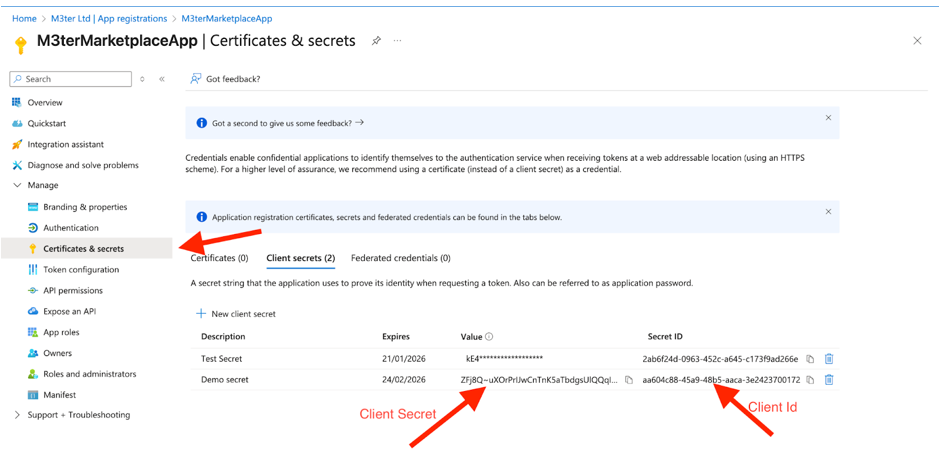
* **Client id**. The App registration client id.
* **Client secret**. The Credential Secret Value.
You can find the **Client id** and **Client secret** in the **M3terMarketplaceApp** under **Certificates & secrets**:
 6. Select **Create credential**. You are returned to the **Integrations>AZURE** page where the new Credential is listed on the **Credentials** panel:
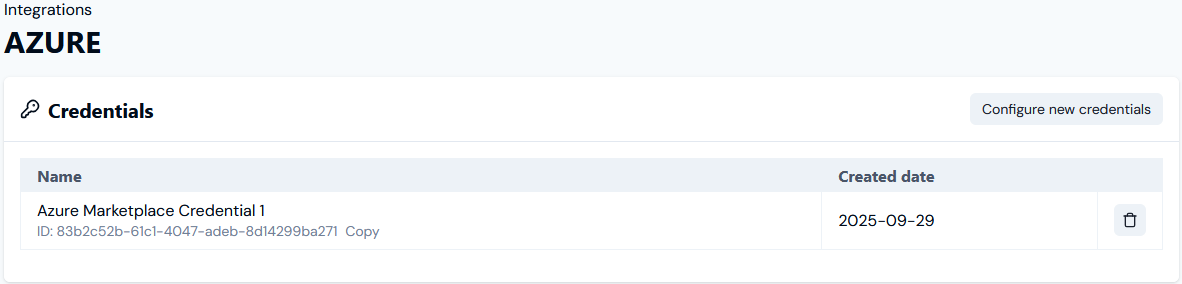 * The Credential is now available for connecting your Azure Marketplace Integration to your Azure Marketplace instance. See [Configuring Azure Marketplace Integrations>Setting Up Authentication for the Integration](/guides/integrations/setting-up-integrations/configuring-azure-marketplace-integrations#setting-up-authentication-for-the-integration).