> ## Documentation Index
> Fetch the complete documentation index at: https://docs.m3ter.com/llms.txt
> Use this file to discover all available pages before exploring further.
# m3ter Connector for Salesforce - Changelog
This m3ter Connector for Salesforce changelog explains how to check for the Connector version you have installed and lists the new features, functionality, and updates added in each version release. The latest version is listed first.
## Checking Connector Version
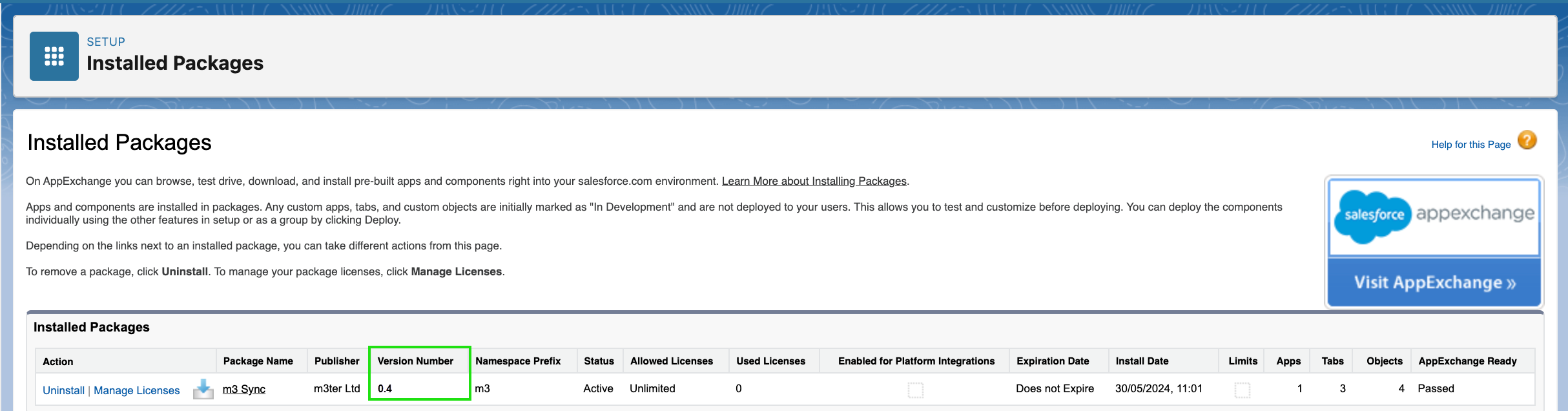
In your Salesforce organization, navigate to **Setup** > **Packaging** > **Installed Packages**. You can read-off the **Version Number** of the m3ter Connector:
 ## Version 1.2
* Introduced a Generic m3ter API Service, so Salesforce Admins and Developers can design and implement more advanced integrations between their Salesforce and m3ter organizations.
## Version 1.1
* Added a new Product Mapping resolution capability: now supporting mapping the same Salesforce Product to different m3ter Plan or Plan Template, depending on Billing Frequency and/or Currency Code. See [Product Mapping Resolution](/guides/m3ter-connector-for-salesforce/product-mapping-resolution) for more details.
* Introducing Usage Design Targets to support Revenue Cloud integration. See [Usage Design Targets](/guides/m3ter-connector-for-salesforce/usage-design-targets) for more details.
* Quality of life improvements.
## Version 1.00 🎉
* User experience improvements.
* Proactive fault monitoring and error reporting.
* Security fixes.
## Version 0.15
* Added support for managing Metering entities (Products, Meters, Aggregations and Compound Aggregations).
* New, improved Setup user experience.
* Bug fixes and quality-of-life improvements.
* See [CRUD for Metering Entities](/guides/m3ter-connector-for-salesforce/crud-for-metering-entities) for more details.
## Version 0.14
* Added support for synchronizing Balances.
* Bug fixes and UX improvements.
## Version 0.13
* Added support for m3sh Webhook Triggers giving Salesforce administrators a solution for sending Salesforce record data to m3sh Workflows via webhook endpoints. See [Setting Up m3sh Webhook Triggers](/guides/m3ter-connector-for-salesforce/setting-up-m3sh-webhook-triggers).
## Version 0.12
* Custom fields enhancement: added support for multiple edition scenarios. Namely, custom fields that are not managed by the m3ter Connector do not get deleted.
* Bug fixes and UX improvements.
## Version 0.11
* Added support for mapping Pricing Segments, in the Pricing custom metadata type. See [Mapping Segment Attributes for Pricing](/guides/m3ter-connector-for-salesforce/mapping-segment-attributes-for-pricing) for more details.
* Added support for mapping m3 Charges.
* Added the ability in m3ter Admin to load reference data from the configured m3ter Organization. Data can be referenced from existing m3 Objects, whenever applicable. Current supported data types:
* **m3 Balance transaction types**
* **m3 Currency codes**
* **m3 Product codes**
* Bug fixes and UX improvements.
**Note:** If you want to upgrade to **v0.11** from previous versions of the m3ter Connector for Salesforce, please get in touch with [m3ter Support](https://m3ter.myfreshworks.com/login/auth/1662629775049?client_id=451980218021503405\&redirect_uri=https%3A%2F%2Fm3ter.freshdesk.com%2Ffreshid%2Fcustomer_authorize_callback%3Fhd%3Dm3ter.freshdesk.com) or your m3ter contact for assistance in performing this upgrade.
## Version 0.9
* Added support for mapping custom fields in m3ter AccountPlans. See [Mapping Custom Fields on m3ter Entities](/guides/m3ter-connector-for-salesforce/mapping-custom-fields-on-m3ter-entities) for more details.
* Added support for m3 Contracts and m3 Commitments [automatic two-way data sync](/guides/m3ter-connector-for-salesforce/enabling-two-way-automated-sync-for-m3ter-objects)!
* For date fields in m3ter Objects, and End-dating operations, the time is now calculated using the timezone set in the Settings area of the m3ter Organisation. For additional clarity, the timezone is now also displayed in Salesforce, in the Setup area of the m3ter Admin app.
## Version 0.8
* Support for mapping custom fields in m3ter entities - Accounts and Contracts for now. See [Mapping Custom Fields on m3ter Entities](/guides/m3ter-connector-for-salesforce/mapping-custom-fields-on-m3ter-entities) for more details.
* m3 Objects are now incorporated into the managed package and are created as Custom Objects in installation. For 0.8:
* \*\* m3 Contract\*\*
* **m3 Commitment**
* **m3 Bill**
* **m3 Bill Item**
## Version 0.6
* Mapping multiple aggregations to the same product and/or plan is now supported.
* m3ter Balance mappings, and [automatic two-way data sync](/guides/m3ter-connector-for-salesforce/enabling-two-way-automated-sync-for-m3ter-objects)! Requires [setting up ](/guides/integrations/setting-up-integrations/configuring-sf-entity-data-integrations) Entity Data Sync integrations for Accounts and Balances.
* m3 Objects are now incorporated into the managed package and are created as Custom Objects in installation. For v0.6:
* **m3 Account**
* **m3 Balance**
* **m3 Balance Transaction**
**Important: Earlier Version Installed?** Customers with a previous version of the Connector for Salesforce managed package installed will need to perform a small manual setup so that the 'Admin' app is clearly distinguishable from the new 'm3ter App' that has been introduced as part of **v0.6**:
1. Go to **Setup** > **App Manager**.
2. Click **Edit** for the App with developer name 'm3terApp'.
3. Update the App name to 'm3ter Admin' and click **Save**.
## Version 0.5.3
* Bugfixes for the End Date m3ter Billing Data action - see [Setting Up Sync for End Dating m3ter Account Billing Entities](/guides/m3ter-connector-for-salesforce/setting-up-sync-for-end-dating-m3ter-account-billing-entities). This resolves issues for scenarios where Salesforce Org and m3ter Organization have a different timezone set.
## Version 0.5.2
* Label updates and minor bugfixes.
## Version 0.5.1
* Enabled the capability to map Compound Aggregations within a Plan or Plan Template.
## Version 0.5
* It's now possible to [end-date](/api/account/end-date-account-billing-entities) a m3ter Account's billing entities, using either a new button or as a Salesforce Invocable action. For more details, see [Setting Up Sync for End Dating m3ter Account Billing Entities](/guides/m3ter-connector-for-salesforce/setting-up-sync-for-end-dating-m3ter-account-billing-entities).
* Synchronizing of Plans and Plan Templates not linked to an Aggregation is now skipped and and informative alert that the Sync has been skipped is given.
## Version 0.4
* Parent / child billing relationships between existing Accounts.
* Ability to trigger data synchronization to m3ter from a Salesforce Trigger or a Flow. For more details, see [Setting Up and Using Sync to m3ter Invocable Action](/guides/m3ter-connector-for-salesforce/setting-up-invocable-action-for-event-driven-sync).
## Version 0.2
* Support for Account, Contract and Opportunity data synchronization to m3ter.
## Version 1.2
* Introduced a Generic m3ter API Service, so Salesforce Admins and Developers can design and implement more advanced integrations between their Salesforce and m3ter organizations.
## Version 1.1
* Added a new Product Mapping resolution capability: now supporting mapping the same Salesforce Product to different m3ter Plan or Plan Template, depending on Billing Frequency and/or Currency Code. See [Product Mapping Resolution](/guides/m3ter-connector-for-salesforce/product-mapping-resolution) for more details.
* Introducing Usage Design Targets to support Revenue Cloud integration. See [Usage Design Targets](/guides/m3ter-connector-for-salesforce/usage-design-targets) for more details.
* Quality of life improvements.
## Version 1.00 🎉
* User experience improvements.
* Proactive fault monitoring and error reporting.
* Security fixes.
## Version 0.15
* Added support for managing Metering entities (Products, Meters, Aggregations and Compound Aggregations).
* New, improved Setup user experience.
* Bug fixes and quality-of-life improvements.
* See [CRUD for Metering Entities](/guides/m3ter-connector-for-salesforce/crud-for-metering-entities) for more details.
## Version 0.14
* Added support for synchronizing Balances.
* Bug fixes and UX improvements.
## Version 0.13
* Added support for m3sh Webhook Triggers giving Salesforce administrators a solution for sending Salesforce record data to m3sh Workflows via webhook endpoints. See [Setting Up m3sh Webhook Triggers](/guides/m3ter-connector-for-salesforce/setting-up-m3sh-webhook-triggers).
## Version 0.12
* Custom fields enhancement: added support for multiple edition scenarios. Namely, custom fields that are not managed by the m3ter Connector do not get deleted.
* Bug fixes and UX improvements.
## Version 0.11
* Added support for mapping Pricing Segments, in the Pricing custom metadata type. See [Mapping Segment Attributes for Pricing](/guides/m3ter-connector-for-salesforce/mapping-segment-attributes-for-pricing) for more details.
* Added support for mapping m3 Charges.
* Added the ability in m3ter Admin to load reference data from the configured m3ter Organization. Data can be referenced from existing m3 Objects, whenever applicable. Current supported data types:
* **m3 Balance transaction types**
* **m3 Currency codes**
* **m3 Product codes**
* Bug fixes and UX improvements.
**Note:** If you want to upgrade to **v0.11** from previous versions of the m3ter Connector for Salesforce, please get in touch with [m3ter Support](https://m3ter.myfreshworks.com/login/auth/1662629775049?client_id=451980218021503405\&redirect_uri=https%3A%2F%2Fm3ter.freshdesk.com%2Ffreshid%2Fcustomer_authorize_callback%3Fhd%3Dm3ter.freshdesk.com) or your m3ter contact for assistance in performing this upgrade.
## Version 0.9
* Added support for mapping custom fields in m3ter AccountPlans. See [Mapping Custom Fields on m3ter Entities](/guides/m3ter-connector-for-salesforce/mapping-custom-fields-on-m3ter-entities) for more details.
* Added support for m3 Contracts and m3 Commitments [automatic two-way data sync](/guides/m3ter-connector-for-salesforce/enabling-two-way-automated-sync-for-m3ter-objects)!
* For date fields in m3ter Objects, and End-dating operations, the time is now calculated using the timezone set in the Settings area of the m3ter Organisation. For additional clarity, the timezone is now also displayed in Salesforce, in the Setup area of the m3ter Admin app.
## Version 0.8
* Support for mapping custom fields in m3ter entities - Accounts and Contracts for now. See [Mapping Custom Fields on m3ter Entities](/guides/m3ter-connector-for-salesforce/mapping-custom-fields-on-m3ter-entities) for more details.
* m3 Objects are now incorporated into the managed package and are created as Custom Objects in installation. For 0.8:
* \*\* m3 Contract\*\*
* **m3 Commitment**
* **m3 Bill**
* **m3 Bill Item**
## Version 0.6
* Mapping multiple aggregations to the same product and/or plan is now supported.
* m3ter Balance mappings, and [automatic two-way data sync](/guides/m3ter-connector-for-salesforce/enabling-two-way-automated-sync-for-m3ter-objects)! Requires [setting up ](/guides/integrations/setting-up-integrations/configuring-sf-entity-data-integrations) Entity Data Sync integrations for Accounts and Balances.
* m3 Objects are now incorporated into the managed package and are created as Custom Objects in installation. For v0.6:
* **m3 Account**
* **m3 Balance**
* **m3 Balance Transaction**
**Important: Earlier Version Installed?** Customers with a previous version of the Connector for Salesforce managed package installed will need to perform a small manual setup so that the 'Admin' app is clearly distinguishable from the new 'm3ter App' that has been introduced as part of **v0.6**:
1. Go to **Setup** > **App Manager**.
2. Click **Edit** for the App with developer name 'm3terApp'.
3. Update the App name to 'm3ter Admin' and click **Save**.
## Version 0.5.3
* Bugfixes for the End Date m3ter Billing Data action - see [Setting Up Sync for End Dating m3ter Account Billing Entities](/guides/m3ter-connector-for-salesforce/setting-up-sync-for-end-dating-m3ter-account-billing-entities). This resolves issues for scenarios where Salesforce Org and m3ter Organization have a different timezone set.
## Version 0.5.2
* Label updates and minor bugfixes.
## Version 0.5.1
* Enabled the capability to map Compound Aggregations within a Plan or Plan Template.
## Version 0.5
* It's now possible to [end-date](/api/account/end-date-account-billing-entities) a m3ter Account's billing entities, using either a new button or as a Salesforce Invocable action. For more details, see [Setting Up Sync for End Dating m3ter Account Billing Entities](/guides/m3ter-connector-for-salesforce/setting-up-sync-for-end-dating-m3ter-account-billing-entities).
* Synchronizing of Plans and Plan Templates not linked to an Aggregation is now skipped and and informative alert that the Sync has been skipped is given.
## Version 0.4
* Parent / child billing relationships between existing Accounts.
* Ability to trigger data synchronization to m3ter from a Salesforce Trigger or a Flow. For more details, see [Setting Up and Using Sync to m3ter Invocable Action](/guides/m3ter-connector-for-salesforce/setting-up-invocable-action-for-event-driven-sync).
## Version 0.2
* Support for Account, Contract and Opportunity data synchronization to m3ter.