> ## Documentation Index
> Fetch the complete documentation index at: https://docs.m3ter.com/llms.txt
> Use this file to discover all available pages before exploring further.
# Granting m3ter Support Access to Organization
You can grant m3ter Support time-bound access to your Organization. If you've made a Support request concerning an issue you've encountered in your Organization, you'll likely want to do this and allow Support to help you in resolving the issue.
**Note: Support Terms?** When you grant m3ter Support access to your Organization, their activity in your Organization will be conducted fully in accordance with our [Support Terms](https://www.m3ter.com/docs/legal/support-terms).
**To grant m3ter Support access to Organization:**
1. Select **Settings>Access settings**. The **Access settings** page opens with the **Users** tab selected.
2. Select the **Support access** tab.
3. On the **Support access details** panel, select **Edit**. The **Edit** page opens and you can enter the **Support access details**.
4. For **Support access end date** (*Required*) use the calendar pop-up to select the date on which you want m3ter Support access to end.
5. Use the **Permission policies** drop-down list to select the Permission Policies you want to apply for support users when they access your Organization.
6. Select **Update support access**. You are returned to the **Support access** tab and the **Support access details** panel and **Permission policies** panel now shows the updated Support access:
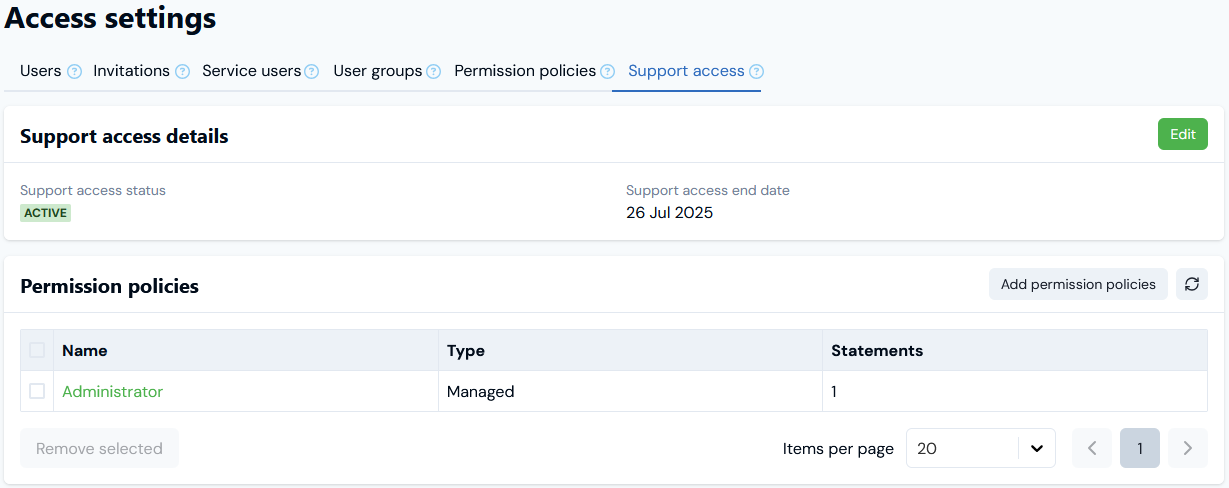 In this example:
* Support access will end at midnight on July 26th, 2025.
* Support has been granted **Administrator** access until that point in time.
7. If you want to update the Support access you've granted because the issue you made a request to Support about is now resolved and you want to close-off access, you can:
* Reset the **Support access end date** to tomorrow's date and select **Update support access** to end access as soon as possible. Note that when you grant Support access, it must be for at least the remainder of the current day.
* Under **Permission policies**, delete any Permission Policies you've added for the access.
In this example:
* Support access will end at midnight on July 26th, 2025.
* Support has been granted **Administrator** access until that point in time.
7. If you want to update the Support access you've granted because the issue you made a request to Support about is now resolved and you want to close-off access, you can:
* Reset the **Support access end date** to tomorrow's date and select **Update support access** to end access as soon as possible. Note that when you grant Support access, it must be for at least the remainder of the current day.
* Under **Permission policies**, delete any Permission Policies you've added for the access.