> ## Documentation Index
> Fetch the complete documentation index at: https://docs.m3ter.com/llms.txt
> Use this file to discover all available pages before exploring further.
# Adding and Editing Custom Fields
*Custom Fields* allow you to attach custom data to entities in m3ter. You can use Custom Fields to define string or number values for these entities. When you set up your Organization, you can create them for your **Organization** and for the following entities:
* **Product**
* **Meter**
* **Plan**
* **Plan Template**
* **Account**
* **Account Plan**
* **Aggregation**
* **Compound Aggregation**
* **Contract**
The key points to note about creating and using Custom Fields are:
* You can define Custom Fields for these entities at two levels: at the Organization-wide level and at the level of individual entities:
* Note that **Organization** is the obvious exception.
* When you create Custom Fields at the Organization-wide level for any of the entities listed above, this allows you to set-up *default Custom Field values* for these entities.
* Custom Fields can be referenced in your Meter Derived Field calculations and in your Compound Aggregation calculations. Using number or string values stored in Custom Fields in this way offers you great flexibility when using those calculations to fulfill complex usage-based pricing use cases.
* For details on referencing Custom Fields in your calculations, see [Referencing Custom Fields in Derived Field Calculations](/guides/creating-and-managing-products/working-with-custom-fields#referencing-custom-fields-in-derived-field-calculations) and [Referencing Custom Fields in Compound Aggregation Calculations](/guides/creating-and-managing-products/working-with-custom-fields#referencing-custom-fields-in-compound-aggregation-calculations).
* If you want to use entity-level Custom Field values in your calculations - for example for a specific Account - *you must first create* a Custom Field for that entity type at Organization-level - in this example an **Account** Custom Field:
* This ensures a default Custom Field value exists for the entity type at the Organization-level.
* The entity-level Custom Field value will then be used for your calculation instead of the default value.
**Limits and Constraints:**
* **Maximum number.** The maximum number of Custom Fields you can create for each entity type at Organization-level is **25**.
* **Duplicate Naming**. More that one Custom Field with the same name is not allowed. If you try to add two or more Custom Fields with the same name for an entity type, when you save your changes *only the last one you added is saved*.
**Important!**
* **More on Custom Fields?** Before you attempt to use Custom Fields, we strongly recommend that you first review the [Working with Custom Fields](/guides/creating-and-managing-products/working-with-custom-fields) topic.
* **What about Custom Fields for Aggregations and Compound Aggregations?** You can define Custom Fields for **Aggregations** and **Compound Aggregations** at both the Organizational level and the individual entity level. However, these Custom Fields are NOT supported for referencing in Derived Field or Compound Aggregation calculations.
**Notes and Tips:**
* **Custom Fields created only at the individual entity-level?** For some entities, you can only create Custom Fields *at the individual entity-level*. This means you cannot set up default values for Custom Fields for Plan Groups or Balances at the Organizational-level, and you therefore cannot reference them in your calculations. Currently, these are:
* **Balances**
* **Balance Transaction Schedules**
* **Balance Charge Schedules**
* **Plan Groups**
* **See Also?** If you intend to add Custom Fields and reference them in your [Derived Field](/guides/usage-data-meters/derived-fields-for-meters-examples-and-supported-syntax) or [Compound Aggregation](/guides/usage-data-aggregations/compound-aggregations) calculations, we strongly recommend that you first review the [Calculations Syntax and Supported Functions/Operators](/guides/usage-data-aggregations/compound-aggregation-calculations) topic.
This topic explains how to create Custom Fields at Organization-level for your Organization and other entities when setting up your Organization.
**To add Custom Fields at Organizational level:**
1. Select **Settings**. The **Organization** page opens with the **Overview** tab selected.
2. Select the **Custom fields** tab.
3. On the **Custom fields details** panel, select **Edit**. The **Edit** page opens.
4. Select **Add** under the entity for which you want to add Custom Fields - **Organization**, **Product**, **Meter**, **Plan**, **Plan template**, **Account**, **Attached plan**, **Aggregation**, **Compound aggregation**, or **Contract**.
5. Enter a **Name**, select the **Type**, and enter the **Value**.
6. If you want to add multiple Custom Fields, select **Add** again - a new row is added and you can repeat steps 4 and 5. The maximum number for any entity type at Organization-level is **25**.
* Note that if you try to add two or more Custom Fields with the same name for an entity type, when you save your changes *only the last one you added is saved*.
7. At the bottom of the page, select **Update Custom fields**. You are returned to the **Organization>Custom field**s tab the new **Name/Value** pair is shown under the entity in the **Custom field details** panel.
8. If you now open the details page for an entity type you've created the Custom Fields for, the fields and their values will be shown on the metadata panel. For example, suppose you've created two **Account** Custom Fields at Organizational-level:
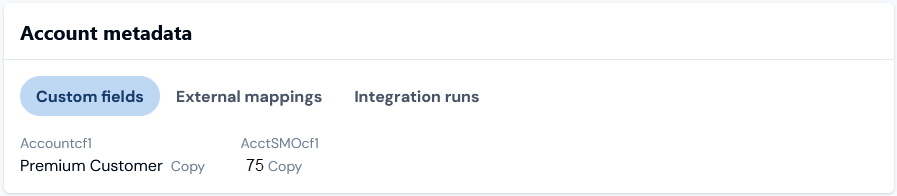 * In this example, Custom Fields *have not been created* at individual Account level and the default values that will be used are those configured at Organizational-level.
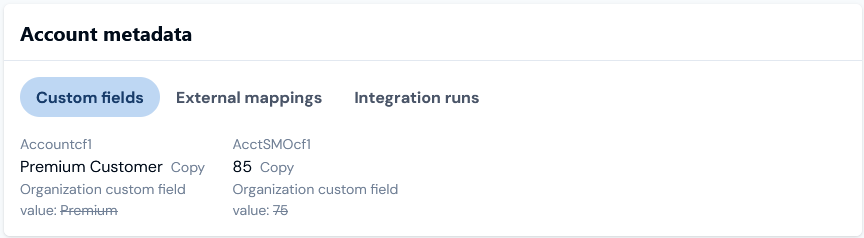 * In this example, Custom Fields *have been created* at the individual Account level and the values configured for those created at Organizational-level are struck out indicating clearly that the Account level values will be used.