This topic explains how to create Integration Credentials which you can then use to connect your Paddle Integrations with your Paddle system. See Configuring Paddle Integrations.
Tip: Paddle or Paddle (Sandbox Mode)? The steps to create a Credential for authenticating an Integration with your Paddle Sandbox environment are the same, except you’ll need to select Paddle (Sandbox Mode) as the destination.
- Select Integrations:
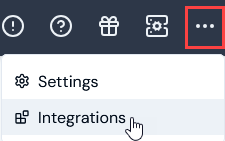 The Integrations page opens.
-
Select Paddle. The Paddle Integrations page opens.
-
On the Credentials panel, select Configure new credentials:
 The Create pages opens.
- Under Credential details enter:
- Name. Descriptive name for the Credential.
- Destination. This will be pre-selected for Paddle.
- Api key. Enter an Api key generated in the Paddle Console.
Tip: Paddle Sandbox Environment? Alternatively, select Paddle (Sandbox Mode) for Destination if you want to use the Credential to authenticate with your Paddle Sandbox environment.
- Select Create credential. You are returned to the Paddle Integrations page where the new Credential is listed on the Credentials panel:


