

- Define this as part of your Organization configuration in the Console.
- Use the Update OrganizationConfig API call.
Understanding the Scheduled Billing Process
If you implement scheduled billing for your Organization to have Bills for end customer Accounts updated at regular intervals, it’s important to be clear about how the process works:- What is included at Bill update? The Bill for each Account is calculated at the time the scheduled update is due. The calculation will only include charges from active Account Plans on the Account at the time of the update. If an Account Plan becomes inactive before the scheduled update, only charges accumulated under that Account Plan up to its deactivation date will be included in the Bill.
- What about late-arriving data? We accommodate usage data received up to 24 hours after the scheduled Bill update. Late-arriving data refers to usage data with a timestamp before the scheduled update, but which is ingested into the m3ter platform after the Bill has been updated. If any late-arriving data is recorded for an Account within this 24-hour window, the Bill will be recalculated to include the associated charges.
- Important qualification: The 24 hour inclusion period following scheduled Bill update for late-arriving data is not always timed from the scheduled Bill update time. For cases where an Account Plan used to charge an Account ends before the scheduled time of Bill update, the 24 hour inclusion period for late-arriving data is timed from the time the Account Plan ends. For example,
- If, on a monthly billing frequency, an Account has a single Account Plan which is active for all of October, we’ll continue to recalculate the Bill to catch any late-arriving data through to end of November 1st.
- If, however, the single Account Plan ceases to be active for the Account at midnight on the 14th October, we’ll continue to recalculate the Bill to catch any late-arriving data only up to midnight on the 15th October.
- Important qualification: The 24 hour inclusion period following scheduled Bill update for late-arriving data is not always timed from the scheduled Bill update time. For cases where an Account Plan used to charge an Account ends before the scheduled time of Bill update, the 24 hour inclusion period for late-arriving data is timed from the time the Account Plan ends. For example,
Scheduling Billing from Console
To schedule Billing in the Console:- Select Settings:
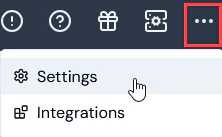
- On the Organization configuration details panel, select Edit The Organization configuration page opens.
- Use the Scheduled bill interval drop-down to select the required interval in minutes or hours - ten options: 15 minutes, 30 minutes, 1 hour, 2 hours, 3 hours, 4 hours, 6 hours, 8 hours, 12 hours, or 24 hours:
- If, and only if, you select 24 hours to implement daily Bill updates, then optionally you can also select a Scheduled bill offset and specify the hour in the day - 1 to 23 - when the scheduled daily Bill update will run.
- The default is Disabled, which means no Billing is scheduled.
- Select Update Organization configuration. You are returned to the Configuration tab where the Scheduled bill interval now shows on the Organization configuration details panel.
Scheduling Billing Using API Call
To schedule Billing using API call:- Review the API Documentation at https://m3ter.com/docs.
- Open the OrganizationConfig section. You can use the Update OrganizationConfig API call to define a schedule interval for updating Bills:
PUT /organizations/{orgid}/organizationconfig
- Enter the required parameters for this call and use the optional
scheduledBillIntervalrequest schema parameter to set the required interval:
- For portions of an hour (minutes). Two options: 0.25 (15 minutes) and 0.5 (30 minutes).
- For full hours. Enter 1 for every hour, 2 for every two hours, and so on. Eight options: 1, 2, 3, 4, 6, 8, 12, or 24.
- If, and only if, you use 24 to implement daily Bill updates, then you can also use the optional
scheduledBillOffsetrequest schema parameter to specify the hour in the day - 1 to 23 - when the scheduled daily Bill update will run. - Default. The default is 0, which disables scheduling.
- Submit the API call.