You can create Statements to accompany the Bills you send out to your end-customers as backing sheets to their invoices. Bill Statements provide a useful breakdown of the usage responsible for charge line items your end-customers see on their invoices:
Create Statement Definitions to specify the way billed usage will be aggregated and compiled in the Statement. For example, if you are billing customers monthly, you might want to breakdown the usage responsible for the monthly charge on a Bill into weekly portions in Bill Statements.
Select a Statement Definition, which will then override the Organization default.
Select to auto-generate Statements when Bills are approved or locked.
When viewing a Bill, generate Statements manually - two options:
Full Statements. Generated Statements will include for all usage collected by the Meters defined for the Statement Definition.
Partial Statements. Allows you to filter by Meter IDs defined for the Statement Definition. Generated Statements will include only for the usage collected by selected Meters.
When Statements have been generated for a Bill, download them in JSON and CSV format, which you can then transpose and compile into the required delivery format.
Check if a Bill Statement needs refreshing by comparing the Bill calculation timestamp against the Statement’s last modified date, which is available in the response to a get Statement API call
Common Bill Statement use cases:
One common use case is to provide a breakdown by time period. For example, if you bill and issue invoices on a monthly frequency, then you might want to provide a weekly or daily charge breakdown Statement as a backing sheet to invoices, allowing end-customers to see how their usage was distributed across the billing period.
Another use case would be to provide a breakdown on the basis of location of usage charged for. For example, a text messaging service imposes a usage charge per billing period for all messages logged that originate from outside of a customer’s native country. This usage is measured for the billing charge as a single block of total recorded usage, which results in a single usage charge line item for “other country” usage in customer invoices. But if the Meter collecting that usage is set up to also record a location for message events by country of origin, you can set up a Statement Definition that provides the required breakdown by the Meter’s location dimension.
This topic uses the second common use case as a worked example to explain how to create Statement Definitions, set up default Statements, generate full or partial Statements for Bills, and how to download generated Statements in your preferred format.
Bill Statement limit. A default Bill line item limit of 50,000 is imposed on Bill Statements. This default limit can be increased on request - please ask your m3ter contact for more details or get in touch with m3ter Support.
When you create and configure a Statement Definition, you can define how the usage data collected by a Meter for a billing period, and on which usage charges are based, will be broken down for end-customers who will receive a Statement generated using the Statement Definition.To create and configure a Statement Definition:
Select Billing. The Billing section opens at the Bill management page.
Select Statement definitions:
The Statement definitions page opens and list any existing Statement Definitions.
Select Create statement definition. The Create page opens.
Under Statement definition details, enter a Name for the Statement Definition.
Use the drop-down to select an Aggregation frequency:
Daily
Weekly
Monthly
Quarterly
Yearly
Whole bill period
Use the switch to enable Include price per unit. Default is disabled.
Use the switch to Generate slim statements. Enable this option if you have priced Plans using segmented Aggregations attached to end-customer Accounts and want to exclude segments that don’t appear on Bills from Statements. Default is disabled:
Generate slim statements not shown? If this option is not shown when creating a Statement definition and you want to use this feature, please advise your m3ter contact or get in touch with m3ter Support to have it enabled for your Organization.
Under Measures, use the drop-down to select a Meter that collects the usage data used as the basis of the usage charges for billing. The Measure drop-down selection field is activated for the selected Meter.
Use the Measure drop-down to select a Meter measure Data Field which is aggregated into unit price rates and used as the basis for usage charges at billing.
Use the Aggregation functions drop-down list to select the way you want to aggregate the selected Meter Data Field values for Statements. Seven options:
Sum. Adds the values
Minimum. Uses the minimum value.
Maximum. Uses the maximum value.
Count. Counts the number of values
Latest. Uses the most recent value.
Mean. Uses the arithmetic mean of the values.
Unique. List each of the unique values.
Custom SQL? The Custom SQL Aggregation function is not available when setting up Measures for a Statement definition.
Under Dimensions, use the drop-down to select a Meter that collects the usage data as the basis of the usage charges on Bills. The Dimension drop-down is activated for the selected Meter.
Use the Dimension drop-down to select the Meter Dimension you want to use as the basis of the Statement’s breakdown of usage.
If you want to filter the selected Dimension values which will appear on the Statement, under Filter, choose the Selected values radio button. The Filter values field is activated.
Enter any values you want to filter the Statement breakdown by - only the Dimension values you enter will be used:
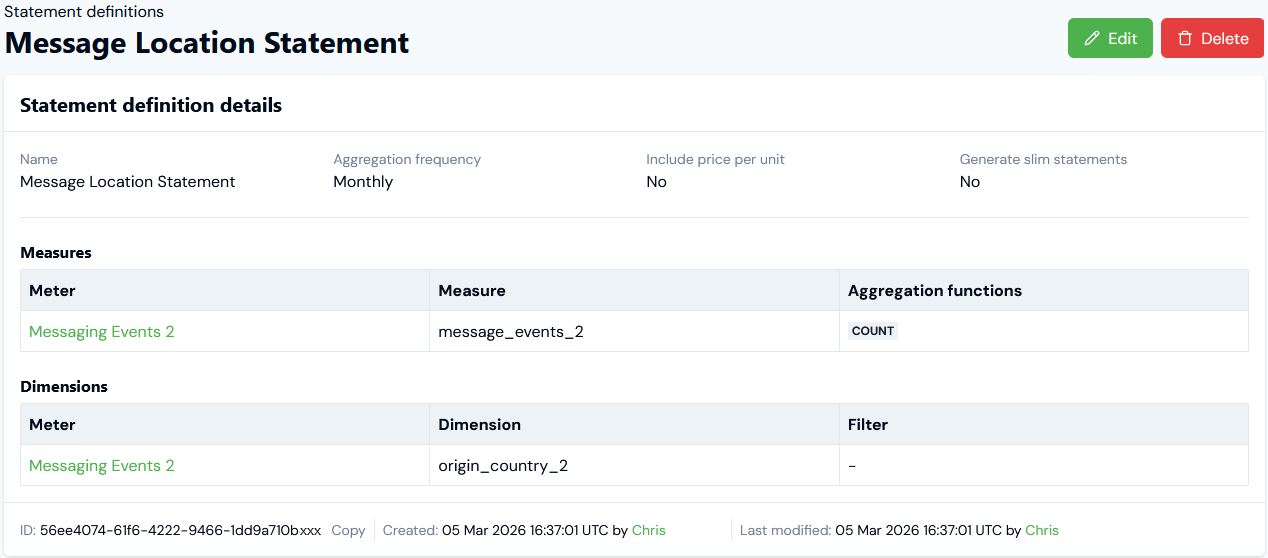
In this example, the Statement Definition uses:
A single numeric Message Events2 measure on a Meter, which collects usage data on the number of messages and on which billing usage charges are based.
A single non-numeric Origin Country2 dimension on a Meter and on which a breakdown of charges will be based. No filtering of values is enabled.
If you want to use other Meter Measures and Dimensions for your Statement Definition, select Add under Measures or Dimensions and repeat steps 6 to 14.
Select Create statement definition. The Statement definition details page opens:
Select it to be used for a particular Account as one of the Account settings.
These options act in the following way:
If you set a default Statement Definition at the Organizational level, this is used when you generate Bill Statements for any Accounts for which you haven’t selected a Statement Definition.
If you set a Statement Definition for an individual Account, this will be used when you generate Bill Statements for the Account and takes precedence over any Statement Definition you’ve selected at Organization level.
To set up default Bill Statements:
Create the Statement Definition you want to set as the default at Organization level or the one you want set as the default for a particular Account level. See the previous section.
To define a default Statement Definition at Organization level, select Settings:
The Organization page opens with the Configuration tab selected.
On the Organization configuration details panel, select Edit. The Organization configuration page opens.
Scroll down the page and under Bill statements, use the Statement definition drop-down to select the Statement Definition you want to set as the default.
Select Update Organization configuration. You are returned to the Configuration tab and the selected Statement Definition is shown on the Organization configuration details panel as the Default statement definition.
Note that you can select the hotlink name text of the Statement Definition to open the Statement definition details page directly.
If you want to override the Statement Definition you’ve set as the default at Organization level for a particular Account, open the Edit page for the Account.
Scroll down the page and on the Bill statements panel, use the Statement definition drop-down to select the Statement Definition you want to use for the Account.
Generating Full Statements for Bills and Downloading
When you open and view a Bill for an Account under Bill management, you can manually generate a full Bill Statement and include for usage collected by all Meters when the Statement is generated:
The Statement generated will use the Statement Definition you’ve set as the default at Organization level or the Statement Definition you applied to the Account - if you’ve defined a Statement Definition at Account level, this will take precedence.
You can choose to generate the Statement in JSON format only or both JSON and CSV format. Note that the line items within a Statement are not necessarily sorted, and you should sort by the appropriate fields as part of subsequent processing.
When the Statement has been generated for the Bill, you can download the Statement in JSON or CSV format if you also selected CSV format when generating the Statement.
To generate full Statements for Bills and Download:
Open the Bill you want to generate a full Statement for in Bill management:
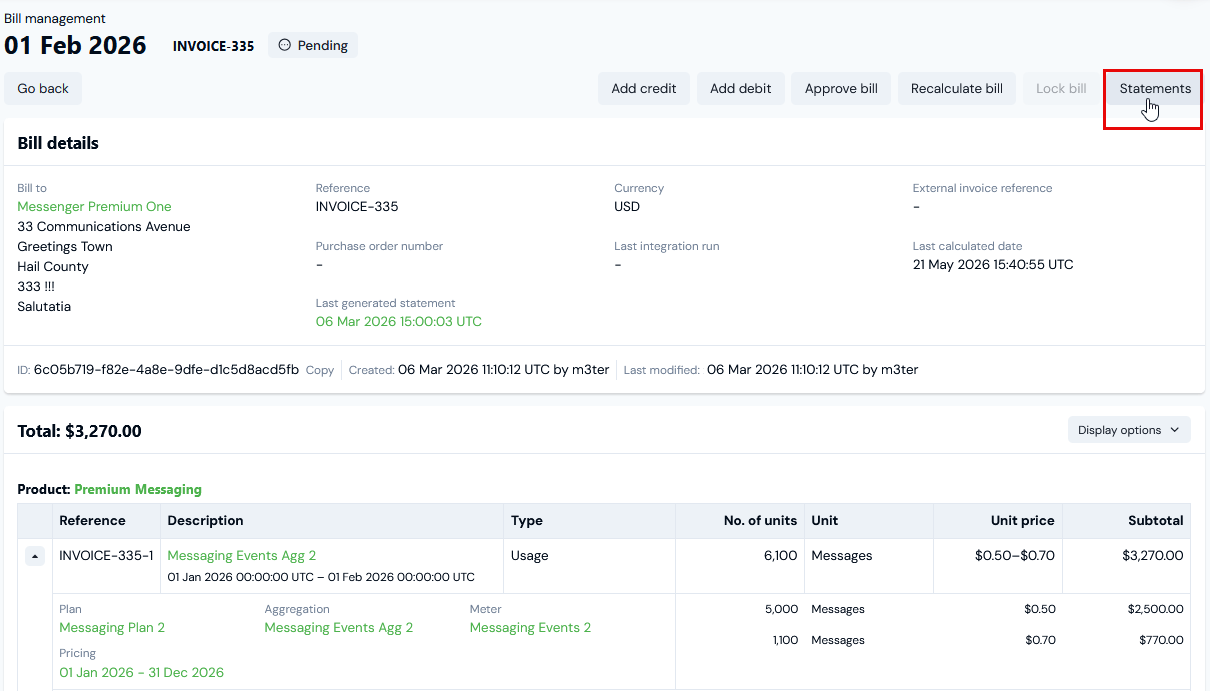
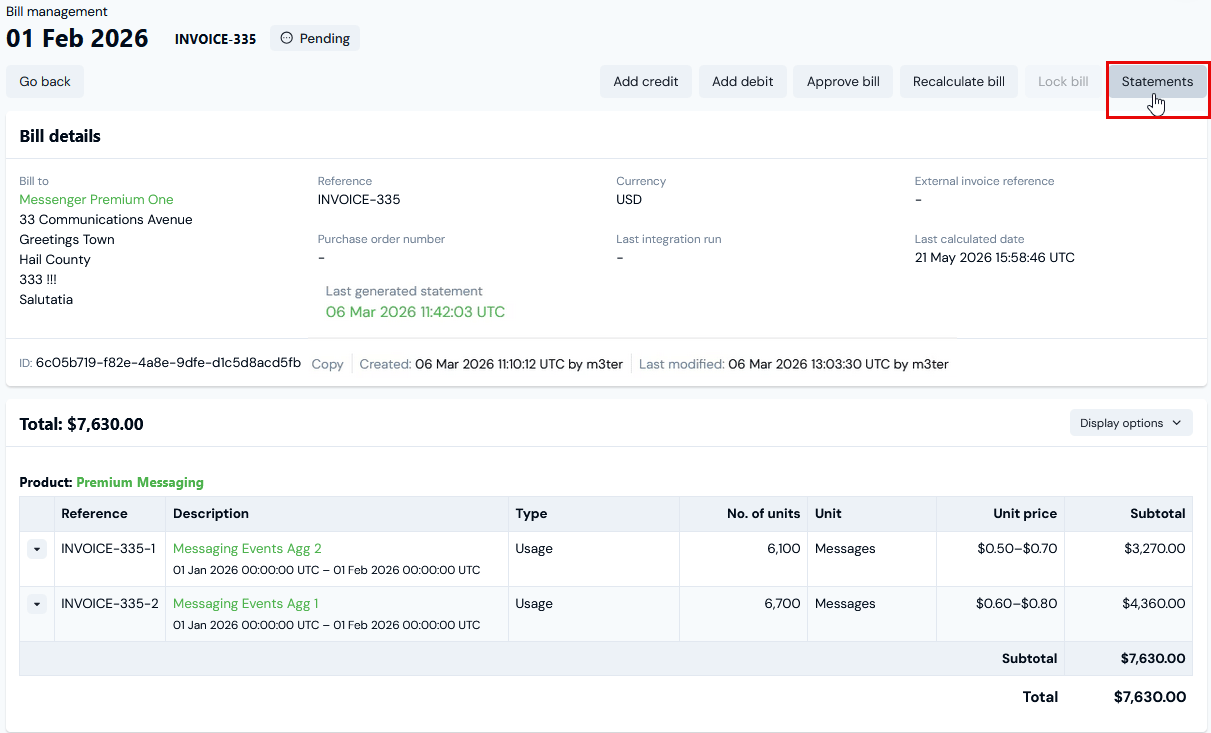
In this example, we’ve opened a monthly Bill for an Account in an Organization where the default Statement Definition is the Message Location Statement we created in the previous section:
We can see that month’s charge is for a total of 6,100 messages, and this is shown as a single line item.
The generated Statement should show a breakdown into separate countries of message origin.
At top-right, select Statements. The Generate statements page opens:
Under Statement job settings, you can review the set up for the Statement that will be generated, including the Statement Definition that will be used.
For the current example, we’ll leave the Statement job type at the default Full statement selection.
Select for the formats used in Statement generation:
Generate JSON statement. This is selected by default and you cannot de-select.
Generate CSV statement. By default this is de-selected - use the switch to select it if you want the statement to be generated in CSV format also.
Important: Statement Definition default must be selected! If you haven’t selected a default Statement Definition for Bills at either Organization or Account level, then the Generate statements button will not be active and you won’t be able to generate Statements. See above: Using Statement Definitions.
Select Generate statement. This will kick-off the job to generate a full Bill Statement and the Statement job details page opens:
Notes:
Note that the Statement job might take a few minutes and the Status will show as PENDING while it runs.
From Statement job details, you can select to Re-generate statement:
This takes you back to the Generate statements page where you can generate another partial or full Statement.
Full Statements are persisted on the Bill and remain available for download from the Generate statements page. A reminder is given:
When the Statement job is COMPLETE, select which format you want to download: Download JSON (always) or Download CSV (if you selected Generate CSV statement). The Statement is downloaded and saved locally to your Downloads folder.
You can now open the Statement in the 3rd-party application of your choice and transpose and compile it as required for issuing to your end-customers as a charge breakdown backing sheet to their invoice.
For the current example using the Messaging Location Statement as Statement Definition for the example Bill, we’ve generated and downloaded a full Statement in CSV format and loaded it into a spreadsheet:
We can see that the Bill Statement shows the breakdown on the basis of location of message origin using the Meter dimension field Origin Country2 (origin_country_2), and in accordance with the Statement Definition we set up and applied to the billed Account.
Generating Partial Statements for Bills and Downloading
When you open and view a Bill for an Account under Bill management, you can manually generate a partial Bill Statement and include only for the usage collected by selected Meters when the Statement is generated. To show how to generate partial Bill Statements:
We’ll extend the current worked example and update the Statement Definition we used in the previous section to now use two each of measure and dimension fields and belonging to two different Meters.
Assume end-customer Accounts are Billed for usage collected by both Meters.
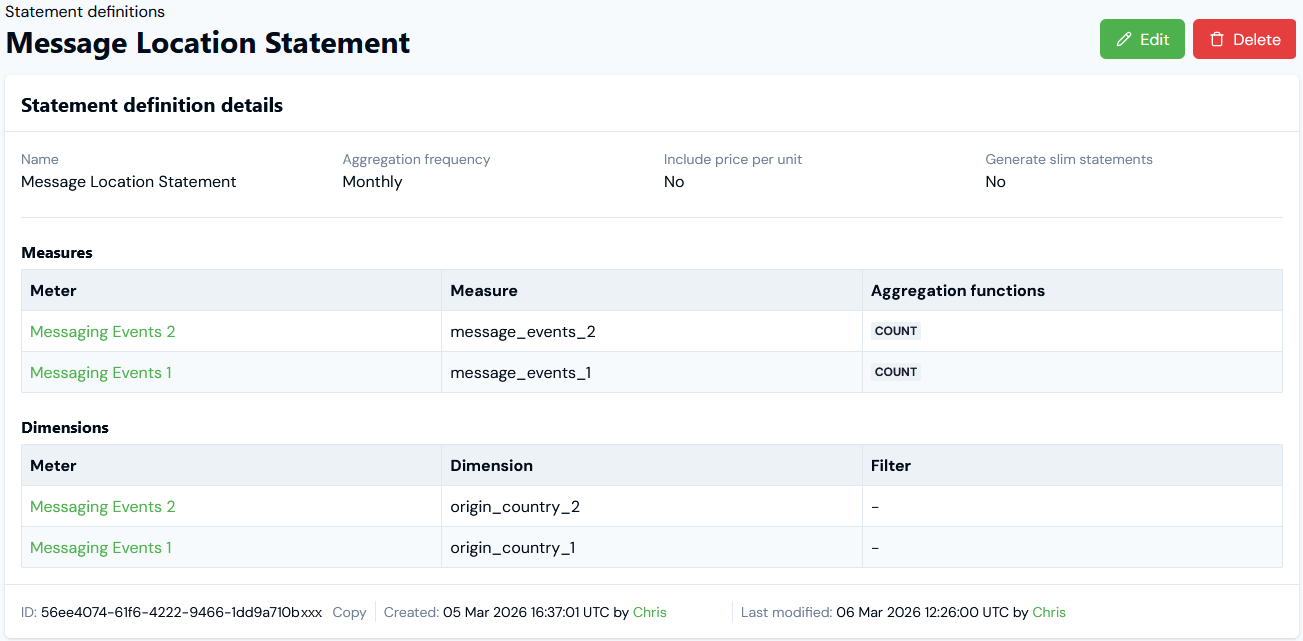
First, here’s the updated Message Location Statement:
Note that we’ve added to include for Statements generated using this Statement Definition to include Measure and Dimension fields on two different Meters - Messaging Events 2 and Messaging Events 1.
To generate partial Statements for Bills and Download:
Open the Bill you want to generate a partial Statement for in Bill management:
Note that the Bill has usage charge line items that derive from Aggregation pricing metrics targeting different Meters.
Select Statements. The Generate statements page opens.
Under Statement job type, select Partial statement. The page adjusts to show a Meters drop-down selection field.
For the current example, select Messaging Events 1 for Meters:
Note that you can select up to a maximum of 10 Meters.
Select Generate partial statement. This will kick-off the job to generate a partial Bill Statement and the Statement job details page opens:
Notes:
The Statement job might take a few minutes and the Status will show as PENDING while it runs.
From Statement job details, you can select to Re-generate statement. This takes you back to the Generate statements page where you can generate another partial or full Statement.
Partial Statements not persisted on Bill! Note that if you do this and in contrast to when full Statements are generated, any partial Statements you might have already generated are no longer available for download from the Generate statements page.
When the Statement job is COMPLETE, select which format you want to download: Download JSON (always) or Download CSV (if you selected Generate CSV statement). The Statement is downloaded and saved locally to your Downloads folder.
You can now open the Statement in the 3rd-party application of your choice and transpose and compile it as required for issuing to your end-customers as a charge breakdown backing sheet to their invoice.
For the current example using the Messaging Location Statement as Statement Definition for the example Bill, we’ve generated and downloaded a partial Statement in CSV format and loaded it into a spreadsheet:
We can see that the Bill Statement shows the breakdown on the basis of location of message origin using the Meter dimension field Origin Country1 (orig_country_1), and in accordance with the Statement Definition we set up and applied to the billed Account. However, this only includes usage data collected by the single Meter we selected for the partial Bill Statement generation: Messaging Events 1.
Note also that all the Measures and Dimensions we included in the Statement Definition - that is in the current example, the Message Events 2 Measure and Origin Country 2 Dimension - are included, but since they belong to the excludedMessaging Events 2 Meter these are empty.
You can enable auto-generation of Bill Statements for Accounts whenever a Bill is approved or locked:
At Organization level.
At individual Account level.
These alternatives work together in the following way:
If you make a selection for auto-generation of Bill Statements at Organization level but do not select for this at the individual Account level, the Organizational level setting is applied.
If you make a selection for auto-generation of Bill Statements at the individual Account level, this selection will apply to the individual Account, regardless of the selection for this made at the Organizational level.
To enable auto-generation of Bill Statements when Bills are approved or locked :
Either:
At Settings>Organization, on the Configuration tab select Edit on the Organization configuration details panel. The Organization configuration page opens.
Open the Account you want to enable auto-generation of Bill Statements for and select Edit. The Edit page opens.
Scroll down the page and on the Bill statements panel, use the radio buttons to enable Auto-generate statements:
None. Statements will not be auto-generated. (Default)
JSON. Statements will be auto-generated in JSON format.
JSON and CSV. Statements will be auto-generated in both JSON and CSV format.
Select Update Organization configuration or Update account.
You can obtain the last modified date for a Bill Statement using API calls. This is useful if you want to check whether or not the Statement needs regenerating by comparing the last modified date/time with the Bill’s timestamp.To obtain a Statement’s last modified date:
First, obtain the id of the Bill whose Statement you want to check the last modified date/time for.
Use this id to make one of the available Retrieve Bill Statement API calls:
The response to either call returns a pre-signed URL, which you can use to download the Statement file in either JSON or CSV format with a GET call using the URL. For example:
GET https://m3ter-billing-statements-16yxyxyxyxy-eu-west-2.s3.eu-west-2.amazonaws.com/0a5ec4d1-3300-4e2e-975d-16b3009fbf4e/89b234c3-bbb7-4179...The response to this call includes a Last-Modified header, where you can read-off the date and time.
{"docsConfig":{"theme":"aspen","$schema":"https://mintlify.com/docs.json","name":"m3ter Documentation","description":"Guides, learning resources and API reference for integrating with m3ter","colors":{"primary":"#4caf4c","dark":"#449d44"},"logo":{"light":"https://mintcdn.com/m3ter/t6C65JBQiQOFtjBy/images/m3ter-logo-blue-sf.svg?fit=max\u0026auto=format\u0026n=t6C65JBQiQOFtjBy\u0026q=85\u0026s=3928db28c84ec6950e43caf96e635d80","dark":"https://mintcdn.com/m3ter/t6C65JBQiQOFtjBy/images/m3ter-logo-white-sf.svg?fit=max\u0026auto=format\u0026n=t6C65JBQiQOFtjBy\u0026q=85\u0026s=a018cb782e49a2fbdd811276476d0605"},"favicon":"https://mintcdn.com/m3ter/T0RRts393DSUkWFc/favicon.svg?fit=max\u0026auto=format\u0026n=T0RRts393DSUkWFc\u0026q=85\u0026s=9492b54cc98df6775983b287b6f865cd","navbar":{"links":[{"href":"https://m3ter.freshdesk.com","label":"Support"},{"href":"https://console.m3ter.com","label":"Console"}],"primary":{"type":"button","label":"Schedule a demo","href":"https://www.m3ter.com/contact"}},"footer":{"socials":{"linkedin":"https://uk.linkedin.com/company/m3ter","x":"https://x.com/m3terHQ","github":"https://github.com/m3ter-com"},"links":[{"items":[{"label":"Website","href":"https://www.m3ter.com"},{"label":"Legal","href":"https://www.m3ter.com/legal"},{"label":"Security","href":"https://www.m3ter.com/security"},{"label":"Trust Center","href":"https://trust.m3ter.com"}]}]},"fonts":{"family":"Montserrat"},"icons":{"library":"lucide"},"styling":{"eyebrows":"breadcrumbs","latex":false},"integrations":{"ga4":{"measurementId":"G-V9C7TTPRQT"}},"contextual":{"options":["copy","view"],"display":"header"},"thumbnails":{"fonts":{"family":"Montserrat"}},"navigation":{"pages":[]}},"deployment":{"deploymentMetadataValue":{"subdomain":"m3ter","hasAudioNarration":false,"actualSubdomain":"m3ter","customDomains":["docs.m3ter.com"],"gitSource":{"type":"github","owner":"m3ter-com","repo":"m3ter-docs","deployBranch":"main","contentDirectory":"","isPrivate":true,"mountPath":"","label":""},"chroma":{"liveDeploymentHistoryId":"6ae4b3832e4c4b8ea8e5ac1c","collectionId":"f4691807-992d-43f9-aab2-d179e798824c","schemaVersion":"v3","latestBuiltDeploymentHistoryId":"6ae4b3832e4c4b8ea8e5ac1c"},"entitlements":{"AI_CHAT":{"status":"ENABLED"},"WEB_MCP":{"status":"ENABLED"},"NARRATION":{"status":"ENABLED"}},"buildId":"6ae9a09c36175fbf7124961d","clientVersion":"0.0.4045","searchFilterCounts":[{"language":"default","tag":"Guides","count":400},{"language":"default","tag":"API Reference","count":393},{"language":"default","tag":"Endpoints","count":387},{"language":"default","tag":"Integrations","count":66},{"language":"default","tag":"m3sh Function Reference","count":66},{"language":"default","tag":"Synthetic functions","count":50},{"language":"default","tag":"m3ter","count":50},{"language":"default","tag":"m3sh","count":43},{"language":"default","tag":"End-Customer Accounts","count":27},{"language":"default","tag":"m3ter Connector for Salesforce","count":24}]},"assistantConfig":{"enableAskAiButton":true,"enableStarterQuestions":false,"enableAskAiSearchBar":false},"basePath":"","hasChatPermissions":true,"hasWebMcpPermissions":true,"toggles":[{"name":"kill-isr","enabled":true,"variant":{"name":"disabled","enabled":false,"feature_enabled":true},"impressionData":false},{"name":"agent-mintlify-slack","enabled":true,"variant":{"name":"disabled","enabled":false,"feature_enabled":true},"impressionData":false},{"name":"agent-integrations-settings","enabled":true,"variant":{"name":"disabled","enabled":false,"feature_enabled":true},"impressionData":false},{"name":"automations-pr-grouping","enabled":true,"variant":{"name":"disabled","enabled":false,"feature_enabled":true},"impressionData":false},{"name":"custom-prefix","enabled":true,"variant":{"name":"disabled","enabled":false,"feature_enabled":true},"impressionData":false},{"name":"analytics-v7","enabled":true,"variant":{"name":"disabled","enabled":false,"feature_enabled":true},"impressionData":false},{"name":"user-flows-analytics","enabled":true,"variant":{"name":"disabled","enabled":false,"feature_enabled":true},"impressionData":false},{"name":"no-publish-flow","enabled":true,"variant":{"name":"disabled","enabled":false,"feature_enabled":true},"impressionData":false},{"name":"workos-onboarding","enabled":true,"variant":{"name":"disabled","enabled":false,"feature_enabled":true},"impressionData":false},{"name":"llms-txt-v2","enabled":true,"variant":{"name":"disabled","enabled":false,"feature_enabled":true},"impressionData":false},{"name":"snapshot-serving-live","enabled":true,"variant":{"name":"disabled","enabled":false,"feature_enabled":true},"impressionData":false},{"name":"stripTemperatureMiddleware","enabled":true,"variant":{"name":"disabled","enabled":false,"feature_enabled":true},"impressionData":false},{"name":"support-platform-pylon-zendesk","enabled":true,"variant":{"name":"disabled","enabled":false,"feature_enabled":true},"impressionData":false},{"name":"snapshot-serving","enabled":true,"variant":{"name":"disabled","enabled":false,"feature_enabled":true},"impressionData":false},{"name":"instant-rollback","enabled":true,"variant":{"name":"disabled","enabled":false,"feature_enabled":true},"impressionData":false},{"name":"granular-notifications-server","enabled":true,"variant":{"name":"disabled","enabled":false,"feature_enabled":true},"impressionData":false},{"name":"granular-notifications","enabled":true,"variant":{"name":"disabled","enabled":false,"feature_enabled":true},"impressionData":false},{"name":"automations-fable","enabled":true,"variant":{"name":"disabled","enabled":false,"feature_enabled":true},"impressionData":false},{"name":"fixed-ai-action-pricing","enabled":true,"variant":{"name":"disabled","enabled":false,"feature_enabled":true},"impressionData":false},{"name":"automation-resolve-merge-conflict","enabled":true,"variant":{"name":"disabled","enabled":false,"feature_enabled":true},"impressionData":false},{"name":"scoped-publishing","enabled":true,"variant":{"name":"disabled","enabled":false,"feature_enabled":true},"impressionData":false},{"name":"mintql","enabled":true,"variant":{"name":"disabled","enabled":false,"feature_enabled":true},"impressionData":false},{"name":"page-level-analytics","enabled":true,"variant":{"name":"disabled","enabled":false,"feature_enabled":true},"impressionData":false},{"name":"editor-version-history-v2","enabled":true,"variant":{"name":"disabled","enabled":false,"feature_enabled":true},"impressionData":false},{"name":"billing-page-v2","enabled":true,"variant":{"name":"disabled","enabled":false,"feature_enabled":true},"impressionData":false},{"name":"full-page-search","enabled":true,"variant":{"name":"disabled","enabled":false,"feature_enabled":true},"impressionData":false},{"name":"workspace-projects","enabled":true,"variant":{"name":"disabled","enabled":false,"feature_enabled":true},"impressionData":false},{"name":"assistant-v5","enabled":true,"variant":{"name":"disabled","enabled":false,"feature_enabled":true},"impressionData":false},{"name":"byok-sep-25","enabled":true,"variant":{"name":"disabled","enabled":false,"feature_enabled":true},"impressionData":false},{"name":"fork-pr-previews","enabled":true,"variant":{"name":"disabled","enabled":false,"feature_enabled":true},"impressionData":false},{"name":"revalidation-jwt","enabled":true,"variant":{"name":"disabled","enabled":false,"feature_enabled":true},"impressionData":false},{"name":"vite-origin","enabled":true,"variant":{"name":"disabled","enabled":false,"feature_enabled":true},"impressionData":false},{"name":"billing-updated-9-15","enabled":true,"variant":{"name":"disabled","enabled":false,"feature_enabled":true},"impressionData":false},{"name":"workos-sso-scim","enabled":true,"variant":{"name":"disabled","enabled":false,"feature_enabled":true},"impressionData":false},{"name":"hobby-abuse-scan","enabled":true,"variant":{"name":"disabled","enabled":false,"feature_enabled":true},"impressionData":false},{"name":"dashboard-inbox","enabled":true,"variant":{"name":"disabled","enabled":false,"feature_enabled":true},"impressionData":false},{"name":"workos-signup","enabled":true,"variant":{"name":"disabled","enabled":false,"feature_enabled":true},"impressionData":false},{"name":"turbopuffer-dual-write","enabled":true,"variant":{"name":"disabled","enabled":false,"feature_enabled":true},"impressionData":false},{"name":"workos-enabled","enabled":true,"variant":{"name":"disabled","enabled":false,"feature_enabled":true},"impressionData":false},{"name":"approve-review-flow","enabled":true,"variant":{"name":"disabled","enabled":false,"feature_enabled":true},"impressionData":false},{"name":"sso-setup-deadline-banner","enabled":true,"variant":{"name":"disabled","enabled":false,"feature_enabled":true},"impressionData":false}],"googleFontsInlined":true},"customCss":[],"page":{"pagePath":"guides/billing-and-usage-data/running-viewing-and-managing-bills/working-with-bill-statements","slug":"/guides/billing-and-usage-data/running-viewing-and-managing-bills/working-with-bill-statements","pageMetadata":{"title":"Working with Bill Statements","description":null,"href":"/guides/billing-and-usage-data/running-viewing-and-managing-bills/working-with-bill-statements"},"pageType":"default","mdx":{"mdxSource":{"compiledSource":"\"use strict\";const{Fragment:_Fragment,jsx:_jsx,jsxs:_jsxs}=arguments[0];const{useMDXComponents:_provideComponents}=arguments[0];function _createMdxContent(props){const _components={a:`a`,code:`code`,em:`em`,li:`li`,ol:`ol`,p:`p`,strong:`strong`,ul:`ul`,..._provideComponents(),...props.components},{Heading,OptimizedImage,Warning}=_components;if(!Heading)_missingMdxReference(`Heading`,true);if(!OptimizedImage)_missingMdxReference(`OptimizedImage`,true);if(!Warning)_missingMdxReference(`Warning`,true);return _jsxs(_Fragment,{children:[_jsxs(_components.p,{children:[`You can create `,_jsx(_components.em,{children:`Statements`}),` to accompany the Bills you send out to your end-customers as backing sheets to their invoices. Bill Statements provide a useful breakdown of the usage responsible for charge line items your end-customers see on their invoices:`]}),`\n`,_jsxs(_components.ul,{children:[`\n`,_jsxs(_components.li,{children:[`Create `,_jsx(_components.em,{children:`Statement Definitions`}),` to specify the way billed usage will be aggregated and compiled in the Statement. For example, if you are billing customers monthly, you might want to breakdown the usage responsible for the monthly charge on a Bill into weekly portions in Bill Statements.`]}),`\n`,_jsxs(_components.li,{children:[`At Organization level select a default Statement Definition. See `,_jsx(_components.a,{href:`/guides/organization-and-access-management/viewing-and-editing-organization/viewing-and-editing-organization-configuration`,children:`Viewing and Editing Organization Configuration`}),`.`]}),`\n`,_jsxs(_components.li,{children:[`At Account level:`,`\n`,_jsxs(_components.ul,{children:[`\n`,_jsx(_components.li,{children:`Select a Statement Definition, which will then override the Organization default.`}),`\n`,_jsx(_components.li,{children:`Select to auto-generate Statements when Bills are approved or locked.`}),`\n`]}),`\n`]}),`\n`,_jsxs(_components.li,{children:[`When viewing a Bill, generate Statements manually - two options:`,`\n`,_jsxs(_components.ul,{children:[`\n`,_jsxs(_components.li,{children:[`Full Statements. Generated Statements will include for `,_jsx(_components.em,{children:`all usage`}),` collected by the Meters defined for the Statement Definition.`]}),`\n`,_jsxs(_components.li,{children:[`Partial Statements. Allows you to filter by Meter IDs defined for the Statement Definition. Generated Statements will include only for the `,_jsx(_components.em,{children:`usage collected by selected Meters`}),`.`]}),`\n`]}),`\n`]}),`\n`,_jsx(_components.li,{children:`When Statements have been generated for a Bill, download them in JSON and CSV format, which you can then transpose and compile into the required delivery format.`}),`\n`,_jsx(_components.li,{children:`Check if a Bill Statement needs refreshing by comparing the Bill calculation timestamp against the Statement’s last modified date, which is available in the response to a get Statement API call`}),`\n`]}),`\n`,_jsx(_components.p,{children:`Common Bill Statement use cases:`}),`\n`,_jsxs(_components.ul,{children:[`\n`,_jsx(_components.li,{children:`One common use case is to provide a breakdown by time period. For example, if you bill and issue invoices on a monthly frequency, then you might want to provide a weekly or daily charge breakdown Statement as a backing sheet to invoices, allowing end-customers to see how their usage was distributed across the billing period.`}),`\n`,_jsx(_components.li,{children:`Another use case would be to provide a breakdown on the basis of location of usage charged for. For example, a text messaging service imposes a usage charge per billing period for all messages logged that originate from outside of a customer’s native country. This usage is measured for the billing charge as a single block of total recorded usage, which results in a single usage charge line item for “other country” usage in customer invoices. But if the Meter collecting that usage is set up to also record a location for message events by country of origin, you can set up a Statement Definition that provides the required breakdown by the Meter’s location dimension.`}),`\n`]}),`\n`,_jsx(_components.p,{children:`This topic uses the second common use case as a worked example to explain how to create Statement Definitions, set up default Statements, generate full or partial Statements for Bills, and how to download generated Statements in your preferred format.`}),`\n`,_jsxs(_components.ul,{children:[`\n`,_jsx(_components.li,{children:_jsx(_components.a,{href:`#creating-statement-definition`,children:`Creating Statement Definitions`})}),`\n`,_jsx(_components.li,{children:_jsx(_components.a,{href:`#using-statement-definitions`,children:`Using Statement Definitions`})}),`\n`,_jsx(_components.li,{children:_jsx(_components.a,{href:`#generating-full-statements-for-bills-and-downloading`,children:`Generating Full Statements for Bills and Downloading`})}),`\n`,_jsx(_components.li,{children:_jsx(_components.a,{href:`#generating-partial-statements-for-bills-and-downloading`,children:`Generating Partial Statements for Bills and Downloading`})}),`\n`,_jsx(_components.li,{children:_jsx(_components.a,{href:`#enabling-auto-generation-for-statements`,children:`Enabling Auto-Generation for Statements`})}),`\n`,_jsx(_components.li,{children:_jsx(_components.a,{href:`#checking-statement-last-modified-date`,children:`Checking Statement Last Modified Date`})}),`\n`]}),`\n`,_jsx(Warning,{children:_jsxs(_components.p,{children:[_jsx(_components.strong,{children:`Bill Statement limit`}),`. A default Bill line item limit of 50,000 is imposed on Bill Statements. This default limit can be increased on request - please ask your m3ter contact for more details or get in touch with `,_jsx(_components.a,{href:`/guides/getting-started/contacting-m3ter-support`,children:`m3ter Support`}),`.`]})}),`\n`,_jsx(Heading,{level:`2`,id:`creating-statement-definitions`,children:`Creating Statement Definitions`}),`\n`,_jsx(_components.p,{children:`When you create and configure a Statement Definition, you can define how the usage data collected by a Meter for a billing period, and on which usage charges are based, will be broken down for end-customers who will receive a Statement generated using the Statement Definition.`}),`\n`,_jsx(_components.p,{children:_jsx(_components.strong,{children:`To create and configure a Statement Definition:`})}),`\n`,_jsxs(_components.ol,{children:[`\n`,_jsxs(_components.li,{children:[`Select `,_jsx(_components.strong,{children:`Billing`}),`. The `,_jsx(_components.strong,{children:`Billing`}),` section opens at the `,_jsx(_components.strong,{children:`Bill management`}),` page.`]}),`\n`,_jsxs(_components.li,{children:[`Select `,_jsx(_components.strong,{children:`Statement definitions`}),`:`]}),`\n`]}),`\n`,_jsx(OptimizedImage,{src:`https://mintcdn.com/m3ter/03osooeLKFU5Y0yI/images/1733240316-statementdefinition18.png?fit=max\u0026auto=format\u0026n=03osooeLKFU5Y0yI\u0026q=85\u0026s=0d30378faf38e141a233310d0256fe4a`,style:{width:`5%`},\"data-og-width\":`50`,width:`50`,\"data-og-height\":`40`,height:`40`,\"data-path\":`images/1733240316-statementdefinition18.png`,\"data-optimize\":`true`,\"data-opv\":`3`,srcset:`https://mintcdn.com/m3ter/03osooeLKFU5Y0yI/images/1733240316-statementdefinition18.png?w=280\u0026fit=max\u0026auto=format\u0026n=03osooeLKFU5Y0yI\u0026q=85\u0026s=350d873012512fc3a7d2b5718f7950c2 280w, https://mintcdn.com/m3ter/03osooeLKFU5Y0yI/images/1733240316-statementdefinition18.png?w=560\u0026fit=max\u0026auto=format\u0026n=03osooeLKFU5Y0yI\u0026q=85\u0026s=f37de3af109c33207046858bce990aaa 560w, https://mintcdn.com/m3ter/03osooeLKFU5Y0yI/images/1733240316-statementdefinition18.png?w=840\u0026fit=max\u0026auto=format\u0026n=03osooeLKFU5Y0yI\u0026q=85\u0026s=ac5cf4498919d98589ed57d23c311bac 840w, https://mintcdn.com/m3ter/03osooeLKFU5Y0yI/images/1733240316-statementdefinition18.png?w=1100\u0026fit=max\u0026auto=format\u0026n=03osooeLKFU5Y0yI\u0026q=85\u0026s=4a730cfbb40fc9d068e88e32e33fd14a 1100w, https://mintcdn.com/m3ter/03osooeLKFU5Y0yI/images/1733240316-statementdefinition18.png?w=1650\u0026fit=max\u0026auto=format\u0026n=03osooeLKFU5Y0yI\u0026q=85\u0026s=4d9c7295f1509e9897c36660f8c463ba 1650w, https://mintcdn.com/m3ter/03osooeLKFU5Y0yI/images/1733240316-statementdefinition18.png?w=2500\u0026fit=max\u0026auto=format\u0026n=03osooeLKFU5Y0yI\u0026q=85\u0026s=5c78dff00622c3e194cadc994dbc4e64 2500w`}),`\n`,_jsxs(_components.p,{children:[`The `,_jsx(_components.strong,{children:`Statement definitions`}),` page opens and list any existing Statement Definitions.`]}),`\n`,_jsxs(_components.ol,{start:`3`,children:[`\n`,_jsxs(_components.li,{children:[`Select `,_jsx(_components.strong,{children:`Create statement definition`}),`. The `,_jsx(_components.strong,{children:`Create`}),` page opens.`]}),`\n`,_jsxs(_components.li,{children:[`Under `,_jsx(_components.strong,{children:`Statement definition details`}),`, enter a `,_jsx(_components.strong,{children:`Name`}),` for the Statement Definition.`]}),`\n`,_jsxs(_components.li,{children:[`Use the drop-down to select an `,_jsx(_components.strong,{children:`Aggregation frequency`}),`:`]}),`\n`]}),`\n`,_jsxs(_components.ul,{children:[`\n`,_jsx(_components.li,{children:_jsx(_components.strong,{children:`Daily`})}),`\n`,_jsx(_components.li,{children:_jsx(_components.strong,{children:`Weekly`})}),`\n`,_jsx(_components.li,{children:_jsx(_components.strong,{children:`Monthly`})}),`\n`,_jsx(_components.li,{children:_jsx(_components.strong,{children:`Quarterly`})}),`\n`,_jsx(_components.li,{children:_jsx(_components.strong,{children:`Yearly`})}),`\n`,_jsx(_components.li,{children:_jsx(_components.strong,{children:`Whole bill period`})}),`\n`]}),`\n`,_jsxs(_components.ol,{start:`6`,children:[`\n`,_jsxs(_components.li,{children:[`Use the switch to enable `,_jsx(_components.strong,{children:`Include price per unit`}),`. Default is disabled.`]}),`\n`,_jsxs(_components.li,{children:[`Use the switch to `,_jsx(_components.strong,{children:`Generate slim statements`}),`. Enable this option if you have priced Plans using segmented Aggregations attached to end-customer Accounts and want to exclude segments that don’t appear on Bills from Statements. Default is disabled:`]}),`\n`]}),`\n`,_jsx(OptimizedImage,{src:`https://mintcdn.com/m3ter/DpDhOUkXlgT5sbP5/images/Statementdef19.png?fit=max\u0026auto=format\u0026n=DpDhOUkXlgT5sbP5\u0026q=85\u0026s=51aac6734e645564ccf0c8646187a4b4`,alt:`Statementdef19`,title:`Statementdef19`,style:{width:`59%`},\"data-og-width\":`647`,width:`647`,\"data-og-height\":`537`,height:`537`,\"data-path\":`images/Statementdef19.png`,\"data-optimize\":`true`,\"data-opv\":`3`,srcset:`https://mintcdn.com/m3ter/DpDhOUkXlgT5sbP5/images/Statementdef19.png?w=280\u0026fit=max\u0026auto=format\u0026n=DpDhOUkXlgT5sbP5\u0026q=85\u0026s=594d4ebb064478ef93bd53151015233d 280w, https://mintcdn.com/m3ter/DpDhOUkXlgT5sbP5/images/Statementdef19.png?w=560\u0026fit=max\u0026auto=format\u0026n=DpDhOUkXlgT5sbP5\u0026q=85\u0026s=c5e82a8fd6d766006ff2737b2eedc7b6 560w, https://mintcdn.com/m3ter/DpDhOUkXlgT5sbP5/images/Statementdef19.png?w=840\u0026fit=max\u0026auto=format\u0026n=DpDhOUkXlgT5sbP5\u0026q=85\u0026s=47d3b80f9a734cbf4c9a26c8b3eecb2c 840w, https://mintcdn.com/m3ter/DpDhOUkXlgT5sbP5/images/Statementdef19.png?w=1100\u0026fit=max\u0026auto=format\u0026n=DpDhOUkXlgT5sbP5\u0026q=85\u0026s=ce1c032acc8ee87db90d07289602534a 1100w, https://mintcdn.com/m3ter/DpDhOUkXlgT5sbP5/images/Statementdef19.png?w=1650\u0026fit=max\u0026auto=format\u0026n=DpDhOUkXlgT5sbP5\u0026q=85\u0026s=268a8c81202d689ff32b93ab02f60ec3 1650w, https://mintcdn.com/m3ter/DpDhOUkXlgT5sbP5/images/Statementdef19.png?w=2500\u0026fit=max\u0026auto=format\u0026n=DpDhOUkXlgT5sbP5\u0026q=85\u0026s=9627dcfd65f781beeee5d1dac3a30e5c 2500w`}),`\n`,_jsx(Warning,{children:_jsxs(_components.p,{children:[_jsx(_components.strong,{children:`Generate slim statements not shown?`}),` If this option is not shown when creating a Statement definition and you want to use this feature, please advise your m3ter contact or get in touch with `,_jsx(_components.a,{href:`/guides/getting-started/contacting-m3ter-support`,children:`m3ter Support`}),` to have it enabled for your Organization.`]})}),`\n`,_jsxs(_components.ol,{start:`8`,children:[`\n`,_jsxs(_components.li,{children:[`Under `,_jsx(_components.strong,{children:`Measures`}),`, use the drop-down to select a `,_jsx(_components.strong,{children:`Meter`}),` that collects the usage data used as the basis of the usage charges for billing. The `,_jsx(_components.strong,{children:`Measure`}),` drop-down selection field is activated for the selected Meter.`]}),`\n`,_jsxs(_components.li,{children:[`Use the `,_jsx(_components.strong,{children:`Measure`}),` drop-down to select a Meter measure Data Field which is aggregated into unit price rates and used as the basis for usage charges at billing.`]}),`\n`,_jsxs(_components.li,{children:[`Use the `,_jsx(_components.strong,{children:`Aggregation functions`}),` drop-down list to select the way you want to aggregate the selected Meter Data Field values for Statements. Seven options:`]}),`\n`]}),`\n`,_jsxs(_components.ul,{children:[`\n`,_jsxs(_components.li,{children:[_jsx(_components.strong,{children:`Sum`}),`. Adds the values`]}),`\n`,_jsxs(_components.li,{children:[_jsx(_components.strong,{children:`Minimum`}),`. Uses the minimum value.`]}),`\n`,_jsxs(_components.li,{children:[_jsx(_components.strong,{children:`Maximum`}),`. Uses the maximum value.`]}),`\n`,_jsxs(_components.li,{children:[_jsx(_components.strong,{children:`Count`}),`. Counts the number of values`]}),`\n`,_jsxs(_components.li,{children:[_jsx(_components.strong,{children:`Latest`}),`. Uses the most recent value.`]}),`\n`,_jsxs(_components.li,{children:[_jsx(_components.strong,{children:`Mean`}),`. Uses the arithmetic mean of the values.`]}),`\n`,_jsxs(_components.li,{children:[_jsx(_components.strong,{children:`Unique`}),`. List each of the unique values.`]}),`\n`]}),`\n`,_jsx(Warning,{children:_jsxs(_components.p,{children:[_jsx(_components.strong,{children:`Custom SQL?`}),` The `,_jsx(_components.strong,{children:`Custom SQL`}),` Aggregation function is not available when setting up `,_jsx(_components.strong,{children:`Measures`}),` for a Statement definition.`]})}),`\n`,_jsxs(_components.ol,{start:`11`,children:[`\n`,_jsxs(_components.li,{children:[`Under `,_jsx(_components.strong,{children:`Dimensions`}),`, use the drop-down to select a Meter that collects the usage data as the basis of the usage charges on Bills. The `,_jsx(_components.strong,{children:`Dimension`}),` drop-down is activated for the selected Meter.`]}),`\n`,_jsxs(_components.li,{children:[`Use the `,_jsx(_components.strong,{children:`Dimension`}),` drop-down to select the Meter Dimension you want to use as the basis of the Statement’s breakdown of usage.`]}),`\n`,_jsxs(_components.li,{children:[`If you want to filter the selected `,_jsx(_components.strong,{children:`Dimension`}),` values which will appear on the Statement, under `,_jsx(_components.strong,{children:`Filter`}),`, choose the `,_jsx(_components.strong,{children:`Selected values`}),` radio button. The `,_jsx(_components.strong,{children:`Filter`}),` values field is activated.`]}),`\n`,_jsxs(_components.li,{children:[`Enter any values you want to filter the Statement breakdown by - only the `,_jsx(_components.strong,{children:`Dimension`}),` values you enter will be used:`]}),`\n`]}),`\n`,_jsx(OptimizedImage,{src:`https://mintcdn.com/m3ter/DpDhOUkXlgT5sbP5/images/Statementdef20.png?fit=max\u0026auto=format\u0026n=DpDhOUkXlgT5sbP5\u0026q=85\u0026s=4f596f88f11124b2b0493571863d37c6`,alt:`Statementdef20`,title:`Statementdef20`,style:{width:`93%`},\"data-og-width\":`966`,width:`966`,\"data-og-height\":`543`,height:`543`,\"data-path\":`images/Statementdef20.png`,\"data-optimize\":`true`,\"data-opv\":`3`,srcset:`https://mintcdn.com/m3ter/DpDhOUkXlgT5sbP5/images/Statementdef20.png?w=280\u0026fit=max\u0026auto=format\u0026n=DpDhOUkXlgT5sbP5\u0026q=85\u0026s=b7ebac248f873eb949b9a71ec1695473 280w, https://mintcdn.com/m3ter/DpDhOUkXlgT5sbP5/images/Statementdef20.png?w=560\u0026fit=max\u0026auto=format\u0026n=DpDhOUkXlgT5sbP5\u0026q=85\u0026s=b64b8748047b88a6fb9a9843dbb55f44 560w, https://mintcdn.com/m3ter/DpDhOUkXlgT5sbP5/images/Statementdef20.png?w=840\u0026fit=max\u0026auto=format\u0026n=DpDhOUkXlgT5sbP5\u0026q=85\u0026s=a546c1e8111be3975eb51b4daf014bd8 840w, https://mintcdn.com/m3ter/DpDhOUkXlgT5sbP5/images/Statementdef20.png?w=1100\u0026fit=max\u0026auto=format\u0026n=DpDhOUkXlgT5sbP5\u0026q=85\u0026s=573bd8bf74e6c8f0128f62916862ce1b 1100w, https://mintcdn.com/m3ter/DpDhOUkXlgT5sbP5/images/Statementdef20.png?w=1650\u0026fit=max\u0026auto=format\u0026n=DpDhOUkXlgT5sbP5\u0026q=85\u0026s=8505291a9a2bf591f8ddecdf050edc53 1650w, https://mintcdn.com/m3ter/DpDhOUkXlgT5sbP5/images/Statementdef20.png?w=2500\u0026fit=max\u0026auto=format\u0026n=DpDhOUkXlgT5sbP5\u0026q=85\u0026s=a8b562fb7e11c6cda0d020eb2d456db9 2500w`}),`\n`,_jsx(_components.p,{children:`In this example, the Statement Definition uses:`}),`\n`,_jsxs(_components.ul,{children:[`\n`,_jsxs(_components.li,{children:[`A single numeric `,_jsx(_components.strong,{children:`Message Events2`}),` measure on a Meter, which collects usage data on the number of messages and on which billing usage charges are based.`]}),`\n`,_jsxs(_components.li,{children:[`A single non-numeric `,_jsx(_components.strong,{children:`Origin Country2`}),` dimension on a Meter and on which a breakdown of charges will be based. No filtering of values is enabled.`]}),`\n`]}),`\n`,_jsxs(_components.ol,{start:`15`,children:[`\n`,_jsxs(_components.li,{children:[`If you want to use other Meter Measures and Dimensions for your Statement Definition, select `,_jsx(_components.strong,{children:`Add`}),` under `,_jsx(_components.strong,{children:`Measures`}),` or `,_jsx(_components.strong,{children:`Dimensions`}),` and repeat steps 6 to 14.`]}),`\n`,_jsxs(_components.li,{children:[`Select `,_jsx(_components.strong,{children:`Create statement definition`}),`. The `,_jsx(_components.strong,{children:`Statement definition details`}),` page opens:`]}),`\n`]}),`\n`,_jsx(OptimizedImage,{src:`https://mintcdn.com/m3ter/fwdjalI57qZLQlM1/images/Statementdef33.png?fit=max\u0026auto=format\u0026n=fwdjalI57qZLQlM1\u0026q=85\u0026s=ecfc30ad6ec3293507cd517b64ba54ef`,alt:`Statementdef33`,\"data-og-width\":`1268`,width:`1268`,\"data-og-height\":`558`,height:`558`,\"data-path\":`images/Statementdef33.png`,\"data-optimize\":`true`,\"data-opv\":`3`,srcset:`https://mintcdn.com/m3ter/fwdjalI57qZLQlM1/images/Statementdef33.png?w=280\u0026fit=max\u0026auto=format\u0026n=fwdjalI57qZLQlM1\u0026q=85\u0026s=f09c042080ff674b67c2093730e688ce 280w, https://mintcdn.com/m3ter/fwdjalI57qZLQlM1/images/Statementdef33.png?w=560\u0026fit=max\u0026auto=format\u0026n=fwdjalI57qZLQlM1\u0026q=85\u0026s=16587c6360fa7a84cbb6ef26df61d58d 560w, https://mintcdn.com/m3ter/fwdjalI57qZLQlM1/images/Statementdef33.png?w=840\u0026fit=max\u0026auto=format\u0026n=fwdjalI57qZLQlM1\u0026q=85\u0026s=3d59bf815edfa3944b2cfff31ad140a1 840w, https://mintcdn.com/m3ter/fwdjalI57qZLQlM1/images/Statementdef33.png?w=1100\u0026fit=max\u0026auto=format\u0026n=fwdjalI57qZLQlM1\u0026q=85\u0026s=3d62a900058f826c7f9f7aa97fd0a02a 1100w, https://mintcdn.com/m3ter/fwdjalI57qZLQlM1/images/Statementdef33.png?w=1650\u0026fit=max\u0026auto=format\u0026n=fwdjalI57qZLQlM1\u0026q=85\u0026s=0d7b30b0563648a6d4a24fd94a06d320 1650w, https://mintcdn.com/m3ter/fwdjalI57qZLQlM1/images/Statementdef33.png?w=2500\u0026fit=max\u0026auto=format\u0026n=fwdjalI57qZLQlM1\u0026q=85\u0026s=7565c186cdca7f8d7f9bb127701ab26a 2500w`}),`\n`,_jsx(Heading,{level:`2`,id:`using-statement-definitions`,children:`Using Statement Definitions`}),`\n`,_jsx(_components.p,{children:`When you’ve set up a Statement Definition, you can select it as the one used to generate Statements for Bills:`}),`\n`,_jsxs(_components.ul,{children:[`\n`,_jsxs(_components.li,{children:[`Select it as the default at the Organization level. See `,_jsx(_components.a,{href:`/guides/organization-and-access-management/viewing-and-editing-organization/viewing-and-editing-organization-configuration`,children:`Viewing and Editing Organization Configuration`}),`.`]}),`\n`,_jsx(_components.li,{children:`Select it to be used for a particular Account as one of the Account settings.`}),`\n`]}),`\n`,_jsx(_components.p,{children:`These options act in the following way:`}),`\n`,_jsxs(_components.ul,{children:[`\n`,_jsxs(_components.li,{children:[`If you set a default Statement Definition at the Organizational level, this is used when you generate Bill Statements for any Accounts for which `,_jsx(_components.em,{children:`you haven’t selected a Statement Definition`}),`.`]}),`\n`,_jsxs(_components.li,{children:[`If you set a Statement Definition for an individual Account, this will be used when you generate Bill Statements for the Account and `,_jsx(_components.em,{children:`takes precedence`}),` over any Statement Definition you’ve selected at Organization level.`]}),`\n`]}),`\n`,_jsx(_components.p,{children:_jsx(_components.strong,{children:`To set up default Bill Statements:`})}),`\n`,_jsxs(_components.ol,{children:[`\n`,_jsxs(_components.li,{children:[`Create the Statement Definition you want to set as the default at Organization level or the one you want set as the default for a particular Account level. See the `,_jsx(_components.a,{href:`/guides/billing-and-usage-data/running-viewing-and-managing-bills/working-with-bill-statements#creating-statement-definitions`,children:`previous section`}),`.`]}),`\n`,_jsxs(_components.li,{children:[`To define a default Statement Definition at Organization level, select `,_jsx(_components.strong,{children:`Settings`}),`:`]}),`\n`]}),`\n`,_jsx(OptimizedImage,{src:`https://mintcdn.com/m3ter/03osooeLKFU5Y0yI/images/1730219822-settings2.png?fit=max\u0026auto=format\u0026n=03osooeLKFU5Y0yI\u0026q=85\u0026s=2c4aeaa3a1b1b11ec82794cd8497e0ad`,style:{maxWidth:`min(175px, 100%)`},\"data-og-width\":`222`,width:`222`,\"data-og-height\":`137`,height:`137`,\"data-path\":`images/1730219822-settings2.png`,\"data-optimize\":`true`,\"data-opv\":`3`,srcset:`https://mintcdn.com/m3ter/03osooeLKFU5Y0yI/images/1730219822-settings2.png?w=280\u0026fit=max\u0026auto=format\u0026n=03osooeLKFU5Y0yI\u0026q=85\u0026s=7c6297a3b63a83bad282ce1b9751e3b7 280w, https://mintcdn.com/m3ter/03osooeLKFU5Y0yI/images/1730219822-settings2.png?w=560\u0026fit=max\u0026auto=format\u0026n=03osooeLKFU5Y0yI\u0026q=85\u0026s=80ecafdc51842eb4ff01ec9c7a081c60 560w, https://mintcdn.com/m3ter/03osooeLKFU5Y0yI/images/1730219822-settings2.png?w=840\u0026fit=max\u0026auto=format\u0026n=03osooeLKFU5Y0yI\u0026q=85\u0026s=33e76c47711b4330dcac4b15a5140bc6 840w, https://mintcdn.com/m3ter/03osooeLKFU5Y0yI/images/1730219822-settings2.png?w=1100\u0026fit=max\u0026auto=format\u0026n=03osooeLKFU5Y0yI\u0026q=85\u0026s=fbcce93ff892d2455c5ac15d2f3af024 1100w, https://mintcdn.com/m3ter/03osooeLKFU5Y0yI/images/1730219822-settings2.png?w=1650\u0026fit=max\u0026auto=format\u0026n=03osooeLKFU5Y0yI\u0026q=85\u0026s=a843afc2ff5da2d19e4803c1e9ce2a7b 1650w, https://mintcdn.com/m3ter/03osooeLKFU5Y0yI/images/1730219822-settings2.png?w=2500\u0026fit=max\u0026auto=format\u0026n=03osooeLKFU5Y0yI\u0026q=85\u0026s=643aa00f0ecf52db708b03fc57fb1cea 2500w`}),`\n`,_jsxs(_components.p,{children:[`The `,_jsx(_components.strong,{children:`Organization`}),` page opens with the `,_jsx(_components.strong,{children:`Configuration`}),` tab selected.`]}),`\n`,_jsxs(_components.ol,{start:`3`,children:[`\n`,_jsxs(_components.li,{children:[`On the `,_jsx(_components.strong,{children:`Organization configuration details`}),` panel, select `,_jsx(_components.strong,{children:`Edit`}),`. The `,_jsx(_components.strong,{children:`Organization configuration`}),` page opens.`]}),`\n`,_jsxs(_components.li,{children:[`Scroll down the page and under `,_jsx(_components.strong,{children:`Bill statements`}),`, use the `,_jsx(_components.strong,{children:`Statement definition`}),` drop-down to select the Statement Definition you want to set as the default.`]}),`\n`,_jsxs(_components.li,{children:[`Select `,_jsx(_components.strong,{children:`Update Organization configuration`}),`. You are returned to the `,_jsx(_components.strong,{children:`Configuration`}),` tab and the selected Statement Definition is shown on the `,_jsx(_components.strong,{children:`Organization configuration details`}),` panel as the `,_jsx(_components.strong,{children:`Default statement definition`}),`.`]}),`\n`]}),`\n`,_jsxs(_components.ul,{children:[`\n`,_jsxs(_components.li,{children:[`Note that you can select the hotlink name text of the Statement Definition to open the `,_jsx(_components.strong,{children:`Statement definition details`}),` page directly.`]}),`\n`]}),`\n`,_jsxs(_components.ol,{start:`6`,children:[`\n`,_jsxs(_components.li,{children:[`If you want to override the Statement Definition you’ve set as the default at Organization level for a particular Account, open the `,_jsx(_components.strong,{children:`Edit`}),` page for the Account.`]}),`\n`,_jsxs(_components.li,{children:[`Scroll down the page and on the `,_jsx(_components.strong,{children:`Bill statements`}),` panel, use the `,_jsx(_components.strong,{children:`Statement definition`}),` drop-down to select the Statement Definition you want to use for the Account.`]}),`\n`,_jsxs(_components.li,{children:[`Select `,_jsx(_components.strong,{children:`Update Account`}),`.`]}),`\n`]}),`\n`,_jsx(Heading,{level:`2`,id:`generating-full-statements-for-bills-and-downloading`,children:`Generating Full Statements for Bills and Downloading`}),`\n`,_jsxs(_components.p,{children:[`When you open and view a Bill for an Account under Bill management, you can manually generate a `,_jsx(_components.em,{children:`full Bill Statement`}),` and include for usage collected by all Meters when the Statement is generated:`]}),`\n`,_jsxs(_components.ul,{children:[`\n`,_jsx(_components.li,{children:`The Statement generated will use the Statement Definition you’ve set as the default at Organization level or the Statement Definition you applied to the Account - if you’ve defined a Statement Definition at Account level, this will take precedence.`}),`\n`,_jsx(_components.li,{children:`You can choose to generate the Statement in JSON format only or both JSON and CSV format. Note that the line items within a Statement are not necessarily sorted, and you should sort by the appropriate fields as part of subsequent processing.`}),`\n`,_jsx(_components.li,{children:`When the Statement has been generated for the Bill, you can download the Statement in JSON or CSV format if you also selected CSV format when generating the Statement.`}),`\n`]}),`\n`,_jsx(_components.p,{children:_jsx(_components.strong,{children:`To generate full Statements for Bills and Download:`})}),`\n`,_jsxs(_components.ol,{children:[`\n`,_jsxs(_components.li,{children:[`Open the Bill you want to generate a full Statement for in `,_jsx(_components.strong,{children:`Bill management`}),`:`]}),`\n`]}),`\n`,_jsx(OptimizedImage,{src:`https://mintcdn.com/m3ter/fwdjalI57qZLQlM1/images/StatementDef37.png?fit=max\u0026auto=format\u0026n=fwdjalI57qZLQlM1\u0026q=85\u0026s=d0c83c94cff6fedd3bfc2051025de14f`,alt:`Statement Def37`,\"data-og-width\":`1210`,width:`1210`,\"data-og-height\":`691`,height:`691`,\"data-path\":`images/StatementDef37.png`,\"data-optimize\":`true`,\"data-opv\":`3`,srcset:`https://mintcdn.com/m3ter/fwdjalI57qZLQlM1/images/StatementDef37.png?w=280\u0026fit=max\u0026auto=format\u0026n=fwdjalI57qZLQlM1\u0026q=85\u0026s=d983949e3196968d8254912048c7140e 280w, https://mintcdn.com/m3ter/fwdjalI57qZLQlM1/images/StatementDef37.png?w=560\u0026fit=max\u0026auto=format\u0026n=fwdjalI57qZLQlM1\u0026q=85\u0026s=46d61f3315acd7b38f420aa56e0709b0 560w, https://mintcdn.com/m3ter/fwdjalI57qZLQlM1/images/StatementDef37.png?w=840\u0026fit=max\u0026auto=format\u0026n=fwdjalI57qZLQlM1\u0026q=85\u0026s=9bef0c369a43ffb527e3ad8b5c5bfa57 840w, https://mintcdn.com/m3ter/fwdjalI57qZLQlM1/images/StatementDef37.png?w=1100\u0026fit=max\u0026auto=format\u0026n=fwdjalI57qZLQlM1\u0026q=85\u0026s=80b5f03ce6adc43ffd6b54becea95515 1100w, https://mintcdn.com/m3ter/fwdjalI57qZLQlM1/images/StatementDef37.png?w=1650\u0026fit=max\u0026auto=format\u0026n=fwdjalI57qZLQlM1\u0026q=85\u0026s=28f796e0832449ddb96ec40a4f58639c 1650w, https://mintcdn.com/m3ter/fwdjalI57qZLQlM1/images/StatementDef37.png?w=2500\u0026fit=max\u0026auto=format\u0026n=fwdjalI57qZLQlM1\u0026q=85\u0026s=5c933e7391d380ae1585a0d8ef6eb87e 2500w`}),`\n`,_jsxs(_components.p,{children:[`In this example, we’ve opened a monthly Bill for an Account in an Organization where the default Statement Definition is the `,_jsx(_components.strong,{children:`Message Location Statement`}),` we created in the `,_jsx(_components.a,{href:`/guides/billing-and-usage-data/running-viewing-and-managing-bills/working-with-bill-statements#creating-statement-definitions`,children:`previous section`}),`:`]}),`\n`,_jsxs(_components.ul,{children:[`\n`,_jsx(_components.li,{children:`We can see that month’s charge is for a total of 6,100 messages, and this is shown as a single line item.`}),`\n`,_jsx(_components.li,{children:`The generated Statement should show a breakdown into separate countries of message origin.`}),`\n`]}),`\n`,_jsxs(_components.ol,{start:`2`,children:[`\n`,_jsxs(_components.li,{children:[`At top-right, select `,_jsx(_components.strong,{children:`Statements`}),`. The `,_jsx(_components.strong,{children:`Generate statements`}),` page opens:`]}),`\n`]}),`\n`,_jsx(OptimizedImage,{src:`https://mintcdn.com/m3ter/DpDhOUkXlgT5sbP5/images/Statementdef24.png?fit=max\u0026auto=format\u0026n=DpDhOUkXlgT5sbP5\u0026q=85\u0026s=a8ea894ed89b30cc7972855e94dab18e`,alt:`Statementdef24`,\"data-og-width\":`1298`,width:`1298`,\"data-og-height\":`518`,height:`518`,\"data-path\":`images/Statementdef24.png`,\"data-optimize\":`true`,\"data-opv\":`3`,srcset:`https://mintcdn.com/m3ter/DpDhOUkXlgT5sbP5/images/Statementdef24.png?w=280\u0026fit=max\u0026auto=format\u0026n=DpDhOUkXlgT5sbP5\u0026q=85\u0026s=8720305846bc6f6f55bb6e4da0a21722 280w, https://mintcdn.com/m3ter/DpDhOUkXlgT5sbP5/images/Statementdef24.png?w=560\u0026fit=max\u0026auto=format\u0026n=DpDhOUkXlgT5sbP5\u0026q=85\u0026s=67ea471a74819e9420f77084d5c6c7bd 560w, https://mintcdn.com/m3ter/DpDhOUkXlgT5sbP5/images/Statementdef24.png?w=840\u0026fit=max\u0026auto=format\u0026n=DpDhOUkXlgT5sbP5\u0026q=85\u0026s=ab9bf17754332e75b27119761b0d7285 840w, https://mintcdn.com/m3ter/DpDhOUkXlgT5sbP5/images/Statementdef24.png?w=1100\u0026fit=max\u0026auto=format\u0026n=DpDhOUkXlgT5sbP5\u0026q=85\u0026s=f7fa49d5139d27cc89b496e9497573b9 1100w, https://mintcdn.com/m3ter/DpDhOUkXlgT5sbP5/images/Statementdef24.png?w=1650\u0026fit=max\u0026auto=format\u0026n=DpDhOUkXlgT5sbP5\u0026q=85\u0026s=4afab5cd963a0e7678a7b540edb3de51 1650w, https://mintcdn.com/m3ter/DpDhOUkXlgT5sbP5/images/Statementdef24.png?w=2500\u0026fit=max\u0026auto=format\u0026n=DpDhOUkXlgT5sbP5\u0026q=85\u0026s=aecf3d663e962ab3819f62d164509f6f 2500w`}),`\n`,_jsxs(_components.ol,{start:`3`,children:[`\n`,_jsxs(_components.li,{children:[`Under `,_jsx(_components.strong,{children:`Statement job settings`}),`, you can review the set up for the Statement that will be generated, including the Statement Definition that will be used.`]}),`\n`,_jsxs(_components.li,{children:[`For the current example, we’ll leave the `,_jsx(_components.strong,{children:`Statement job type`}),` at the default `,_jsx(_components.strong,{children:`Full statement`}),` selection.`]}),`\n`,_jsx(_components.li,{children:`Select for the formats used in Statement generation:`}),`\n`]}),`\n`,_jsxs(_components.ul,{children:[`\n`,_jsxs(_components.li,{children:[_jsx(_components.strong,{children:`Generate JSON statement`}),`. This is selected by default and you cannot de-select.`]}),`\n`,_jsxs(_components.li,{children:[_jsx(_components.strong,{children:`Generate CSV statement`}),`. By default this is de-selected - use the switch to select it if you want the statement to be generated in CSV format also.`]}),`\n`]}),`\n`,_jsx(Warning,{children:_jsxs(_components.p,{children:[_jsx(_components.strong,{children:`Important: Statement Definition default must be selected!`}),` If you haven’t selected a default Statement Definition for Bills at either Organization or Account level, then the `,_jsx(_components.strong,{children:`Generate statements`}),` button will not be active and you won’t be able to generate Statements. See above: `,_jsx(_components.a,{href:`/guides/billing-and-usage-data/running-viewing-and-managing-bills/working-with-bill-statements#using-statement-definitions`,children:`Using Statement Definitions`}),`.`]})}),`\n`,_jsxs(_components.ol,{start:`6`,children:[`\n`,_jsxs(_components.li,{children:[`Select `,_jsx(_components.strong,{children:`Generate statement`}),`. This will kick-off the job to generate a full Bill Statement and the `,_jsx(_components.strong,{children:`Statement job details`}),` page opens:`]}),`\n`]}),`\n`,_jsx(OptimizedImage,{src:`https://mintcdn.com/m3ter/DpDhOUkXlgT5sbP5/images/Statementdef25.png?fit=max\u0026auto=format\u0026n=DpDhOUkXlgT5sbP5\u0026q=85\u0026s=209a0be82cc3375fd32e0b9b6ed2145b`,alt:`Statementdef25`,\"data-og-width\":`1301`,width:`1301`,\"data-og-height\":`471`,height:`471`,\"data-path\":`images/Statementdef25.png`,\"data-optimize\":`true`,\"data-opv\":`3`,srcset:`https://mintcdn.com/m3ter/DpDhOUkXlgT5sbP5/images/Statementdef25.png?w=280\u0026fit=max\u0026auto=format\u0026n=DpDhOUkXlgT5sbP5\u0026q=85\u0026s=b78810e080f085980dbb7653594a8d14 280w, https://mintcdn.com/m3ter/DpDhOUkXlgT5sbP5/images/Statementdef25.png?w=560\u0026fit=max\u0026auto=format\u0026n=DpDhOUkXlgT5sbP5\u0026q=85\u0026s=58a02ca712cbd478fb1af5d6f47c9ab9 560w, https://mintcdn.com/m3ter/DpDhOUkXlgT5sbP5/images/Statementdef25.png?w=840\u0026fit=max\u0026auto=format\u0026n=DpDhOUkXlgT5sbP5\u0026q=85\u0026s=8d71cfd17fef044a390dbba319babcd4 840w, https://mintcdn.com/m3ter/DpDhOUkXlgT5sbP5/images/Statementdef25.png?w=1100\u0026fit=max\u0026auto=format\u0026n=DpDhOUkXlgT5sbP5\u0026q=85\u0026s=dc25a2450dd594c71afc143733f0a5a5 1100w, https://mintcdn.com/m3ter/DpDhOUkXlgT5sbP5/images/Statementdef25.png?w=1650\u0026fit=max\u0026auto=format\u0026n=DpDhOUkXlgT5sbP5\u0026q=85\u0026s=055524a6286b3dd462cac51fe4f858b9 1650w, https://mintcdn.com/m3ter/DpDhOUkXlgT5sbP5/images/Statementdef25.png?w=2500\u0026fit=max\u0026auto=format\u0026n=DpDhOUkXlgT5sbP5\u0026q=85\u0026s=8f364276a5858bd5fc4f5f2121de956b 2500w`}),`\n`,_jsxs(_components.p,{children:[_jsx(_components.strong,{children:`Notes`}),`:`]}),`\n`,_jsxs(_components.ul,{children:[`\n`,_jsxs(_components.li,{children:[`Note that the Statement job might take a few minutes and the `,_jsx(_components.strong,{children:`Status`}),` will show as `,_jsx(_components.strong,{children:`PENDING`}),` while it runs.`]}),`\n`,_jsxs(_components.li,{children:[`From `,_jsx(_components.strong,{children:`Statement job details`}),`, you can select to `,_jsx(_components.strong,{children:`Re-generate statement`}),`:`,`\n`,_jsxs(_components.ul,{children:[`\n`,_jsxs(_components.li,{children:[`This takes you back to the `,_jsx(_components.strong,{children:`Generate statements`}),` page where you can generate another partial or full Statement.`]}),`\n`,_jsxs(_components.li,{children:[`Full Statements are persisted on the Bill and remain available for download from the `,_jsx(_components.strong,{children:`Generate statements`}),` page. A reminder is given:`]}),`\n`]}),`\n`]}),`\n`]}),`\n`,_jsx(OptimizedImage,{src:`https://mintcdn.com/m3ter/DpDhOUkXlgT5sbP5/images/Statementdef32.png?fit=max\u0026auto=format\u0026n=DpDhOUkXlgT5sbP5\u0026q=85\u0026s=f96e5f126035657e4191d696082632c0`,alt:`Statementdef32`,\"data-og-width\":`1484`,width:`1484`,\"data-og-height\":`615`,height:`615`,\"data-path\":`images/Statementdef32.png`,\"data-optimize\":`true`,\"data-opv\":`3`,srcset:`https://mintcdn.com/m3ter/DpDhOUkXlgT5sbP5/images/Statementdef32.png?w=280\u0026fit=max\u0026auto=format\u0026n=DpDhOUkXlgT5sbP5\u0026q=85\u0026s=5bab4982c7852b5884464fd1fd0bc19c 280w, https://mintcdn.com/m3ter/DpDhOUkXlgT5sbP5/images/Statementdef32.png?w=560\u0026fit=max\u0026auto=format\u0026n=DpDhOUkXlgT5sbP5\u0026q=85\u0026s=7a7713010e4cbe255ecd5fa907ced2f7 560w, https://mintcdn.com/m3ter/DpDhOUkXlgT5sbP5/images/Statementdef32.png?w=840\u0026fit=max\u0026auto=format\u0026n=DpDhOUkXlgT5sbP5\u0026q=85\u0026s=fffc9858bd84854c6ac4c48f20790804 840w, https://mintcdn.com/m3ter/DpDhOUkXlgT5sbP5/images/Statementdef32.png?w=1100\u0026fit=max\u0026auto=format\u0026n=DpDhOUkXlgT5sbP5\u0026q=85\u0026s=4aa8f13c146c33f7f1a962726879cf8f 1100w, https://mintcdn.com/m3ter/DpDhOUkXlgT5sbP5/images/Statementdef32.png?w=1650\u0026fit=max\u0026auto=format\u0026n=DpDhOUkXlgT5sbP5\u0026q=85\u0026s=29feec576a2458cc57c25de6737ef814 1650w, https://mintcdn.com/m3ter/DpDhOUkXlgT5sbP5/images/Statementdef32.png?w=2500\u0026fit=max\u0026auto=format\u0026n=DpDhOUkXlgT5sbP5\u0026q=85\u0026s=a12f66a43a12eadd7a9b555089595fd5 2500w`}),`\n`,_jsxs(_components.ol,{start:`7`,children:[`\n`,_jsxs(_components.li,{children:[`When the Statement job is `,_jsx(_components.strong,{children:`COMPLETE`}),`, select which format you want to download: `,_jsx(_components.strong,{children:`Download JSON`}),` (always) or `,_jsx(_components.strong,{children:`Download CSV`}),` (if you selected `,_jsx(_components.strong,{children:`Generate CSV statement`}),`). The Statement is downloaded and saved locally to your `,_jsx(_components.strong,{children:`Downloads`}),` folder.`]}),`\n`,_jsx(_components.li,{children:`You can now open the Statement in the 3rd-party application of your choice and transpose and compile it as required for issuing to your end-customers as a charge breakdown backing sheet to their invoice.`}),`\n`]}),`\n`,_jsxs(_components.ul,{children:[`\n`,_jsxs(_components.li,{children:[`For the current example using the `,_jsx(_components.strong,{children:`Messaging Location Statement`}),` as Statement Definition for the example Bill, we’ve generated and downloaded a full Statement in CSV format and loaded it into a spreadsheet:`]}),`\n`]}),`\n`,_jsx(OptimizedImage,{src:`https://mintcdn.com/m3ter/DpDhOUkXlgT5sbP5/images/Statementdef26.png?fit=max\u0026auto=format\u0026n=DpDhOUkXlgT5sbP5\u0026q=85\u0026s=58d9efb2a352dc988f7d9eb5f61a5ab8`,alt:`Statementdef26`,\"data-og-width\":`1171`,width:`1171`,\"data-og-height\":`75`,height:`75`,\"data-path\":`images/Statementdef26.png`,\"data-optimize\":`true`,\"data-opv\":`3`,srcset:`https://mintcdn.com/m3ter/DpDhOUkXlgT5sbP5/images/Statementdef26.png?w=280\u0026fit=max\u0026auto=format\u0026n=DpDhOUkXlgT5sbP5\u0026q=85\u0026s=167d4d99a91b91483bfbbf4e07efed92 280w, https://mintcdn.com/m3ter/DpDhOUkXlgT5sbP5/images/Statementdef26.png?w=560\u0026fit=max\u0026auto=format\u0026n=DpDhOUkXlgT5sbP5\u0026q=85\u0026s=3fb219b660226839e9a3f34eb3dd6e7d 560w, https://mintcdn.com/m3ter/DpDhOUkXlgT5sbP5/images/Statementdef26.png?w=840\u0026fit=max\u0026auto=format\u0026n=DpDhOUkXlgT5sbP5\u0026q=85\u0026s=5312086e2ce34e8d362ae6f3abd13b51 840w, https://mintcdn.com/m3ter/DpDhOUkXlgT5sbP5/images/Statementdef26.png?w=1100\u0026fit=max\u0026auto=format\u0026n=DpDhOUkXlgT5sbP5\u0026q=85\u0026s=3c5b85c87da7246d1100b7fec8d49bea 1100w, https://mintcdn.com/m3ter/DpDhOUkXlgT5sbP5/images/Statementdef26.png?w=1650\u0026fit=max\u0026auto=format\u0026n=DpDhOUkXlgT5sbP5\u0026q=85\u0026s=5b1827f381f79b6d47c1ba1fc645c78e 1650w, https://mintcdn.com/m3ter/DpDhOUkXlgT5sbP5/images/Statementdef26.png?w=2500\u0026fit=max\u0026auto=format\u0026n=DpDhOUkXlgT5sbP5\u0026q=85\u0026s=3675cd0325ac58cf82a6ee5e7410d5d3 2500w`}),`\n`,_jsxs(_components.ul,{children:[`\n`,_jsxs(_components.li,{children:[`We can see that the Bill Statement shows the breakdown on the basis of location of message origin using the Meter dimension field `,_jsx(_components.strong,{children:`Origin Country2 (origin_country_2)`}),`, and in accordance with the Statement Definition we set up and applied to the billed Account.`]}),`\n`]}),`\n`,_jsx(Heading,{level:`2`,id:`generating-partial-statements-for-bills-and-downloading`,children:`Generating Partial Statements for Bills and Downloading`}),`\n`,_jsxs(_components.p,{children:[`When you open and view a Bill for an Account under Bill management, you can manually generate a `,_jsx(_components.em,{children:`partial Bill Statement`}),` and include only for the usage collected by selected Meters when the Statement is generated. To show how to generate partial Bill Statements:`]}),`\n`,_jsxs(_components.ul,{children:[`\n`,_jsxs(_components.li,{children:[`We’ll extend the current worked example and update the Statement Definition we used in the `,_jsx(_components.a,{href:`#generating-full-statements-for-bills-and-downloading`,children:`previous section`}),` to now use `,_jsx(_components.em,{children:`two each of measure and dimension fields`}),` and belonging to two different Meters.`]}),`\n`,_jsx(_components.li,{children:`Assume end-customer Accounts are Billed for usage collected by both Meters.`}),`\n`]}),`\n`,_jsxs(_components.p,{children:[`First, here’s the updated `,_jsx(_components.strong,{children:`Message Location Statement`}),`:`]}),`\n`,_jsx(OptimizedImage,{src:`https://mintcdn.com/m3ter/fwdjalI57qZLQlM1/images/Statementdef35.png?fit=max\u0026auto=format\u0026n=fwdjalI57qZLQlM1\u0026q=85\u0026s=44ac697394feefe4a7110c8d592ede17`,alt:`Statementdef35`,\"data-og-width\":`1303`,width:`1303`,\"data-og-height\":`641`,height:`641`,\"data-path\":`images/Statementdef35.png`,\"data-optimize\":`true`,\"data-opv\":`3`,srcset:`https://mintcdn.com/m3ter/fwdjalI57qZLQlM1/images/Statementdef35.png?w=280\u0026fit=max\u0026auto=format\u0026n=fwdjalI57qZLQlM1\u0026q=85\u0026s=9b02b54b358e237f952623652f98d616 280w, https://mintcdn.com/m3ter/fwdjalI57qZLQlM1/images/Statementdef35.png?w=560\u0026fit=max\u0026auto=format\u0026n=fwdjalI57qZLQlM1\u0026q=85\u0026s=d9e581a25a46f8b031c245d7c331bfe5 560w, https://mintcdn.com/m3ter/fwdjalI57qZLQlM1/images/Statementdef35.png?w=840\u0026fit=max\u0026auto=format\u0026n=fwdjalI57qZLQlM1\u0026q=85\u0026s=3857f8727ebb886037aff90339a8a494 840w, https://mintcdn.com/m3ter/fwdjalI57qZLQlM1/images/Statementdef35.png?w=1100\u0026fit=max\u0026auto=format\u0026n=fwdjalI57qZLQlM1\u0026q=85\u0026s=e5e75dee082145723fb6dd647cea58b9 1100w, https://mintcdn.com/m3ter/fwdjalI57qZLQlM1/images/Statementdef35.png?w=1650\u0026fit=max\u0026auto=format\u0026n=fwdjalI57qZLQlM1\u0026q=85\u0026s=49696a5af653830e21b2e2361ad07758 1650w, https://mintcdn.com/m3ter/fwdjalI57qZLQlM1/images/Statementdef35.png?w=2500\u0026fit=max\u0026auto=format\u0026n=fwdjalI57qZLQlM1\u0026q=85\u0026s=205483cbcaf5b1e390b46b95994d6a47 2500w`}),`\n`,_jsxs(_components.ul,{children:[`\n`,_jsxs(_components.li,{children:[`Note that we’ve added to include for Statements generated using this Statement Definition to include Measure and Dimension fields on `,_jsx(_components.em,{children:`two different Meters`}),` - `,_jsx(_components.strong,{children:`Messaging Events 2`}),` and `,_jsx(_components.strong,{children:`Messaging Events 1`}),`.`]}),`\n`]}),`\n`,_jsx(_components.p,{children:_jsx(_components.strong,{children:`To generate partial Statements for Bills and Download:`})}),`\n`,_jsxs(_components.ol,{children:[`\n`,_jsxs(_components.li,{children:[`Open the Bill you want to generate a partial Statement for in `,_jsx(_components.strong,{children:`Bill management`}),`:`]}),`\n`]}),`\n`,_jsx(OptimizedImage,{src:`https://mintcdn.com/m3ter/fwdjalI57qZLQlM1/images/StatementDef38.png?fit=max\u0026auto=format\u0026n=fwdjalI57qZLQlM1\u0026q=85\u0026s=e60101b7019437a0eb7fe496ba0c1e73`,alt:`Statement Def38`,\"data-og-width\":`1211`,width:`1211`,\"data-og-height\":`733`,height:`733`,\"data-path\":`images/StatementDef38.png`,\"data-optimize\":`true`,\"data-opv\":`3`,srcset:`https://mintcdn.com/m3ter/fwdjalI57qZLQlM1/images/StatementDef38.png?w=280\u0026fit=max\u0026auto=format\u0026n=fwdjalI57qZLQlM1\u0026q=85\u0026s=507366b82741de70d755b3bd56e8539b 280w, https://mintcdn.com/m3ter/fwdjalI57qZLQlM1/images/StatementDef38.png?w=560\u0026fit=max\u0026auto=format\u0026n=fwdjalI57qZLQlM1\u0026q=85\u0026s=338e47f310964268f45cf5ddd6b3310f 560w, https://mintcdn.com/m3ter/fwdjalI57qZLQlM1/images/StatementDef38.png?w=840\u0026fit=max\u0026auto=format\u0026n=fwdjalI57qZLQlM1\u0026q=85\u0026s=24fd62b724bb8e57016c82eeab48a51b 840w, https://mintcdn.com/m3ter/fwdjalI57qZLQlM1/images/StatementDef38.png?w=1100\u0026fit=max\u0026auto=format\u0026n=fwdjalI57qZLQlM1\u0026q=85\u0026s=d0391f46359b54ca6a629977c85a9dab 1100w, https://mintcdn.com/m3ter/fwdjalI57qZLQlM1/images/StatementDef38.png?w=1650\u0026fit=max\u0026auto=format\u0026n=fwdjalI57qZLQlM1\u0026q=85\u0026s=e2502a336d69a4b7ef3ad39395e01cfd 1650w, https://mintcdn.com/m3ter/fwdjalI57qZLQlM1/images/StatementDef38.png?w=2500\u0026fit=max\u0026auto=format\u0026n=fwdjalI57qZLQlM1\u0026q=85\u0026s=f170c038c26bad57a87b55af05346b57 2500w`}),`\n`,_jsxs(_components.ul,{children:[`\n`,_jsx(_components.li,{children:`Note that the Bill has usage charge line items that derive from Aggregation pricing metrics targeting different Meters.`}),`\n`]}),`\n`,_jsxs(_components.ol,{start:`2`,children:[`\n`,_jsxs(_components.li,{children:[`Select `,_jsx(_components.strong,{children:`Statements`}),`. The `,_jsx(_components.strong,{children:`Generate statements`}),` page opens.`]}),`\n`,_jsxs(_components.li,{children:[`Under `,_jsx(_components.strong,{children:`Statement job type`}),`, select `,_jsx(_components.strong,{children:`Partial statement`}),`. The page adjusts to show a `,_jsx(_components.strong,{children:`Meters`}),` drop-down selection field.`]}),`\n`,_jsxs(_components.li,{children:[`For the current example, select `,_jsx(_components.strong,{children:`Messaging Events 1`}),` for `,_jsx(_components.strong,{children:`Meters`}),`:`]}),`\n`]}),`\n`,_jsx(OptimizedImage,{src:`https://mintcdn.com/m3ter/DpDhOUkXlgT5sbP5/images/Statementdef29.png?fit=max\u0026auto=format\u0026n=DpDhOUkXlgT5sbP5\u0026q=85\u0026s=34fe8a0bf1057af598e2b206a002326b`,alt:`Statementdef29`,\"data-og-width\":`1299`,width:`1299`,\"data-og-height\":`609`,height:`609`,\"data-path\":`images/Statementdef29.png`,\"data-optimize\":`true`,\"data-opv\":`3`,srcset:`https://mintcdn.com/m3ter/DpDhOUkXlgT5sbP5/images/Statementdef29.png?w=280\u0026fit=max\u0026auto=format\u0026n=DpDhOUkXlgT5sbP5\u0026q=85\u0026s=80d1facfd7efeb2d4e6827b2f7864d4c 280w, https://mintcdn.com/m3ter/DpDhOUkXlgT5sbP5/images/Statementdef29.png?w=560\u0026fit=max\u0026auto=format\u0026n=DpDhOUkXlgT5sbP5\u0026q=85\u0026s=40893466122db1437e094c0796e9534b 560w, https://mintcdn.com/m3ter/DpDhOUkXlgT5sbP5/images/Statementdef29.png?w=840\u0026fit=max\u0026auto=format\u0026n=DpDhOUkXlgT5sbP5\u0026q=85\u0026s=5380b48da96f66fde7da96b33eb2a115 840w, https://mintcdn.com/m3ter/DpDhOUkXlgT5sbP5/images/Statementdef29.png?w=1100\u0026fit=max\u0026auto=format\u0026n=DpDhOUkXlgT5sbP5\u0026q=85\u0026s=a3fc3a8ca1fe09fde686861ff25eba62 1100w, https://mintcdn.com/m3ter/DpDhOUkXlgT5sbP5/images/Statementdef29.png?w=1650\u0026fit=max\u0026auto=format\u0026n=DpDhOUkXlgT5sbP5\u0026q=85\u0026s=2b12ecac74a5f2655442fe6aa3c2bbab 1650w, https://mintcdn.com/m3ter/DpDhOUkXlgT5sbP5/images/Statementdef29.png?w=2500\u0026fit=max\u0026auto=format\u0026n=DpDhOUkXlgT5sbP5\u0026q=85\u0026s=6d9067690eb5f57a274a10fc75401f97 2500w`}),`\n`,_jsxs(_components.ul,{children:[`\n`,_jsxs(_components.li,{children:[`Note that you can select up to a maximum of `,_jsx(_components.strong,{children:`10 Meters`}),`.`]}),`\n`]}),`\n`,_jsxs(_components.ol,{start:`5`,children:[`\n`,_jsxs(_components.li,{children:[`Select `,_jsx(_components.strong,{children:`Generate partial statement`}),`. This will kick-off the job to generate a partial Bill Statement and the `,_jsx(_components.strong,{children:`Statement job details`}),` page opens:`]}),`\n`]}),`\n`,_jsx(OptimizedImage,{src:`https://mintcdn.com/m3ter/DpDhOUkXlgT5sbP5/images/Statementdef30.png?fit=max\u0026auto=format\u0026n=DpDhOUkXlgT5sbP5\u0026q=85\u0026s=9f7d3419a8f55cb67d3c47defc1bf53d`,alt:`Statementdef30`,\"data-og-width\":`1301`,width:`1301`,\"data-og-height\":`543`,height:`543`,\"data-path\":`images/Statementdef30.png`,\"data-optimize\":`true`,\"data-opv\":`3`,srcset:`https://mintcdn.com/m3ter/DpDhOUkXlgT5sbP5/images/Statementdef30.png?w=280\u0026fit=max\u0026auto=format\u0026n=DpDhOUkXlgT5sbP5\u0026q=85\u0026s=69016ceefe06717bbbd4bb5d4cdb8573 280w, https://mintcdn.com/m3ter/DpDhOUkXlgT5sbP5/images/Statementdef30.png?w=560\u0026fit=max\u0026auto=format\u0026n=DpDhOUkXlgT5sbP5\u0026q=85\u0026s=6cf8e20a44573fef71cfe5b92bd804c4 560w, https://mintcdn.com/m3ter/DpDhOUkXlgT5sbP5/images/Statementdef30.png?w=840\u0026fit=max\u0026auto=format\u0026n=DpDhOUkXlgT5sbP5\u0026q=85\u0026s=b7174bcb0f761ea198bd93a5231feb43 840w, https://mintcdn.com/m3ter/DpDhOUkXlgT5sbP5/images/Statementdef30.png?w=1100\u0026fit=max\u0026auto=format\u0026n=DpDhOUkXlgT5sbP5\u0026q=85\u0026s=d230ae68102f73226c9b8b06cab3a6db 1100w, https://mintcdn.com/m3ter/DpDhOUkXlgT5sbP5/images/Statementdef30.png?w=1650\u0026fit=max\u0026auto=format\u0026n=DpDhOUkXlgT5sbP5\u0026q=85\u0026s=9f00012fbf8d8e0b5562d39374d12e0b 1650w, https://mintcdn.com/m3ter/DpDhOUkXlgT5sbP5/images/Statementdef30.png?w=2500\u0026fit=max\u0026auto=format\u0026n=DpDhOUkXlgT5sbP5\u0026q=85\u0026s=7301cdf758d4a050e1136160c700c094 2500w`}),`\n`,_jsxs(_components.p,{children:[_jsx(_components.strong,{children:`Notes`}),`:`]}),`\n`,_jsxs(_components.ul,{children:[`\n`,_jsxs(_components.li,{children:[`The Statement job might take a few minutes and the `,_jsx(_components.strong,{children:`Status`}),` will show as `,_jsx(_components.strong,{children:`PENDING`}),` while it runs.`]}),`\n`,_jsxs(_components.li,{children:[`From `,_jsx(_components.strong,{children:`Statement job details`}),`, you can select to `,_jsx(_components.strong,{children:`Re-generate statement`}),`. This takes you back to the `,_jsx(_components.strong,{children:`Generate statements`}),` page where you can generate another partial or full Statement.`,`\n`,_jsx(Warning,{children:_jsxs(_components.p,{children:[_jsx(_components.strong,{children:`Partial Statements not persisted on Bill!`}),` Note that if you do this and in contrast to when full Statements are generated, any partial Statements you might have already generated are no longer available for download from the `,_jsx(_components.strong,{children:`Generate statements`}),` page.`]})}),`\n`]}),`\n`]}),`\n`,_jsxs(_components.ol,{start:`6`,children:[`\n`,_jsxs(_components.li,{children:[`When the Statement job is `,_jsx(_components.strong,{children:`COMPLETE`}),`, select which format you want to download: `,_jsx(_components.strong,{children:`Download JSON`}),` (always) or `,_jsx(_components.strong,{children:`Download CSV`}),` (if you selected `,_jsx(_components.strong,{children:`Generate CSV statement`}),`). The Statement is downloaded and saved locally to your `,_jsx(_components.strong,{children:`Downloads`}),` folder.`]}),`\n`,_jsx(_components.li,{children:`You can now open the Statement in the 3rd-party application of your choice and transpose and compile it as required for issuing to your end-customers as a charge breakdown backing sheet to their invoice.`}),`\n`]}),`\n`,_jsxs(_components.ul,{children:[`\n`,_jsxs(_components.li,{children:[`For the current example using the `,_jsx(_components.strong,{children:`Messaging Location Statement`}),` as Statement Definition for the example Bill, we’ve generated and downloaded a partial Statement in CSV format and loaded it into a spreadsheet:`]}),`\n`]}),`\n`,_jsx(OptimizedImage,{src:`https://mintcdn.com/m3ter/DpDhOUkXlgT5sbP5/images/Statementdef31.png?fit=max\u0026auto=format\u0026n=DpDhOUkXlgT5sbP5\u0026q=85\u0026s=ba1bba5778b80604f7d140c1f24fc744`,alt:`Statementdef31`,\"data-og-width\":`1547`,width:`1547`,\"data-og-height\":`76`,height:`76`,\"data-path\":`images/Statementdef31.png`,\"data-optimize\":`true`,\"data-opv\":`3`,srcset:`https://mintcdn.com/m3ter/DpDhOUkXlgT5sbP5/images/Statementdef31.png?w=280\u0026fit=max\u0026auto=format\u0026n=DpDhOUkXlgT5sbP5\u0026q=85\u0026s=f20c5dfffa8ec0fd962aa5b96dbb0f68 280w, https://mintcdn.com/m3ter/DpDhOUkXlgT5sbP5/images/Statementdef31.png?w=560\u0026fit=max\u0026auto=format\u0026n=DpDhOUkXlgT5sbP5\u0026q=85\u0026s=59e5b827ef562aa74232ebbacb37b7c3 560w, https://mintcdn.com/m3ter/DpDhOUkXlgT5sbP5/images/Statementdef31.png?w=840\u0026fit=max\u0026auto=format\u0026n=DpDhOUkXlgT5sbP5\u0026q=85\u0026s=5a3c481255829808788cc2ca1b0e32a5 840w, https://mintcdn.com/m3ter/DpDhOUkXlgT5sbP5/images/Statementdef31.png?w=1100\u0026fit=max\u0026auto=format\u0026n=DpDhOUkXlgT5sbP5\u0026q=85\u0026s=b649ad3d79189789c14bf30a64214ff4 1100w, https://mintcdn.com/m3ter/DpDhOUkXlgT5sbP5/images/Statementdef31.png?w=1650\u0026fit=max\u0026auto=format\u0026n=DpDhOUkXlgT5sbP5\u0026q=85\u0026s=31647a4ecf73a19df203729427fd3381 1650w, https://mintcdn.com/m3ter/DpDhOUkXlgT5sbP5/images/Statementdef31.png?w=2500\u0026fit=max\u0026auto=format\u0026n=DpDhOUkXlgT5sbP5\u0026q=85\u0026s=50ab5b54b00c50c1a7a0919598c793c2 2500w`}),`\n`,_jsxs(_components.ul,{children:[`\n`,_jsxs(_components.li,{children:[`We can see that the Bill Statement shows the breakdown on the basis of location of message origin using the Meter dimension field `,_jsx(_components.strong,{children:`Origin Country1 (orig_country_1)`}),`, and in accordance with the Statement Definition we set up and applied to the billed Account. However, this only includes usage data collected by the single Meter we selected for the partial Bill Statement generation: `,_jsx(_components.strong,{children:`Messaging Events 1`}),`.`]}),`\n`,_jsxs(_components.li,{children:[`Note also that `,_jsx(_components.em,{children:`all`}),` the Measures and Dimensions we included in the Statement Definition - that is in the current example, the `,_jsx(_components.strong,{children:`Message Events 2`}),` Measure and `,_jsx(_components.strong,{children:`Origin Country 2`}),` Dimension - are included, but since they belong to the `,_jsx(_components.em,{children:`excluded`}),` `,_jsx(_components.strong,{children:`Messaging Events 2`}),` Meter these are empty.`]}),`\n`]}),`\n`,_jsx(Heading,{level:`2`,id:`enabling-auto-generation-for-statements`,children:`Enabling Auto-Generation for Statements`}),`\n`,_jsx(_components.p,{children:`You can enable auto-generation of Bill Statements for Accounts whenever a Bill is approved or locked:`}),`\n`,_jsxs(_components.ul,{children:[`\n`,_jsx(_components.li,{children:`At Organization level.`}),`\n`,_jsx(_components.li,{children:`At individual Account level.`}),`\n`]}),`\n`,_jsx(_components.p,{children:`These alternatives work together in the following way:`}),`\n`,_jsxs(_components.ul,{children:[`\n`,_jsx(_components.li,{children:`If you make a selection for auto-generation of Bill Statements at Organization level but do not select for this at the individual Account level, the Organizational level setting is applied.`}),`\n`,_jsx(_components.li,{children:`If you make a selection for auto-generation of Bill Statements at the individual Account level, this selection will apply to the individual Account, regardless of the selection for this made at the Organizational level.`}),`\n`]}),`\n`,_jsx(_components.p,{children:_jsx(_components.strong,{children:`To enable auto-generation of Bill Statements when Bills are approved or locked :`})}),`\n`,_jsxs(_components.ol,{children:[`\n`,_jsx(_components.li,{children:`Either:`}),`\n`]}),`\n`,_jsxs(_components.ul,{children:[`\n`,_jsxs(_components.li,{children:[`At `,_jsx(_components.strong,{children:`Settings>Organization`}),`, on the `,_jsx(_components.strong,{children:`Configuration`}),` tab select `,_jsx(_components.strong,{children:`Edit`}),` on the `,_jsx(_components.strong,{children:`Organization configuration details`}),` panel. The `,_jsx(_components.strong,{children:`Organization configuration`}),` page opens.`]}),`\n`,_jsxs(_components.li,{children:[`Open the Account you want to enable auto-generation of Bill Statements for and select `,_jsx(_components.strong,{children:`Edit`}),`. The `,_jsx(_components.strong,{children:`Edit`}),` page opens.`]}),`\n`]}),`\n`,_jsxs(_components.ol,{start:`2`,children:[`\n`,_jsxs(_components.li,{children:[`Scroll down the page and on the `,_jsx(_components.strong,{children:`Bill statements`}),` panel, use the radio buttons to enable `,_jsx(_components.strong,{children:`Auto-generate statements`}),`:`]}),`\n`]}),`\n`,_jsxs(_components.ul,{children:[`\n`,_jsxs(_components.li,{children:[_jsx(_components.strong,{children:`None`}),`. Statements will not be auto-generated. (`,_jsx(_components.em,{children:`Default`}),`)`]}),`\n`,_jsxs(_components.li,{children:[_jsx(_components.strong,{children:`JSON`}),`. Statements will be auto-generated in JSON format.`]}),`\n`,_jsxs(_components.li,{children:[_jsx(_components.strong,{children:`JSON and CSV`}),`. Statements will be auto-generated in both JSON and CSV format.`]}),`\n`]}),`\n`,_jsxs(_components.ol,{start:`3`,children:[`\n`,_jsxs(_components.li,{children:[`Select `,_jsx(_components.strong,{children:`Update Organization configuration`}),` or `,_jsx(_components.strong,{children:`Update account`}),`.`]}),`\n`]}),`\n`,_jsx(Heading,{level:`2`,id:`checking-statement-last-modified-date`,children:`Checking Statement Last Modified Date`}),`\n`,_jsx(_components.p,{children:`You can obtain the last modified date for a Bill Statement using API calls. This is useful if you want to check whether or not the Statement needs regenerating by comparing the last modified date/time with the Bill’s timestamp.`}),`\n`,_jsx(_components.p,{children:_jsx(_components.strong,{children:`To obtain a Statement’s last modified date:`})}),`\n`,_jsxs(_components.ol,{children:[`\n`,_jsxs(_components.li,{children:[`First, obtain the `,_jsx(_components.code,{children:`id`}),` of the Bill whose Statement you want to check the last modified date/time for.`]}),`\n`,_jsxs(_components.li,{children:[`Use this `,_jsx(_components.code,{children:`id`}),` to make one of the available Retrieve Bill Statement API calls:`]}),`\n`]}),`\n`,_jsxs(_components.ul,{children:[`\n`,_jsx(_components.li,{children:_jsx(_components.a,{href:`/api/bill/retrieve-bill-statement-in-json-format`,children:`Retrieve Bill Statement in JSON format`})}),`\n`,_jsx(_components.li,{children:_jsx(_components.a,{href:`/api/bill/retrieve-bill-statement-in-csv-format`,children:`Retrieve Bill Statement in CSV format`})}),`\n`]}),`\n`,_jsxs(_components.ol,{start:`3`,children:[`\n`,_jsxs(_components.li,{children:[`The response to either call returns a pre-signed URL, which you can use to download the Statement file in either JSON or CSV format with a `,_jsx(_components.code,{children:`GET`}),` call using the URL. For example:`]}),`\n`]}),`\n`,_jsx(_components.p,{children:_jsx(_components.code,{children:`GET https://m3ter-billing-statements-16yxyxyxyxy-eu-west-2.s3.eu-west-2.amazonaws.com/0a5ec4d1-3300-4e2e-975d-16b3009fbf4e/89b234c3-bbb7-4179...`})}),`\n`,_jsxs(_components.p,{children:[`The response to this call includes a `,_jsx(_components.strong,{children:`Last-Modified`}),` header, where you can read-off the date and time.`]})]})}function MDXContent(props={}){const{wrapper:MDXLayout}={..._provideComponents(),...props.components};return MDXLayout?_jsx(MDXLayout,{...props,children:_jsx(_createMdxContent,{...props})}):_createMdxContent(props)}return{default:MDXContent};function _missingMdxReference(id,component){throw new Error(`Expected `+(component?`component`:`object`)+\" `\"+id+\"` to be defined: you likely forgot to import, pass, or provide it.\")}","frontmatter":{},"scope":{"config":{},"pageMetadata":{"title":"Working with Bill Statements","description":null,"href":"/guides/billing-and-usage-data/running-viewing-and-managing-bills/working-with-bill-statements"}}},"mdxSourceWithNoJs":null},"mdxExtracts":{"tableOfContents":[{"title":"Creating Statement Definitions","slug":"creating-statement-definitions","depth":2,"children":[]},{"title":"Using Statement Definitions","slug":"using-statement-definitions","depth":2,"children":[]},{"title":"Generating Full Statements for Bills and Downloading","slug":"generating-full-statements-for-bills-and-downloading","depth":2,"children":[]},{"title":"Generating Partial Statements for Bills and Downloading","slug":"generating-partial-statements-for-bills-and-downloading","depth":2,"children":[]},{"title":"Enabling Auto-Generation for Statements","slug":"enabling-auto-generation-for-statements","depth":2,"children":[]},{"title":"Checking Statement Last Modified Date","slug":"checking-statement-last-modified-date","depth":2,"children":[]}],"codeExamples":{}},"jsLinks":[],"subdomain":"m3ter","siteName":"m3ter Documentation","title":"Working with Bill Statements - m3ter Documentation","navMaps":{"firstHrefInVersion":{},"firstHrefInLanguage":{}},"lastModified":"2026-10-30T15:11:26.169Z","originalFileLocation":"guides/billing-and-usage-data/running-viewing-and-managing-bills/working-with-bill-statements.mdx"},"headHtml":"\u003cscript data-mint-head>(function(){var d=document.documentElement,p=null;if(!p){try{p=localStorage.getItem(\"isDarkMode\")}catch(e){}if(p==='true')p='dark';else if(p==='false')p='light';if(p!=='light'\u0026\u0026p!=='dark'\u0026\u0026p!=='system')p=\"system\"}var r=p==='system'?(matchMedia(\"(prefers-color-scheme: dark)\").matches?'dark':'light'):p;d.classList.remove(r==='dark'?'light':'dark');d.classList.add(r);d.setAttribute(\"data-theme-preference\",p)})();\u003c/script>\u003cmeta data-mint-head name=\"application-name\" content=\"m3ter Documentation\">\u003cmeta data-mint-head name=\"generator\" content=\"Mintlify\">\u003clink data-mint-head rel=\"icon\" type=\"image/png\" sizes=\"192x192\" href=\"/mintlify-assets/_mintlify/favicons/m3ter/zwvZvZyvpa8TKV7c/_generated/favicon/android-chrome-192x192.png\" media=\"(prefers-color-scheme: light)\">\u003clink data-mint-head rel=\"apple-touch-icon\" type=\"image/png\" sizes=\"180x180\" href=\"/mintlify-assets/_mintlify/favicons/m3ter/zwvZvZyvpa8TKV7c/_generated/favicon/apple-touch-icon.png\">\u003clink data-mint-head rel=\"icon\" type=\"image/png\" sizes=\"16x16\" href=\"/mintlify-assets/_mintlify/favicons/m3ter/zwvZvZyvpa8TKV7c/_generated/favicon/favicon-16x16.png\" media=\"(prefers-color-scheme: light)\">\u003clink data-mint-head rel=\"icon\" type=\"image/png\" sizes=\"32x32\" href=\"/mintlify-assets/_mintlify/favicons/m3ter/zwvZvZyvpa8TKV7c/_generated/favicon/favicon-32x32.png\" media=\"(prefers-color-scheme: light)\">\u003clink data-mint-head rel=\"shortcut icon\" type=\"image/x-icon\" href=\"/mintlify-assets/_mintlify/favicons/m3ter/zwvZvZyvpa8TKV7c/_generated/favicon/favicon.ico\" media=\"(prefers-color-scheme: light)\">\u003clink data-mint-head rel=\"icon\" type=\"image/png\" sizes=\"192x192\" href=\"/mintlify-assets/_mintlify/favicons/m3ter/zwvZvZyvpa8TKV7c/_generated/favicon-dark/android-chrome-192x192.png\" media=\"(prefers-color-scheme: dark)\">\u003clink data-mint-head rel=\"icon\" type=\"image/png\" sizes=\"16x16\" href=\"/mintlify-assets/_mintlify/favicons/m3ter/zwvZvZyvpa8TKV7c/_generated/favicon-dark/favicon-16x16.png\" media=\"(prefers-color-scheme: dark)\">\u003clink data-mint-head rel=\"icon\" type=\"image/png\" sizes=\"32x32\" href=\"/mintlify-assets/_mintlify/favicons/m3ter/zwvZvZyvpa8TKV7c/_generated/favicon-dark/favicon-32x32.png\" media=\"(prefers-color-scheme: dark)\">\u003clink data-mint-head rel=\"shortcut icon\" type=\"image/x-icon\" href=\"/mintlify-assets/_mintlify/favicons/m3ter/zwvZvZyvpa8TKV7c/_generated/favicon-dark/favicon.ico\" media=\"(prefers-color-scheme: dark)\">\u003cmeta data-mint-head property=\"og:title\" content=\"Working with Bill Statements - m3ter Documentation\">\u003cmeta data-mint-head property=\"og:site_name\" content=\"m3ter Documentation\">\u003cmeta data-mint-head property=\"og:url\" content=\"https://docs.m3ter.com/guides/billing-and-usage-data/running-viewing-and-managing-bills/working-with-bill-statements\">\u003cmeta data-mint-head property=\"og:type\" content=\"website\">\u003cmeta data-mint-head property=\"og:image\" content=\"https://m3ter.mintlify.app/_mintlify/api/og/v2?division=Running%2C+Viewing%2C+and+Managing+Bills\u0026amp;title=Working+with+Bill+Statements\u0026amp;theme=a12cf6d8598fbb808e7ba8a7\u0026amp;signature=3fcded99fb541bef0dcbc3c79edb1c80a4f076119397e2d7351407244a1e833d\">\u003cmeta data-mint-head property=\"og:image:width\" content=\"1200\">\u003cmeta data-mint-head property=\"og:image:height\" content=\"630\">\u003cmeta data-mint-head name=\"twitter:card\" content=\"summary_large_image\">\u003cmeta data-mint-head name=\"twitter:title\" content=\"Working with Bill Statements - m3ter Documentation\">\u003cmeta data-mint-head name=\"twitter:image\" content=\"https://m3ter.mintlify.app/_mintlify/api/og/v2?division=Running%2C+Viewing%2C+and+Managing+Bills\u0026amp;title=Working+with+Bill+Statements\u0026amp;theme=a12cf6d8598fbb808e7ba8a7\u0026amp;signature=3fcded99fb541bef0dcbc3c79edb1c80a4f076119397e2d7351407244a1e833d\">\u003cmeta data-mint-head name=\"twitter:image:width\" content=\"1200\">\u003cmeta data-mint-head name=\"twitter:image:height\" content=\"630\">\u003cmeta data-mint-head name=\"msapplication-config\" content=\"/mintlify-assets/_mintlify/favicons/m3ter/zwvZvZyvpa8TKV7c/_generated/favicon/browserconfig.xml\">\u003cmeta data-mint-head name=\"apple-mobile-web-app-title\" content=\"m3ter Documentation\">\u003cmeta data-mint-head name=\"msapplication-TileColor\" content=\"#4caf4c\">\u003clink data-mint-head rel=\"canonical\" href=\"https://docs.m3ter.com/guides/billing-and-usage-data/running-viewing-and-managing-bills/working-with-bill-statements\">\u003clink data-mint-head rel=\"alternate\" type=\"application/xml\" href=\"/sitemap.xml\">\u003clink data-mint-head rel=\"alternate\" type=\"text/markdown\" href=\"/guides/billing-and-usage-data/running-viewing-and-managing-bills/working-with-bill-statements.md\">\u003cscript data-mint-head type=\"application/ld+json\">{\"@context\":\"https://schema.org\",\"@graph\":[{\"@type\":\"Organization\",\"@id\":\"https://docs.m3ter.com/#organization\",\"name\":\"m3ter Documentation\",\"url\":\"https://docs.m3ter.com\",\"logo\":{\"@type\":\"ImageObject\",\"url\":\"https://mintcdn.com/m3ter/t6C65JBQiQOFtjBy/images/m3ter-logo-blue-sf.svg?fit=max\u0026auto=format\u0026n=t6C65JBQiQOFtjBy\u0026q=85\u0026s=3928db28c84ec6950e43caf96e635d80\"}},{\"@type\":\"WebSite\",\"@id\":\"https://docs.m3ter.com#website\",\"name\":\"m3ter Documentation\",\"url\":\"https://docs.m3ter.com\",\"publisher\":{\"@id\":\"https://docs.m3ter.com/#organization\"}},{\"@type\":\"WebPage\",\"@id\":\"https://docs.m3ter.com/guides/billing-and-usage-data/running-viewing-and-managing-bills/working-with-bill-statements#webpage\",\"url\":\"https://docs.m3ter.com/guides/billing-and-usage-data/running-viewing-and-managing-bills/working-with-bill-statements\",\"name\":\"Working with Bill Statements\",\"dateModified\":\"2026-10-30T15:11:26.169Z\",\"isPartOf\":{\"@id\":\"https://docs.m3ter.com#website\"},\"breadcrumb\":{\"@id\":\"https://docs.m3ter.com/guides/billing-and-usage-data/running-viewing-and-managing-bills/working-with-bill-statements#breadcrumb\"}},{\"@type\":\"BreadcrumbList\",\"@id\":\"https://docs.m3ter.com/guides/billing-and-usage-data/running-viewing-and-managing-bills/working-with-bill-statements#breadcrumb\",\"itemListElement\":[{\"@type\":\"ListItem\",\"position\":1,\"name\":\"Guides\",\"item\":\"https://docs.m3ter.com/guides/getting-started/quick-start-worked-example\"},{\"@type\":\"ListItem\",\"position\":2,\"name\":\"Billing and Usage Data\",\"item\":\"https://docs.m3ter.com/guides/billing-and-usage-data\"},{\"@type\":\"ListItem\",\"position\":3,\"name\":\"Running, Viewing, and Managing Bills\",\"item\":\"https://docs.m3ter.com/guides/billing-and-usage-data/running-viewing-and-managing-bills\"},{\"@type\":\"ListItem\",\"position\":4,\"name\":\"Working with Bill Statements\",\"item\":\"https://docs.m3ter.com/guides/billing-and-usage-data/running-viewing-and-managing-bills/working-with-bill-statements\"}]},{\"@type\":[\"Article\",\"TechArticle\"],\"@id\":\"https://docs.m3ter.com/guides/billing-and-usage-data/running-viewing-and-managing-bills/working-with-bill-statements#article\",\"headline\":\"Working with Bill Statements\",\"name\":\"Working with Bill Statements\",\"url\":\"https://docs.m3ter.com/guides/billing-and-usage-data/running-viewing-and-managing-bills/working-with-bill-statements\",\"mainEntityOfPage\":{\"@id\":\"https://docs.m3ter.com/guides/billing-and-usage-data/running-viewing-and-managing-bills/working-with-bill-statements#webpage\"},\"dateModified\":\"2026-10-30T15:11:26.169Z\",\"publisher\":{\"@id\":\"https://docs.m3ter.com/#organization\"},\"isPartOf\":{\"@id\":\"https://docs.m3ter.com#website\"}}]}\u003c/script>\u003cscript data-mint-head type=\"application/ld+json\">{\"@context\":\"https://schema.org\",\"@type\":\"WebSite\",\"name\":\"m3ter Documentation\",\"creator\":{\"@type\":\"Organization\",\"name\":\"Mintlify\",\"url\":\"https://mintlify.com\"}}\u003c/script>","siteName":"m3ter Documentation","nav":{"global":null,"tabs":[{"tab":"Exploring m3ter","pages":[{"title":"Exploring m3ter","href":""}]},{"tab":"Guides","pages":[{"group":"Guides","pages":[{"group":"Getting Started","root":{"title":"Getting Started","href":"/guides/getting-started"},"expanded":false,"pages":[{"title":"Quick Start","href":"/guides/getting-started/quick-start-worked-example"},{"title":"m3ter Console","href":"/guides/getting-started/working-in-the-m3ter-console"},{"title":"Configuration Workflow","href":"/guides/getting-started/previewing-main-configuration-steps"},{"group":"Worked Examples","expanded":false,"pages":[{"title":"Worked Examples","href":"/guides/getting-started/metering-for-production-worked-examples"},{"title":"Example 1: Cloud Storage and File Cleanup","href":"/guides/getting-started/metering-for-production-worked-examples/worked-example-1-cloud-storage-and-file-cleanup"},{"title":"Example 2: Compound Aggregation for Sign-Up Bonus","href":"/guides/getting-started/metering-for-production-worked-examples/example-2-compound-aggregation-for-sign-up-bonus"},{"title":"Example 3: Segmented Aggregation on Single Meter Usage","href":"/guides/getting-started/metering-for-production-worked-examples/example-3-segmented-aggregation-on-single-meter-usage"}]},{"title":"Dates in m3ter - Quick Reference Starter","href":"/guides/getting-started/working-with-dates-in-m3ter-easy-reference"},{"title":"Feature Release Stages","href":"/guides/getting-started/feature-release-stages"},{"title":"Knowledge Index","href":"/guides/getting-started/knowledge-index"},{"title":"Contacting m3ter Support","href":"/guides/getting-started/contacting-m3ter-support"}]},{"group":"Authentication","root":{"title":"Authentication","href":"/guides/authenticating-with-the-platform"},"expanded":false,"pages":[{"title":"User/Password Authentication","href":"/guides/authenticating-with-the-platform/user-password-authentication"},{"title":"m3ter Single Sign-On","href":"/guides/authenticating-with-the-platform/m3ter-single-sign-on"},{"title":"Service Authentication","href":"/guides/authenticating-with-the-platform/service-authentication"}]},{"group":"Creating, Managing, and Reviewing Products","root":{"title":"Creating, Managing, and Reviewing Products","href":"/guides/creating-and-managing-products"},"expanded":false,"pages":[{"title":"Working with Custom Fields","href":"/guides/creating-and-managing-products/working-with-custom-fields"}]},{"group":"Usage Data: Meters","root":{"title":"Usage Data: Meters","href":"/guides/usage-data-meters"},"expanded":false,"pages":[{"title":"Reviewing Meter Options","mode":"default","href":"/guides/usage-data-meters/reviewing-meter-options"},{"title":"Creating Product Meters","href":"/guides/usage-data-meters/creating-meters"},{"title":"Creating Global Meters","href":"/guides/usage-data-meters/creating-global-meters"},{"title":"Working in Meter Details","href":"/guides/usage-data-meters/working-in-meter-details"},{"title":"Working with Meter Derived Fields and Examples","href":"/guides/usage-data-meters/derived-fields-for-meters-examples-and-supported-syntax"}]},{"group":"Pricing Metrics: Aggregations","root":{"title":"Pricing Metrics: Aggregations","href":"/guides/usage-data-aggregations"},"expanded":false,"pages":[{"title":"Reviewing Aggregation Options","href":"/guides/usage-data-aggregations/reviewing-aggregation-options"},{"title":"Creating Product Aggregations","href":"/guides/usage-data-aggregations/creating-aggregations"},{"title":"Creating Global Aggregations","href":"/guides/usage-data-aggregations/creating-global-aggregations"},{"title":"Compound Aggregations","href":"/guides/usage-data-aggregations/compound-aggregations"},{"title":"Working with Compound Aggregation Calculations","href":"/guides/usage-data-aggregations/compound-aggregation-calculations"},{"title":"Compound Aggregations - Examples","href":"/guides/usage-data-aggregations/compound-aggregations-examples"},{"title":"Segmented Aggregations","href":"/guides/usage-data-aggregations/segmented-aggregations"},{"title":"Custom SQL Aggregations","href":"/guides/usage-data-aggregations/custom-sql-aggregations"},{"title":"Reviewing Aggregation Details","href":"/guides/usage-data-aggregations/reviewing-aggregation-details"}]},{"group":"Recurring Charges: Counters","root":{"title":"Recurring Charges: Counters","href":"/guides/recurring-charges-counters"},"expanded":false,"pages":[{"title":"Creating Counters and Pricing Plans","href":"/guides/recurring-charges-counters/creating-counters"},{"title":"Understanding and Creating Counter Adjustments for Accounts","href":"/guides/recurring-charges-counters/creating-counter-adjustments-for-accounts"},{"title":"Recurring Charges Billing: Seat-Based Pricing","href":"/guides/recurring-charges-counters/reviewing-bills-for-recurring-charges"},{"title":"Recurring Charges Billing: Hybrid Pricing","href":"/guides/recurring-charges-counters/recurring-charges-example-2-hybrid-pricing"}]},{"group":"Plans and Pricing","root":{"title":"Plans and Pricing","href":"/guides/plans-and-pricing"},"expanded":false,"pages":[{"group":"Creating and Working with Plan Templates, Plans, and Plan Groups","root":{"title":"Creating and Working with Plan Templates, Plans, and Plan Groups","href":"/guides/plans-and-pricing/working-with-plan-templates-and-plans"},"expanded":false,"pages":[{"title":"Reviewing Options for Plans and Plan Templates","href":"/guides/plans-and-pricing/working-with-plan-templates-and-plans/reviewing-configuration-options-for-plans-and-plan-templates"},{"title":"Understanding Billing Options for Plan Templates/Plans","href":"/guides/plans-and-pricing/working-with-plan-templates-and-plans/understanding-billing-options-for-plan-templates-plans"},{"title":"Creating Plan Templates","href":"/guides/plans-and-pricing/working-with-plan-templates-and-plans/creating-plan-templates"},{"title":"Creating Plans","href":"/guides/plans-and-pricing/working-with-plan-templates-and-plans/creating-plans"},{"title":"Working in Plan Template and Plan Details","href":"/guides/plans-and-pricing/working-with-plan-templates-and-plans/working-in-plan-details"},{"title":"Editing and Deleting Plan Templates and Plans","href":"/guides/plans-and-pricing/working-with-plan-templates-and-plans/editing-plan-templates-and-plans"},{"title":"Working with Plan Groups","href":"/guides/plans-and-pricing/working-with-plan-templates-and-plans/working-with-plan-groups"}]},{"group":"Pricing and Managing Plans and Plan Templates","root":{"title":"Pricing and Managing Plans and Plan Templates","href":"/guides/plans-and-pricing/pricing-plans"},"expanded":false,"pages":[{"title":"Reviewing Pricing Options for Plans and Plan Templates","href":"/guides/plans-and-pricing/pricing-plans/reviewing-pricing-options-and-pricing-plans"},{"title":"Pricing Plans and Plan Templates","href":"/guides/plans-and-pricing/pricing-plans/pricing-plans"},{"title":"Pricing Plans Using Segmented Aggregations","href":"/guides/plans-and-pricing/pricing-plans/pricing-plans-using-segmented-aggregations"},{"title":"Managing and Editing Priced Plans and Plan Templates","href":"/guides/plans-and-pricing/pricing-plans/managing-and-editing-priced-plans-or-plan-templates"},{"title":"Duplicating Priced Plans and Plan Templates","href":"/guides/plans-and-pricing/pricing-plans/duplicating-priced-plans-or-plan-templates"}]}]},{"group":"End-Customer Accounts","root":{"title":"End-Customer Accounts","href":"/guides/end-customer-accounts"},"expanded":false,"pages":[{"title":"Managing Accounts - Best Practices","href":"/guides/end-customer-accounts/managing-accounts-best-practices"},{"title":"Creating and Managing Accounts","href":"/guides/end-customer-accounts/creating-an-account"},{"title":"Attaching Plans to an Account","href":"/guides/end-customer-accounts/attaching-plans-to-an-account"},{"title":"Creating Custom Plans for Accounts","href":"/guides/end-customer-accounts/creating-custom-account-plans"},{"title":"Attaching Plan Groups to an Account","href":"/guides/end-customer-accounts/attaching-plan-groups-to-an-account"},{"title":"Creating Custom Plan Groups for Accounts","href":"/guides/end-customer-accounts/creating-custom-plan-groups-for-accounts"},{"title":"Creating Prepayments for Accounts","href":"/guides/end-customer-accounts/creating-prepayments-for-accounts"},{"group":"Working with Contracts for Accounts","root":{"title":"Working with Contracts for Accounts","href":"/guides/end-customer-accounts/creating-contracts-for-accounts"},"expanded":false,"pages":[{"title":"Creating and Managing Contracts","href":"/guides/end-customer-accounts/creating-contracts-for-accounts/creating-and-managing-contracts"},{"title":"Setting Up Contract Billing","href":"/guides/end-customer-accounts/creating-contracts-for-accounts/setting-up-contract-billing"},{"title":"Reviewing Organization Contracts","href":"/guides/end-customer-accounts/creating-contracts-for-accounts/reviewing-organization-contracts"}]},{"group":"Working with Balances for Accounts","root":{"title":"Working with Balances for Accounts","href":"/guides/end-customer-accounts/creating-balances-for-accounts"},"expanded":false,"pages":[{"title":"Understanding and Managing Billing for Balances","href":"/guides/end-customer-accounts/creating-balances-for-accounts/understanding-billing-for-balances"},{"title":"Creating and Managing Account Balances","href":"/guides/end-customer-accounts/creating-balances-for-accounts/creating-and-managing-account-balances"},{"title":"Creating and Managing Transactions for Balances","href":"/guides/end-customer-accounts/creating-balances-for-accounts/creating-and-managing-transactions-for-balances"},{"title":"Setting Up Transaction Schedules for Balances","href":"/guides/end-customer-accounts/creating-balances-for-accounts/setting-transaction-schedules-for-balances"},{"title":"Creating Charges for Balances","href":"/guides/end-customer-accounts/creating-balances-for-accounts/creating-charges-for-balances"},{"title":"Setting Up Charge Schedules for Balances","href":"/guides/end-customer-accounts/creating-balances-for-accounts/setting-charge-schedules-for-balances"},{"title":"Running and Viewing Bills for Balance Charges","href":"/guides/end-customer-accounts/creating-balances-for-accounts/runnning-viewing-bill-for-balance-charges"},{"title":"Reviewing Account Balances Summary","href":"/guides/end-customer-accounts/creating-balances-for-accounts/reviewing-account-balances-summary"},{"title":"Grants","href":"/guides/end-customer-accounts/creating-balances-for-accounts/balance-grants"}]},{"title":"Creating Charges for Accounts","href":"/guides/end-customer-accounts/creating-charges-for-accounts"},{"title":"Creating Counter Adjustments for Accounts","href":"/guides/end-customer-accounts/creating-counter-adjustments-for-accounts"},{"title":"Submitting Usage Data for an Account","href":"/guides/end-customer-accounts/submitting-usage-data-for-an-account"},{"title":"Working in Account Overview","href":"/guides/end-customer-accounts/working-in-account-overview"},{"title":"Reviewing and Recalculating Bills for an Account","href":"/guides/end-customer-accounts/reviewing-bills-for-an-account"},{"group":"Working with Parent/Child Accounts","root":{"title":"Working with Parent/Child Accounts","href":"/guides/end-customer-accounts/creating-and-working-with-child-accounts"},"expanded":false,"pages":[{"title":"Billing Hierarchy Modes for Parent/Child Accounts","href":"/guides/end-customer-accounts/creating-and-working-with-child-accounts/billing-for-parent-child-accounts"}]},{"title":"End Dating Account Billing Entities","href":"/guides/end-customer-accounts/end-dating-account-billing-entities"},{"title":"Creating and Managing External Mappings for Accounts","href":"/guides/end-customer-accounts/creating-and-managing-external-mappings-for-accounts"}]},{"group":"Billing and Usage Data","root":{"title":"Billing and Usage Data","href":"/guides/billing-and-usage-data"},"expanded":false,"pages":[{"group":"Submitting Usage Data","root":{"title":"Submitting Usage Data","href":"/guides/billing-and-usage-data/submitting-usage-data"},"expanded":false,"pages":[{"title":"API Calls for Data Ingest","href":"/guides/billing-and-usage-data/submitting-usage-data/api-calls-for-data-ingest"},{"title":"File Upload Service API","href":"/guides/billing-and-usage-data/submitting-usage-data/file-upload-service-api"},{"title":"Submitting and Checking Test Usage Data","href":"/guides/billing-and-usage-data/submitting-usage-data/submitting-test-usage-data"},{"title":"File Uploads for Usage Data by Meter","href":"/guides/billing-and-usage-data/submitting-usage-data/file-uploads-for-usage-data-by-meter"},{"title":"Submitting Usage Data Adjustments Using Timestamp","href":"/guides/billing-and-usage-data/submitting-usage-data/submitting-usage-data-adjustments-using-timestamp"},{"title":"Submitting Usage Data for Non-Existent Accounts","href":"/guides/billing-and-usage-data/submitting-usage-data/submitting-usage-data-for-non-existent-accounts"},{"title":"Reviewing and Resolving Ingest Events","href":"/guides/billing-and-usage-data/submitting-usage-data/reviewing-and-resolving-ingest-events"}]},{"group":"Running, Viewing, and Managing Bills","root":{"title":"Running, Viewing, and Managing Bills","href":"/guides/billing-and-usage-data/running-viewing-and-managing-bills"},"expanded":false,"pages":[{"title":"Running Bills and Viewing Bill Details","href":"/guides/billing-and-usage-data/running-viewing-and-managing-bills/running-bills-and-viewing-bill-details"},{"title":"Working with Bills in Bill Management","href":"/guides/billing-and-usage-data/running-viewing-and-managing-bills/managing-bills"},{"title":"Approving and Locking Bills - Managing Bill Lifecycle","href":"/guides/billing-and-usage-data/running-viewing-and-managing-bills/approving-and-locking-bills-managing-bill-lifecycle"},{"title":"Adding Credit Line Items to Bills","href":"/guides/billing-and-usage-data/running-viewing-and-managing-bills/adding-credit-line-items-to-bills"},{"title":"Adding Debit Line Items to Bills","href":"/guides/billing-and-usage-data/running-viewing-and-managing-bills/adding-debit-line-items-to-bills"},{"title":"Viewing Bill History","href":"/guides/billing-and-usage-data/running-viewing-and-managing-bills/viewing-bill-history"},{"title":"Scheduling Billing","description":null,"href":"/guides/billing-and-usage-data/running-viewing-and-managing-bills/scheduling-billing"},{"title":"Working with Bill Statements","href":"/guides/billing-and-usage-data/running-viewing-and-managing-bills/working-with-bill-statements"},{"title":"Bill Line Item Types","description":null,"href":"/guides/billing-and-usage-data/running-viewing-and-managing-bills/bill-line-item-types"},{"title":"Bill Line Items - Default Descriptions","href":"/guides/billing-and-usage-data/running-viewing-and-managing-bills/bill-line-items-default-descriptions"},{"title":"Bill Line Items - Mapping to Accounting Products","href":"/guides/billing-and-usage-data/running-viewing-and-managing-bills/bill-line-items-mapping-accounting-products"},{"title":"Troubleshooting Bills","href":"/guides/billing-and-usage-data/running-viewing-and-managing-bills/troubleshooting-bills"}]}]},{"group":"m3sh","root":{"title":"m3sh","href":"/guides/m3sh-automation"},"expanded":false,"pages":[{"group":"m3sh Workflows","root":{"title":"m3sh Workflows","href":"/guides/m3sh-workflows/m3sh-workflows"},"pages":[{"title":"m3sh Workflows - Key Concepts and Options","href":"/guides/m3sh-workflows/m3sh-workflows-key-concepts-and-options"},{"title":"Exploring m3sh Workflows","href":"/guides/m3sh-automation/exploring-m3sh-workflows"},{"title":"Reviewing m3sh Workflow Runs","href":"/guides/m3sh-automation/reviewing-m3sh-workflow-runs"},{"title":"Getting to Know the Workflow Builder","href":"/guides/m3sh-workflows/getting-to-know-the-workflow-builder"},{"title":"Creating Event Notification Workflows","href":"/guides/m3sh-workflows/creating-event-notification-workflows"},{"title":"Creating Incoming Webhook Workflows","href":"/guides/m3sh-workflows/creating-incoming-webhook-workflows"},{"title":"Working with Global Parameters","href":"/guides/m3sh-workflows/working-with-global-parameters"},{"title":"Utilizing Workflow Managed Templates","href":"/guides/m3sh-workflows/utilizing-workflow-managed-templates"},{"title":"Testing and Troubleshooting Workflows","href":"/guides/m3sh-workflows/testing-and-troubleshooting-workflows"},{"title":"Exporting and Importing Workflows","href":"/guides/m3sh-workflows/exporting-and-importing-workflows"}]},{"group":"Utilizing Events and Notifications","root":{"title":"Utilizing Events and Notifications","href":"/guides/alerts-events-and-notifications/utilizing-events-and-notifications"},"expanded":false,"pages":[{"title":"Key Concepts and Relationships","href":"/guides/alerts-events-and-notifications/utilizing-events-and-notifications/key-concepts-and-relationships"},{"title":"Object Definitions and API Calls","href":"/guides/alerts-events-and-notifications/utilizing-events-and-notifications/object-definitions-and-api-calls"},{"title":"Creating, Managing, and Reviewing Notifications","href":"/guides/alerts-events-and-notifications/utilizing-events-and-notifications/creating-managing-and-reviewing-notifications"},{"title":"Example - Notification Setup for Commitment Updated Event","href":"/guides/alerts-events-and-notifications/utilizing-events-and-notifications/example-1-commitment-updated-event"},{"title":"Working with Scheduled Events","href":"/guides/alerts-events-and-notifications/utilizing-events-and-notifications/working-with-scheduled-events"}]},{"group":"Creating and Managing Credentials","root":{"title":"Creating and Managing Credentials","href":"/guides/integrations/setting-up-integrations/managing-integration-credentials"},"expanded":false,"pages":[{"title":"Creating Stripe Integration Credentials","href":"/guides/integrations/setting-up-integrations/_managing-integration-credentials-legacy/creating-stripe-integration-credentials"},{"title":"Creating NetSuite Integration Credentials","href":"/guides/integrations/setting-up-integrations/_managing-integration-credentials-legacy/creating-netsuite-integration-credentials"},{"title":"Creating Paddle Integration Credentials","href":"/guides/integrations/setting-up-integrations/_managing-integration-credentials-legacy/creating-paddle-integration-credentials"},{"title":"Creating Chargebee Integration Credentials","href":"/guides/integrations/setting-up-integrations/_managing-integration-credentials-legacy/creating-chargebee-integration-credentials"},{"title":"Creating QuickBooks Integration Credentials","href":"/guides/integrations/setting-up-integrations/_managing-integration-credentials-legacy/creating-quickbooks-integration-credentials"},{"title":"Creating Xero Integration Credentials","href":"/guides/integrations/setting-up-integrations/_managing-integration-credentials-legacy/creating-xero-integration-credentials"},{"title":"Creating Salesforce Integration Credentials","href":"/guides/integrations/setting-up-integrations/_managing-integration-credentials-legacy/creating-salesforce-integration-credentials"},{"title":"Creating AWS Marketplace Integration Credentials","href":"/guides/integrations/setting-up-integrations/_managing-integration-credentials-legacy/creating-aws-marketplace-integration-credentials"},{"title":"Creating Azure Marketplace Integration Credentials","href":"/guides/integrations/setting-up-integrations/_managing-integration-credentials-legacy/creating-azure-marketplace-integration-credentials"}]},{"group":"Integrations","root":{"title":"Integrations","href":"/guides/integrations"},"expanded":false,"pages":[{"title":"m3ter Integrations - Overview","sidebarTitle":"m3ter Integrations","href":"/guides/integrations/m3ter-integrations"},{"group":"Setting Up and Managing Integrations","root":{"title":"Setting Up and Managing Integrations","href":"/guides/integrations/setting-up-integrations"},"expanded":false,"pages":[{"title":"Creating and Managing Integrations","href":"/guides/integrations/setting-up-integrations/creating-and-managing-integration-configurations"},{"title":"Configuring Stripe Integrations","href":"/guides/integrations/setting-up-integrations/configuring-stripe-integrations"},{"title":"Configuring NetSuite Integrations","href":"/guides/integrations/setting-up-integrations/configuring-netsuite-integrations"},{"title":"Configuring Paddle Integrations","href":"/guides/integrations/setting-up-integrations/configuring-paddle-integrations"},{"title":"Configuring Chargebee Integrations","href":"/guides/integrations/setting-up-integrations/configuring-chargebee-integrations"},{"title":"Configuring QuickBooks Integrations","href":"/guides/integrations/setting-up-integrations/configuring-quickbooks-integrations"},{"title":"Configuring Xero Integrations","href":"/guides/integrations/setting-up-integrations/configuring-xero-integrations"},{"title":"Configuring Salesforce Entity Data Sync Integrations","href":"/guides/integrations/setting-up-integrations/configuring-sf-entity-data-integrations"},{"title":"Configuring AWS Marketplace Integrations","href":"/guides/integrations/setting-up-integrations/configuring-aws-integrations"},{"title":"AWS Marketplace Integrations - Reconciliation Features","href":"/guides/integrations/setting-up-integrations/aws-marketplace-integrations-reconciliation-features"},{"title":"Configuring Azure Marketplace Integrations","href":"/guides/integrations/setting-up-integrations/configuring-azure-marketplace-integrations"},{"title":"Azure Marketplace Integrations - Reconciliation Features","href":"/guides/integrations/setting-up-integrations/azure-marketplace-integrations-reconciliation-features"},{"title":"Managing Multiple Third Party Destinations for Integrations","href":"/guides/integrations/setting-up-integrations/managing-multiple-destinations-for-integrations"},{"title":"Reviewing Integration Run Details","href":"/guides/integrations/setting-up-integrations/reviewing-integration-run-details"}]}]},{"title":"Creating and Managing Outgoing Webhooks","href":"/guides/integrations/setting-up-integrations/creating-and-managing-destinations"},{"title":"Reviewing and Resolving Integration Events","href":"/guides/integrations/setting-up-integrations/reviewing-and-resolving-integration-events"},{"title":"Creating and Managing External Mappings","href":"/guides/integrations/setting-up-integrations/creating-and-managing-external-mappings"},{"title":"Creating and Managing Transformations","href":"/guides/m3sh-workflows/creating-and-managing-transformations"}]},{"group":"m3ter APIs","root":{"title":"m3ter APIs","href":"/guides/m3ter-apis"},"expanded":false,"pages":[{"title":"Config API Limits","href":"/guides/m3ter-apis/config-api-limits"},{"title":"Ingest API Limits and Optimizing Measurement Submissions","href":"/guides/m3ter-apis/ingest-api-limits"},{"title":"WAF Rules for HTTP Requests","href":"/guides/m3ter-apis/waf-rules-for-http-requests"},{"title":"Getting Started with API Calls","href":"/guides/m3ter-apis/getting-started-with-api-calls"},{"title":"HTTP Error Codes","href":"/guides/m3ter-apis/http-error-codes"}]},{"title":"m3ter Calculation Engine","href":"/guides/m3ter-calculation-engine"},{"group":"Lookup Tables","root":{"title":"Lookup Tables (Beta)","href":"/guides/lookup-tables"},"tag":"Beta","expanded":false,"pages":[{"title":"Creating and Managing Lookup Tables","href":"/guides/lookup-tables/creating-and-managing-lookup-tables"},{"title":"Adding Data to, Publishing, and Managing Lookup Table Revisions","href":"/guides/lookup-tables/adding-data-to-and-publishing-table-revisions"},{"title":"Worked Example - Variable Usage Discounting","href":"/guides/lookup-tables/worked-example-variable-usage-discounting"},{"title":"Worked Example - Variable Usage Discounting by Account","href":"/guides/lookup-tables/worked-example-variable-usage-discouting-by-account"},{"title":"Lookup Functions","href":"/guides/lookup-tables/lookup-functions"}]},{"title":"System Alerts","href":"/guides/alerts-events-and-notifications/viewing-and-managing-alerts"},{"group":"Organization and Access Management","root":{"title":"Organization and Access Management","href":"/guides/organization-and-access-management"},"expanded":false,"pages":[{"group":"Managing your Organization","root":{"title":"Managing your Organization","href":"/guides/organization-and-access-management/viewing-and-editing-organization"},"expanded":false,"pages":[{"title":"Viewing and Editing Organization Configuration","href":"/guides/organization-and-access-management/viewing-and-editing-organization/viewing-and-editing-organization-configuration"},{"title":"Timezone Settings - Notes and Recommendations","href":"/guides/organization-and-access-management/viewing-and-editing-organization/timezone-settings-notes-and-recommendations"},{"title":"Creating and Managing Currencies","href":"/guides/organization-and-access-management/viewing-and-editing-organization/creating-and-managing-currencies"},{"title":"Creating Credit Reasons","href":"/guides/organization-and-access-management/viewing-and-editing-organization/creating-credit-reasons"},{"title":"Creating Debit Reasons","href":"/guides/organization-and-access-management/viewing-and-editing-organization/creating-debit-reasons"},{"title":"Creating Transaction Types","href":"/guides/organization-and-access-management/viewing-and-editing-organization/creating-transaction-types"},{"title":"Adding and Editing Custom Fields","href":"/guides/organization-and-access-management/viewing-and-editing-organization/adding-and-editing-custom-fields"}]},{"title":"Understanding, Creating, and Managing Permission Policies","href":"/guides/organization-and-access-management/creating-and-managing-permissions"},{"group":"Managing Access and Users","root":{"title":"Managing Access and Users","href":"/guides/organization-and-access-management/managing-users"},"expanded":false,"pages":[{"title":"Managing Users and Assigning Permission Policies","href":"/guides/organization-and-access-management/managing-users/managing-users-and-assigning-permission-policies"},{"title":"Creating and Configuring Service Users","href":"/guides/organization-and-access-management/managing-users/creating-and-configuring-service-users"},{"title":"Creating and Managing User Groups","href":"/guides/organization-and-access-management/managing-users/creating-and-managing-user-groups"},{"title":"Inviting Users to Organization","href":"/guides/organization-and-access-management/managing-users/inviting-users-to-organization"},{"title":"Tracking User Activity in Organization","href":"/guides/organization-and-access-management/managing-users/tracking-user-activity-in-organization"},{"title":"Granting m3ter Support Access to Organization","href":"/guides/organization-and-access-management/managing-users/granting-m3ter-support-access-to-organization"},{"title":"Viewing and Managing Permission Policies","href":"/guides/organization-and-access-management/managing-users/viewing-and-managing-permission-policies"}]}]},{"group":"m3ter Connector for Salesforce","root":{"title":"m3ter Connector for Salesforce","href":"/guides/m3ter-connector-for-salesforce"},"expanded":false,"pages":[{"title":"Overview - Functional Scope and Limitations","href":"/guides/m3ter-connector-for-salesforce/overview-functional-scope-and-limitations"},{"title":"Configuring the m3ter Connector for Salesforce","href":"/guides/m3ter-connector-for-salesforce/configuring-m3ter-salesforce-connector"},{"title":"Reviewing and Managing Metadata Mappings","href":"/guides/m3ter-connector-for-salesforce/reviewing-and-managing-metadata-mappings"},{"title":"Creating Custom Metadata Mappings","href":"/guides/m3ter-connector-for-salesforce/creating-metadata-mappings"},{"title":"Testing Sync Setup from Salesforce to m3ter","href":"/guides/m3ter-connector-for-salesforce/testing-sync-setup-from-salesforce-to-m3ter"},{"title":"Setting Up and Using Sync to m3ter Invocable Action","href":"/guides/m3ter-connector-for-salesforce/setting-up-invocable-action-for-event-driven-sync"},{"title":"Setting Up Sync for End Dating m3ter Account Billing Entities","href":"/guides/m3ter-connector-for-salesforce/setting-up-sync-for-end-dating-m3ter-account-billing-entities"},{"title":"Enabling Two-Way Automated Sync for m3ter Objects","href":"/guides/m3ter-connector-for-salesforce/enabling-two-way-automated-sync-for-m3ter-objects"},{"title":"Mapping Custom Fields on m3ter Entities","href":"/guides/m3ter-connector-for-salesforce/mapping-custom-fields-on-m3ter-entities"},{"title":"Mapping Segment Attributes for Pricing","href":"/guides/m3ter-connector-for-salesforce/mapping-segment-attributes-for-pricing"},{"title":"Setting Up m3sh Webhook Triggers","href":"/guides/m3ter-connector-for-salesforce/setting-up-m3sh-webhook-triggers"},{"title":"CRUD for Metering Entities","href":"/guides/m3ter-connector-for-salesforce/crud-for-metering-entities"},{"title":"Usage Design Targets","href":"/guides/m3ter-connector-for-salesforce/usage-design-targets"},{"title":"Generic m3ter API Invocable Action","href":"/guides/m3ter-connector-for-salesforce/generic-m3ter-api-invocable-action"},{"title":"Product Mapping Resolution","href":"/guides/m3ter-connector-for-salesforce/product-mapping-resolution"},{"title":"Checking Sync Logs and Troubleshooting","href":"/guides/m3ter-connector-for-salesforce/checking-sync-logs-and-troubleshooting"},{"group":"m3ter Connector - Sample Mappings","root":{"title":"m3ter Connector - Sample Mappings","href":"/guides/m3ter-connector-for-salesforce/m3ter-connector-sample-mappings"},"expanded":false,"pages":[{"title":"Sample Mappings 1 - Account","href":"/guides/m3ter-connector-for-salesforce/m3ter-connector-sample-mappings/sample-mapping-1-account"},{"title":"Sample Mappings 2 - Commitment","href":"/guides/m3ter-connector-for-salesforce/m3ter-connector-sample-mappings/sample-mappings-2-commitment"},{"title":"Sample Mappings 3 - Contract","href":"/guides/m3ter-connector-for-salesforce/m3ter-connector-sample-mappings/sample-mappings-3-contract"},{"title":"Sample Mappings 4 - AccountPlan","href":"/guides/m3ter-connector-for-salesforce/m3ter-connector-sample-mappings/sample-mappings-4-accountplan"},{"title":"Sample Mappings 5 - Plan","href":"/guides/m3ter-connector-for-salesforce/m3ter-connector-sample-mappings/sample-mappings-5-plan"},{"title":"Sample Mappings 6 - Pricing","href":"/guides/m3ter-connector-for-salesforce/m3ter-connector-sample-mappings/sample-mappings-6-pricing"},{"title":"Sample Mappings 7 - Pricing Bands","href":"/guides/m3ter-connector-for-salesforce/m3ter-connector-sample-mappings/sample-mappings-7-pricing-bands"}]},{"title":"m3ter Connector for Salesforce - Changelog","href":"/guides/m3ter-connector-for-salesforce/m3ter-connector-for-salesforce-changelog"}]},{"group":"Data Explorers","root":{"title":"Data Explorers","href":"/guides/data-explorer"},"expanded":false,"pages":[{"title":"Usage Data Explorer","href":"/guides/data-explorer/performing-usage-queries-and-reviewing-results"},{"title":"Usage Data Explorer (v2)","href":"/guides/data-explorer/usage-data-explorer-v2"},{"title":"Billing Data Explorer","href":"/guides/data-explorer/performing-billing-queries-and-reviewing-results"},{"title":"Prepayments Data Explorer","href":"/guides/data-explorer/performing-commitments-queries-and-reviewing-results"},{"title":"Data Explorers: Saving, Updating, and Re-Using Queries","href":"/guides/data-explorer/saving-queries"},{"title":"Data Explorers: Exporting Query Results","href":"/guides/data-explorer/exporting-usage-query-results"}]},{"group":"Data Exports","root":{"title":"Data Exports (Preview)","href":"/guides/data-exports"},"tag":"Preview","expanded":false,"pages":[{"title":"Creating and Managing Export Destinations","href":"/guides/data-exports/creating-data-export-destinations"},{"group":"Creating Usage Data Export Schedules","root":{"title":"Creating Usage Data Export Schedules","href":"/guides/data-exports/creating-export-schedules"},"expanded":false,"pages":[{"title":"Creating Legacy Usage Data Export Schedules","href":"/guides/data-exports/creating-export-schedules/creating-legacy-usage-export-schedules"}]},{"title":"Creating Operational Data Export Schedules","href":"/guides/data-exports/creating-operational-data-export-schedules"},{"title":"Reviewing and Managing Export Schedules","href":"/guides/data-exports/reviewing-and-managing-export-schedules"},{"group":"Running Ad-Hoc Usage Data Exports","root":{"title":"Running Ad-Hoc Usage Data Exports","href":"/guides/data-exports/running-ad-hoc-data-exports"},"expanded":false,"pages":[{"title":"Running Ad-Hoc Legacy Usage Data Exports","href":"/guides/data-exports/running-ad-hoc-data-exports/running-ad-hoc-legacy-data-exports"}]},{"title":"Running Ad-Hoc Operational Data Exports","href":"/guides/data-exports/running-ad-hoc-operational-data-exports"},{"title":"Downloading Data Export Files Locally","href":"/guides/data-exports/downloading-data-export-files-locally"},{"title":"Reviewing Export Jobs","href":"/guides/data-exports/reviewing-export-jobs"},{"title":"Data Export - Entity Schema and Relationship Diagram","href":"/guides/data-exports/data-export-object-relationship-diagram"}]}]}]},{"tab":"Glossary","pages":[{"title":"Glossary","href":"/glossary-of-terms"}]},{"tab":"API Reference","pages":[{"title":"API Reference","href":"/api/introduction"}]},{"tab":"m3sh Function Reference","pages":[{"title":"m3sh Function Reference","href":"/m3sh-function-reference/m3ter/introduction"}]},{"tab":"Changelog","pages":[{"title":"Changelog","href":"/changelog"}]}]},"basePath":"","title":"Working with Bill Statements - m3ter Documentation","buildId":"dpl_36EDyZCDfRuoUD9af5CH4M1bqY2h","deploymentId":"dpl_36EDyZCDfRuoUD9af5CH4M1bqY2h","dynamics":["a74be98ba7"],"chunks":["zoom-image-lightbox-eHyQ0tlO.js","lightbox-handle-r17bVUz3.js"]}