

- Creating Lookup Table and Revision. Create and configure a Lookup Table and Revision for imposing different usage rates for billing on an account-by-account basis.
- Setting Up Meter. Create and configure a Meter with a Derived Field calculation that uses a Lookup function referencing the Lookup Table to apply discount rates by Account to ingested usage data volumes.
- Creating Aggregation. Target the Meter’s Derived Field and use the Aggregation to price Plans attached to Accounts.
- Submitting Test Data and Checking Bills. Submit some sample usage data measures for test Accounts and generate sample Bills to check that different Accounts are billed according to the defined discounted usage volume measures.
Creating Lookup Table and Revision
We’ll first create the Disc Vol Rates Lookup Table and add Disc Vol Rates Revision 1 to it: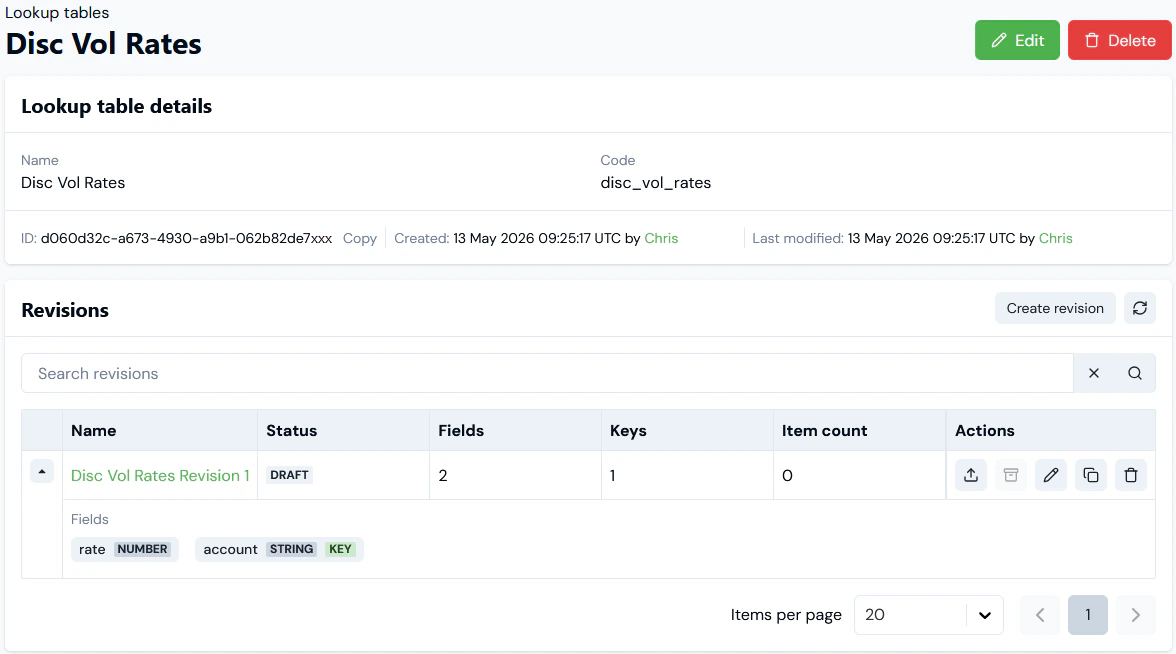
- We’ve added two fields for the Table Revision schema:
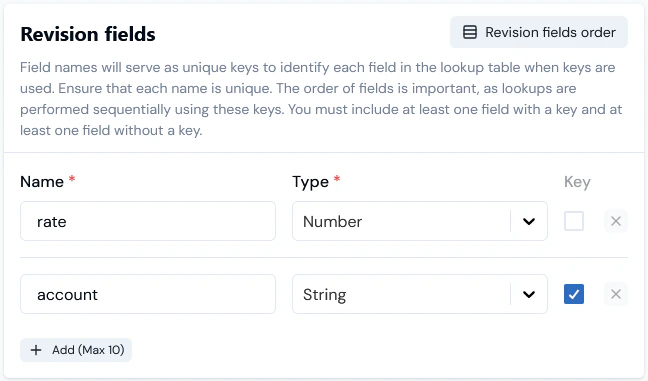
- The Revision schema uses an account String field as the key field for Lookup and we can now add some data items for the fields:
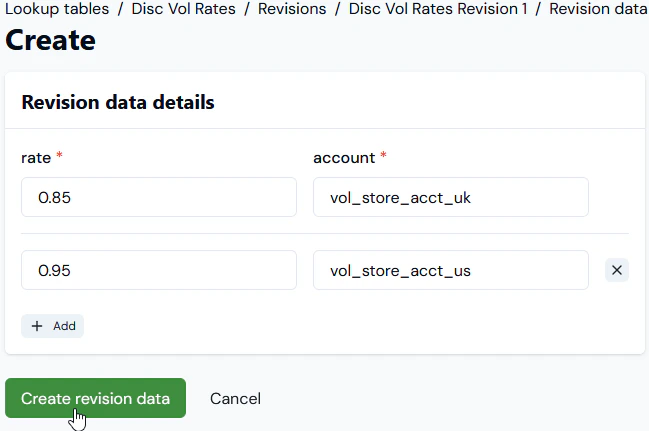
- Importantly note here that we’ve entered the actual code string values for the Accounts we want to impose usage discounting on.
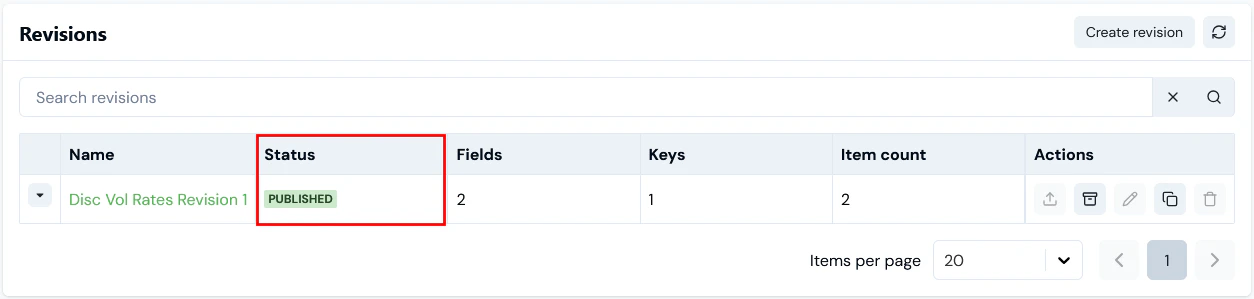
- We can now publish the Table Revision:
Setting Up Meter
Here’s the setup for VolDisc Meter 1 to serve the example discounting usage rate by Account use case: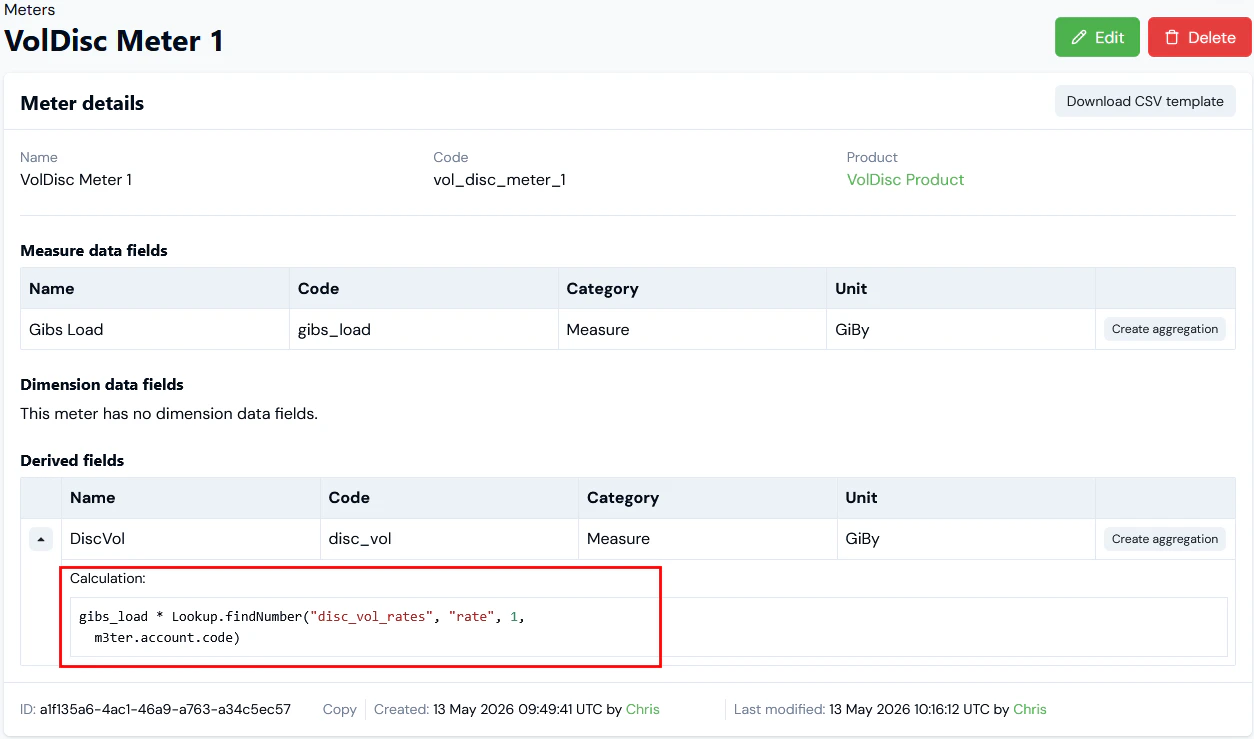
- A Measure Data Field called Gibs Load to collect usage volumes.
- A DiscVol Derived Field with a calculation that uses a Lookup function referencing the Disc Vol Rates Lookup Table to apply discount rates by Account to the Gibs Load Data Field usage volumes.
Lookup.findNumber() function.
For the Lookup.findNumber() function used in our Derived Field calculation we have:
Lookup.findNumber("disc_vol_rates", "rate", 1, m3ter.account.code)
This will lookup the number value for the rate field in the published Disc Vol Rates Revision 1 of the Disc Vol Rates Lookup Table given the Account code string of the account keyed field, which must be present in the measurement. If no match is found for a code string, then a default value of 1 will be used for the rate.
Given the data values we set up for the published Disc Vol Rates Revision 1 of the Disc Vol Rates Lookup Table:
- If the Meter ingests a usage data measurement where the Account code string is vol_store_acct_uk, then the
ratevalue returned by the Lookup.findNumber() function will be 0.85. - If the Meter ingests a usage data measurement where the Account code string is vol_store_acct_us, then the
ratevalue returned by the Lookup.findNumber() function will be 0.95.
Creating Aggregation
Here’s the detail for a VolDisc Agg 1 Aggregation targeting the DiscVol Derived Field on VolDisc Meter 1: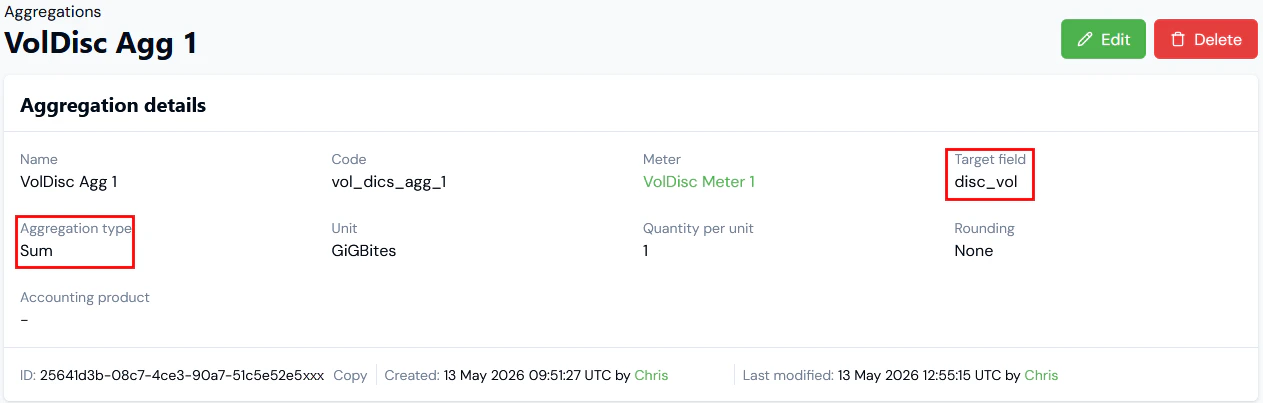
Submitting Test Data and Checking Bills
To check our worked example of a variable discounted usage rate implemented using a Lookup Table, we’ll now submit some sample Data to two test Accounts. We can then:- Open Usage Data Explorer (v2) and perform a query to return the usage data submissions that were ingested, and to check the DiscVol Derived Field values have been calculated correctly
- Run billing for each Account and check they are correctly charged at the appropriate discounted rates by Account.
- First create two test Accounts. For the current example:
- Vol Store Acct UK with code: vol_store_acct_uk
- Vol Store Acct US with code: vol_store_acct_us
- Create a test Product, create a Product Plan Template and a Plan based on the Plan Template that uses monthly billing in arrears with US Dollars billing currency.
- Then use the VolDisc Agg1 Aggregation to price the Plan using a single price tier for a flat charge rate of 1 USD per GiGBites of storage used.
- Attach the priced Plan to each test Account.
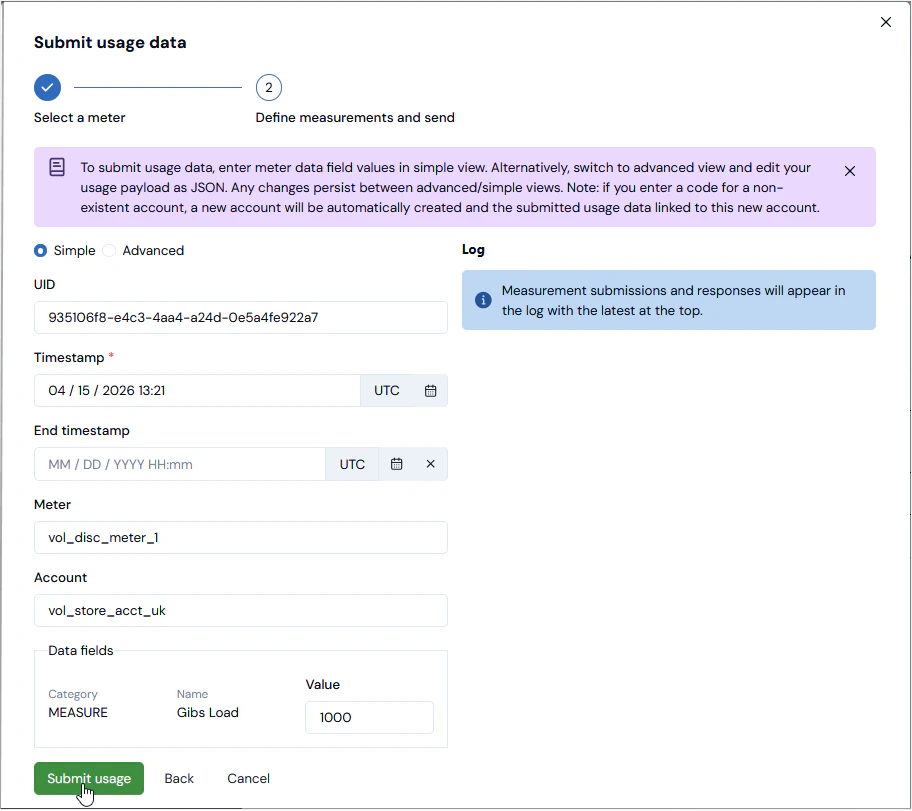
- Open each Account, and submit a single sample usage data measurement of 1000 GB using VolDisc Meter 1 for a given month’s billing period. For example:
- To check how the usage data measurements were ingested, you can now open Usage Data Explorer (v2) and submit a Query for the VolDisc Meter 1 and a Previous month time period for the date you made the usage submissions:
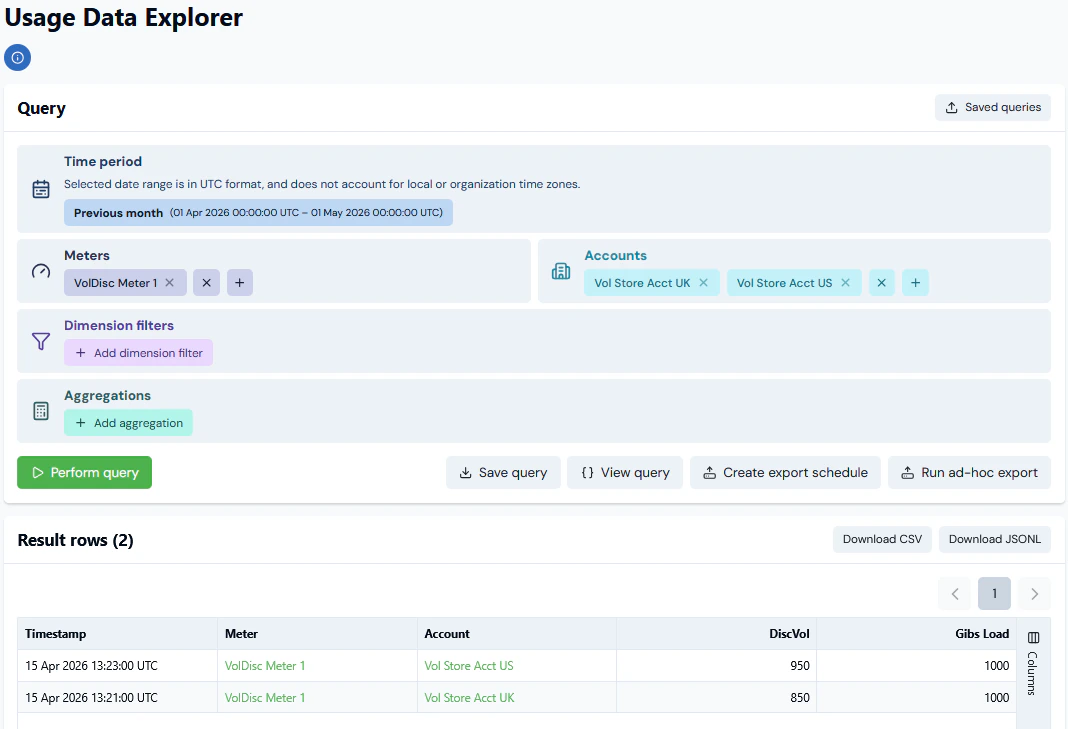
- In the Results row table returned for the Query, we see that for each usage measurement submitted to the two Accounts, the DiscVol Derived Field value has been correctly calculated for the Gibs Load raw volume and the rate values by Account we added to the published Disc Vol Rates Revision 1 of the Disc Vol Rates Lookup Table.
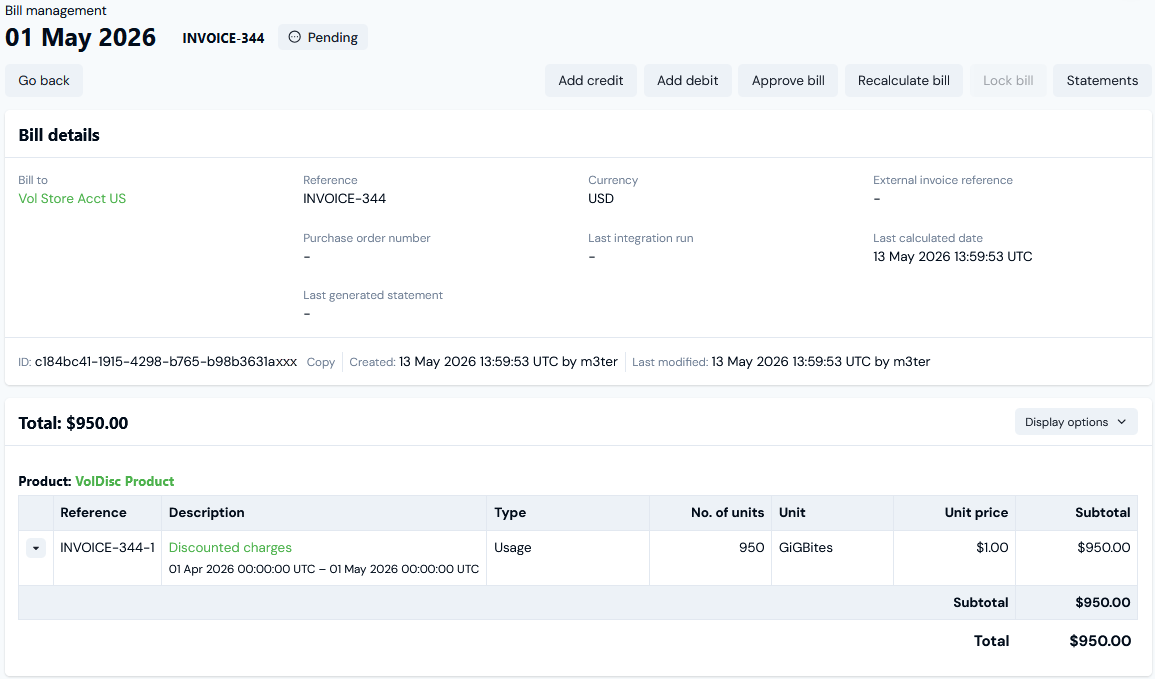
- Lastly, run billing for each Account for the relevant month’s billing period. For the current example and, having made the single 1000 GB submissions to each Account in April, we’ll run billing to check the usage charge for the May 1st bills:
- For Vol Store Acct UK:

- For Vol Store Acct US:
m3ter.account.code in the Lookup function configured for the Meter Derived Field Calculation, we can quickly set up additional usage discounting for customer Accounts by simply adding their respective Account codes to the published Lookup Table Revision data.