Understanding, Creating, and Managing Permission Policies
You can create Permission Policies for your Users and assign these Permission Policies to them. There are two types of Permission Policies you can assign to Users:
Custom. The policies you create yourself for controlling access to your Organization.
Managed. System generated policies which you can assign to Users but which you cannot edit to change the access to resources they are configured to allow or deny.
When you create a Custom Permission Policy, you can add statements to the policy that allow or deny actions for specific resources. This allows you to control very precisely what a User who has been given access to your Organization can and cannot do. For example, you might want to create a Permissions Policy that denies Users the ability to retrieve Meters.This section explains the m3ter permissions model, lists the actions and resources you can use when adding statements to create Permission Policies, and how to create and manage your Custom Permissions Policies:
Warning - Check for Exceptions! There are instances where exceptions to the general permissions framework might occur as a result of shared data. See the Permissions Exceptions section below for more details.
The m3ter Permissions model is implemented using a three-fold framework of Effect, Action, and Resource:
Def: A Permission is defined as imposing an effect of either allowing or denying access to a specific resource to perform a specific action on that resource.
In JSON format, the general schema for a Permission is:
Resources are defined as m3ter Resource Identifiers (MRIs) in the format:
service:resource-type/item-type/id
Where:
service is a distinct part of the overall m3ter system, and which forms a natural functional grouping, such as “config” or “billing”.
resource-type is the resource type item accessed - for example: “Plan”, “Meter”, “Bill”
item-type is one of:
“item” - to specify an individual item.
“group” - to specify a resource group.
id is the resource group id or the resource item id
For example:
To denote as resource a specific Plan with an id = 12345 in the config service, the MRI would be:
config:plan/item/12345
To denote as resource a Plan Resource Group with id= 987 (that is, applying to all Plans that are contained within the resource group) the MRI would be:
The use of wildcards when denoting resources is allowed. For example, to denote all Plans as the resource in a permission statement, you can use:
config:plan/*
Tip: Available Resources? Please see the following section for a full list of available resources by service you can use in statements when creating your Permission Policies.
Resources can be assigned to one or more Resource Groups. For example, a Plan can be assigned to Plan Resource Groups, a Meter can be assigned to Meter Resource Groups, and so on. This is useful for cases where you want to create Permission Policies which allow or deny access to a specific subset of resources - you want to grant access to a User to only some of the Plans in your Organization.This concept of grouping resources applies to every resource in m3ter, including Resource Groups themselves, which allows you to nest resource groups to support hierarchies of groups.
Tip: Creating Resource Groups? You can create Resource Groups, add resource items to them, and manage your Resource Groups using the Resource Groups API calls
Actions define what a User is either allowed or not allowed to do with respect to a resource. For example, you can use a config:create and config:retrieve action to create a statement for a Permission Policy that allows Users to create or retrieve any Plan in your Organization. But if this is the only Permission Policy assigned to a User, they will not be able to update or delete any Plans:
Please see the following section for full details and explanation on using actions against resources when creating statements for your Permission Policies.
The effect for a Permission Policy is either to allow or to deny:
Allow - indicates the policy is allowing access to the resource(s) for the given action(s).
Deny - indicates the policy is denying access to the resource(s) for the given action(s).
If you create a Permission Policy with multiple statements this is how evaluation of access to a resource for a given action is applied:
There is an implicit denial - the order of evaluation is:
We check to see if there is a statement that denies access to a resource for a given action. If there is, the access is denied.
We check to see if there is a statement that allows access to a resource for a given action. If there is, the access is allowed.
If there is no statement that explicitly denies and no statement that explicitly allows, the access is denied.
In the case of a conflict of deny/allow, denial takes precedence:
If there is a statement that denies access to a resource for a given action and there is a statement that allows access to a resource for the same action, the access is denied.
Warning - Check for Exceptions! There are instances where exceptions to the general permissions framework might occur as a result of shared data. See the Permissions Exceptions section below for more details.
When creating statements for Permission Policies, actions always require a resource-type to operate against.
Warning! If you attempt to use a statement when creating a Permission Policy without specifying a resource, then you’ll receive an error message when you attempt to save the policy.
Some actions also require a resource path - either a specific item or group to be defined or a wildcard ‘*' to indicate all items of the resource-type.For a config:create action, no resource path is required and we use a wildcard to apply denial of meter creation to all meters:
For actions that don’t require a path, paths in associated MRIs will be ignored, and only the resource-type will be used.You can use the following actions when creating Permission Policy statements:
For the resources listed in the following section, the Actions you can use when creating Permission Policy Statements are determined by Resource type:
Measurements data:
measurements:retrieve
measurements:upload
measurements:fileUpload
Exports data:
exports:download
Other Resource types:
config:create
config:retrieve
config:update
config:delete
Examples
Billing Operations. Suppose you want to set up a Permission Policy that you’ll assign to Users of your Organization that belong to the Billing Operations Team. You want them to have full access to work with a specific collection of Bill, Account, AccountPlan, and Bill Statement resources. You can use the four config actions with the relevant resources to build the required Permission Policy statement:
This means that all members of the Billing Operations Team will have full CRUD access to all resources of the type specified.
Tip: Assign Permissions using a User Group. Note that for this sort of permissions control use case, you can create a Billing Operations User Group, add this Permission Policy to the User Group, and assign each team member to the Group. See Creating and Managing User Groups.
Measurements Data. For a Permission Policy statement you want to use to define User permissions for the measurements:data resource, you cannot use any of the config actions. If you want to create a Permission Policy to allow a User full access to work with measurements data, you must use the measurements actions:
Tip: Lower Case! Always use lower case for "action" in your statements. For example, "config:Create" is not a valid expression.
Data Exports. For a Permission Policy granting Users full working access to create, manage and run data exports, you can create a Permission Policy with two statements. To create and manage data exports:
In the Settings area of the Console, you can quickly create and mange Custom Permission Policies.
Important: Access to Console! To enable any Users who are assigned Custom Permission Policies to access the m3ter Console, please ensure that one of their Permission Policies includes a Statement that allows them to Retrieve two Resources:
config:organizationConfig
billing:config
Without these permissions Users will be unable to access the Console - see step 9 in the following procedure.
To create and manage Permission Policies:
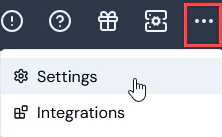
Select Settings:
The Organization page opens.
Select Access settings:
The Access settings page opens with the Users tab selected.
Select the Permission policies tab:
Any system-generated Managed Permission Policies will be listed. You can view this type of Permission Policy and assign them to your Users, but you cannot edit them.
Any Custom Permission Policies already created for your Organization are also listed and you can view and edit these.
Tip: You can’t view, create, or edit Permission Policies? As a User, you might have been assigned a Permission Policy that denies you view, creation, or edit rights for Permission Policies.
Select Create permission policy. The Create page opens.
Under Permission policy details, enter a descriptive Name for the new Permission Policy.
Under Permission policy statements, you have the option to use either a Simple or Advanced editor to add Statements to the Permission Policy. The Simple editor is selected by default.
Leave the Simple editor selected. Here’s an example of how to compile Statements using the Advanced editor to allow all actions for all Meters:
Under Effects, leave the default selection as Allow.
Under Actions, select the All Config checkbox for Create, Retrieve, Update, and Delete.
Under Resources, select Selected resources and use the drop-down to select config.meter:
Select Advanced if you want to add JSON formatted Statements. The page adjusts again to show a Statements text editor. Here’s an example of how to compile Statements using the Advanced editor to allow all actions for all Meters:
If you want to add another JSON formatted Statement, select Add. A new Statement text editor window is shown:
Warning - Resource always required! If you attempt to use a statement when creating a Permission Policy without specifying a resource, then you’ll receive an error message when you attempt to save the policy.
Tip: Permission Statement actions and resources? For a full list of the actions and resources you can use when compiling your Permission Policy statements, see the previous section.
In addition to adding the specific Permission policy statements for a Custom Permission Policy, to ensure any Users who are assigned this as a single Permission Policy you must also add a Statement that enables these Users to access the m3ter Console. This Statement should allow them to Retrieve two Resources:
config:organizationConfig
billing:config
When you have finished adding all of the required Statements for the Permission Policy, select Create permission policy. The Permission policy details page opens for the new Permission Policy:
The new Permission Policy is now available for assigning to Users, Service Users, and User Groups that have access to your Organization.
Select Edit to edit the new policy.
If you want to delete a Permission Policy, return to the Permission policies tab and select the delete icon for the Policy:
A confirmation popup appears.
Select Yes to confirm the delete.
Tip: Using API Call to Create Permission Policy? You can use the Create Permission Policy config API call.
There are instances where exceptions to the general permissions framework can occur as a result of shared data:
For example, if a user has been assigned a Permission Policy that denies them access to Products but grants them access to Bills, when they open a Bill, some Product data referenced by the Bill’s line items will be shown for the user.
{"docsConfig":{"theme":"aspen","$schema":"https://mintlify.com/docs.json","name":"m3ter Documentation","description":"Guides, learning resources and API reference for integrating with m3ter","colors":{"primary":"#4caf4c","dark":"#449d44"},"logo":{"light":"https://mintcdn.com/m3ter/t6C65JBQiQOFtjBy/images/m3ter-logo-blue-sf.svg?fit=max\u0026auto=format\u0026n=t6C65JBQiQOFtjBy\u0026q=85\u0026s=3928db28c84ec6950e43caf96e635d80","dark":"https://mintcdn.com/m3ter/t6C65JBQiQOFtjBy/images/m3ter-logo-white-sf.svg?fit=max\u0026auto=format\u0026n=t6C65JBQiQOFtjBy\u0026q=85\u0026s=a018cb782e49a2fbdd811276476d0605"},"favicon":"https://mintcdn.com/m3ter/T0RRts393DSUkWFc/favicon.svg?fit=max\u0026auto=format\u0026n=T0RRts393DSUkWFc\u0026q=85\u0026s=9492b54cc98df6775983b287b6f865cd","navbar":{"links":[{"href":"https://m3ter.freshdesk.com","label":"Support"},{"href":"https://console.m3ter.com","label":"Console"}],"primary":{"type":"button","label":"Schedule a demo","href":"https://www.m3ter.com/contact"}},"footer":{"socials":{"linkedin":"https://uk.linkedin.com/company/m3ter","x":"https://x.com/m3terHQ","github":"https://github.com/m3ter-com"},"links":[{"items":[{"label":"Website","href":"https://www.m3ter.com"},{"label":"Legal","href":"https://www.m3ter.com/legal"},{"label":"Security","href":"https://www.m3ter.com/security"},{"label":"Trust Center","href":"https://trust.m3ter.com"}]}]},"fonts":{"family":"Montserrat"},"icons":{"library":"lucide"},"styling":{"eyebrows":"breadcrumbs","latex":false},"integrations":{"ga4":{"measurementId":"G-V9C7TTPRQT"}},"contextual":{"options":["copy","view"],"display":"header"},"thumbnails":{"fonts":{"family":"Montserrat"}},"navigation":{"pages":[]}},"deployment":{"deploymentMetadataValue":{"subdomain":"m3ter","hasAudioNarration":false,"actualSubdomain":"m3ter","customDomains":["docs.m3ter.com"],"gitSource":{"type":"github","owner":"m3ter-com","repo":"m3ter-docs","deployBranch":"main","contentDirectory":"","isPrivate":true,"mountPath":"","label":""},"chroma":{"liveDeploymentHistoryId":"6ae4b3832e4c4b8ea8e5ac1c","collectionId":"f4691807-992d-43f9-aab2-d179e798824c","schemaVersion":"v3","latestBuiltDeploymentHistoryId":"6ae4b3832e4c4b8ea8e5ac1c"},"entitlements":{"AI_CHAT":{"status":"ENABLED"},"WEB_MCP":{"status":"ENABLED"},"NARRATION":{"status":"ENABLED"}},"buildId":"6ae9a09c36175fbf7124961d","clientVersion":"0.0.4045","searchFilterCounts":[{"language":"default","tag":"Guides","count":400},{"language":"default","tag":"API Reference","count":393},{"language":"default","tag":"Endpoints","count":387},{"language":"default","tag":"Integrations","count":66},{"language":"default","tag":"m3sh Function Reference","count":66},{"language":"default","tag":"Synthetic functions","count":50},{"language":"default","tag":"m3ter","count":50},{"language":"default","tag":"m3sh","count":43},{"language":"default","tag":"End-Customer Accounts","count":27},{"language":"default","tag":"m3ter Connector for Salesforce","count":24}]},"assistantConfig":{"enableAskAiButton":true,"enableStarterQuestions":false,"enableAskAiSearchBar":false},"basePath":"","hasChatPermissions":true,"hasWebMcpPermissions":true,"toggles":[{"name":"kill-isr","enabled":true,"variant":{"name":"disabled","enabled":false,"feature_enabled":true},"impressionData":false},{"name":"agent-mintlify-slack","enabled":true,"variant":{"name":"disabled","enabled":false,"feature_enabled":true},"impressionData":false},{"name":"agent-integrations-settings","enabled":true,"variant":{"name":"disabled","enabled":false,"feature_enabled":true},"impressionData":false},{"name":"automations-pr-grouping","enabled":true,"variant":{"name":"disabled","enabled":false,"feature_enabled":true},"impressionData":false},{"name":"custom-prefix","enabled":true,"variant":{"name":"disabled","enabled":false,"feature_enabled":true},"impressionData":false},{"name":"analytics-v7","enabled":true,"variant":{"name":"disabled","enabled":false,"feature_enabled":true},"impressionData":false},{"name":"user-flows-analytics","enabled":true,"variant":{"name":"disabled","enabled":false,"feature_enabled":true},"impressionData":false},{"name":"no-publish-flow","enabled":true,"variant":{"name":"disabled","enabled":false,"feature_enabled":true},"impressionData":false},{"name":"workos-onboarding","enabled":true,"variant":{"name":"disabled","enabled":false,"feature_enabled":true},"impressionData":false},{"name":"llms-txt-v2","enabled":true,"variant":{"name":"disabled","enabled":false,"feature_enabled":true},"impressionData":false},{"name":"snapshot-serving-live","enabled":true,"variant":{"name":"disabled","enabled":false,"feature_enabled":true},"impressionData":false},{"name":"stripTemperatureMiddleware","enabled":true,"variant":{"name":"disabled","enabled":false,"feature_enabled":true},"impressionData":false},{"name":"support-platform-pylon-zendesk","enabled":true,"variant":{"name":"disabled","enabled":false,"feature_enabled":true},"impressionData":false},{"name":"snapshot-serving","enabled":true,"variant":{"name":"disabled","enabled":false,"feature_enabled":true},"impressionData":false},{"name":"instant-rollback","enabled":true,"variant":{"name":"disabled","enabled":false,"feature_enabled":true},"impressionData":false},{"name":"granular-notifications-server","enabled":true,"variant":{"name":"disabled","enabled":false,"feature_enabled":true},"impressionData":false},{"name":"granular-notifications","enabled":true,"variant":{"name":"disabled","enabled":false,"feature_enabled":true},"impressionData":false},{"name":"automations-fable","enabled":true,"variant":{"name":"disabled","enabled":false,"feature_enabled":true},"impressionData":false},{"name":"fixed-ai-action-pricing","enabled":true,"variant":{"name":"disabled","enabled":false,"feature_enabled":true},"impressionData":false},{"name":"automation-resolve-merge-conflict","enabled":true,"variant":{"name":"disabled","enabled":false,"feature_enabled":true},"impressionData":false},{"name":"scoped-publishing","enabled":true,"variant":{"name":"disabled","enabled":false,"feature_enabled":true},"impressionData":false},{"name":"mintql","enabled":true,"variant":{"name":"disabled","enabled":false,"feature_enabled":true},"impressionData":false},{"name":"page-level-analytics","enabled":true,"variant":{"name":"disabled","enabled":false,"feature_enabled":true},"impressionData":false},{"name":"editor-version-history-v2","enabled":true,"variant":{"name":"disabled","enabled":false,"feature_enabled":true},"impressionData":false},{"name":"billing-page-v2","enabled":true,"variant":{"name":"disabled","enabled":false,"feature_enabled":true},"impressionData":false},{"name":"full-page-search","enabled":true,"variant":{"name":"disabled","enabled":false,"feature_enabled":true},"impressionData":false},{"name":"workspace-projects","enabled":true,"variant":{"name":"disabled","enabled":false,"feature_enabled":true},"impressionData":false},{"name":"assistant-v5","enabled":true,"variant":{"name":"disabled","enabled":false,"feature_enabled":true},"impressionData":false},{"name":"byok-sep-25","enabled":true,"variant":{"name":"disabled","enabled":false,"feature_enabled":true},"impressionData":false},{"name":"fork-pr-previews","enabled":true,"variant":{"name":"disabled","enabled":false,"feature_enabled":true},"impressionData":false},{"name":"revalidation-jwt","enabled":true,"variant":{"name":"disabled","enabled":false,"feature_enabled":true},"impressionData":false},{"name":"vite-origin","enabled":true,"variant":{"name":"disabled","enabled":false,"feature_enabled":true},"impressionData":false},{"name":"billing-updated-9-15","enabled":true,"variant":{"name":"disabled","enabled":false,"feature_enabled":true},"impressionData":false},{"name":"workos-sso-scim","enabled":true,"variant":{"name":"disabled","enabled":false,"feature_enabled":true},"impressionData":false},{"name":"hobby-abuse-scan","enabled":true,"variant":{"name":"disabled","enabled":false,"feature_enabled":true},"impressionData":false},{"name":"dashboard-inbox","enabled":true,"variant":{"name":"disabled","enabled":false,"feature_enabled":true},"impressionData":false},{"name":"workos-signup","enabled":true,"variant":{"name":"disabled","enabled":false,"feature_enabled":true},"impressionData":false},{"name":"turbopuffer-dual-write","enabled":true,"variant":{"name":"disabled","enabled":false,"feature_enabled":true},"impressionData":false},{"name":"workos-enabled","enabled":true,"variant":{"name":"disabled","enabled":false,"feature_enabled":true},"impressionData":false},{"name":"approve-review-flow","enabled":true,"variant":{"name":"disabled","enabled":false,"feature_enabled":true},"impressionData":false},{"name":"sso-setup-deadline-banner","enabled":true,"variant":{"name":"disabled","enabled":false,"feature_enabled":true},"impressionData":false}],"googleFontsInlined":true},"customCss":[],"page":{"pagePath":"guides/organization-and-access-management/creating-and-managing-permissions","slug":"/guides/organization-and-access-management/creating-and-managing-permissions","pageMetadata":{"title":"Understanding, Creating, and Managing Permission Policies","description":null,"href":"/guides/organization-and-access-management/creating-and-managing-permissions"},"pageType":"default","mdx":{"mdxSource":{"compiledSource":"\"use strict\";const{Fragment:_Fragment,jsx:_jsx,jsxs:_jsxs}=arguments[0];const{useMDXComponents:_provideComponents}=arguments[0];function _createMdxContent(props){const _components={a:`a`,blockquote:`blockquote`,code:`code`,em:`em`,h5:`h5`,li:`li`,ol:`ol`,p:`p`,pre:`pre`,span:`span`,strong:`strong`,tbody:`tbody`,td:`td`,th:`th`,thead:`thead`,tr:`tr`,ul:`ul`,..._provideComponents(),...props.components},{CodeBlock,Heading,OptimizedImage,Table,Tip,Warning}=_components;if(!CodeBlock)_missingMdxReference(`CodeBlock`,true);if(!Heading)_missingMdxReference(`Heading`,true);if(!OptimizedImage)_missingMdxReference(`OptimizedImage`,true);if(!Table)_missingMdxReference(`Table`,true);if(!Tip)_missingMdxReference(`Tip`,true);if(!Warning)_missingMdxReference(`Warning`,true);return _jsxs(_Fragment,{children:[_jsxs(_components.p,{children:[`You can create `,_jsx(_components.em,{children:`Permission Policies`}),` for your Users and assign these Permission Policies to them. There are two types of Permission Policies you can assign to Users:`]}),`\n`,_jsxs(_components.ul,{children:[`\n`,_jsxs(_components.li,{children:[_jsx(_components.strong,{children:`Custom`}),`. The policies you create yourself for controlling access to your Organization.`]}),`\n`,_jsxs(_components.li,{children:[_jsx(_components.strong,{children:`Managed`}),`. System generated policies which you can assign to Users but which you cannot edit to change the access to resources they are configured to allow or deny.`]}),`\n`]}),`\n`,_jsxs(_components.p,{children:[`When you create a Custom Permission Policy, you can add `,_jsx(_components.em,{children:`statements`}),` to the policy that `,_jsx(_components.em,{children:`allow or deny actions`}),` for specific `,_jsx(_components.em,{children:`resources`}),`. This allows you to control very precisely what a User who has been given access to your Organization can and cannot do. For example, you might want to create a Permissions Policy that denies Users the ability to retrieve Meters.`]}),`\n`,_jsx(_components.p,{children:`This section explains the m3ter permissions model, lists the actions and resources you can use when adding statements to create Permission Policies, and how to create and manage your Custom Permissions Policies:`}),`\n`,_jsxs(_components.ul,{children:[`\n`,_jsx(_components.li,{children:_jsx(_components.a,{href:`/guides/organization-and-access-management/creating-and-managing-permissions#understanding-the-m3ter-permissions-model`,children:`Understanding the m3ter Permissions Model`})}),`\n`,_jsx(_components.li,{children:_jsx(_components.a,{href:`/guides/organization-and-access-management/creating-and-managing-permissions#permission-policy-statements-available-actions-and-resources`,children:`Permission Policy Statements - Actions and Resources`})}),`\n`,_jsx(_components.li,{children:_jsx(_components.a,{href:`/guides/organization-and-access-management/creating-and-managing-permissions#creating-custom-permission-policies`,children:`Creating Custom Permission Policies`})}),`\n`,_jsx(_components.li,{children:_jsx(_components.a,{href:`/guides/organization-and-access-management/creating-and-managing-permissions#permissions-exceptions`,children:`Permissions Exceptions`})}),`\n`]}),`\n`,_jsx(Warning,{children:_jsxs(_components.p,{children:[_jsx(_components.strong,{children:`Warning - Check for Exceptions!`}),` There are instances where exceptions to the general permissions framework might occur as a result of shared data. See the `,_jsx(_components.a,{href:`/guides/organization-and-access-management/creating-and-managing-permissions#permissions-exceptions`,children:`Permissions Exceptions`}),` section below for more details.`]})}),`\n`,_jsx(Heading,{level:`2`,id:`understanding-the-m3ter-permissions-model`,children:`Understanding the m3ter Permissions Model`}),`\n`,_jsxs(_components.p,{children:[`The m3ter Permissions model is implemented using a three-fold framework of `,_jsx(_components.em,{children:`Effect`}),`, `,_jsx(_components.em,{children:`Action`}),`, and `,_jsx(_components.em,{children:`Resource`}),`:`]}),`\n`,_jsxs(_components.ul,{children:[`\n`,_jsxs(_components.li,{children:[_jsx(_components.strong,{children:`Def`}),`: A Permission is defined as imposing an `,_jsx(_components.em,{children:`effect`}),` of either allowing or denying access to a specific `,_jsx(_components.em,{children:`resource`}),` to perform a specific `,_jsx(_components.em,{children:`action`}),` on that resource.`]}),`\n`]}),`\n`,_jsx(_components.p,{children:`In JSON format, the general schema for a Permission is:`}),`\n`,_jsx(CodeBlock,{filename:``,numberOfLines:`5`,language:`json`,children:_jsx(_components.pre,{className:`shiki shiki-themes github-light-default dark-plus`,style:{backgroundColor:`#ffffff`,\"--shiki-dark-bg\":`#0B0C0E`,color:`#1f2328`,\"--shiki-dark\":`#D4D4D4`},language:`json`,children:_jsxs(_components.code,{language:`json`,numberOfLines:`5`,children:[_jsx(_components.span,{className:`line`,children:_jsx(_components.span,{style:{color:`#1F2328`,\"--shiki-dark\":`#D4D4D4`},children:`{`})}),`\n`,_jsxs(_components.span,{className:`line`,children:[_jsx(_components.span,{style:{color:`#116329`,\"--shiki-dark\":`#9CDCFE`},children:` \"Effect\"`}),_jsx(_components.span,{style:{color:`#1F2328`,\"--shiki-dark\":`#D4D4D4`},children:`: {`}),_jsx(_components.span,{style:{color:`#82071E`,\"--shiki-light-font-style\":`italic`,\"--shiki-dark\":`#F44747`,\"--shiki-dark-font-style\":`inherit`},children:`effect`}),_jsx(_components.span,{style:{color:`#1F2328`,\"--shiki-dark\":`#D4D4D4`},children:`},`})]}),`\n`,_jsxs(_components.span,{className:`line`,children:[_jsx(_components.span,{style:{color:`#116329`,\"--shiki-dark\":`#9CDCFE`},children:` \"Action\"`}),_jsx(_components.span,{style:{color:`#1F2328`,\"--shiki-dark\":`#D4D4D4`},children:`: [{`}),_jsx(_components.span,{style:{color:`#82071E`,\"--shiki-light-font-style\":`italic`,\"--shiki-dark\":`#F44747`,\"--shiki-dark-font-style\":`inherit`},children:`action`}),_jsx(_components.span,{style:{color:`#1F2328`,\"--shiki-dark\":`#D4D4D4`},children:`}],`})]}),`\n`,_jsxs(_components.span,{className:`line`,children:[_jsx(_components.span,{style:{color:`#116329`,\"--shiki-dark\":`#9CDCFE`},children:` \"Resource\"`}),_jsx(_components.span,{style:{color:`#1F2328`,\"--shiki-dark\":`#D4D4D4`},children:`: [{`}),_jsx(_components.span,{style:{color:`#82071E`,\"--shiki-light-font-style\":`italic`,\"--shiki-dark\":`#F44747`,\"--shiki-dark-font-style\":`inherit`},children:`resource`}),_jsx(_components.span,{style:{color:`#1F2328`,\"--shiki-dark\":`#D4D4D4`},children:`}]`})]}),`\n`,_jsx(_components.span,{className:`line`,children:_jsx(_components.span,{style:{color:`#1F2328`,\"--shiki-dark\":`#D4D4D4`},children:`}`})}),`\n`]})})}),`\n`,_jsx(Heading,{level:`3`,id:`resources`,children:`Resources`}),`\n`,_jsxs(_components.p,{children:[`Resources are defined as `,_jsx(_components.em,{children:`m3ter Resource Identifiers`}),` (MRIs) in the format:`]}),`\n`,_jsxs(_components.blockquote,{children:[`\n`,_jsx(_components.p,{children:_jsx(_components.code,{children:`service:resource-type/item-type/id`})}),`\n`]}),`\n`,_jsx(_components.p,{children:`Where:`}),`\n`,_jsxs(_components.ul,{children:[`\n`,_jsxs(_components.li,{children:[_jsx(_components.em,{children:`service`}),` is a distinct part of the overall m3ter system, and which forms a natural functional grouping, such as “config” or “billing”.`]}),`\n`,_jsxs(_components.li,{children:[_jsx(_components.em,{children:`resource-type`}),` is the resource type item accessed - for example: “Plan”, “Meter”, “Bill”`]}),`\n`,_jsxs(_components.li,{children:[_jsx(_components.em,{children:`item-type`}),` is one of:`,`\n`,_jsxs(_components.ul,{children:[`\n`,_jsx(_components.li,{children:`“item” - to specify an individual item.`}),`\n`,_jsx(_components.li,{children:`“group” - to specify a resource group.`}),`\n`]}),`\n`]}),`\n`,_jsxs(_components.li,{children:[_jsx(_components.em,{children:`id`}),` is the resource group id or the resource item id`]}),`\n`]}),`\n`,_jsx(_components.p,{children:`For example:`}),`\n`,_jsxs(_components.ul,{children:[`\n`,_jsxs(_components.li,{children:[`To denote as resource a specific `,_jsx(_components.em,{children:`Plan`}),` with an `,_jsx(_components.em,{children:`id = 12345`}),` in the `,_jsx(_components.em,{children:`config`}),` service, the MRI would be:`]}),`\n`]}),`\n`,_jsxs(_components.blockquote,{children:[`\n`,_jsx(_components.p,{children:_jsx(_components.code,{children:`config:plan/item/12345`})}),`\n`]}),`\n`,_jsxs(_components.ul,{children:[`\n`,_jsxs(_components.li,{children:[`To denote as resource a `,_jsx(_components.em,{children:`Plan Resource Group`}),` with `,_jsx(_components.em,{children:`id= 987`}),` (that is, applying to all Plans that are contained within the resource group) the MRI would be:`]}),`\n`]}),`\n`,_jsxs(_components.blockquote,{children:[`\n`,_jsx(_components.p,{children:_jsx(_components.code,{children:`config:plan/group/987`})}),`\n`]}),`\n`,_jsx(Heading,{level:`4`,id:`use-of-wildcards-for-resources`,children:`Use of Wildcards for Resources`}),`\n`,_jsx(_components.p,{children:`The use of wildcards when denoting resources is allowed. For example, to denote all Plans as the resource in a permission statement, you can use:`}),`\n`,_jsxs(_components.blockquote,{children:[`\n`,_jsx(_components.p,{children:_jsx(_components.code,{children:`config:plan/*`})}),`\n`]}),`\n`,_jsx(Tip,{children:_jsxs(_components.p,{children:[_jsx(_components.strong,{children:`Tip: Available Resources?`}),` Please see the `,_jsx(_components.a,{href:`/guides/organization-and-access-management/creating-and-managing-permissions#permission-policy-statements-available-actions-and-resources`,children:`following section`}),` for a full list of available resources by service you can use in statements when creating your Permission Policies.`]})}),`\n`,_jsx(Heading,{level:`4`,id:`resource-groups`,children:`Resource Groups`}),`\n`,_jsx(_components.p,{children:`Resources can be assigned to one or more Resource Groups. For example, a Plan can be assigned to Plan Resource Groups, a Meter can be assigned to Meter Resource Groups, and so on. This is useful for cases where you want to create Permission Policies which allow or deny access to a specific subset of resources - you want to grant access to a User to only some of the Plans in your Organization.`}),`\n`,_jsx(_components.p,{children:`This concept of grouping resources applies to every resource in m3ter, including Resource Groups themselves, which allows you to nest resource groups to support hierarchies of groups.`}),`\n`,_jsx(Tip,{children:_jsxs(_components.p,{children:[_jsx(_components.strong,{children:`Tip: Creating Resource Groups?`}),` You can create Resource Groups, add resource items to them, and manage your Resource Groups using the `,_jsx(_components.a,{href:`/api/resourcegroup/introduction`,children:`Resource Groups`}),` API calls`]})}),`\n`,_jsx(Heading,{level:`3`,id:`actions`,children:`Actions`}),`\n`,_jsxs(_components.p,{children:[`Actions define what a User is either allowed or not allowed to do with respect to a resource. For example, you can use a `,_jsx(_components.code,{children:`config:create`}),` and `,_jsx(_components.code,{children:`config:retrieve`}),` action to create a statement for a Permission Policy that allows Users to create or retrieve any Plan in your Organization. But if this is the only Permission Policy assigned to a User, they will not be able to update or delete any Plans:`]}),`\n`,_jsx(CodeBlock,{filename:``,numberOfLines:`10`,language:`json`,children:_jsx(_components.pre,{className:`shiki shiki-themes github-light-default dark-plus`,style:{backgroundColor:`#ffffff`,\"--shiki-dark-bg\":`#0B0C0E`,color:`#1f2328`,\"--shiki-dark\":`#D4D4D4`},language:`json`,children:_jsxs(_components.code,{language:`json`,numberOfLines:`10`,children:[_jsx(_components.span,{className:`line`,children:_jsx(_components.span,{style:{color:`#1F2328`,\"--shiki-dark\":`#D4D4D4`},children:`{`})}),`\n`,_jsxs(_components.span,{className:`line`,children:[_jsx(_components.span,{style:{color:`#116329`,\"--shiki-dark\":`#9CDCFE`},children:`\"effect\"`}),_jsx(_components.span,{style:{color:`#1F2328`,\"--shiki-dark\":`#D4D4D4`},children:`: `}),_jsx(_components.span,{style:{color:`#0A3069`,\"--shiki-dark\":`#CE9178`},children:`\"allow\"`}),_jsx(_components.span,{style:{color:`#1F2328`,\"--shiki-dark\":`#D4D4D4`},children:`,`})]}),`\n`,_jsxs(_components.span,{className:`line`,children:[_jsx(_components.span,{style:{color:`#116329`,\"--shiki-dark\":`#9CDCFE`},children:`\"action\"`}),_jsx(_components.span,{style:{color:`#1F2328`,\"--shiki-dark\":`#D4D4D4`},children:`: [ `})]}),`\n`,_jsxs(_components.span,{className:`line`,children:[_jsx(_components.span,{style:{color:`#0A3069`,\"--shiki-dark\":`#CE9178`},children:` \"config:create\"`}),_jsx(_components.span,{style:{color:`#1F2328`,\"--shiki-dark\":`#D4D4D4`},children:`,`})]}),`\n`,_jsxs(_components.span,{className:`line`,children:[_jsx(_components.span,{style:{color:`#0A3069`,\"--shiki-dark\":`#CE9178`},children:` \"config:retrieve\"`}),_jsx(_components.span,{style:{color:`#1F2328`,\"--shiki-dark\":`#D4D4D4`},children:` `})]}),`\n`,_jsx(_components.span,{className:`line`,children:_jsx(_components.span,{style:{color:`#1F2328`,\"--shiki-dark\":`#D4D4D4`},children:`],`})}),`\n`,_jsxs(_components.span,{className:`line`,children:[_jsx(_components.span,{style:{color:`#116329`,\"--shiki-dark\":`#9CDCFE`},children:`\"resource\"`}),_jsx(_components.span,{style:{color:`#1F2328`,\"--shiki-dark\":`#D4D4D4`},children:`: [`})]}),`\n`,_jsxs(_components.span,{className:`line`,children:[_jsx(_components.span,{style:{color:`#0A3069`,\"--shiki-dark\":`#CE9178`},children:` \"config:plan/*\"`}),_jsx(_components.span,{style:{color:`#1F2328`,\"--shiki-dark\":`#D4D4D4`},children:` `})]}),`\n`,_jsx(_components.span,{className:`line`,children:_jsx(_components.span,{style:{color:`#1F2328`,\"--shiki-dark\":`#D4D4D4`},children:` ]`})}),`\n`,_jsx(_components.span,{className:`line`,children:_jsx(_components.span,{style:{color:`#1F2328`,\"--shiki-dark\":`#D4D4D4`},children:`}`})}),`\n`]})})}),`\n`,_jsxs(_components.p,{children:[`Please see the `,_jsx(_components.a,{href:`/guides/organization-and-access-management/creating-and-managing-permissions#permission-policy-statements-available-actions-and-resources`,children:`following section`}),` for full details and explanation on using actions against resources when creating statements for your Permission Policies.`]}),`\n`,_jsx(Heading,{level:`3`,id:`effects-and-evaluation-logic`,children:`Effects and Evaluation Logic`}),`\n`,_jsxs(_components.p,{children:[`The effect for a Permission Policy is either `,_jsx(_components.em,{children:`to allow`}),` or `,_jsx(_components.em,{children:`to deny`}),`:`]}),`\n`,_jsxs(_components.ul,{children:[`\n`,_jsxs(_components.li,{children:[_jsx(_components.strong,{children:`Allow`}),` - indicates the policy is allowing access to the resource(s) for the given action(s).`]}),`\n`,_jsxs(_components.li,{children:[_jsx(_components.strong,{children:`Deny`}),` - indicates the policy is denying access to the resource(s) for the given action(s).`]}),`\n`]}),`\n`,_jsx(_components.p,{children:`If you create a Permission Policy with multiple statements this is how evaluation of access to a resource for a given action is applied:`}),`\n`,_jsxs(_components.ul,{children:[`\n`,_jsxs(_components.li,{children:[`There is an implicit denial - the order of evaluation is:`,`\n`,_jsxs(_components.ul,{children:[`\n`,_jsx(_components.li,{children:`We check to see if there is a statement that denies access to a resource for a given action. If there is, the access is denied.`}),`\n`,_jsx(_components.li,{children:`We check to see if there is a statement that allows access to a resource for a given action. If there is, the access is allowed.`}),`\n`,_jsx(_components.li,{children:`If there is no statement that explicitly denies and no statement that explicitly allows, the access is denied.`}),`\n`]}),`\n`]}),`\n`,_jsxs(_components.li,{children:[`In the case of a conflict of deny/allow, denial takes precedence:`,`\n`,_jsxs(_components.ul,{children:[`\n`,_jsx(_components.li,{children:`If there is a statement that denies access to a resource for a given action and there is a statement that allows access to a resource for the same action, the access is denied.`}),`\n`]}),`\n`]}),`\n`]}),`\n`,_jsx(Warning,{children:_jsxs(_components.p,{children:[_jsx(_components.strong,{children:`Warning - Check for Exceptions!`}),` There are instances where exceptions to the general permissions framework might occur as a result of shared data. See the `,_jsx(_components.a,{href:`/guides/organization-and-access-management/creating-and-managing-permissions#permissions-exceptions`,children:`Permissions Exceptions`}),` section below for more details.`]})}),`\n`,_jsx(Heading,{level:`2`,id:`permission-policy-statements-available-actions-and-resources`,children:`Permission Policy Statements - Available Actions and Resources`}),`\n`,_jsx(_components.p,{children:`This section lists the actions and resources available for compiling statements you add to your custom Permission Policies.`}),`\n`,_jsx(Heading,{level:`3`,id:`statements-available-actions`,children:`Statements - Available Actions`}),`\n`,_jsxs(_components.p,{children:[`When creating statements for Permission Policies, actions `,_jsx(_components.em,{children:`always require`}),` a resource-type to operate against.`]}),`\n`,_jsx(Warning,{children:_jsxs(_components.p,{children:[_jsx(_components.strong,{children:`Warning!`}),` If you attempt to use a statement when creating a Permission Policy without specifying a resource, then you’ll receive an error message when you attempt to save the policy.`]})}),`\n`,_jsxs(_components.p,{children:[`Some actions also require a resource path - either a specific item or group to be defined or a wildcard `,_jsx(_components.code,{children:`‘*'`}),` to indicate all items of the resource-type.`]}),`\n`,_jsxs(_components.p,{children:[`For a `,_jsx(_components.code,{children:`config:create`}),` action, no resource path is required and we use a wildcard to apply denial of meter creation to all meters:`]}),`\n`,_jsx(CodeBlock,{filename:``,numberOfLines:`5`,language:`json`,children:_jsx(_components.pre,{className:`shiki shiki-themes github-light-default dark-plus`,style:{backgroundColor:`#ffffff`,\"--shiki-dark-bg\":`#0B0C0E`,color:`#1f2328`,\"--shiki-dark\":`#D4D4D4`},language:`json`,children:_jsxs(_components.code,{language:`json`,numberOfLines:`5`,children:[_jsx(_components.span,{className:`line`,children:_jsx(_components.span,{style:{color:`#1F2328`,\"--shiki-dark\":`#D4D4D4`},children:`{`})}),`\n`,_jsxs(_components.span,{className:`line`,children:[_jsx(_components.span,{style:{color:`#116329`,\"--shiki-dark\":`#9CDCFE`},children:`\"effect\"`}),_jsx(_components.span,{style:{color:`#1F2328`,\"--shiki-dark\":`#D4D4D4`},children:`: `}),_jsx(_components.span,{style:{color:`#0A3069`,\"--shiki-dark\":`#CE9178`},children:`\"deny\"`}),_jsx(_components.span,{style:{color:`#1F2328`,\"--shiki-dark\":`#D4D4D4`},children:`,`})]}),`\n`,_jsxs(_components.span,{className:`line`,children:[_jsx(_components.span,{style:{color:`#116329`,\"--shiki-dark\":`#9CDCFE`},children:`\"action\"`}),_jsx(_components.span,{style:{color:`#1F2328`,\"--shiki-dark\":`#D4D4D4`},children:`: [ `}),_jsx(_components.span,{style:{color:`#0A3069`,\"--shiki-dark\":`#CE9178`},children:`\"config:create\"`}),_jsx(_components.span,{style:{color:`#1F2328`,\"--shiki-dark\":`#D4D4D4`},children:` ],`})]}),`\n`,_jsxs(_components.span,{className:`line`,children:[_jsx(_components.span,{style:{color:`#116329`,\"--shiki-dark\":`#9CDCFE`},children:`\"resource\"`}),_jsx(_components.span,{style:{color:`#1F2328`,\"--shiki-dark\":`#D4D4D4`},children:`: [ `}),_jsx(_components.span,{style:{color:`#0A3069`,\"--shiki-dark\":`#CE9178`},children:`\"config:meter/*\"`}),_jsx(_components.span,{style:{color:`#1F2328`,\"--shiki-dark\":`#D4D4D4`},children:` ]`})]}),`\n`,_jsx(_components.span,{className:`line`,children:_jsx(_components.span,{style:{color:`#1F2328`,\"--shiki-dark\":`#D4D4D4`},children:`}`})}),`\n`]})})}),`\n`,_jsxs(_components.p,{children:[`However, for a `,_jsx(_components.code,{children:`config:retrieve`}),` action, a resource path is required:`]}),`\n`,_jsx(CodeBlock,{filename:``,numberOfLines:`5`,language:`json`,children:_jsx(_components.pre,{className:`shiki shiki-themes github-light-default dark-plus`,style:{backgroundColor:`#ffffff`,\"--shiki-dark-bg\":`#0B0C0E`,color:`#1f2328`,\"--shiki-dark\":`#D4D4D4`},language:`json`,children:_jsxs(_components.code,{language:`json`,numberOfLines:`5`,children:[_jsx(_components.span,{className:`line`,children:_jsx(_components.span,{style:{color:`#1F2328`,\"--shiki-dark\":`#D4D4D4`},children:`{`})}),`\n`,_jsxs(_components.span,{className:`line`,children:[_jsx(_components.span,{style:{color:`#116329`,\"--shiki-dark\":`#9CDCFE`},children:`\"effect\"`}),_jsx(_components.span,{style:{color:`#1F2328`,\"--shiki-dark\":`#D4D4D4`},children:`: `}),_jsx(_components.span,{style:{color:`#0A3069`,\"--shiki-dark\":`#CE9178`},children:`\"deny\"`}),_jsx(_components.span,{style:{color:`#1F2328`,\"--shiki-dark\":`#D4D4D4`},children:`,`})]}),`\n`,_jsxs(_components.span,{className:`line`,children:[_jsx(_components.span,{style:{color:`#116329`,\"--shiki-dark\":`#9CDCFE`},children:`\"action\"`}),_jsx(_components.span,{style:{color:`#1F2328`,\"--shiki-dark\":`#D4D4D4`},children:`: [ `}),_jsx(_components.span,{style:{color:`#0A3069`,\"--shiki-dark\":`#CE9178`},children:`\"config:retrieve\"`}),_jsx(_components.span,{style:{color:`#1F2328`,\"--shiki-dark\":`#D4D4D4`},children:` ],`})]}),`\n`,_jsxs(_components.span,{className:`line`,children:[_jsx(_components.span,{style:{color:`#116329`,\"--shiki-dark\":`#9CDCFE`},children:`\"resource\"`}),_jsx(_components.span,{style:{color:`#1F2328`,\"--shiki-dark\":`#D4D4D4`},children:`: [ `}),_jsx(_components.span,{style:{color:`#0A3069`,\"--shiki-dark\":`#CE9178`},children:`\"config:meter/item/456\"`}),_jsx(_components.span,{style:{color:`#1F2328`,\"--shiki-dark\":`#D4D4D4`},children:` ]`})]}),`\n`,_jsx(_components.span,{className:`line`,children:_jsx(_components.span,{style:{color:`#1F2328`,\"--shiki-dark\":`#D4D4D4`},children:`}`})}),`\n`]})})}),`\n`,_jsx(_components.p,{children:`For actions that don’t require a path, paths in associated MRIs will be ignored, and only the resource-type will be used.`}),`\n`,_jsx(_components.p,{children:`You can use the following actions when creating Permission Policy statements:`}),`\n`,_jsxs(Table,{children:[_jsx(_components.thead,{children:_jsxs(_components.tr,{children:[_jsx(_components.th,{children:`Action`}),_jsx(_components.th,{children:`MRI Path Required?`})]})}),_jsxs(_components.tbody,{children:[_jsxs(_components.tr,{children:[_jsx(_components.td,{children:`config:create`}),_jsx(_components.td,{children:`No`})]}),_jsxs(_components.tr,{children:[_jsx(_components.td,{children:`config:retrieve`}),_jsx(_components.td,{children:`Yes`})]}),_jsxs(_components.tr,{children:[_jsx(_components.td,{children:`config:update`}),_jsx(_components.td,{children:`Yes`})]}),_jsxs(_components.tr,{children:[_jsx(_components.td,{children:`config:delete`}),_jsx(_components.td,{children:`Yes`})]}),_jsxs(_components.tr,{children:[_jsx(_components.td,{children:`measurements:upload`}),_jsx(_components.td,{children:`Yes`})]}),_jsxs(_components.tr,{children:[_jsx(_components.td,{children:`measurements:fileUpload`}),_jsx(_components.td,{children:`Yes`})]}),_jsxs(_components.tr,{children:[_jsx(_components.td,{children:`measurements:retrieve`}),_jsx(_components.td,{children:`Yes`})]}),_jsxs(_components.tr,{children:[_jsx(_components.td,{children:`exports:download`}),_jsx(_components.td,{children:`Yes`})]}),_jsxs(_components.tr,{children:[_jsx(_components.td,{children:`ALL`}),_jsx(_components.td,{children:`*`})]})]})]}),`\n`,_jsx(Heading,{level:`4`,id:`which-actions-can-i-use-with-which-resources`,children:`Which Actions can I use with which Resources?`}),`\n`,_jsxs(_components.p,{children:[`For the resources listed in the `,_jsx(_components.a,{href:`/guides/organization-and-access-management/creating-and-managing-permissions#statements-available-resources`,children:`following section`}),`, the Actions you can use when creating Permission Policy Statements are determined by Resource type:`]}),`\n`,_jsxs(_components.ul,{children:[`\n`,_jsxs(_components.li,{children:[`Measurements data:`,`\n`,_jsxs(_components.ul,{children:[`\n`,_jsx(_components.li,{children:_jsx(_components.code,{children:`measurements:retrieve`})}),`\n`,_jsx(_components.li,{children:_jsx(_components.code,{children:`measurements:upload`})}),`\n`,_jsx(_components.li,{children:_jsx(_components.code,{children:`measurements:fileUpload`})}),`\n`]}),`\n`]}),`\n`,_jsxs(_components.li,{children:[`Exports data:`,`\n`,_jsxs(_components.ul,{children:[`\n`,_jsx(_components.li,{children:_jsx(_components.code,{children:`exports:download`})}),`\n`]}),`\n`]}),`\n`,_jsxs(_components.li,{children:[`Other Resource types:`,`\n`,_jsxs(_components.ul,{children:[`\n`,_jsx(_components.li,{children:_jsx(_components.code,{children:`config:create`})}),`\n`,_jsx(_components.li,{children:_jsx(_components.code,{children:`config:retrieve`})}),`\n`,_jsx(_components.li,{children:_jsx(_components.code,{children:`config:update`})}),`\n`,_jsx(_components.li,{children:_jsx(_components.code,{children:`config:delete`})}),`\n`]}),`\n`]}),`\n`]}),`\n`,_jsx(_components.h5,{children:`Examples`}),`\n`,_jsxs(_components.ul,{children:[`\n`,_jsxs(_components.li,{children:[_jsx(_components.strong,{children:`Billing Operations`}),`. Suppose you want to set up a Permission Policy that you’ll assign to Users of your Organization that belong to the Billing Operations Team. You want them to have full access to work with a specific collection of Bill, Account, AccountPlan, and Bill Statement resources. You can use the four `,_jsx(_components.code,{children:`config`}),` actions with the relevant resources to build the required Permission Policy statement:`]}),`\n`]}),`\n`,_jsx(CodeBlock,{filename:``,numberOfLines:`25`,language:`json`,children:_jsx(_components.pre,{className:`shiki shiki-themes github-light-default dark-plus`,style:{backgroundColor:`#ffffff`,\"--shiki-dark-bg\":`#0B0C0E`,color:`#1f2328`,\"--shiki-dark\":`#D4D4D4`},language:`json`,children:_jsxs(_components.code,{language:`json`,numberOfLines:`25`,children:[_jsx(_components.span,{className:`line`,children:_jsx(_components.span,{style:{color:`#1F2328`,\"--shiki-dark\":`#D4D4D4`},children:`{`})}),`\n`,_jsxs(_components.span,{className:`line`,children:[_jsx(_components.span,{style:{color:`#116329`,\"--shiki-dark\":`#9CDCFE`},children:`\"effect\"`}),_jsx(_components.span,{style:{color:`#1F2328`,\"--shiki-dark\":`#D4D4D4`},children:`: `}),_jsx(_components.span,{style:{color:`#0A3069`,\"--shiki-dark\":`#CE9178`},children:`\"allow\"`}),_jsx(_components.span,{style:{color:`#1F2328`,\"--shiki-dark\":`#D4D4D4`},children:`,`})]}),`\n`,_jsxs(_components.span,{className:`line`,children:[_jsx(_components.span,{style:{color:`#116329`,\"--shiki-dark\":`#9CDCFE`},children:`\"action\"`}),_jsx(_components.span,{style:{color:`#1F2328`,\"--shiki-dark\":`#D4D4D4`},children:`: [ `})]}),`\n`,_jsxs(_components.span,{className:`line`,children:[_jsx(_components.span,{style:{color:`#0A3069`,\"--shiki-dark\":`#CE9178`},children:` \"config:create\"`}),_jsx(_components.span,{style:{color:`#1F2328`,\"--shiki-dark\":`#D4D4D4`},children:`,`})]}),`\n`,_jsxs(_components.span,{className:`line`,children:[_jsx(_components.span,{style:{color:`#0A3069`,\"--shiki-dark\":`#CE9178`},children:` \"config:retrieve\"`}),_jsx(_components.span,{style:{color:`#1F2328`,\"--shiki-dark\":`#D4D4D4`},children:`,`})]}),`\n`,_jsxs(_components.span,{className:`line`,children:[_jsx(_components.span,{style:{color:`#0A3069`,\"--shiki-dark\":`#CE9178`},children:` \"config:update\"`}),_jsx(_components.span,{style:{color:`#1F2328`,\"--shiki-dark\":`#D4D4D4`},children:`,`})]}),`\n`,_jsxs(_components.span,{className:`line`,children:[_jsx(_components.span,{style:{color:`#0A3069`,\"--shiki-dark\":`#CE9178`},children:` \"config:delete\"`}),_jsx(_components.span,{style:{color:`#1F2328`,\"--shiki-dark\":`#D4D4D4`},children:` `})]}),`\n`,_jsx(_components.span,{className:`line`,children:_jsx(_components.span,{style:{color:`#1F2328`,\"--shiki-dark\":`#D4D4D4`},children:`],`})}),`\n`,_jsxs(_components.span,{className:`line`,children:[_jsx(_components.span,{style:{color:`#116329`,\"--shiki-dark\":`#9CDCFE`},children:`\"resource\"`}),_jsx(_components.span,{style:{color:`#1F2328`,\"--shiki-dark\":`#D4D4D4`},children:`: [ `})]}),`\n`,_jsxs(_components.span,{className:`line`,children:[_jsx(_components.span,{style:{color:`#0A3069`,\"--shiki-dark\":`#CE9178`},children:` \"billing:bill/*\"`}),_jsx(_components.span,{style:{color:`#1F2328`,\"--shiki-dark\":`#D4D4D4`},children:`,`})]}),`\n`,_jsxs(_components.span,{className:`line`,children:[_jsx(_components.span,{style:{color:`#0A3069`,\"--shiki-dark\":`#CE9178`},children:` \"billing:balance/*\"`}),_jsx(_components.span,{style:{color:`#1F2328`,\"--shiki-dark\":`#D4D4D4`},children:`,`})]}),`\n`,_jsxs(_components.span,{className:`line`,children:[_jsx(_components.span,{style:{color:`#0A3069`,\"--shiki-dark\":`#CE9178`},children:` \"billing:billjob/*\"`}),_jsx(_components.span,{style:{color:`#1F2328`,\"--shiki-dark\":`#D4D4D4`},children:`,`})]}),`\n`,_jsxs(_components.span,{className:`line`,children:[_jsx(_components.span,{style:{color:`#0A3069`,\"--shiki-dark\":`#CE9178`},children:` \"billing:credit/*\"`}),_jsx(_components.span,{style:{color:`#1F2328`,\"--shiki-dark\":`#D4D4D4`},children:`,`})]}),`\n`,_jsxs(_components.span,{className:`line`,children:[_jsx(_components.span,{style:{color:`#0A3069`,\"--shiki-dark\":`#CE9178`},children:` \"billing:creditAdjustment/*\"`}),_jsx(_components.span,{style:{color:`#1F2328`,\"--shiki-dark\":`#D4D4D4`},children:`,`})]}),`\n`,_jsxs(_components.span,{className:`line`,children:[_jsx(_components.span,{style:{color:`#0A3069`,\"--shiki-dark\":`#CE9178`},children:` \"config:account/*\"`}),_jsx(_components.span,{style:{color:`#1F2328`,\"--shiki-dark\":`#D4D4D4`},children:`,`})]}),`\n`,_jsxs(_components.span,{className:`line`,children:[_jsx(_components.span,{style:{color:`#0A3069`,\"--shiki-dark\":`#CE9178`},children:` \"config:accountPlan/*\"`}),_jsx(_components.span,{style:{color:`#1F2328`,\"--shiki-dark\":`#D4D4D4`},children:`,`})]}),`\n`,_jsxs(_components.span,{className:`line`,children:[_jsx(_components.span,{style:{color:`#0A3069`,\"--shiki-dark\":`#CE9178`},children:` \"config:commitment/*\"`}),_jsx(_components.span,{style:{color:`#1F2328`,\"--shiki-dark\":`#D4D4D4`},children:`,`})]}),`\n`,_jsxs(_components.span,{className:`line`,children:[_jsx(_components.span,{style:{color:`#0A3069`,\"--shiki-dark\":`#CE9178`},children:` \"config:contract/*\"`}),_jsx(_components.span,{style:{color:`#1F2328`,\"--shiki-dark\":`#D4D4D4`},children:`,`})]}),`\n`,_jsxs(_components.span,{className:`line`,children:[_jsx(_components.span,{style:{color:`#0A3069`,\"--shiki-dark\":`#CE9178`},children:` \"config:plan/*\"`}),_jsx(_components.span,{style:{color:`#1F2328`,\"--shiki-dark\":`#D4D4D4`},children:`,`})]}),`\n`,_jsxs(_components.span,{className:`line`,children:[_jsx(_components.span,{style:{color:`#0A3069`,\"--shiki-dark\":`#CE9178`},children:` \"config:planGroup/*\"`}),_jsx(_components.span,{style:{color:`#1F2328`,\"--shiki-dark\":`#D4D4D4`},children:`,`})]}),`\n`,_jsxs(_components.span,{className:`line`,children:[_jsx(_components.span,{style:{color:`#0A3069`,\"--shiki-dark\":`#CE9178`},children:` \"config:planGroupLink/*\"`}),_jsx(_components.span,{style:{color:`#1F2328`,\"--shiki-dark\":`#D4D4D4`},children:`,`})]}),`\n`,_jsxs(_components.span,{className:`line`,children:[_jsx(_components.span,{style:{color:`#0A3069`,\"--shiki-dark\":`#CE9178`},children:` \"statement:statement/*\"`}),_jsx(_components.span,{style:{color:`#1F2328`,\"--shiki-dark\":`#D4D4D4`},children:`,`})]}),`\n`,_jsx(_components.span,{className:`line`,children:_jsx(_components.span,{style:{color:`#0A3069`,\"--shiki-dark\":`#CE9178`},children:` \"statementjob:statementjob/*\"`})}),`\n`,_jsx(_components.span,{className:`line`,children:_jsx(_components.span,{style:{color:`#1F2328`,\"--shiki-dark\":`#D4D4D4`},children:`]`})}),`\n`,_jsx(_components.span,{className:`line`,children:_jsx(_components.span,{style:{color:`#1F2328`,\"--shiki-dark\":`#D4D4D4`},children:`}`})}),`\n`]})})}),`\n`,_jsx(_components.p,{children:`This means that all members of the Billing Operations Team will have full CRUD access to all resources of the type specified.`}),`\n`,_jsx(Tip,{children:_jsxs(_components.p,{children:[_jsx(_components.strong,{children:`Tip: Assign Permissions using a User Group`}),`. Note that for this sort of permissions control use case, you can create a Billing Operations User Group, add this Permission Policy to the User Group, and assign each team member to the Group. See `,_jsx(_components.a,{href:`/guides/organization-and-access-management/managing-users#creating-and-managing-user-groups`,children:`Creating and Managing User Groups`}),`.`]})}),`\n`,_jsxs(_components.ul,{children:[`\n`,_jsxs(_components.li,{children:[_jsx(_components.strong,{children:`Measurements Data`}),`. For a Permission Policy statement you want to use to define User permissions for the `,_jsx(_components.code,{children:`measurements:data`}),` resource, you `,_jsx(_components.em,{children:`cannot use`}),` any of the `,_jsx(_components.code,{children:`config`}),` actions. If you want to create a Permission Policy to allow a User full access to work with measurements data, you must use the `,_jsx(_components.code,{children:`measurements`}),` actions:`]}),`\n`]}),`\n`,_jsx(CodeBlock,{filename:``,numberOfLines:`11`,language:`json`,children:_jsx(_components.pre,{className:`shiki shiki-themes github-light-default dark-plus`,style:{backgroundColor:`#ffffff`,\"--shiki-dark-bg\":`#0B0C0E`,color:`#1f2328`,\"--shiki-dark\":`#D4D4D4`},language:`json`,children:_jsxs(_components.code,{language:`json`,numberOfLines:`11`,children:[_jsx(_components.span,{className:`line`,children:_jsx(_components.span,{style:{color:`#1F2328`,\"--shiki-dark\":`#D4D4D4`},children:`{`})}),`\n`,_jsxs(_components.span,{className:`line`,children:[_jsx(_components.span,{style:{color:`#116329`,\"--shiki-dark\":`#9CDCFE`},children:` \"effect\"`}),_jsx(_components.span,{style:{color:`#1F2328`,\"--shiki-dark\":`#D4D4D4`},children:`: `}),_jsx(_components.span,{style:{color:`#0A3069`,\"--shiki-dark\":`#CE9178`},children:`\"allow\"`}),_jsx(_components.span,{style:{color:`#1F2328`,\"--shiki-dark\":`#D4D4D4`},children:`,`})]}),`\n`,_jsxs(_components.span,{className:`line`,children:[_jsx(_components.span,{style:{color:`#116329`,\"--shiki-dark\":`#9CDCFE`},children:` \"action\"`}),_jsx(_components.span,{style:{color:`#1F2328`,\"--shiki-dark\":`#D4D4D4`},children:`: [`})]}),`\n`,_jsxs(_components.span,{className:`line`,children:[_jsx(_components.span,{style:{color:`#0A3069`,\"--shiki-dark\":`#CE9178`},children:` \"measurements:upload\"`}),_jsx(_components.span,{style:{color:`#1F2328`,\"--shiki-dark\":`#D4D4D4`},children:`,`})]}),`\n`,_jsxs(_components.span,{className:`line`,children:[_jsx(_components.span,{style:{color:`#0A3069`,\"--shiki-dark\":`#CE9178`},children:` \"measurements:fileUpload\"`}),_jsx(_components.span,{style:{color:`#1F2328`,\"--shiki-dark\":`#D4D4D4`},children:`,`})]}),`\n`,_jsx(_components.span,{className:`line`,children:_jsx(_components.span,{style:{color:`#0A3069`,\"--shiki-dark\":`#CE9178`},children:` \"measurements:retrieve\"`})}),`\n`,_jsx(_components.span,{className:`line`,children:_jsx(_components.span,{style:{color:`#1F2328`,\"--shiki-dark\":`#D4D4D4`},children:` ],`})}),`\n`,_jsxs(_components.span,{className:`line`,children:[_jsx(_components.span,{style:{color:`#116329`,\"--shiki-dark\":`#9CDCFE`},children:` \"resource\"`}),_jsx(_components.span,{style:{color:`#1F2328`,\"--shiki-dark\":`#D4D4D4`},children:`: [`})]}),`\n`,_jsx(_components.span,{className:`line`,children:_jsx(_components.span,{style:{color:`#0A3069`,\"--shiki-dark\":`#CE9178`},children:` \"measurements:data/*\"`})}),`\n`,_jsx(_components.span,{className:`line`,children:_jsx(_components.span,{style:{color:`#1F2328`,\"--shiki-dark\":`#D4D4D4`},children:` ]`})}),`\n`,_jsx(_components.span,{className:`line`,children:_jsx(_components.span,{style:{color:`#1F2328`,\"--shiki-dark\":`#D4D4D4`},children:`}`})}),`\n`]})})}),`\n`,_jsx(Tip,{children:_jsxs(_components.p,{children:[_jsx(_components.strong,{children:`Tip: Lower Case!`}),` Always use lower case for `,_jsx(_components.code,{children:`\"action\"`}),` in your statements. For example, `,_jsx(_components.code,{children:`\"config:Create\"`}),` is not a valid expression.`]})}),`\n`,_jsxs(_components.ul,{children:[`\n`,_jsxs(_components.li,{children:[_jsx(_components.strong,{children:`Data Exports`}),`. For a Permission Policy granting Users full working access to create, manage and run data exports, you can create a Permission Policy with two statements. To create and manage data exports:`]}),`\n`]}),`\n`,_jsx(CodeBlock,{filename:``,numberOfLines:`14`,language:`json`,children:_jsx(_components.pre,{className:`shiki shiki-themes github-light-default dark-plus`,style:{backgroundColor:`#ffffff`,\"--shiki-dark-bg\":`#0B0C0E`,color:`#1f2328`,\"--shiki-dark\":`#D4D4D4`},language:`json`,children:_jsxs(_components.code,{language:`json`,numberOfLines:`14`,children:[_jsx(_components.span,{className:`line`,children:_jsx(_components.span,{style:{color:`#1F2328`,\"--shiki-dark\":`#D4D4D4`},children:`{`})}),`\n`,_jsxs(_components.span,{className:`line`,children:[_jsx(_components.span,{style:{color:`#116329`,\"--shiki-dark\":`#9CDCFE`},children:` \"effect\"`}),_jsx(_components.span,{style:{color:`#1F2328`,\"--shiki-dark\":`#D4D4D4`},children:`: `}),_jsx(_components.span,{style:{color:`#0A3069`,\"--shiki-dark\":`#CE9178`},children:`\"allow\"`}),_jsx(_components.span,{style:{color:`#1F2328`,\"--shiki-dark\":`#D4D4D4`},children:`,`})]}),`\n`,_jsxs(_components.span,{className:`line`,children:[_jsx(_components.span,{style:{color:`#116329`,\"--shiki-dark\":`#9CDCFE`},children:` \"action\"`}),_jsx(_components.span,{style:{color:`#1F2328`,\"--shiki-dark\":`#D4D4D4`},children:`: [`})]}),`\n`,_jsxs(_components.span,{className:`line`,children:[_jsx(_components.span,{style:{color:`#0A3069`,\"--shiki-dark\":`#CE9178`},children:` \"config:create\"`}),_jsx(_components.span,{style:{color:`#1F2328`,\"--shiki-dark\":`#D4D4D4`},children:`,`})]}),`\n`,_jsxs(_components.span,{className:`line`,children:[_jsx(_components.span,{style:{color:`#0A3069`,\"--shiki-dark\":`#CE9178`},children:` \"config:delete\"`}),_jsx(_components.span,{style:{color:`#1F2328`,\"--shiki-dark\":`#D4D4D4`},children:`,`})]}),`\n`,_jsxs(_components.span,{className:`line`,children:[_jsx(_components.span,{style:{color:`#0A3069`,\"--shiki-dark\":`#CE9178`},children:` \"config:retrieve\"`}),_jsx(_components.span,{style:{color:`#1F2328`,\"--shiki-dark\":`#D4D4D4`},children:`,`})]}),`\n`,_jsx(_components.span,{className:`line`,children:_jsx(_components.span,{style:{color:`#0A3069`,\"--shiki-dark\":`#CE9178`},children:` \"config:update\"`})}),`\n`,_jsx(_components.span,{className:`line`,children:_jsx(_components.span,{style:{color:`#1F2328`,\"--shiki-dark\":`#D4D4D4`},children:` ],`})}),`\n`,_jsxs(_components.span,{className:`line`,children:[_jsx(_components.span,{style:{color:`#116329`,\"--shiki-dark\":`#9CDCFE`},children:` \"resource\"`}),_jsx(_components.span,{style:{color:`#1F2328`,\"--shiki-dark\":`#D4D4D4`},children:`: [`})]}),`\n`,_jsxs(_components.span,{className:`line`,children:[_jsx(_components.span,{style:{color:`#0A3069`,\"--shiki-dark\":`#CE9178`},children:` \"config:exportDestination/*\"`}),_jsx(_components.span,{style:{color:`#1F2328`,\"--shiki-dark\":`#D4D4D4`},children:`,`})]}),`\n`,_jsxs(_components.span,{className:`line`,children:[_jsx(_components.span,{style:{color:`#0A3069`,\"--shiki-dark\":`#CE9178`},children:` \"config:exportSchedules/*\"`}),_jsx(_components.span,{style:{color:`#1F2328`,\"--shiki-dark\":`#D4D4D4`},children:`,`})]}),`\n`,_jsx(_components.span,{className:`line`,children:_jsx(_components.span,{style:{color:`#0A3069`,\"--shiki-dark\":`#CE9178`},children:` \"config:exportStatus/*\"`})}),`\n`,_jsx(_components.span,{className:`line`,children:_jsx(_components.span,{style:{color:`#1F2328`,\"--shiki-dark\":`#D4D4D4`},children:` ]`})}),`\n`,_jsx(_components.span,{className:`line`,children:_jsx(_components.span,{style:{color:`#1F2328`,\"--shiki-dark\":`#D4D4D4`},children:`}`})}),`\n`]})})}),`\n`,_jsxs(_components.ul,{children:[`\n`,_jsx(_components.li,{children:`To run data exports:`}),`\n`]}),`\n`,_jsx(CodeBlock,{filename:``,numberOfLines:`9`,language:`json`,children:_jsx(_components.pre,{className:`shiki shiki-themes github-light-default dark-plus`,style:{backgroundColor:`#ffffff`,\"--shiki-dark-bg\":`#0B0C0E`,color:`#1f2328`,\"--shiki-dark\":`#D4D4D4`},language:`json`,children:_jsxs(_components.code,{language:`json`,numberOfLines:`9`,children:[_jsx(_components.span,{className:`line`,children:_jsx(_components.span,{style:{color:`#1F2328`,\"--shiki-dark\":`#D4D4D4`},children:`{`})}),`\n`,_jsxs(_components.span,{className:`line`,children:[_jsx(_components.span,{style:{color:`#116329`,\"--shiki-dark\":`#9CDCFE`},children:` \"effect\"`}),_jsx(_components.span,{style:{color:`#1F2328`,\"--shiki-dark\":`#D4D4D4`},children:`: `}),_jsx(_components.span,{style:{color:`#0A3069`,\"--shiki-dark\":`#CE9178`},children:`\"allow\"`}),_jsx(_components.span,{style:{color:`#1F2328`,\"--shiki-dark\":`#D4D4D4`},children:`,`})]}),`\n`,_jsxs(_components.span,{className:`line`,children:[_jsx(_components.span,{style:{color:`#116329`,\"--shiki-dark\":`#9CDCFE`},children:` \"action\"`}),_jsx(_components.span,{style:{color:`#1F2328`,\"--shiki-dark\":`#D4D4D4`},children:`: [`})]}),`\n`,_jsx(_components.span,{className:`line`,children:_jsx(_components.span,{style:{color:`#0A3069`,\"--shiki-dark\":`#CE9178`},children:` \"exports:download\"`})}),`\n`,_jsx(_components.span,{className:`line`,children:_jsx(_components.span,{style:{color:`#1F2328`,\"--shiki-dark\":`#D4D4D4`},children:` ],`})}),`\n`,_jsxs(_components.span,{className:`line`,children:[_jsx(_components.span,{style:{color:`#116329`,\"--shiki-dark\":`#9CDCFE`},children:` \"resource\"`}),_jsx(_components.span,{style:{color:`#1F2328`,\"--shiki-dark\":`#D4D4D4`},children:`: [`})]}),`\n`,_jsx(_components.span,{className:`line`,children:_jsx(_components.span,{style:{color:`#0A3069`,\"--shiki-dark\":`#CE9178`},children:` \"exports:data/*\"`})}),`\n`,_jsx(_components.span,{className:`line`,children:_jsx(_components.span,{style:{color:`#1F2328`,\"--shiki-dark\":`#D4D4D4`},children:` ]`})}),`\n`,_jsx(_components.span,{className:`line`,children:_jsx(_components.span,{style:{color:`#1F2328`,\"--shiki-dark\":`#D4D4D4`},children:`}`})}),`\n`]})})}),`\n`,_jsx(Heading,{level:`3`,id:`statements-available-resources`,children:`Statements - Available Resources`}),`\n`,_jsx(_components.p,{children:`You can use the following resources when creating Permission Policy statements:`}),`\n`,_jsxs(Table,{children:[_jsx(_components.thead,{children:_jsxs(_components.tr,{children:[_jsx(_components.th,{children:`Resource`}),_jsx(_components.th,{children:`Policy Statement Format`})]})}),_jsxs(_components.tbody,{children:[_jsxs(_components.tr,{children:[_jsx(_components.td,{children:`ALL`}),_jsx(_components.td,{children:`*`})]}),_jsxs(_components.tr,{children:[_jsx(_components.td,{children:`action`}),_jsx(_components.td,{})]}),_jsxs(_components.tr,{children:[_jsx(_components.td,{children:`ACTION_PERFORMED`}),_jsx(_components.td,{children:`action:actionPerformed`})]}),_jsxs(_components.tr,{children:[_jsx(_components.td,{children:`analytics`}),_jsx(_components.td,{})]}),_jsxs(_components.tr,{children:[_jsx(_components.td,{children:`USAGE`}),_jsx(_components.td,{children:`analytics:usage`})]}),_jsxs(_components.tr,{children:[_jsx(_components.td,{children:`billing`}),_jsx(_components.td,{})]}),_jsxs(_components.tr,{children:[_jsx(_components.td,{children:`BALANCE`}),_jsx(_components.td,{children:`billing:balance`})]}),_jsxs(_components.tr,{children:[_jsx(_components.td,{children:`BILL`}),_jsx(_components.td,{children:`billing:bill`})]}),_jsxs(_components.tr,{children:[_jsx(_components.td,{children:`BILL_JOB`}),_jsx(_components.td,{children:`billing:billjob`})]}),_jsxs(_components.tr,{children:[_jsx(_components.td,{children:`CHARGE`}),_jsx(_components.td,{children:`billing:charge`})]}),_jsxs(_components.tr,{children:[_jsx(_components.td,{children:`BILL_CONFIG`}),_jsx(_components.td,{children:`billing:config`})]}),_jsxs(_components.tr,{children:[_jsx(_components.td,{children:`COUNTER_ADJUSTMENT`}),_jsx(_components.td,{children:`billing:counterAdjustment`})]}),_jsxs(_components.tr,{children:[_jsx(_components.td,{children:`CREDIT`}),_jsx(_components.td,{children:`billing:credit`})]}),_jsxs(_components.tr,{children:[_jsx(_components.td,{children:`CREDIT_ADJUSTMENT`}),_jsx(_components.td,{children:`billing:creditAdjustment`})]}),_jsxs(_components.tr,{children:[_jsx(_components.td,{children:`BILL_LOCK`}),_jsx(_components.td,{children:`billing:lock`})]}),_jsxs(_components.tr,{children:[_jsx(_components.td,{children:`SCHEDULED_VALIDATION`}),_jsx(_components.td,{children:`billing:validation`})]}),_jsxs(_components.tr,{children:[_jsx(_components.td,{children:`config`}),_jsx(_components.td,{})]}),_jsxs(_components.tr,{children:[_jsx(_components.td,{children:`ACCOUNT`}),_jsx(_components.td,{children:`config:account`})]}),_jsxs(_components.tr,{children:[_jsx(_components.td,{children:`ACCOUNT_PLAN`}),_jsx(_components.td,{children:`config:accountPlan`})]}),_jsxs(_components.tr,{children:[_jsx(_components.td,{children:`ACTION`}),_jsx(_components.td,{children:`config:action`})]}),_jsxs(_components.tr,{children:[_jsx(_components.td,{children:`ACTION_TRIGGER`}),_jsx(_components.td,{children:`config:actionTrigger`})]}),_jsxs(_components.tr,{children:[_jsx(_components.td,{children:`AGGREGATION`}),_jsx(_components.td,{children:`config:aggregation`})]}),_jsxs(_components.tr,{children:[_jsx(_components.td,{children:`ALERT`}),_jsx(_components.td,{children:`config:alert`})]}),_jsxs(_components.tr,{children:[_jsx(_components.td,{children:`ANALYTICS_JOB`}),_jsx(_components.td,{children:`config:analyticsJob`})]}),_jsxs(_components.tr,{children:[_jsx(_components.td,{children:`COMMITMENT`}),_jsx(_components.td,{children:`config:commitment`})]}),_jsxs(_components.tr,{children:[_jsx(_components.td,{children:`CONTRACT`}),_jsx(_components.td,{children:`config:contract`})]}),_jsxs(_components.tr,{children:[_jsx(_components.td,{children:`COUNTER`}),_jsx(_components.td,{children:`config:counter`})]}),_jsxs(_components.tr,{children:[_jsx(_components.td,{children:`PICKLIST_CREDIT_REASON`}),_jsx(_components.td,{children:`config:creditReason`})]}),_jsxs(_components.tr,{children:[_jsx(_components.td,{children:`CREDIT_TYPE`}),_jsx(_components.td,{children:`config:creditType`})]}),_jsxs(_components.tr,{children:[_jsx(_components.td,{children:`PICKLIST_CURRENCY`}),_jsx(_components.td,{children:`config:currency`})]}),_jsxs(_components.tr,{children:[_jsx(_components.td,{children:`CUSTOM_FIELD`}),_jsx(_components.td,{children:`config:customField`})]}),_jsxs(_components.tr,{children:[_jsx(_components.td,{children:`DATA_EXPLORER_SELECTION`}),_jsx(_components.td,{children:`config:dataExplorerSelection`})]}),_jsxs(_components.tr,{children:[_jsx(_components.td,{children:`PICKLIST_DEBIT_REASON`}),_jsx(_components.td,{children:`config:debitReason`})]}),_jsxs(_components.tr,{children:[_jsx(_components.td,{children:`EVENT`}),_jsx(_components.td,{children:`config:event`})]}),_jsxs(_components.tr,{children:[_jsx(_components.td,{children:`EXTERNAL_MAPPING`}),_jsx(_components.td,{children:`config:externalMapping`})]}),_jsxs(_components.tr,{children:[_jsx(_components.td,{children:`INTEGRATION`}),_jsx(_components.td,{children:`config:integration`})]}),_jsxs(_components.tr,{children:[_jsx(_components.td,{children:`METER`}),_jsx(_components.td,{children:`config:meter`})]}),_jsxs(_components.tr,{children:[_jsx(_components.td,{children:`METER_GROUP`}),_jsx(_components.td,{children:`config:metergroup`})]}),_jsxs(_components.tr,{children:[_jsx(_components.td,{children:`NOTIFICATION`}),_jsx(_components.td,{children:`config:notification`})]}),_jsxs(_components.tr,{children:[_jsx(_components.td,{children:`ORGANIZATION_CONFIG`}),_jsx(_components.td,{children:`config:organizationConfig`})]}),_jsxs(_components.tr,{children:[_jsx(_components.td,{children:`OUTGOING_INTEGRATION`}),_jsx(_components.td,{children:`config:outgoingIntegration`})]}),_jsxs(_components.tr,{children:[_jsx(_components.td,{children:`PERMISSION_POLICY`}),_jsx(_components.td,{children:`config:permissionPolicy`})]}),_jsxs(_components.tr,{children:[_jsx(_components.td,{children:`PRINCIPAL_PERMISSION`}),_jsx(_components.td,{children:`config:principalPermission`})]}),_jsxs(_components.tr,{children:[_jsx(_components.td,{children:`PLAN`}),_jsx(_components.td,{children:`config:plan`})]}),_jsxs(_components.tr,{children:[_jsx(_components.td,{children:`PLAN_GROUP`}),_jsx(_components.td,{children:`config:planGroup`})]}),_jsxs(_components.tr,{children:[_jsx(_components.td,{children:`PLAN_GROUP_LINK`}),_jsx(_components.td,{children:`config:planGroupLink`})]}),_jsxs(_components.tr,{children:[_jsx(_components.td,{children:`PLAN_TEMPLATE`}),_jsx(_components.td,{children:`config:planTemplate`})]}),_jsxs(_components.tr,{children:[_jsx(_components.td,{children:`PRODUCT`}),_jsx(_components.td,{children:`config:product`})]}),_jsxs(_components.tr,{children:[_jsx(_components.td,{children:`REPORT_SELECTION`}),_jsx(_components.td,{children:`config:reportSelection`})]}),_jsxs(_components.tr,{children:[_jsx(_components.td,{children:`RESOURCE_GROUP`}),_jsx(_components.td,{children:`config:resourceGroup`})]}),_jsxs(_components.tr,{children:[_jsx(_components.td,{children:`SERVICE_USER`}),_jsx(_components.td,{children:`config:serviceUser`})]}),_jsxs(_components.tr,{children:[_jsx(_components.td,{children:`SUPPORT_USERS`}),_jsx(_components.td,{children:`config:supportUsers`})]}),_jsxs(_components.tr,{children:[_jsx(_components.td,{children:`TEMPLATE`}),_jsx(_components.td,{children:`config:template`})]}),_jsxs(_components.tr,{children:[_jsx(_components.td,{children:`PICKLIST_TRANSACTION_TYPE`}),_jsx(_components.td,{children:`config:transactionType`})]}),_jsxs(_components.tr,{children:[_jsx(_components.td,{children:`ORG_USER`}),_jsx(_components.td,{children:`config:user`})]}),_jsxs(_components.tr,{children:[_jsx(_components.td,{children:`ORG_USER_INVITATION`}),_jsx(_components.td,{children:`config:orgUserInvitation`})]}),_jsxs(_components.tr,{children:[_jsx(_components.td,{children:`EXPORT_DESTINATION`}),_jsx(_components.td,{children:`config:exportDestination`})]}),_jsxs(_components.tr,{children:[_jsx(_components.td,{children:`EXPORT_SCHEDULES`}),_jsx(_components.td,{children:`config:exportSchedules`})]}),_jsxs(_components.tr,{children:[_jsx(_components.td,{children:`EXPORT_STATUS`}),_jsx(_components.td,{children:`config:exportStatus`})]}),_jsxs(_components.tr,{children:[_jsx(_components.td,{children:`SCHEDULED_EVENT`}),_jsx(_components.td,{children:`config:scheduledEvent`})]}),_jsxs(_components.tr,{children:[_jsx(_components.td,{children:`USAGE_SAVED_QUERY`}),_jsx(_components.td,{children:`config:usageSavedQuery`})]}),_jsxs(_components.tr,{children:[_jsx(_components.td,{children:`integration`}),_jsx(_components.td,{})]}),_jsxs(_components.tr,{children:[_jsx(_components.td,{children:`INTEGRATION_CONFIG`}),_jsx(_components.td,{children:`integration:integrationConfig`})]}),_jsxs(_components.tr,{children:[_jsx(_components.td,{children:`INTEGRATION_CREDENTIALS`}),_jsx(_components.td,{children:`integration:integrationCredentials`})]}),_jsxs(_components.tr,{children:[_jsx(_components.td,{children:`INTEGRATION_DESTINATION`}),_jsx(_components.td,{children:`integration:integrationDestination`})]}),_jsxs(_components.tr,{children:[_jsx(_components.td,{children:`INTEGRATION_RUN`}),_jsx(_components.td,{children:`integration:integrationRun`})]}),_jsxs(_components.tr,{children:[_jsx(_components.td,{children:`INTEGRATION_MARKETPLACE_USAGE`}),_jsx(_components.td,{children:`integration:marketplaceUsage`})]}),_jsxs(_components.tr,{children:[_jsx(_components.td,{children:`measurements`}),_jsx(_components.td,{})]}),_jsxs(_components.tr,{children:[_jsx(_components.td,{children:`MEASUREMENTS`}),_jsx(_components.td,{children:`measurements:data`})]}),_jsxs(_components.tr,{children:[_jsx(_components.td,{children:`MEASUREMENTS_VALIDATION_ERRORS`}),_jsx(_components.td,{children:`measurements:validationErrors`})]}),_jsxs(_components.tr,{children:[_jsx(_components.td,{children:`statement`}),_jsx(_components.td,{})]}),_jsxs(_components.tr,{children:[_jsx(_components.td,{children:`STATEMENT`}),_jsx(_components.td,{children:`statement:statement`})]}),_jsxs(_components.tr,{children:[_jsx(_components.td,{children:`statement definition`}),_jsx(_components.td,{})]}),_jsxs(_components.tr,{children:[_jsx(_components.td,{children:`STATEMENT_DEFINITION`}),_jsx(_components.td,{children:`statementdefinition:statementdefinition`})]}),_jsxs(_components.tr,{children:[_jsx(_components.td,{children:`statement job`}),_jsx(_components.td,{})]}),_jsxs(_components.tr,{children:[_jsx(_components.td,{children:`STATEMENT_JOB`}),_jsx(_components.td,{children:`statementjob:statementjob`})]}),_jsxs(_components.tr,{children:[_jsx(_components.td,{children:`exports`}),_jsx(_components.td,{})]}),_jsxs(_components.tr,{children:[_jsx(_components.td,{children:`EXPORTS_JOB`}),_jsx(_components.td,{children:`exports:data`})]})]})]}),`\n`,_jsx(Heading,{level:`2`,id:`creating-custom-permission-policies`,children:`Creating Custom Permission Policies`}),`\n`,_jsx(_components.p,{children:`In the Settings area of the Console, you can quickly create and mange Custom Permission Policies.`}),`\n`,_jsxs(Warning,{children:[_jsxs(_components.p,{children:[_jsx(_components.strong,{children:`Important: Access to Console!`}),` To enable any Users who are assigned `,_jsx(_components.strong,{children:`Custom`}),` Permission Policies to access the m3ter Console, please ensure that one of their Permission Policies includes a Statement that allows them to `,_jsx(_components.strong,{children:`Retrieve`}),` two Resources:`]}),_jsxs(_components.ul,{children:[`\n`,_jsx(_components.li,{children:_jsx(_components.code,{children:`config:organizationConfig`})}),`\n`,_jsx(_components.li,{children:_jsx(_components.code,{children:`billing:config`})}),`\n`]}),_jsx(_components.p,{children:`Without these permissions Users will be unable to access the Console - see step 9 in the following procedure.`})]}),`\n`,_jsx(_components.p,{children:_jsx(_components.strong,{children:`To create and manage Permission Policies:`})}),`\n`,_jsxs(_components.ol,{children:[`\n`,_jsxs(_components.li,{children:[`Select `,_jsx(_components.strong,{children:`Settings`}),`:`]}),`\n`]}),`\n`,_jsx(OptimizedImage,{src:`https://mintcdn.com/m3ter/03osooeLKFU5Y0yI/images/1730219822-settings2.png?fit=max\u0026auto=format\u0026n=03osooeLKFU5Y0yI\u0026q=85\u0026s=2c4aeaa3a1b1b11ec82794cd8497e0ad`,style:{maxWidth:`min(170px, 100%)`},\"data-og-width\":`222`,width:`222`,\"data-og-height\":`137`,height:`137`,\"data-path\":`images/1730219822-settings2.png`,\"data-optimize\":`true`,\"data-opv\":`3`,srcset:`https://mintcdn.com/m3ter/03osooeLKFU5Y0yI/images/1730219822-settings2.png?w=280\u0026fit=max\u0026auto=format\u0026n=03osooeLKFU5Y0yI\u0026q=85\u0026s=7c6297a3b63a83bad282ce1b9751e3b7 280w, https://mintcdn.com/m3ter/03osooeLKFU5Y0yI/images/1730219822-settings2.png?w=560\u0026fit=max\u0026auto=format\u0026n=03osooeLKFU5Y0yI\u0026q=85\u0026s=80ecafdc51842eb4ff01ec9c7a081c60 560w, https://mintcdn.com/m3ter/03osooeLKFU5Y0yI/images/1730219822-settings2.png?w=840\u0026fit=max\u0026auto=format\u0026n=03osooeLKFU5Y0yI\u0026q=85\u0026s=33e76c47711b4330dcac4b15a5140bc6 840w, https://mintcdn.com/m3ter/03osooeLKFU5Y0yI/images/1730219822-settings2.png?w=1100\u0026fit=max\u0026auto=format\u0026n=03osooeLKFU5Y0yI\u0026q=85\u0026s=fbcce93ff892d2455c5ac15d2f3af024 1100w, https://mintcdn.com/m3ter/03osooeLKFU5Y0yI/images/1730219822-settings2.png?w=1650\u0026fit=max\u0026auto=format\u0026n=03osooeLKFU5Y0yI\u0026q=85\u0026s=a843afc2ff5da2d19e4803c1e9ce2a7b 1650w, https://mintcdn.com/m3ter/03osooeLKFU5Y0yI/images/1730219822-settings2.png?w=2500\u0026fit=max\u0026auto=format\u0026n=03osooeLKFU5Y0yI\u0026q=85\u0026s=643aa00f0ecf52db708b03fc57fb1cea 2500w`}),`\n`,_jsxs(_components.p,{children:[`The `,_jsx(_components.strong,{children:`Organization`}),` page opens.`]}),`\n`,_jsxs(_components.ol,{start:`2`,children:[`\n`,_jsxs(_components.li,{children:[`Select `,_jsx(_components.strong,{children:`Access settings`}),`:`]}),`\n`]}),`\n`,_jsx(OptimizedImage,{src:`https://mintcdn.com/m3ter/DOKwY-7WzlS7EMNx/images/Permissions22.png?fit=max\u0026auto=format\u0026n=DOKwY-7WzlS7EMNx\u0026q=85\u0026s=c613ec62cf340a3f94caa3f20415884a`,alt:`Permissions22`,title:`Permissions22`,style:{width:`22%`},\"data-og-width\":`165`,width:`165`,\"data-og-height\":`52`,height:`52`,\"data-path\":`images/Permissions22.png`,\"data-optimize\":`true`,\"data-opv\":`3`,srcset:`https://mintcdn.com/m3ter/DOKwY-7WzlS7EMNx/images/Permissions22.png?w=280\u0026fit=max\u0026auto=format\u0026n=DOKwY-7WzlS7EMNx\u0026q=85\u0026s=ee6c43e607235571bde074d15bdfffb8 280w, https://mintcdn.com/m3ter/DOKwY-7WzlS7EMNx/images/Permissions22.png?w=560\u0026fit=max\u0026auto=format\u0026n=DOKwY-7WzlS7EMNx\u0026q=85\u0026s=f14da7a278e728b3710ced41dbe2abc7 560w, https://mintcdn.com/m3ter/DOKwY-7WzlS7EMNx/images/Permissions22.png?w=840\u0026fit=max\u0026auto=format\u0026n=DOKwY-7WzlS7EMNx\u0026q=85\u0026s=954996594eda0fa7ab9e46087e2e0eff 840w, https://mintcdn.com/m3ter/DOKwY-7WzlS7EMNx/images/Permissions22.png?w=1100\u0026fit=max\u0026auto=format\u0026n=DOKwY-7WzlS7EMNx\u0026q=85\u0026s=5677caa8afc5176f94caa88fc08ac8dd 1100w, https://mintcdn.com/m3ter/DOKwY-7WzlS7EMNx/images/Permissions22.png?w=1650\u0026fit=max\u0026auto=format\u0026n=DOKwY-7WzlS7EMNx\u0026q=85\u0026s=9df2d5a2d7c59f10aede4ab2fd04694e 1650w, https://mintcdn.com/m3ter/DOKwY-7WzlS7EMNx/images/Permissions22.png?w=2500\u0026fit=max\u0026auto=format\u0026n=DOKwY-7WzlS7EMNx\u0026q=85\u0026s=5dda4ab31f5bb4f55881db2d5183e772 2500w`}),`\n`,_jsxs(_components.p,{children:[`The `,_jsx(_components.strong,{children:`Access settings`}),` page opens with the `,_jsx(_components.strong,{children:`Users`}),` tab selected.`]}),`\n`,_jsxs(_components.ol,{start:`3`,children:[`\n`,_jsxs(_components.li,{children:[`Select the `,_jsx(_components.strong,{children:`Permission policies`}),` tab:`]}),`\n`]}),`\n`,_jsxs(_components.ul,{children:[`\n`,_jsxs(_components.li,{children:[`Any system-generated `,_jsx(_components.strong,{children:`Managed`}),` Permission Policies will be listed. You can view this type of Permission Policy and assign them to your Users, but `,_jsx(_components.em,{children:`you cannot edit them`}),`.`]}),`\n`,_jsxs(_components.li,{children:[`Any `,_jsx(_components.strong,{children:`Custom`}),` Permission Policies already created for your Organization are also listed and you can view and edit these.`]}),`\n`]}),`\n`,_jsx(Tip,{children:_jsxs(_components.p,{children:[_jsx(_components.strong,{children:`Tip: You can’t view, create, or edit Permission Policies?`}),` As a User, you might have been assigned a Permission Policy that denies you view, creation, or edit rights for Permission Policies.`]})}),`\n`,_jsxs(_components.ol,{start:`4`,children:[`\n`,_jsxs(_components.li,{children:[`Select `,_jsx(_components.strong,{children:`Create permission policy`}),`. The `,_jsx(_components.strong,{children:`Create`}),` page opens.`]}),`\n`,_jsxs(_components.li,{children:[`Under `,_jsx(_components.strong,{children:`Permission policy details`}),`, enter a descriptive `,_jsx(_components.strong,{children:`Name`}),` for the new Permission Policy.`]}),`\n`,_jsxs(_components.li,{children:[`Under `,_jsx(_components.strong,{children:`Permission policy statements`}),`, you have the option to use either a `,_jsx(_components.strong,{children:`Simple`}),` or `,_jsx(_components.strong,{children:`Advanced`}),` editor to add Statements to the Permission Policy. The `,_jsx(_components.strong,{children:`Simple`}),` editor is selected by default.`]}),`\n`,_jsxs(_components.li,{children:[`Leave the `,_jsx(_components.strong,{children:`Simple`}),` editor selected. Here’s an example of how to compile Statements using the `,_jsx(_components.strong,{children:`Advanced editor`}),` to allow all actions for all Meters:`]}),`\n`]}),`\n`,_jsxs(_components.ul,{children:[`\n`,_jsxs(_components.li,{children:[`Under `,_jsx(_components.strong,{children:`Effects`}),`, leave the default selection as `,_jsx(_components.strong,{children:`Allow`}),`.`]}),`\n`,_jsxs(_components.li,{children:[`Under `,_jsx(_components.strong,{children:`Actions`}),`, select the `,_jsx(_components.strong,{children:`All Config`}),` checkbox for `,_jsx(_components.strong,{children:`Create`}),`, `,_jsx(_components.strong,{children:`Retrieve`}),`, `,_jsx(_components.strong,{children:`Update`}),`, and `,_jsx(_components.strong,{children:`Delete`}),`.`]}),`\n`,_jsxs(_components.li,{children:[`Under `,_jsx(_components.strong,{children:`Resources`}),`, select `,_jsx(_components.strong,{children:`Selected resources`}),` and use the drop-down to select `,_jsx(_components.code,{children:`config.meter`}),`:`]}),`\n`]}),`\n`,_jsx(OptimizedImage,{src:`https://mintcdn.com/m3ter/cjpGaJzHuJUkLaLS/images/1754411781-permissions18b.png?fit=max\u0026auto=format\u0026n=cjpGaJzHuJUkLaLS\u0026q=85\u0026s=49222f1a4df0d3e4612770f33ca0c28a`,style:{maxWidth:`min(900px, 100%)`},\"data-og-width\":`1251`,width:`1251`,\"data-og-height\":`688`,height:`688`,\"data-path\":`images/1754411781-permissions18b.png`,\"data-optimize\":`true`,\"data-opv\":`3`,srcset:`https://mintcdn.com/m3ter/cjpGaJzHuJUkLaLS/images/1754411781-permissions18b.png?w=280\u0026fit=max\u0026auto=format\u0026n=cjpGaJzHuJUkLaLS\u0026q=85\u0026s=dd8ef18373a704ef9f9800de174921f5 280w, https://mintcdn.com/m3ter/cjpGaJzHuJUkLaLS/images/1754411781-permissions18b.png?w=560\u0026fit=max\u0026auto=format\u0026n=cjpGaJzHuJUkLaLS\u0026q=85\u0026s=9fd49f1003ff17513a7fd98c416bb448 560w, https://mintcdn.com/m3ter/cjpGaJzHuJUkLaLS/images/1754411781-permissions18b.png?w=840\u0026fit=max\u0026auto=format\u0026n=cjpGaJzHuJUkLaLS\u0026q=85\u0026s=8c34e72640847aa66e9ad664799c01f7 840w, https://mintcdn.com/m3ter/cjpGaJzHuJUkLaLS/images/1754411781-permissions18b.png?w=1100\u0026fit=max\u0026auto=format\u0026n=cjpGaJzHuJUkLaLS\u0026q=85\u0026s=8380114c66339d98bb72eb13820647b8 1100w, https://mintcdn.com/m3ter/cjpGaJzHuJUkLaLS/images/1754411781-permissions18b.png?w=1650\u0026fit=max\u0026auto=format\u0026n=cjpGaJzHuJUkLaLS\u0026q=85\u0026s=f0d3050b9d764fc6eb36ea7563f80c7c 1650w, https://mintcdn.com/m3ter/cjpGaJzHuJUkLaLS/images/1754411781-permissions18b.png?w=2500\u0026fit=max\u0026auto=format\u0026n=cjpGaJzHuJUkLaLS\u0026q=85\u0026s=b32f028fa30f97a8712200d15c152767 2500w`}),`\n`,_jsxs(_components.ol,{start:`8`,children:[`\n`,_jsxs(_components.li,{children:[`Select `,_jsx(_components.strong,{children:`Advanced`}),` if you want to add JSON formatted Statements. The page adjusts again to show a `,_jsx(_components.strong,{children:`Statements`}),` text editor. Here’s an example of how to compile Statements using the `,_jsx(_components.strong,{children:`Advanced`}),` editor to allow all actions for all Meters:`]}),`\n`]}),`\n`,_jsx(OptimizedImage,{src:`https://mintcdn.com/m3ter/cjpGaJzHuJUkLaLS/images/1754412070-permissions11a.png?fit=max\u0026auto=format\u0026n=cjpGaJzHuJUkLaLS\u0026q=85\u0026s=28c23008a01b4a5c15902f4e18247683`,style:{maxWidth:`min(450px, 100%)`},\"data-og-width\":`649`,width:`649`,\"data-og-height\":`781`,height:`781`,\"data-path\":`images/1754412070-permissions11a.png`,\"data-optimize\":`true`,\"data-opv\":`3`,srcset:`https://mintcdn.com/m3ter/cjpGaJzHuJUkLaLS/images/1754412070-permissions11a.png?w=280\u0026fit=max\u0026auto=format\u0026n=cjpGaJzHuJUkLaLS\u0026q=85\u0026s=b33dc5fe37307df20be7b2af7d70aa28 280w, https://mintcdn.com/m3ter/cjpGaJzHuJUkLaLS/images/1754412070-permissions11a.png?w=560\u0026fit=max\u0026auto=format\u0026n=cjpGaJzHuJUkLaLS\u0026q=85\u0026s=afa79c58657eda16252a3589e94ce918 560w, https://mintcdn.com/m3ter/cjpGaJzHuJUkLaLS/images/1754412070-permissions11a.png?w=840\u0026fit=max\u0026auto=format\u0026n=cjpGaJzHuJUkLaLS\u0026q=85\u0026s=26cab8d707cd5e3473a8f2e26186dd2a 840w, https://mintcdn.com/m3ter/cjpGaJzHuJUkLaLS/images/1754412070-permissions11a.png?w=1100\u0026fit=max\u0026auto=format\u0026n=cjpGaJzHuJUkLaLS\u0026q=85\u0026s=0636f10e4ffc627316fed41dbd3845ec 1100w, https://mintcdn.com/m3ter/cjpGaJzHuJUkLaLS/images/1754412070-permissions11a.png?w=1650\u0026fit=max\u0026auto=format\u0026n=cjpGaJzHuJUkLaLS\u0026q=85\u0026s=6ee39ff106e361efe1c6146e98405d5b 1650w, https://mintcdn.com/m3ter/cjpGaJzHuJUkLaLS/images/1754412070-permissions11a.png?w=2500\u0026fit=max\u0026auto=format\u0026n=cjpGaJzHuJUkLaLS\u0026q=85\u0026s=3f880926446488145d0878781143d84a 2500w`}),`\n`,_jsxs(_components.ol,{start:`9`,children:[`\n`,_jsxs(_components.li,{children:[`If you want to add another JSON formatted Statement, select `,_jsx(_components.strong,{children:`Add`}),`. A new Statement text editor window is shown:`]}),`\n`]}),`\n`,_jsx(OptimizedImage,{src:`https://mintcdn.com/m3ter/cjpGaJzHuJUkLaLS/images/1754473051-permissions11b.png?fit=max\u0026auto=format\u0026n=cjpGaJzHuJUkLaLS\u0026q=85\u0026s=5ea5d4bab88f9824dad56cee6a079668`,style:{maxWidth:`min(450px, 100%)`},\"data-og-width\":`647`,width:`647`,\"data-og-height\":`675`,height:`675`,\"data-path\":`images/1754473051-permissions11b.png`,\"data-optimize\":`true`,\"data-opv\":`3`,srcset:`https://mintcdn.com/m3ter/cjpGaJzHuJUkLaLS/images/1754473051-permissions11b.png?w=280\u0026fit=max\u0026auto=format\u0026n=cjpGaJzHuJUkLaLS\u0026q=85\u0026s=df160e75128d8f1c4bff96a4046d4491 280w, https://mintcdn.com/m3ter/cjpGaJzHuJUkLaLS/images/1754473051-permissions11b.png?w=560\u0026fit=max\u0026auto=format\u0026n=cjpGaJzHuJUkLaLS\u0026q=85\u0026s=0de16888e26145e2bb8a044838f0703f 560w, https://mintcdn.com/m3ter/cjpGaJzHuJUkLaLS/images/1754473051-permissions11b.png?w=840\u0026fit=max\u0026auto=format\u0026n=cjpGaJzHuJUkLaLS\u0026q=85\u0026s=25dc0a9e5154aeb912c33afaea81ee5c 840w, https://mintcdn.com/m3ter/cjpGaJzHuJUkLaLS/images/1754473051-permissions11b.png?w=1100\u0026fit=max\u0026auto=format\u0026n=cjpGaJzHuJUkLaLS\u0026q=85\u0026s=9b36319f6fd032f299b2f6b075203c7c 1100w, https://mintcdn.com/m3ter/cjpGaJzHuJUkLaLS/images/1754473051-permissions11b.png?w=1650\u0026fit=max\u0026auto=format\u0026n=cjpGaJzHuJUkLaLS\u0026q=85\u0026s=a435b1b66dc6a0d9a7ac0cb39ca82e48 1650w, https://mintcdn.com/m3ter/cjpGaJzHuJUkLaLS/images/1754473051-permissions11b.png?w=2500\u0026fit=max\u0026auto=format\u0026n=cjpGaJzHuJUkLaLS\u0026q=85\u0026s=4ba53b538092b03e958981d19d2b049d 2500w`}),`\n`,_jsx(Warning,{children:_jsxs(_components.p,{children:[_jsx(_components.strong,{children:`Warning - Resource always required!`}),` If you attempt to use a statement when creating a Permission Policy without specifying a resource, then you’ll receive an error message when you attempt to save the policy.`]})}),`\n`,_jsx(Tip,{children:_jsxs(_components.p,{children:[_jsx(_components.strong,{children:`Tip: Permission Statement actions and resources?`}),` For a full list of the actions and resources you can use when compiling your Permission Policy statements, see the `,_jsx(_components.a,{href:`/guides/organization-and-access-management/creating-and-managing-permissions#permission-policy-statements-available-actions-and-resources`,children:`previous section`}),`.`]})}),`\n`,_jsxs(_components.ol,{start:`10`,children:[`\n`,_jsxs(_components.li,{children:[`In addition to adding the specific `,_jsx(_components.strong,{children:`Permission policy statements`}),` for a `,_jsx(_components.strong,{children:`Custom`}),` Permission Policy, to ensure any Users who are assigned this as a single Permission Policy `,_jsx(_components.em,{children:`you must also add`}),` a Statement that enables these Users to access the m3ter Console. This Statement should allow them to `,_jsx(_components.strong,{children:`Retrieve`}),` two Resources:`]}),`\n`]}),`\n`,_jsxs(_components.ul,{children:[`\n`,_jsx(_components.li,{children:_jsx(_components.code,{children:`config:organizationConfig`})}),`\n`,_jsx(_components.li,{children:_jsx(_components.code,{children:`billing:config`})}),`\n`]}),`\n`,_jsxs(_components.ol,{start:`11`,children:[`\n`,_jsxs(_components.li,{children:[`When you have finished adding all of the required Statements for the Permission Policy, select `,_jsx(_components.strong,{children:`Create permission policy`}),`. The `,_jsx(_components.strong,{children:`Permission policy details`}),` page opens for the new Permission Policy:`]}),`\n`]}),`\n`,_jsx(OptimizedImage,{src:`https://mintcdn.com/m3ter/DOKwY-7WzlS7EMNx/images/Permissions24.png?fit=max\u0026auto=format\u0026n=DOKwY-7WzlS7EMNx\u0026q=85\u0026s=b36e4c59147ef40f1ac6a9b874d2d766`,alt:`Permissions24`,\"data-og-width\":`1214`,width:`1214`,\"data-og-height\":`568`,height:`568`,\"data-path\":`images/Permissions24.png`,\"data-optimize\":`true`,\"data-opv\":`3`,srcset:`https://mintcdn.com/m3ter/DOKwY-7WzlS7EMNx/images/Permissions24.png?w=280\u0026fit=max\u0026auto=format\u0026n=DOKwY-7WzlS7EMNx\u0026q=85\u0026s=cec0701f84531b1ba45fbff1dcab9ae1 280w, https://mintcdn.com/m3ter/DOKwY-7WzlS7EMNx/images/Permissions24.png?w=560\u0026fit=max\u0026auto=format\u0026n=DOKwY-7WzlS7EMNx\u0026q=85\u0026s=f94ef5de0455397b9a1b7b1dc96284b3 560w, https://mintcdn.com/m3ter/DOKwY-7WzlS7EMNx/images/Permissions24.png?w=840\u0026fit=max\u0026auto=format\u0026n=DOKwY-7WzlS7EMNx\u0026q=85\u0026s=0b400a08ebfc074379373729e55a5dbb 840w, https://mintcdn.com/m3ter/DOKwY-7WzlS7EMNx/images/Permissions24.png?w=1100\u0026fit=max\u0026auto=format\u0026n=DOKwY-7WzlS7EMNx\u0026q=85\u0026s=a9616749e48fba02d7932866de4b7f08 1100w, https://mintcdn.com/m3ter/DOKwY-7WzlS7EMNx/images/Permissions24.png?w=1650\u0026fit=max\u0026auto=format\u0026n=DOKwY-7WzlS7EMNx\u0026q=85\u0026s=71be6ef620bc8d226d7b54755f4a7e85 1650w, https://mintcdn.com/m3ter/DOKwY-7WzlS7EMNx/images/Permissions24.png?w=2500\u0026fit=max\u0026auto=format\u0026n=DOKwY-7WzlS7EMNx\u0026q=85\u0026s=f1526f29d6244c591d800d1e80543b8d 2500w`}),`\n`,_jsxs(_components.ul,{children:[`\n`,_jsx(_components.li,{children:`The new Permission Policy is now available for assigning to Users, Service Users, and User Groups that have access to your Organization.`}),`\n`]}),`\n`,_jsxs(_components.ol,{start:`12`,children:[`\n`,_jsxs(_components.li,{children:[`Select `,_jsx(_components.strong,{children:`Edit`}),` to edit the new policy.`]}),`\n`,_jsxs(_components.li,{children:[`If you want to delete a Permission Policy, return to the `,_jsx(_components.strong,{children:`Permission policies`}),` tab and select the delete icon for the Policy:`]}),`\n`]}),`\n`,_jsx(OptimizedImage,{src:`https://mintcdn.com/m3ter/4PA7eaLaMtaA6FQv/images/1727272786-deleteicon2.png?fit=max\u0026auto=format\u0026n=4PA7eaLaMtaA6FQv\u0026q=85\u0026s=164e2bf3ef1032ad21cfed6fcd09a18a`,style:{width:`5%`},\"data-og-width\":`31`,width:`31`,\"data-og-height\":`29`,height:`29`,\"data-path\":`images/1727272786-deleteicon2.png`,\"data-optimize\":`true`,\"data-opv\":`3`,srcset:`https://mintcdn.com/m3ter/4PA7eaLaMtaA6FQv/images/1727272786-deleteicon2.png?w=280\u0026fit=max\u0026auto=format\u0026n=4PA7eaLaMtaA6FQv\u0026q=85\u0026s=d0b4b13cdf4e6a052f3ec8fc63e35e3e 280w, https://mintcdn.com/m3ter/4PA7eaLaMtaA6FQv/images/1727272786-deleteicon2.png?w=560\u0026fit=max\u0026auto=format\u0026n=4PA7eaLaMtaA6FQv\u0026q=85\u0026s=c678ba57482a829bec44025f36aa1776 560w, https://mintcdn.com/m3ter/4PA7eaLaMtaA6FQv/images/1727272786-deleteicon2.png?w=840\u0026fit=max\u0026auto=format\u0026n=4PA7eaLaMtaA6FQv\u0026q=85\u0026s=0963585ce2c4472885cc8c460108ccd4 840w, https://mintcdn.com/m3ter/4PA7eaLaMtaA6FQv/images/1727272786-deleteicon2.png?w=1100\u0026fit=max\u0026auto=format\u0026n=4PA7eaLaMtaA6FQv\u0026q=85\u0026s=345c3b8906833e99cb3c4bf839813e16 1100w, https://mintcdn.com/m3ter/4PA7eaLaMtaA6FQv/images/1727272786-deleteicon2.png?w=1650\u0026fit=max\u0026auto=format\u0026n=4PA7eaLaMtaA6FQv\u0026q=85\u0026s=39f50d9941045a27fa6d63a873b7892b 1650w, https://mintcdn.com/m3ter/4PA7eaLaMtaA6FQv/images/1727272786-deleteicon2.png?w=2500\u0026fit=max\u0026auto=format\u0026n=4PA7eaLaMtaA6FQv\u0026q=85\u0026s=bfc1db390a7b05061a8d2783e4994317 2500w`}),`\n`,_jsx(_components.p,{children:`A confirmation popup appears.`}),`\n`,_jsxs(_components.ol,{start:`14`,children:[`\n`,_jsxs(_components.li,{children:[`Select `,_jsx(_components.strong,{children:`Yes`}),` to confirm the delete.`]}),`\n`]}),`\n`,_jsx(Tip,{children:_jsxs(_components.p,{children:[_jsx(_components.strong,{children:`Tip: Using API Call to Create Permission Policy?`}),` You can use the `,_jsx(_components.a,{href:`/api/permissionpolicy/create-permission-policy`,children:`Create Permission Policy`}),` config API call.`]})}),`\n`,_jsx(Heading,{level:`2`,id:`permissions-exceptions`,children:`Permissions Exceptions`}),`\n`,_jsx(_components.p,{children:`There are instances where exceptions to the general permissions framework can occur as a result of shared data:`}),`\n`,_jsxs(_components.ul,{children:[`\n`,_jsx(_components.li,{children:`For example, if a user has been assigned a Permission Policy that denies them access to Products but grants them access to Bills, when they open a Bill, some Product data referenced by the Bill’s line items will be shown for the user.`}),`\n`]})]})}function MDXContent(props={}){const{wrapper:MDXLayout}={..._provideComponents(),...props.components};return MDXLayout?_jsx(MDXLayout,{...props,children:_jsx(_createMdxContent,{...props})}):_createMdxContent(props)}return{default:MDXContent};function _missingMdxReference(id,component){throw new Error(`Expected `+(component?`component`:`object`)+\" `\"+id+\"` to be defined: you likely forgot to import, pass, or provide it.\")}","frontmatter":{},"scope":{"config":{},"pageMetadata":{"title":"Understanding, Creating, and Managing Permission Policies","description":null,"href":"/guides/organization-and-access-management/creating-and-managing-permissions"}}},"mdxSourceWithNoJs":null},"mdxExtracts":{"tableOfContents":[{"title":"Understanding the m3ter Permissions Model","slug":"understanding-the-m3ter-permissions-model","depth":2,"children":[{"title":"Resources","slug":"resources","depth":3,"children":[]},{"title":"Use of Wildcards for Resources","slug":"use-of-wildcards-for-resources","depth":4,"children":[]},{"title":"Resource Groups","slug":"resource-groups","depth":4,"children":[]},{"title":"Actions","slug":"actions","depth":3,"children":[]},{"title":"Effects and Evaluation Logic","slug":"effects-and-evaluation-logic","depth":3,"children":[]}]},{"title":"Permission Policy Statements - Available Actions and Resources","slug":"permission-policy-statements-available-actions-and-resources","depth":2,"children":[{"title":"Statements - Available Actions","slug":"statements-available-actions","depth":3,"children":[]},{"title":"Which Actions can I use with which Resources?","slug":"which-actions-can-i-use-with-which-resources","depth":4,"children":[]},{"title":"Statements - Available Resources","slug":"statements-available-resources","depth":3,"children":[]}]},{"title":"Creating Custom Permission Policies","slug":"creating-custom-permission-policies","depth":2,"children":[]},{"title":"Permissions Exceptions","slug":"permissions-exceptions","depth":2,"children":[]}],"codeExamples":{}},"jsLinks":[],"subdomain":"m3ter","siteName":"m3ter Documentation","title":"Understanding, Creating, and Managing Permission Policies - m3ter Documentation","navMaps":{"firstHrefInVersion":{},"firstHrefInLanguage":{}},"lastModified":"2026-10-30T15:11:25.297Z","originalFileLocation":"guides/organization-and-access-management/creating-and-managing-permissions.mdx"},"headHtml":"\u003cscript data-mint-head>(function(){var d=document.documentElement,p=null;if(!p){try{p=localStorage.getItem(\"isDarkMode\")}catch(e){}if(p==='true')p='dark';else if(p==='false')p='light';if(p!=='light'\u0026\u0026p!=='dark'\u0026\u0026p!=='system')p=\"system\"}var r=p==='system'?(matchMedia(\"(prefers-color-scheme: dark)\").matches?'dark':'light'):p;d.classList.remove(r==='dark'?'light':'dark');d.classList.add(r);d.setAttribute(\"data-theme-preference\",p)})();\u003c/script>\u003cmeta data-mint-head name=\"application-name\" content=\"m3ter Documentation\">\u003cmeta data-mint-head name=\"generator\" content=\"Mintlify\">\u003clink data-mint-head rel=\"icon\" type=\"image/png\" sizes=\"192x192\" href=\"/mintlify-assets/_mintlify/favicons/m3ter/zwvZvZyvpa8TKV7c/_generated/favicon/android-chrome-192x192.png\" media=\"(prefers-color-scheme: light)\">\u003clink data-mint-head rel=\"apple-touch-icon\" type=\"image/png\" sizes=\"180x180\" href=\"/mintlify-assets/_mintlify/favicons/m3ter/zwvZvZyvpa8TKV7c/_generated/favicon/apple-touch-icon.png\">\u003clink data-mint-head rel=\"icon\" type=\"image/png\" sizes=\"16x16\" href=\"/mintlify-assets/_mintlify/favicons/m3ter/zwvZvZyvpa8TKV7c/_generated/favicon/favicon-16x16.png\" media=\"(prefers-color-scheme: light)\">\u003clink data-mint-head rel=\"icon\" type=\"image/png\" sizes=\"32x32\" href=\"/mintlify-assets/_mintlify/favicons/m3ter/zwvZvZyvpa8TKV7c/_generated/favicon/favicon-32x32.png\" media=\"(prefers-color-scheme: light)\">\u003clink data-mint-head rel=\"shortcut icon\" type=\"image/x-icon\" href=\"/mintlify-assets/_mintlify/favicons/m3ter/zwvZvZyvpa8TKV7c/_generated/favicon/favicon.ico\" media=\"(prefers-color-scheme: light)\">\u003clink data-mint-head rel=\"icon\" type=\"image/png\" sizes=\"192x192\" href=\"/mintlify-assets/_mintlify/favicons/m3ter/zwvZvZyvpa8TKV7c/_generated/favicon-dark/android-chrome-192x192.png\" media=\"(prefers-color-scheme: dark)\">\u003clink data-mint-head rel=\"icon\" type=\"image/png\" sizes=\"16x16\" href=\"/mintlify-assets/_mintlify/favicons/m3ter/zwvZvZyvpa8TKV7c/_generated/favicon-dark/favicon-16x16.png\" media=\"(prefers-color-scheme: dark)\">\u003clink data-mint-head rel=\"icon\" type=\"image/png\" sizes=\"32x32\" href=\"/mintlify-assets/_mintlify/favicons/m3ter/zwvZvZyvpa8TKV7c/_generated/favicon-dark/favicon-32x32.png\" media=\"(prefers-color-scheme: dark)\">\u003clink data-mint-head rel=\"shortcut icon\" type=\"image/x-icon\" href=\"/mintlify-assets/_mintlify/favicons/m3ter/zwvZvZyvpa8TKV7c/_generated/favicon-dark/favicon.ico\" media=\"(prefers-color-scheme: dark)\">\u003cmeta data-mint-head property=\"og:title\" content=\"Understanding, Creating, and Managing Permission Policies - m3ter Documentation\">\u003cmeta data-mint-head property=\"og:site_name\" content=\"m3ter Documentation\">\u003cmeta data-mint-head property=\"og:url\" content=\"https://docs.m3ter.com/guides/organization-and-access-management/creating-and-managing-permissions\">\u003cmeta data-mint-head property=\"og:type\" content=\"website\">\u003cmeta data-mint-head property=\"og:image\" content=\"https://m3ter.mintlify.app/_mintlify/api/og/v2?division=Organization+and+Access+Management\u0026amp;title=Understanding%2C+Creating%2C+and+Managing+Permission+Policies\u0026amp;theme=a12cf6d8598fbb808e7ba8a7\u0026amp;signature=a58ee455cf91832f4ab14bc03b175c5ea6357c7f1b4f41084533a41e5af0cb5f\">\u003cmeta data-mint-head property=\"og:image:width\" content=\"1200\">\u003cmeta data-mint-head property=\"og:image:height\" content=\"630\">\u003cmeta data-mint-head name=\"twitter:card\" content=\"summary_large_image\">\u003cmeta data-mint-head name=\"twitter:title\" content=\"Understanding, Creating, and Managing Permission Policies - m3ter Documentation\">\u003cmeta data-mint-head name=\"twitter:image\" content=\"https://m3ter.mintlify.app/_mintlify/api/og/v2?division=Organization+and+Access+Management\u0026amp;title=Understanding%2C+Creating%2C+and+Managing+Permission+Policies\u0026amp;theme=a12cf6d8598fbb808e7ba8a7\u0026amp;signature=a58ee455cf91832f4ab14bc03b175c5ea6357c7f1b4f41084533a41e5af0cb5f\">\u003cmeta data-mint-head name=\"twitter:image:width\" content=\"1200\">\u003cmeta data-mint-head name=\"twitter:image:height\" content=\"630\">\u003cmeta data-mint-head name=\"msapplication-config\" content=\"/mintlify-assets/_mintlify/favicons/m3ter/zwvZvZyvpa8TKV7c/_generated/favicon/browserconfig.xml\">\u003cmeta data-mint-head name=\"apple-mobile-web-app-title\" content=\"m3ter Documentation\">\u003cmeta data-mint-head name=\"msapplication-TileColor\" content=\"#4caf4c\">\u003clink data-mint-head rel=\"canonical\" href=\"https://docs.m3ter.com/guides/organization-and-access-management/creating-and-managing-permissions\">\u003clink data-mint-head rel=\"alternate\" type=\"application/xml\" href=\"/sitemap.xml\">\u003clink data-mint-head rel=\"alternate\" type=\"text/markdown\" href=\"/guides/organization-and-access-management/creating-and-managing-permissions.md\">\u003cscript data-mint-head type=\"application/ld+json\">{\"@context\":\"https://schema.org\",\"@graph\":[{\"@type\":\"Organization\",\"@id\":\"https://docs.m3ter.com/#organization\",\"name\":\"m3ter Documentation\",\"url\":\"https://docs.m3ter.com\",\"logo\":{\"@type\":\"ImageObject\",\"url\":\"https://mintcdn.com/m3ter/t6C65JBQiQOFtjBy/images/m3ter-logo-blue-sf.svg?fit=max\u0026auto=format\u0026n=t6C65JBQiQOFtjBy\u0026q=85\u0026s=3928db28c84ec6950e43caf96e635d80\"}},{\"@type\":\"WebSite\",\"@id\":\"https://docs.m3ter.com#website\",\"name\":\"m3ter Documentation\",\"url\":\"https://docs.m3ter.com\",\"publisher\":{\"@id\":\"https://docs.m3ter.com/#organization\"}},{\"@type\":\"WebPage\",\"@id\":\"https://docs.m3ter.com/guides/organization-and-access-management/creating-and-managing-permissions#webpage\",\"url\":\"https://docs.m3ter.com/guides/organization-and-access-management/creating-and-managing-permissions\",\"name\":\"Understanding, Creating, and Managing Permission Policies\",\"dateModified\":\"2026-10-30T15:11:25.297Z\",\"isPartOf\":{\"@id\":\"https://docs.m3ter.com#website\"},\"breadcrumb\":{\"@id\":\"https://docs.m3ter.com/guides/organization-and-access-management/creating-and-managing-permissions#breadcrumb\"}},{\"@type\":\"BreadcrumbList\",\"@id\":\"https://docs.m3ter.com/guides/organization-and-access-management/creating-and-managing-permissions#breadcrumb\",\"itemListElement\":[{\"@type\":\"ListItem\",\"position\":1,\"name\":\"Guides\",\"item\":\"https://docs.m3ter.com/guides/getting-started/quick-start-worked-example\"},{\"@type\":\"ListItem\",\"position\":2,\"name\":\"Organization and Access Management\",\"item\":\"https://docs.m3ter.com/guides/organization-and-access-management\"},{\"@type\":\"ListItem\",\"position\":3,\"name\":\"Understanding, Creating, and Managing Permission Policies\",\"item\":\"https://docs.m3ter.com/guides/organization-and-access-management/creating-and-managing-permissions\"}]},{\"@type\":[\"Article\",\"TechArticle\"],\"@id\":\"https://docs.m3ter.com/guides/organization-and-access-management/creating-and-managing-permissions#article\",\"headline\":\"Understanding, Creating, and Managing Permission Policies\",\"name\":\"Understanding, Creating, and Managing Permission Policies\",\"url\":\"https://docs.m3ter.com/guides/organization-and-access-management/creating-and-managing-permissions\",\"mainEntityOfPage\":{\"@id\":\"https://docs.m3ter.com/guides/organization-and-access-management/creating-and-managing-permissions#webpage\"},\"dateModified\":\"2026-10-30T15:11:25.297Z\",\"publisher\":{\"@id\":\"https://docs.m3ter.com/#organization\"},\"isPartOf\":{\"@id\":\"https://docs.m3ter.com#website\"}}]}\u003c/script>\u003cscript data-mint-head type=\"application/ld+json\">{\"@context\":\"https://schema.org\",\"@type\":\"WebSite\",\"name\":\"m3ter Documentation\",\"creator\":{\"@type\":\"Organization\",\"name\":\"Mintlify\",\"url\":\"https://mintlify.com\"}}\u003c/script>","siteName":"m3ter Documentation","nav":{"global":null,"tabs":[{"tab":"Exploring m3ter","pages":[{"title":"Exploring m3ter","href":""}]},{"tab":"Guides","pages":[{"group":"Guides","pages":[{"group":"Getting Started","root":{"title":"Getting Started","href":"/guides/getting-started"},"expanded":false,"pages":[{"title":"Quick Start","href":"/guides/getting-started/quick-start-worked-example"},{"title":"m3ter Console","href":"/guides/getting-started/working-in-the-m3ter-console"},{"title":"Configuration Workflow","href":"/guides/getting-started/previewing-main-configuration-steps"},{"group":"Worked Examples","expanded":false,"pages":[{"title":"Worked Examples","href":"/guides/getting-started/metering-for-production-worked-examples"},{"title":"Example 1: Cloud Storage and File Cleanup","href":"/guides/getting-started/metering-for-production-worked-examples/worked-example-1-cloud-storage-and-file-cleanup"},{"title":"Example 2: Compound Aggregation for Sign-Up Bonus","href":"/guides/getting-started/metering-for-production-worked-examples/example-2-compound-aggregation-for-sign-up-bonus"},{"title":"Example 3: Segmented Aggregation on Single Meter Usage","href":"/guides/getting-started/metering-for-production-worked-examples/example-3-segmented-aggregation-on-single-meter-usage"}]},{"title":"Dates in m3ter - Quick Reference Starter","href":"/guides/getting-started/working-with-dates-in-m3ter-easy-reference"},{"title":"Feature Release Stages","href":"/guides/getting-started/feature-release-stages"},{"title":"Knowledge Index","href":"/guides/getting-started/knowledge-index"},{"title":"Contacting m3ter Support","href":"/guides/getting-started/contacting-m3ter-support"}]},{"group":"Authentication","root":{"title":"Authentication","href":"/guides/authenticating-with-the-platform"},"expanded":false,"pages":[{"title":"User/Password Authentication","href":"/guides/authenticating-with-the-platform/user-password-authentication"},{"title":"m3ter Single Sign-On","href":"/guides/authenticating-with-the-platform/m3ter-single-sign-on"},{"title":"Service Authentication","href":"/guides/authenticating-with-the-platform/service-authentication"}]},{"group":"Creating, Managing, and Reviewing Products","root":{"title":"Creating, Managing, and Reviewing Products","href":"/guides/creating-and-managing-products"},"expanded":false,"pages":[{"title":"Working with Custom Fields","href":"/guides/creating-and-managing-products/working-with-custom-fields"}]},{"group":"Usage Data: Meters","root":{"title":"Usage Data: Meters","href":"/guides/usage-data-meters"},"expanded":false,"pages":[{"title":"Reviewing Meter Options","mode":"default","href":"/guides/usage-data-meters/reviewing-meter-options"},{"title":"Creating Product Meters","href":"/guides/usage-data-meters/creating-meters"},{"title":"Creating Global Meters","href":"/guides/usage-data-meters/creating-global-meters"},{"title":"Working in Meter Details","href":"/guides/usage-data-meters/working-in-meter-details"},{"title":"Working with Meter Derived Fields and Examples","href":"/guides/usage-data-meters/derived-fields-for-meters-examples-and-supported-syntax"}]},{"group":"Pricing Metrics: Aggregations","root":{"title":"Pricing Metrics: Aggregations","href":"/guides/usage-data-aggregations"},"expanded":false,"pages":[{"title":"Reviewing Aggregation Options","href":"/guides/usage-data-aggregations/reviewing-aggregation-options"},{"title":"Creating Product Aggregations","href":"/guides/usage-data-aggregations/creating-aggregations"},{"title":"Creating Global Aggregations","href":"/guides/usage-data-aggregations/creating-global-aggregations"},{"title":"Compound Aggregations","href":"/guides/usage-data-aggregations/compound-aggregations"},{"title":"Working with Compound Aggregation Calculations","href":"/guides/usage-data-aggregations/compound-aggregation-calculations"},{"title":"Compound Aggregations - Examples","href":"/guides/usage-data-aggregations/compound-aggregations-examples"},{"title":"Segmented Aggregations","href":"/guides/usage-data-aggregations/segmented-aggregations"},{"title":"Custom SQL Aggregations","href":"/guides/usage-data-aggregations/custom-sql-aggregations"},{"title":"Reviewing Aggregation Details","href":"/guides/usage-data-aggregations/reviewing-aggregation-details"}]},{"group":"Recurring Charges: Counters","root":{"title":"Recurring Charges: Counters","href":"/guides/recurring-charges-counters"},"expanded":false,"pages":[{"title":"Creating Counters and Pricing Plans","href":"/guides/recurring-charges-counters/creating-counters"},{"title":"Understanding and Creating Counter Adjustments for Accounts","href":"/guides/recurring-charges-counters/creating-counter-adjustments-for-accounts"},{"title":"Recurring Charges Billing: Seat-Based Pricing","href":"/guides/recurring-charges-counters/reviewing-bills-for-recurring-charges"},{"title":"Recurring Charges Billing: Hybrid Pricing","href":"/guides/recurring-charges-counters/recurring-charges-example-2-hybrid-pricing"}]},{"group":"Plans and Pricing","root":{"title":"Plans and Pricing","href":"/guides/plans-and-pricing"},"expanded":false,"pages":[{"group":"Creating and Working with Plan Templates, Plans, and Plan Groups","root":{"title":"Creating and Working with Plan Templates, Plans, and Plan Groups","href":"/guides/plans-and-pricing/working-with-plan-templates-and-plans"},"expanded":false,"pages":[{"title":"Reviewing Options for Plans and Plan Templates","href":"/guides/plans-and-pricing/working-with-plan-templates-and-plans/reviewing-configuration-options-for-plans-and-plan-templates"},{"title":"Understanding Billing Options for Plan Templates/Plans","href":"/guides/plans-and-pricing/working-with-plan-templates-and-plans/understanding-billing-options-for-plan-templates-plans"},{"title":"Creating Plan Templates","href":"/guides/plans-and-pricing/working-with-plan-templates-and-plans/creating-plan-templates"},{"title":"Creating Plans","href":"/guides/plans-and-pricing/working-with-plan-templates-and-plans/creating-plans"},{"title":"Working in Plan Template and Plan Details","href":"/guides/plans-and-pricing/working-with-plan-templates-and-plans/working-in-plan-details"},{"title":"Editing and Deleting Plan Templates and Plans","href":"/guides/plans-and-pricing/working-with-plan-templates-and-plans/editing-plan-templates-and-plans"},{"title":"Working with Plan Groups","href":"/guides/plans-and-pricing/working-with-plan-templates-and-plans/working-with-plan-groups"}]},{"group":"Pricing and Managing Plans and Plan Templates","root":{"title":"Pricing and Managing Plans and Plan Templates","href":"/guides/plans-and-pricing/pricing-plans"},"expanded":false,"pages":[{"title":"Reviewing Pricing Options for Plans and Plan Templates","href":"/guides/plans-and-pricing/pricing-plans/reviewing-pricing-options-and-pricing-plans"},{"title":"Pricing Plans and Plan Templates","href":"/guides/plans-and-pricing/pricing-plans/pricing-plans"},{"title":"Pricing Plans Using Segmented Aggregations","href":"/guides/plans-and-pricing/pricing-plans/pricing-plans-using-segmented-aggregations"},{"title":"Managing and Editing Priced Plans and Plan Templates","href":"/guides/plans-and-pricing/pricing-plans/managing-and-editing-priced-plans-or-plan-templates"},{"title":"Duplicating Priced Plans and Plan Templates","href":"/guides/plans-and-pricing/pricing-plans/duplicating-priced-plans-or-plan-templates"}]}]},{"group":"End-Customer Accounts","root":{"title":"End-Customer Accounts","href":"/guides/end-customer-accounts"},"expanded":false,"pages":[{"title":"Managing Accounts - Best Practices","href":"/guides/end-customer-accounts/managing-accounts-best-practices"},{"title":"Creating and Managing Accounts","href":"/guides/end-customer-accounts/creating-an-account"},{"title":"Attaching Plans to an Account","href":"/guides/end-customer-accounts/attaching-plans-to-an-account"},{"title":"Creating Custom Plans for Accounts","href":"/guides/end-customer-accounts/creating-custom-account-plans"},{"title":"Attaching Plan Groups to an Account","href":"/guides/end-customer-accounts/attaching-plan-groups-to-an-account"},{"title":"Creating Custom Plan Groups for Accounts","href":"/guides/end-customer-accounts/creating-custom-plan-groups-for-accounts"},{"title":"Creating Prepayments for Accounts","href":"/guides/end-customer-accounts/creating-prepayments-for-accounts"},{"group":"Working with Contracts for Accounts","root":{"title":"Working with Contracts for Accounts","href":"/guides/end-customer-accounts/creating-contracts-for-accounts"},"expanded":false,"pages":[{"title":"Creating and Managing Contracts","href":"/guides/end-customer-accounts/creating-contracts-for-accounts/creating-and-managing-contracts"},{"title":"Setting Up Contract Billing","href":"/guides/end-customer-accounts/creating-contracts-for-accounts/setting-up-contract-billing"},{"title":"Reviewing Organization Contracts","href":"/guides/end-customer-accounts/creating-contracts-for-accounts/reviewing-organization-contracts"}]},{"group":"Working with Balances for Accounts","root":{"title":"Working with Balances for Accounts","href":"/guides/end-customer-accounts/creating-balances-for-accounts"},"expanded":false,"pages":[{"title":"Understanding and Managing Billing for Balances","href":"/guides/end-customer-accounts/creating-balances-for-accounts/understanding-billing-for-balances"},{"title":"Creating and Managing Account Balances","href":"/guides/end-customer-accounts/creating-balances-for-accounts/creating-and-managing-account-balances"},{"title":"Creating and Managing Transactions for Balances","href":"/guides/end-customer-accounts/creating-balances-for-accounts/creating-and-managing-transactions-for-balances"},{"title":"Setting Up Transaction Schedules for Balances","href":"/guides/end-customer-accounts/creating-balances-for-accounts/setting-transaction-schedules-for-balances"},{"title":"Creating Charges for Balances","href":"/guides/end-customer-accounts/creating-balances-for-accounts/creating-charges-for-balances"},{"title":"Setting Up Charge Schedules for Balances","href":"/guides/end-customer-accounts/creating-balances-for-accounts/setting-charge-schedules-for-balances"},{"title":"Running and Viewing Bills for Balance Charges","href":"/guides/end-customer-accounts/creating-balances-for-accounts/runnning-viewing-bill-for-balance-charges"},{"title":"Reviewing Account Balances Summary","href":"/guides/end-customer-accounts/creating-balances-for-accounts/reviewing-account-balances-summary"},{"title":"Grants","href":"/guides/end-customer-accounts/creating-balances-for-accounts/balance-grants"}]},{"title":"Creating Charges for Accounts","href":"/guides/end-customer-accounts/creating-charges-for-accounts"},{"title":"Creating Counter Adjustments for Accounts","href":"/guides/end-customer-accounts/creating-counter-adjustments-for-accounts"},{"title":"Submitting Usage Data for an Account","href":"/guides/end-customer-accounts/submitting-usage-data-for-an-account"},{"title":"Working in Account Overview","href":"/guides/end-customer-accounts/working-in-account-overview"},{"title":"Reviewing and Recalculating Bills for an Account","href":"/guides/end-customer-accounts/reviewing-bills-for-an-account"},{"group":"Working with Parent/Child Accounts","root":{"title":"Working with Parent/Child Accounts","href":"/guides/end-customer-accounts/creating-and-working-with-child-accounts"},"expanded":false,"pages":[{"title":"Billing Hierarchy Modes for Parent/Child Accounts","href":"/guides/end-customer-accounts/creating-and-working-with-child-accounts/billing-for-parent-child-accounts"}]},{"title":"End Dating Account Billing Entities","href":"/guides/end-customer-accounts/end-dating-account-billing-entities"},{"title":"Creating and Managing External Mappings for Accounts","href":"/guides/end-customer-accounts/creating-and-managing-external-mappings-for-accounts"}]},{"group":"Billing and Usage Data","root":{"title":"Billing and Usage Data","href":"/guides/billing-and-usage-data"},"expanded":false,"pages":[{"group":"Submitting Usage Data","root":{"title":"Submitting Usage Data","href":"/guides/billing-and-usage-data/submitting-usage-data"},"expanded":false,"pages":[{"title":"API Calls for Data Ingest","href":"/guides/billing-and-usage-data/submitting-usage-data/api-calls-for-data-ingest"},{"title":"File Upload Service API","href":"/guides/billing-and-usage-data/submitting-usage-data/file-upload-service-api"},{"title":"Submitting and Checking Test Usage Data","href":"/guides/billing-and-usage-data/submitting-usage-data/submitting-test-usage-data"},{"title":"File Uploads for Usage Data by Meter","href":"/guides/billing-and-usage-data/submitting-usage-data/file-uploads-for-usage-data-by-meter"},{"title":"Submitting Usage Data Adjustments Using Timestamp","href":"/guides/billing-and-usage-data/submitting-usage-data/submitting-usage-data-adjustments-using-timestamp"},{"title":"Submitting Usage Data for Non-Existent Accounts","href":"/guides/billing-and-usage-data/submitting-usage-data/submitting-usage-data-for-non-existent-accounts"},{"title":"Reviewing and Resolving Ingest Events","href":"/guides/billing-and-usage-data/submitting-usage-data/reviewing-and-resolving-ingest-events"}]},{"group":"Running, Viewing, and Managing Bills","root":{"title":"Running, Viewing, and Managing Bills","href":"/guides/billing-and-usage-data/running-viewing-and-managing-bills"},"expanded":false,"pages":[{"title":"Running Bills and Viewing Bill Details","href":"/guides/billing-and-usage-data/running-viewing-and-managing-bills/running-bills-and-viewing-bill-details"},{"title":"Working with Bills in Bill Management","href":"/guides/billing-and-usage-data/running-viewing-and-managing-bills/managing-bills"},{"title":"Approving and Locking Bills - Managing Bill Lifecycle","href":"/guides/billing-and-usage-data/running-viewing-and-managing-bills/approving-and-locking-bills-managing-bill-lifecycle"},{"title":"Adding Credit Line Items to Bills","href":"/guides/billing-and-usage-data/running-viewing-and-managing-bills/adding-credit-line-items-to-bills"},{"title":"Adding Debit Line Items to Bills","href":"/guides/billing-and-usage-data/running-viewing-and-managing-bills/adding-debit-line-items-to-bills"},{"title":"Viewing Bill History","href":"/guides/billing-and-usage-data/running-viewing-and-managing-bills/viewing-bill-history"},{"title":"Scheduling Billing","href":"/guides/billing-and-usage-data/running-viewing-and-managing-bills/scheduling-billing"},{"title":"Working with Bill Statements","href":"/guides/billing-and-usage-data/running-viewing-and-managing-bills/working-with-bill-statements"},{"title":"Bill Line Item Types","href":"/guides/billing-and-usage-data/running-viewing-and-managing-bills/bill-line-item-types"},{"title":"Bill Line Items - Default Descriptions","href":"/guides/billing-and-usage-data/running-viewing-and-managing-bills/bill-line-items-default-descriptions"},{"title":"Bill Line Items - Mapping to Accounting Products","href":"/guides/billing-and-usage-data/running-viewing-and-managing-bills/bill-line-items-mapping-accounting-products"},{"title":"Troubleshooting Bills","href":"/guides/billing-and-usage-data/running-viewing-and-managing-bills/troubleshooting-bills"}]}]},{"group":"m3sh","root":{"title":"m3sh","href":"/guides/m3sh-automation"},"expanded":false,"pages":[{"group":"m3sh Workflows","root":{"title":"m3sh Workflows","href":"/guides/m3sh-workflows/m3sh-workflows"},"pages":[{"title":"m3sh Workflows - Key Concepts and Options","href":"/guides/m3sh-workflows/m3sh-workflows-key-concepts-and-options"},{"title":"Exploring m3sh Workflows","href":"/guides/m3sh-automation/exploring-m3sh-workflows"},{"title":"Reviewing m3sh Workflow Runs","href":"/guides/m3sh-automation/reviewing-m3sh-workflow-runs"},{"title":"Getting to Know the Workflow Builder","href":"/guides/m3sh-workflows/getting-to-know-the-workflow-builder"},{"title":"Creating Event Notification Workflows","href":"/guides/m3sh-workflows/creating-event-notification-workflows"},{"title":"Creating Incoming Webhook Workflows","href":"/guides/m3sh-workflows/creating-incoming-webhook-workflows"},{"title":"Working with Global Parameters","href":"/guides/m3sh-workflows/working-with-global-parameters"},{"title":"Utilizing Workflow Managed Templates","href":"/guides/m3sh-workflows/utilizing-workflow-managed-templates"},{"title":"Testing and Troubleshooting Workflows","href":"/guides/m3sh-workflows/testing-and-troubleshooting-workflows"},{"title":"Exporting and Importing Workflows","href":"/guides/m3sh-workflows/exporting-and-importing-workflows"}]},{"group":"Utilizing Events and Notifications","root":{"title":"Utilizing Events and Notifications","href":"/guides/alerts-events-and-notifications/utilizing-events-and-notifications"},"expanded":false,"pages":[{"title":"Key Concepts and Relationships","href":"/guides/alerts-events-and-notifications/utilizing-events-and-notifications/key-concepts-and-relationships"},{"title":"Object Definitions and API Calls","href":"/guides/alerts-events-and-notifications/utilizing-events-and-notifications/object-definitions-and-api-calls"},{"title":"Creating, Managing, and Reviewing Notifications","href":"/guides/alerts-events-and-notifications/utilizing-events-and-notifications/creating-managing-and-reviewing-notifications"},{"title":"Example - Notification Setup for Commitment Updated Event","href":"/guides/alerts-events-and-notifications/utilizing-events-and-notifications/example-1-commitment-updated-event"},{"title":"Working with Scheduled Events","href":"/guides/alerts-events-and-notifications/utilizing-events-and-notifications/working-with-scheduled-events"}]},{"group":"Creating and Managing Credentials","root":{"title":"Creating and Managing Credentials","href":"/guides/integrations/setting-up-integrations/managing-integration-credentials"},"expanded":false,"pages":[{"title":"Creating Stripe Integration Credentials","href":"/guides/integrations/setting-up-integrations/_managing-integration-credentials-legacy/creating-stripe-integration-credentials"},{"title":"Creating NetSuite Integration Credentials","href":"/guides/integrations/setting-up-integrations/_managing-integration-credentials-legacy/creating-netsuite-integration-credentials"},{"title":"Creating Paddle Integration Credentials","href":"/guides/integrations/setting-up-integrations/_managing-integration-credentials-legacy/creating-paddle-integration-credentials"},{"title":"Creating Chargebee Integration Credentials","href":"/guides/integrations/setting-up-integrations/_managing-integration-credentials-legacy/creating-chargebee-integration-credentials"},{"title":"Creating QuickBooks Integration Credentials","href":"/guides/integrations/setting-up-integrations/_managing-integration-credentials-legacy/creating-quickbooks-integration-credentials"},{"title":"Creating Xero Integration Credentials","href":"/guides/integrations/setting-up-integrations/_managing-integration-credentials-legacy/creating-xero-integration-credentials"},{"title":"Creating Salesforce Integration Credentials","href":"/guides/integrations/setting-up-integrations/_managing-integration-credentials-legacy/creating-salesforce-integration-credentials"},{"title":"Creating AWS Marketplace Integration Credentials","href":"/guides/integrations/setting-up-integrations/_managing-integration-credentials-legacy/creating-aws-marketplace-integration-credentials"},{"title":"Creating Azure Marketplace Integration Credentials","href":"/guides/integrations/setting-up-integrations/_managing-integration-credentials-legacy/creating-azure-marketplace-integration-credentials"}]},{"group":"Integrations","root":{"title":"Integrations","href":"/guides/integrations"},"expanded":false,"pages":[{"title":"m3ter Integrations - Overview","sidebarTitle":"m3ter Integrations","href":"/guides/integrations/m3ter-integrations"},{"group":"Setting Up and Managing Integrations","root":{"title":"Setting Up and Managing Integrations","href":"/guides/integrations/setting-up-integrations"},"expanded":false,"pages":[{"title":"Creating and Managing Integrations","href":"/guides/integrations/setting-up-integrations/creating-and-managing-integration-configurations"},{"title":"Configuring Stripe Integrations","href":"/guides/integrations/setting-up-integrations/configuring-stripe-integrations"},{"title":"Configuring NetSuite Integrations","href":"/guides/integrations/setting-up-integrations/configuring-netsuite-integrations"},{"title":"Configuring Paddle Integrations","href":"/guides/integrations/setting-up-integrations/configuring-paddle-integrations"},{"title":"Configuring Chargebee Integrations","href":"/guides/integrations/setting-up-integrations/configuring-chargebee-integrations"},{"title":"Configuring QuickBooks Integrations","href":"/guides/integrations/setting-up-integrations/configuring-quickbooks-integrations"},{"title":"Configuring Xero Integrations","href":"/guides/integrations/setting-up-integrations/configuring-xero-integrations"},{"title":"Configuring Salesforce Entity Data Sync Integrations","href":"/guides/integrations/setting-up-integrations/configuring-sf-entity-data-integrations"},{"title":"Configuring AWS Marketplace Integrations","href":"/guides/integrations/setting-up-integrations/configuring-aws-integrations"},{"title":"AWS Marketplace Integrations - Reconciliation Features","href":"/guides/integrations/setting-up-integrations/aws-marketplace-integrations-reconciliation-features"},{"title":"Configuring Azure Marketplace Integrations","href":"/guides/integrations/setting-up-integrations/configuring-azure-marketplace-integrations"},{"title":"Azure Marketplace Integrations - Reconciliation Features","href":"/guides/integrations/setting-up-integrations/azure-marketplace-integrations-reconciliation-features"},{"title":"Managing Multiple Third Party Destinations for Integrations","href":"/guides/integrations/setting-up-integrations/managing-multiple-destinations-for-integrations"},{"title":"Reviewing Integration Run Details","href":"/guides/integrations/setting-up-integrations/reviewing-integration-run-details"}]}]},{"title":"Creating and Managing Outgoing Webhooks","href":"/guides/integrations/setting-up-integrations/creating-and-managing-destinations"},{"title":"Reviewing and Resolving Integration Events","href":"/guides/integrations/setting-up-integrations/reviewing-and-resolving-integration-events"},{"title":"Creating and Managing External Mappings","href":"/guides/integrations/setting-up-integrations/creating-and-managing-external-mappings"},{"title":"Creating and Managing Transformations","href":"/guides/m3sh-workflows/creating-and-managing-transformations"}]},{"group":"m3ter APIs","root":{"title":"m3ter APIs","href":"/guides/m3ter-apis"},"expanded":false,"pages":[{"title":"Config API Limits","href":"/guides/m3ter-apis/config-api-limits"},{"title":"Ingest API Limits and Optimizing Measurement Submissions","href":"/guides/m3ter-apis/ingest-api-limits"},{"title":"WAF Rules for HTTP Requests","href":"/guides/m3ter-apis/waf-rules-for-http-requests"},{"title":"Getting Started with API Calls","href":"/guides/m3ter-apis/getting-started-with-api-calls"},{"title":"HTTP Error Codes","href":"/guides/m3ter-apis/http-error-codes"}]},{"title":"m3ter Calculation Engine","href":"/guides/m3ter-calculation-engine"},{"group":"Lookup Tables","root":{"title":"Lookup Tables (Beta)","href":"/guides/lookup-tables"},"tag":"Beta","expanded":false,"pages":[{"title":"Creating and Managing Lookup Tables","href":"/guides/lookup-tables/creating-and-managing-lookup-tables"},{"title":"Adding Data to, Publishing, and Managing Lookup Table Revisions","href":"/guides/lookup-tables/adding-data-to-and-publishing-table-revisions"},{"title":"Worked Example - Variable Usage Discounting","href":"/guides/lookup-tables/worked-example-variable-usage-discounting"},{"title":"Worked Example - Variable Usage Discounting by Account","href":"/guides/lookup-tables/worked-example-variable-usage-discouting-by-account"},{"title":"Lookup Functions","href":"/guides/lookup-tables/lookup-functions"}]},{"title":"System Alerts","href":"/guides/alerts-events-and-notifications/viewing-and-managing-alerts"},{"group":"Organization and Access Management","root":{"title":"Organization and Access Management","href":"/guides/organization-and-access-management"},"expanded":false,"pages":[{"group":"Managing your Organization","root":{"title":"Managing your Organization","href":"/guides/organization-and-access-management/viewing-and-editing-organization"},"expanded":false,"pages":[{"title":"Viewing and Editing Organization Configuration","href":"/guides/organization-and-access-management/viewing-and-editing-organization/viewing-and-editing-organization-configuration"},{"title":"Timezone Settings - Notes and Recommendations","href":"/guides/organization-and-access-management/viewing-and-editing-organization/timezone-settings-notes-and-recommendations"},{"title":"Creating and Managing Currencies","href":"/guides/organization-and-access-management/viewing-and-editing-organization/creating-and-managing-currencies"},{"title":"Creating Credit Reasons","href":"/guides/organization-and-access-management/viewing-and-editing-organization/creating-credit-reasons"},{"title":"Creating Debit Reasons","href":"/guides/organization-and-access-management/viewing-and-editing-organization/creating-debit-reasons"},{"title":"Creating Transaction Types","href":"/guides/organization-and-access-management/viewing-and-editing-organization/creating-transaction-types"},{"title":"Adding and Editing Custom Fields","description":null,"href":"/guides/organization-and-access-management/viewing-and-editing-organization/adding-and-editing-custom-fields"}]},{"title":"Understanding, Creating, and Managing Permission Policies","href":"/guides/organization-and-access-management/creating-and-managing-permissions"},{"group":"Managing Access and Users","root":{"title":"Managing Access and Users","description":null,"href":"/guides/organization-and-access-management/managing-users"},"expanded":false,"pages":[{"title":"Managing Users and Assigning Permission Policies","href":"/guides/organization-and-access-management/managing-users/managing-users-and-assigning-permission-policies"},{"title":"Creating and Configuring Service Users","href":"/guides/organization-and-access-management/managing-users/creating-and-configuring-service-users"},{"title":"Creating and Managing User Groups","href":"/guides/organization-and-access-management/managing-users/creating-and-managing-user-groups"},{"title":"Inviting Users to Organization","href":"/guides/organization-and-access-management/managing-users/inviting-users-to-organization"},{"title":"Tracking User Activity in Organization","href":"/guides/organization-and-access-management/managing-users/tracking-user-activity-in-organization"},{"title":"Granting m3ter Support Access to Organization","href":"/guides/organization-and-access-management/managing-users/granting-m3ter-support-access-to-organization"},{"title":"Viewing and Managing Permission Policies","href":"/guides/organization-and-access-management/managing-users/viewing-and-managing-permission-policies"}]}]},{"group":"m3ter Connector for Salesforce","root":{"title":"m3ter Connector for Salesforce","href":"/guides/m3ter-connector-for-salesforce"},"expanded":false,"pages":[{"title":"Overview - Functional Scope and Limitations","href":"/guides/m3ter-connector-for-salesforce/overview-functional-scope-and-limitations"},{"title":"Configuring the m3ter Connector for Salesforce","href":"/guides/m3ter-connector-for-salesforce/configuring-m3ter-salesforce-connector"},{"title":"Reviewing and Managing Metadata Mappings","href":"/guides/m3ter-connector-for-salesforce/reviewing-and-managing-metadata-mappings"},{"title":"Creating Custom Metadata Mappings","href":"/guides/m3ter-connector-for-salesforce/creating-metadata-mappings"},{"title":"Testing Sync Setup from Salesforce to m3ter","href":"/guides/m3ter-connector-for-salesforce/testing-sync-setup-from-salesforce-to-m3ter"},{"title":"Setting Up and Using Sync to m3ter Invocable Action","href":"/guides/m3ter-connector-for-salesforce/setting-up-invocable-action-for-event-driven-sync"},{"title":"Setting Up Sync for End Dating m3ter Account Billing Entities","href":"/guides/m3ter-connector-for-salesforce/setting-up-sync-for-end-dating-m3ter-account-billing-entities"},{"title":"Enabling Two-Way Automated Sync for m3ter Objects","href":"/guides/m3ter-connector-for-salesforce/enabling-two-way-automated-sync-for-m3ter-objects"},{"title":"Mapping Custom Fields on m3ter Entities","href":"/guides/m3ter-connector-for-salesforce/mapping-custom-fields-on-m3ter-entities"},{"title":"Mapping Segment Attributes for Pricing","href":"/guides/m3ter-connector-for-salesforce/mapping-segment-attributes-for-pricing"},{"title":"Setting Up m3sh Webhook Triggers","href":"/guides/m3ter-connector-for-salesforce/setting-up-m3sh-webhook-triggers"},{"title":"CRUD for Metering Entities","href":"/guides/m3ter-connector-for-salesforce/crud-for-metering-entities"},{"title":"Usage Design Targets","href":"/guides/m3ter-connector-for-salesforce/usage-design-targets"},{"title":"Generic m3ter API Invocable Action","href":"/guides/m3ter-connector-for-salesforce/generic-m3ter-api-invocable-action"},{"title":"Product Mapping Resolution","href":"/guides/m3ter-connector-for-salesforce/product-mapping-resolution"},{"title":"Checking Sync Logs and Troubleshooting","href":"/guides/m3ter-connector-for-salesforce/checking-sync-logs-and-troubleshooting"},{"group":"m3ter Connector - Sample Mappings","root":{"title":"m3ter Connector - Sample Mappings","href":"/guides/m3ter-connector-for-salesforce/m3ter-connector-sample-mappings"},"expanded":false,"pages":[{"title":"Sample Mappings 1 - Account","href":"/guides/m3ter-connector-for-salesforce/m3ter-connector-sample-mappings/sample-mapping-1-account"},{"title":"Sample Mappings 2 - Commitment","href":"/guides/m3ter-connector-for-salesforce/m3ter-connector-sample-mappings/sample-mappings-2-commitment"},{"title":"Sample Mappings 3 - Contract","href":"/guides/m3ter-connector-for-salesforce/m3ter-connector-sample-mappings/sample-mappings-3-contract"},{"title":"Sample Mappings 4 - AccountPlan","href":"/guides/m3ter-connector-for-salesforce/m3ter-connector-sample-mappings/sample-mappings-4-accountplan"},{"title":"Sample Mappings 5 - Plan","href":"/guides/m3ter-connector-for-salesforce/m3ter-connector-sample-mappings/sample-mappings-5-plan"},{"title":"Sample Mappings 6 - Pricing","href":"/guides/m3ter-connector-for-salesforce/m3ter-connector-sample-mappings/sample-mappings-6-pricing"},{"title":"Sample Mappings 7 - Pricing Bands","href":"/guides/m3ter-connector-for-salesforce/m3ter-connector-sample-mappings/sample-mappings-7-pricing-bands"}]},{"title":"m3ter Connector for Salesforce - Changelog","href":"/guides/m3ter-connector-for-salesforce/m3ter-connector-for-salesforce-changelog"}]},{"group":"Data Explorers","root":{"title":"Data Explorers","href":"/guides/data-explorer"},"expanded":false,"pages":[{"title":"Usage Data Explorer","href":"/guides/data-explorer/performing-usage-queries-and-reviewing-results"},{"title":"Usage Data Explorer (v2)","href":"/guides/data-explorer/usage-data-explorer-v2"},{"title":"Billing Data Explorer","href":"/guides/data-explorer/performing-billing-queries-and-reviewing-results"},{"title":"Prepayments Data Explorer","href":"/guides/data-explorer/performing-commitments-queries-and-reviewing-results"},{"title":"Data Explorers: Saving, Updating, and Re-Using Queries","href":"/guides/data-explorer/saving-queries"},{"title":"Data Explorers: Exporting Query Results","href":"/guides/data-explorer/exporting-usage-query-results"}]},{"group":"Data Exports","root":{"title":"Data Exports (Preview)","href":"/guides/data-exports"},"tag":"Preview","expanded":false,"pages":[{"title":"Creating and Managing Export Destinations","href":"/guides/data-exports/creating-data-export-destinations"},{"group":"Creating Usage Data Export Schedules","root":{"title":"Creating Usage Data Export Schedules","href":"/guides/data-exports/creating-export-schedules"},"expanded":false,"pages":[{"title":"Creating Legacy Usage Data Export Schedules","href":"/guides/data-exports/creating-export-schedules/creating-legacy-usage-export-schedules"}]},{"title":"Creating Operational Data Export Schedules","href":"/guides/data-exports/creating-operational-data-export-schedules"},{"title":"Reviewing and Managing Export Schedules","href":"/guides/data-exports/reviewing-and-managing-export-schedules"},{"group":"Running Ad-Hoc Usage Data Exports","root":{"title":"Running Ad-Hoc Usage Data Exports","href":"/guides/data-exports/running-ad-hoc-data-exports"},"expanded":false,"pages":[{"title":"Running Ad-Hoc Legacy Usage Data Exports","href":"/guides/data-exports/running-ad-hoc-data-exports/running-ad-hoc-legacy-data-exports"}]},{"title":"Running Ad-Hoc Operational Data Exports","href":"/guides/data-exports/running-ad-hoc-operational-data-exports"},{"title":"Downloading Data Export Files Locally","href":"/guides/data-exports/downloading-data-export-files-locally"},{"title":"Reviewing Export Jobs","href":"/guides/data-exports/reviewing-export-jobs"},{"title":"Data Export - Entity Schema and Relationship Diagram","href":"/guides/data-exports/data-export-object-relationship-diagram"}]}]}]},{"tab":"Glossary","pages":[{"title":"Glossary","href":"/glossary-of-terms"}]},{"tab":"API Reference","pages":[{"title":"API Reference","href":"/api/introduction"}]},{"tab":"m3sh Function Reference","pages":[{"title":"m3sh Function Reference","href":"/m3sh-function-reference/m3ter/introduction"}]},{"tab":"Changelog","pages":[{"title":"Changelog","href":"/changelog"}]}]},"basePath":"","title":"Understanding, Creating, and Managing Permission Policies - m3ter Documentation","buildId":"dpl_36EDyZCDfRuoUD9af5CH4M1bqY2h","deploymentId":"dpl_36EDyZCDfRuoUD9af5CH4M1bqY2h","dynamics":["a74be98ba7"],"chunks":["zoom-image-lightbox-eHyQ0tlO.js","lightbox-handle-r17bVUz3.js"]}