When you integrate your 3rd-party external systems with the m3ter platform, entities and fields in external systems are mapped to m3ter entities and fields. External Mappings are created and act as mapping reference lookups for which entities and fields have been mapped across two or more systems. You can review these mapping references on the External Mappings page under Integrations where they are listed.When you are working to set up your Integrations and want to test or troubleshoot your implementation before going live, you might need to create External Mappings manually and, at a later date, edit or delete them. You can also create bulk mappings for specific mapping types.If you want to create multiple separate integrations for an external system, you can create external mappings for each separate integration, and these external mappings are then linked to the specific integration they were created for.This topic explains how to create and manage the External Mapping needed for the integrations with external systems you’ve set up for your Organization:
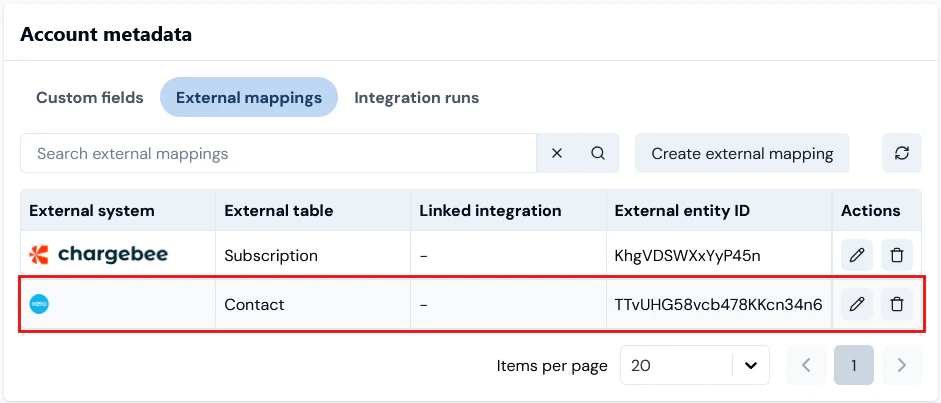
Tip: Reviewing External Mappings for Entities? On the Details pages for m3ter entities, any External mappings created for an entity are listed on the Entity metadata panel. You can then create External Mappings for the entity directly from there. For an example of how to do this, see Creating and Managing External Mappings for Accounts.
Creating Single External Mappings
From the External mappings page, you can create a single mapping of a specific mapping type.To create a single External Mapping:
Select m3sh:
The Workflows page opens.
Select External mappings:
The External mappings page opens and lists the mappings in your Organization by external system. The page will open for the external system mappings you last viewed.
Select the external system you want to view the external mappings for:
In this example, we’ve selected to view the external mappings created for Xero integrations. Note that:
The external systems available for creating external mappings for their integrations with m3ter are shown across the top of the page.
If you want to view external mappings for another system, select it’s icon. The icon will be highlighted as the selected system.
For each external mapping, you can read off:
Entity type. The m3ter entity the mapping is for.
External table. The external table in the external system for the entity that is mapped to.
Linked integration. If you’ve created the mapping as a linked external mapping, which means it can only be used for a specific integration for the external system, then the name of the specific integration is shown and you can select the hotlink text to open the integration’s details page directly. See Creating Linked External Mappings below for more details.
m3ter ID. The id of the m3ter entity the mapping is for.
External entity ID. The id of the external system entity that is mapped to.
Select Create external mapping. To create a mapping, you must complete a two-stage workflow and the Create page opens ready for you to complete Stage 1.
Stage 1 - Select mapping type:
Enter External mapping settings:
Use the Entity type drop-down to select the m3ter entity type you want to use to create the mapping type.
Use the External system drop-down to select the 3rd-party system referenced.
Use the External table drop-down to select the table in the selected 3rd-party system that you want to use for the mapping type:
In this example, we’ve chosen to create an Account <> Contact mapping for m3ter <> Xero.
Tip: Settings are searchable. The three drop-down selection fields for External mapping settings are searchable - if you start to enter the value you require, the list will be filtered according to your text input.
When you’ve completed the mapping type set up, select Next. The page adjusts to allow you to complete Stage 2.
Stage 2 - Add mapping IDs:
The Entity type, External System, and External table you configured for Stage 1 are shown.
Linked integration. Note that because you started the create external mapping workflow from the general External mappings page, this mapping will not be linked to a specific integration for the external system.
On External mappings details:
Use the m3ter entity drop-down to enter the specific m3ter entity of the type you’ve selected in Stage 1 - in this example a m3ter Account - you want to create the mapping for.
Tip: m3ter entity field is a drop-down selection field?
Depending on the m3ter entity type you are creating the mapping for, the m3ter entity field might show as a drop-down selection field - for example if you are mapping Account entities. In this kind of case, you can select the m3ter entity by Name/Code. Note that the list of m3ter entities available for selection will be filtered to show only those entities of that type for which a mapping of the selected type has not yet been created.
If the m3ter entity field does not show as a drop-down selection, such as when you are creating a mapping for m3ter Bill Line Items, then you can enter the entity’s ID.
In the External entity ID field, enter the ID of the external system entity you want to map to.
Tip: Possibles values might show! Note that if the possible values for the External entity ID field can be fetched for the external system, then you can use a drop-down list to select the value for this field from the list of possible values returned.
Select Create external mapping. The Create page closes and the new external mapping is shown on the External mappings page for the external system:
Note that if you select the hotlink text for the m3ter ID, this will open the Details page for the m3ter entity - in this example the Clean Graph Customer 1 Account - where the new external mapping will be listed under Account metadata. You can start a Create external mapping workflow for the Account from there - see Creating and Managing External Mappings for Accounts for more details:
Creating Bulk External Mappings
From the External mappings page, you can create mappings in bulk for a specific mapping type for an external system:To create External mappings in bulk:
Select mesh. The Workflows page opens.
Select External mappings:
The External mappings page opens.
Select the three-dot menu button at top-right of the page and then select Create in bulk:
To create mappings in bulk, you must complete a two-stage workflow and the Create in bulk page opens ready for you to complete Stage 1.Stage 1 - Select mapping type:
Enter External mapping settings:
Use the Entity type drop-down to select the m3ter entity type you want to use to create the mapping type.
The External system drop-down field will be preselected for the external system - in this example Chargebee.
Use the External table drop-down to select the table in the selected 3rd-party system that you want to use for the mapping type:
In this example, we’ve chosen to create Account <> Subscription mappings in bulk for m3ter <> Chargebee.
When you’ve completed the mapping type set up, select Next. The page adjusts to allow you to complete Stage 2:
Stage 2 - Add mapping IDs:
The Entity type, External system, and External table you configured for Stage 1 are shown.
Linked integration. Note that because you started the create bulk external mapping workflow from the general mappings page, none of the mappings will not be linked to a specific integration for the external system
On the External mappings panel, select Add. The page adjusts to add a row for the first mapping:
Use the m3ter entity drop-down to select the specific entity in your Organization you want to create the mapping for.
Tip: Selection is filtered! Note that the list of m3ter entities available for selection will be filtered to show only those entities of that type - here Accounts - for which a mapping of the selected type has not yet been created.
In the External entity ID field, enter the id of the external system entity you want to map to.
Tip: Possibles values might show! Note that if the possible values for the External entity ID field can be fetched for the external system, then you can use a drop-down list to select the value for this field from the list of possible values returned.
Select Add again and repeat up to a maximum of 20 mappings of the selected type:
In this example, we’ve added four mappings of the selected Account <> Subscription mapping type for m3ter <> Chargebee.
Select Create external mappings. You are returned to the External mappings page for the external system where the bulk mappings of the selected type are now listed:
Viewing and Managing External Mappings
From the External mappings page you can view and manage the external mappings created for your integrations with external systems and edit or delete them:To view and manage External Mappings:
Select m3sh. The Workflows page opens.
In the sidebar, select External mappings:
The External mappings page opens.
Select the external system you want to view and manage the external mappings for:
If you want to edit a mapping, select Edit:
On the Edit page, make your changes and select Update external mapping.
If you want to delete a single mapping, select Delete:
A confirmation pop-up appears. Select Yes to complete the delete action.
If you want to delete multiple mappings, check those you want to delete and click Delete selected:
Creating Linked External Mappings
If you intend to set up multiple integrations in m3ter with an external system, it’s a good idea to create separate external mappings for use with each separate integration. You can do this by creating linked external mappings from the details page of each of the integrations you’ve set up for an external system.For example, you might have your Xero system set up for two invoicing locations for your end-customers - UK and Europe. To serve this kind of use case:
You can set Xero Integration 1 for Bills outbound to your Xero UK invoicing instance and then create any required external mappings for the integration as linked to Xero Integration 1.
You can set Xero Integration 2 for Bills outbound to your Xero Europe invoicing instance and then create any required external mappings for the integration as linked to Xero Integration 2.
To create linked External mappings:
Select m3sh. The Workflows page opens.
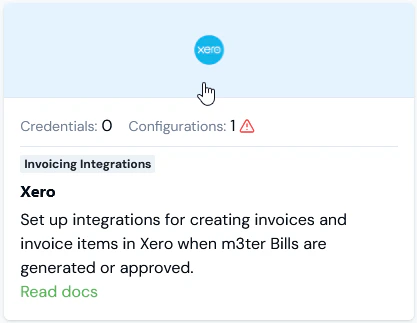
Select the external system you want to create a linked external mappings for:
The Integrations page for the external system opens.
On the Configurations panel, select the name hotlink text of the integration you want to create a linked external mapping for:
The Integration details page opens.
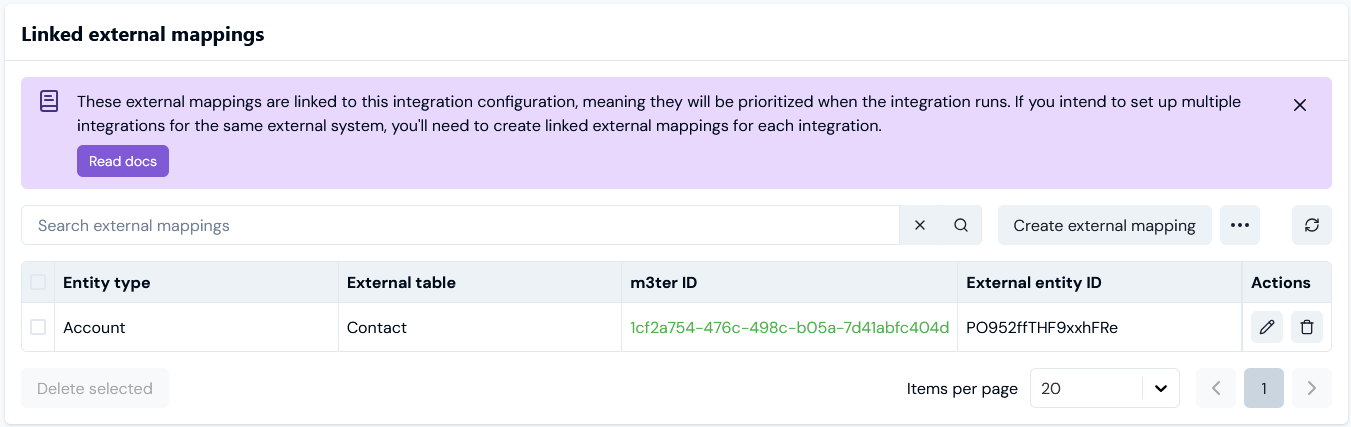
Scroll down the page and on the Linked external mappings panel select Create external mapping:
To create a mapping, you must complete a two-stage workflow and the Create page opens allowing you to complete Stage 1.Stage 1 - Select mapping type:
Enter External mapping settings:
Use the Entity type drop-down to select the m3ter entity type you want to use to create the mapping type.
The External system drop-down is preselected for the external system.
Use the External table drop-down to select the table in the external system that you want to use for the mapping type:
When you’ve completed the mapping type set up, select Next. The page adjusts to allow you to complete Stage 2:
Stage 2 - Add mapping IDs:
The Entity type, External System, and External table you configured for Stage 1 are shown.
Linked integration. Note that because you started the create external mapping workflow from the Integration details page, this mapping will be linkedto the specific integration for the external system and cannot be used for any other integration you’ve set up with that external system.
On External mappings details:
Use the m3ter entity drop-down to enter the specific m3ter entity of the type you’ve selected in Stage 1 - in this example the m3ter Account - you want to create the mapping for.
Tip: m3ter entity field is a drop-down selection field?
Depending on the m3ter entity type you are creating the mapping for, the m3ter entity field might show as a drop-down selection field - for example if you are mapping Account entities. In this kind of case, you can select the m3ter entity by Name/Code. Note that the list of m3ter entities available for selection will be filtered to show only those entities of that type for which a mapping of the selected type has not yet been created.
If the m3ter entity field does not show as a drop-down selection, such as when you are creating a mapping for m3ter Bill Line Items, then you can enter the entity’s ID.
In the External entity ID field, enter the ID of the 3rd-party system entity you want to map to.
Tip: Possibles values might show! Note that if the possible values for the External entity ID field can be fetched for the External system, then you can use a drop-down list to select the value for this field from the list of possible values returned.
Select Create External mapping. The Create page closes and the new external mapping is shown on the Linked external mappings panel for the integration:
{"docsConfig":{"theme":"aspen","$schema":"https://mintlify.com/docs.json","name":"m3ter Documentation","description":"Guides, learning resources and API reference for integrating with m3ter","colors":{"primary":"#4caf4c","dark":"#449d44"},"logo":{"light":"https://mintcdn.com/m3ter/t6C65JBQiQOFtjBy/images/m3ter-logo-blue-sf.svg?fit=max\u0026auto=format\u0026n=t6C65JBQiQOFtjBy\u0026q=85\u0026s=3928db28c84ec6950e43caf96e635d80","dark":"https://mintcdn.com/m3ter/t6C65JBQiQOFtjBy/images/m3ter-logo-white-sf.svg?fit=max\u0026auto=format\u0026n=t6C65JBQiQOFtjBy\u0026q=85\u0026s=a018cb782e49a2fbdd811276476d0605"},"favicon":"https://mintcdn.com/m3ter/T0RRts393DSUkWFc/favicon.svg?fit=max\u0026auto=format\u0026n=T0RRts393DSUkWFc\u0026q=85\u0026s=9492b54cc98df6775983b287b6f865cd","navbar":{"links":[{"href":"https://m3ter.freshdesk.com","label":"Support"},{"href":"https://console.m3ter.com","label":"Console"}],"primary":{"type":"button","label":"Schedule a demo","href":"https://www.m3ter.com/contact"}},"footer":{"socials":{"linkedin":"https://uk.linkedin.com/company/m3ter","x":"https://x.com/m3terHQ","github":"https://github.com/m3ter-com"},"links":[{"items":[{"label":"Website","href":"https://www.m3ter.com"},{"label":"Legal","href":"https://www.m3ter.com/legal"},{"label":"Security","href":"https://www.m3ter.com/security"},{"label":"Trust Center","href":"https://trust.m3ter.com"}]}]},"fonts":{"family":"Montserrat"},"icons":{"library":"lucide"},"styling":{"eyebrows":"breadcrumbs","latex":false},"integrations":{"ga4":{"measurementId":"G-V9C7TTPRQT"}},"contextual":{"options":["copy","view"],"display":"header"},"thumbnails":{"fonts":{"family":"Montserrat"}},"navigation":{"pages":[]}},"deployment":{"deploymentMetadataValue":{"subdomain":"m3ter","hasAudioNarration":false,"actualSubdomain":"m3ter","customDomains":["docs.m3ter.com"],"gitSource":{"type":"github","owner":"m3ter-com","repo":"m3ter-docs","deployBranch":"main","contentDirectory":"","isPrivate":true,"mountPath":"","label":""},"entitlements":{"AI_CHAT":{"status":"ENABLED"},"WEB_MCP":{"status":"ENABLED"},"NARRATION":{"status":"ENABLED"}},"buildId":"6afd7e9c7d9a0e231c56ca16","clientVersion":"0.0.4270","searchFilterCounts":[{"language":"default","tag":"Guides","count":402},{"language":"default","tag":"API Reference","count":397},{"language":"default","tag":"Endpoints","count":391},{"language":"default","tag":"Integrations","count":69},{"language":"default","tag":"m3sh Function Reference","count":66},{"language":"default","tag":"Synthetic functions","count":50},{"language":"default","tag":"m3ter","count":50},{"language":"default","tag":"m3sh","count":43},{"language":"default","tag":"End-Customer Accounts","count":27},{"language":"default","tag":"m3ter Connector for Salesforce","count":24}]},"assistantConfig":{"enableAskAiButton":true,"enableStarterQuestions":false,"enableAskAiSearchBar":false},"basePath":"","hasChatPermissions":true,"hasWebMcpPermissions":true,"toggles":[{"name":"kill-isr","enabled":true,"variant":{"name":"disabled","enabled":false,"feature_enabled":true},"impressionData":false},{"name":"custom-rbac-roles","enabled":true,"variant":{"name":"disabled","enabled":false,"feature_enabled":true},"impressionData":false},{"name":"agent-mintlify-slack","enabled":true,"variant":{"name":"disabled","enabled":false,"feature_enabled":true},"impressionData":false},{"name":"agent-integrations-settings","enabled":true,"variant":{"name":"disabled","enabled":false,"feature_enabled":true},"impressionData":false},{"name":"rbac-expansion","enabled":true,"variant":{"name":"disabled","enabled":false,"feature_enabled":true},"impressionData":false},{"name":"automations-pr-grouping","enabled":true,"variant":{"name":"disabled","enabled":false,"feature_enabled":true},"impressionData":false},{"name":"custom-prefix","enabled":true,"variant":{"name":"disabled","enabled":false,"feature_enabled":true},"impressionData":false},{"name":"analytics-v7","enabled":true,"variant":{"name":"disabled","enabled":false,"feature_enabled":true},"impressionData":false},{"name":"user-flows-analytics","enabled":true,"variant":{"name":"disabled","enabled":false,"feature_enabled":true},"impressionData":false},{"name":"no-publish-flow","enabled":true,"variant":{"name":"disabled","enabled":false,"feature_enabled":true},"impressionData":false},{"name":"workos-onboarding","enabled":true,"variant":{"name":"disabled","enabled":false,"feature_enabled":true},"impressionData":false},{"name":"snapshot-serving-live","enabled":true,"variant":{"name":"disabled","enabled":false,"feature_enabled":true},"impressionData":false},{"name":"stripTemperatureMiddleware","enabled":true,"variant":{"name":"disabled","enabled":false,"feature_enabled":true},"impressionData":false},{"name":"support-platform-pylon-zendesk","enabled":true,"variant":{"name":"disabled","enabled":false,"feature_enabled":true},"impressionData":false},{"name":"snapshot-serving","enabled":true,"variant":{"name":"disabled","enabled":false,"feature_enabled":true},"impressionData":false},{"name":"instant-rollback","enabled":true,"variant":{"name":"disabled","enabled":false,"feature_enabled":true},"impressionData":false},{"name":"granular-notifications-server","enabled":true,"variant":{"name":"disabled","enabled":false,"feature_enabled":true},"impressionData":false},{"name":"granular-notifications","enabled":true,"variant":{"name":"disabled","enabled":false,"feature_enabled":true},"impressionData":false},{"name":"automations-fable","enabled":true,"variant":{"name":"disabled","enabled":false,"feature_enabled":true},"impressionData":false},{"name":"fixed-ai-action-pricing","enabled":true,"variant":{"name":"disabled","enabled":false,"feature_enabled":true},"impressionData":false},{"name":"site-roles","enabled":true,"variant":{"name":"disabled","enabled":false,"feature_enabled":true},"impressionData":false},{"name":"automation-resolve-merge-conflict","enabled":true,"variant":{"name":"disabled","enabled":false,"feature_enabled":true},"impressionData":false},{"name":"scoped-publishing","enabled":true,"variant":{"name":"disabled","enabled":false,"feature_enabled":true},"impressionData":false},{"name":"mintql","enabled":true,"variant":{"name":"disabled","enabled":false,"feature_enabled":true},"impressionData":false},{"name":"page-level-analytics","enabled":true,"variant":{"name":"disabled","enabled":false,"feature_enabled":true},"impressionData":false},{"name":"editor-version-history-v2","enabled":true,"variant":{"name":"disabled","enabled":false,"feature_enabled":true},"impressionData":false},{"name":"billing-page-v2","enabled":true,"variant":{"name":"disabled","enabled":false,"feature_enabled":true},"impressionData":false},{"name":"full-page-search","enabled":true,"variant":{"name":"disabled","enabled":false,"feature_enabled":true},"impressionData":false},{"name":"workspace-projects","enabled":true,"variant":{"name":"disabled","enabled":false,"feature_enabled":true},"impressionData":false},{"name":"assistant-v5","enabled":true,"variant":{"name":"disabled","enabled":false,"feature_enabled":true},"impressionData":false},{"name":"fork-pr-previews","enabled":true,"variant":{"name":"disabled","enabled":false,"feature_enabled":true},"impressionData":false},{"name":"revalidation-jwt","enabled":true,"variant":{"name":"disabled","enabled":false,"feature_enabled":true},"impressionData":false},{"name":"workos-sso-scim","enabled":true,"variant":{"name":"disabled","enabled":false,"feature_enabled":true},"impressionData":false},{"name":"hobby-abuse-scan","enabled":true,"variant":{"name":"disabled","enabled":false,"feature_enabled":true},"impressionData":false},{"name":"dashboard-inbox","enabled":true,"variant":{"name":"disabled","enabled":false,"feature_enabled":true},"impressionData":false},{"name":"workos-signup","enabled":true,"variant":{"name":"disabled","enabled":false,"feature_enabled":true},"impressionData":false},{"name":"turbopuffer-dual-write","enabled":true,"variant":{"name":"disabled","enabled":false,"feature_enabled":true},"impressionData":false},{"name":"workos-enabled","enabled":true,"variant":{"name":"disabled","enabled":false,"feature_enabled":true},"impressionData":false},{"name":"approve-review-flow","enabled":true,"variant":{"name":"disabled","enabled":false,"feature_enabled":true},"impressionData":false},{"name":"editor-metadata","enabled":true,"variant":{"name":"disabled","enabled":false,"feature_enabled":true},"impressionData":false},{"name":"sso-setup-deadline-banner","enabled":true,"variant":{"name":"disabled","enabled":false,"feature_enabled":true},"impressionData":false},{"name":"turbopuffer-serve","enabled":true,"variant":{"name":"disabled","enabled":false,"feature_enabled":true},"impressionData":false},{"name":"live-agents","enabled":true,"variant":{"name":"disabled","enabled":false,"feature_enabled":true},"impressionData":false},{"name":"starter-pricing","enabled":true,"variant":{"name":"treatment","enabled":true,"payload":{"type":"string","value":"treatment"},"feature_enabled":true},"impressionData":false},{"name":"llms-txt-v2","enabled":true,"variant":{"name":"disabled","enabled":false,"feature_enabled":true},"impressionData":false},{"name":"wildcard-email-auth","enabled":true,"variant":{"name":"disabled","enabled":false,"feature_enabled":true},"impressionData":false}],"googleFontsInlined":true},"customCss":[]}
{"page":{"pagePath":"guides/integrations/setting-up-integrations/creating-and-managing-external-mappings","slug":"/guides/integrations/setting-up-integrations/creating-and-managing-external-mappings","pageMetadata":{"title":"Creating and Managing External Mappings","description":null,"href":"/guides/integrations/setting-up-integrations/creating-and-managing-external-mappings"},"pageType":"default","mdx":{"mdxSource":{"compiledSource":"\"use strict\";const{Fragment:_Fragment,jsx:_jsx,jsxs:_jsxs}=arguments[0];const{useMDXComponents:_provideComponents}=arguments[0];function _createMdxContent(props){const _components={a:`a`,em:`em`,li:`li`,ol:`ol`,p:`p`,strong:`strong`,ul:`ul`,..._provideComponents(),...props.components},{Heading,OptimizedImage,Tip}=_components;if(!Heading)_missingMdxReference(`Heading`,true);if(!OptimizedImage)_missingMdxReference(`OptimizedImage`,true);if(!Tip)_missingMdxReference(`Tip`,true);return _jsxs(_Fragment,{children:[_jsxs(_components.p,{children:[`When you integrate your 3rd-party external systems with the m3ter platform, entities and fields in external systems are mapped to m3ter entities and fields. `,_jsx(_components.em,{children:`External Mappings`}),` are created and act as mapping reference lookups for which entities and fields have been mapped across two or more systems. You can review these mapping references on the `,_jsx(_components.strong,{children:`External Mappings`}),` page under `,_jsx(_components.strong,{children:`Integrations`}),` where they are listed.`]}),`\n`,_jsxs(_components.p,{children:[`When you are working to set up your Integrations and want to test or troubleshoot your implementation before going live, you might need to create External Mappings manually and, at a later date, edit or delete them. You can also create `,_jsx(_components.em,{children:`bulk mappings`}),` for specific mapping types.`]}),`\n`,_jsxs(_components.p,{children:[`If you want to create multiple separate integrations for an external system, you can create external mappings for each separate integration, and these external mappings are then `,_jsx(_components.em,{children:`linked to`}),` the specific integration they were created for.`]}),`\n`,_jsx(_components.p,{children:`This topic explains how to create and manage the External Mapping needed for the integrations with external systems you’ve set up for your Organization:`}),`\n`,_jsxs(_components.ul,{children:[`\n`,_jsx(_components.li,{children:_jsx(_components.a,{href:`/guides/integrations/setting-up-integrations/creating-and-managing-external-mappings#creating-single-external-mappings`,children:`Creating Single External Mappings`})}),`\n`,_jsx(_components.li,{children:_jsx(_components.a,{href:`/guides/integrations/setting-up-integrations/creating-and-managing-external-mappings#creating-bulk-external-mappings`,children:`Creating Bulk External Mappings`})}),`\n`,_jsx(_components.li,{children:_jsx(_components.a,{href:`/guides/integrations/setting-up-integrations/creating-and-managing-external-mappings#viewing-and-managing-external-mappings`,children:`Viewing and Managing External Mappings`})}),`\n`,_jsx(_components.li,{children:_jsx(_components.a,{href:`/guides/integrations/setting-up-integrations/creating-and-managing-external-mappings#creating-linked-external-mappings`,children:`Creating Linked External Mappings`})}),`\n`]}),`\n`,_jsx(Tip,{children:_jsxs(_components.p,{children:[_jsx(_components.strong,{children:`Tip: Reviewing External Mappings for Entities?`}),` On the Details pages for m3ter entities, any External mappings created for an entity are listed on the `,_jsx(_components.strong,{children:`Entity metadata`}),` panel. You can then create External Mappings for the entity directly from there. For an example of how to do this, see `,_jsx(_components.a,{href:`/guides/end-customer-accounts/creating-and-managing-external-mappings-for-accounts`,children:`Creating and Managing External Mappings for Accounts`}),`.`]})}),`\n`,_jsx(Heading,{level:`2`,id:`creating-single-external-mappings`,children:`Creating Single External Mappings`}),`\n`,_jsxs(_components.p,{children:[`From the `,_jsx(_components.strong,{children:`External mappings`}),` page, you can create a single mapping of a specific mapping type.`]}),`\n`,_jsx(_components.p,{children:_jsx(_components.strong,{children:`To create a single External Mapping:`})}),`\n`,_jsxs(_components.ol,{children:[`\n`,_jsxs(_components.li,{children:[`Select `,_jsx(_components.strong,{children:`m3sh`}),`:`]}),`\n`]}),`\n`,_jsx(OptimizedImage,{src:`https://mintcdn.com/m3ter/gg3zPcB5MVj--Cnq/images/m3shMainNav1.png?fit=max\u0026auto=format\u0026n=gg3zPcB5MVj--Cnq\u0026q=85\u0026s=c26ad71debe6cffcd46844fa558e0e6f`,alt:`M3sh Main Nav1`,title:`M3sh Main Nav1`,style:{width:`8%`},\"data-og-width\":`61`,width:`61`,\"data-og-height\":`64`,height:`64`,\"data-path\":`images/m3shMainNav1.png`,\"data-optimize\":`true`,\"data-opv\":`3`,srcset:`https://mintcdn.com/m3ter/gg3zPcB5MVj--Cnq/images/m3shMainNav1.png?w=280\u0026fit=max\u0026auto=format\u0026n=gg3zPcB5MVj--Cnq\u0026q=85\u0026s=fe3ac651321aa11df53b83b0fd230256 280w, https://mintcdn.com/m3ter/gg3zPcB5MVj--Cnq/images/m3shMainNav1.png?w=560\u0026fit=max\u0026auto=format\u0026n=gg3zPcB5MVj--Cnq\u0026q=85\u0026s=1f58ad93c04cdc3ed5cd3b76d4506472 560w, https://mintcdn.com/m3ter/gg3zPcB5MVj--Cnq/images/m3shMainNav1.png?w=840\u0026fit=max\u0026auto=format\u0026n=gg3zPcB5MVj--Cnq\u0026q=85\u0026s=517207d64345c42f2dc1dcde73630009 840w, https://mintcdn.com/m3ter/gg3zPcB5MVj--Cnq/images/m3shMainNav1.png?w=1100\u0026fit=max\u0026auto=format\u0026n=gg3zPcB5MVj--Cnq\u0026q=85\u0026s=d7887d92cf2fbee414d23c3870ebd40c 1100w, https://mintcdn.com/m3ter/gg3zPcB5MVj--Cnq/images/m3shMainNav1.png?w=1650\u0026fit=max\u0026auto=format\u0026n=gg3zPcB5MVj--Cnq\u0026q=85\u0026s=8f715eeb32d8670a864608e3c186de72 1650w, https://mintcdn.com/m3ter/gg3zPcB5MVj--Cnq/images/m3shMainNav1.png?w=2500\u0026fit=max\u0026auto=format\u0026n=gg3zPcB5MVj--Cnq\u0026q=85\u0026s=ae21cc3976cbf6a81e69ea0c9103a477 2500w`}),`\n`,_jsxs(_components.p,{children:[`The `,_jsx(_components.strong,{children:`Workflows`}),` page opens.`]}),`\n`,_jsxs(_components.ol,{start:`2`,children:[`\n`,_jsxs(_components.li,{children:[`Select `,_jsx(_components.strong,{children:`External mappings`}),`:`]}),`\n`]}),`\n`,_jsx(OptimizedImage,{src:`https://mintcdn.com/m3ter/UNNNqzWAlbEgfOnu/images/ExtMapping72.png?fit=max\u0026auto=format\u0026n=UNNNqzWAlbEgfOnu\u0026q=85\u0026s=cc7f5549daebb805cd1abd610ea08bca`,alt:`Ext Mapping72`,title:`Ext Mapping72`,style:{width:`22%`},\"data-og-width\":`183`,width:`183`,\"data-og-height\":`55`,height:`55`,\"data-path\":`images/ExtMapping72.png`,\"data-optimize\":`true`,\"data-opv\":`3`,srcset:`https://mintcdn.com/m3ter/UNNNqzWAlbEgfOnu/images/ExtMapping72.png?w=280\u0026fit=max\u0026auto=format\u0026n=UNNNqzWAlbEgfOnu\u0026q=85\u0026s=e093758c106f0fa52313043365a35fa5 280w, https://mintcdn.com/m3ter/UNNNqzWAlbEgfOnu/images/ExtMapping72.png?w=560\u0026fit=max\u0026auto=format\u0026n=UNNNqzWAlbEgfOnu\u0026q=85\u0026s=dcdd9257c44a96e6457a829cbf55f146 560w, https://mintcdn.com/m3ter/UNNNqzWAlbEgfOnu/images/ExtMapping72.png?w=840\u0026fit=max\u0026auto=format\u0026n=UNNNqzWAlbEgfOnu\u0026q=85\u0026s=efe26981759f6a24a32fe9c2bbd9cb90 840w, https://mintcdn.com/m3ter/UNNNqzWAlbEgfOnu/images/ExtMapping72.png?w=1100\u0026fit=max\u0026auto=format\u0026n=UNNNqzWAlbEgfOnu\u0026q=85\u0026s=ac5352128362da206622a1db22483aa4 1100w, https://mintcdn.com/m3ter/UNNNqzWAlbEgfOnu/images/ExtMapping72.png?w=1650\u0026fit=max\u0026auto=format\u0026n=UNNNqzWAlbEgfOnu\u0026q=85\u0026s=a292e7486580ba271602cd4a3f6126d2 1650w, https://mintcdn.com/m3ter/UNNNqzWAlbEgfOnu/images/ExtMapping72.png?w=2500\u0026fit=max\u0026auto=format\u0026n=UNNNqzWAlbEgfOnu\u0026q=85\u0026s=4cb2a7d930f12b9204fc447cef88e71d 2500w`}),`\n`,_jsxs(_components.p,{children:[`The `,_jsx(_components.strong,{children:`External mappings`}),` page opens and lists the mappings in your Organization by external system. The page will open for the external system mappings you last viewed.`]}),`\n`,_jsxs(_components.ol,{start:`3`,children:[`\n`,_jsx(_components.li,{children:`Select the external system you want to view the external mappings for:`}),`\n`]}),`\n`,_jsx(OptimizedImage,{src:`https://mintcdn.com/m3ter/kKlHDl-4iCfb1L41/images/ExtMapping46C.png?fit=max\u0026auto=format\u0026n=kKlHDl-4iCfb1L41\u0026q=85\u0026s=f8d78560e498c0f8c8ee38005e514570`,alt:`Ext Mapping46c`,\"data-og-width\":`1291`,width:`1291`,\"data-og-height\":`475`,height:`475`,\"data-path\":`images/ExtMapping46C.png`,\"data-optimize\":`true`,\"data-opv\":`3`,srcset:`https://mintcdn.com/m3ter/kKlHDl-4iCfb1L41/images/ExtMapping46C.png?w=280\u0026fit=max\u0026auto=format\u0026n=kKlHDl-4iCfb1L41\u0026q=85\u0026s=ab1399c53d3061b63484a871202dee23 280w, https://mintcdn.com/m3ter/kKlHDl-4iCfb1L41/images/ExtMapping46C.png?w=560\u0026fit=max\u0026auto=format\u0026n=kKlHDl-4iCfb1L41\u0026q=85\u0026s=41eacb0549aea21de5206997eb8ae8d2 560w, https://mintcdn.com/m3ter/kKlHDl-4iCfb1L41/images/ExtMapping46C.png?w=840\u0026fit=max\u0026auto=format\u0026n=kKlHDl-4iCfb1L41\u0026q=85\u0026s=b3a6fd9de6038477bd0d2f7ac04bb207 840w, https://mintcdn.com/m3ter/kKlHDl-4iCfb1L41/images/ExtMapping46C.png?w=1100\u0026fit=max\u0026auto=format\u0026n=kKlHDl-4iCfb1L41\u0026q=85\u0026s=a21b09de006b6f69f2e11d78cf1fc724 1100w, https://mintcdn.com/m3ter/kKlHDl-4iCfb1L41/images/ExtMapping46C.png?w=1650\u0026fit=max\u0026auto=format\u0026n=kKlHDl-4iCfb1L41\u0026q=85\u0026s=49421494c8bd904a49069bebc96bf384 1650w, https://mintcdn.com/m3ter/kKlHDl-4iCfb1L41/images/ExtMapping46C.png?w=2500\u0026fit=max\u0026auto=format\u0026n=kKlHDl-4iCfb1L41\u0026q=85\u0026s=3e5fc6dc2abd8ff36b11c9745b13e303 2500w`}),`\n`,_jsx(_components.p,{children:`In this example, we’ve selected to view the external mappings created for Xero integrations. Note that:`}),`\n`,_jsxs(_components.ul,{children:[`\n`,_jsx(_components.li,{children:`The external systems available for creating external mappings for their integrations with m3ter are shown across the top of the page.`}),`\n`,_jsx(_components.li,{children:`If you want to view external mappings for another system, select it’s icon. The icon will be highlighted as the selected system.`}),`\n`,_jsxs(_components.li,{children:[`For each external mapping, you can read off:`,`\n`,_jsxs(_components.ul,{children:[`\n`,_jsxs(_components.li,{children:[_jsx(_components.strong,{children:`Entity type`}),`. The m3ter entity the mapping is for.`]}),`\n`,_jsxs(_components.li,{children:[_jsx(_components.strong,{children:`External table`}),`. The external table in the external system for the entity that is mapped to.`]}),`\n`,_jsxs(_components.li,{children:[_jsx(_components.strong,{children:`Linked integration`}),`. If you’ve created the mapping as a `,_jsx(_components.em,{children:`linked external mapping`}),`, which means it can only be used for a specific integration for the external system, then the name of the specific integration is shown and you can select the hotlink text to open the integration’s details page directly. See `,_jsx(_components.a,{href:`/guides/integrations/setting-up-integrations/creating-and-managing-external-mappings#creating-linked-external-mappings`,children:`Creating Linked External Mappings`}),` below for more details.`]}),`\n`,_jsxs(_components.li,{children:[_jsx(_components.strong,{children:`m3ter ID`}),`. The id of the m3ter entity the mapping is for.`]}),`\n`,_jsxs(_components.li,{children:[_jsx(_components.strong,{children:`External entity ID`}),`. The id of the external system entity that is mapped to.`]}),`\n`]}),`\n`]}),`\n`]}),`\n`,_jsxs(_components.ol,{start:`4`,children:[`\n`,_jsxs(_components.li,{children:[`Select `,_jsx(_components.strong,{children:`Create external mapping`}),`. To create a mapping, you must complete a two-stage workflow and the `,_jsx(_components.strong,{children:`Create`}),` page opens ready for you to complete `,_jsx(_components.strong,{children:`Stage 1`}),`.`]}),`\n`]}),`\n`,_jsx(_components.p,{children:_jsx(_components.strong,{children:`Stage 1 - Select mapping type:`})}),`\n`,_jsxs(_components.ol,{start:`5`,children:[`\n`,_jsxs(_components.li,{children:[`Enter `,_jsx(_components.strong,{children:`External mapping settings`}),`:`]}),`\n`]}),`\n`,_jsxs(_components.ul,{children:[`\n`,_jsxs(_components.li,{children:[`Use the `,_jsx(_components.strong,{children:`Entity type`}),` drop-down to select the m3ter entity type you want to use to create the mapping type.`]}),`\n`,_jsxs(_components.li,{children:[`Use the `,_jsx(_components.strong,{children:`External system`}),` drop-down to select the 3rd-party system referenced.`]}),`\n`,_jsxs(_components.li,{children:[`Use the `,_jsx(_components.strong,{children:`External table`}),` drop-down to select the table in the selected 3rd-party system that you want to use for the mapping type:`]}),`\n`]}),`\n`,_jsx(OptimizedImage,{src:`https://mintcdn.com/m3ter/kKlHDl-4iCfb1L41/images/ExtMapping73A.png?fit=max\u0026auto=format\u0026n=kKlHDl-4iCfb1L41\u0026q=85\u0026s=9f78b781c92f900d267730f8aa0dd40e`,alt:`Ext Mapping73a`,title:`Ext Mapping73a`,style:{width:`63%`},\"data-og-width\":`634`,width:`634`,\"data-og-height\":`758`,height:`758`,\"data-path\":`images/ExtMapping73A.png`,\"data-optimize\":`true`,\"data-opv\":`3`,srcset:`https://mintcdn.com/m3ter/kKlHDl-4iCfb1L41/images/ExtMapping73A.png?w=280\u0026fit=max\u0026auto=format\u0026n=kKlHDl-4iCfb1L41\u0026q=85\u0026s=97d4d360bdbb6353c567ff5908bff7e9 280w, https://mintcdn.com/m3ter/kKlHDl-4iCfb1L41/images/ExtMapping73A.png?w=560\u0026fit=max\u0026auto=format\u0026n=kKlHDl-4iCfb1L41\u0026q=85\u0026s=b4100f5b00e695e378e194ce2e74c8eb 560w, https://mintcdn.com/m3ter/kKlHDl-4iCfb1L41/images/ExtMapping73A.png?w=840\u0026fit=max\u0026auto=format\u0026n=kKlHDl-4iCfb1L41\u0026q=85\u0026s=17ff81421e0ee3fd424168c8887b8637 840w, https://mintcdn.com/m3ter/kKlHDl-4iCfb1L41/images/ExtMapping73A.png?w=1100\u0026fit=max\u0026auto=format\u0026n=kKlHDl-4iCfb1L41\u0026q=85\u0026s=04e1fb61739dd815bb3bbd1087837fbc 1100w, https://mintcdn.com/m3ter/kKlHDl-4iCfb1L41/images/ExtMapping73A.png?w=1650\u0026fit=max\u0026auto=format\u0026n=kKlHDl-4iCfb1L41\u0026q=85\u0026s=8a691028346f16350457213cb3e6922d 1650w, https://mintcdn.com/m3ter/kKlHDl-4iCfb1L41/images/ExtMapping73A.png?w=2500\u0026fit=max\u0026auto=format\u0026n=kKlHDl-4iCfb1L41\u0026q=85\u0026s=7e4ec0ecdb5c621124848417699f05e0 2500w`}),`\n`,_jsxs(_components.ul,{children:[`\n`,_jsxs(_components.li,{children:[`In this example, we’ve chosen to create an `,_jsx(_components.strong,{children:`Account \u003c> Contact`}),` mapping for `,_jsx(_components.strong,{children:`m3ter \u003c> Xero`}),`.`]}),`\n`]}),`\n`,_jsx(Tip,{children:_jsxs(_components.p,{children:[_jsx(_components.strong,{children:`Tip: Settings are searchable.`}),` The three drop-down selection fields for `,_jsx(_components.strong,{children:`External mapping settings`}),` are searchable - if you start to enter the value you require, the list will be filtered according to your text input.`]})}),`\n`,_jsxs(_components.ol,{start:`6`,children:[`\n`,_jsxs(_components.li,{children:[`When you’ve completed the mapping type set up, select `,_jsx(_components.strong,{children:`Next`}),`. The page adjusts to allow you to complete `,_jsx(_components.strong,{children:`Stage 2`}),`.`]}),`\n`]}),`\n`,_jsx(_components.p,{children:_jsx(_components.strong,{children:`Stage 2 - Add mapping IDs:`})}),`\n`,_jsxs(_components.ul,{children:[`\n`,_jsxs(_components.li,{children:[`The `,_jsx(_components.strong,{children:`Entity type`}),`, `,_jsx(_components.strong,{children:`External System`}),`, and `,_jsx(_components.strong,{children:`External table`}),` you configured for `,_jsx(_components.strong,{children:`Stage 1`}),` are shown.`]}),`\n`,_jsxs(_components.li,{children:[_jsx(_components.strong,{children:`Linked integration`}),`. Note that because you started the create external mapping workflow from the general `,_jsx(_components.strong,{children:`External mappings`}),` page, this mapping will `,_jsx(_components.em,{children:`not be linked`}),` to a specific integration for the external system.`]}),`\n`]}),`\n`,_jsxs(_components.ol,{start:`7`,children:[`\n`,_jsxs(_components.li,{children:[`On `,_jsx(_components.strong,{children:`External mappings details`}),`:`]}),`\n`]}),`\n`,_jsxs(_components.ul,{children:[`\n`,_jsxs(_components.li,{children:[`Use the `,_jsx(_components.strong,{children:`m3ter entity`}),` drop-down to enter the specific m3ter entity of the type you’ve selected in `,_jsx(_components.strong,{children:`Stage 1`}),` - in this example a m3ter Account - you want to create the mapping for.`]}),`\n`]}),`\n`,_jsxs(Tip,{children:[_jsx(_components.p,{children:_jsx(_components.strong,{children:`Tip: m3ter entity field is a drop-down selection field?`})}),_jsxs(_components.ul,{children:[`\n`,_jsx(_components.li,{children:`Depending on the m3ter entity type you are creating the mapping for, the m3ter entity field might show as a drop-down selection field - for example if you are mapping Account entities. In this kind of case, you can select the m3ter entity by Name/Code. Note that the list of m3ter entities available for selection will be filtered to show only those entities of that type for which a mapping of the selected type has not yet been created.`}),`\n`,_jsx(_components.li,{children:`If the m3ter entity field does not show as a drop-down selection, such as when you are creating a mapping for m3ter Bill Line Items, then you can enter the entity’s ID.`}),`\n`]})]}),`\n`,_jsxs(_components.ul,{children:[`\n`,_jsxs(_components.li,{children:[`In the `,_jsx(_components.strong,{children:`External entity ID`}),` field, enter the ID of the external system entity you want to map to.`]}),`\n`]}),`\n`,_jsx(Tip,{children:_jsxs(_components.p,{children:[_jsx(_components.strong,{children:`Tip: Possibles values might show!`}),` Note that if the possible values for the `,_jsx(_components.strong,{children:`External entity ID`}),` field can be fetched for the external system, then you can use a drop-down list to select the value for this field from the list of possible values returned.`]})}),`\n`,_jsx(OptimizedImage,{src:`https://mintcdn.com/m3ter/kKlHDl-4iCfb1L41/images/ExtMapping74A.png?fit=max\u0026auto=format\u0026n=kKlHDl-4iCfb1L41\u0026q=85\u0026s=d9c9272fba2619f0f0502762251194f5`,alt:`Ext Mapping74a`,title:`Ext Mapping74a`,style:{width:`63%`},\"data-og-width\":`633`,width:`633`,\"data-og-height\":`796`,height:`796`,\"data-path\":`images/ExtMapping74A.png`,\"data-optimize\":`true`,\"data-opv\":`3`,srcset:`https://mintcdn.com/m3ter/kKlHDl-4iCfb1L41/images/ExtMapping74A.png?w=280\u0026fit=max\u0026auto=format\u0026n=kKlHDl-4iCfb1L41\u0026q=85\u0026s=9c9f03c8aab905bbcac63ab1a2cc826b 280w, https://mintcdn.com/m3ter/kKlHDl-4iCfb1L41/images/ExtMapping74A.png?w=560\u0026fit=max\u0026auto=format\u0026n=kKlHDl-4iCfb1L41\u0026q=85\u0026s=906e747786aac311b0c7b35b7c12c2c7 560w, https://mintcdn.com/m3ter/kKlHDl-4iCfb1L41/images/ExtMapping74A.png?w=840\u0026fit=max\u0026auto=format\u0026n=kKlHDl-4iCfb1L41\u0026q=85\u0026s=e742ed2471730ebcb29713c686a21961 840w, https://mintcdn.com/m3ter/kKlHDl-4iCfb1L41/images/ExtMapping74A.png?w=1100\u0026fit=max\u0026auto=format\u0026n=kKlHDl-4iCfb1L41\u0026q=85\u0026s=361ce33c5a6db3532773245c9f7a9bef 1100w, https://mintcdn.com/m3ter/kKlHDl-4iCfb1L41/images/ExtMapping74A.png?w=1650\u0026fit=max\u0026auto=format\u0026n=kKlHDl-4iCfb1L41\u0026q=85\u0026s=3586971d1d7703e04329b9af83c59c98 1650w, https://mintcdn.com/m3ter/kKlHDl-4iCfb1L41/images/ExtMapping74A.png?w=2500\u0026fit=max\u0026auto=format\u0026n=kKlHDl-4iCfb1L41\u0026q=85\u0026s=1f88e9485d03a1dde072e3aa7d801efb 2500w`}),`\n`,_jsxs(_components.ol,{start:`8`,children:[`\n`,_jsxs(_components.li,{children:[`Select `,_jsx(_components.strong,{children:`Create external mapping`}),`. The `,_jsx(_components.strong,{children:`Create`}),` page closes and the new external mapping is shown on the `,_jsx(_components.strong,{children:`External mappings`}),` page for the external system:`]}),`\n`]}),`\n`,_jsx(OptimizedImage,{src:`https://mintcdn.com/m3ter/kKlHDl-4iCfb1L41/images/ExtMapping75A.png?fit=max\u0026auto=format\u0026n=kKlHDl-4iCfb1L41\u0026q=85\u0026s=9e29c2145dc13798ca9af0c3f78f4638`,alt:`Ext Mapping75a`,\"data-og-width\":`1249`,width:`1249`,\"data-og-height\":`523`,height:`523`,\"data-path\":`images/ExtMapping75A.png`,\"data-optimize\":`true`,\"data-opv\":`3`,srcset:`https://mintcdn.com/m3ter/kKlHDl-4iCfb1L41/images/ExtMapping75A.png?w=280\u0026fit=max\u0026auto=format\u0026n=kKlHDl-4iCfb1L41\u0026q=85\u0026s=8cc2a37854ba9b43c0ced995218eafcd 280w, https://mintcdn.com/m3ter/kKlHDl-4iCfb1L41/images/ExtMapping75A.png?w=560\u0026fit=max\u0026auto=format\u0026n=kKlHDl-4iCfb1L41\u0026q=85\u0026s=56df46c1d4b565001cc84b8f0b785d44 560w, https://mintcdn.com/m3ter/kKlHDl-4iCfb1L41/images/ExtMapping75A.png?w=840\u0026fit=max\u0026auto=format\u0026n=kKlHDl-4iCfb1L41\u0026q=85\u0026s=652e05632680992a1df36d81011226db 840w, https://mintcdn.com/m3ter/kKlHDl-4iCfb1L41/images/ExtMapping75A.png?w=1100\u0026fit=max\u0026auto=format\u0026n=kKlHDl-4iCfb1L41\u0026q=85\u0026s=6cb8a594412b7541dc48c56b54365987 1100w, https://mintcdn.com/m3ter/kKlHDl-4iCfb1L41/images/ExtMapping75A.png?w=1650\u0026fit=max\u0026auto=format\u0026n=kKlHDl-4iCfb1L41\u0026q=85\u0026s=93f44b16bd9ee89a703e9995269ad3bf 1650w, https://mintcdn.com/m3ter/kKlHDl-4iCfb1L41/images/ExtMapping75A.png?w=2500\u0026fit=max\u0026auto=format\u0026n=kKlHDl-4iCfb1L41\u0026q=85\u0026s=67a8b61f93f867d958f94baa2de19d46 2500w`}),`\n`,_jsxs(_components.ul,{children:[`\n`,_jsxs(_components.li,{children:[`Note that if you select the hotlink text for the `,_jsx(_components.strong,{children:`m3ter ID`}),`, this will open the `,_jsx(_components.strong,{children:`Details`}),` page for the m3ter entity - in this example the `,_jsx(_components.strong,{children:`Clean Graph Customer 1`}),` Account - where the new external mapping will be listed under `,_jsx(_components.strong,{children:`Account metadata`}),`. You can start a `,_jsx(_components.strong,{children:`Create external mapping`}),` workflow for the Account from there - see `,_jsx(_components.a,{href:`/guides/end-customer-accounts/creating-and-managing-external-mappings-for-accounts`,children:`Creating and Managing External Mappings for Accounts`}),` for more details:`]}),`\n`]}),`\n`,_jsx(OptimizedImage,{src:`https://mintcdn.com/m3ter/UNNNqzWAlbEgfOnu/images/ExtMapping77.png?fit=max\u0026auto=format\u0026n=UNNNqzWAlbEgfOnu\u0026q=85\u0026s=15a9cec00d7d3c1e2ae6830ba378d4c6`,alt:`Ext Mapping77`,\"data-og-width\":`941`,width:`941`,\"data-og-height\":`403`,height:`403`,\"data-path\":`images/ExtMapping77.png`,\"data-optimize\":`true`,\"data-opv\":`3`,srcset:`https://mintcdn.com/m3ter/UNNNqzWAlbEgfOnu/images/ExtMapping77.png?w=280\u0026fit=max\u0026auto=format\u0026n=UNNNqzWAlbEgfOnu\u0026q=85\u0026s=9227d0169feda5ab91d6271b1dee5327 280w, https://mintcdn.com/m3ter/UNNNqzWAlbEgfOnu/images/ExtMapping77.png?w=560\u0026fit=max\u0026auto=format\u0026n=UNNNqzWAlbEgfOnu\u0026q=85\u0026s=d53bfac07d592e14d0ed3a534f88d370 560w, https://mintcdn.com/m3ter/UNNNqzWAlbEgfOnu/images/ExtMapping77.png?w=840\u0026fit=max\u0026auto=format\u0026n=UNNNqzWAlbEgfOnu\u0026q=85\u0026s=0731113bf4ac33167a06e3282e5736bf 840w, https://mintcdn.com/m3ter/UNNNqzWAlbEgfOnu/images/ExtMapping77.png?w=1100\u0026fit=max\u0026auto=format\u0026n=UNNNqzWAlbEgfOnu\u0026q=85\u0026s=84a540b6d560ff5ecd6d51451d70cc12 1100w, https://mintcdn.com/m3ter/UNNNqzWAlbEgfOnu/images/ExtMapping77.png?w=1650\u0026fit=max\u0026auto=format\u0026n=UNNNqzWAlbEgfOnu\u0026q=85\u0026s=440766deb85b36e60e3153d358b0f608 1650w, https://mintcdn.com/m3ter/UNNNqzWAlbEgfOnu/images/ExtMapping77.png?w=2500\u0026fit=max\u0026auto=format\u0026n=UNNNqzWAlbEgfOnu\u0026q=85\u0026s=dd288ec87b7a03f5c998f93770cd2a0c 2500w`}),`\n`,_jsx(Heading,{level:`2`,id:`creating-bulk-external-mappings`,children:`Creating Bulk External Mappings`}),`\n`,_jsxs(_components.p,{children:[`From the `,_jsx(_components.strong,{children:`External mappings`}),` page, you can create mappings in bulk for a specific mapping type for an external system:`]}),`\n`,_jsx(_components.p,{children:_jsx(_components.strong,{children:`To create External mappings in bulk:`})}),`\n`,_jsxs(_components.ol,{children:[`\n`,_jsxs(_components.li,{children:[`Select `,_jsx(_components.strong,{children:`mesh`}),`. The `,_jsx(_components.strong,{children:`Workflows`}),` page opens.`]}),`\n`,_jsxs(_components.li,{children:[`Select `,_jsx(_components.strong,{children:`External mappings`}),`:`]}),`\n`]}),`\n`,_jsx(OptimizedImage,{src:`https://mintcdn.com/m3ter/UNNNqzWAlbEgfOnu/images/ExtMapping72.png?fit=max\u0026auto=format\u0026n=UNNNqzWAlbEgfOnu\u0026q=85\u0026s=cc7f5549daebb805cd1abd610ea08bca`,alt:`Ext Mapping72`,title:`Ext Mapping72`,style:{width:`22%`},\"data-og-width\":`183`,width:`183`,\"data-og-height\":`55`,height:`55`,\"data-path\":`images/ExtMapping72.png`,\"data-optimize\":`true`,\"data-opv\":`3`,srcset:`https://mintcdn.com/m3ter/UNNNqzWAlbEgfOnu/images/ExtMapping72.png?w=280\u0026fit=max\u0026auto=format\u0026n=UNNNqzWAlbEgfOnu\u0026q=85\u0026s=e093758c106f0fa52313043365a35fa5 280w, https://mintcdn.com/m3ter/UNNNqzWAlbEgfOnu/images/ExtMapping72.png?w=560\u0026fit=max\u0026auto=format\u0026n=UNNNqzWAlbEgfOnu\u0026q=85\u0026s=dcdd9257c44a96e6457a829cbf55f146 560w, https://mintcdn.com/m3ter/UNNNqzWAlbEgfOnu/images/ExtMapping72.png?w=840\u0026fit=max\u0026auto=format\u0026n=UNNNqzWAlbEgfOnu\u0026q=85\u0026s=efe26981759f6a24a32fe9c2bbd9cb90 840w, https://mintcdn.com/m3ter/UNNNqzWAlbEgfOnu/images/ExtMapping72.png?w=1100\u0026fit=max\u0026auto=format\u0026n=UNNNqzWAlbEgfOnu\u0026q=85\u0026s=ac5352128362da206622a1db22483aa4 1100w, https://mintcdn.com/m3ter/UNNNqzWAlbEgfOnu/images/ExtMapping72.png?w=1650\u0026fit=max\u0026auto=format\u0026n=UNNNqzWAlbEgfOnu\u0026q=85\u0026s=a292e7486580ba271602cd4a3f6126d2 1650w, https://mintcdn.com/m3ter/UNNNqzWAlbEgfOnu/images/ExtMapping72.png?w=2500\u0026fit=max\u0026auto=format\u0026n=UNNNqzWAlbEgfOnu\u0026q=85\u0026s=4cb2a7d930f12b9204fc447cef88e71d 2500w`}),`\n`,_jsxs(_components.p,{children:[`The `,_jsx(_components.strong,{children:`External mappings`}),` page opens.`]}),`\n`,_jsxs(_components.ol,{start:`3`,children:[`\n`,_jsxs(_components.li,{children:[`Select the three-dot menu button at top-right of the page and then select `,_jsx(_components.strong,{children:`Create in bulk`}),`:`]}),`\n`]}),`\n`,_jsx(OptimizedImage,{src:`https://mintcdn.com/m3ter/zFF74W1cpWY5nnkU/images/1734692193-extmapping9b.png?fit=max\u0026auto=format\u0026n=zFF74W1cpWY5nnkU\u0026q=85\u0026s=ef2b98024fe5502f629c5e87d1d8b1dc`,style:{maxWidth:`min(200px, 100%)`},\"data-og-width\":`261`,width:`261`,\"data-og-height\":`110`,height:`110`,\"data-path\":`images/1734692193-extmapping9b.png`,\"data-optimize\":`true`,\"data-opv\":`3`,srcset:`https://mintcdn.com/m3ter/zFF74W1cpWY5nnkU/images/1734692193-extmapping9b.png?w=280\u0026fit=max\u0026auto=format\u0026n=zFF74W1cpWY5nnkU\u0026q=85\u0026s=a4a6c0d6d89d620f3950217b4047d827 280w, https://mintcdn.com/m3ter/zFF74W1cpWY5nnkU/images/1734692193-extmapping9b.png?w=560\u0026fit=max\u0026auto=format\u0026n=zFF74W1cpWY5nnkU\u0026q=85\u0026s=4f640c90ddd258eecde2ab0fb272a111 560w, https://mintcdn.com/m3ter/zFF74W1cpWY5nnkU/images/1734692193-extmapping9b.png?w=840\u0026fit=max\u0026auto=format\u0026n=zFF74W1cpWY5nnkU\u0026q=85\u0026s=ea82c3279d07220952530a9d3b3dbb8d 840w, https://mintcdn.com/m3ter/zFF74W1cpWY5nnkU/images/1734692193-extmapping9b.png?w=1100\u0026fit=max\u0026auto=format\u0026n=zFF74W1cpWY5nnkU\u0026q=85\u0026s=6cb41ff982953ebab808d09fecf3b452 1100w, https://mintcdn.com/m3ter/zFF74W1cpWY5nnkU/images/1734692193-extmapping9b.png?w=1650\u0026fit=max\u0026auto=format\u0026n=zFF74W1cpWY5nnkU\u0026q=85\u0026s=e43743eee8a962fce89c630cef1f5146 1650w, https://mintcdn.com/m3ter/zFF74W1cpWY5nnkU/images/1734692193-extmapping9b.png?w=2500\u0026fit=max\u0026auto=format\u0026n=zFF74W1cpWY5nnkU\u0026q=85\u0026s=2fffc383a35d9ae64602717ece0daf16 2500w`}),`\n`,_jsxs(_components.p,{children:[`To create mappings in bulk, you must complete a two-stage workflow and the `,_jsx(_components.strong,{children:`Create in bulk`}),` page opens ready for you to complete `,_jsx(_components.strong,{children:`Stage 1`}),`.`]}),`\n`,_jsx(_components.p,{children:_jsx(_components.strong,{children:`Stage 1 - Select mapping type:`})}),`\n`,_jsxs(_components.ol,{start:`4`,children:[`\n`,_jsxs(_components.li,{children:[`Enter `,_jsx(_components.strong,{children:`External mapping settings`}),`:`]}),`\n`]}),`\n`,_jsxs(_components.ul,{children:[`\n`,_jsxs(_components.li,{children:[`Use the `,_jsx(_components.strong,{children:`Entity type`}),` drop-down to select the m3ter entity type you want to use to create the mapping type.`]}),`\n`,_jsxs(_components.li,{children:[`The `,_jsx(_components.strong,{children:`External system`}),` drop-down field will be preselected for the external system - in this example Chargebee.`]}),`\n`,_jsxs(_components.li,{children:[`Use the `,_jsx(_components.strong,{children:`External table`}),` drop-down to select the table in the selected 3rd-party system that you want to use for the mapping type:`]}),`\n`]}),`\n`,_jsx(OptimizedImage,{src:`https://mintcdn.com/m3ter/kKlHDl-4iCfb1L41/images/ExtMapping78A.png?fit=max\u0026auto=format\u0026n=kKlHDl-4iCfb1L41\u0026q=85\u0026s=b4175951222d578839bd52adba9939c5`,alt:`Ext Mapping78a`,title:`Ext Mapping78a`,style:{width:`63%`},\"data-og-width\":`647`,width:`647`,\"data-og-height\":`759`,height:`759`,\"data-path\":`images/ExtMapping78A.png`,\"data-optimize\":`true`,\"data-opv\":`3`,srcset:`https://mintcdn.com/m3ter/kKlHDl-4iCfb1L41/images/ExtMapping78A.png?w=280\u0026fit=max\u0026auto=format\u0026n=kKlHDl-4iCfb1L41\u0026q=85\u0026s=86fbb94e8ea718308de437dda4057b90 280w, https://mintcdn.com/m3ter/kKlHDl-4iCfb1L41/images/ExtMapping78A.png?w=560\u0026fit=max\u0026auto=format\u0026n=kKlHDl-4iCfb1L41\u0026q=85\u0026s=5b847cf1eafd732f3c85142e27244fc1 560w, https://mintcdn.com/m3ter/kKlHDl-4iCfb1L41/images/ExtMapping78A.png?w=840\u0026fit=max\u0026auto=format\u0026n=kKlHDl-4iCfb1L41\u0026q=85\u0026s=6bc12853260181e86f9f186bdfb5ef9d 840w, https://mintcdn.com/m3ter/kKlHDl-4iCfb1L41/images/ExtMapping78A.png?w=1100\u0026fit=max\u0026auto=format\u0026n=kKlHDl-4iCfb1L41\u0026q=85\u0026s=1b7fc69f0b0865bd21cd6340cf6776b1 1100w, https://mintcdn.com/m3ter/kKlHDl-4iCfb1L41/images/ExtMapping78A.png?w=1650\u0026fit=max\u0026auto=format\u0026n=kKlHDl-4iCfb1L41\u0026q=85\u0026s=88c490aa14cd00a9d9eb35fd04201283 1650w, https://mintcdn.com/m3ter/kKlHDl-4iCfb1L41/images/ExtMapping78A.png?w=2500\u0026fit=max\u0026auto=format\u0026n=kKlHDl-4iCfb1L41\u0026q=85\u0026s=29f2492790eba22c80acb359e4b0526a 2500w`}),`\n`,_jsxs(_components.ul,{children:[`\n`,_jsxs(_components.li,{children:[`In this example, we’ve chosen to create `,_jsx(_components.strong,{children:`Account \u003c> Subscription`}),` mappings in bulk for `,_jsx(_components.strong,{children:`m3ter \u003c> Chargebee`}),`.`]}),`\n`]}),`\n`,_jsxs(_components.ol,{start:`5`,children:[`\n`,_jsxs(_components.li,{children:[`When you’ve completed the mapping type set up, select `,_jsx(_components.strong,{children:`Next`}),`. The page adjusts to allow you to complete `,_jsx(_components.strong,{children:`Stage 2`}),`:`]}),`\n`]}),`\n`,_jsx(_components.p,{children:_jsx(_components.strong,{children:`Stage 2 - Add mapping IDs:`})}),`\n`,_jsxs(_components.ul,{children:[`\n`,_jsxs(_components.li,{children:[`The `,_jsx(_components.strong,{children:`Entity type`}),`, `,_jsx(_components.strong,{children:`External system`}),`, and `,_jsx(_components.strong,{children:`External table`}),` you configured for `,_jsx(_components.strong,{children:`Stage 1`}),` are shown.`]}),`\n`,_jsxs(_components.li,{children:[_jsx(_components.strong,{children:`Linked integration`}),`. Note that because you started the create bulk external mapping workflow from the general mappings page, none of the mappings will `,_jsx(_components.em,{children:`not be linked`}),` to a specific integration for the external system`]}),`\n`]}),`\n`,_jsxs(_components.ol,{start:`6`,children:[`\n`,_jsxs(_components.li,{children:[`On the `,_jsx(_components.strong,{children:`External mappings`}),` panel, select `,_jsx(_components.strong,{children:`Add`}),`. The page adjusts to add a row for the first mapping:`]}),`\n`]}),`\n`,_jsxs(_components.ul,{children:[`\n`,_jsxs(_components.li,{children:[`Use the `,_jsx(_components.strong,{children:`m3ter entity`}),` drop-down to select the specific entity in your Organization you want to create the mapping for.`]}),`\n`]}),`\n`,_jsx(Tip,{children:_jsxs(_components.p,{children:[_jsx(_components.strong,{children:`Tip: Selection is filtered!`}),` Note that the list of m3ter entities available for selection will be filtered to show only those entities of that type - here Accounts - for which a mapping of the selected type has not yet been created.`]})}),`\n`,_jsxs(_components.ul,{children:[`\n`,_jsxs(_components.li,{children:[`In the `,_jsx(_components.strong,{children:`External entity ID`}),` field, enter the id of the external system entity you want to map to.`]}),`\n`]}),`\n`,_jsx(Tip,{children:_jsxs(_components.p,{children:[_jsx(_components.strong,{children:`Tip: Possibles values might show!`}),` Note that if the possible values for the `,_jsx(_components.strong,{children:`External entity ID`}),` field can be fetched for the external system, then you can use a drop-down list to select the value for this field from the list of possible values returned.`]})}),`\n`,_jsxs(_components.ol,{start:`7`,children:[`\n`,_jsxs(_components.li,{children:[`Select `,_jsx(_components.strong,{children:`Add`}),` again and repeat up to a maximum of 20 mappings of the selected type:`]}),`\n`]}),`\n`,_jsx(OptimizedImage,{src:`https://mintcdn.com/m3ter/kKlHDl-4iCfb1L41/images/ExtMapping79A.png?fit=max\u0026auto=format\u0026n=kKlHDl-4iCfb1L41\u0026q=85\u0026s=d357cb51b1ccf53f80c35e42a07d1837`,alt:`Ext Mapping79a`,title:`Ext Mapping79a`,style:{width:`85%`},\"data-og-width\":`755`,width:`755`,\"data-og-height\":`797`,height:`797`,\"data-path\":`images/ExtMapping79A.png`,\"data-optimize\":`true`,\"data-opv\":`3`,srcset:`https://mintcdn.com/m3ter/kKlHDl-4iCfb1L41/images/ExtMapping79A.png?w=280\u0026fit=max\u0026auto=format\u0026n=kKlHDl-4iCfb1L41\u0026q=85\u0026s=612e62a633e36fa275755d43b02a5b48 280w, https://mintcdn.com/m3ter/kKlHDl-4iCfb1L41/images/ExtMapping79A.png?w=560\u0026fit=max\u0026auto=format\u0026n=kKlHDl-4iCfb1L41\u0026q=85\u0026s=1d53931b259fb8205ddf1bf7a8dbf8be 560w, https://mintcdn.com/m3ter/kKlHDl-4iCfb1L41/images/ExtMapping79A.png?w=840\u0026fit=max\u0026auto=format\u0026n=kKlHDl-4iCfb1L41\u0026q=85\u0026s=93d3a32b6c3b6b2745f6fc39ff92413e 840w, https://mintcdn.com/m3ter/kKlHDl-4iCfb1L41/images/ExtMapping79A.png?w=1100\u0026fit=max\u0026auto=format\u0026n=kKlHDl-4iCfb1L41\u0026q=85\u0026s=fff65bd2ff894c4fed2314c7bd86bb4f 1100w, https://mintcdn.com/m3ter/kKlHDl-4iCfb1L41/images/ExtMapping79A.png?w=1650\u0026fit=max\u0026auto=format\u0026n=kKlHDl-4iCfb1L41\u0026q=85\u0026s=a0300e0434ebb361d9d2f455c50d78df 1650w, https://mintcdn.com/m3ter/kKlHDl-4iCfb1L41/images/ExtMapping79A.png?w=2500\u0026fit=max\u0026auto=format\u0026n=kKlHDl-4iCfb1L41\u0026q=85\u0026s=6e5324bf9619b7cb2c6d1ea334d628cb 2500w`}),`\n`,_jsxs(_components.ul,{children:[`\n`,_jsxs(_components.li,{children:[`In this example, we’ve added four mappings of the selected `,_jsx(_components.strong,{children:`Account \u003c> Subscription`}),` mapping type for `,_jsx(_components.strong,{children:`m3ter \u003c> Chargebee`}),`.`]}),`\n`]}),`\n`,_jsxs(_components.ol,{start:`8`,children:[`\n`,_jsxs(_components.li,{children:[`Select `,_jsx(_components.strong,{children:`Create external mappings`}),`. You are returned to the `,_jsx(_components.strong,{children:`External mappings`}),` page for the external system where the bulk mappings of the selected type are now listed:`]}),`\n`]}),`\n`,_jsx(OptimizedImage,{src:`https://mintcdn.com/m3ter/kKlHDl-4iCfb1L41/images/ExtMapping80A.png?fit=max\u0026auto=format\u0026n=kKlHDl-4iCfb1L41\u0026q=85\u0026s=61f0cf9721da859bfe9997585273e1b2`,alt:`Ext Mapping80a`,\"data-og-width\":`1270`,width:`1270`,\"data-og-height\":`672`,height:`672`,\"data-path\":`images/ExtMapping80A.png`,\"data-optimize\":`true`,\"data-opv\":`3`,srcset:`https://mintcdn.com/m3ter/kKlHDl-4iCfb1L41/images/ExtMapping80A.png?w=280\u0026fit=max\u0026auto=format\u0026n=kKlHDl-4iCfb1L41\u0026q=85\u0026s=cee6fdefe12a8afffd1a6ba260f040f6 280w, https://mintcdn.com/m3ter/kKlHDl-4iCfb1L41/images/ExtMapping80A.png?w=560\u0026fit=max\u0026auto=format\u0026n=kKlHDl-4iCfb1L41\u0026q=85\u0026s=87f417e84ab3323906944193e082f56b 560w, https://mintcdn.com/m3ter/kKlHDl-4iCfb1L41/images/ExtMapping80A.png?w=840\u0026fit=max\u0026auto=format\u0026n=kKlHDl-4iCfb1L41\u0026q=85\u0026s=87d6d3ae87a45ef33fe60da27c9967f3 840w, https://mintcdn.com/m3ter/kKlHDl-4iCfb1L41/images/ExtMapping80A.png?w=1100\u0026fit=max\u0026auto=format\u0026n=kKlHDl-4iCfb1L41\u0026q=85\u0026s=5f53a52cc251b9875115ffd2b629371f 1100w, https://mintcdn.com/m3ter/kKlHDl-4iCfb1L41/images/ExtMapping80A.png?w=1650\u0026fit=max\u0026auto=format\u0026n=kKlHDl-4iCfb1L41\u0026q=85\u0026s=15e699d7cade421223e3e7ba1dd5f051 1650w, https://mintcdn.com/m3ter/kKlHDl-4iCfb1L41/images/ExtMapping80A.png?w=2500\u0026fit=max\u0026auto=format\u0026n=kKlHDl-4iCfb1L41\u0026q=85\u0026s=1b8f51983782b50f2bc7a942cc4bfa53 2500w`}),`\n`,_jsx(Heading,{level:`2`,id:`viewing-and-managing-external-mappings`,children:`Viewing and Managing External Mappings`}),`\n`,_jsxs(_components.p,{children:[`From the `,_jsx(_components.strong,{children:`External mappings`}),` page you can view and manage the external mappings created for your integrations with external systems and edit or delete them:`]}),`\n`,_jsx(_components.p,{children:_jsx(_components.strong,{children:`To view and manage External Mappings:`})}),`\n`,_jsxs(_components.ol,{children:[`\n`,_jsxs(_components.li,{children:[`Select `,_jsx(_components.strong,{children:`m3sh`}),`. The `,_jsx(_components.strong,{children:`Workflows`}),` page opens.`]}),`\n`,_jsxs(_components.li,{children:[`In the sidebar, select `,_jsx(_components.strong,{children:`External mappings`}),`:`]}),`\n`]}),`\n`,_jsx(OptimizedImage,{src:`https://mintcdn.com/m3ter/UNNNqzWAlbEgfOnu/images/ExtMapping72.png?fit=max\u0026auto=format\u0026n=UNNNqzWAlbEgfOnu\u0026q=85\u0026s=cc7f5549daebb805cd1abd610ea08bca`,alt:`Ext Mapping72`,style:{width:`22%`},\"data-og-width\":`183`,width:`183`,\"data-og-height\":`55`,height:`55`,\"data-path\":`images/ExtMapping72.png`,\"data-optimize\":`true`,\"data-opv\":`3`,srcset:`https://mintcdn.com/m3ter/UNNNqzWAlbEgfOnu/images/ExtMapping72.png?w=280\u0026fit=max\u0026auto=format\u0026n=UNNNqzWAlbEgfOnu\u0026q=85\u0026s=e093758c106f0fa52313043365a35fa5 280w, https://mintcdn.com/m3ter/UNNNqzWAlbEgfOnu/images/ExtMapping72.png?w=560\u0026fit=max\u0026auto=format\u0026n=UNNNqzWAlbEgfOnu\u0026q=85\u0026s=dcdd9257c44a96e6457a829cbf55f146 560w, https://mintcdn.com/m3ter/UNNNqzWAlbEgfOnu/images/ExtMapping72.png?w=840\u0026fit=max\u0026auto=format\u0026n=UNNNqzWAlbEgfOnu\u0026q=85\u0026s=efe26981759f6a24a32fe9c2bbd9cb90 840w, https://mintcdn.com/m3ter/UNNNqzWAlbEgfOnu/images/ExtMapping72.png?w=1100\u0026fit=max\u0026auto=format\u0026n=UNNNqzWAlbEgfOnu\u0026q=85\u0026s=ac5352128362da206622a1db22483aa4 1100w, https://mintcdn.com/m3ter/UNNNqzWAlbEgfOnu/images/ExtMapping72.png?w=1650\u0026fit=max\u0026auto=format\u0026n=UNNNqzWAlbEgfOnu\u0026q=85\u0026s=a292e7486580ba271602cd4a3f6126d2 1650w, https://mintcdn.com/m3ter/UNNNqzWAlbEgfOnu/images/ExtMapping72.png?w=2500\u0026fit=max\u0026auto=format\u0026n=UNNNqzWAlbEgfOnu\u0026q=85\u0026s=4cb2a7d930f12b9204fc447cef88e71d 2500w`}),`\n`,_jsxs(_components.p,{children:[`The `,_jsx(_components.strong,{children:`External mappings`}),` page opens.`]}),`\n`,_jsxs(_components.ol,{start:`3`,children:[`\n`,_jsx(_components.li,{children:`Select the external system you want to view and manage the external mappings for:`}),`\n`]}),`\n`,_jsx(OptimizedImage,{src:`https://mintcdn.com/m3ter/kKlHDl-4iCfb1L41/images/ExtMapping81A.png?fit=max\u0026auto=format\u0026n=kKlHDl-4iCfb1L41\u0026q=85\u0026s=8bf0ae92f1cced3cd7f3b5b0ee210945`,alt:`Ext Mapping81a`,\"data-og-width\":`1266`,width:`1266`,\"data-og-height\":`671`,height:`671`,\"data-path\":`images/ExtMapping81A.png`,\"data-optimize\":`true`,\"data-opv\":`3`,srcset:`https://mintcdn.com/m3ter/kKlHDl-4iCfb1L41/images/ExtMapping81A.png?w=280\u0026fit=max\u0026auto=format\u0026n=kKlHDl-4iCfb1L41\u0026q=85\u0026s=8ebf53de09dfb0fca2350b833937ed3f 280w, https://mintcdn.com/m3ter/kKlHDl-4iCfb1L41/images/ExtMapping81A.png?w=560\u0026fit=max\u0026auto=format\u0026n=kKlHDl-4iCfb1L41\u0026q=85\u0026s=2d230809912a230ca3363d70ca697825 560w, https://mintcdn.com/m3ter/kKlHDl-4iCfb1L41/images/ExtMapping81A.png?w=840\u0026fit=max\u0026auto=format\u0026n=kKlHDl-4iCfb1L41\u0026q=85\u0026s=32bb46e27e38cf9d16cc2485b4e6feb1 840w, https://mintcdn.com/m3ter/kKlHDl-4iCfb1L41/images/ExtMapping81A.png?w=1100\u0026fit=max\u0026auto=format\u0026n=kKlHDl-4iCfb1L41\u0026q=85\u0026s=c7ed8ce80de04d698821de0f10a321d7 1100w, https://mintcdn.com/m3ter/kKlHDl-4iCfb1L41/images/ExtMapping81A.png?w=1650\u0026fit=max\u0026auto=format\u0026n=kKlHDl-4iCfb1L41\u0026q=85\u0026s=e4ac5aa9b36aa0a5fd3de2b9a9f0faea 1650w, https://mintcdn.com/m3ter/kKlHDl-4iCfb1L41/images/ExtMapping81A.png?w=2500\u0026fit=max\u0026auto=format\u0026n=kKlHDl-4iCfb1L41\u0026q=85\u0026s=20621f7bc2050e28fa8e7f953a10a240 2500w`}),`\n`,_jsxs(_components.ol,{start:`4`,children:[`\n`,_jsxs(_components.li,{children:[`If you want to edit a mapping, select `,_jsx(_components.strong,{children:`Edit`}),`:`]}),`\n`]}),`\n`,_jsx(OptimizedImage,{src:`https://mintcdn.com/m3ter/4PA7eaLaMtaA6FQv/images/1727276886-editbutton2.png?fit=max\u0026auto=format\u0026n=4PA7eaLaMtaA6FQv\u0026q=85\u0026s=3f40a58bc776bc60d57dd8985886a798`,style:{width:`5%`},\"data-og-width\":`31`,width:`31`,\"data-og-height\":`29`,height:`29`,\"data-path\":`images/1727276886-editbutton2.png`,\"data-optimize\":`true`,\"data-opv\":`3`,srcset:`https://mintcdn.com/m3ter/4PA7eaLaMtaA6FQv/images/1727276886-editbutton2.png?w=280\u0026fit=max\u0026auto=format\u0026n=4PA7eaLaMtaA6FQv\u0026q=85\u0026s=ee2aebfd9ea9bcf25b2a3388957c4538 280w, https://mintcdn.com/m3ter/4PA7eaLaMtaA6FQv/images/1727276886-editbutton2.png?w=560\u0026fit=max\u0026auto=format\u0026n=4PA7eaLaMtaA6FQv\u0026q=85\u0026s=e977459255ea6bc43a805711b19f8828 560w, https://mintcdn.com/m3ter/4PA7eaLaMtaA6FQv/images/1727276886-editbutton2.png?w=840\u0026fit=max\u0026auto=format\u0026n=4PA7eaLaMtaA6FQv\u0026q=85\u0026s=d59c50afd2fae948004a1d9b21591f18 840w, https://mintcdn.com/m3ter/4PA7eaLaMtaA6FQv/images/1727276886-editbutton2.png?w=1100\u0026fit=max\u0026auto=format\u0026n=4PA7eaLaMtaA6FQv\u0026q=85\u0026s=48d296c50d9e6acee016abd2cfda545a 1100w, https://mintcdn.com/m3ter/4PA7eaLaMtaA6FQv/images/1727276886-editbutton2.png?w=1650\u0026fit=max\u0026auto=format\u0026n=4PA7eaLaMtaA6FQv\u0026q=85\u0026s=bda704061f921062c679acd632a9ed7e 1650w, https://mintcdn.com/m3ter/4PA7eaLaMtaA6FQv/images/1727276886-editbutton2.png?w=2500\u0026fit=max\u0026auto=format\u0026n=4PA7eaLaMtaA6FQv\u0026q=85\u0026s=36e70b874d36c3844d693d3f7165973d 2500w`}),`\n`,_jsxs(_components.ol,{start:`5`,children:[`\n`,_jsxs(_components.li,{children:[`On the `,_jsx(_components.strong,{children:`Edit`}),` page, make your changes and select `,_jsx(_components.strong,{children:`Update external mapping`}),`.`]}),`\n`,_jsxs(_components.li,{children:[`If you want to delete a single mapping, select `,_jsx(_components.strong,{children:`Delete`}),`:`]}),`\n`]}),`\n`,_jsx(OptimizedImage,{src:`https://mintcdn.com/m3ter/4PA7eaLaMtaA6FQv/images/1727272786-deleteicon2.png?fit=max\u0026auto=format\u0026n=4PA7eaLaMtaA6FQv\u0026q=85\u0026s=164e2bf3ef1032ad21cfed6fcd09a18a`,style:{width:`5%`},\"data-og-width\":`31`,width:`31`,\"data-og-height\":`29`,height:`29`,\"data-path\":`images/1727272786-deleteicon2.png`,\"data-optimize\":`true`,\"data-opv\":`3`,srcset:`https://mintcdn.com/m3ter/4PA7eaLaMtaA6FQv/images/1727272786-deleteicon2.png?w=280\u0026fit=max\u0026auto=format\u0026n=4PA7eaLaMtaA6FQv\u0026q=85\u0026s=d0b4b13cdf4e6a052f3ec8fc63e35e3e 280w, https://mintcdn.com/m3ter/4PA7eaLaMtaA6FQv/images/1727272786-deleteicon2.png?w=560\u0026fit=max\u0026auto=format\u0026n=4PA7eaLaMtaA6FQv\u0026q=85\u0026s=c678ba57482a829bec44025f36aa1776 560w, https://mintcdn.com/m3ter/4PA7eaLaMtaA6FQv/images/1727272786-deleteicon2.png?w=840\u0026fit=max\u0026auto=format\u0026n=4PA7eaLaMtaA6FQv\u0026q=85\u0026s=0963585ce2c4472885cc8c460108ccd4 840w, https://mintcdn.com/m3ter/4PA7eaLaMtaA6FQv/images/1727272786-deleteicon2.png?w=1100\u0026fit=max\u0026auto=format\u0026n=4PA7eaLaMtaA6FQv\u0026q=85\u0026s=345c3b8906833e99cb3c4bf839813e16 1100w, https://mintcdn.com/m3ter/4PA7eaLaMtaA6FQv/images/1727272786-deleteicon2.png?w=1650\u0026fit=max\u0026auto=format\u0026n=4PA7eaLaMtaA6FQv\u0026q=85\u0026s=39f50d9941045a27fa6d63a873b7892b 1650w, https://mintcdn.com/m3ter/4PA7eaLaMtaA6FQv/images/1727272786-deleteicon2.png?w=2500\u0026fit=max\u0026auto=format\u0026n=4PA7eaLaMtaA6FQv\u0026q=85\u0026s=bfc1db390a7b05061a8d2783e4994317 2500w`}),`\n`,_jsxs(_components.p,{children:[`A confirmation pop-up appears. Select `,_jsx(_components.strong,{children:`Yes`}),` to complete the delete action.`]}),`\n`,_jsxs(_components.ol,{start:`7`,children:[`\n`,_jsxs(_components.li,{children:[`If you want to delete multiple mappings, check those you want to delete and click `,_jsx(_components.strong,{children:`Delete selected`}),`:`]}),`\n`]}),`\n`,_jsx(OptimizedImage,{src:`https://mintcdn.com/m3ter/kKlHDl-4iCfb1L41/images/ExtMapping82A.png?fit=max\u0026auto=format\u0026n=kKlHDl-4iCfb1L41\u0026q=85\u0026s=b776a18f1e89f028b272bf4d489cf1f6`,alt:`Ext Mapping82a`,\"data-og-width\":`1268`,width:`1268`,\"data-og-height\":`680`,height:`680`,\"data-path\":`images/ExtMapping82A.png`,\"data-optimize\":`true`,\"data-opv\":`3`,srcset:`https://mintcdn.com/m3ter/kKlHDl-4iCfb1L41/images/ExtMapping82A.png?w=280\u0026fit=max\u0026auto=format\u0026n=kKlHDl-4iCfb1L41\u0026q=85\u0026s=377e9407f110af267157f0b1a0950737 280w, https://mintcdn.com/m3ter/kKlHDl-4iCfb1L41/images/ExtMapping82A.png?w=560\u0026fit=max\u0026auto=format\u0026n=kKlHDl-4iCfb1L41\u0026q=85\u0026s=4a8d7b9f2b36fcfd55c9ccc4e4c4ea74 560w, https://mintcdn.com/m3ter/kKlHDl-4iCfb1L41/images/ExtMapping82A.png?w=840\u0026fit=max\u0026auto=format\u0026n=kKlHDl-4iCfb1L41\u0026q=85\u0026s=bf61cfece7dafeca7e8ed4fe844f457b 840w, https://mintcdn.com/m3ter/kKlHDl-4iCfb1L41/images/ExtMapping82A.png?w=1100\u0026fit=max\u0026auto=format\u0026n=kKlHDl-4iCfb1L41\u0026q=85\u0026s=0177c02d6690205c2e5c8e9edd129573 1100w, https://mintcdn.com/m3ter/kKlHDl-4iCfb1L41/images/ExtMapping82A.png?w=1650\u0026fit=max\u0026auto=format\u0026n=kKlHDl-4iCfb1L41\u0026q=85\u0026s=a8d2707eb118677275109171ec194df5 1650w, https://mintcdn.com/m3ter/kKlHDl-4iCfb1L41/images/ExtMapping82A.png?w=2500\u0026fit=max\u0026auto=format\u0026n=kKlHDl-4iCfb1L41\u0026q=85\u0026s=6a058106c89f6e56aa468f993e561d04 2500w`}),`\n`,_jsx(Heading,{level:`2`,id:`creating-linked-external-mappings`,children:`Creating Linked External Mappings`}),`\n`,_jsxs(_components.p,{children:[`If you intend to set up multiple integrations in m3ter with an external system, it’s a good idea to create separate external mappings for use with each separate integration. You can do this by creating `,_jsx(_components.em,{children:`linked external mappings`}),` from the details page of each of the integrations you’ve set up for an external system.`]}),`\n`,_jsx(_components.p,{children:`For example, you might have your Xero system set up for two invoicing locations for your end-customers - UK and Europe. To serve this kind of use case:`}),`\n`,_jsxs(_components.ul,{children:[`\n`,_jsxs(_components.li,{children:[`You can set `,_jsx(_components.strong,{children:`Xero Integration 1`}),` for Bills outbound to your `,_jsx(_components.strong,{children:`Xero UK`}),` invoicing instance and then create any required external mappings for the integration as linked to `,_jsx(_components.strong,{children:`Xero Integration 1`}),`.`]}),`\n`,_jsxs(_components.li,{children:[`You can set `,_jsx(_components.strong,{children:`Xero Integration 2`}),` for Bills outbound to your `,_jsx(_components.strong,{children:`Xero Europe`}),` invoicing instance and then create any required external mappings for the integration as linked to `,_jsx(_components.strong,{children:`Xero Integration 2`}),`.`]}),`\n`]}),`\n`,_jsx(_components.p,{children:_jsx(_components.strong,{children:`To create linked External mappings:`})}),`\n`,_jsxs(_components.ol,{children:[`\n`,_jsxs(_components.li,{children:[`Select `,_jsx(_components.strong,{children:`m3sh`}),`. The `,_jsx(_components.strong,{children:`Workflows`}),` page opens.`]}),`\n`,_jsx(_components.li,{children:`Select the external system you want to create a linked external mappings for:`}),`\n`]}),`\n`,_jsx(OptimizedImage,{src:`https://mintcdn.com/m3ter/UNNNqzWAlbEgfOnu/images/ExtMapping83.png?fit=max\u0026auto=format\u0026n=UNNNqzWAlbEgfOnu\u0026q=85\u0026s=c0eb8b9341dfc81724dd089767931446`,alt:`Ext Mapping83`,title:`Ext Mapping83`,style:{width:`49%`},\"data-og-width\":`417`,width:`417`,\"data-og-height\":`323`,height:`323`,\"data-path\":`images/ExtMapping83.png`,\"data-optimize\":`true`,\"data-opv\":`3`,srcset:`https://mintcdn.com/m3ter/UNNNqzWAlbEgfOnu/images/ExtMapping83.png?w=280\u0026fit=max\u0026auto=format\u0026n=UNNNqzWAlbEgfOnu\u0026q=85\u0026s=6ee596ec88f1c747d9b969a7cfb295a4 280w, https://mintcdn.com/m3ter/UNNNqzWAlbEgfOnu/images/ExtMapping83.png?w=560\u0026fit=max\u0026auto=format\u0026n=UNNNqzWAlbEgfOnu\u0026q=85\u0026s=fd33163cb25b3945e9efbf90392bd9c6 560w, https://mintcdn.com/m3ter/UNNNqzWAlbEgfOnu/images/ExtMapping83.png?w=840\u0026fit=max\u0026auto=format\u0026n=UNNNqzWAlbEgfOnu\u0026q=85\u0026s=0f5484aeaf440c56e2b58f36266d6fa3 840w, https://mintcdn.com/m3ter/UNNNqzWAlbEgfOnu/images/ExtMapping83.png?w=1100\u0026fit=max\u0026auto=format\u0026n=UNNNqzWAlbEgfOnu\u0026q=85\u0026s=8a386b83f9f3c8f235cb81aa4c50bdb7 1100w, https://mintcdn.com/m3ter/UNNNqzWAlbEgfOnu/images/ExtMapping83.png?w=1650\u0026fit=max\u0026auto=format\u0026n=UNNNqzWAlbEgfOnu\u0026q=85\u0026s=41beea57690dd6c0d13012e91b2d0325 1650w, https://mintcdn.com/m3ter/UNNNqzWAlbEgfOnu/images/ExtMapping83.png?w=2500\u0026fit=max\u0026auto=format\u0026n=UNNNqzWAlbEgfOnu\u0026q=85\u0026s=e276f443ac9f74e71f924042d5c311e0 2500w`}),`\n`,_jsxs(_components.p,{children:[`The `,_jsx(_components.strong,{children:`Integrations`}),` page for the external system opens.`]}),`\n`,_jsxs(_components.ol,{start:`3`,children:[`\n`,_jsxs(_components.li,{children:[`On the `,_jsx(_components.strong,{children:`Configurations`}),` panel, select the name hotlink text of the integration you want to create a linked external mapping for:`]}),`\n`]}),`\n`,_jsx(OptimizedImage,{src:`https://mintcdn.com/m3ter/cjpGaJzHuJUkLaLS/images/1753179009-extmapping66.png?fit=max\u0026auto=format\u0026n=cjpGaJzHuJUkLaLS\u0026q=85\u0026s=2e3f9248aecd6515f466b7c7a9b3824e`,style:{maxWidth:`min(850px, 100%)`},\"data-og-width\":`1284`,width:`1284`,\"data-og-height\":`463`,height:`463`,\"data-path\":`images/1753179009-extmapping66.png`,\"data-optimize\":`true`,\"data-opv\":`3`,srcset:`https://mintcdn.com/m3ter/cjpGaJzHuJUkLaLS/images/1753179009-extmapping66.png?w=280\u0026fit=max\u0026auto=format\u0026n=cjpGaJzHuJUkLaLS\u0026q=85\u0026s=55c22cbba622325f73f5a80fea020a2f 280w, https://mintcdn.com/m3ter/cjpGaJzHuJUkLaLS/images/1753179009-extmapping66.png?w=560\u0026fit=max\u0026auto=format\u0026n=cjpGaJzHuJUkLaLS\u0026q=85\u0026s=dd6edf90697194073a42edb180e69d64 560w, https://mintcdn.com/m3ter/cjpGaJzHuJUkLaLS/images/1753179009-extmapping66.png?w=840\u0026fit=max\u0026auto=format\u0026n=cjpGaJzHuJUkLaLS\u0026q=85\u0026s=2839b1e976f47dca3ad65e988f6a98d1 840w, https://mintcdn.com/m3ter/cjpGaJzHuJUkLaLS/images/1753179009-extmapping66.png?w=1100\u0026fit=max\u0026auto=format\u0026n=cjpGaJzHuJUkLaLS\u0026q=85\u0026s=8c6a51de6d8fc0c300f85eef8e39d5f1 1100w, https://mintcdn.com/m3ter/cjpGaJzHuJUkLaLS/images/1753179009-extmapping66.png?w=1650\u0026fit=max\u0026auto=format\u0026n=cjpGaJzHuJUkLaLS\u0026q=85\u0026s=4053c53de8b97079bc932bb4dc675384 1650w, https://mintcdn.com/m3ter/cjpGaJzHuJUkLaLS/images/1753179009-extmapping66.png?w=2500\u0026fit=max\u0026auto=format\u0026n=cjpGaJzHuJUkLaLS\u0026q=85\u0026s=e5d4842f60168e5848f7e4573cafee58 2500w`}),`\n`,_jsxs(_components.p,{children:[`The `,_jsx(_components.strong,{children:`Integration details`}),` page opens.`]}),`\n`,_jsxs(_components.ol,{start:`4`,children:[`\n`,_jsxs(_components.li,{children:[`Scroll down the page and on the `,_jsx(_components.strong,{children:`Linked external mappings`}),` panel select `,_jsx(_components.strong,{children:`Create external mapping`}),`:`]}),`\n`]}),`\n`,_jsx(OptimizedImage,{src:`https://mintcdn.com/m3ter/cjpGaJzHuJUkLaLS/images/1753179664-extmapping55d.png?fit=max\u0026auto=format\u0026n=cjpGaJzHuJUkLaLS\u0026q=85\u0026s=26b7e6af112c3d5cbc530868b35b4034`,style:{maxWidth:`min(800px, 100%)`},\"data-og-width\":`1281`,width:`1281`,\"data-og-height\":`601`,height:`601`,\"data-path\":`images/1753179664-extmapping55d.png`,\"data-optimize\":`true`,\"data-opv\":`3`,srcset:`https://mintcdn.com/m3ter/cjpGaJzHuJUkLaLS/images/1753179664-extmapping55d.png?w=280\u0026fit=max\u0026auto=format\u0026n=cjpGaJzHuJUkLaLS\u0026q=85\u0026s=dd350392ea99e735f0d4ed3b33341b03 280w, https://mintcdn.com/m3ter/cjpGaJzHuJUkLaLS/images/1753179664-extmapping55d.png?w=560\u0026fit=max\u0026auto=format\u0026n=cjpGaJzHuJUkLaLS\u0026q=85\u0026s=a81407775f8f049cd6ae4f8a1bb1f817 560w, https://mintcdn.com/m3ter/cjpGaJzHuJUkLaLS/images/1753179664-extmapping55d.png?w=840\u0026fit=max\u0026auto=format\u0026n=cjpGaJzHuJUkLaLS\u0026q=85\u0026s=f524cdf36a06f3dd12b498c5c5063687 840w, https://mintcdn.com/m3ter/cjpGaJzHuJUkLaLS/images/1753179664-extmapping55d.png?w=1100\u0026fit=max\u0026auto=format\u0026n=cjpGaJzHuJUkLaLS\u0026q=85\u0026s=1393e3ee7a7e4e820de1170fa9e9243d 1100w, https://mintcdn.com/m3ter/cjpGaJzHuJUkLaLS/images/1753179664-extmapping55d.png?w=1650\u0026fit=max\u0026auto=format\u0026n=cjpGaJzHuJUkLaLS\u0026q=85\u0026s=c41c2dfa7b8d02a4ac5197284fdf5b67 1650w, https://mintcdn.com/m3ter/cjpGaJzHuJUkLaLS/images/1753179664-extmapping55d.png?w=2500\u0026fit=max\u0026auto=format\u0026n=cjpGaJzHuJUkLaLS\u0026q=85\u0026s=9a33d272230706da03f5931285963d7e 2500w`}),`\n`,_jsxs(_components.p,{children:[`To create a mapping, you must complete a two-stage workflow and the `,_jsx(_components.strong,{children:`Create`}),` page opens allowing you to complete `,_jsx(_components.strong,{children:`Stage 1`}),`.`]}),`\n`,_jsx(_components.p,{children:_jsx(_components.strong,{children:`Stage 1 - Select mapping type:`})}),`\n`,_jsxs(_components.ol,{start:`5`,children:[`\n`,_jsxs(_components.li,{children:[`Enter `,_jsx(_components.strong,{children:`External mapping settings`}),`:`]}),`\n`]}),`\n`,_jsxs(_components.ul,{children:[`\n`,_jsxs(_components.li,{children:[`Use the `,_jsx(_components.strong,{children:`Entity type`}),` drop-down to select the m3ter entity type you want to use to create the mapping type.`]}),`\n`,_jsxs(_components.li,{children:[`The `,_jsx(_components.strong,{children:`External system`}),` drop-down is preselected for the external system.`]}),`\n`,_jsxs(_components.li,{children:[`Use the `,_jsx(_components.strong,{children:`External table`}),` drop-down to select the table in the external system that you want to use for the mapping type:`]}),`\n`]}),`\n`,_jsx(OptimizedImage,{src:`https://mintcdn.com/m3ter/kKlHDl-4iCfb1L41/images/ExtMapping56B.png?fit=max\u0026auto=format\u0026n=kKlHDl-4iCfb1L41\u0026q=85\u0026s=3e0509702ce3090f5d9a722ed9223888`,alt:`Ext Mapping56b`,title:`Ext Mapping56b`,style:{width:`63%`},\"data-og-width\":`649`,width:`649`,\"data-og-height\":`620`,height:`620`,\"data-path\":`images/ExtMapping56B.png`,\"data-optimize\":`true`,\"data-opv\":`3`,srcset:`https://mintcdn.com/m3ter/kKlHDl-4iCfb1L41/images/ExtMapping56B.png?w=280\u0026fit=max\u0026auto=format\u0026n=kKlHDl-4iCfb1L41\u0026q=85\u0026s=8873575e949a1e7459944c11b84a6e72 280w, https://mintcdn.com/m3ter/kKlHDl-4iCfb1L41/images/ExtMapping56B.png?w=560\u0026fit=max\u0026auto=format\u0026n=kKlHDl-4iCfb1L41\u0026q=85\u0026s=f59ea8bb5334071f52bf849fda63b932 560w, https://mintcdn.com/m3ter/kKlHDl-4iCfb1L41/images/ExtMapping56B.png?w=840\u0026fit=max\u0026auto=format\u0026n=kKlHDl-4iCfb1L41\u0026q=85\u0026s=0b9af0d2e5fb12dadc5052253fab3c4d 840w, https://mintcdn.com/m3ter/kKlHDl-4iCfb1L41/images/ExtMapping56B.png?w=1100\u0026fit=max\u0026auto=format\u0026n=kKlHDl-4iCfb1L41\u0026q=85\u0026s=a17f1d3a048aadff8cfa0f0cec1df1e0 1100w, https://mintcdn.com/m3ter/kKlHDl-4iCfb1L41/images/ExtMapping56B.png?w=1650\u0026fit=max\u0026auto=format\u0026n=kKlHDl-4iCfb1L41\u0026q=85\u0026s=a2afe086af4583ec6e6d87f13e1a2e8f 1650w, https://mintcdn.com/m3ter/kKlHDl-4iCfb1L41/images/ExtMapping56B.png?w=2500\u0026fit=max\u0026auto=format\u0026n=kKlHDl-4iCfb1L41\u0026q=85\u0026s=cc3c642bc654f490fb0157f026ee2f19 2500w`}),`\n`,_jsxs(_components.ol,{start:`6`,children:[`\n`,_jsxs(_components.li,{children:[`When you’ve completed the mapping type set up, select `,_jsx(_components.strong,{children:`Next`}),`. The page adjusts to allow you to complete `,_jsx(_components.strong,{children:`Stage 2`}),`:`]}),`\n`]}),`\n`,_jsx(_components.p,{children:_jsx(_components.strong,{children:`Stage 2 - Add mapping IDs:`})}),`\n`,_jsxs(_components.ul,{children:[`\n`,_jsxs(_components.li,{children:[`The `,_jsx(_components.strong,{children:`Entity type`}),`, `,_jsx(_components.strong,{children:`External System`}),`, and `,_jsx(_components.strong,{children:`External table`}),` you configured for `,_jsx(_components.strong,{children:`Stage 1`}),` are shown.`]}),`\n`,_jsxs(_components.li,{children:[_jsx(_components.strong,{children:`Linked integration`}),`. Note that because you started the create external mapping workflow from the Integration details page, this mapping will `,_jsx(_components.em,{children:`be linked`}),` `,_jsx(_components.em,{children:`to the specific integration`}),` for the external system and cannot be used for any other integration you’ve set up with that external system.`]}),`\n`]}),`\n`,_jsxs(_components.ol,{start:`7`,children:[`\n`,_jsxs(_components.li,{children:[`On `,_jsx(_components.strong,{children:`External mappings details`}),`:`]}),`\n`]}),`\n`,_jsxs(_components.ul,{children:[`\n`,_jsxs(_components.li,{children:[`Use the `,_jsx(_components.strong,{children:`m3ter entity`}),` drop-down to enter the specific m3ter entity of the type you’ve selected in `,_jsx(_components.strong,{children:`Stage 1`}),` - in this example the m3ter Account - you want to create the mapping for.`]}),`\n`]}),`\n`,_jsxs(Tip,{children:[_jsx(_components.p,{children:_jsx(_components.strong,{children:`Tip: m3ter entity field is a drop-down selection field?`})}),_jsxs(_components.ul,{children:[`\n`,_jsx(_components.li,{children:`Depending on the m3ter entity type you are creating the mapping for, the m3ter entity field might show as a drop-down selection field - for example if you are mapping Account entities. In this kind of case, you can select the m3ter entity by Name/Code. Note that the list of m3ter entities available for selection will be filtered to show only those entities of that type for which a mapping of the selected type has not yet been created.`}),`\n`,_jsx(_components.li,{children:`If the m3ter entity field does not show as a drop-down selection, such as when you are creating a mapping for m3ter Bill Line Items, then you can enter the entity’s ID.`}),`\n`]})]}),`\n`,_jsxs(_components.ul,{children:[`\n`,_jsxs(_components.li,{children:[`In the `,_jsx(_components.strong,{children:`External entity ID`}),` field, enter the ID of the 3rd-party system entity you want to map to.`]}),`\n`]}),`\n`,_jsx(Tip,{children:_jsxs(_components.p,{children:[_jsx(_components.strong,{children:`Tip: Possibles values might show!`}),` Note that if the possible values for the `,_jsx(_components.strong,{children:`External entity ID`}),` field can be fetched for the `,_jsx(_components.strong,{children:`External system`}),`, then you can use a drop-down list to select the value for this field from the list of possible values returned.`]})}),`\n`,_jsx(OptimizedImage,{src:`https://mintcdn.com/m3ter/kKlHDl-4iCfb1L41/images/ExtMapping57B.png?fit=max\u0026auto=format\u0026n=kKlHDl-4iCfb1L41\u0026q=85\u0026s=fc36866f79dfdd0f217ddbc397adeaa4`,alt:`Ext Mapping57b`,title:`Ext Mapping57b`,style:{width:`63%`},\"data-og-width\":`647`,width:`647`,\"data-og-height\":`662`,height:`662`,\"data-path\":`images/ExtMapping57B.png`,\"data-optimize\":`true`,\"data-opv\":`3`,srcset:`https://mintcdn.com/m3ter/kKlHDl-4iCfb1L41/images/ExtMapping57B.png?w=280\u0026fit=max\u0026auto=format\u0026n=kKlHDl-4iCfb1L41\u0026q=85\u0026s=6553daef7ae4de1e45954e42a51bef32 280w, https://mintcdn.com/m3ter/kKlHDl-4iCfb1L41/images/ExtMapping57B.png?w=560\u0026fit=max\u0026auto=format\u0026n=kKlHDl-4iCfb1L41\u0026q=85\u0026s=517d089d43da5155bd267bb415bf63ec 560w, https://mintcdn.com/m3ter/kKlHDl-4iCfb1L41/images/ExtMapping57B.png?w=840\u0026fit=max\u0026auto=format\u0026n=kKlHDl-4iCfb1L41\u0026q=85\u0026s=5ccdaf2ea8c5c4bc86531d6ad3211e5c 840w, https://mintcdn.com/m3ter/kKlHDl-4iCfb1L41/images/ExtMapping57B.png?w=1100\u0026fit=max\u0026auto=format\u0026n=kKlHDl-4iCfb1L41\u0026q=85\u0026s=269c410be36559cda4aa05c71bf837de 1100w, https://mintcdn.com/m3ter/kKlHDl-4iCfb1L41/images/ExtMapping57B.png?w=1650\u0026fit=max\u0026auto=format\u0026n=kKlHDl-4iCfb1L41\u0026q=85\u0026s=3b3c7274f7d4a597d6b7c9992922998b 1650w, https://mintcdn.com/m3ter/kKlHDl-4iCfb1L41/images/ExtMapping57B.png?w=2500\u0026fit=max\u0026auto=format\u0026n=kKlHDl-4iCfb1L41\u0026q=85\u0026s=dd1f3eedc6275a2753401e7891f28607 2500w`}),`\n`,_jsxs(_components.ol,{start:`8`,children:[`\n`,_jsxs(_components.li,{children:[`Select `,_jsx(_components.strong,{children:`Create External mapping`}),`. The `,_jsx(_components.strong,{children:`Create`}),` page closes and the new external mapping is shown on the `,_jsx(_components.strong,{children:`Linked external mappings`}),` panel for the integration:`]}),`\n`]}),`\n`,_jsx(OptimizedImage,{src:`https://mintcdn.com/m3ter/cjpGaJzHuJUkLaLS/images/1753180736-extmapping64a.png?fit=max\u0026auto=format\u0026n=cjpGaJzHuJUkLaLS\u0026q=85\u0026s=4e0500027660fccfe8ff88b40b046094`,style:{maxWidth:`min(850px, 100%)`},\"data-og-width\":`1351`,width:`1351`,\"data-og-height\":`427`,height:`427`,\"data-path\":`images/1753180736-extmapping64a.png`,\"data-optimize\":`true`,\"data-opv\":`3`,srcset:`https://mintcdn.com/m3ter/cjpGaJzHuJUkLaLS/images/1753180736-extmapping64a.png?w=280\u0026fit=max\u0026auto=format\u0026n=cjpGaJzHuJUkLaLS\u0026q=85\u0026s=207a60eece9dc0493ca0cf983151bf19 280w, https://mintcdn.com/m3ter/cjpGaJzHuJUkLaLS/images/1753180736-extmapping64a.png?w=560\u0026fit=max\u0026auto=format\u0026n=cjpGaJzHuJUkLaLS\u0026q=85\u0026s=1ee3db155e39da6c9f76f51a1823d966 560w, https://mintcdn.com/m3ter/cjpGaJzHuJUkLaLS/images/1753180736-extmapping64a.png?w=840\u0026fit=max\u0026auto=format\u0026n=cjpGaJzHuJUkLaLS\u0026q=85\u0026s=e88ca5d448355138519aedadd83df81f 840w, https://mintcdn.com/m3ter/cjpGaJzHuJUkLaLS/images/1753180736-extmapping64a.png?w=1100\u0026fit=max\u0026auto=format\u0026n=cjpGaJzHuJUkLaLS\u0026q=85\u0026s=f2a7c8be4c9c9d4e4479db9a6edcd2cf 1100w, https://mintcdn.com/m3ter/cjpGaJzHuJUkLaLS/images/1753180736-extmapping64a.png?w=1650\u0026fit=max\u0026auto=format\u0026n=cjpGaJzHuJUkLaLS\u0026q=85\u0026s=92b70c924e866a2b72465b30531d0e40 1650w, https://mintcdn.com/m3ter/cjpGaJzHuJUkLaLS/images/1753180736-extmapping64a.png?w=2500\u0026fit=max\u0026auto=format\u0026n=cjpGaJzHuJUkLaLS\u0026q=85\u0026s=30d1c3ca19d01c0608f96f2e58b98e72 2500w`})]})}function MDXContent(props={}){const{wrapper:MDXLayout}={..._provideComponents(),...props.components};return MDXLayout?_jsx(MDXLayout,{...props,children:_jsx(_createMdxContent,{...props})}):_createMdxContent(props)}return{default:MDXContent};function _missingMdxReference(id,component){throw new Error(`Expected `+(component?`component`:`object`)+\" `\"+id+\"` to be defined: you likely forgot to import, pass, or provide it.\")}","frontmatter":{},"scope":{"config":{},"pageMetadata":{"title":"Creating and Managing External Mappings","description":null,"href":"/guides/integrations/setting-up-integrations/creating-and-managing-external-mappings"}}},"mdxSourceWithNoJs":null},"mdxExtracts":{"tableOfContents":[{"title":"Creating Single External Mappings","slug":"creating-single-external-mappings","depth":2,"children":[]},{"title":"Creating Bulk External Mappings","slug":"creating-bulk-external-mappings","depth":2,"children":[]},{"title":"Viewing and Managing External Mappings","slug":"viewing-and-managing-external-mappings","depth":2,"children":[]},{"title":"Creating Linked External Mappings","slug":"creating-linked-external-mappings","depth":2,"children":[]}],"codeExamples":{}},"jsLinks":[],"subdomain":"m3ter","siteName":"m3ter Documentation","title":"Creating and Managing External Mappings - m3ter Documentation","navMaps":{"firstHrefInVersion":{},"firstHrefInLanguage":{}},"lastModified":"2026-11-12T10:33:55.911Z","originalFileLocation":"guides/integrations/setting-up-integrations/creating-and-managing-external-mappings.mdx"},"headHtml":"\u003cscript data-mint-head>(function(){var d=document.documentElement,p=null;if(!p){try{p=localStorage.getItem(\"isDarkMode\")}catch(e){}if(p==='true')p='dark';else if(p==='false')p='light';if(p!=='light'\u0026\u0026p!=='dark'\u0026\u0026p!=='system')p=\"system\"}var r=p==='system'?(matchMedia(\"(prefers-color-scheme: dark)\").matches?'dark':'light'):p;d.classList.remove(r==='dark'?'light':'dark');d.classList.add(r);d.setAttribute(\"data-theme-preference\",p)})();\u003c/script>\u003cmeta data-mint-head name=\"application-name\" content=\"m3ter Documentation\">\u003cmeta data-mint-head name=\"generator\" content=\"Mintlify\">\u003clink data-mint-head rel=\"icon\" type=\"image/png\" sizes=\"192x192\" href=\"/mintlify-assets/_mintlify/favicons/m3ter/zwvZvZyvpa8TKV7c/_generated/favicon/android-chrome-192x192.png\" media=\"(prefers-color-scheme: light)\">\u003clink data-mint-head rel=\"apple-touch-icon\" type=\"image/png\" sizes=\"180x180\" href=\"/mintlify-assets/_mintlify/favicons/m3ter/zwvZvZyvpa8TKV7c/_generated/favicon/apple-touch-icon.png\">\u003clink data-mint-head rel=\"icon\" type=\"image/png\" sizes=\"16x16\" href=\"/mintlify-assets/_mintlify/favicons/m3ter/zwvZvZyvpa8TKV7c/_generated/favicon/favicon-16x16.png\" media=\"(prefers-color-scheme: light)\">\u003clink data-mint-head rel=\"icon\" type=\"image/png\" sizes=\"32x32\" href=\"/mintlify-assets/_mintlify/favicons/m3ter/zwvZvZyvpa8TKV7c/_generated/favicon/favicon-32x32.png\" media=\"(prefers-color-scheme: light)\">\u003clink data-mint-head rel=\"shortcut icon\" type=\"image/x-icon\" href=\"/mintlify-assets/_mintlify/favicons/m3ter/zwvZvZyvpa8TKV7c/_generated/favicon/favicon.ico\" media=\"(prefers-color-scheme: light)\">\u003clink data-mint-head rel=\"icon\" type=\"image/png\" sizes=\"192x192\" href=\"/mintlify-assets/_mintlify/favicons/m3ter/zwvZvZyvpa8TKV7c/_generated/favicon-dark/android-chrome-192x192.png\" media=\"(prefers-color-scheme: dark)\">\u003clink data-mint-head rel=\"icon\" type=\"image/png\" sizes=\"16x16\" href=\"/mintlify-assets/_mintlify/favicons/m3ter/zwvZvZyvpa8TKV7c/_generated/favicon-dark/favicon-16x16.png\" media=\"(prefers-color-scheme: dark)\">\u003clink data-mint-head rel=\"icon\" type=\"image/png\" sizes=\"32x32\" href=\"/mintlify-assets/_mintlify/favicons/m3ter/zwvZvZyvpa8TKV7c/_generated/favicon-dark/favicon-32x32.png\" media=\"(prefers-color-scheme: dark)\">\u003clink data-mint-head rel=\"shortcut icon\" type=\"image/x-icon\" href=\"/mintlify-assets/_mintlify/favicons/m3ter/zwvZvZyvpa8TKV7c/_generated/favicon-dark/favicon.ico\" media=\"(prefers-color-scheme: dark)\">\u003cmeta data-mint-head property=\"og:title\" content=\"Creating and Managing External Mappings - m3ter Documentation\">\u003cmeta data-mint-head property=\"og:site_name\" content=\"m3ter Documentation\">\u003cmeta data-mint-head property=\"og:url\" content=\"https://docs.m3ter.com/guides/integrations/setting-up-integrations/creating-and-managing-external-mappings\">\u003cmeta data-mint-head property=\"og:type\" content=\"website\">\u003cmeta data-mint-head property=\"og:image\" content=\"https://m3ter.mintlify.site/_mintlify/api/og/v2?division=m3sh\u0026amp;title=Creating+and+Managing+External+Mappings\u0026amp;theme=f65f867c9d6db06823eaf387\u0026amp;signature=1f491c742dc234bcbd8d6a3a0e47295480f4bf0401e850b421a2d382bd8f507b\">\u003cmeta data-mint-head property=\"og:image:width\" content=\"1200\">\u003cmeta data-mint-head property=\"og:image:height\" content=\"630\">\u003cmeta data-mint-head name=\"twitter:card\" content=\"summary_large_image\">\u003cmeta data-mint-head name=\"twitter:title\" content=\"Creating and Managing External Mappings - m3ter Documentation\">\u003cmeta data-mint-head name=\"twitter:image\" content=\"https://m3ter.mintlify.site/_mintlify/api/og/v2?division=m3sh\u0026amp;title=Creating+and+Managing+External+Mappings\u0026amp;theme=f65f867c9d6db06823eaf387\u0026amp;signature=1f491c742dc234bcbd8d6a3a0e47295480f4bf0401e850b421a2d382bd8f507b\">\u003cmeta data-mint-head name=\"twitter:image:width\" content=\"1200\">\u003cmeta data-mint-head name=\"twitter:image:height\" content=\"630\">\u003cmeta data-mint-head name=\"msapplication-config\" content=\"/mintlify-assets/_mintlify/favicons/m3ter/zwvZvZyvpa8TKV7c/_generated/favicon/browserconfig.xml\">\u003cmeta data-mint-head name=\"apple-mobile-web-app-title\" content=\"m3ter Documentation\">\u003cmeta data-mint-head name=\"msapplication-TileColor\" content=\"#4caf4c\">\u003clink data-mint-head rel=\"canonical\" href=\"https://docs.m3ter.com/guides/integrations/setting-up-integrations/creating-and-managing-external-mappings\">\u003clink data-mint-head rel=\"alternate\" type=\"application/xml\" href=\"/sitemap.xml\">\u003clink data-mint-head rel=\"alternate\" type=\"text/markdown\" href=\"/guides/integrations/setting-up-integrations/creating-and-managing-external-mappings.md\">\u003cscript data-mint-head type=\"application/ld+json\">{\"@context\":\"https://schema.org\",\"@graph\":[{\"@type\":\"Organization\",\"@id\":\"https://docs.m3ter.com/#organization\",\"name\":\"m3ter Documentation\",\"url\":\"https://docs.m3ter.com\",\"logo\":{\"@type\":\"ImageObject\",\"url\":\"https://mintcdn.com/m3ter/t6C65JBQiQOFtjBy/images/m3ter-logo-blue-sf.svg?fit=max\u0026auto=format\u0026n=t6C65JBQiQOFtjBy\u0026q=85\u0026s=3928db28c84ec6950e43caf96e635d80\"}},{\"@type\":\"WebSite\",\"@id\":\"https://docs.m3ter.com#website\",\"name\":\"m3ter Documentation\",\"url\":\"https://docs.m3ter.com\",\"publisher\":{\"@id\":\"https://docs.m3ter.com/#organization\"}},{\"@type\":\"WebPage\",\"@id\":\"https://docs.m3ter.com/guides/integrations/setting-up-integrations/creating-and-managing-external-mappings#webpage\",\"url\":\"https://docs.m3ter.com/guides/integrations/setting-up-integrations/creating-and-managing-external-mappings\",\"name\":\"Creating and Managing External Mappings\",\"dateModified\":\"2026-11-12T10:33:55.911Z\",\"isPartOf\":{\"@id\":\"https://docs.m3ter.com#website\"},\"breadcrumb\":{\"@id\":\"https://docs.m3ter.com/guides/integrations/setting-up-integrations/creating-and-managing-external-mappings#breadcrumb\"}},{\"@type\":\"BreadcrumbList\",\"@id\":\"https://docs.m3ter.com/guides/integrations/setting-up-integrations/creating-and-managing-external-mappings#breadcrumb\",\"itemListElement\":[{\"@type\":\"ListItem\",\"position\":1,\"name\":\"Guides\",\"item\":\"https://docs.m3ter.com/guides/getting-started/quick-start-worked-example\"},{\"@type\":\"ListItem\",\"position\":2,\"name\":\"m3sh\",\"item\":\"https://docs.m3ter.com/guides/m3sh-automation\"},{\"@type\":\"ListItem\",\"position\":3,\"name\":\"Creating and Managing External Mappings\",\"item\":\"https://docs.m3ter.com/guides/integrations/setting-up-integrations/creating-and-managing-external-mappings\"}]},{\"@type\":[\"Article\",\"TechArticle\"],\"@id\":\"https://docs.m3ter.com/guides/integrations/setting-up-integrations/creating-and-managing-external-mappings#article\",\"headline\":\"Creating and Managing External Mappings\",\"name\":\"Creating and Managing External Mappings\",\"url\":\"https://docs.m3ter.com/guides/integrations/setting-up-integrations/creating-and-managing-external-mappings\",\"mainEntityOfPage\":{\"@id\":\"https://docs.m3ter.com/guides/integrations/setting-up-integrations/creating-and-managing-external-mappings#webpage\"},\"dateModified\":\"2026-11-12T10:33:55.911Z\",\"publisher\":{\"@id\":\"https://docs.m3ter.com/#organization\"},\"isPartOf\":{\"@id\":\"https://docs.m3ter.com#website\"}}]}\u003c/script>\u003cscript data-mint-head type=\"application/ld+json\">{\"@context\":\"https://schema.org\",\"@type\":\"WebSite\",\"name\":\"m3ter Documentation\",\"publisher\":{\"@type\":\"Organization\",\"name\":\"m3ter Documentation\"},\"provider\":{\"@type\":\"Organization\",\"name\":\"Mintlify\",\"url\":\"https://mintlify.com\"}}\u003c/script>","agentPointerHref":"/guides/integrations/setting-up-integrations/creating-and-managing-external-mappings.md","siteName":"m3ter Documentation","nav":{"global":null,"tabs":[{"tab":"Exploring m3ter","pages":[{"title":"Exploring m3ter","href":""}]},{"tab":"Guides","pages":[{"group":"Guides","pages":[{"group":"Getting Started","root":{"title":"Getting Started","href":"/guides/getting-started"},"expanded":false,"pages":[{"title":"Quick Start","href":"/guides/getting-started/quick-start-worked-example"},{"title":"m3ter Console","href":"/guides/getting-started/working-in-the-m3ter-console"},{"title":"Configuration Workflow","href":"/guides/getting-started/previewing-main-configuration-steps"},{"group":"Worked Examples","expanded":false,"pages":[{"title":"Worked Examples","href":"/guides/getting-started/metering-for-production-worked-examples"},{"title":"Example 1: Cloud Storage and File Cleanup","href":"/guides/getting-started/metering-for-production-worked-examples/worked-example-1-cloud-storage-and-file-cleanup"},{"title":"Example 2: Compound Aggregation for Sign-Up Bonus","href":"/guides/getting-started/metering-for-production-worked-examples/example-2-compound-aggregation-for-sign-up-bonus"},{"title":"Example 3: Segmented Aggregation on Single Meter Usage","href":"/guides/getting-started/metering-for-production-worked-examples/example-3-segmented-aggregation-on-single-meter-usage"}]},{"title":"Dates in m3ter - Quick Reference Starter","href":"/guides/getting-started/working-with-dates-in-m3ter-easy-reference"},{"title":"Feature Release Stages","href":"/guides/getting-started/feature-release-stages"},{"title":"Knowledge Index","href":"/guides/getting-started/knowledge-index"},{"title":"Contacting m3ter Support","href":"/guides/getting-started/contacting-m3ter-support"}]},{"group":"Authentication","root":{"title":"Authentication","href":"/guides/authenticating-with-the-platform"},"expanded":false,"pages":[{"title":"User/Password Authentication","href":"/guides/authenticating-with-the-platform/user-password-authentication"},{"title":"m3ter Single Sign-On","href":"/guides/authenticating-with-the-platform/m3ter-single-sign-on"},{"title":"Service Authentication","href":"/guides/authenticating-with-the-platform/service-authentication"}]},{"group":"Creating, Managing, and Reviewing Products","root":{"title":"Creating, Managing, and Reviewing Products","href":"/guides/creating-and-managing-products"},"expanded":false,"pages":[{"title":"Working with Custom Fields","href":"/guides/creating-and-managing-products/working-with-custom-fields"}]},{"group":"Usage Data: Meters","root":{"title":"Usage Data: Meters","href":"/guides/usage-data-meters"},"expanded":false,"pages":[{"title":"Reviewing Meter Options","mode":"default","href":"/guides/usage-data-meters/reviewing-meter-options"},{"title":"Creating Product Meters","href":"/guides/usage-data-meters/creating-meters"},{"title":"Creating Global Meters","href":"/guides/usage-data-meters/creating-global-meters"},{"title":"Working in Meter Details","href":"/guides/usage-data-meters/working-in-meter-details"},{"title":"Working with Meter Derived Fields and Examples","href":"/guides/usage-data-meters/derived-fields-for-meters-examples-and-supported-syntax"}]},{"group":"Pricing Metrics: Aggregations","root":{"title":"Pricing Metrics: Aggregations","href":"/guides/usage-data-aggregations"},"expanded":false,"pages":[{"title":"Reviewing Aggregation Options","href":"/guides/usage-data-aggregations/reviewing-aggregation-options"},{"title":"Creating Product Aggregations","href":"/guides/usage-data-aggregations/creating-aggregations"},{"title":"Creating Global Aggregations","href":"/guides/usage-data-aggregations/creating-global-aggregations"},{"title":"Compound Aggregations","href":"/guides/usage-data-aggregations/compound-aggregations"},{"title":"Working with Compound Aggregation Calculations","href":"/guides/usage-data-aggregations/compound-aggregation-calculations"},{"title":"Compound Aggregations - Examples","href":"/guides/usage-data-aggregations/compound-aggregations-examples"},{"title":"Segmented Aggregations","href":"/guides/usage-data-aggregations/segmented-aggregations"},{"title":"Custom SQL Aggregations","href":"/guides/usage-data-aggregations/custom-sql-aggregations"},{"title":"Reviewing Aggregation Details","href":"/guides/usage-data-aggregations/reviewing-aggregation-details"}]},{"group":"Recurring Charges: Counters","root":{"title":"Recurring Charges: Counters","href":"/guides/recurring-charges-counters"},"expanded":false,"pages":[{"title":"Creating Counters and Pricing Plans","href":"/guides/recurring-charges-counters/creating-counters"},{"title":"Understanding and Creating Counter Adjustments for Accounts","href":"/guides/recurring-charges-counters/creating-counter-adjustments-for-accounts"},{"title":"Recurring Charges Billing: Seat-Based Pricing","href":"/guides/recurring-charges-counters/reviewing-bills-for-recurring-charges"},{"title":"Recurring Charges Billing: Hybrid Pricing","href":"/guides/recurring-charges-counters/recurring-charges-example-2-hybrid-pricing"}]},{"group":"Plans and Pricing","root":{"title":"Plans and Pricing","href":"/guides/plans-and-pricing"},"expanded":false,"pages":[{"group":"Creating and Working with Plan Templates, Plans, and Plan Groups","root":{"title":"Creating and Working with Plan Templates, Plans, and Plan Groups","href":"/guides/plans-and-pricing/working-with-plan-templates-and-plans"},"expanded":false,"pages":[{"title":"Reviewing Options for Plans and Plan Templates","href":"/guides/plans-and-pricing/working-with-plan-templates-and-plans/reviewing-configuration-options-for-plans-and-plan-templates"},{"title":"Understanding Billing Options for Plan Templates/Plans","href":"/guides/plans-and-pricing/working-with-plan-templates-and-plans/understanding-billing-options-for-plan-templates-plans"},{"title":"Creating Plan Templates","href":"/guides/plans-and-pricing/working-with-plan-templates-and-plans/creating-plan-templates"},{"title":"Creating Plans","href":"/guides/plans-and-pricing/working-with-plan-templates-and-plans/creating-plans"},{"title":"Working in Plan Template and Plan Details","href":"/guides/plans-and-pricing/working-with-plan-templates-and-plans/working-in-plan-details"},{"title":"Editing and Deleting Plan Templates and Plans","href":"/guides/plans-and-pricing/working-with-plan-templates-and-plans/editing-plan-templates-and-plans"},{"title":"Working with Plan Groups","href":"/guides/plans-and-pricing/working-with-plan-templates-and-plans/working-with-plan-groups"}]},{"group":"Pricing and Managing Plans and Plan Templates","root":{"title":"Pricing and Managing Plans and Plan Templates","href":"/guides/plans-and-pricing/pricing-plans"},"expanded":false,"pages":[{"title":"Reviewing Pricing Options for Plans and Plan Templates","href":"/guides/plans-and-pricing/pricing-plans/reviewing-pricing-options-and-pricing-plans"},{"title":"Pricing Plans and Plan Templates","href":"/guides/plans-and-pricing/pricing-plans/pricing-plans"},{"title":"Pricing Plans Using Segmented Aggregations","href":"/guides/plans-and-pricing/pricing-plans/pricing-plans-using-segmented-aggregations"},{"title":"Managing and Editing Priced Plans and Plan Templates","href":"/guides/plans-and-pricing/pricing-plans/managing-and-editing-priced-plans-or-plan-templates"},{"title":"Duplicating Priced Plans and Plan Templates","href":"/guides/plans-and-pricing/pricing-plans/duplicating-priced-plans-or-plan-templates"}]}]},{"group":"End-Customer Accounts","root":{"title":"End-Customer Accounts","href":"/guides/end-customer-accounts"},"expanded":false,"pages":[{"title":"Managing Accounts - Best Practices","href":"/guides/end-customer-accounts/managing-accounts-best-practices"},{"title":"Creating and Managing Accounts","href":"/guides/end-customer-accounts/creating-an-account"},{"title":"Attaching Plans to an Account","href":"/guides/end-customer-accounts/attaching-plans-to-an-account"},{"title":"Creating Custom Plans for Accounts","href":"/guides/end-customer-accounts/creating-custom-account-plans"},{"title":"Attaching Plan Groups to an Account","href":"/guides/end-customer-accounts/attaching-plan-groups-to-an-account"},{"title":"Creating Custom Plan Groups for Accounts","href":"/guides/end-customer-accounts/creating-custom-plan-groups-for-accounts"},{"title":"Creating Prepayments for Accounts","href":"/guides/end-customer-accounts/creating-prepayments-for-accounts"},{"group":"Working with Contracts for Accounts","root":{"title":"Working with Contracts for Accounts","href":"/guides/end-customer-accounts/creating-contracts-for-accounts"},"expanded":false,"pages":[{"title":"Creating and Managing Contracts","href":"/guides/end-customer-accounts/creating-contracts-for-accounts/creating-and-managing-contracts"},{"title":"Setting Up Contract Billing","href":"/guides/end-customer-accounts/creating-contracts-for-accounts/setting-up-contract-billing"},{"title":"Reviewing Organization Contracts","href":"/guides/end-customer-accounts/creating-contracts-for-accounts/reviewing-organization-contracts"}]},{"group":"Working with Balances for Accounts","root":{"title":"Working with Balances for Accounts","href":"/guides/end-customer-accounts/creating-balances-for-accounts"},"expanded":false,"pages":[{"title":"Understanding and Managing Billing for Balances","href":"/guides/end-customer-accounts/creating-balances-for-accounts/understanding-billing-for-balances"},{"title":"Creating and Managing Account Balances","href":"/guides/end-customer-accounts/creating-balances-for-accounts/creating-and-managing-account-balances"},{"title":"Creating and Managing Transactions for Balances","href":"/guides/end-customer-accounts/creating-balances-for-accounts/creating-and-managing-transactions-for-balances"},{"title":"Setting Up Transaction Schedules for Balances","href":"/guides/end-customer-accounts/creating-balances-for-accounts/setting-transaction-schedules-for-balances"},{"title":"Creating Charges for Balances","href":"/guides/end-customer-accounts/creating-balances-for-accounts/creating-charges-for-balances"},{"title":"Setting Up Charge Schedules for Balances","href":"/guides/end-customer-accounts/creating-balances-for-accounts/setting-charge-schedules-for-balances"},{"title":"Running and Viewing Bills for Balance Charges","href":"/guides/end-customer-accounts/creating-balances-for-accounts/runnning-viewing-bill-for-balance-charges"},{"title":"Reviewing Account Balances Summary","href":"/guides/end-customer-accounts/creating-balances-for-accounts/reviewing-account-balances-summary"},{"title":"Grants","href":"/guides/end-customer-accounts/creating-balances-for-accounts/balance-grants"}]},{"title":"Creating Charges for Accounts","href":"/guides/end-customer-accounts/creating-charges-for-accounts"},{"title":"Creating Counter Adjustments for Accounts","href":"/guides/end-customer-accounts/creating-counter-adjustments-for-accounts"},{"title":"Submitting Usage Data for an Account","href":"/guides/end-customer-accounts/submitting-usage-data-for-an-account"},{"title":"Working in Account Overview","href":"/guides/end-customer-accounts/working-in-account-overview"},{"title":"Reviewing and Recalculating Bills for an Account","href":"/guides/end-customer-accounts/reviewing-bills-for-an-account"},{"group":"Working with Parent/Child Accounts","root":{"title":"Working with Parent/Child Accounts","href":"/guides/end-customer-accounts/creating-and-working-with-child-accounts"},"expanded":false,"pages":[{"title":"Billing Hierarchy Modes for Parent/Child Accounts","href":"/guides/end-customer-accounts/creating-and-working-with-child-accounts/billing-for-parent-child-accounts"}]},{"title":"End Dating Account Billing Entities","href":"/guides/end-customer-accounts/end-dating-account-billing-entities"},{"title":"Creating and Managing External Mappings for Accounts","href":"/guides/end-customer-accounts/creating-and-managing-external-mappings-for-accounts"}]},{"group":"Billing and Usage Data","root":{"title":"Billing and Usage Data","href":"/guides/billing-and-usage-data"},"expanded":false,"pages":[{"group":"Submitting Usage Data","root":{"title":"Submitting Usage Data","href":"/guides/billing-and-usage-data/submitting-usage-data"},"expanded":false,"pages":[{"title":"API Calls for Data Ingest","href":"/guides/billing-and-usage-data/submitting-usage-data/api-calls-for-data-ingest"},{"title":"File Upload Service API","href":"/guides/billing-and-usage-data/submitting-usage-data/file-upload-service-api"},{"title":"Submitting and Checking Test Usage Data","href":"/guides/billing-and-usage-data/submitting-usage-data/submitting-test-usage-data"},{"title":"File Uploads for Usage Data by Meter","href":"/guides/billing-and-usage-data/submitting-usage-data/file-uploads-for-usage-data-by-meter"},{"title":"Submitting Usage Data Adjustments Using Timestamp","href":"/guides/billing-and-usage-data/submitting-usage-data/submitting-usage-data-adjustments-using-timestamp"},{"title":"Submitting Usage Data for Non-Existent Accounts","href":"/guides/billing-and-usage-data/submitting-usage-data/submitting-usage-data-for-non-existent-accounts"},{"title":"Reviewing and Resolving Ingest Events","href":"/guides/billing-and-usage-data/submitting-usage-data/reviewing-and-resolving-ingest-events"}]},{"group":"Running, Viewing, and Managing Bills","root":{"title":"Running, Viewing, and Managing Bills","href":"/guides/billing-and-usage-data/running-viewing-and-managing-bills"},"expanded":false,"pages":[{"title":"Running Bills and Viewing Bill Details","href":"/guides/billing-and-usage-data/running-viewing-and-managing-bills/running-bills-and-viewing-bill-details"},{"title":"Working with Bills in Bill Management","href":"/guides/billing-and-usage-data/running-viewing-and-managing-bills/managing-bills"},{"title":"Approving and Locking Bills - Managing Bill Lifecycle","href":"/guides/billing-and-usage-data/running-viewing-and-managing-bills/approving-and-locking-bills-managing-bill-lifecycle"},{"title":"Adding Credit Line Items to Bills","href":"/guides/billing-and-usage-data/running-viewing-and-managing-bills/adding-credit-line-items-to-bills"},{"title":"Adding Debit Line Items to Bills","href":"/guides/billing-and-usage-data/running-viewing-and-managing-bills/adding-debit-line-items-to-bills"},{"title":"Viewing Bill History","href":"/guides/billing-and-usage-data/running-viewing-and-managing-bills/viewing-bill-history"},{"title":"Scheduling Billing","href":"/guides/billing-and-usage-data/running-viewing-and-managing-bills/scheduling-billing"},{"title":"Working with Bill Statements","href":"/guides/billing-and-usage-data/running-viewing-and-managing-bills/working-with-bill-statements"},{"title":"Bill Line Item Types","href":"/guides/billing-and-usage-data/running-viewing-and-managing-bills/bill-line-item-types"},{"title":"Bill Line Items - Default Descriptions","href":"/guides/billing-and-usage-data/running-viewing-and-managing-bills/bill-line-items-default-descriptions"},{"title":"Bill Line Items - Mapping to Accounting Products","href":"/guides/billing-and-usage-data/running-viewing-and-managing-bills/bill-line-items-mapping-accounting-products"},{"title":"Troubleshooting Bills","href":"/guides/billing-and-usage-data/running-viewing-and-managing-bills/troubleshooting-bills"}]}]},{"group":"m3sh","root":{"title":"m3sh","href":"/guides/m3sh-automation"},"expanded":false,"pages":[{"group":"m3sh Workflows","root":{"title":"m3sh Workflows","href":"/guides/m3sh-workflows/m3sh-workflows"},"pages":[{"title":"m3sh Workflows - Key Concepts and Options","href":"/guides/m3sh-workflows/m3sh-workflows-key-concepts-and-options"},{"title":"Exploring m3sh Workflows","href":"/guides/m3sh-automation/exploring-m3sh-workflows"},{"title":"Reviewing m3sh Workflow Runs","href":"/guides/m3sh-automation/reviewing-m3sh-workflow-runs"},{"title":"Getting to Know the Workflow Builder","href":"/guides/m3sh-workflows/getting-to-know-the-workflow-builder"},{"title":"Creating Event Notification Workflows","href":"/guides/m3sh-workflows/creating-event-notification-workflows"},{"title":"Creating Incoming Webhook Workflows","href":"/guides/m3sh-workflows/creating-incoming-webhook-workflows"},{"title":"Working with Global Parameters","href":"/guides/m3sh-workflows/working-with-global-parameters"},{"title":"Utilizing Workflow Managed Templates","href":"/guides/m3sh-workflows/utilizing-workflow-managed-templates"},{"title":"Testing and Troubleshooting Workflows","href":"/guides/m3sh-workflows/testing-and-troubleshooting-workflows"},{"title":"Exporting and Importing Workflows","href":"/guides/m3sh-workflows/exporting-and-importing-workflows"}]},{"group":"Utilizing Events and Notifications","root":{"title":"Utilizing Events and Notifications","href":"/guides/alerts-events-and-notifications/utilizing-events-and-notifications"},"expanded":false,"pages":[{"title":"Key Concepts and Relationships","href":"/guides/alerts-events-and-notifications/utilizing-events-and-notifications/key-concepts-and-relationships"},{"title":"Object Definitions and API Calls","href":"/guides/alerts-events-and-notifications/utilizing-events-and-notifications/object-definitions-and-api-calls"},{"title":"Creating, Managing, and Reviewing Notifications","href":"/guides/alerts-events-and-notifications/utilizing-events-and-notifications/creating-managing-and-reviewing-notifications"},{"title":"Example - Notification Setup for Commitment Updated Event","href":"/guides/alerts-events-and-notifications/utilizing-events-and-notifications/example-1-commitment-updated-event"},{"title":"Working with Scheduled Events","href":"/guides/alerts-events-and-notifications/utilizing-events-and-notifications/working-with-scheduled-events"}]},{"group":"Creating and Managing Credentials","root":{"title":"Creating and Managing Credentials","href":"/guides/integrations/setting-up-integrations/managing-integration-credentials"},"expanded":false,"pages":[{"title":"Creating Stripe Integration Credentials","href":"/guides/integrations/setting-up-integrations/_managing-integration-credentials-legacy/creating-stripe-integration-credentials"},{"title":"Creating NetSuite Integration Credentials","href":"/guides/integrations/setting-up-integrations/_managing-integration-credentials-legacy/creating-netsuite-integration-credentials"},{"title":"Creating Paddle Integration Credentials","href":"/guides/integrations/setting-up-integrations/_managing-integration-credentials-legacy/creating-paddle-integration-credentials"},{"title":"Creating Chargebee Integration Credentials","href":"/guides/integrations/setting-up-integrations/_managing-integration-credentials-legacy/creating-chargebee-integration-credentials"},{"title":"Creating QuickBooks Integration Credentials","href":"/guides/integrations/setting-up-integrations/_managing-integration-credentials-legacy/creating-quickbooks-integration-credentials"},{"title":"Creating Xero Integration Credentials","href":"/guides/integrations/setting-up-integrations/_managing-integration-credentials-legacy/creating-xero-integration-credentials"},{"title":"Creating Salesforce Integration Credentials","href":"/guides/integrations/setting-up-integrations/_managing-integration-credentials-legacy/creating-salesforce-integration-credentials"},{"title":"Creating AWS Marketplace Integration Credentials","href":"/guides/integrations/setting-up-integrations/_managing-integration-credentials-legacy/creating-aws-marketplace-integration-credentials"},{"title":"Creating Azure Marketplace Integration Credentials","href":"/guides/integrations/setting-up-integrations/_managing-integration-credentials-legacy/creating-azure-marketplace-integration-credentials"}]},{"group":"Integrations","root":{"title":"Integrations","href":"/guides/integrations"},"expanded":false,"pages":[{"title":"m3ter Integrations - Overview","sidebarTitle":"m3ter Integrations","href":"/guides/integrations/m3ter-integrations"},{"group":"Setting Up and Managing Integrations","root":{"title":"Setting Up and Managing Integrations","href":"/guides/integrations/setting-up-integrations"},"expanded":false,"pages":[{"title":"Creating and Managing Integrations","href":"/guides/integrations/setting-up-integrations/creating-and-managing-integration-configurations"},{"title":"Configuring Stripe Integrations","href":"/guides/integrations/setting-up-integrations/configuring-stripe-integrations"},{"title":"Configuring NetSuite Integrations","href":"/guides/integrations/setting-up-integrations/configuring-netsuite-integrations"},{"title":"Configuring Paddle Integrations","href":"/guides/integrations/setting-up-integrations/configuring-paddle-integrations"},{"title":"Configuring Chargebee Integrations","href":"/guides/integrations/setting-up-integrations/configuring-chargebee-integrations"},{"title":"Configuring QuickBooks Integrations","href":"/guides/integrations/setting-up-integrations/configuring-quickbooks-integrations"},{"title":"Configuring Xero Integrations","href":"/guides/integrations/setting-up-integrations/configuring-xero-integrations"},{"title":"Configuring Salesforce Entity Data Sync Integrations","href":"/guides/integrations/setting-up-integrations/configuring-sf-entity-data-integrations"},{"title":"Configuring AWS Marketplace Integrations","href":"/guides/integrations/setting-up-integrations/configuring-aws-integrations"},{"title":"AWS Marketplace Integrations - Reconciliation Features","href":"/guides/integrations/setting-up-integrations/aws-marketplace-integrations-reconciliation-features"},{"title":"Configuring Azure Marketplace Integrations","href":"/guides/integrations/setting-up-integrations/configuring-azure-marketplace-integrations"},{"title":"Azure Marketplace Integrations - Reconciliation Features","href":"/guides/integrations/setting-up-integrations/azure-marketplace-integrations-reconciliation-features"},{"title":"Managing Multiple Third Party Destinations for Integrations","href":"/guides/integrations/setting-up-integrations/managing-multiple-destinations-for-integrations"},{"title":"Reviewing Integration Run Details","href":"/guides/integrations/setting-up-integrations/reviewing-integration-run-details"}]}]},{"title":"Creating and Managing Outgoing Webhooks","href":"/guides/integrations/setting-up-integrations/creating-and-managing-destinations"},{"title":"Reviewing and Resolving Integration Events","description":null,"href":"/guides/integrations/setting-up-integrations/reviewing-and-resolving-integration-events"},{"title":"Creating and Managing External Mappings","href":"/guides/integrations/setting-up-integrations/creating-and-managing-external-mappings"},{"title":"Creating and Managing Transformations","description":null,"href":"/guides/m3sh-workflows/creating-and-managing-transformations"}]},{"group":"m3ter APIs","root":{"title":"m3ter APIs","href":"/guides/m3ter-apis"},"expanded":false,"pages":[{"title":"Config API Limits","href":"/guides/m3ter-apis/config-api-limits"},{"title":"Ingest API Limits and Optimizing Measurement Submissions","href":"/guides/m3ter-apis/ingest-api-limits"},{"title":"WAF Rules for HTTP Requests","href":"/guides/m3ter-apis/waf-rules-for-http-requests"},{"title":"Getting Started with API Calls","href":"/guides/m3ter-apis/getting-started-with-api-calls"},{"title":"HTTP Error Codes","href":"/guides/m3ter-apis/http-error-codes"}]},{"title":"m3ter Calculation Engine","href":"/guides/m3ter-calculation-engine"},{"group":"Lookup Tables","root":{"title":"Lookup Tables (Beta)","href":"/guides/lookup-tables"},"tag":"Beta","expanded":false,"pages":[{"title":"Creating and Managing Lookup Tables","href":"/guides/lookup-tables/creating-and-managing-lookup-tables"},{"title":"Adding Data to, Publishing, and Managing Lookup Table Revisions","href":"/guides/lookup-tables/adding-data-to-and-publishing-table-revisions"},{"title":"Worked Example - Variable Usage Discounting","href":"/guides/lookup-tables/worked-example-variable-usage-discounting"},{"title":"Worked Example - Variable Usage Discounting by Account","href":"/guides/lookup-tables/worked-example-variable-usage-discouting-by-account"},{"title":"Lookup Functions","href":"/guides/lookup-tables/lookup-functions"}]},{"title":"System Alerts","href":"/guides/alerts-events-and-notifications/viewing-and-managing-alerts"},{"group":"Organization and Access Management","root":{"title":"Organization and Access Management","href":"/guides/organization-and-access-management"},"expanded":false,"pages":[{"group":"Managing your Organization","root":{"title":"Managing your Organization","href":"/guides/organization-and-access-management/viewing-and-editing-organization"},"expanded":false,"pages":[{"title":"Viewing and Editing Organization Configuration","href":"/guides/organization-and-access-management/viewing-and-editing-organization/viewing-and-editing-organization-configuration"},{"title":"Timezone Settings - Notes and Recommendations","href":"/guides/organization-and-access-management/viewing-and-editing-organization/timezone-settings-notes-and-recommendations"},{"title":"Creating and Managing Currencies","href":"/guides/organization-and-access-management/viewing-and-editing-organization/creating-and-managing-currencies"},{"title":"Creating Credit Reasons","href":"/guides/organization-and-access-management/viewing-and-editing-organization/creating-credit-reasons"},{"title":"Creating Debit Reasons","href":"/guides/organization-and-access-management/viewing-and-editing-organization/creating-debit-reasons"},{"title":"Creating Transaction Types","href":"/guides/organization-and-access-management/viewing-and-editing-organization/creating-transaction-types"},{"title":"Adding and Editing Custom Fields","href":"/guides/organization-and-access-management/viewing-and-editing-organization/adding-and-editing-custom-fields"}]},{"title":"Understanding, Creating, and Managing Permission Policies","href":"/guides/organization-and-access-management/creating-and-managing-permissions"},{"group":"Managing Access and Users","root":{"title":"Managing Access and Users","href":"/guides/organization-and-access-management/managing-users"},"expanded":false,"pages":[{"title":"Managing Users and Assigning Permission Policies","href":"/guides/organization-and-access-management/managing-users/managing-users-and-assigning-permission-policies"},{"title":"Creating and Configuring Service Users","href":"/guides/organization-and-access-management/managing-users/creating-and-configuring-service-users"},{"title":"Creating and Managing User Groups","href":"/guides/organization-and-access-management/managing-users/creating-and-managing-user-groups"},{"title":"Inviting Users to Organization","href":"/guides/organization-and-access-management/managing-users/inviting-users-to-organization"},{"title":"Tracking User Activity in Organization","href":"/guides/organization-and-access-management/managing-users/tracking-user-activity-in-organization"},{"title":"Granting m3ter Support Access to Organization","href":"/guides/organization-and-access-management/managing-users/granting-m3ter-support-access-to-organization"},{"title":"Viewing and Managing Permission Policies","href":"/guides/organization-and-access-management/managing-users/viewing-and-managing-permission-policies"}]}]},{"group":"m3ter Connector for Salesforce","root":{"title":"m3ter Connector for Salesforce","href":"/guides/m3ter-connector-for-salesforce"},"expanded":false,"pages":[{"title":"Overview - Functional Scope and Limitations","href":"/guides/m3ter-connector-for-salesforce/overview-functional-scope-and-limitations"},{"title":"Configuring the m3ter Connector for Salesforce","href":"/guides/m3ter-connector-for-salesforce/configuring-m3ter-salesforce-connector"},{"title":"Reviewing and Managing Metadata Mappings","href":"/guides/m3ter-connector-for-salesforce/reviewing-and-managing-metadata-mappings"},{"title":"Creating Custom Metadata Mappings","href":"/guides/m3ter-connector-for-salesforce/creating-metadata-mappings"},{"title":"Testing Sync Setup from Salesforce to m3ter","href":"/guides/m3ter-connector-for-salesforce/testing-sync-setup-from-salesforce-to-m3ter"},{"title":"Setting Up and Using Sync to m3ter Invocable Action","href":"/guides/m3ter-connector-for-salesforce/setting-up-invocable-action-for-event-driven-sync"},{"title":"Setting Up Sync for End Dating m3ter Account Billing Entities","href":"/guides/m3ter-connector-for-salesforce/setting-up-sync-for-end-dating-m3ter-account-billing-entities"},{"title":"Enabling Two-Way Automated Sync for m3ter Objects","href":"/guides/m3ter-connector-for-salesforce/enabling-two-way-automated-sync-for-m3ter-objects"},{"title":"Mapping Custom Fields on m3ter Entities","href":"/guides/m3ter-connector-for-salesforce/mapping-custom-fields-on-m3ter-entities"},{"title":"Mapping Segment Attributes for Pricing","href":"/guides/m3ter-connector-for-salesforce/mapping-segment-attributes-for-pricing"},{"title":"Setting Up m3sh Webhook Triggers","href":"/guides/m3ter-connector-for-salesforce/setting-up-m3sh-webhook-triggers"},{"title":"CRUD for Metering Entities","href":"/guides/m3ter-connector-for-salesforce/crud-for-metering-entities"},{"title":"Usage Design Targets","href":"/guides/m3ter-connector-for-salesforce/usage-design-targets"},{"title":"Generic m3ter API Invocable Action","href":"/guides/m3ter-connector-for-salesforce/generic-m3ter-api-invocable-action"},{"title":"Product Mapping Resolution","href":"/guides/m3ter-connector-for-salesforce/product-mapping-resolution"},{"title":"Checking Sync Logs and Troubleshooting","href":"/guides/m3ter-connector-for-salesforce/checking-sync-logs-and-troubleshooting"},{"group":"m3ter Connector - Sample Mappings","root":{"title":"m3ter Connector - Sample Mappings","href":"/guides/m3ter-connector-for-salesforce/m3ter-connector-sample-mappings"},"expanded":false,"pages":[{"title":"Sample Mappings 1 - Account","href":"/guides/m3ter-connector-for-salesforce/m3ter-connector-sample-mappings/sample-mapping-1-account"},{"title":"Sample Mappings 2 - Commitment","href":"/guides/m3ter-connector-for-salesforce/m3ter-connector-sample-mappings/sample-mappings-2-commitment"},{"title":"Sample Mappings 3 - Contract","href":"/guides/m3ter-connector-for-salesforce/m3ter-connector-sample-mappings/sample-mappings-3-contract"},{"title":"Sample Mappings 4 - AccountPlan","href":"/guides/m3ter-connector-for-salesforce/m3ter-connector-sample-mappings/sample-mappings-4-accountplan"},{"title":"Sample Mappings 5 - Plan","href":"/guides/m3ter-connector-for-salesforce/m3ter-connector-sample-mappings/sample-mappings-5-plan"},{"title":"Sample Mappings 6 - Pricing","href":"/guides/m3ter-connector-for-salesforce/m3ter-connector-sample-mappings/sample-mappings-6-pricing"},{"title":"Sample Mappings 7 - Pricing Bands","href":"/guides/m3ter-connector-for-salesforce/m3ter-connector-sample-mappings/sample-mappings-7-pricing-bands"}]},{"title":"m3ter Connector for Salesforce - Changelog","href":"/guides/m3ter-connector-for-salesforce/m3ter-connector-for-salesforce-changelog"}]},{"group":"Data Explorers","root":{"title":"Data Explorers","href":"/guides/data-explorer"},"expanded":false,"pages":[{"title":"Usage Data Explorer","href":"/guides/data-explorer/performing-usage-queries-and-reviewing-results"},{"title":"Usage Data Explorer (v2)","href":"/guides/data-explorer/usage-data-explorer-v2"},{"title":"Billing Data Explorer","href":"/guides/data-explorer/performing-billing-queries-and-reviewing-results"},{"title":"Prepayments Data Explorer","href":"/guides/data-explorer/performing-commitments-queries-and-reviewing-results"},{"title":"Data Explorers: Saving, Updating, and Re-Using Queries","href":"/guides/data-explorer/saving-queries"},{"title":"Data Explorers: Exporting Query Results","href":"/guides/data-explorer/exporting-usage-query-results"}]},{"title":"Audit Logs (Preview)","href":"/audit-logs"},{"group":"Data Exports","root":{"title":"Data Exports (Preview)","href":"/guides/data-exports"},"tag":"Preview","expanded":false,"pages":[{"title":"Creating and Managing Export Destinations","href":"/guides/data-exports/creating-data-export-destinations"},{"group":"Creating Usage Data Export Schedules","root":{"title":"Creating Usage Data Export Schedules","href":"/guides/data-exports/creating-export-schedules"},"expanded":false,"pages":[{"title":"Creating Legacy Usage Data Export Schedules","href":"/guides/data-exports/creating-export-schedules/creating-legacy-usage-export-schedules"}]},{"title":"Creating Operational Data Export Schedules","href":"/guides/data-exports/creating-operational-data-export-schedules"},{"title":"Reviewing and Managing Export Schedules","href":"/guides/data-exports/reviewing-and-managing-export-schedules"},{"group":"Running Ad-Hoc Usage Data Exports","root":{"title":"Running Ad-Hoc Usage Data Exports","href":"/guides/data-exports/running-ad-hoc-data-exports"},"expanded":false,"pages":[{"title":"Running Ad-Hoc Legacy Usage Data Exports","href":"/guides/data-exports/running-ad-hoc-data-exports/running-ad-hoc-legacy-data-exports"}]},{"title":"Running Ad-Hoc Operational Data Exports","href":"/guides/data-exports/running-ad-hoc-operational-data-exports"},{"title":"Downloading Data Export Files Locally","href":"/guides/data-exports/downloading-data-export-files-locally"},{"title":"Reviewing Export Jobs","href":"/guides/data-exports/reviewing-export-jobs"},{"title":"Data Export - Entity Schema and Relationship Diagram","href":"/guides/data-exports/data-export-object-relationship-diagram"}]}]}]},{"tab":"Glossary","pages":[{"title":"Glossary","href":"/glossary-of-terms"}]},{"tab":"API Reference","pages":[{"title":"API Reference","href":"/api/introduction"}]},{"tab":"m3sh Function Reference","pages":[{"title":"m3sh Function Reference","href":"/m3sh-function-reference/m3ter/introduction"}]},{"tab":"Changelog","pages":[{"title":"Changelog","href":"/changelog"}]}]},"basePath":"","title":"Creating and Managing External Mappings - m3ter Documentation","deploymentId":"dpl_DyXGnKeCjZyA3sUdfMJ7FjkdBefg","buildId":"dpl_DyXGnKeCjZyA3sUdfMJ7FjkdBefg","dynamics":["a74be98ba7"],"chunks":["zoom-image-lightbox-BQ4tbj_9.js","lightbox-handle-r17bVUz3.js"]}