Five system Events are generated for errors that might occur with your integrations:
integration.validation.error
integration.missingaccountmapping.error
integration.authentication.error
integration.perform.error
integration.disabled.error
In the m3sh section of the Console on the Integration events page, you can review and follow up on integrations error Events generated for your Organization and troubleshoot and resolve them. When you have followed-up on an error Event and resolved it, you can mark the event as actioned and remove it from the Events list:
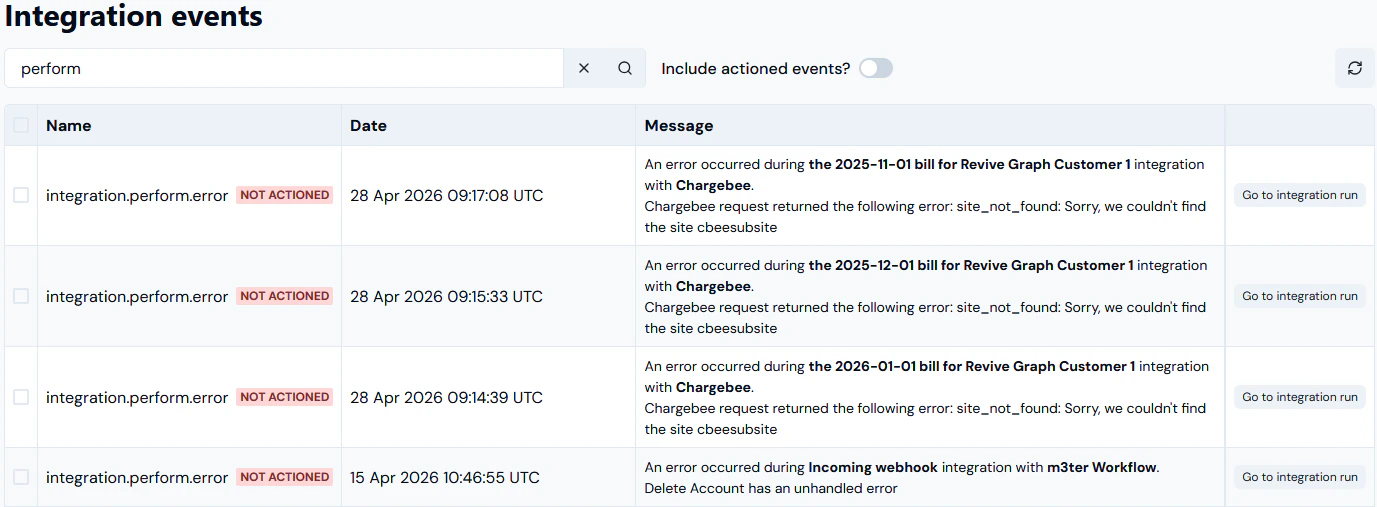
The Integration events page opens and lists any existing error Events generated for your Organization:In this example:
Threeintegration.perform.error Event are listed for a Chargebee integration.
Anintegration.perform.error Event is listed for an incoming webhook integration with a m3sh Workflow.
You can read off the details of the Event:
NAME. The Event type.
DATE. A timestamp of when the Event occurred.
MESSAGE. Details of the cause of the Event and suggested remedial action you can take.
ACTIONED/NOT ACTIONED. All of the Events are shown as NOT ACTIONED.
Depending on the type of error Event, an appropriate button is also provided and which allows you to follow-up and resolve the error.
If you want to follow-up and resolve the error, click the follow-up and resolve button:
integration.validation.error. Select Go to integration run:
The relevant Integrations run details page opens and you can troubleshoot the perform error Event. For more details, see Reviewing Integration Run Details.
The External mappings>Create page opens. The m3ter entity and m3ter entity type fields are automatically populated and you can proceed to create the required mapping. For more details, see Creating and Managing External Mappings.
integration.authentication.error. Select Go to integration:
The relevant Integration configuration details page opens and you can proceed to configure the correct authentication for the integration’s connection to the 3rd-party system. For more details, see the relevant Integrations topic in this section.
integration.perform.error. Select Go to integration run:
The relevant Integrations run details page opens and you can troubleshoot the perform error Event. For more details, see Reviewing Integration Run Details.
integration.disabled.error. Select Go to integration:
The relevant Integration configuration details page opens where you can select to re-enable the Integration or fix any Credential issues.
Note. An integration is automatically disabled if there have been 20 successive previous error Event responses to earlier attempts to run the integration. Please check the earlier error Events to resolve any issues preventing the integration from running before you re-enable the integration.
For example, if we select Go to integration run for the integration.perform.error Event listed for a Chargebee integration, the Integration run details page opens:
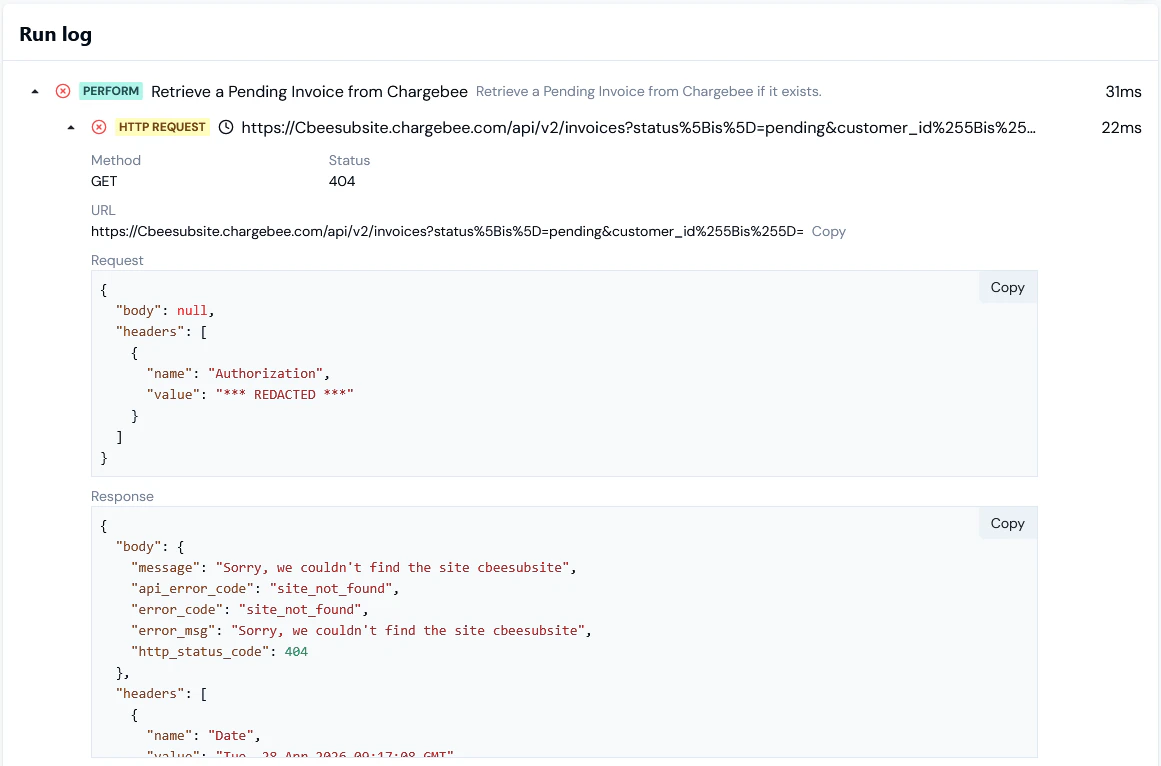
On the Run log panel, drill into the PERFORM error and read-off the reason:
You can expand the HTTP REQUEST and inspect the details of the request and response:
Marking Events as Actioned
When you have followed-up and resolved an error Event, you can mark it as actioned to remove it from the Integration events listTo mark an Event as actioned and remove it from the Events list:
Select the checkbox of the Event you want to mark as actioned.
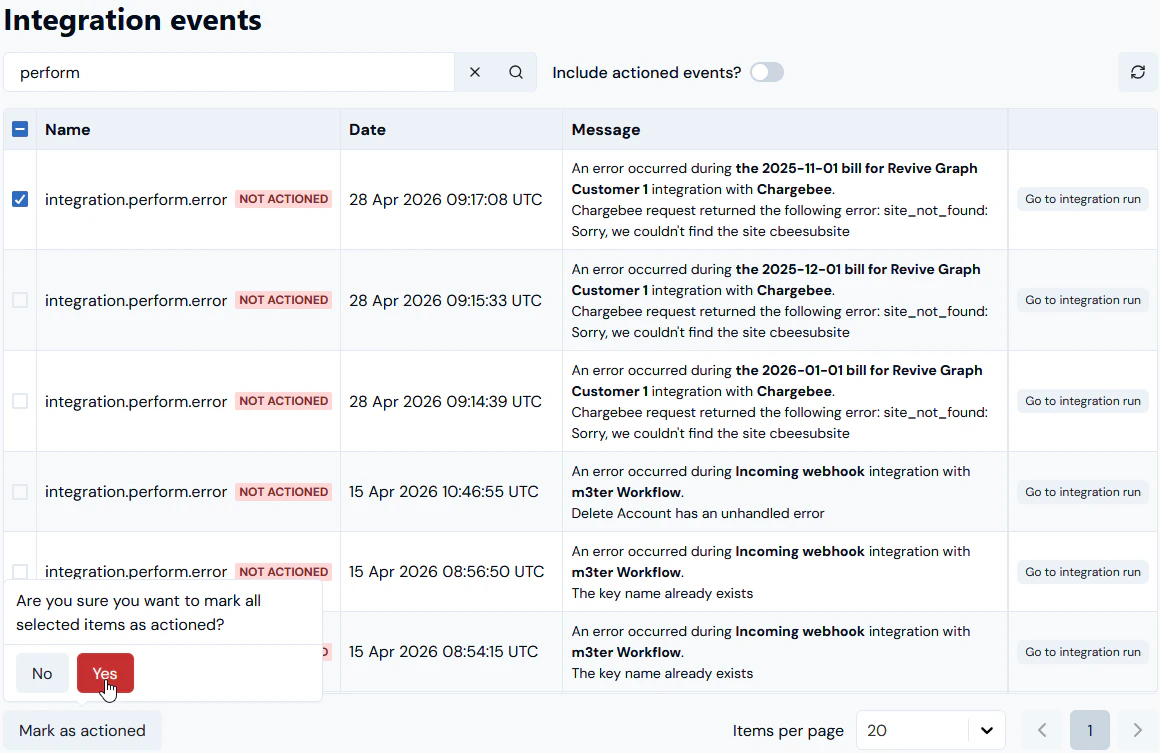
Select the Mark as actioned button. A confirmation popup appears:
Select Yes to confirm. The page refreshes and the checked Event is removed from the Integration events list.
Tip: Mark multiple Events as actioned? You can check-off multiple Events to mark them all as actioned at the same time.
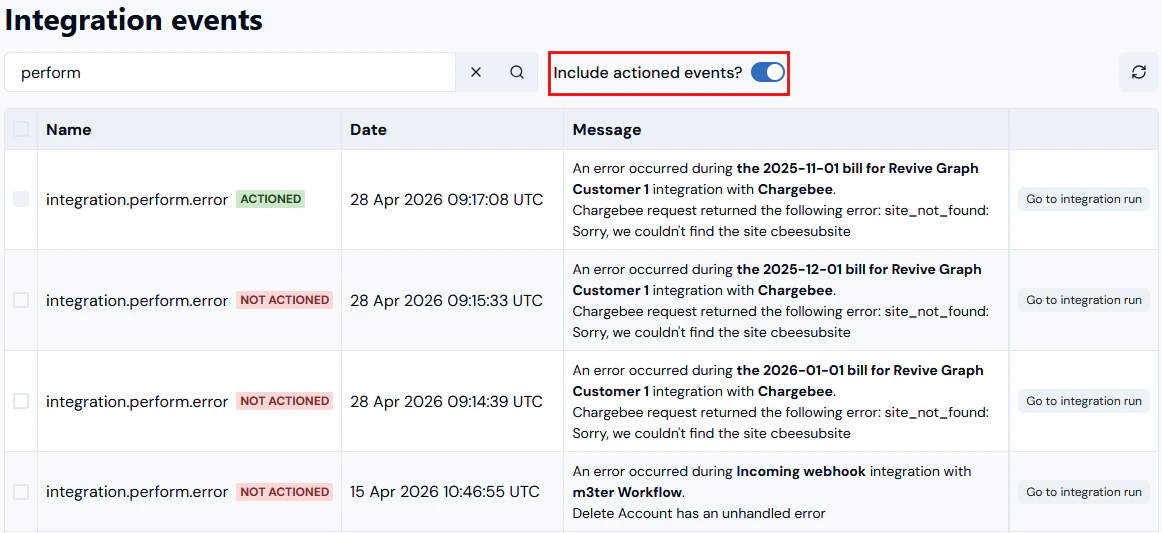
If you want to check again on Events that you’ve already actioned, enable the Include actioned events? switch. The page refreshes and any actioned Events are added back into the Integration events list, and are clearly marked as ACTIONED:
{"docsConfig":{"theme":"aspen","$schema":"https://mintlify.com/docs.json","name":"m3ter Documentation","description":"Guides, learning resources and API reference for integrating with m3ter","colors":{"primary":"#4caf4c","dark":"#449d44"},"logo":{"light":"https://mintcdn.com/m3ter/t6C65JBQiQOFtjBy/images/m3ter-logo-blue-sf.svg?fit=max\u0026auto=format\u0026n=t6C65JBQiQOFtjBy\u0026q=85\u0026s=3928db28c84ec6950e43caf96e635d80","dark":"https://mintcdn.com/m3ter/t6C65JBQiQOFtjBy/images/m3ter-logo-white-sf.svg?fit=max\u0026auto=format\u0026n=t6C65JBQiQOFtjBy\u0026q=85\u0026s=a018cb782e49a2fbdd811276476d0605"},"favicon":"https://mintcdn.com/m3ter/T0RRts393DSUkWFc/favicon.svg?fit=max\u0026auto=format\u0026n=T0RRts393DSUkWFc\u0026q=85\u0026s=9492b54cc98df6775983b287b6f865cd","navbar":{"links":[{"href":"https://m3ter.freshdesk.com","label":"Support"},{"href":"https://console.m3ter.com","label":"Console"}],"primary":{"type":"button","label":"Schedule a demo","href":"https://www.m3ter.com/contact"}},"footer":{"socials":{"linkedin":"https://uk.linkedin.com/company/m3ter","x":"https://x.com/m3terHQ","github":"https://github.com/m3ter-com"},"links":[{"items":[{"label":"Website","href":"https://www.m3ter.com"},{"label":"Legal","href":"https://www.m3ter.com/legal"},{"label":"Security","href":"https://www.m3ter.com/security"},{"label":"Trust Center","href":"https://trust.m3ter.com"}]}]},"fonts":{"family":"Montserrat"},"icons":{"library":"lucide"},"styling":{"eyebrows":"breadcrumbs","latex":false},"integrations":{"ga4":{"measurementId":"G-V9C7TTPRQT"}},"contextual":{"options":["copy","view"],"display":"header"},"thumbnails":{"fonts":{"family":"Montserrat"}},"navigation":{"pages":[]}},"deployment":{"deploymentMetadataValue":{"subdomain":"m3ter","hasAudioNarration":false,"actualSubdomain":"m3ter","customDomains":["docs.m3ter.com"],"gitSource":{"type":"github","owner":"m3ter-com","repo":"m3ter-docs","deployBranch":"main","contentDirectory":"","isPrivate":true,"mountPath":"","label":""},"entitlements":{"AI_CHAT":{"status":"ENABLED"},"WEB_MCP":{"status":"ENABLED"},"NARRATION":{"status":"ENABLED"}},"buildId":"6afd7e9c7d9a0e231c56ca16","clientVersion":"0.0.4270","searchFilterCounts":[{"language":"default","tag":"Guides","count":402},{"language":"default","tag":"API Reference","count":397},{"language":"default","tag":"Endpoints","count":391},{"language":"default","tag":"Integrations","count":69},{"language":"default","tag":"m3sh Function Reference","count":66},{"language":"default","tag":"Synthetic functions","count":50},{"language":"default","tag":"m3ter","count":50},{"language":"default","tag":"m3sh","count":43},{"language":"default","tag":"End-Customer Accounts","count":27},{"language":"default","tag":"m3ter Connector for Salesforce","count":24}]},"assistantConfig":{"enableAskAiButton":true,"enableStarterQuestions":false,"enableAskAiSearchBar":false},"basePath":"","hasChatPermissions":true,"hasWebMcpPermissions":true,"toggles":[],"googleFontsInlined":true},"customCss":[]}
{"page":{"pagePath":"guides/integrations/setting-up-integrations/reviewing-and-resolving-integration-events","slug":"/guides/integrations/setting-up-integrations/reviewing-and-resolving-integration-events","pageMetadata":{"title":"Reviewing and Resolving Integration Events","description":null,"href":"/guides/integrations/setting-up-integrations/reviewing-and-resolving-integration-events"},"pageType":"default","mdx":{"mdxSource":{"compiledSource":"\"use strict\";const{Fragment:_Fragment,jsx:_jsx,jsxs:_jsxs}=arguments[0];const{useMDXComponents:_provideComponents}=arguments[0];function _createMdxContent(props){const _components={a:`a`,code:`code`,em:`em`,li:`li`,ol:`ol`,p:`p`,strong:`strong`,ul:`ul`,..._provideComponents(),...props.components},{Heading,OptimizedImage,Tip}=_components;if(!Heading)_missingMdxReference(`Heading`,true);if(!OptimizedImage)_missingMdxReference(`OptimizedImage`,true);if(!Tip)_missingMdxReference(`Tip`,true);return _jsxs(_Fragment,{children:[_jsx(_components.p,{children:`Five system Events are generated for errors that might occur with your integrations:`}),`\n`,_jsxs(_components.ul,{children:[`\n`,_jsx(_components.li,{children:_jsx(_components.strong,{children:`integration.validation.error`})}),`\n`,_jsx(_components.li,{children:_jsx(_components.strong,{children:`integration.missingaccountmapping.error`})}),`\n`,_jsx(_components.li,{children:_jsx(_components.strong,{children:`integration.authentication.error`})}),`\n`,_jsx(_components.li,{children:_jsx(_components.strong,{children:`integration.perform.error`})}),`\n`,_jsx(_components.li,{children:_jsx(_components.strong,{children:`integration.disabled.error`})}),`\n`]}),`\n`,_jsxs(_components.p,{children:[`In the `,_jsx(_components.strong,{children:`m3sh`}),` section of the Console on the `,_jsx(_components.strong,{children:`Integration events`}),` page, you can review and follow up on integrations error Events generated for your Organization and troubleshoot and resolve them. When you have followed-up on an error Event and resolved it, you can mark the event as actioned and remove it from the Events list:`]}),`\n`,_jsxs(_components.ul,{children:[`\n`,_jsx(_components.li,{children:_jsx(_components.a,{href:`/guides/integrations/setting-up-integrations/reviewing-and-resolving-integration-events#reviewing-and-resolving-events`,children:`Reviewing and Resolving Events`})}),`\n`,_jsx(_components.li,{children:_jsx(_components.a,{href:`/guides/integrations/setting-up-integrations/reviewing-and-resolving-integration-events#marking-events-as-actioned`,children:`Marking Events as Actioned`})}),`\n`]}),`\n`,_jsx(Heading,{level:`2`,id:`reviewing-and-resolving-events`,children:`Reviewing and Resolving Events`}),`\n`,_jsx(_components.p,{children:_jsx(_components.strong,{children:`To review and resolve integration error Events:`})}),`\n`,_jsxs(_components.ol,{children:[`\n`,_jsxs(_components.li,{children:[`Select `,_jsx(_components.strong,{children:`m3sh`}),`:`]}),`\n`]}),`\n`,_jsxs(_components.p,{children:[`The `,_jsx(_components.strong,{children:`Workflows`}),` page opens.`]}),`\n`,_jsxs(_components.ol,{start:`2`,children:[`\n`,_jsxs(_components.li,{children:[`Select `,_jsx(_components.strong,{children:`Integration events`}),`:`]}),`\n`]}),`\n`,_jsx(OptimizedImage,{src:`https://mintcdn.com/m3ter/UNNNqzWAlbEgfOnu/images/IntegEvents12.png?fit=max\u0026auto=format\u0026n=UNNNqzWAlbEgfOnu\u0026q=85\u0026s=70d29ec46b1936066cd7abaf3faac61d`,alt:`Integ Events12`,title:`Integ Events12`,style:{width:`22%`},\"data-og-width\":`179`,width:`179`,\"data-og-height\":`50`,height:`50`,\"data-path\":`images/IntegEvents12.png`,\"data-optimize\":`true`,\"data-opv\":`3`,srcset:`https://mintcdn.com/m3ter/UNNNqzWAlbEgfOnu/images/IntegEvents12.png?w=280\u0026fit=max\u0026auto=format\u0026n=UNNNqzWAlbEgfOnu\u0026q=85\u0026s=97308a2ba89e29a567b110a8dabd4814 280w, https://mintcdn.com/m3ter/UNNNqzWAlbEgfOnu/images/IntegEvents12.png?w=560\u0026fit=max\u0026auto=format\u0026n=UNNNqzWAlbEgfOnu\u0026q=85\u0026s=b6c69e2be7806ec21401d8b934850555 560w, https://mintcdn.com/m3ter/UNNNqzWAlbEgfOnu/images/IntegEvents12.png?w=840\u0026fit=max\u0026auto=format\u0026n=UNNNqzWAlbEgfOnu\u0026q=85\u0026s=856ed107727fbf98459a1fdec1334030 840w, https://mintcdn.com/m3ter/UNNNqzWAlbEgfOnu/images/IntegEvents12.png?w=1100\u0026fit=max\u0026auto=format\u0026n=UNNNqzWAlbEgfOnu\u0026q=85\u0026s=716ba60d0446a181ae552b958d503eca 1100w, https://mintcdn.com/m3ter/UNNNqzWAlbEgfOnu/images/IntegEvents12.png?w=1650\u0026fit=max\u0026auto=format\u0026n=UNNNqzWAlbEgfOnu\u0026q=85\u0026s=5d761883182f8265fc2afd237ab9f20c 1650w, https://mintcdn.com/m3ter/UNNNqzWAlbEgfOnu/images/IntegEvents12.png?w=2500\u0026fit=max\u0026auto=format\u0026n=UNNNqzWAlbEgfOnu\u0026q=85\u0026s=b25ac254d664ee17c6ba5654e3ec4192 2500w`}),`\n`,_jsxs(_components.p,{children:[`The `,_jsx(_components.strong,{children:`Integration events`}),` page opens and lists any existing error Events generated for your Organization:`]}),`\n`,_jsx(OptimizedImage,{src:`https://mintcdn.com/m3ter/UNNNqzWAlbEgfOnu/images/IntegEvents13.png?fit=max\u0026auto=format\u0026n=UNNNqzWAlbEgfOnu\u0026q=85\u0026s=519ec1590de2902a3111d18055c4deef`,alt:`Integ Events13`,\"data-og-width\":`1377`,width:`1377`,\"data-og-height\":`507`,height:`507`,\"data-path\":`images/IntegEvents13.png`,\"data-optimize\":`true`,\"data-opv\":`3`,srcset:`https://mintcdn.com/m3ter/UNNNqzWAlbEgfOnu/images/IntegEvents13.png?w=280\u0026fit=max\u0026auto=format\u0026n=UNNNqzWAlbEgfOnu\u0026q=85\u0026s=7f356c9edf9db0007c3a51970f2ca8f8 280w, https://mintcdn.com/m3ter/UNNNqzWAlbEgfOnu/images/IntegEvents13.png?w=560\u0026fit=max\u0026auto=format\u0026n=UNNNqzWAlbEgfOnu\u0026q=85\u0026s=45b1e6bbd10ea04cbc5466604dfb5387 560w, https://mintcdn.com/m3ter/UNNNqzWAlbEgfOnu/images/IntegEvents13.png?w=840\u0026fit=max\u0026auto=format\u0026n=UNNNqzWAlbEgfOnu\u0026q=85\u0026s=12da92ca9cfa5eedd166b1f4b042c904 840w, https://mintcdn.com/m3ter/UNNNqzWAlbEgfOnu/images/IntegEvents13.png?w=1100\u0026fit=max\u0026auto=format\u0026n=UNNNqzWAlbEgfOnu\u0026q=85\u0026s=fd4b1e755742baa781feafcee6ce5409 1100w, https://mintcdn.com/m3ter/UNNNqzWAlbEgfOnu/images/IntegEvents13.png?w=1650\u0026fit=max\u0026auto=format\u0026n=UNNNqzWAlbEgfOnu\u0026q=85\u0026s=33a556e91c94a72e054c15e9fb219063 1650w, https://mintcdn.com/m3ter/UNNNqzWAlbEgfOnu/images/IntegEvents13.png?w=2500\u0026fit=max\u0026auto=format\u0026n=UNNNqzWAlbEgfOnu\u0026q=85\u0026s=10a9d3b0211394bc1a334a72ba868092 2500w`}),`\n`,_jsx(_components.p,{children:`In this example:`}),`\n`,_jsxs(_components.ul,{children:[`\n`,_jsxs(_components.li,{children:[`Three`,_jsx(_components.code,{children:`integration.perform.error`}),` Event are listed for a `,_jsx(_components.strong,{children:`Chargebee`}),` integration.`]}),`\n`,_jsxs(_components.li,{children:[`An`,_jsx(_components.code,{children:`integration.perform.error`}),` Event is listed for an `,_jsx(_components.strong,{children:`incoming webhook`}),` integration with a `,_jsx(_components.strong,{children:`m3sh Workflow`}),`.`]}),`\n`]}),`\n`,_jsx(_components.p,{children:`You can read off the details of the Event:`}),`\n`,_jsxs(_components.ul,{children:[`\n`,_jsxs(_components.li,{children:[_jsx(_components.strong,{children:`NAME`}),`. The Event type.`]}),`\n`,_jsxs(_components.li,{children:[_jsx(_components.strong,{children:`DATE`}),`. A timestamp of when the Event occurred.`]}),`\n`,_jsxs(_components.li,{children:[_jsx(_components.strong,{children:`MESSAGE`}),`. Details of the cause of the Event and suggested remedial action you can take.`]}),`\n`,_jsxs(_components.li,{children:[_jsx(_components.strong,{children:`ACTIONED/NOT ACTIONED`}),`. All of the Events are shown as `,_jsx(_components.strong,{children:`NOT ACTIONED`}),`.`]}),`\n`]}),`\n`,_jsx(_components.p,{children:`Depending on the type of error Event, an appropriate button is also provided and which allows you to follow-up and resolve the error.`}),`\n`,_jsxs(_components.ol,{start:`3`,children:[`\n`,_jsx(_components.li,{children:`If you want to follow-up and resolve the error, click the follow-up and resolve button:`}),`\n`]}),`\n`,_jsxs(_components.ul,{children:[`\n`,_jsxs(_components.li,{children:[_jsx(_components.strong,{children:`integration.validation.error`}),`. Select `,_jsx(_components.strong,{children:`Go to integration run`}),`:`,`\n`,_jsxs(_components.ul,{children:[`\n`,_jsxs(_components.li,{children:[`The relevant `,_jsx(_components.strong,{children:`Integrations run details`}),` page opens and you can troubleshoot the perform error Event. For more details, see `,_jsx(_components.a,{href:`/guides/integrations/setting-up-integrations/reviewing-integration-run-details`,children:`Reviewing Integration Run Details`}),`.`]}),`\n`]}),`\n`]}),`\n`,_jsxs(_components.li,{children:[_jsx(_components.strong,{children:`integration.missingaccountmapping.error`}),`. Select `,_jsx(_components.strong,{children:`Create external mapping`}),`:`,`\n`,_jsxs(_components.ul,{children:[`\n`,_jsxs(_components.li,{children:[`The `,_jsx(_components.strong,{children:`External mappings>Create`}),` page opens. The `,_jsx(_components.strong,{children:`m3ter entity`}),` and `,_jsx(_components.strong,{children:`m3ter entity type`}),` fields are automatically populated and you can proceed to create the required mapping. For more details, see `,_jsx(_components.a,{href:`/guides/integrations/setting-up-integrations/creating-and-managing-external-mappings`,children:`Creating and Managing External Mappings`}),`.`]}),`\n`]}),`\n`]}),`\n`,_jsxs(_components.li,{children:[_jsx(_components.strong,{children:`integration.authentication.error`}),`. Select `,_jsx(_components.strong,{children:`Go to integration`}),`:`,`\n`,_jsxs(_components.ul,{children:[`\n`,_jsxs(_components.li,{children:[`The relevant `,_jsx(_components.strong,{children:`Integration configuration details`}),` page opens and you can proceed to configure the correct authentication for the integration’s connection to the 3rd-party system. For more details, see the relevant `,_jsx(_components.em,{children:`Integrations`}),` topic in this `,_jsx(_components.a,{href:`/guides/integrations/setting-up-integrations`,children:`section`}),`.`]}),`\n`]}),`\n`]}),`\n`,_jsxs(_components.li,{children:[_jsx(_components.strong,{children:`integration.perform.error`}),`. Select `,_jsx(_components.strong,{children:`Go to integration run`}),`:`,`\n`,_jsxs(_components.ul,{children:[`\n`,_jsxs(_components.li,{children:[`The relevant `,_jsx(_components.strong,{children:`Integrations run details`}),` page opens and you can troubleshoot the perform error Event. For more details, see `,_jsx(_components.a,{href:`/guides/integrations/setting-up-integrations/reviewing-integration-run-details`,children:`Reviewing Integration Run Details`}),`.`]}),`\n`]}),`\n`]}),`\n`,_jsxs(_components.li,{children:[_jsx(_components.strong,{children:`integration.disabled.error`}),`. Select `,_jsx(_components.strong,{children:`Go to integration`}),`:`,`\n`,_jsxs(_components.ul,{children:[`\n`,_jsxs(_components.li,{children:[`The relevant `,_jsx(_components.strong,{children:`Integration configuration details`}),` page opens where you can select to re-enable the Integration or fix any Credential issues.`,`\n`,_jsxs(_components.ul,{children:[`\n`,_jsxs(_components.li,{children:[_jsx(_components.strong,{children:`Note`}),`. An integration is automatically disabled if there have been 20 successive previous error Event responses to earlier attempts to run the integration. Please check the earlier error Events to resolve any issues preventing the integration from running before you re-enable the integration.`]}),`\n`]}),`\n`]}),`\n`]}),`\n`]}),`\n`]}),`\n`,_jsxs(_components.ol,{start:`4`,children:[`\n`,_jsxs(_components.li,{children:[`For example, if we select `,_jsx(_components.strong,{children:`Go to integration run`}),` for the `,_jsx(_components.code,{children:`integration.perform.error`}),` Event listed for a Chargebee integration, the `,_jsx(_components.strong,{children:`Integration run details`}),` page opens:`]}),`\n`]}),`\n`,_jsx(OptimizedImage,{src:`https://mintcdn.com/m3ter/_WrggqO-h-Q_N-7Q/images/IntegEvents14A.png?fit=max\u0026auto=format\u0026n=_WrggqO-h-Q_N-7Q\u0026q=85\u0026s=c7e16a385882c9b3928630f54e24e298`,alt:`Integ Events14a`,\"data-og-width\":`1163`,width:`1163`,\"data-og-height\":`585`,height:`585`,\"data-path\":`images/IntegEvents14A.png`,\"data-optimize\":`true`,\"data-opv\":`3`,srcset:`https://mintcdn.com/m3ter/_WrggqO-h-Q_N-7Q/images/IntegEvents14A.png?w=280\u0026fit=max\u0026auto=format\u0026n=_WrggqO-h-Q_N-7Q\u0026q=85\u0026s=08381bec668c93786b2d3c30f1c04e89 280w, https://mintcdn.com/m3ter/_WrggqO-h-Q_N-7Q/images/IntegEvents14A.png?w=560\u0026fit=max\u0026auto=format\u0026n=_WrggqO-h-Q_N-7Q\u0026q=85\u0026s=b19c7d89dd884f29161cc57d7ee715b5 560w, https://mintcdn.com/m3ter/_WrggqO-h-Q_N-7Q/images/IntegEvents14A.png?w=840\u0026fit=max\u0026auto=format\u0026n=_WrggqO-h-Q_N-7Q\u0026q=85\u0026s=4c295cf30fb08a7b821f97c67e3c8194 840w, https://mintcdn.com/m3ter/_WrggqO-h-Q_N-7Q/images/IntegEvents14A.png?w=1100\u0026fit=max\u0026auto=format\u0026n=_WrggqO-h-Q_N-7Q\u0026q=85\u0026s=8831057380d74ab74ade7605db2f58a6 1100w, https://mintcdn.com/m3ter/_WrggqO-h-Q_N-7Q/images/IntegEvents14A.png?w=1650\u0026fit=max\u0026auto=format\u0026n=_WrggqO-h-Q_N-7Q\u0026q=85\u0026s=1e257a8dd025d994d93464946532bcb0 1650w, https://mintcdn.com/m3ter/_WrggqO-h-Q_N-7Q/images/IntegEvents14A.png?w=2500\u0026fit=max\u0026auto=format\u0026n=_WrggqO-h-Q_N-7Q\u0026q=85\u0026s=236134d80c1e8581de89767e00e346de 2500w`}),`\n`,_jsxs(_components.ol,{start:`5`,children:[`\n`,_jsxs(_components.li,{children:[`On the `,_jsx(_components.strong,{children:`Run log`}),` panel, drill into the `,_jsx(_components.strong,{children:`PERFORM`}),` error and read-off the reason:`]}),`\n`]}),`\n`,_jsx(OptimizedImage,{src:`https://mintcdn.com/m3ter/UNNNqzWAlbEgfOnu/images/IntegEvents15.png?fit=max\u0026auto=format\u0026n=UNNNqzWAlbEgfOnu\u0026q=85\u0026s=c7d1a30008b889f767efe7d0a4d1efb3`,alt:`Integ Events15`,\"data-og-width\":`1161`,width:`1161`,\"data-og-height\":`219`,height:`219`,\"data-path\":`images/IntegEvents15.png`,\"data-optimize\":`true`,\"data-opv\":`3`,srcset:`https://mintcdn.com/m3ter/UNNNqzWAlbEgfOnu/images/IntegEvents15.png?w=280\u0026fit=max\u0026auto=format\u0026n=UNNNqzWAlbEgfOnu\u0026q=85\u0026s=fe02849160134d20d08fe1d27d69c88f 280w, https://mintcdn.com/m3ter/UNNNqzWAlbEgfOnu/images/IntegEvents15.png?w=560\u0026fit=max\u0026auto=format\u0026n=UNNNqzWAlbEgfOnu\u0026q=85\u0026s=d963fa0877988b4e71723aadab636ced 560w, https://mintcdn.com/m3ter/UNNNqzWAlbEgfOnu/images/IntegEvents15.png?w=840\u0026fit=max\u0026auto=format\u0026n=UNNNqzWAlbEgfOnu\u0026q=85\u0026s=3090d334b80bd3474aab5152bbab1f61 840w, https://mintcdn.com/m3ter/UNNNqzWAlbEgfOnu/images/IntegEvents15.png?w=1100\u0026fit=max\u0026auto=format\u0026n=UNNNqzWAlbEgfOnu\u0026q=85\u0026s=506e04a4e177da6ba094487f12701ddf 1100w, https://mintcdn.com/m3ter/UNNNqzWAlbEgfOnu/images/IntegEvents15.png?w=1650\u0026fit=max\u0026auto=format\u0026n=UNNNqzWAlbEgfOnu\u0026q=85\u0026s=0812c6089b1e89bdcc9686003ee495d9 1650w, https://mintcdn.com/m3ter/UNNNqzWAlbEgfOnu/images/IntegEvents15.png?w=2500\u0026fit=max\u0026auto=format\u0026n=UNNNqzWAlbEgfOnu\u0026q=85\u0026s=93faf3b9c659c83dbe43514500ab1181 2500w`}),`\n`,_jsxs(_components.ol,{start:`6`,children:[`\n`,_jsxs(_components.li,{children:[`You can expand the `,_jsx(_components.strong,{children:`HTTP REQUEST`}),` and inspect the details of the request and response:`]}),`\n`]}),`\n`,_jsx(OptimizedImage,{src:`https://mintcdn.com/m3ter/UNNNqzWAlbEgfOnu/images/IntegEvents16.png?fit=max\u0026auto=format\u0026n=UNNNqzWAlbEgfOnu\u0026q=85\u0026s=a380f21970e422417d71a8e5da3a286a`,alt:`Integ Events16`,\"data-og-width\":`1161`,width:`1161`,\"data-og-height\":`766`,height:`766`,\"data-path\":`images/IntegEvents16.png`,\"data-optimize\":`true`,\"data-opv\":`3`,srcset:`https://mintcdn.com/m3ter/UNNNqzWAlbEgfOnu/images/IntegEvents16.png?w=280\u0026fit=max\u0026auto=format\u0026n=UNNNqzWAlbEgfOnu\u0026q=85\u0026s=1dba1bb3ac319625c1be3400a41d6bb7 280w, https://mintcdn.com/m3ter/UNNNqzWAlbEgfOnu/images/IntegEvents16.png?w=560\u0026fit=max\u0026auto=format\u0026n=UNNNqzWAlbEgfOnu\u0026q=85\u0026s=60787c016592be2e4a45d7ee63bcbcba 560w, https://mintcdn.com/m3ter/UNNNqzWAlbEgfOnu/images/IntegEvents16.png?w=840\u0026fit=max\u0026auto=format\u0026n=UNNNqzWAlbEgfOnu\u0026q=85\u0026s=d7d34684a190b3a86c1f34362b23d7ee 840w, https://mintcdn.com/m3ter/UNNNqzWAlbEgfOnu/images/IntegEvents16.png?w=1100\u0026fit=max\u0026auto=format\u0026n=UNNNqzWAlbEgfOnu\u0026q=85\u0026s=cb68fa8bc721e4525d572da7cdb14308 1100w, https://mintcdn.com/m3ter/UNNNqzWAlbEgfOnu/images/IntegEvents16.png?w=1650\u0026fit=max\u0026auto=format\u0026n=UNNNqzWAlbEgfOnu\u0026q=85\u0026s=87668ed570bb881fbadad304a4bbf5a2 1650w, https://mintcdn.com/m3ter/UNNNqzWAlbEgfOnu/images/IntegEvents16.png?w=2500\u0026fit=max\u0026auto=format\u0026n=UNNNqzWAlbEgfOnu\u0026q=85\u0026s=788bc09bf1155f22745d485ecf2bce0d 2500w`}),`\n`,_jsx(Heading,{level:`2`,id:`marking-events-as-actioned`,children:`Marking Events as Actioned`}),`\n`,_jsx(_components.p,{children:`When you have followed-up and resolved an error Event, you can mark it as actioned to remove it from the Integration events list`}),`\n`,_jsx(_components.p,{children:_jsx(_components.strong,{children:`To mark an Event as actioned and remove it from the Events list:`})}),`\n`,_jsxs(_components.ol,{children:[`\n`,_jsx(_components.li,{children:`Select the checkbox of the Event you want to mark as actioned.`}),`\n`,_jsxs(_components.li,{children:[`Select the `,_jsx(_components.strong,{children:`Mark as actioned`}),` button. A confirmation popup appears:`]}),`\n`]}),`\n`,_jsx(OptimizedImage,{src:`https://mintcdn.com/m3ter/UNNNqzWAlbEgfOnu/images/IntegEvents17.png?fit=max\u0026auto=format\u0026n=UNNNqzWAlbEgfOnu\u0026q=85\u0026s=1d6574d23c6b9624099a776d274faf07`,alt:`Integ Events17`,\"data-og-width\":`1160`,width:`1160`,\"data-og-height\":`753`,height:`753`,\"data-path\":`images/IntegEvents17.png`,\"data-optimize\":`true`,\"data-opv\":`3`,srcset:`https://mintcdn.com/m3ter/UNNNqzWAlbEgfOnu/images/IntegEvents17.png?w=280\u0026fit=max\u0026auto=format\u0026n=UNNNqzWAlbEgfOnu\u0026q=85\u0026s=9e46eae9c5c1358ce5efe0d0835a30e4 280w, https://mintcdn.com/m3ter/UNNNqzWAlbEgfOnu/images/IntegEvents17.png?w=560\u0026fit=max\u0026auto=format\u0026n=UNNNqzWAlbEgfOnu\u0026q=85\u0026s=160d95645965956c4b058002dd3488ee 560w, https://mintcdn.com/m3ter/UNNNqzWAlbEgfOnu/images/IntegEvents17.png?w=840\u0026fit=max\u0026auto=format\u0026n=UNNNqzWAlbEgfOnu\u0026q=85\u0026s=77466500fc98b4b83278bb1e2817688c 840w, https://mintcdn.com/m3ter/UNNNqzWAlbEgfOnu/images/IntegEvents17.png?w=1100\u0026fit=max\u0026auto=format\u0026n=UNNNqzWAlbEgfOnu\u0026q=85\u0026s=e621c5889b2b3978109ade30398aed93 1100w, https://mintcdn.com/m3ter/UNNNqzWAlbEgfOnu/images/IntegEvents17.png?w=1650\u0026fit=max\u0026auto=format\u0026n=UNNNqzWAlbEgfOnu\u0026q=85\u0026s=6ea14dee65e8da211d8ac16553dd98d0 1650w, https://mintcdn.com/m3ter/UNNNqzWAlbEgfOnu/images/IntegEvents17.png?w=2500\u0026fit=max\u0026auto=format\u0026n=UNNNqzWAlbEgfOnu\u0026q=85\u0026s=4bbd357975bd5cc0cde0a96c0236acc4 2500w`}),`\n`,_jsxs(_components.ol,{start:`3`,children:[`\n`,_jsxs(_components.li,{children:[`Select `,_jsx(_components.strong,{children:`Yes`}),` to confirm. The page refreshes and the checked Event is removed from the `,_jsx(_components.strong,{children:`Integration events`}),` list.`]}),`\n`]}),`\n`,_jsx(Tip,{children:_jsxs(_components.p,{children:[_jsx(_components.strong,{children:`Tip: Mark multiple Events as actioned?`}),` You can check-off multiple Events to mark them all as actioned at the same time.`]})}),`\n`,_jsxs(_components.ol,{start:`4`,children:[`\n`,_jsxs(_components.li,{children:[`If you want to check again on Events that you’ve already actioned, enable the `,_jsx(_components.strong,{children:`Include actioned events?`}),` switch. The page refreshes and any actioned Events are added back into the `,_jsx(_components.strong,{children:`Integration events`}),` list, and are clearly marked as `,_jsx(_components.strong,{children:`ACTIONED`}),`:`]}),`\n`]}),`\n`,_jsx(OptimizedImage,{src:`https://mintcdn.com/m3ter/UNNNqzWAlbEgfOnu/images/IntegEvents18.png?fit=max\u0026auto=format\u0026n=UNNNqzWAlbEgfOnu\u0026q=85\u0026s=471c1caf151180da73beed4058678638`,alt:`Integ Events18`,\"data-og-width\":`1162`,width:`1162`,\"data-og-height\":`533`,height:`533`,\"data-path\":`images/IntegEvents18.png`,\"data-optimize\":`true`,\"data-opv\":`3`,srcset:`https://mintcdn.com/m3ter/UNNNqzWAlbEgfOnu/images/IntegEvents18.png?w=280\u0026fit=max\u0026auto=format\u0026n=UNNNqzWAlbEgfOnu\u0026q=85\u0026s=898ea4138e62c05bebd2adff55ed8350 280w, https://mintcdn.com/m3ter/UNNNqzWAlbEgfOnu/images/IntegEvents18.png?w=560\u0026fit=max\u0026auto=format\u0026n=UNNNqzWAlbEgfOnu\u0026q=85\u0026s=85b99ac9edd187e5753fb65edf15627d 560w, https://mintcdn.com/m3ter/UNNNqzWAlbEgfOnu/images/IntegEvents18.png?w=840\u0026fit=max\u0026auto=format\u0026n=UNNNqzWAlbEgfOnu\u0026q=85\u0026s=575325883f59282245ae051f6752e2d4 840w, https://mintcdn.com/m3ter/UNNNqzWAlbEgfOnu/images/IntegEvents18.png?w=1100\u0026fit=max\u0026auto=format\u0026n=UNNNqzWAlbEgfOnu\u0026q=85\u0026s=afc573ef88644ff73b0bf70137b81698 1100w, https://mintcdn.com/m3ter/UNNNqzWAlbEgfOnu/images/IntegEvents18.png?w=1650\u0026fit=max\u0026auto=format\u0026n=UNNNqzWAlbEgfOnu\u0026q=85\u0026s=0495fe7456e67b04bb8b80536439628d 1650w, https://mintcdn.com/m3ter/UNNNqzWAlbEgfOnu/images/IntegEvents18.png?w=2500\u0026fit=max\u0026auto=format\u0026n=UNNNqzWAlbEgfOnu\u0026q=85\u0026s=0b5d7b80499fbfc37465256d2e44f601 2500w`})]})}function MDXContent(props={}){const{wrapper:MDXLayout}={..._provideComponents(),...props.components};return MDXLayout?_jsx(MDXLayout,{...props,children:_jsx(_createMdxContent,{...props})}):_createMdxContent(props)}return{default:MDXContent};function _missingMdxReference(id,component){throw new Error(`Expected `+(component?`component`:`object`)+\" `\"+id+\"` to be defined: you likely forgot to import, pass, or provide it.\")}","frontmatter":{},"scope":{"config":{},"pageMetadata":{"title":"Reviewing and Resolving Integration Events","description":null,"href":"/guides/integrations/setting-up-integrations/reviewing-and-resolving-integration-events"}}},"mdxSourceWithNoJs":null},"mdxExtracts":{"tableOfContents":[{"title":"Reviewing and Resolving Events","slug":"reviewing-and-resolving-events","depth":2,"children":[]},{"title":"Marking Events as Actioned","slug":"marking-events-as-actioned","depth":2,"children":[]}],"codeExamples":{}},"jsLinks":[],"subdomain":"m3ter","siteName":"m3ter Documentation","title":"Reviewing and Resolving Integration Events - m3ter Documentation","navMaps":{"firstHrefInVersion":{},"firstHrefInLanguage":{}},"lastModified":"2026-11-12T10:33:55.904Z","originalFileLocation":"guides/integrations/setting-up-integrations/reviewing-and-resolving-integration-events.mdx"},"headHtml":"\u003cscript data-mint-head>(function(){var d=document.documentElement,p=null;if(!p){try{p=localStorage.getItem(\"isDarkMode\")}catch(e){}if(p==='true')p='dark';else if(p==='false')p='light';if(p!=='light'\u0026\u0026p!=='dark'\u0026\u0026p!=='system')p=\"system\"}var r=p==='system'?(matchMedia(\"(prefers-color-scheme: dark)\").matches?'dark':'light'):p;d.classList.remove(r==='dark'?'light':'dark');d.classList.add(r);d.setAttribute(\"data-theme-preference\",p)})();\u003c/script>\u003cmeta data-mint-head name=\"application-name\" content=\"m3ter Documentation\">\u003cmeta data-mint-head name=\"generator\" content=\"Mintlify\">\u003clink data-mint-head rel=\"icon\" type=\"image/png\" sizes=\"192x192\" href=\"/mintlify-assets/_mintlify/favicons/m3ter/zwvZvZyvpa8TKV7c/_generated/favicon/android-chrome-192x192.png\" media=\"(prefers-color-scheme: light)\">\u003clink data-mint-head rel=\"apple-touch-icon\" type=\"image/png\" sizes=\"180x180\" href=\"/mintlify-assets/_mintlify/favicons/m3ter/zwvZvZyvpa8TKV7c/_generated/favicon/apple-touch-icon.png\">\u003clink data-mint-head rel=\"icon\" type=\"image/png\" sizes=\"16x16\" href=\"/mintlify-assets/_mintlify/favicons/m3ter/zwvZvZyvpa8TKV7c/_generated/favicon/favicon-16x16.png\" media=\"(prefers-color-scheme: light)\">\u003clink data-mint-head rel=\"icon\" type=\"image/png\" sizes=\"32x32\" href=\"/mintlify-assets/_mintlify/favicons/m3ter/zwvZvZyvpa8TKV7c/_generated/favicon/favicon-32x32.png\" media=\"(prefers-color-scheme: light)\">\u003clink data-mint-head rel=\"shortcut icon\" type=\"image/x-icon\" href=\"/mintlify-assets/_mintlify/favicons/m3ter/zwvZvZyvpa8TKV7c/_generated/favicon/favicon.ico\" media=\"(prefers-color-scheme: light)\">\u003clink data-mint-head rel=\"icon\" type=\"image/png\" sizes=\"192x192\" href=\"/mintlify-assets/_mintlify/favicons/m3ter/zwvZvZyvpa8TKV7c/_generated/favicon-dark/android-chrome-192x192.png\" media=\"(prefers-color-scheme: dark)\">\u003clink data-mint-head rel=\"icon\" type=\"image/png\" sizes=\"16x16\" href=\"/mintlify-assets/_mintlify/favicons/m3ter/zwvZvZyvpa8TKV7c/_generated/favicon-dark/favicon-16x16.png\" media=\"(prefers-color-scheme: dark)\">\u003clink data-mint-head rel=\"icon\" type=\"image/png\" sizes=\"32x32\" href=\"/mintlify-assets/_mintlify/favicons/m3ter/zwvZvZyvpa8TKV7c/_generated/favicon-dark/favicon-32x32.png\" media=\"(prefers-color-scheme: dark)\">\u003clink data-mint-head rel=\"shortcut icon\" type=\"image/x-icon\" href=\"/mintlify-assets/_mintlify/favicons/m3ter/zwvZvZyvpa8TKV7c/_generated/favicon-dark/favicon.ico\" media=\"(prefers-color-scheme: dark)\">\u003cmeta data-mint-head property=\"og:title\" content=\"Reviewing and Resolving Integration Events - m3ter Documentation\">\u003cmeta data-mint-head property=\"og:site_name\" content=\"m3ter Documentation\">\u003cmeta data-mint-head property=\"og:url\" content=\"https://docs.m3ter.com/guides/integrations/setting-up-integrations/reviewing-and-resolving-integration-events\">\u003cmeta data-mint-head property=\"og:type\" content=\"website\">\u003cmeta data-mint-head property=\"og:image\" content=\"https://m3ter.mintlify.site/_mintlify/api/og/v2?division=m3sh\u0026amp;title=Reviewing+and+Resolving+Integration+Events\u0026amp;theme=f65f867c9d6db06823eaf387\u0026amp;signature=b938c5d0432dc8a8940ebf1c83eb5429581f7c21b6d236f15c4468c5b5134b06\">\u003cmeta data-mint-head property=\"og:image:width\" content=\"1200\">\u003cmeta data-mint-head property=\"og:image:height\" content=\"630\">\u003cmeta data-mint-head name=\"twitter:card\" content=\"summary_large_image\">\u003cmeta data-mint-head name=\"twitter:title\" content=\"Reviewing and Resolving Integration Events - m3ter Documentation\">\u003cmeta data-mint-head name=\"twitter:image\" content=\"https://m3ter.mintlify.site/_mintlify/api/og/v2?division=m3sh\u0026amp;title=Reviewing+and+Resolving+Integration+Events\u0026amp;theme=f65f867c9d6db06823eaf387\u0026amp;signature=b938c5d0432dc8a8940ebf1c83eb5429581f7c21b6d236f15c4468c5b5134b06\">\u003cmeta data-mint-head name=\"twitter:image:width\" content=\"1200\">\u003cmeta data-mint-head name=\"twitter:image:height\" content=\"630\">\u003cmeta data-mint-head name=\"msapplication-config\" content=\"/mintlify-assets/_mintlify/favicons/m3ter/zwvZvZyvpa8TKV7c/_generated/favicon/browserconfig.xml\">\u003cmeta data-mint-head name=\"apple-mobile-web-app-title\" content=\"m3ter Documentation\">\u003cmeta data-mint-head name=\"msapplication-TileColor\" content=\"#4caf4c\">\u003clink data-mint-head rel=\"canonical\" href=\"https://docs.m3ter.com/guides/integrations/setting-up-integrations/reviewing-and-resolving-integration-events\">\u003clink data-mint-head rel=\"alternate\" type=\"application/xml\" href=\"/sitemap.xml\">\u003clink data-mint-head rel=\"alternate\" type=\"text/markdown\" href=\"/guides/integrations/setting-up-integrations/reviewing-and-resolving-integration-events.md\">\u003cscript data-mint-head type=\"application/ld+json\">{\"@context\":\"https://schema.org\",\"@graph\":[{\"@type\":\"Organization\",\"@id\":\"https://docs.m3ter.com/#organization\",\"name\":\"m3ter Documentation\",\"url\":\"https://docs.m3ter.com\",\"logo\":{\"@type\":\"ImageObject\",\"url\":\"https://mintcdn.com/m3ter/t6C65JBQiQOFtjBy/images/m3ter-logo-blue-sf.svg?fit=max\u0026auto=format\u0026n=t6C65JBQiQOFtjBy\u0026q=85\u0026s=3928db28c84ec6950e43caf96e635d80\"}},{\"@type\":\"WebSite\",\"@id\":\"https://docs.m3ter.com#website\",\"name\":\"m3ter Documentation\",\"url\":\"https://docs.m3ter.com\",\"publisher\":{\"@id\":\"https://docs.m3ter.com/#organization\"}},{\"@type\":\"WebPage\",\"@id\":\"https://docs.m3ter.com/guides/integrations/setting-up-integrations/reviewing-and-resolving-integration-events#webpage\",\"url\":\"https://docs.m3ter.com/guides/integrations/setting-up-integrations/reviewing-and-resolving-integration-events\",\"name\":\"Reviewing and Resolving Integration Events\",\"dateModified\":\"2026-11-12T10:33:55.904Z\",\"isPartOf\":{\"@id\":\"https://docs.m3ter.com#website\"},\"breadcrumb\":{\"@id\":\"https://docs.m3ter.com/guides/integrations/setting-up-integrations/reviewing-and-resolving-integration-events#breadcrumb\"}},{\"@type\":\"BreadcrumbList\",\"@id\":\"https://docs.m3ter.com/guides/integrations/setting-up-integrations/reviewing-and-resolving-integration-events#breadcrumb\",\"itemListElement\":[{\"@type\":\"ListItem\",\"position\":1,\"name\":\"Guides\",\"item\":\"https://docs.m3ter.com/guides/getting-started/quick-start-worked-example\"},{\"@type\":\"ListItem\",\"position\":2,\"name\":\"m3sh\",\"item\":\"https://docs.m3ter.com/guides/m3sh-automation\"},{\"@type\":\"ListItem\",\"position\":3,\"name\":\"Reviewing and Resolving Integration Events\",\"item\":\"https://docs.m3ter.com/guides/integrations/setting-up-integrations/reviewing-and-resolving-integration-events\"}]},{\"@type\":[\"Article\",\"TechArticle\"],\"@id\":\"https://docs.m3ter.com/guides/integrations/setting-up-integrations/reviewing-and-resolving-integration-events#article\",\"headline\":\"Reviewing and Resolving Integration Events\",\"name\":\"Reviewing and Resolving Integration Events\",\"url\":\"https://docs.m3ter.com/guides/integrations/setting-up-integrations/reviewing-and-resolving-integration-events\",\"mainEntityOfPage\":{\"@id\":\"https://docs.m3ter.com/guides/integrations/setting-up-integrations/reviewing-and-resolving-integration-events#webpage\"},\"dateModified\":\"2026-11-12T10:33:55.904Z\",\"publisher\":{\"@id\":\"https://docs.m3ter.com/#organization\"},\"isPartOf\":{\"@id\":\"https://docs.m3ter.com#website\"}}]}\u003c/script>\u003cscript data-mint-head type=\"application/ld+json\">{\"@context\":\"https://schema.org\",\"@type\":\"WebSite\",\"name\":\"m3ter Documentation\",\"publisher\":{\"@type\":\"Organization\",\"name\":\"m3ter Documentation\"},\"provider\":{\"@type\":\"Organization\",\"name\":\"Mintlify\",\"url\":\"https://mintlify.com\"}}\u003c/script>","agentPointerHref":"/guides/integrations/setting-up-integrations/reviewing-and-resolving-integration-events.md","siteName":"m3ter Documentation","nav":{"global":null,"tabs":[{"tab":"Exploring m3ter","pages":[{"title":"Exploring m3ter","href":""}]},{"tab":"Guides","pages":[{"group":"Guides","pages":[{"group":"Getting Started","root":{"title":"Getting Started","href":"/guides/getting-started"},"expanded":false,"pages":[{"title":"Quick Start","href":"/guides/getting-started/quick-start-worked-example"},{"title":"m3ter Console","href":"/guides/getting-started/working-in-the-m3ter-console"},{"title":"Configuration Workflow","href":"/guides/getting-started/previewing-main-configuration-steps"},{"group":"Worked Examples","expanded":false,"pages":[{"title":"Worked Examples","href":"/guides/getting-started/metering-for-production-worked-examples"},{"title":"Example 1: Cloud Storage and File Cleanup","href":"/guides/getting-started/metering-for-production-worked-examples/worked-example-1-cloud-storage-and-file-cleanup"},{"title":"Example 2: Compound Aggregation for Sign-Up Bonus","href":"/guides/getting-started/metering-for-production-worked-examples/example-2-compound-aggregation-for-sign-up-bonus"},{"title":"Example 3: Segmented Aggregation on Single Meter Usage","href":"/guides/getting-started/metering-for-production-worked-examples/example-3-segmented-aggregation-on-single-meter-usage"}]},{"title":"Dates in m3ter - Quick Reference Starter","href":"/guides/getting-started/working-with-dates-in-m3ter-easy-reference"},{"title":"Feature Release Stages","href":"/guides/getting-started/feature-release-stages"},{"title":"Knowledge Index","href":"/guides/getting-started/knowledge-index"},{"title":"Contacting m3ter Support","href":"/guides/getting-started/contacting-m3ter-support"}]},{"group":"Authentication","root":{"title":"Authentication","href":"/guides/authenticating-with-the-platform"},"expanded":false,"pages":[{"title":"User/Password Authentication","href":"/guides/authenticating-with-the-platform/user-password-authentication"},{"title":"m3ter Single Sign-On","href":"/guides/authenticating-with-the-platform/m3ter-single-sign-on"},{"title":"Service Authentication","href":"/guides/authenticating-with-the-platform/service-authentication"}]},{"group":"Creating, Managing, and Reviewing Products","root":{"title":"Creating, Managing, and Reviewing Products","href":"/guides/creating-and-managing-products"},"expanded":false,"pages":[{"title":"Working with Custom Fields","href":"/guides/creating-and-managing-products/working-with-custom-fields"}]},{"group":"Usage Data: Meters","root":{"title":"Usage Data: Meters","href":"/guides/usage-data-meters"},"expanded":false,"pages":[{"title":"Reviewing Meter Options","mode":"default","href":"/guides/usage-data-meters/reviewing-meter-options"},{"title":"Creating Product Meters","href":"/guides/usage-data-meters/creating-meters"},{"title":"Creating Global Meters","href":"/guides/usage-data-meters/creating-global-meters"},{"title":"Working in Meter Details","href":"/guides/usage-data-meters/working-in-meter-details"},{"title":"Working with Meter Derived Fields and Examples","href":"/guides/usage-data-meters/derived-fields-for-meters-examples-and-supported-syntax"}]},{"group":"Pricing Metrics: Aggregations","root":{"title":"Pricing Metrics: Aggregations","href":"/guides/usage-data-aggregations"},"expanded":false,"pages":[{"title":"Reviewing Aggregation Options","href":"/guides/usage-data-aggregations/reviewing-aggregation-options"},{"title":"Creating Product Aggregations","href":"/guides/usage-data-aggregations/creating-aggregations"},{"title":"Creating Global Aggregations","href":"/guides/usage-data-aggregations/creating-global-aggregations"},{"title":"Compound Aggregations","href":"/guides/usage-data-aggregations/compound-aggregations"},{"title":"Working with Compound Aggregation Calculations","href":"/guides/usage-data-aggregations/compound-aggregation-calculations"},{"title":"Compound Aggregations - Examples","href":"/guides/usage-data-aggregations/compound-aggregations-examples"},{"title":"Segmented Aggregations","href":"/guides/usage-data-aggregations/segmented-aggregations"},{"title":"Custom SQL Aggregations","href":"/guides/usage-data-aggregations/custom-sql-aggregations"},{"title":"Reviewing Aggregation Details","href":"/guides/usage-data-aggregations/reviewing-aggregation-details"}]},{"group":"Recurring Charges: Counters","root":{"title":"Recurring Charges: Counters","href":"/guides/recurring-charges-counters"},"expanded":false,"pages":[{"title":"Creating Counters and Pricing Plans","href":"/guides/recurring-charges-counters/creating-counters"},{"title":"Understanding and Creating Counter Adjustments for Accounts","href":"/guides/recurring-charges-counters/creating-counter-adjustments-for-accounts"},{"title":"Recurring Charges Billing: Seat-Based Pricing","href":"/guides/recurring-charges-counters/reviewing-bills-for-recurring-charges"},{"title":"Recurring Charges Billing: Hybrid Pricing","href":"/guides/recurring-charges-counters/recurring-charges-example-2-hybrid-pricing"}]},{"group":"Plans and Pricing","root":{"title":"Plans and Pricing","href":"/guides/plans-and-pricing"},"expanded":false,"pages":[{"group":"Creating and Working with Plan Templates, Plans, and Plan Groups","root":{"title":"Creating and Working with Plan Templates, Plans, and Plan Groups","href":"/guides/plans-and-pricing/working-with-plan-templates-and-plans"},"expanded":false,"pages":[{"title":"Reviewing Options for Plans and Plan Templates","href":"/guides/plans-and-pricing/working-with-plan-templates-and-plans/reviewing-configuration-options-for-plans-and-plan-templates"},{"title":"Understanding Billing Options for Plan Templates/Plans","href":"/guides/plans-and-pricing/working-with-plan-templates-and-plans/understanding-billing-options-for-plan-templates-plans"},{"title":"Creating Plan Templates","href":"/guides/plans-and-pricing/working-with-plan-templates-and-plans/creating-plan-templates"},{"title":"Creating Plans","href":"/guides/plans-and-pricing/working-with-plan-templates-and-plans/creating-plans"},{"title":"Working in Plan Template and Plan Details","href":"/guides/plans-and-pricing/working-with-plan-templates-and-plans/working-in-plan-details"},{"title":"Editing and Deleting Plan Templates and Plans","href":"/guides/plans-and-pricing/working-with-plan-templates-and-plans/editing-plan-templates-and-plans"},{"title":"Working with Plan Groups","href":"/guides/plans-and-pricing/working-with-plan-templates-and-plans/working-with-plan-groups"}]},{"group":"Pricing and Managing Plans and Plan Templates","root":{"title":"Pricing and Managing Plans and Plan Templates","href":"/guides/plans-and-pricing/pricing-plans"},"expanded":false,"pages":[{"title":"Reviewing Pricing Options for Plans and Plan Templates","href":"/guides/plans-and-pricing/pricing-plans/reviewing-pricing-options-and-pricing-plans"},{"title":"Pricing Plans and Plan Templates","href":"/guides/plans-and-pricing/pricing-plans/pricing-plans"},{"title":"Pricing Plans Using Segmented Aggregations","href":"/guides/plans-and-pricing/pricing-plans/pricing-plans-using-segmented-aggregations"},{"title":"Managing and Editing Priced Plans and Plan Templates","href":"/guides/plans-and-pricing/pricing-plans/managing-and-editing-priced-plans-or-plan-templates"},{"title":"Duplicating Priced Plans and Plan Templates","href":"/guides/plans-and-pricing/pricing-plans/duplicating-priced-plans-or-plan-templates"}]}]},{"group":"End-Customer Accounts","root":{"title":"End-Customer Accounts","href":"/guides/end-customer-accounts"},"expanded":false,"pages":[{"title":"Managing Accounts - Best Practices","href":"/guides/end-customer-accounts/managing-accounts-best-practices"},{"title":"Creating and Managing Accounts","href":"/guides/end-customer-accounts/creating-an-account"},{"title":"Attaching Plans to an Account","href":"/guides/end-customer-accounts/attaching-plans-to-an-account"},{"title":"Creating Custom Plans for Accounts","href":"/guides/end-customer-accounts/creating-custom-account-plans"},{"title":"Attaching Plan Groups to an Account","href":"/guides/end-customer-accounts/attaching-plan-groups-to-an-account"},{"title":"Creating Custom Plan Groups for Accounts","href":"/guides/end-customer-accounts/creating-custom-plan-groups-for-accounts"},{"title":"Creating Prepayments for Accounts","href":"/guides/end-customer-accounts/creating-prepayments-for-accounts"},{"group":"Working with Contracts for Accounts","root":{"title":"Working with Contracts for Accounts","href":"/guides/end-customer-accounts/creating-contracts-for-accounts"},"expanded":false,"pages":[{"title":"Creating and Managing Contracts","href":"/guides/end-customer-accounts/creating-contracts-for-accounts/creating-and-managing-contracts"},{"title":"Setting Up Contract Billing","href":"/guides/end-customer-accounts/creating-contracts-for-accounts/setting-up-contract-billing"},{"title":"Reviewing Organization Contracts","href":"/guides/end-customer-accounts/creating-contracts-for-accounts/reviewing-organization-contracts"}]},{"group":"Working with Balances for Accounts","root":{"title":"Working with Balances for Accounts","href":"/guides/end-customer-accounts/creating-balances-for-accounts"},"expanded":false,"pages":[{"title":"Understanding and Managing Billing for Balances","href":"/guides/end-customer-accounts/creating-balances-for-accounts/understanding-billing-for-balances"},{"title":"Creating and Managing Account Balances","href":"/guides/end-customer-accounts/creating-balances-for-accounts/creating-and-managing-account-balances"},{"title":"Creating and Managing Transactions for Balances","href":"/guides/end-customer-accounts/creating-balances-for-accounts/creating-and-managing-transactions-for-balances"},{"title":"Setting Up Transaction Schedules for Balances","href":"/guides/end-customer-accounts/creating-balances-for-accounts/setting-transaction-schedules-for-balances"},{"title":"Creating Charges for Balances","href":"/guides/end-customer-accounts/creating-balances-for-accounts/creating-charges-for-balances"},{"title":"Setting Up Charge Schedules for Balances","href":"/guides/end-customer-accounts/creating-balances-for-accounts/setting-charge-schedules-for-balances"},{"title":"Running and Viewing Bills for Balance Charges","href":"/guides/end-customer-accounts/creating-balances-for-accounts/runnning-viewing-bill-for-balance-charges"},{"title":"Reviewing Account Balances Summary","href":"/guides/end-customer-accounts/creating-balances-for-accounts/reviewing-account-balances-summary"},{"title":"Grants","href":"/guides/end-customer-accounts/creating-balances-for-accounts/balance-grants"}]},{"title":"Creating Charges for Accounts","href":"/guides/end-customer-accounts/creating-charges-for-accounts"},{"title":"Creating Counter Adjustments for Accounts","href":"/guides/end-customer-accounts/creating-counter-adjustments-for-accounts"},{"title":"Submitting Usage Data for an Account","href":"/guides/end-customer-accounts/submitting-usage-data-for-an-account"},{"title":"Working in Account Overview","href":"/guides/end-customer-accounts/working-in-account-overview"},{"title":"Reviewing and Recalculating Bills for an Account","href":"/guides/end-customer-accounts/reviewing-bills-for-an-account"},{"group":"Working with Parent/Child Accounts","root":{"title":"Working with Parent/Child Accounts","href":"/guides/end-customer-accounts/creating-and-working-with-child-accounts"},"expanded":false,"pages":[{"title":"Billing Hierarchy Modes for Parent/Child Accounts","href":"/guides/end-customer-accounts/creating-and-working-with-child-accounts/billing-for-parent-child-accounts"}]},{"title":"End Dating Account Billing Entities","href":"/guides/end-customer-accounts/end-dating-account-billing-entities"},{"title":"Creating and Managing External Mappings for Accounts","href":"/guides/end-customer-accounts/creating-and-managing-external-mappings-for-accounts"}]},{"group":"Billing and Usage Data","root":{"title":"Billing and Usage Data","href":"/guides/billing-and-usage-data"},"expanded":false,"pages":[{"group":"Submitting Usage Data","root":{"title":"Submitting Usage Data","href":"/guides/billing-and-usage-data/submitting-usage-data"},"expanded":false,"pages":[{"title":"API Calls for Data Ingest","href":"/guides/billing-and-usage-data/submitting-usage-data/api-calls-for-data-ingest"},{"title":"File Upload Service API","href":"/guides/billing-and-usage-data/submitting-usage-data/file-upload-service-api"},{"title":"Submitting and Checking Test Usage Data","href":"/guides/billing-and-usage-data/submitting-usage-data/submitting-test-usage-data"},{"title":"File Uploads for Usage Data by Meter","href":"/guides/billing-and-usage-data/submitting-usage-data/file-uploads-for-usage-data-by-meter"},{"title":"Submitting Usage Data Adjustments Using Timestamp","href":"/guides/billing-and-usage-data/submitting-usage-data/submitting-usage-data-adjustments-using-timestamp"},{"title":"Submitting Usage Data for Non-Existent Accounts","href":"/guides/billing-and-usage-data/submitting-usage-data/submitting-usage-data-for-non-existent-accounts"},{"title":"Reviewing and Resolving Ingest Events","href":"/guides/billing-and-usage-data/submitting-usage-data/reviewing-and-resolving-ingest-events"}]},{"group":"Running, Viewing, and Managing Bills","root":{"title":"Running, Viewing, and Managing Bills","href":"/guides/billing-and-usage-data/running-viewing-and-managing-bills"},"expanded":false,"pages":[{"title":"Running Bills and Viewing Bill Details","href":"/guides/billing-and-usage-data/running-viewing-and-managing-bills/running-bills-and-viewing-bill-details"},{"title":"Working with Bills in Bill Management","href":"/guides/billing-and-usage-data/running-viewing-and-managing-bills/managing-bills"},{"title":"Approving and Locking Bills - Managing Bill Lifecycle","href":"/guides/billing-and-usage-data/running-viewing-and-managing-bills/approving-and-locking-bills-managing-bill-lifecycle"},{"title":"Adding Credit Line Items to Bills","href":"/guides/billing-and-usage-data/running-viewing-and-managing-bills/adding-credit-line-items-to-bills"},{"title":"Adding Debit Line Items to Bills","href":"/guides/billing-and-usage-data/running-viewing-and-managing-bills/adding-debit-line-items-to-bills"},{"title":"Viewing Bill History","href":"/guides/billing-and-usage-data/running-viewing-and-managing-bills/viewing-bill-history"},{"title":"Scheduling Billing","href":"/guides/billing-and-usage-data/running-viewing-and-managing-bills/scheduling-billing"},{"title":"Working with Bill Statements","href":"/guides/billing-and-usage-data/running-viewing-and-managing-bills/working-with-bill-statements"},{"title":"Bill Line Item Types","href":"/guides/billing-and-usage-data/running-viewing-and-managing-bills/bill-line-item-types"},{"title":"Bill Line Items - Default Descriptions","href":"/guides/billing-and-usage-data/running-viewing-and-managing-bills/bill-line-items-default-descriptions"},{"title":"Bill Line Items - Mapping to Accounting Products","href":"/guides/billing-and-usage-data/running-viewing-and-managing-bills/bill-line-items-mapping-accounting-products"},{"title":"Troubleshooting Bills","href":"/guides/billing-and-usage-data/running-viewing-and-managing-bills/troubleshooting-bills"}]}]},{"group":"m3sh","root":{"title":"m3sh","href":"/guides/m3sh-automation"},"expanded":false,"pages":[{"group":"m3sh Workflows","root":{"title":"m3sh Workflows","href":"/guides/m3sh-workflows/m3sh-workflows"},"pages":[{"title":"m3sh Workflows - Key Concepts and Options","href":"/guides/m3sh-workflows/m3sh-workflows-key-concepts-and-options"},{"title":"Exploring m3sh Workflows","href":"/guides/m3sh-automation/exploring-m3sh-workflows"},{"title":"Reviewing m3sh Workflow Runs","href":"/guides/m3sh-automation/reviewing-m3sh-workflow-runs"},{"title":"Getting to Know the Workflow Builder","href":"/guides/m3sh-workflows/getting-to-know-the-workflow-builder"},{"title":"Creating Event Notification Workflows","href":"/guides/m3sh-workflows/creating-event-notification-workflows"},{"title":"Creating Incoming Webhook Workflows","href":"/guides/m3sh-workflows/creating-incoming-webhook-workflows"},{"title":"Working with Global Parameters","href":"/guides/m3sh-workflows/working-with-global-parameters"},{"title":"Utilizing Workflow Managed Templates","href":"/guides/m3sh-workflows/utilizing-workflow-managed-templates"},{"title":"Testing and Troubleshooting Workflows","href":"/guides/m3sh-workflows/testing-and-troubleshooting-workflows"},{"title":"Exporting and Importing Workflows","href":"/guides/m3sh-workflows/exporting-and-importing-workflows"}]},{"group":"Utilizing Events and Notifications","root":{"title":"Utilizing Events and Notifications","href":"/guides/alerts-events-and-notifications/utilizing-events-and-notifications"},"expanded":false,"pages":[{"title":"Key Concepts and Relationships","href":"/guides/alerts-events-and-notifications/utilizing-events-and-notifications/key-concepts-and-relationships"},{"title":"Object Definitions and API Calls","href":"/guides/alerts-events-and-notifications/utilizing-events-and-notifications/object-definitions-and-api-calls"},{"title":"Creating, Managing, and Reviewing Notifications","href":"/guides/alerts-events-and-notifications/utilizing-events-and-notifications/creating-managing-and-reviewing-notifications"},{"title":"Example - Notification Setup for Commitment Updated Event","href":"/guides/alerts-events-and-notifications/utilizing-events-and-notifications/example-1-commitment-updated-event"},{"title":"Working with Scheduled Events","href":"/guides/alerts-events-and-notifications/utilizing-events-and-notifications/working-with-scheduled-events"}]},{"group":"Creating and Managing Credentials","root":{"title":"Creating and Managing Credentials","href":"/guides/integrations/setting-up-integrations/managing-integration-credentials"},"expanded":false,"pages":[{"title":"Creating Stripe Integration Credentials","href":"/guides/integrations/setting-up-integrations/_managing-integration-credentials-legacy/creating-stripe-integration-credentials"},{"title":"Creating NetSuite Integration Credentials","href":"/guides/integrations/setting-up-integrations/_managing-integration-credentials-legacy/creating-netsuite-integration-credentials"},{"title":"Creating Paddle Integration Credentials","href":"/guides/integrations/setting-up-integrations/_managing-integration-credentials-legacy/creating-paddle-integration-credentials"},{"title":"Creating Chargebee Integration Credentials","href":"/guides/integrations/setting-up-integrations/_managing-integration-credentials-legacy/creating-chargebee-integration-credentials"},{"title":"Creating QuickBooks Integration Credentials","href":"/guides/integrations/setting-up-integrations/_managing-integration-credentials-legacy/creating-quickbooks-integration-credentials"},{"title":"Creating Xero Integration Credentials","href":"/guides/integrations/setting-up-integrations/_managing-integration-credentials-legacy/creating-xero-integration-credentials"},{"title":"Creating Salesforce Integration Credentials","href":"/guides/integrations/setting-up-integrations/_managing-integration-credentials-legacy/creating-salesforce-integration-credentials"},{"title":"Creating AWS Marketplace Integration Credentials","href":"/guides/integrations/setting-up-integrations/_managing-integration-credentials-legacy/creating-aws-marketplace-integration-credentials"},{"title":"Creating Azure Marketplace Integration Credentials","href":"/guides/integrations/setting-up-integrations/_managing-integration-credentials-legacy/creating-azure-marketplace-integration-credentials"}]},{"group":"Integrations","root":{"title":"Integrations","href":"/guides/integrations"},"expanded":false,"pages":[{"title":"m3ter Integrations - Overview","sidebarTitle":"m3ter Integrations","href":"/guides/integrations/m3ter-integrations"},{"group":"Setting Up and Managing Integrations","root":{"title":"Setting Up and Managing Integrations","href":"/guides/integrations/setting-up-integrations"},"expanded":false,"pages":[{"title":"Creating and Managing Integrations","href":"/guides/integrations/setting-up-integrations/creating-and-managing-integration-configurations"},{"title":"Configuring Stripe Integrations","href":"/guides/integrations/setting-up-integrations/configuring-stripe-integrations"},{"title":"Configuring NetSuite Integrations","href":"/guides/integrations/setting-up-integrations/configuring-netsuite-integrations"},{"title":"Configuring Paddle Integrations","href":"/guides/integrations/setting-up-integrations/configuring-paddle-integrations"},{"title":"Configuring Chargebee Integrations","href":"/guides/integrations/setting-up-integrations/configuring-chargebee-integrations"},{"title":"Configuring QuickBooks Integrations","href":"/guides/integrations/setting-up-integrations/configuring-quickbooks-integrations"},{"title":"Configuring Xero Integrations","href":"/guides/integrations/setting-up-integrations/configuring-xero-integrations"},{"title":"Configuring Salesforce Entity Data Sync Integrations","href":"/guides/integrations/setting-up-integrations/configuring-sf-entity-data-integrations"},{"title":"Configuring AWS Marketplace Integrations","href":"/guides/integrations/setting-up-integrations/configuring-aws-integrations"},{"title":"AWS Marketplace Integrations - Reconciliation Features","href":"/guides/integrations/setting-up-integrations/aws-marketplace-integrations-reconciliation-features"},{"title":"Configuring Azure Marketplace Integrations","href":"/guides/integrations/setting-up-integrations/configuring-azure-marketplace-integrations"},{"title":"Azure Marketplace Integrations - Reconciliation Features","href":"/guides/integrations/setting-up-integrations/azure-marketplace-integrations-reconciliation-features"},{"title":"Managing Multiple Third Party Destinations for Integrations","href":"/guides/integrations/setting-up-integrations/managing-multiple-destinations-for-integrations"},{"title":"Reviewing Integration Run Details","href":"/guides/integrations/setting-up-integrations/reviewing-integration-run-details"}]}]},{"title":"Creating and Managing Outgoing Webhooks","description":null,"href":"/guides/integrations/setting-up-integrations/creating-and-managing-destinations"},{"title":"Reviewing and Resolving Integration Events","href":"/guides/integrations/setting-up-integrations/reviewing-and-resolving-integration-events"},{"title":"Creating and Managing External Mappings","description":null,"href":"/guides/integrations/setting-up-integrations/creating-and-managing-external-mappings"},{"title":"Creating and Managing Transformations","href":"/guides/m3sh-workflows/creating-and-managing-transformations"}]},{"group":"m3ter APIs","root":{"title":"m3ter APIs","href":"/guides/m3ter-apis"},"expanded":false,"pages":[{"title":"Config API Limits","href":"/guides/m3ter-apis/config-api-limits"},{"title":"Ingest API Limits and Optimizing Measurement Submissions","href":"/guides/m3ter-apis/ingest-api-limits"},{"title":"WAF Rules for HTTP Requests","href":"/guides/m3ter-apis/waf-rules-for-http-requests"},{"title":"Getting Started with API Calls","href":"/guides/m3ter-apis/getting-started-with-api-calls"},{"title":"HTTP Error Codes","href":"/guides/m3ter-apis/http-error-codes"}]},{"title":"m3ter Calculation Engine","href":"/guides/m3ter-calculation-engine"},{"group":"Lookup Tables","root":{"title":"Lookup Tables (Beta)","href":"/guides/lookup-tables"},"tag":"Beta","expanded":false,"pages":[{"title":"Creating and Managing Lookup Tables","href":"/guides/lookup-tables/creating-and-managing-lookup-tables"},{"title":"Adding Data to, Publishing, and Managing Lookup Table Revisions","href":"/guides/lookup-tables/adding-data-to-and-publishing-table-revisions"},{"title":"Worked Example - Variable Usage Discounting","href":"/guides/lookup-tables/worked-example-variable-usage-discounting"},{"title":"Worked Example - Variable Usage Discounting by Account","href":"/guides/lookup-tables/worked-example-variable-usage-discouting-by-account"},{"title":"Lookup Functions","href":"/guides/lookup-tables/lookup-functions"}]},{"title":"System Alerts","href":"/guides/alerts-events-and-notifications/viewing-and-managing-alerts"},{"group":"Organization and Access Management","root":{"title":"Organization and Access Management","href":"/guides/organization-and-access-management"},"expanded":false,"pages":[{"group":"Managing your Organization","root":{"title":"Managing your Organization","href":"/guides/organization-and-access-management/viewing-and-editing-organization"},"expanded":false,"pages":[{"title":"Viewing and Editing Organization Configuration","href":"/guides/organization-and-access-management/viewing-and-editing-organization/viewing-and-editing-organization-configuration"},{"title":"Timezone Settings - Notes and Recommendations","href":"/guides/organization-and-access-management/viewing-and-editing-organization/timezone-settings-notes-and-recommendations"},{"title":"Creating and Managing Currencies","href":"/guides/organization-and-access-management/viewing-and-editing-organization/creating-and-managing-currencies"},{"title":"Creating Credit Reasons","href":"/guides/organization-and-access-management/viewing-and-editing-organization/creating-credit-reasons"},{"title":"Creating Debit Reasons","href":"/guides/organization-and-access-management/viewing-and-editing-organization/creating-debit-reasons"},{"title":"Creating Transaction Types","href":"/guides/organization-and-access-management/viewing-and-editing-organization/creating-transaction-types"},{"title":"Adding and Editing Custom Fields","href":"/guides/organization-and-access-management/viewing-and-editing-organization/adding-and-editing-custom-fields"}]},{"title":"Understanding, Creating, and Managing Permission Policies","href":"/guides/organization-and-access-management/creating-and-managing-permissions"},{"group":"Managing Access and Users","root":{"title":"Managing Access and Users","href":"/guides/organization-and-access-management/managing-users"},"expanded":false,"pages":[{"title":"Managing Users and Assigning Permission Policies","href":"/guides/organization-and-access-management/managing-users/managing-users-and-assigning-permission-policies"},{"title":"Creating and Configuring Service Users","href":"/guides/organization-and-access-management/managing-users/creating-and-configuring-service-users"},{"title":"Creating and Managing User Groups","href":"/guides/organization-and-access-management/managing-users/creating-and-managing-user-groups"},{"title":"Inviting Users to Organization","href":"/guides/organization-and-access-management/managing-users/inviting-users-to-organization"},{"title":"Tracking User Activity in Organization","href":"/guides/organization-and-access-management/managing-users/tracking-user-activity-in-organization"},{"title":"Granting m3ter Support Access to Organization","href":"/guides/organization-and-access-management/managing-users/granting-m3ter-support-access-to-organization"},{"title":"Viewing and Managing Permission Policies","href":"/guides/organization-and-access-management/managing-users/viewing-and-managing-permission-policies"}]}]},{"group":"m3ter Connector for Salesforce","root":{"title":"m3ter Connector for Salesforce","href":"/guides/m3ter-connector-for-salesforce"},"expanded":false,"pages":[{"title":"Overview - Functional Scope and Limitations","href":"/guides/m3ter-connector-for-salesforce/overview-functional-scope-and-limitations"},{"title":"Configuring the m3ter Connector for Salesforce","href":"/guides/m3ter-connector-for-salesforce/configuring-m3ter-salesforce-connector"},{"title":"Reviewing and Managing Metadata Mappings","href":"/guides/m3ter-connector-for-salesforce/reviewing-and-managing-metadata-mappings"},{"title":"Creating Custom Metadata Mappings","href":"/guides/m3ter-connector-for-salesforce/creating-metadata-mappings"},{"title":"Testing Sync Setup from Salesforce to m3ter","href":"/guides/m3ter-connector-for-salesforce/testing-sync-setup-from-salesforce-to-m3ter"},{"title":"Setting Up and Using Sync to m3ter Invocable Action","href":"/guides/m3ter-connector-for-salesforce/setting-up-invocable-action-for-event-driven-sync"},{"title":"Setting Up Sync for End Dating m3ter Account Billing Entities","href":"/guides/m3ter-connector-for-salesforce/setting-up-sync-for-end-dating-m3ter-account-billing-entities"},{"title":"Enabling Two-Way Automated Sync for m3ter Objects","href":"/guides/m3ter-connector-for-salesforce/enabling-two-way-automated-sync-for-m3ter-objects"},{"title":"Mapping Custom Fields on m3ter Entities","href":"/guides/m3ter-connector-for-salesforce/mapping-custom-fields-on-m3ter-entities"},{"title":"Mapping Segment Attributes for Pricing","href":"/guides/m3ter-connector-for-salesforce/mapping-segment-attributes-for-pricing"},{"title":"Setting Up m3sh Webhook Triggers","href":"/guides/m3ter-connector-for-salesforce/setting-up-m3sh-webhook-triggers"},{"title":"CRUD for Metering Entities","href":"/guides/m3ter-connector-for-salesforce/crud-for-metering-entities"},{"title":"Usage Design Targets","href":"/guides/m3ter-connector-for-salesforce/usage-design-targets"},{"title":"Generic m3ter API Invocable Action","href":"/guides/m3ter-connector-for-salesforce/generic-m3ter-api-invocable-action"},{"title":"Product Mapping Resolution","href":"/guides/m3ter-connector-for-salesforce/product-mapping-resolution"},{"title":"Checking Sync Logs and Troubleshooting","href":"/guides/m3ter-connector-for-salesforce/checking-sync-logs-and-troubleshooting"},{"group":"m3ter Connector - Sample Mappings","root":{"title":"m3ter Connector - Sample Mappings","href":"/guides/m3ter-connector-for-salesforce/m3ter-connector-sample-mappings"},"expanded":false,"pages":[{"title":"Sample Mappings 1 - Account","href":"/guides/m3ter-connector-for-salesforce/m3ter-connector-sample-mappings/sample-mapping-1-account"},{"title":"Sample Mappings 2 - Commitment","href":"/guides/m3ter-connector-for-salesforce/m3ter-connector-sample-mappings/sample-mappings-2-commitment"},{"title":"Sample Mappings 3 - Contract","href":"/guides/m3ter-connector-for-salesforce/m3ter-connector-sample-mappings/sample-mappings-3-contract"},{"title":"Sample Mappings 4 - AccountPlan","href":"/guides/m3ter-connector-for-salesforce/m3ter-connector-sample-mappings/sample-mappings-4-accountplan"},{"title":"Sample Mappings 5 - Plan","href":"/guides/m3ter-connector-for-salesforce/m3ter-connector-sample-mappings/sample-mappings-5-plan"},{"title":"Sample Mappings 6 - Pricing","href":"/guides/m3ter-connector-for-salesforce/m3ter-connector-sample-mappings/sample-mappings-6-pricing"},{"title":"Sample Mappings 7 - Pricing Bands","href":"/guides/m3ter-connector-for-salesforce/m3ter-connector-sample-mappings/sample-mappings-7-pricing-bands"}]},{"title":"m3ter Connector for Salesforce - Changelog","href":"/guides/m3ter-connector-for-salesforce/m3ter-connector-for-salesforce-changelog"}]},{"group":"Data Explorers","root":{"title":"Data Explorers","href":"/guides/data-explorer"},"expanded":false,"pages":[{"title":"Usage Data Explorer","href":"/guides/data-explorer/performing-usage-queries-and-reviewing-results"},{"title":"Usage Data Explorer (v2)","href":"/guides/data-explorer/usage-data-explorer-v2"},{"title":"Billing Data Explorer","href":"/guides/data-explorer/performing-billing-queries-and-reviewing-results"},{"title":"Prepayments Data Explorer","href":"/guides/data-explorer/performing-commitments-queries-and-reviewing-results"},{"title":"Data Explorers: Saving, Updating, and Re-Using Queries","href":"/guides/data-explorer/saving-queries"},{"title":"Data Explorers: Exporting Query Results","href":"/guides/data-explorer/exporting-usage-query-results"}]},{"title":"Audit Logs (Preview)","href":"/audit-logs"},{"group":"Data Exports","root":{"title":"Data Exports (Preview)","href":"/guides/data-exports"},"tag":"Preview","expanded":false,"pages":[{"title":"Creating and Managing Export Destinations","href":"/guides/data-exports/creating-data-export-destinations"},{"group":"Creating Usage Data Export Schedules","root":{"title":"Creating Usage Data Export Schedules","href":"/guides/data-exports/creating-export-schedules"},"expanded":false,"pages":[{"title":"Creating Legacy Usage Data Export Schedules","href":"/guides/data-exports/creating-export-schedules/creating-legacy-usage-export-schedules"}]},{"title":"Creating Operational Data Export Schedules","href":"/guides/data-exports/creating-operational-data-export-schedules"},{"title":"Reviewing and Managing Export Schedules","href":"/guides/data-exports/reviewing-and-managing-export-schedules"},{"group":"Running Ad-Hoc Usage Data Exports","root":{"title":"Running Ad-Hoc Usage Data Exports","href":"/guides/data-exports/running-ad-hoc-data-exports"},"expanded":false,"pages":[{"title":"Running Ad-Hoc Legacy Usage Data Exports","href":"/guides/data-exports/running-ad-hoc-data-exports/running-ad-hoc-legacy-data-exports"}]},{"title":"Running Ad-Hoc Operational Data Exports","href":"/guides/data-exports/running-ad-hoc-operational-data-exports"},{"title":"Downloading Data Export Files Locally","href":"/guides/data-exports/downloading-data-export-files-locally"},{"title":"Reviewing Export Jobs","href":"/guides/data-exports/reviewing-export-jobs"},{"title":"Data Export - Entity Schema and Relationship Diagram","href":"/guides/data-exports/data-export-object-relationship-diagram"}]}]}]},{"tab":"Glossary","pages":[{"title":"Glossary","href":"/glossary-of-terms"}]},{"tab":"API Reference","pages":[{"title":"API Reference","href":"/api/introduction"}]},{"tab":"m3sh Function Reference","pages":[{"title":"m3sh Function Reference","href":"/m3sh-function-reference/m3ter/introduction"}]},{"tab":"Changelog","pages":[{"title":"Changelog","href":"/changelog"}]}]},"basePath":"","title":"Reviewing and Resolving Integration Events - m3ter Documentation","deploymentId":"dpl_DyXGnKeCjZyA3sUdfMJ7FjkdBefg","buildId":"dpl_DyXGnKeCjZyA3sUdfMJ7FjkdBefg","dynamics":["a74be98ba7"],"chunks":["zoom-image-lightbox-BQ4tbj_9.js","lightbox-handle-r17bVUz3.js"]}