If you want to use a Segmented Aggregation to price up one of your Product Plans, the Pricing Editor is designed to help you quickly price the segments you’ve defined for the Aggregation. This topic explains how to use the Segmented Aggregation described in the Segmented Aggregations topic to price a Plan:
Preparing to price Plans and Plan Templates using Segmented Aggregations! We strongly recommend that before you attempt to price up Product Plans or Plan Templates using a Segmented Aggregation, you first review the Pricing Plans and Plan Templates topic.
Pricing Plans in conjunction with tiered pricing! Caution is required when using Segmented Aggregations in conjunction with a tiered pricing structure:
Suppose you offer a service to perform background checks for companies on job application candidates. You want to offer 50 free background checks to your customers per billing period and then charge $50 per 100 checks made after the first 50 free per billing period. If you had priced using a non-segmented Aggregation and a customer consumes 150 checks in total during a billing period, then the bill would amount to $50. If however you use a Segmented Aggregation and your customer again consumes a total of 150 checks but across 3 segmented values and at 50 checks for each value, then the 50 free tier is applied separately to each segment and the bill amount will be $0.
Creating Segmented Pricings for Plans in the Console
When you use a Segmented Aggregation to price one of your Product Plans, you must create a separate pricing for each segment value you’ve defined. You can do this using the Console’s Pricing Editor.To price a Plan using a Segmented Aggregation:
Select Pricing>Pricing editor. The Pricing editor opens.
In the Product drop-down, select the Product for which you want to add a Plan to price up.
Select Add Plans. A Select Plans popup appears and lists the Plans created for the Product.
Select the Plan or Plans you want to price and select Confirm. You are returned to the Pricing page where the selected Plan is shown. A warning states that no pricing has yet been configured for the Plan.
Select Add aggregations. A Select Aggregations popup appears listing the Aggregations created for the Product.
Notes: Selecting Aggregations for Pricing.
Available Aggregations: Only those Aggregations belonging to the same Product as the Plan and any Global Aggregations in your Organization are shown for selection in the popup.
Duplicating Aggregations: You cannot add the same Aggregation more than once for pricing a Plan and any Aggregations you’ve already added will no longer be available for selection in the popup.
Select the Segmented Aggregation you want to use to price the Plan and select Confirm. The popup closes, you are returned to the Pricing Editor where the Segmented Aggregation is shown ready for pricing. A warning states that no active pricing is yet configured.
Select Edit segmented pricing. The Pricing>Segments page opens:
An Aggregation details and Plan Details panel are shown.
A Segmented pricing grid allows you to create the pricing for each segment value you have configured for the Segmented Aggregation.
Tip: Filter Grid? You can use the filter fields at the head of each segment field column to filter the grid.
To configure a price for a segment value, select Create plan pricing. A Pricing page opens for the segment value, which mimics the Pricing page for a simple Aggregation that is not segmented - you can use either a Pricing Wizard workflow or choose to use the Advanced Pricing configuration options. See Creating a Pricing for a Plan for more guidance.
Use the Pricing page to configure the precise pricing you want to apply to the segment value and select Create Pricing:
Above shows the first two for China location under Segmented pricing.
Repeat Steps 8 and 9 to create the pricing for all segment values:
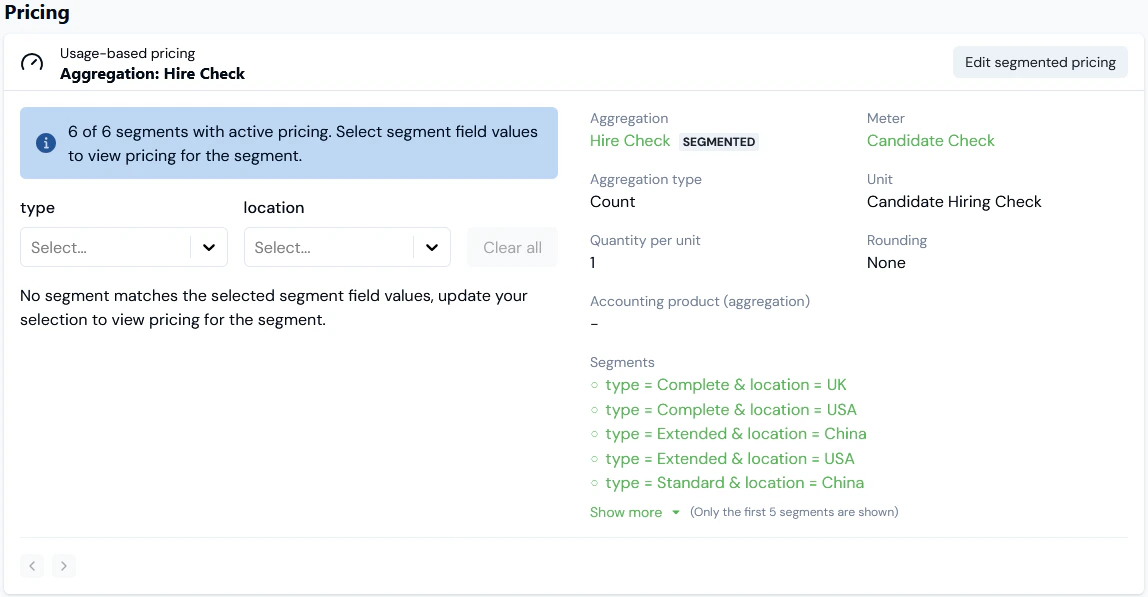
When you return to the Pricing Editor, you’ll see the pricing you’ve configured using the Segmented Aggregation has been saved - in this example 6/6 (6 of 6) segments are now priced:
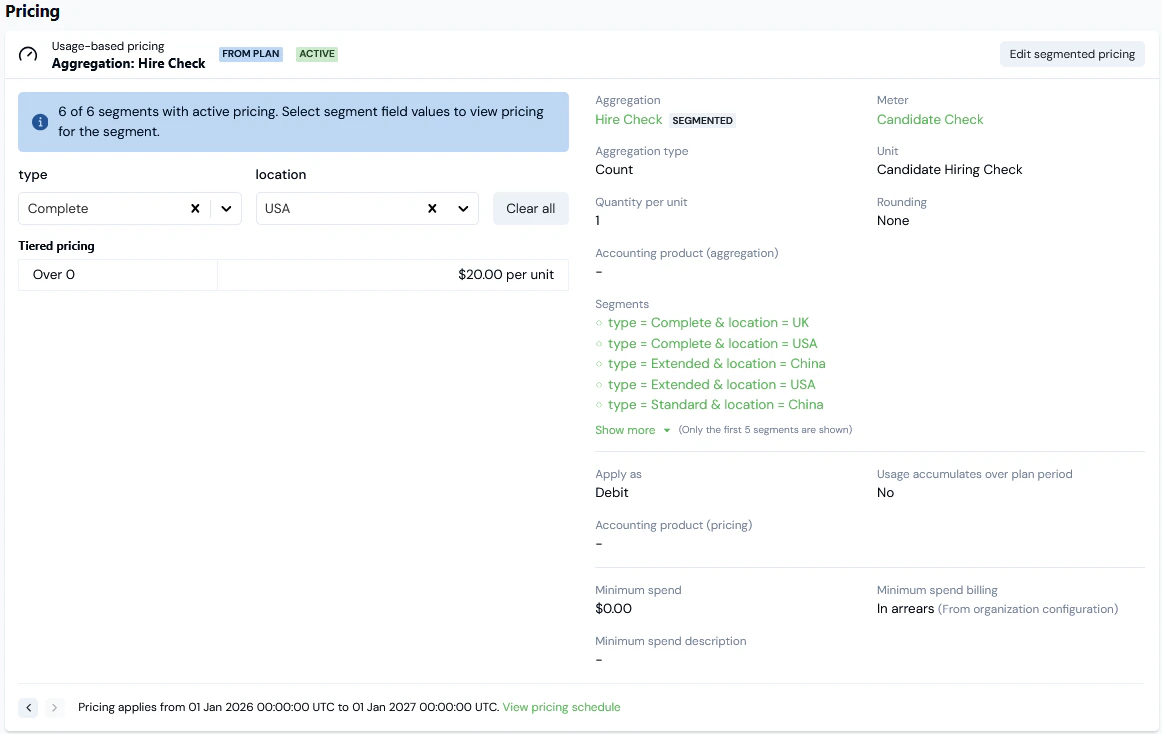
If you open the Plan details page of a Plan you’ve priced using a Segmented Aggregation, under Pricing you can review and manage the each segment’s pricing. For the current example:
For the current example, we’ll select the type and location for the segment pricing to review:
Note that you can Edit segmented pricing from this panel.
When you’ve selected a specific segment pricing, you can then view any historic or future pricing for that segment applied to the Plan using the paging arrows at the bottom of the Pricing card:
Lastly, you can select the View pricing schedule hotlink to open the Pricing schedule for the selected segment pricing applied to the Plan:
Instead of using the Console Pricing Editor, you can use the Create Pricing API call to create a pricing on a Plan using a Segmented Aggregation. When you do this, you can create a separate pricing for each of the segment values defined for the Segmented Aggregation. You can also create a pricing using wildcards to satisfy cases where you only want a specific pricing to apply to some of the segment values and apply a common pricing to any of the other segment values.This section uses the example of a Segmented Aggregation defined in the main Segmented Aggregations topic to show how to:
We’ll adapt the previous example to imagine we want to price a Plan using a Segmented Aggregation called Hiring Check 4:The Hiring Check 4 Segmented Aggregation defines three segment values using Location and Type fields:If we select to Edit segmented pricing, Pricing>Segments page opens. Under Segmented pricing, the Pricing Grid shows that no active pricings have been configured for any of the three segment values:To create a segment value pricing:
Make a POSTCreate Pricing call to create a pricing for the Location = China/Type = Standard segment value:
API Call - Creating Wildcard Pricings for Segments
If you’ve created a Segmented Aggregation and defined multiple segment values, you might have a pricing use case that requires only some of those segment values to have their own specific pricing defined and for the remainder of the segments to be priced together using a common or default pricing. You can do this by using wildcard values for some or all of the fields used to define segments. This section illustrates with two example how to create such wildcard pricings for your Segmented Aggregations using the Create Pricing API call.
Suppose the pricing requirements for the current example of a three-value Segmented Aggregation is that for one segment value - Location = China/Type = Standard - a specific pricing will apply but for the remaining two segment values - Location = USA/Type = Complete and Location = UK/Type = Extended - a common pricing will apply.To implement this, you’ll first have to define a wildcard segment value for the Segmented Aggregation:
In the Console, open the Edit page for the Hiring Check 4 Aggregation and select Add default segment:
Select Update Aggregation.
Return to the Segmented pricing grid for the Segmented Aggregation - we can see that this double-wildcard default segment value has no pricing yet created for it:
We can now create a pricing for this double-wildcard default segment. This pricing will then be applied to any usage data submitted for any undefined segment values.To create a double-wildcard segment value pricing:
Note that for the segment request parameter we leave this empty and omit any use of a "location" value or "type" value to create a double-wildcard pricing.
If we return to Pricing>Segments and refresh the page, we can check that the Segmented pricing grid is now showing for the wildcard segment value:
With this double-wildcard default pricing created, any usage submitted for Location/Type Data Fields on our usage Meter and which do not have a corresponding segment defined for the Hire Check 4 Segmented Aggregation will have this pricing applied for billing purposes.
Important! Segments added to the Aggregation and which do not have Pricing created for them yet,DO NOThave the default segment pricing applied. In the current example, if we now want the default segment pricing to be applied to usage data submitted for either Location = USA/Type = Complete or Location = UK/Type = Extended, we first have to update the Hire Check 4 Segmented Aggregation and delete them from the Aggregation.
Lastly, you might want to create a pricing for a Segmented Aggregation that uses a single wildcard. In the current Example, suppose we define a segment value on Hiring Check 4 for Location = Germany/Type = Any, since we want to apply the same pricing to any checks made for candidates located in Germany and regardless of the Type of check performed:
Select Update Aggregation.
Return to the Segmented Pricing grid for the Segmented Aggregation - we can see that this single-wildcard segment value has no pricing yet created for it:
We can now create a pricing for this single-wildcard pricing.To create a single-wildcard segment value pricing:
Note that for the segment request parameter, we use a “location” value and omit any "type" to create a single-wildcard pricing.
If we return to Pricing>Segments and refresh the page, we can check that the Segmented pricing grid is now showing for the wildcard segment value:
With this single-wildcard pricing created, any usage for Location = Germany, whether of Type = Standard, Type = Complete, or Type = Extended, will be charged according to this pricing.
Tip: Using Wildcards for Segment Values - Evaluation Order? If you use a mix of specific segment values and wildcard segment values, you might be wondering in what order evaluation occurs when usage data is ingested for different segment values. For details, see Using Wildcards - Order of Evaluation.
Pricing with Compound Aggregations Based on Segmented Aggregations
You cannot define segments directly for a Compound Aggregation. However, if you’ve created a Compound Aggregation that references one or more Segmented Aggregations, you can also use the Compound Aggregation to price a Plan by segments defined for the Segmented Aggregations:
The Compound Aggregation does not inherit any of the pricings for segments you might have configured when using the referenced Segmented Aggregations to price Plans.
The segments set up on the referenced Segmented Aggregations are available to the Compound Aggregation to price a Plan by:
If only one Segmented Aggregation is referenced, then all of the segments are available for pricing using the Compound Aggregation.
If two or more Segmented Aggregations are referenced, then the segments available for pricing are restricted to those segments that are defined in common or intersect across any of the referenced Segmented Aggregations - see below Compound Aggregations - Segments Available.
To price with Compound Aggregation based on Segmented Aggregations:
Select Pricing>Pricing Editor. The Pricing page opens.
In the Product drop-down, select the Product for which you want to add a Plan to price up.
Select Add Plans. A Select Plans popup appears and lists the Plans created for the Product.
Select the Plan or Plans you want to price and select Confirm. You are returned to the Pricing page where the selected Plan is shown. A warning states that no pricing has yet been configured for the Plan.
Select Add compound aggregations. A Select Compound Aggregations popup appears listing the Aggregations created for the Product.
Select the Compound Aggregation based on Segmented Aggregations you want to use to price the Plan and select Confirm. The popup closes, you are returned to the Pricing Editor, and the Segmented Aggregation is shown ready for pricing. A warning states that no active pricing is yet configured for any of the available segments:
Select Edit segmented pricing. The Pricing>Segments page opens:
An Aggregation details and Plan Details panel are shown.
Under Segmented pricing, a grid allows you to create the pricing for each available segment configured for the referenced Segmented Aggregations:
In this example, Hiring Check Compound1 references a single Segmented Aggregation - Hiring Check - which has six segments defined and therefore there are 6 segments available to price, but we’ve chosen to price only 4/6 (4 of 6) segments:
The Segments available for pricing using a Compound Aggregation depends on how many Segmented Aggregations are referenced:
If a single Segmented Aggregation is referenced, then all segments defined are available.
If two or more are referenced, then only those segments defined in common or which intersect across the referenced Segmented Aggregations are available.
For example, suppose we’ve set up Hiring Check 1 Aggregation and defined the following segments on it for "location" and "type" fields:
If we now create a Compound Aggregation - Hiring Check Compound - that references both Hiring Check 1 and Hiring Check 2, then only the following three segments will be available to Hiring Check Compound:
{"docsConfig":{"theme":"aspen","$schema":"https://mintlify.com/docs.json","name":"m3ter Documentation","description":"Guides, learning resources and API reference for integrating with m3ter","colors":{"primary":"#4caf4c","dark":"#449d44"},"logo":{"light":"https://mintcdn.com/m3ter/t6C65JBQiQOFtjBy/images/m3ter-logo-blue-sf.svg?fit=max\u0026auto=format\u0026n=t6C65JBQiQOFtjBy\u0026q=85\u0026s=3928db28c84ec6950e43caf96e635d80","dark":"https://mintcdn.com/m3ter/t6C65JBQiQOFtjBy/images/m3ter-logo-white-sf.svg?fit=max\u0026auto=format\u0026n=t6C65JBQiQOFtjBy\u0026q=85\u0026s=a018cb782e49a2fbdd811276476d0605"},"favicon":"https://mintcdn.com/m3ter/T0RRts393DSUkWFc/favicon.svg?fit=max\u0026auto=format\u0026n=T0RRts393DSUkWFc\u0026q=85\u0026s=9492b54cc98df6775983b287b6f865cd","navbar":{"links":[{"href":"https://m3ter.freshdesk.com","label":"Support"},{"href":"https://console.m3ter.com","label":"Console"}],"primary":{"type":"button","label":"Schedule a demo","href":"https://www.m3ter.com/contact"}},"footer":{"socials":{"linkedin":"https://uk.linkedin.com/company/m3ter","x":"https://x.com/m3terHQ","github":"https://github.com/m3ter-com"},"links":[{"items":[{"label":"Website","href":"https://www.m3ter.com"},{"label":"Legal","href":"https://www.m3ter.com/legal"},{"label":"Security","href":"https://www.m3ter.com/security"},{"label":"Trust Center","href":"https://trust.m3ter.com"}]}]},"fonts":{"family":"Montserrat"},"icons":{"library":"lucide"},"styling":{"eyebrows":"breadcrumbs","latex":false},"integrations":{"ga4":{"measurementId":"G-V9C7TTPRQT"}},"contextual":{"options":["copy","view"],"display":"header"},"thumbnails":{"fonts":{"family":"Montserrat"}},"navigation":{"pages":[]}},"deployment":{"deploymentMetadataValue":{"subdomain":"m3ter","hasAudioNarration":false,"actualSubdomain":"m3ter","customDomains":["docs.m3ter.com"],"gitSource":{"type":"github","owner":"m3ter-com","repo":"m3ter-docs","deployBranch":"main","contentDirectory":"","isPrivate":true,"mountPath":"","label":""},"chroma":{"liveDeploymentHistoryId":"6ae4b3832e4c4b8ea8e5ac1c","collectionId":"f4691807-992d-43f9-aab2-d179e798824c","schemaVersion":"v3","latestBuiltDeploymentHistoryId":"6ae4b3832e4c4b8ea8e5ac1c"},"entitlements":{"AI_CHAT":{"status":"ENABLED"},"WEB_MCP":{"status":"ENABLED"},"NARRATION":{"status":"ENABLED"}},"buildId":"6ae9a09c36175fbf7124961d","clientVersion":"0.0.4045","searchFilterCounts":[{"language":"default","tag":"Guides","count":400},{"language":"default","tag":"API Reference","count":393},{"language":"default","tag":"Endpoints","count":387},{"language":"default","tag":"Integrations","count":66},{"language":"default","tag":"m3sh Function Reference","count":66},{"language":"default","tag":"Synthetic functions","count":50},{"language":"default","tag":"m3ter","count":50},{"language":"default","tag":"m3sh","count":43},{"language":"default","tag":"End-Customer Accounts","count":27},{"language":"default","tag":"m3ter Connector for Salesforce","count":24}]},"assistantConfig":{"enableAskAiButton":true,"enableStarterQuestions":false,"enableAskAiSearchBar":false},"basePath":"","hasChatPermissions":true,"hasWebMcpPermissions":true,"toggles":[{"name":"kill-isr","enabled":true,"variant":{"name":"disabled","enabled":false,"feature_enabled":true},"impressionData":false},{"name":"agent-mintlify-slack","enabled":true,"variant":{"name":"disabled","enabled":false,"feature_enabled":true},"impressionData":false},{"name":"agent-integrations-settings","enabled":true,"variant":{"name":"disabled","enabled":false,"feature_enabled":true},"impressionData":false},{"name":"automations-pr-grouping","enabled":true,"variant":{"name":"disabled","enabled":false,"feature_enabled":true},"impressionData":false},{"name":"custom-prefix","enabled":true,"variant":{"name":"disabled","enabled":false,"feature_enabled":true},"impressionData":false},{"name":"analytics-v7","enabled":true,"variant":{"name":"disabled","enabled":false,"feature_enabled":true},"impressionData":false},{"name":"user-flows-analytics","enabled":true,"variant":{"name":"disabled","enabled":false,"feature_enabled":true},"impressionData":false},{"name":"no-publish-flow","enabled":true,"variant":{"name":"disabled","enabled":false,"feature_enabled":true},"impressionData":false},{"name":"workos-onboarding","enabled":true,"variant":{"name":"disabled","enabled":false,"feature_enabled":true},"impressionData":false},{"name":"llms-txt-v2","enabled":true,"variant":{"name":"disabled","enabled":false,"feature_enabled":true},"impressionData":false},{"name":"snapshot-serving-live","enabled":true,"variant":{"name":"disabled","enabled":false,"feature_enabled":true},"impressionData":false},{"name":"stripTemperatureMiddleware","enabled":true,"variant":{"name":"disabled","enabled":false,"feature_enabled":true},"impressionData":false},{"name":"support-platform-pylon-zendesk","enabled":true,"variant":{"name":"disabled","enabled":false,"feature_enabled":true},"impressionData":false},{"name":"snapshot-serving","enabled":true,"variant":{"name":"disabled","enabled":false,"feature_enabled":true},"impressionData":false},{"name":"instant-rollback","enabled":true,"variant":{"name":"disabled","enabled":false,"feature_enabled":true},"impressionData":false},{"name":"granular-notifications-server","enabled":true,"variant":{"name":"disabled","enabled":false,"feature_enabled":true},"impressionData":false},{"name":"granular-notifications","enabled":true,"variant":{"name":"disabled","enabled":false,"feature_enabled":true},"impressionData":false},{"name":"automations-fable","enabled":true,"variant":{"name":"disabled","enabled":false,"feature_enabled":true},"impressionData":false},{"name":"fixed-ai-action-pricing","enabled":true,"variant":{"name":"disabled","enabled":false,"feature_enabled":true},"impressionData":false},{"name":"automation-resolve-merge-conflict","enabled":true,"variant":{"name":"disabled","enabled":false,"feature_enabled":true},"impressionData":false},{"name":"scoped-publishing","enabled":true,"variant":{"name":"disabled","enabled":false,"feature_enabled":true},"impressionData":false},{"name":"mintql","enabled":true,"variant":{"name":"disabled","enabled":false,"feature_enabled":true},"impressionData":false},{"name":"page-level-analytics","enabled":true,"variant":{"name":"disabled","enabled":false,"feature_enabled":true},"impressionData":false},{"name":"editor-version-history-v2","enabled":true,"variant":{"name":"disabled","enabled":false,"feature_enabled":true},"impressionData":false},{"name":"billing-page-v2","enabled":true,"variant":{"name":"disabled","enabled":false,"feature_enabled":true},"impressionData":false},{"name":"full-page-search","enabled":true,"variant":{"name":"disabled","enabled":false,"feature_enabled":true},"impressionData":false},{"name":"workspace-projects","enabled":true,"variant":{"name":"disabled","enabled":false,"feature_enabled":true},"impressionData":false},{"name":"assistant-v5","enabled":true,"variant":{"name":"disabled","enabled":false,"feature_enabled":true},"impressionData":false},{"name":"byok-sep-25","enabled":true,"variant":{"name":"disabled","enabled":false,"feature_enabled":true},"impressionData":false},{"name":"fork-pr-previews","enabled":true,"variant":{"name":"disabled","enabled":false,"feature_enabled":true},"impressionData":false},{"name":"revalidation-jwt","enabled":true,"variant":{"name":"disabled","enabled":false,"feature_enabled":true},"impressionData":false},{"name":"vite-origin","enabled":true,"variant":{"name":"disabled","enabled":false,"feature_enabled":true},"impressionData":false},{"name":"billing-updated-9-15","enabled":true,"variant":{"name":"disabled","enabled":false,"feature_enabled":true},"impressionData":false},{"name":"workos-sso-scim","enabled":true,"variant":{"name":"disabled","enabled":false,"feature_enabled":true},"impressionData":false},{"name":"hobby-abuse-scan","enabled":true,"variant":{"name":"disabled","enabled":false,"feature_enabled":true},"impressionData":false},{"name":"dashboard-inbox","enabled":true,"variant":{"name":"disabled","enabled":false,"feature_enabled":true},"impressionData":false},{"name":"workos-signup","enabled":true,"variant":{"name":"disabled","enabled":false,"feature_enabled":true},"impressionData":false},{"name":"turbopuffer-dual-write","enabled":true,"variant":{"name":"disabled","enabled":false,"feature_enabled":true},"impressionData":false},{"name":"workos-enabled","enabled":true,"variant":{"name":"disabled","enabled":false,"feature_enabled":true},"impressionData":false},{"name":"approve-review-flow","enabled":true,"variant":{"name":"disabled","enabled":false,"feature_enabled":true},"impressionData":false},{"name":"sso-setup-deadline-banner","enabled":true,"variant":{"name":"disabled","enabled":false,"feature_enabled":true},"impressionData":false}],"googleFontsInlined":true},"customCss":[],"page":{"pagePath":"guides/plans-and-pricing/pricing-plans/pricing-plans-using-segmented-aggregations","slug":"/guides/plans-and-pricing/pricing-plans/pricing-plans-using-segmented-aggregations","pageMetadata":{"title":"Pricing Plans Using Segmented Aggregations","description":null,"href":"/guides/plans-and-pricing/pricing-plans/pricing-plans-using-segmented-aggregations"},"pageType":"default","mdx":{"mdxSource":{"compiledSource":"\"use strict\";const{Fragment:_Fragment,jsx:_jsx,jsxs:_jsxs}=arguments[0];const{useMDXComponents:_provideComponents}=arguments[0];function _createMdxContent(props){const _components={a:`a`,code:`code`,em:`em`,li:`li`,ol:`ol`,p:`p`,pre:`pre`,span:`span`,strong:`strong`,ul:`ul`,..._provideComponents(),...props.components},{CodeBlock,Frame,Heading,OptimizedImage,Tip,Warning}=_components;if(!CodeBlock)_missingMdxReference(`CodeBlock`,true);if(!Frame)_missingMdxReference(`Frame`,true);if(!Heading)_missingMdxReference(`Heading`,true);if(!OptimizedImage)_missingMdxReference(`OptimizedImage`,true);if(!Tip)_missingMdxReference(`Tip`,true);if(!Warning)_missingMdxReference(`Warning`,true);return _jsxs(_Fragment,{children:[_jsxs(_components.p,{children:[`If you want to use a Segmented Aggregation to price up one of your Product Plans, the Pricing Editor is designed to help you quickly price the segments you’ve defined for the Aggregation. This topic explains how to use the Segmented Aggregation described in the `,_jsx(_components.a,{href:`/guides/usage-data-aggregations/segmented-aggregations`,children:`Segmented Aggregations`}),` topic to price a Plan:`]}),`\n`,_jsxs(_components.ul,{children:[`\n`,_jsx(_components.li,{children:_jsx(_components.a,{href:`/guides/plans-and-pricing/pricing-plans/pricing-plans-using-segmented-aggregations#creating-segmented-pricings-for-plans-in-the-console`,children:`Creating Segmented Pricings for Plans in the Console`})}),`\n`,_jsx(_components.li,{children:_jsx(_components.a,{href:`#reviewing-segmented-priced-plan-details`,children:`Reviewing Segmented Priced Plan Details`})}),`\n`,_jsx(_components.li,{children:_jsx(_components.a,{href:`/guides/plans-and-pricing/pricing-plans/pricing-plans-using-segmented-aggregations#using-api-call-to-create-a-segmented-pricing`,children:`Using an API call to Create a Segmented Pricing`})}),`\n`]}),`\n`,_jsx(_components.p,{children:`If you’ve set up a Compound Aggregation that references Segmented Aggregations, you can also use this to Price Plans:`}),`\n`,_jsxs(_components.ul,{children:[`\n`,_jsx(_components.li,{children:_jsx(_components.a,{href:`/guides/plans-and-pricing/pricing-plans/pricing-plans-using-segmented-aggregations#pricing-with-compound-aggregations-based-on-segmented-aggregations`,children:`Pricing with Compound Aggregations Based on Segmented Aggregations`})}),`\n`]}),`\n`,_jsxs(Warning,{children:[_jsx(_components.p,{children:_jsx(_components.strong,{children:`Notes \u0026 Warnings:`})}),_jsxs(_components.ul,{children:[`\n`,_jsxs(_components.li,{children:[_jsx(_components.strong,{children:`Preparing to price Plans and Plan Templates using Segmented Aggregations!`}),` We `,_jsx(_components.em,{children:`strongly recommend`}),` that before you attempt to price up Product Plans or Plan Templates using a Segmented Aggregation, you first review the `,_jsx(_components.a,{href:`/guides/plans-and-pricing/pricing-plans/pricing-plans`,children:`Pricing Plans and Plan Templates`}),` topic.`]}),`\n`,_jsxs(_components.li,{children:[_jsx(_components.strong,{children:`Pricing Plans in conjunction with tiered pricing!`}),` Caution is required when using Segmented Aggregations in conjunction with a tiered pricing structure:`,`\n`,_jsxs(_components.ul,{children:[`\n`,_jsx(_components.li,{children:`Suppose you offer a service to perform background checks for companies on job application candidates. You want to offer 50 free background checks to your customers per billing period and then charge $50 per 100 checks made after the first 50 free per billing period. If you had priced using a non-segmented Aggregation and a customer consumes 150 checks in total during a billing period, then the bill would amount to $50. If however you use a Segmented Aggregation and your customer again consumes a total of 150 checks but across 3 segmented values and at 50 checks for each value, then the 50 free tier is applied separately to each segment and the bill amount will be $0.`}),`\n`]}),`\n`]}),`\n`]})]}),`\n`,_jsx(Heading,{level:`2`,id:`creating-segmented-pricings-for-plans-in-the-console`,children:`Creating Segmented Pricings for Plans in the Console`}),`\n`,_jsx(_components.p,{children:`When you use a Segmented Aggregation to price one of your Product Plans, you must create a separate pricing for each segment value you’ve defined. You can do this using the Console’s Pricing Editor.`}),`\n`,_jsx(_components.p,{children:_jsx(_components.strong,{children:`To price a Plan using a Segmented Aggregation:`})}),`\n`,_jsxs(_components.ol,{children:[`\n`,_jsxs(_components.li,{children:[`Select `,_jsx(_components.strong,{children:`Pricing>Pricing editor`}),`. The `,_jsx(_components.strong,{children:`Pricing editor`}),` opens.`]}),`\n`,_jsxs(_components.li,{children:[`In the `,_jsx(_components.strong,{children:`Product`}),` drop-down, select the Product for which you want to add a Plan to price up.`]}),`\n`,_jsxs(_components.li,{children:[`Select `,_jsx(_components.strong,{children:`Add Plans`}),`. A `,_jsx(_components.strong,{children:`Select Plans`}),` popup appears and lists the Plans created for the Product.`]}),`\n`,_jsxs(_components.li,{children:[`Select the Plan or Plans you want to price and select `,_jsx(_components.strong,{children:`Confirm`}),`. You are returned to the `,_jsx(_components.strong,{children:`Pricing`}),` page where the selected `,_jsx(_components.strong,{children:`Plan`}),` is shown. A warning states that no pricing has yet been configured for the Plan.`]}),`\n`,_jsxs(_components.li,{children:[`Select `,_jsx(_components.strong,{children:`Add aggregations`}),`. A `,_jsx(_components.strong,{children:`Select Aggregations`}),` popup appears listing the Aggregations created for the Product.`]}),`\n`]}),`\n`,_jsxs(Tip,{children:[_jsx(_components.p,{children:_jsx(_components.strong,{children:`Notes: Selecting Aggregations for Pricing.`})}),_jsxs(_components.ul,{children:[`\n`,_jsxs(_components.li,{children:[_jsx(_components.strong,{children:`Available Aggregations:`}),` Only those Aggregations belonging to the same Product as the Plan and any Global Aggregations in your Organization are shown for selection in the popup.`]}),`\n`,_jsxs(_components.li,{children:[_jsx(_components.strong,{children:`Duplicating Aggregations:`}),` You cannot add the same Aggregation more than once for pricing a Plan and any Aggregations you’ve already added will no longer be available for selection in the popup.`]}),`\n`]})]}),`\n`,_jsxs(_components.ol,{start:`6`,children:[`\n`,_jsxs(_components.li,{children:[`Select the Segmented Aggregation you want to use to price the Plan and select `,_jsx(_components.strong,{children:`Confirm`}),`. The popup closes, you are returned to the Pricing Editor where the Segmented Aggregation is shown ready for pricing. A warning states that no active pricing is yet configured.`]}),`\n`,_jsxs(_components.li,{children:[`Select `,_jsx(_components.strong,{children:`Edit segmented pricing`}),`. The `,_jsx(_components.strong,{children:`Pricing>Segments`}),` page opens:`]}),`\n`]}),`\n`,_jsxs(_components.ul,{children:[`\n`,_jsxs(_components.li,{children:[`An `,_jsx(_components.strong,{children:`Aggregation details`}),` and `,_jsx(_components.strong,{children:`Plan Details`}),` panel are shown.`]}),`\n`,_jsxs(_components.li,{children:[`A `,_jsx(_components.strong,{children:`Segmented pricing`}),` grid allows you to create the pricing for each segment value you have configured for the Segmented Aggregation.`]}),`\n`]}),`\n`,_jsx(Tip,{children:_jsxs(_components.p,{children:[_jsx(_components.strong,{children:`Tip: Filter Grid?`}),` You can use the filter fields at the head of each segment field column to filter the grid.`]})}),`\n`,_jsxs(_components.ol,{start:`8`,children:[`\n`,_jsxs(_components.li,{children:[`To configure a price for a segment value, select `,_jsx(_components.strong,{children:`Create plan pricing`}),`. A `,_jsx(_components.strong,{children:`Pricing`}),` page opens for the segment value, which mimics the Pricing page for a simple Aggregation that is not segmented - you can use either a `,_jsx(_components.strong,{children:`Pricing Wizard`}),` workflow or choose to use the `,_jsx(_components.strong,{children:`Advanced Pricing`}),` configuration options. See `,_jsx(_components.a,{href:`/guides/plans-and-pricing/pricing-plans/pricing-plans#creating-a-pricing-for-a-plan`,children:`Creating a Pricing for a Plan`}),` for more guidance.`]}),`\n`,_jsxs(_components.li,{children:[`Use the `,_jsx(_components.strong,{children:`Pricing`}),` page to configure the precise pricing you want to apply to the segment value and select `,_jsx(_components.strong,{children:`Create Pricing`}),`:`]}),`\n`]}),`\n`,_jsx(OptimizedImage,{src:`https://mintcdn.com/m3ter/ucv4buhQEsrG1QDb/images/Segmentaggs75.png?fit=max\u0026auto=format\u0026n=ucv4buhQEsrG1QDb\u0026q=85\u0026s=2c58e64e19b7f4b177cf8758d97f5645`,alt:`Segmentaggs75`,title:`Segmentaggs75`,style:{width:`98%`},\"data-og-width\":`1022`,width:`1022`,\"data-og-height\":`662`,height:`662`,\"data-path\":`images/Segmentaggs75.png`,\"data-optimize\":`true`,\"data-opv\":`3`,srcset:`https://mintcdn.com/m3ter/ucv4buhQEsrG1QDb/images/Segmentaggs75.png?w=280\u0026fit=max\u0026auto=format\u0026n=ucv4buhQEsrG1QDb\u0026q=85\u0026s=825556ebc7907323ef0cc22b081d3cb6 280w, https://mintcdn.com/m3ter/ucv4buhQEsrG1QDb/images/Segmentaggs75.png?w=560\u0026fit=max\u0026auto=format\u0026n=ucv4buhQEsrG1QDb\u0026q=85\u0026s=349ffa10e51ab0a0b31b9bdd6641a10b 560w, https://mintcdn.com/m3ter/ucv4buhQEsrG1QDb/images/Segmentaggs75.png?w=840\u0026fit=max\u0026auto=format\u0026n=ucv4buhQEsrG1QDb\u0026q=85\u0026s=608a3e93d8400a85ed0a48262110bfdc 840w, https://mintcdn.com/m3ter/ucv4buhQEsrG1QDb/images/Segmentaggs75.png?w=1100\u0026fit=max\u0026auto=format\u0026n=ucv4buhQEsrG1QDb\u0026q=85\u0026s=2ee914ffc6256922f29a7068889a04e9 1100w, https://mintcdn.com/m3ter/ucv4buhQEsrG1QDb/images/Segmentaggs75.png?w=1650\u0026fit=max\u0026auto=format\u0026n=ucv4buhQEsrG1QDb\u0026q=85\u0026s=0deecf718125f60daed3e9bd8290ce1f 1650w, https://mintcdn.com/m3ter/ucv4buhQEsrG1QDb/images/Segmentaggs75.png?w=2500\u0026fit=max\u0026auto=format\u0026n=ucv4buhQEsrG1QDb\u0026q=85\u0026s=0531f5db215eed9e166ec1035b5edb41 2500w`}),`\n`,_jsxs(_components.ul,{children:[`\n`,_jsxs(_components.li,{children:[`Above shows the first two for China location under `,_jsx(_components.strong,{children:`Segmented pricing`}),`.`]}),`\n`,_jsx(_components.li,{children:`Repeat Steps 8 and 9 to create the pricing for all segment values:`}),`\n`]}),`\n`,_jsxs(_components.ol,{start:`10`,children:[`\n`,_jsxs(_components.li,{children:[`When you return to the `,_jsx(_components.strong,{children:`Pricing Editor`}),`, you’ll see the pricing you’ve configured using the Segmented Aggregation has been saved - in this example `,_jsx(_components.strong,{children:`6/6`}),` (6 of 6) segments are now priced:`]}),`\n`]}),`\n`,_jsx(OptimizedImage,{src:`https://mintcdn.com/m3ter/4PA7eaLaMtaA6FQv/images/1726142843-segmentaggs41a.png?fit=max\u0026auto=format\u0026n=4PA7eaLaMtaA6FQv\u0026q=85\u0026s=c536093b7d367f3b8210eeb3b5ea1b91`,style:{maxWidth:`min(450px, 100%)`},\"data-og-width\":`599`,width:`599`,\"data-og-height\":`319`,height:`319`,\"data-path\":`images/1726142843-segmentaggs41a.png`,\"data-optimize\":`true`,\"data-opv\":`3`,srcset:`https://mintcdn.com/m3ter/4PA7eaLaMtaA6FQv/images/1726142843-segmentaggs41a.png?w=280\u0026fit=max\u0026auto=format\u0026n=4PA7eaLaMtaA6FQv\u0026q=85\u0026s=6ea4c9fb059db593eef2bca4a74de4cd 280w, https://mintcdn.com/m3ter/4PA7eaLaMtaA6FQv/images/1726142843-segmentaggs41a.png?w=560\u0026fit=max\u0026auto=format\u0026n=4PA7eaLaMtaA6FQv\u0026q=85\u0026s=2cadd1e70f9d570b1e646fc141def62f 560w, https://mintcdn.com/m3ter/4PA7eaLaMtaA6FQv/images/1726142843-segmentaggs41a.png?w=840\u0026fit=max\u0026auto=format\u0026n=4PA7eaLaMtaA6FQv\u0026q=85\u0026s=e21d38af60d80fd37a865d15df7c0990 840w, https://mintcdn.com/m3ter/4PA7eaLaMtaA6FQv/images/1726142843-segmentaggs41a.png?w=1100\u0026fit=max\u0026auto=format\u0026n=4PA7eaLaMtaA6FQv\u0026q=85\u0026s=ee61161c9eb6ccc2a9230ea932f2ddb7 1100w, https://mintcdn.com/m3ter/4PA7eaLaMtaA6FQv/images/1726142843-segmentaggs41a.png?w=1650\u0026fit=max\u0026auto=format\u0026n=4PA7eaLaMtaA6FQv\u0026q=85\u0026s=e95eed8b176ea18333959541eabac695 1650w, https://mintcdn.com/m3ter/4PA7eaLaMtaA6FQv/images/1726142843-segmentaggs41a.png?w=2500\u0026fit=max\u0026auto=format\u0026n=4PA7eaLaMtaA6FQv\u0026q=85\u0026s=5686acd45f8dd5d4abde6c3e7913bf60 2500w`}),`\n`,_jsx(Heading,{level:`2`,id:`reviewing-segmented-priced-plan-details`,children:`Reviewing Segmented Priced Plan Details`}),`\n`,_jsxs(_components.p,{children:[`If you open the `,_jsx(_components.strong,{children:`Plan details`}),` page of a Plan you’ve priced using a Segmented Aggregation, under `,_jsx(_components.strong,{children:`Pricing`}),` you can review and manage the each segment’s pricing. For the current example:`]}),`\n`,_jsx(Frame,{children:_jsx(OptimizedImage,{src:`https://mintcdn.com/m3ter/_zyklg5v2aTb8R0S/images/CreatePlans46.png?fit=max\u0026auto=format\u0026n=_zyklg5v2aTb8R0S\u0026q=85\u0026s=ccf8ed5341694193f632dd2e5dd7788b`,alt:`Create Plans46`,\"data-og-width\":`1148`,width:`1148`,\"data-og-height\":`597`,height:`597`,\"data-path\":`images/CreatePlans46.png`,\"data-optimize\":`true`,\"data-opv\":`3`,srcset:`https://mintcdn.com/m3ter/_zyklg5v2aTb8R0S/images/CreatePlans46.png?w=280\u0026fit=max\u0026auto=format\u0026n=_zyklg5v2aTb8R0S\u0026q=85\u0026s=4ff1f0a0343ec832ce4a283d95edaca9 280w, https://mintcdn.com/m3ter/_zyklg5v2aTb8R0S/images/CreatePlans46.png?w=560\u0026fit=max\u0026auto=format\u0026n=_zyklg5v2aTb8R0S\u0026q=85\u0026s=f1887c24f592345f1dd3e9bff249f04f 560w, https://mintcdn.com/m3ter/_zyklg5v2aTb8R0S/images/CreatePlans46.png?w=840\u0026fit=max\u0026auto=format\u0026n=_zyklg5v2aTb8R0S\u0026q=85\u0026s=80a44ff64f7302ea3eaee5815aac86db 840w, https://mintcdn.com/m3ter/_zyklg5v2aTb8R0S/images/CreatePlans46.png?w=1100\u0026fit=max\u0026auto=format\u0026n=_zyklg5v2aTb8R0S\u0026q=85\u0026s=a8b8b5a9b67cabd6d9682719a5b838fa 1100w, https://mintcdn.com/m3ter/_zyklg5v2aTb8R0S/images/CreatePlans46.png?w=1650\u0026fit=max\u0026auto=format\u0026n=_zyklg5v2aTb8R0S\u0026q=85\u0026s=a5b42ac96b0d4916422ee227eee04218 1650w, https://mintcdn.com/m3ter/_zyklg5v2aTb8R0S/images/CreatePlans46.png?w=2500\u0026fit=max\u0026auto=format\u0026n=_zyklg5v2aTb8R0S\u0026q=85\u0026s=e836977b8321b4e1f530c9055eb6999e 2500w`})}),`\n`,_jsxs(_components.ul,{children:[`\n`,_jsxs(_components.li,{children:[`For the current example, we’ll select the `,_jsx(_components.strong,{children:`type`}),` and `,_jsx(_components.strong,{children:`location`}),` for the segment pricing to review:`]}),`\n`]}),`\n`,_jsx(OptimizedImage,{src:`https://mintcdn.com/m3ter/_zyklg5v2aTb8R0S/images/CreatePlans47.png?fit=max\u0026auto=format\u0026n=_zyklg5v2aTb8R0S\u0026q=85\u0026s=a2cd20f369f489f15f6923512066c94d`,alt:`Create Plans47`,\"data-og-width\":`1162`,width:`1162`,\"data-og-height\":`734`,height:`734`,\"data-path\":`images/CreatePlans47.png`,\"data-optimize\":`true`,\"data-opv\":`3`,srcset:`https://mintcdn.com/m3ter/_zyklg5v2aTb8R0S/images/CreatePlans47.png?w=280\u0026fit=max\u0026auto=format\u0026n=_zyklg5v2aTb8R0S\u0026q=85\u0026s=49b826c77305973072780c07a067af46 280w, https://mintcdn.com/m3ter/_zyklg5v2aTb8R0S/images/CreatePlans47.png?w=560\u0026fit=max\u0026auto=format\u0026n=_zyklg5v2aTb8R0S\u0026q=85\u0026s=271b330f90a3d509cb663e588e8d072a 560w, https://mintcdn.com/m3ter/_zyklg5v2aTb8R0S/images/CreatePlans47.png?w=840\u0026fit=max\u0026auto=format\u0026n=_zyklg5v2aTb8R0S\u0026q=85\u0026s=98c94c46d6bf53a4534ab04b834b3a13 840w, https://mintcdn.com/m3ter/_zyklg5v2aTb8R0S/images/CreatePlans47.png?w=1100\u0026fit=max\u0026auto=format\u0026n=_zyklg5v2aTb8R0S\u0026q=85\u0026s=7148290b70beb9b32a46e6d7cb01a053 1100w, https://mintcdn.com/m3ter/_zyklg5v2aTb8R0S/images/CreatePlans47.png?w=1650\u0026fit=max\u0026auto=format\u0026n=_zyklg5v2aTb8R0S\u0026q=85\u0026s=2552e2ff8b3022356c8fc40a361f2470 1650w, https://mintcdn.com/m3ter/_zyklg5v2aTb8R0S/images/CreatePlans47.png?w=2500\u0026fit=max\u0026auto=format\u0026n=_zyklg5v2aTb8R0S\u0026q=85\u0026s=e0118a03862c329a6b1932a865456da6 2500w`}),`\n`,_jsxs(_components.ul,{children:[`\n`,_jsxs(_components.li,{children:[`Note that you can `,_jsx(_components.strong,{children:`Edit segmented pricing`}),` from this panel.`]}),`\n`,_jsxs(_components.li,{children:[`When you’ve selected a specific segment pricing, you can then view any historic or future pricing for that segment applied to the Plan using the paging arrows at the bottom of the `,_jsx(_components.strong,{children:`Pricing`}),` card:`]}),`\n`]}),`\n`,_jsx(OptimizedImage,{src:`https://mintcdn.com/m3ter/UNNNqzWAlbEgfOnu/images/CreatePlans53.png?fit=max\u0026auto=format\u0026n=UNNNqzWAlbEgfOnu\u0026q=85\u0026s=49940acbe32fd1164dc65ca84d52816c`,alt:`Create Plans53`,\"data-og-width\":`1329`,width:`1329`,\"data-og-height\":`715`,height:`715`,\"data-path\":`images/CreatePlans53.png`,\"data-optimize\":`true`,\"data-opv\":`3`,srcset:`https://mintcdn.com/m3ter/UNNNqzWAlbEgfOnu/images/CreatePlans53.png?w=280\u0026fit=max\u0026auto=format\u0026n=UNNNqzWAlbEgfOnu\u0026q=85\u0026s=fb2ecaa81d03f188de9baa5669c529c5 280w, https://mintcdn.com/m3ter/UNNNqzWAlbEgfOnu/images/CreatePlans53.png?w=560\u0026fit=max\u0026auto=format\u0026n=UNNNqzWAlbEgfOnu\u0026q=85\u0026s=7e620eacab6dde767d5da59650b66a42 560w, https://mintcdn.com/m3ter/UNNNqzWAlbEgfOnu/images/CreatePlans53.png?w=840\u0026fit=max\u0026auto=format\u0026n=UNNNqzWAlbEgfOnu\u0026q=85\u0026s=92f4557c0b3696e8d9e04b7f9cce2bca 840w, https://mintcdn.com/m3ter/UNNNqzWAlbEgfOnu/images/CreatePlans53.png?w=1100\u0026fit=max\u0026auto=format\u0026n=UNNNqzWAlbEgfOnu\u0026q=85\u0026s=780cf1c62fe1c44cb646731bbc42f816 1100w, https://mintcdn.com/m3ter/UNNNqzWAlbEgfOnu/images/CreatePlans53.png?w=1650\u0026fit=max\u0026auto=format\u0026n=UNNNqzWAlbEgfOnu\u0026q=85\u0026s=0e38b83c7105416ae05d877e2419ad6a 1650w, https://mintcdn.com/m3ter/UNNNqzWAlbEgfOnu/images/CreatePlans53.png?w=2500\u0026fit=max\u0026auto=format\u0026n=UNNNqzWAlbEgfOnu\u0026q=85\u0026s=ed501082e763ee4cf5be2beeebdcb6ab 2500w`}),`\n`,_jsxs(_components.ul,{children:[`\n`,_jsxs(_components.li,{children:[`Lastly, you can select the `,_jsx(_components.strong,{children:`View pricing schedule`}),` hotlink to open the `,_jsx(_components.strong,{children:`Pricing schedule`}),` for the selected segment pricing applied to the Plan:`]}),`\n`]}),`\n`,_jsx(OptimizedImage,{src:`https://mintcdn.com/m3ter/UNNNqzWAlbEgfOnu/images/CreatePlans54.png?fit=max\u0026auto=format\u0026n=UNNNqzWAlbEgfOnu\u0026q=85\u0026s=67e0e52b83d65e7d9e68c068c761c416`,alt:`Create Plans54`,\"data-og-width\":`1199`,width:`1199`,\"data-og-height\":`795`,height:`795`,\"data-path\":`images/CreatePlans54.png`,\"data-optimize\":`true`,\"data-opv\":`3`,srcset:`https://mintcdn.com/m3ter/UNNNqzWAlbEgfOnu/images/CreatePlans54.png?w=280\u0026fit=max\u0026auto=format\u0026n=UNNNqzWAlbEgfOnu\u0026q=85\u0026s=adb3f4d907519fa3fd6ecb808af562da 280w, https://mintcdn.com/m3ter/UNNNqzWAlbEgfOnu/images/CreatePlans54.png?w=560\u0026fit=max\u0026auto=format\u0026n=UNNNqzWAlbEgfOnu\u0026q=85\u0026s=b294042adfd94cb735f16c6f4e425175 560w, https://mintcdn.com/m3ter/UNNNqzWAlbEgfOnu/images/CreatePlans54.png?w=840\u0026fit=max\u0026auto=format\u0026n=UNNNqzWAlbEgfOnu\u0026q=85\u0026s=5030f5b735b549507caa76e991e40e75 840w, https://mintcdn.com/m3ter/UNNNqzWAlbEgfOnu/images/CreatePlans54.png?w=1100\u0026fit=max\u0026auto=format\u0026n=UNNNqzWAlbEgfOnu\u0026q=85\u0026s=dd4f74be0e9badec7135c0ad0a7b93d1 1100w, https://mintcdn.com/m3ter/UNNNqzWAlbEgfOnu/images/CreatePlans54.png?w=1650\u0026fit=max\u0026auto=format\u0026n=UNNNqzWAlbEgfOnu\u0026q=85\u0026s=ed661cc3b27317e3935fc94cc1cd39c3 1650w, https://mintcdn.com/m3ter/UNNNqzWAlbEgfOnu/images/CreatePlans54.png?w=2500\u0026fit=max\u0026auto=format\u0026n=UNNNqzWAlbEgfOnu\u0026q=85\u0026s=972cb9c4a4836f7ff1ea27effc205f0c 2500w`}),`\n`,_jsxs(_components.ul,{children:[`\n`,_jsxs(_components.li,{children:[`See `,_jsx(_components.a,{href:`https://docs.m3ter.com/guides/plans-and-pricing/pricing-plans/managing-and-editing-priced-plans-or-plan-templates#viewing-pricing-schedule`,children:`Viewing Pricing Schedule`}),` for more details.`]}),`\n`]}),`\n`,_jsx(Heading,{level:`2`,id:`using-api-call-to-create-a-segmented-pricing`,children:`Using API Call to Create a Segmented Pricing`}),`\n`,_jsxs(_components.p,{children:[`Instead of using the Console Pricing Editor, you can use the `,_jsx(_components.a,{href:`/api/pricing/create-pricing`,children:`Create Pricing`}),` API call to create a pricing on a Plan using a Segmented Aggregation. When you do this, you can create a separate pricing for each of the segment values defined for the Segmented Aggregation. You can also create a pricing using wildcards to satisfy cases where you only want a specific pricing to apply to some of the segment values and apply a common pricing to any of the other segment values.`]}),`\n`,_jsxs(_components.p,{children:[`This section uses the example of a Segmented Aggregation defined in the main `,_jsx(_components.a,{href:`/guides/usage-data-aggregations/segmented-aggregations`,children:`Segmented Aggregations`}),` topic to show how to:`]}),`\n`,_jsxs(_components.ul,{children:[`\n`,_jsxs(_components.li,{children:[_jsx(_components.a,{href:`/guides/plans-and-pricing/pricing-plans/pricing-plans-using-segmented-aggregations#api-call-creating-a-pricing-for-a-segment`,children:`Create a pricing for a specific segment value`}),`.`]}),`\n`,_jsxs(_components.li,{children:[_jsx(_components.a,{href:`/guides/plans-and-pricing/pricing-plans/pricing-plans-using-segmented-aggregations#api-call-creating-wildcard-pricings-for-segments`,children:`Create wildcard pricings`}),` to apply to segment values for which no specific pricing has been created`]}),`\n`]}),`\n`,_jsx(Heading,{level:`3`,id:`api-call-creating-a-pricing-for-a-segment`,children:`API Call - Creating a Pricing for a Segment`}),`\n`,_jsxs(_components.p,{children:[`We’ll adapt the previous example to imagine we want to price a Plan using a Segmented Aggregation called `,_jsx(_components.strong,{children:`Hiring Check 4`}),`:`]}),`\n`,_jsx(OptimizedImage,{src:`https://mintcdn.com/m3ter/sSeshoNuulAewaeU/images/1699465508-segmentaggs44.png?fit=max\u0026auto=format\u0026n=sSeshoNuulAewaeU\u0026q=85\u0026s=de68701dd993ca78f5556e300740db93`,style:{maxWidth:`min(450px, 100%)`},\"data-og-width\":`643`,width:`643`,\"data-og-height\":`326`,height:`326`,\"data-path\":`images/1699465508-segmentaggs44.png`,\"data-optimize\":`true`,\"data-opv\":`3`,srcset:`https://mintcdn.com/m3ter/sSeshoNuulAewaeU/images/1699465508-segmentaggs44.png?w=280\u0026fit=max\u0026auto=format\u0026n=sSeshoNuulAewaeU\u0026q=85\u0026s=e2c3db1c728c4011c0b19d1b318a4a59 280w, https://mintcdn.com/m3ter/sSeshoNuulAewaeU/images/1699465508-segmentaggs44.png?w=560\u0026fit=max\u0026auto=format\u0026n=sSeshoNuulAewaeU\u0026q=85\u0026s=ed51e04fe8131f96d012d65616c42809 560w, https://mintcdn.com/m3ter/sSeshoNuulAewaeU/images/1699465508-segmentaggs44.png?w=840\u0026fit=max\u0026auto=format\u0026n=sSeshoNuulAewaeU\u0026q=85\u0026s=f8e8d2d31b9703fa72b738252d4a4985 840w, https://mintcdn.com/m3ter/sSeshoNuulAewaeU/images/1699465508-segmentaggs44.png?w=1100\u0026fit=max\u0026auto=format\u0026n=sSeshoNuulAewaeU\u0026q=85\u0026s=2089f8fd085089de2c47a8341543cd99 1100w, https://mintcdn.com/m3ter/sSeshoNuulAewaeU/images/1699465508-segmentaggs44.png?w=1650\u0026fit=max\u0026auto=format\u0026n=sSeshoNuulAewaeU\u0026q=85\u0026s=764434d22bc2346c7bd2604f2ec61877 1650w, https://mintcdn.com/m3ter/sSeshoNuulAewaeU/images/1699465508-segmentaggs44.png?w=2500\u0026fit=max\u0026auto=format\u0026n=sSeshoNuulAewaeU\u0026q=85\u0026s=8675de1a4b7abfb653d96bcb8a96954b 2500w`}),`\n`,_jsxs(_components.p,{children:[`The `,_jsx(_components.strong,{children:`Hiring Check 4`}),` Segmented Aggregation defines three segment values using `,_jsx(_components.strong,{children:`Location`}),` and `,_jsx(_components.strong,{children:`Type`}),` fields:`]}),`\n`,_jsx(OptimizedImage,{src:`https://mintcdn.com/m3ter/sSeshoNuulAewaeU/images/1699465803-segmentaggs46.png?fit=max\u0026auto=format\u0026n=sSeshoNuulAewaeU\u0026q=85\u0026s=66f285a2560ad05b199f79d0673025e0`,style:{maxWidth:`min(500px, 100%)`},\"data-og-width\":`995`,width:`995`,\"data-og-height\":`436`,height:`436`,\"data-path\":`images/1699465803-segmentaggs46.png`,\"data-optimize\":`true`,\"data-opv\":`3`,srcset:`https://mintcdn.com/m3ter/sSeshoNuulAewaeU/images/1699465803-segmentaggs46.png?w=280\u0026fit=max\u0026auto=format\u0026n=sSeshoNuulAewaeU\u0026q=85\u0026s=c15d253a82a0ae25d092a445fbefbbad 280w, https://mintcdn.com/m3ter/sSeshoNuulAewaeU/images/1699465803-segmentaggs46.png?w=560\u0026fit=max\u0026auto=format\u0026n=sSeshoNuulAewaeU\u0026q=85\u0026s=15baf210f1636d4391514d2e5f5eab07 560w, https://mintcdn.com/m3ter/sSeshoNuulAewaeU/images/1699465803-segmentaggs46.png?w=840\u0026fit=max\u0026auto=format\u0026n=sSeshoNuulAewaeU\u0026q=85\u0026s=3f534971a8ffdbba1106ba0d5392270b 840w, https://mintcdn.com/m3ter/sSeshoNuulAewaeU/images/1699465803-segmentaggs46.png?w=1100\u0026fit=max\u0026auto=format\u0026n=sSeshoNuulAewaeU\u0026q=85\u0026s=bc4b21c8877e4cb4e1cc3a5f9b8ae327 1100w, https://mintcdn.com/m3ter/sSeshoNuulAewaeU/images/1699465803-segmentaggs46.png?w=1650\u0026fit=max\u0026auto=format\u0026n=sSeshoNuulAewaeU\u0026q=85\u0026s=95e658ccabc24ca2b0bc97f8c9c6d979 1650w, https://mintcdn.com/m3ter/sSeshoNuulAewaeU/images/1699465803-segmentaggs46.png?w=2500\u0026fit=max\u0026auto=format\u0026n=sSeshoNuulAewaeU\u0026q=85\u0026s=d6ec483c98b6fb9434361f96dd13897d 2500w`}),`\n`,_jsxs(_components.p,{children:[`If we select to `,_jsx(_components.strong,{children:`Edit segmented pricing`}),`, `,_jsx(_components.strong,{children:`Pricing>Segments`}),` page opens. Under `,_jsx(_components.strong,{children:`Segmented pricing`}),`, the Pricing Grid shows that no active pricings have been configured for any of the three segment values:`]}),`\n`,_jsx(OptimizedImage,{src:`https://mintcdn.com/m3ter/sSeshoNuulAewaeU/images/1699465928-segmentaggs45.png?fit=max\u0026auto=format\u0026n=sSeshoNuulAewaeU\u0026q=85\u0026s=3b0b2751551d37ef391e7fbbc4df2cf8`,style:{maxWidth:`min(500px, 100%)`},\"data-og-width\":`842`,width:`842`,\"data-og-height\":`522`,height:`522`,\"data-path\":`images/1699465928-segmentaggs45.png`,\"data-optimize\":`true`,\"data-opv\":`3`,srcset:`https://mintcdn.com/m3ter/sSeshoNuulAewaeU/images/1699465928-segmentaggs45.png?w=280\u0026fit=max\u0026auto=format\u0026n=sSeshoNuulAewaeU\u0026q=85\u0026s=1f71fb0888efadf65662159332d9d92c 280w, https://mintcdn.com/m3ter/sSeshoNuulAewaeU/images/1699465928-segmentaggs45.png?w=560\u0026fit=max\u0026auto=format\u0026n=sSeshoNuulAewaeU\u0026q=85\u0026s=561c142b3b2ba1b8d54dc8416f8285e1 560w, https://mintcdn.com/m3ter/sSeshoNuulAewaeU/images/1699465928-segmentaggs45.png?w=840\u0026fit=max\u0026auto=format\u0026n=sSeshoNuulAewaeU\u0026q=85\u0026s=4af33f274d6e9d7f1cbf118766603458 840w, https://mintcdn.com/m3ter/sSeshoNuulAewaeU/images/1699465928-segmentaggs45.png?w=1100\u0026fit=max\u0026auto=format\u0026n=sSeshoNuulAewaeU\u0026q=85\u0026s=c54437d1c421e92533d099d6c1cbf11e 1100w, https://mintcdn.com/m3ter/sSeshoNuulAewaeU/images/1699465928-segmentaggs45.png?w=1650\u0026fit=max\u0026auto=format\u0026n=sSeshoNuulAewaeU\u0026q=85\u0026s=8d8bcd03eabcdee856934a30568337ef 1650w, https://mintcdn.com/m3ter/sSeshoNuulAewaeU/images/1699465928-segmentaggs45.png?w=2500\u0026fit=max\u0026auto=format\u0026n=sSeshoNuulAewaeU\u0026q=85\u0026s=9166ca56a97830c7abc4143b026dbd73 2500w`}),`\n`,_jsx(_components.p,{children:_jsx(_components.strong,{children:`To create a segment value pricing:`})}),`\n`,_jsxs(_components.ol,{children:[`\n`,_jsxs(_components.li,{children:[`Make a `,_jsx(_components.code,{children:`POST`}),` `,_jsx(_components.a,{href:`/api/pricing/create-pricing`,children:`Create Pricing`}),` call to create a pricing for the `,_jsx(_components.em,{children:`Location = China/Type = Standard`}),` segment value:`]}),`\n`]}),`\n`,_jsx(OptimizedImage,{src:`https://mintcdn.com/m3ter/sSeshoNuulAewaeU/images/1699466655-segmentaggs47.png?fit=max\u0026auto=format\u0026n=sSeshoNuulAewaeU\u0026q=85\u0026s=20baecaa18eeb330d6f05e2b63ab4643`,style:{maxWidth:`min(500px, 100%)`},\"data-og-width\":`751`,width:`751`,\"data-og-height\":`685`,height:`685`,\"data-path\":`images/1699466655-segmentaggs47.png`,\"data-optimize\":`true`,\"data-opv\":`3`,srcset:`https://mintcdn.com/m3ter/sSeshoNuulAewaeU/images/1699466655-segmentaggs47.png?w=280\u0026fit=max\u0026auto=format\u0026n=sSeshoNuulAewaeU\u0026q=85\u0026s=ab40d700a8e1b926d0ac9e78af2a2528 280w, https://mintcdn.com/m3ter/sSeshoNuulAewaeU/images/1699466655-segmentaggs47.png?w=560\u0026fit=max\u0026auto=format\u0026n=sSeshoNuulAewaeU\u0026q=85\u0026s=9926dedfb907d4a93163786c1defd158 560w, https://mintcdn.com/m3ter/sSeshoNuulAewaeU/images/1699466655-segmentaggs47.png?w=840\u0026fit=max\u0026auto=format\u0026n=sSeshoNuulAewaeU\u0026q=85\u0026s=866d2be15831e8b94f082b03cda294ad 840w, https://mintcdn.com/m3ter/sSeshoNuulAewaeU/images/1699466655-segmentaggs47.png?w=1100\u0026fit=max\u0026auto=format\u0026n=sSeshoNuulAewaeU\u0026q=85\u0026s=340a5af30297ad57835cb3a469aee316 1100w, https://mintcdn.com/m3ter/sSeshoNuulAewaeU/images/1699466655-segmentaggs47.png?w=1650\u0026fit=max\u0026auto=format\u0026n=sSeshoNuulAewaeU\u0026q=85\u0026s=92b4fb814932e5270f2704017d916737 1650w, https://mintcdn.com/m3ter/sSeshoNuulAewaeU/images/1699466655-segmentaggs47.png?w=2500\u0026fit=max\u0026auto=format\u0026n=sSeshoNuulAewaeU\u0026q=85\u0026s=31687ed94dd3a78c3e43ce712e1da268 2500w`}),`\n`,_jsx(_components.p,{children:`Here’s the request body JSON:`}),`\n`,_jsx(CodeBlock,{filename:``,numberOfLines:`25`,language:`json`,children:_jsx(_components.pre,{className:`shiki shiki-themes github-light-default dark-plus`,style:{backgroundColor:`#ffffff`,\"--shiki-dark-bg\":`#0B0C0E`,color:`#1f2328`,\"--shiki-dark\":`#D4D4D4`},language:`json`,children:_jsxs(_components.code,{language:`json`,numberOfLines:`25`,children:[_jsx(_components.span,{className:`line`,children:_jsx(_components.span,{style:{color:`#1F2328`,\"--shiki-dark\":`#D4D4D4`},children:`{`})}),`\n`,_jsx(_components.span,{className:`line`}),`\n`,_jsxs(_components.span,{className:`line`,children:[_jsx(_components.span,{style:{color:`#116329`,\"--shiki-dark\":`#9CDCFE`},children:` \"planId\"`}),_jsx(_components.span,{style:{color:`#1F2328`,\"--shiki-dark\":`#D4D4D4`},children:`: `}),_jsx(_components.span,{style:{color:`#0A3069`,\"--shiki-dark\":`#CE9178`},children:`\"12f2e595-d758-4d68-a492-d923bbxxxxxx\"`}),_jsx(_components.span,{style:{color:`#1F2328`,\"--shiki-dark\":`#D4D4D4`},children:`,`})]}),`\n`,_jsxs(_components.span,{className:`line`,children:[_jsx(_components.span,{style:{color:`#116329`,\"--shiki-dark\":`#9CDCFE`},children:` \"aggregationId\"`}),_jsx(_components.span,{style:{color:`#1F2328`,\"--shiki-dark\":`#D4D4D4`},children:`: `}),_jsx(_components.span,{style:{color:`#0A3069`,\"--shiki-dark\":`#CE9178`},children:`\"2a6db6df-26de-481e-8974-e1a43fxxxxxx\"`}),_jsx(_components.span,{style:{color:`#1F2328`,\"--shiki-dark\":`#D4D4D4`},children:`,`})]}),`\n`,_jsxs(_components.span,{className:`line`,children:[_jsx(_components.span,{style:{color:`#116329`,\"--shiki-dark\":`#9CDCFE`},children:` \"segment\"`}),_jsx(_components.span,{style:{color:`#1F2328`,\"--shiki-dark\":`#D4D4D4`},children:`: {`})]}),`\n`,_jsxs(_components.span,{className:`line`,children:[_jsx(_components.span,{style:{color:`#116329`,\"--shiki-dark\":`#9CDCFE`},children:` \"location\"`}),_jsx(_components.span,{style:{color:`#1F2328`,\"--shiki-dark\":`#D4D4D4`},children:`: `}),_jsx(_components.span,{style:{color:`#0A3069`,\"--shiki-dark\":`#CE9178`},children:`\"China\"`}),_jsx(_components.span,{style:{color:`#1F2328`,\"--shiki-dark\":`#D4D4D4`},children:`,`})]}),`\n`,_jsxs(_components.span,{className:`line`,children:[_jsx(_components.span,{style:{color:`#116329`,\"--shiki-dark\":`#9CDCFE`},children:` \"type\"`}),_jsx(_components.span,{style:{color:`#1F2328`,\"--shiki-dark\":`#D4D4D4`},children:`: `}),_jsx(_components.span,{style:{color:`#0A3069`,\"--shiki-dark\":`#CE9178`},children:`\"Standard\"`})]}),`\n`,_jsx(_components.span,{className:`line`,children:_jsx(_components.span,{style:{color:`#1F2328`,\"--shiki-dark\":`#D4D4D4`},children:` },`})}),`\n`,_jsxs(_components.span,{className:`line`,children:[_jsx(_components.span,{style:{color:`#116329`,\"--shiki-dark\":`#9CDCFE`},children:` \"cumulative\"`}),_jsx(_components.span,{style:{color:`#1F2328`,\"--shiki-dark\":`#D4D4D4`},children:`: `}),_jsx(_components.span,{style:{color:`#0550AE`,\"--shiki-dark\":`#569CD6`},children:`true`}),_jsx(_components.span,{style:{color:`#1F2328`,\"--shiki-dark\":`#D4D4D4`},children:`,`})]}),`\n`,_jsxs(_components.span,{className:`line`,children:[_jsx(_components.span,{style:{color:`#116329`,\"--shiki-dark\":`#9CDCFE`},children:` \"tiersSpanPlan\"`}),_jsx(_components.span,{style:{color:`#1F2328`,\"--shiki-dark\":`#D4D4D4`},children:`: `}),_jsx(_components.span,{style:{color:`#0550AE`,\"--shiki-dark\":`#569CD6`},children:`false`}),_jsx(_components.span,{style:{color:`#1F2328`,\"--shiki-dark\":`#D4D4D4`},children:`,`})]}),`\n`,_jsxs(_components.span,{className:`line`,children:[_jsx(_components.span,{style:{color:`#116329`,\"--shiki-dark\":`#9CDCFE`},children:` \"pricingBands\"`}),_jsx(_components.span,{style:{color:`#1F2328`,\"--shiki-dark\":`#D4D4D4`},children:`: [`})]}),`\n`,_jsx(_components.span,{className:`line`,children:_jsx(_components.span,{style:{color:`#1F2328`,\"--shiki-dark\":`#D4D4D4`},children:` {`})}),`\n`,_jsxs(_components.span,{className:`line`,children:[_jsx(_components.span,{style:{color:`#116329`,\"--shiki-dark\":`#9CDCFE`},children:` \"lowerLimit\"`}),_jsx(_components.span,{style:{color:`#1F2328`,\"--shiki-dark\":`#D4D4D4`},children:`: `}),_jsx(_components.span,{style:{color:`#0550AE`,\"--shiki-dark\":`#B5CEA8`},children:`0`}),_jsx(_components.span,{style:{color:`#1F2328`,\"--shiki-dark\":`#D4D4D4`},children:`,`})]}),`\n`,_jsxs(_components.span,{className:`line`,children:[_jsx(_components.span,{style:{color:`#116329`,\"--shiki-dark\":`#9CDCFE`},children:` \"fixedPrice\"`}),_jsx(_components.span,{style:{color:`#1F2328`,\"--shiki-dark\":`#D4D4D4`},children:`: `}),_jsx(_components.span,{style:{color:`#0550AE`,\"--shiki-dark\":`#B5CEA8`},children:`0`}),_jsx(_components.span,{style:{color:`#1F2328`,\"--shiki-dark\":`#D4D4D4`},children:`,`})]}),`\n`,_jsxs(_components.span,{className:`line`,children:[_jsx(_components.span,{style:{color:`#116329`,\"--shiki-dark\":`#9CDCFE`},children:` \"unitPrice\"`}),_jsx(_components.span,{style:{color:`#1F2328`,\"--shiki-dark\":`#D4D4D4`},children:`: `}),_jsx(_components.span,{style:{color:`#0550AE`,\"--shiki-dark\":`#B5CEA8`},children:`0.25`})]}),`\n`,_jsx(_components.span,{className:`line`}),`\n`,_jsx(_components.span,{className:`line`,children:_jsx(_components.span,{style:{color:`#1F2328`,\"--shiki-dark\":`#D4D4D4`},children:` }`})}),`\n`,_jsx(_components.span,{className:`line`,children:_jsx(_components.span,{style:{color:`#1F2328`,\"--shiki-dark\":`#D4D4D4`},children:` ],`})}),`\n`,_jsx(_components.span,{className:`line`}),`\n`,_jsxs(_components.span,{className:`line`,children:[_jsx(_components.span,{style:{color:`#116329`,\"--shiki-dark\":`#9CDCFE`},children:` \"startDate\"`}),_jsx(_components.span,{style:{color:`#1F2328`,\"--shiki-dark\":`#D4D4D4`},children:`: `}),_jsx(_components.span,{style:{color:`#0A3069`,\"--shiki-dark\":`#CE9178`},children:`\"2023-11-01T14:15:22Z\"`}),_jsx(_components.span,{style:{color:`#1F2328`,\"--shiki-dark\":`#D4D4D4`},children:`,`})]}),`\n`,_jsxs(_components.span,{className:`line`,children:[_jsx(_components.span,{style:{color:`#116329`,\"--shiki-dark\":`#9CDCFE`},children:` \"endDate\"`}),_jsx(_components.span,{style:{color:`#1F2328`,\"--shiki-dark\":`#D4D4D4`},children:`: `}),_jsx(_components.span,{style:{color:`#0A3069`,\"--shiki-dark\":`#CE9178`},children:`\"2024-11-01T14:15:22Z\"`}),_jsx(_components.span,{style:{color:`#1F2328`,\"--shiki-dark\":`#D4D4D4`},children:`,`})]}),`\n`,_jsxs(_components.span,{className:`line`,children:[_jsx(_components.span,{style:{color:`#116329`,\"--shiki-dark\":`#9CDCFE`},children:` \"minimumSpend\"`}),_jsx(_components.span,{style:{color:`#1F2328`,\"--shiki-dark\":`#D4D4D4`},children:`: `}),_jsx(_components.span,{style:{color:`#0550AE`,\"--shiki-dark\":`#B5CEA8`},children:`0`}),_jsx(_components.span,{style:{color:`#1F2328`,\"--shiki-dark\":`#D4D4D4`},children:`,`})]}),`\n`,_jsxs(_components.span,{className:`line`,children:[_jsx(_components.span,{style:{color:`#116329`,\"--shiki-dark\":`#9CDCFE`},children:` \"minimumSpendDescription\"`}),_jsx(_components.span,{style:{color:`#1F2328`,\"--shiki-dark\":`#D4D4D4`},children:`: `}),_jsx(_components.span,{style:{color:`#0A3069`,\"--shiki-dark\":`#CE9178`},children:`\"\"`})]}),`\n`,_jsx(_components.span,{className:`line`}),`\n`,_jsx(_components.span,{className:`line`,children:_jsx(_components.span,{style:{color:`#1F2328`,\"--shiki-dark\":`#D4D4D4`},children:`}`})}),`\n`]})})}),`\n`,_jsx(_components.p,{children:`Note that:`}),`\n`,_jsxs(_components.ul,{children:[`\n`,_jsxs(_components.li,{children:[`The `,_jsx(_components.code,{children:`planId`}),` parameter is required.`]}),`\n`,_jsxs(_components.li,{children:[`The `,_jsx(_components.code,{children:`aggregationId`}),` of the Segmented Aggregation is a required request parameter for each segment pricing you create.`]}),`\n`,_jsxs(_components.li,{children:[`Use the `,_jsx(_components.code,{children:`segment`}),` request parameter to specify which segment defined for the Segmented Aggregation you want the pricing to apply to.`]}),`\n`,_jsxs(_components.li,{children:[`Use the `,_jsx(_components.code,{children:`pricingBands`}),` request parameter to define the pricing - in this example, a single tier pricing has been defined.`]}),`\n`]}),`\n`,_jsx(_components.p,{children:`If the segment pricing has been created successfully, you’ll receive a 200 response and a response body similar to this:`}),`\n`,_jsx(OptimizedImage,{src:`https://mintcdn.com/m3ter/sSeshoNuulAewaeU/images/1699467820-segmentaggs50.png?fit=max\u0026auto=format\u0026n=sSeshoNuulAewaeU\u0026q=85\u0026s=7f175f25b26d308c7508abcccb83f31a`,style:{maxWidth:`min(500px, 100%)`},\"data-og-width\":`519`,width:`519`,\"data-og-height\":`578`,height:`578`,\"data-path\":`images/1699467820-segmentaggs50.png`,\"data-optimize\":`true`,\"data-opv\":`3`,srcset:`https://mintcdn.com/m3ter/sSeshoNuulAewaeU/images/1699467820-segmentaggs50.png?w=280\u0026fit=max\u0026auto=format\u0026n=sSeshoNuulAewaeU\u0026q=85\u0026s=9c1525d1d5efb89da65c805d631f34d6 280w, https://mintcdn.com/m3ter/sSeshoNuulAewaeU/images/1699467820-segmentaggs50.png?w=560\u0026fit=max\u0026auto=format\u0026n=sSeshoNuulAewaeU\u0026q=85\u0026s=34c7c740984b4230842dd191dc344fb8 560w, https://mintcdn.com/m3ter/sSeshoNuulAewaeU/images/1699467820-segmentaggs50.png?w=840\u0026fit=max\u0026auto=format\u0026n=sSeshoNuulAewaeU\u0026q=85\u0026s=82236442a6ad28501a462fc10c141b95 840w, https://mintcdn.com/m3ter/sSeshoNuulAewaeU/images/1699467820-segmentaggs50.png?w=1100\u0026fit=max\u0026auto=format\u0026n=sSeshoNuulAewaeU\u0026q=85\u0026s=58f9ae733a31971c1abe5e04ce5d66b4 1100w, https://mintcdn.com/m3ter/sSeshoNuulAewaeU/images/1699467820-segmentaggs50.png?w=1650\u0026fit=max\u0026auto=format\u0026n=sSeshoNuulAewaeU\u0026q=85\u0026s=5d3682c287d97d2ffdfebdf975847e40 1650w, https://mintcdn.com/m3ter/sSeshoNuulAewaeU/images/1699467820-segmentaggs50.png?w=2500\u0026fit=max\u0026auto=format\u0026n=sSeshoNuulAewaeU\u0026q=85\u0026s=3c63de7c26664202cf5f7708c45511d3 2500w`}),`\n`,_jsx(_components.p,{children:`Note that:`}),`\n`,_jsxs(_components.ul,{children:[`\n`,_jsxs(_components.li,{children:[`The pricing `,_jsx(_components.code,{children:`id`}),` is given.`]}),`\n`,_jsxs(_components.li,{children:[`Each pricing band `,_jsx(_components.code,{children:`id`}),` is given.`]}),`\n`]}),`\n`,_jsxs(_components.ol,{start:`2`,children:[`\n`,_jsxs(_components.li,{children:[`If we return to `,_jsx(_components.strong,{children:`Pricing>Segments`}),` and refresh the page, we can check that the `,_jsx(_components.strong,{children:`Segmented pricing`}),` grid is now showing for the specified segment value:`]}),`\n`]}),`\n`,_jsx(OptimizedImage,{src:`https://mintcdn.com/m3ter/sSeshoNuulAewaeU/images/1699467294-segmentaggs48.png?fit=max\u0026auto=format\u0026n=sSeshoNuulAewaeU\u0026q=85\u0026s=501dc8a86dd8a00126b225fcadc487ff`,style:{maxWidth:`min(650px, 100%)`},\"data-og-width\":`905`,width:`905`,\"data-og-height\":`623`,height:`623`,\"data-path\":`images/1699467294-segmentaggs48.png`,\"data-optimize\":`true`,\"data-opv\":`3`,srcset:`https://mintcdn.com/m3ter/sSeshoNuulAewaeU/images/1699467294-segmentaggs48.png?w=280\u0026fit=max\u0026auto=format\u0026n=sSeshoNuulAewaeU\u0026q=85\u0026s=3046403179f4d0be4b62b558d3ba714b 280w, https://mintcdn.com/m3ter/sSeshoNuulAewaeU/images/1699467294-segmentaggs48.png?w=560\u0026fit=max\u0026auto=format\u0026n=sSeshoNuulAewaeU\u0026q=85\u0026s=00394cf60aa84af74c9f32e627ef3b50 560w, https://mintcdn.com/m3ter/sSeshoNuulAewaeU/images/1699467294-segmentaggs48.png?w=840\u0026fit=max\u0026auto=format\u0026n=sSeshoNuulAewaeU\u0026q=85\u0026s=fdaeb9a31f79bbbb814f2bb7836c2fdd 840w, https://mintcdn.com/m3ter/sSeshoNuulAewaeU/images/1699467294-segmentaggs48.png?w=1100\u0026fit=max\u0026auto=format\u0026n=sSeshoNuulAewaeU\u0026q=85\u0026s=6697fba93e8f01ab07840bf6cc9ee320 1100w, https://mintcdn.com/m3ter/sSeshoNuulAewaeU/images/1699467294-segmentaggs48.png?w=1650\u0026fit=max\u0026auto=format\u0026n=sSeshoNuulAewaeU\u0026q=85\u0026s=2c2507d265bde918f55ca327e0ad2f28 1650w, https://mintcdn.com/m3ter/sSeshoNuulAewaeU/images/1699467294-segmentaggs48.png?w=2500\u0026fit=max\u0026auto=format\u0026n=sSeshoNuulAewaeU\u0026q=85\u0026s=425fd987a047ffd66f4a8a170c5a816d 2500w`}),`\n`,_jsx(Heading,{level:`3`,id:`api-call-creating-wildcard-pricings-for-segments`,children:`API Call - Creating Wildcard Pricings for Segments`}),`\n`,_jsxs(_components.p,{children:[`If you’ve created a Segmented Aggregation and defined multiple segment values, you might have a pricing use case that requires only some of those segment values to have their own specific pricing defined and for the remainder of the segments to be priced together using a common or default pricing. You can do this by using wildcard values for some or all of the fields used to define segments. This section illustrates with two example how to create such wildcard pricings for your Segmented Aggregations using the `,_jsx(_components.a,{href:`/api/pricing/create-pricing`,children:`Create Pricing`}),` API call.`]}),`\n`,_jsx(Heading,{level:`4`,id:`creating-double-wildcard-default-segment-pricing`,children:`Creating Double-Wildcard Default Segment Pricing`}),`\n`,_jsxs(_components.p,{children:[`Suppose the pricing requirements for the current example of a three-value Segmented Aggregation is that for one segment value - `,_jsx(_components.em,{children:`Location = China/Type = Standard`}),` - a specific pricing will apply but for the remaining two segment values - `,_jsx(_components.em,{children:`Location = USA/Type = Complete`}),` and `,_jsx(_components.em,{children:`Location = UK/Type = Extended`}),` - a common pricing will apply.`]}),`\n`,_jsx(_components.p,{children:`To implement this, you’ll first have to define a wildcard segment value for the Segmented Aggregation:`}),`\n`,_jsxs(_components.ul,{children:[`\n`,_jsxs(_components.li,{children:[`In the Console, open the `,_jsx(_components.strong,{children:`Edit`}),` page for the `,_jsx(_components.strong,{children:`Hiring Check 4`}),` Aggregation and select `,_jsx(_components.strong,{children:`Add default segment`}),`:`]}),`\n`]}),`\n`,_jsx(OptimizedImage,{src:`https://mintcdn.com/m3ter/sSeshoNuulAewaeU/images/1699469065-segmentaggs51.png?fit=max\u0026auto=format\u0026n=sSeshoNuulAewaeU\u0026q=85\u0026s=3db49df99819514580c562b44cb4b408`,style:{maxWidth:`min(700px, 100%)`},\"data-og-width\":`1271`,width:`1271`,\"data-og-height\":`469`,height:`469`,\"data-path\":`images/1699469065-segmentaggs51.png`,\"data-optimize\":`true`,\"data-opv\":`3`,srcset:`https://mintcdn.com/m3ter/sSeshoNuulAewaeU/images/1699469065-segmentaggs51.png?w=280\u0026fit=max\u0026auto=format\u0026n=sSeshoNuulAewaeU\u0026q=85\u0026s=b37e444234884a07446c7256cbf4693e 280w, https://mintcdn.com/m3ter/sSeshoNuulAewaeU/images/1699469065-segmentaggs51.png?w=560\u0026fit=max\u0026auto=format\u0026n=sSeshoNuulAewaeU\u0026q=85\u0026s=9afdd20e1771475db6d6adabfb0a3b0b 560w, https://mintcdn.com/m3ter/sSeshoNuulAewaeU/images/1699469065-segmentaggs51.png?w=840\u0026fit=max\u0026auto=format\u0026n=sSeshoNuulAewaeU\u0026q=85\u0026s=08cc77dd0f384b79db5379b51af5bf4d 840w, https://mintcdn.com/m3ter/sSeshoNuulAewaeU/images/1699469065-segmentaggs51.png?w=1100\u0026fit=max\u0026auto=format\u0026n=sSeshoNuulAewaeU\u0026q=85\u0026s=19894447028882aa5cc8e04515bb6695 1100w, https://mintcdn.com/m3ter/sSeshoNuulAewaeU/images/1699469065-segmentaggs51.png?w=1650\u0026fit=max\u0026auto=format\u0026n=sSeshoNuulAewaeU\u0026q=85\u0026s=8b10642f671364c51f90b61e97b9145d 1650w, https://mintcdn.com/m3ter/sSeshoNuulAewaeU/images/1699469065-segmentaggs51.png?w=2500\u0026fit=max\u0026auto=format\u0026n=sSeshoNuulAewaeU\u0026q=85\u0026s=537b708932fa9d976bc9e80c2709ddf9 2500w`}),`\n`,_jsxs(_components.ul,{children:[`\n`,_jsxs(_components.li,{children:[`Select `,_jsx(_components.strong,{children:`Update Aggregation`}),`.`]}),`\n`,_jsxs(_components.li,{children:[`Return to the `,_jsx(_components.strong,{children:`Segmented pricing`}),` grid for the Segmented Aggregation - we can see that this double-wildcard default segment value has no pricing yet created for it:`]}),`\n`]}),`\n`,_jsx(OptimizedImage,{src:`https://mintcdn.com/m3ter/sSeshoNuulAewaeU/images/1699469454-segmentaggs52.png?fit=max\u0026auto=format\u0026n=sSeshoNuulAewaeU\u0026q=85\u0026s=4c5f184cdae31f439b6dbc3352ba074f`,style:{maxWidth:`min(500px, 100%)`},\"data-og-width\":`906`,width:`906`,\"data-og-height\":`761`,height:`761`,\"data-path\":`images/1699469454-segmentaggs52.png`,\"data-optimize\":`true`,\"data-opv\":`3`,srcset:`https://mintcdn.com/m3ter/sSeshoNuulAewaeU/images/1699469454-segmentaggs52.png?w=280\u0026fit=max\u0026auto=format\u0026n=sSeshoNuulAewaeU\u0026q=85\u0026s=4fb10e873687b094e5e41c2aea805055 280w, https://mintcdn.com/m3ter/sSeshoNuulAewaeU/images/1699469454-segmentaggs52.png?w=560\u0026fit=max\u0026auto=format\u0026n=sSeshoNuulAewaeU\u0026q=85\u0026s=122abe659785165ec475fc2ba7f12425 560w, https://mintcdn.com/m3ter/sSeshoNuulAewaeU/images/1699469454-segmentaggs52.png?w=840\u0026fit=max\u0026auto=format\u0026n=sSeshoNuulAewaeU\u0026q=85\u0026s=8b232f963dc11660010240a1d3223f6f 840w, https://mintcdn.com/m3ter/sSeshoNuulAewaeU/images/1699469454-segmentaggs52.png?w=1100\u0026fit=max\u0026auto=format\u0026n=sSeshoNuulAewaeU\u0026q=85\u0026s=bc4ce4d3fcd87f9c10a8e7ba65b2da66 1100w, https://mintcdn.com/m3ter/sSeshoNuulAewaeU/images/1699469454-segmentaggs52.png?w=1650\u0026fit=max\u0026auto=format\u0026n=sSeshoNuulAewaeU\u0026q=85\u0026s=1d1c07c45c3b56326ca3ee14026fdf50 1650w, https://mintcdn.com/m3ter/sSeshoNuulAewaeU/images/1699469454-segmentaggs52.png?w=2500\u0026fit=max\u0026auto=format\u0026n=sSeshoNuulAewaeU\u0026q=85\u0026s=a4e779865eb99d7e6cafb923804e826e 2500w`}),`\n`,_jsx(_components.p,{children:`We can now create a pricing for this double-wildcard default segment. This pricing will then be applied to any usage data submitted for any undefined segment values.`}),`\n`,_jsx(_components.p,{children:_jsx(_components.strong,{children:`To create a double-wildcard segment value pricing:`})}),`\n`,_jsxs(_components.ol,{children:[`\n`,_jsxs(_components.li,{children:[`Make a `,_jsx(_components.code,{children:`POST`}),` `,_jsx(_components.a,{href:`/api/pricing/create-pricing`,children:`Create Pricing`}),` call:`]}),`\n`]}),`\n`,_jsx(OptimizedImage,{src:`https://mintcdn.com/m3ter/sSeshoNuulAewaeU/images/1699473737-segmentaggs56.png?fit=max\u0026auto=format\u0026n=sSeshoNuulAewaeU\u0026q=85\u0026s=752fad6dfeb3a11591c459a9ff8263d0`,style:{maxWidth:`min(750px, 100%)`},\"data-og-width\":`1064`,width:`1064`,\"data-og-height\":`550`,height:`550`,\"data-path\":`images/1699473737-segmentaggs56.png`,\"data-optimize\":`true`,\"data-opv\":`3`,srcset:`https://mintcdn.com/m3ter/sSeshoNuulAewaeU/images/1699473737-segmentaggs56.png?w=280\u0026fit=max\u0026auto=format\u0026n=sSeshoNuulAewaeU\u0026q=85\u0026s=759d6032c1a948796e80d3f1f64abf41 280w, https://mintcdn.com/m3ter/sSeshoNuulAewaeU/images/1699473737-segmentaggs56.png?w=560\u0026fit=max\u0026auto=format\u0026n=sSeshoNuulAewaeU\u0026q=85\u0026s=e54cfceab8e4d1e4e5e1de3556b09279 560w, https://mintcdn.com/m3ter/sSeshoNuulAewaeU/images/1699473737-segmentaggs56.png?w=840\u0026fit=max\u0026auto=format\u0026n=sSeshoNuulAewaeU\u0026q=85\u0026s=1941b47db26413df7545a1a1360eb78a 840w, https://mintcdn.com/m3ter/sSeshoNuulAewaeU/images/1699473737-segmentaggs56.png?w=1100\u0026fit=max\u0026auto=format\u0026n=sSeshoNuulAewaeU\u0026q=85\u0026s=82ba9d516eac26765645660798bd9a92 1100w, https://mintcdn.com/m3ter/sSeshoNuulAewaeU/images/1699473737-segmentaggs56.png?w=1650\u0026fit=max\u0026auto=format\u0026n=sSeshoNuulAewaeU\u0026q=85\u0026s=3f05f62833863a43ccfa709378872881 1650w, https://mintcdn.com/m3ter/sSeshoNuulAewaeU/images/1699473737-segmentaggs56.png?w=2500\u0026fit=max\u0026auto=format\u0026n=sSeshoNuulAewaeU\u0026q=85\u0026s=b084cce90481d904c1f079d8fa9c13de 2500w`}),`\n`,_jsx(_components.p,{children:`Here’s the request body JSON:`}),`\n`,_jsx(CodeBlock,{filename:``,numberOfLines:`22`,language:`json`,children:_jsx(_components.pre,{className:`shiki shiki-themes github-light-default dark-plus`,style:{backgroundColor:`#ffffff`,\"--shiki-dark-bg\":`#0B0C0E`,color:`#1f2328`,\"--shiki-dark\":`#D4D4D4`},language:`json`,children:_jsxs(_components.code,{language:`json`,numberOfLines:`22`,children:[_jsx(_components.span,{className:`line`,children:_jsx(_components.span,{style:{color:`#1F2328`,\"--shiki-dark\":`#D4D4D4`},children:`{`})}),`\n`,_jsx(_components.span,{className:`line`}),`\n`,_jsxs(_components.span,{className:`line`,children:[_jsx(_components.span,{style:{color:`#116329`,\"--shiki-dark\":`#9CDCFE`},children:` \"planId\"`}),_jsx(_components.span,{style:{color:`#1F2328`,\"--shiki-dark\":`#D4D4D4`},children:`: `}),_jsx(_components.span,{style:{color:`#0A3069`,\"--shiki-dark\":`#CE9178`},children:`\"12f2e595-d758-4d68-a492-d923bb1xxxxx\"`}),_jsx(_components.span,{style:{color:`#1F2328`,\"--shiki-dark\":`#D4D4D4`},children:`,`})]}),`\n`,_jsxs(_components.span,{className:`line`,children:[_jsx(_components.span,{style:{color:`#116329`,\"--shiki-dark\":`#9CDCFE`},children:` \"aggregationId\"`}),_jsx(_components.span,{style:{color:`#1F2328`,\"--shiki-dark\":`#D4D4D4`},children:`: `}),_jsx(_components.span,{style:{color:`#0A3069`,\"--shiki-dark\":`#CE9178`},children:`\"2a6db6df-26de-481e-8974-e1a43f12xxxx\"`}),_jsx(_components.span,{style:{color:`#1F2328`,\"--shiki-dark\":`#D4D4D4`},children:`,`})]}),`\n`,_jsxs(_components.span,{className:`line`,children:[_jsx(_components.span,{style:{color:`#116329`,\"--shiki-dark\":`#9CDCFE`},children:` \"segment\"`}),_jsx(_components.span,{style:{color:`#1F2328`,\"--shiki-dark\":`#D4D4D4`},children:`: {},`})]}),`\n`,_jsxs(_components.span,{className:`line`,children:[_jsx(_components.span,{style:{color:`#116329`,\"--shiki-dark\":`#9CDCFE`},children:` \"cumulative\"`}),_jsx(_components.span,{style:{color:`#1F2328`,\"--shiki-dark\":`#D4D4D4`},children:`: `}),_jsx(_components.span,{style:{color:`#0550AE`,\"--shiki-dark\":`#569CD6`},children:`true`}),_jsx(_components.span,{style:{color:`#1F2328`,\"--shiki-dark\":`#D4D4D4`},children:`,`})]}),`\n`,_jsxs(_components.span,{className:`line`,children:[_jsx(_components.span,{style:{color:`#116329`,\"--shiki-dark\":`#9CDCFE`},children:` \"tiersSpanPlan\"`}),_jsx(_components.span,{style:{color:`#1F2328`,\"--shiki-dark\":`#D4D4D4`},children:`: `}),_jsx(_components.span,{style:{color:`#0550AE`,\"--shiki-dark\":`#569CD6`},children:`false`}),_jsx(_components.span,{style:{color:`#1F2328`,\"--shiki-dark\":`#D4D4D4`},children:`,`})]}),`\n`,_jsxs(_components.span,{className:`line`,children:[_jsx(_components.span,{style:{color:`#116329`,\"--shiki-dark\":`#9CDCFE`},children:` \"pricingBands\"`}),_jsx(_components.span,{style:{color:`#1F2328`,\"--shiki-dark\":`#D4D4D4`},children:`: [`})]}),`\n`,_jsx(_components.span,{className:`line`,children:_jsx(_components.span,{style:{color:`#1F2328`,\"--shiki-dark\":`#D4D4D4`},children:` {`})}),`\n`,_jsxs(_components.span,{className:`line`,children:[_jsx(_components.span,{style:{color:`#116329`,\"--shiki-dark\":`#9CDCFE`},children:` \"lowerLimit\"`}),_jsx(_components.span,{style:{color:`#1F2328`,\"--shiki-dark\":`#D4D4D4`},children:`: `}),_jsx(_components.span,{style:{color:`#0550AE`,\"--shiki-dark\":`#B5CEA8`},children:`0`}),_jsx(_components.span,{style:{color:`#1F2328`,\"--shiki-dark\":`#D4D4D4`},children:`,`})]}),`\n`,_jsxs(_components.span,{className:`line`,children:[_jsx(_components.span,{style:{color:`#116329`,\"--shiki-dark\":`#9CDCFE`},children:` \"fixedPrice\"`}),_jsx(_components.span,{style:{color:`#1F2328`,\"--shiki-dark\":`#D4D4D4`},children:`: `}),_jsx(_components.span,{style:{color:`#0550AE`,\"--shiki-dark\":`#B5CEA8`},children:`0`}),_jsx(_components.span,{style:{color:`#1F2328`,\"--shiki-dark\":`#D4D4D4`},children:`,`})]}),`\n`,_jsxs(_components.span,{className:`line`,children:[_jsx(_components.span,{style:{color:`#116329`,\"--shiki-dark\":`#9CDCFE`},children:` \"unitPrice\"`}),_jsx(_components.span,{style:{color:`#1F2328`,\"--shiki-dark\":`#D4D4D4`},children:`: `}),_jsx(_components.span,{style:{color:`#0550AE`,\"--shiki-dark\":`#B5CEA8`},children:`0.50`})]}),`\n`,_jsx(_components.span,{className:`line`}),`\n`,_jsx(_components.span,{className:`line`,children:_jsx(_components.span,{style:{color:`#1F2328`,\"--shiki-dark\":`#D4D4D4`},children:` }`})}),`\n`,_jsx(_components.span,{className:`line`,children:_jsx(_components.span,{style:{color:`#1F2328`,\"--shiki-dark\":`#D4D4D4`},children:` ],`})}),`\n`,_jsx(_components.span,{className:`line`}),`\n`,_jsxs(_components.span,{className:`line`,children:[_jsx(_components.span,{style:{color:`#116329`,\"--shiki-dark\":`#9CDCFE`},children:` \"startDate\"`}),_jsx(_components.span,{style:{color:`#1F2328`,\"--shiki-dark\":`#D4D4D4`},children:`: `}),_jsx(_components.span,{style:{color:`#0A3069`,\"--shiki-dark\":`#CE9178`},children:`\"2023-11-01T14:15:22Z\"`}),_jsx(_components.span,{style:{color:`#1F2328`,\"--shiki-dark\":`#D4D4D4`},children:`,`})]}),`\n`,_jsxs(_components.span,{className:`line`,children:[_jsx(_components.span,{style:{color:`#116329`,\"--shiki-dark\":`#9CDCFE`},children:` \"endDate\"`}),_jsx(_components.span,{style:{color:`#1F2328`,\"--shiki-dark\":`#D4D4D4`},children:`: `}),_jsx(_components.span,{style:{color:`#0A3069`,\"--shiki-dark\":`#CE9178`},children:`\"2024-11-01T14:15:22Z\"`}),_jsx(_components.span,{style:{color:`#1F2328`,\"--shiki-dark\":`#D4D4D4`},children:`,`})]}),`\n`,_jsxs(_components.span,{className:`line`,children:[_jsx(_components.span,{style:{color:`#116329`,\"--shiki-dark\":`#9CDCFE`},children:` \"minimumSpend\"`}),_jsx(_components.span,{style:{color:`#1F2328`,\"--shiki-dark\":`#D4D4D4`},children:`: `}),_jsx(_components.span,{style:{color:`#0550AE`,\"--shiki-dark\":`#B5CEA8`},children:`0`}),_jsx(_components.span,{style:{color:`#1F2328`,\"--shiki-dark\":`#D4D4D4`},children:`,`})]}),`\n`,_jsxs(_components.span,{className:`line`,children:[_jsx(_components.span,{style:{color:`#116329`,\"--shiki-dark\":`#9CDCFE`},children:` \"minimumSpendDescription\"`}),_jsx(_components.span,{style:{color:`#1F2328`,\"--shiki-dark\":`#D4D4D4`},children:`: `}),_jsx(_components.span,{style:{color:`#0A3069`,\"--shiki-dark\":`#CE9178`},children:`\"\"`})]}),`\n`,_jsx(_components.span,{className:`line`}),`\n`,_jsx(_components.span,{className:`line`,children:_jsx(_components.span,{style:{color:`#1F2328`,\"--shiki-dark\":`#D4D4D4`},children:`}`})}),`\n`]})})}),`\n`,_jsxs(_components.ul,{children:[`\n`,_jsxs(_components.li,{children:[`Note that for the `,_jsx(_components.code,{children:`segment`}),` request parameter we leave this empty and omit any use of a `,_jsx(_components.code,{children:`\"location\"`}),` value or `,_jsx(_components.code,{children:`\"type\"`}),` value to create a double-wildcard pricing.`]}),`\n`]}),`\n`,_jsxs(_components.ol,{start:`2`,children:[`\n`,_jsxs(_components.li,{children:[`If we return to `,_jsx(_components.strong,{children:`Pricing>Segments`}),` and refresh the page, we can check that the `,_jsx(_components.strong,{children:`Segmented pricing`}),` grid is now showing for the wildcard segment value:`]}),`\n`]}),`\n`,_jsx(OptimizedImage,{src:`https://mintcdn.com/m3ter/sSeshoNuulAewaeU/images/1699473453-segmentaggs55.png?fit=max\u0026auto=format\u0026n=sSeshoNuulAewaeU\u0026q=85\u0026s=94cfe69cf8771cf6419cc7f2692a0b9a`,style:{maxWidth:`min(500px, 100%)`},\"data-og-width\":`906`,width:`906`,\"data-og-height\":`867`,height:`867`,\"data-path\":`images/1699473453-segmentaggs55.png`,\"data-optimize\":`true`,\"data-opv\":`3`,srcset:`https://mintcdn.com/m3ter/sSeshoNuulAewaeU/images/1699473453-segmentaggs55.png?w=280\u0026fit=max\u0026auto=format\u0026n=sSeshoNuulAewaeU\u0026q=85\u0026s=0c1b5405b08279156e55e43d40e5a191 280w, https://mintcdn.com/m3ter/sSeshoNuulAewaeU/images/1699473453-segmentaggs55.png?w=560\u0026fit=max\u0026auto=format\u0026n=sSeshoNuulAewaeU\u0026q=85\u0026s=cece1451e8e34f2ec9c1d5e7dc27f022 560w, https://mintcdn.com/m3ter/sSeshoNuulAewaeU/images/1699473453-segmentaggs55.png?w=840\u0026fit=max\u0026auto=format\u0026n=sSeshoNuulAewaeU\u0026q=85\u0026s=81b92a14523b8bcf68a37f821ce46d5f 840w, https://mintcdn.com/m3ter/sSeshoNuulAewaeU/images/1699473453-segmentaggs55.png?w=1100\u0026fit=max\u0026auto=format\u0026n=sSeshoNuulAewaeU\u0026q=85\u0026s=5d4de768f7ec6bdbafaaa18cb9ad2398 1100w, https://mintcdn.com/m3ter/sSeshoNuulAewaeU/images/1699473453-segmentaggs55.png?w=1650\u0026fit=max\u0026auto=format\u0026n=sSeshoNuulAewaeU\u0026q=85\u0026s=f8b4ab91691fa124e7da3d5fc78b1f96 1650w, https://mintcdn.com/m3ter/sSeshoNuulAewaeU/images/1699473453-segmentaggs55.png?w=2500\u0026fit=max\u0026auto=format\u0026n=sSeshoNuulAewaeU\u0026q=85\u0026s=3edc64800b6c51feb8fd9fe17028b9bd 2500w`}),`\n`,_jsxs(_components.ul,{children:[`\n`,_jsxs(_components.li,{children:[`With this double-wildcard default pricing created, any usage submitted for `,_jsx(_components.em,{children:`Location/Type`}),` Data Fields on our usage Meter and which do not have a corresponding segment defined for the `,_jsx(_components.strong,{children:`Hire Check 4`}),` Segmented Aggregation will have this pricing applied for billing purposes.`]}),`\n`]}),`\n`,_jsx(Warning,{children:_jsxs(_components.p,{children:[_jsx(_components.strong,{children:`Important! Segments added to the Aggregation and which do not have Pricing created for them yet,`}),` `,_jsx(_components.em,{children:_jsx(_components.strong,{children:`DO NOT`})}),` `,_jsx(_components.strong,{children:`have the default segment pricing applied`}),`. In the current example, if we now want the default segment pricing to be applied to usage data submitted for either `,_jsx(_components.em,{children:`Location = USA/Type = Complete`}),` or `,_jsx(_components.em,{children:`Location = UK/Type = Extended`}),`, we first have to update the `,_jsx(_components.strong,{children:`Hire Check 4`}),` Segmented Aggregation and delete them from the Aggregation.`]})}),`\n`,_jsx(OptimizedImage,{src:`https://mintcdn.com/m3ter/sSeshoNuulAewaeU/images/1699547461-segmentaggs62.png?fit=max\u0026auto=format\u0026n=sSeshoNuulAewaeU\u0026q=85\u0026s=bb22091a121f9f3f4f92332764ab9b6e`,style:{maxWidth:`min(650px, 100%)`},\"data-og-width\":`981`,width:`981`,\"data-og-height\":`408`,height:`408`,\"data-path\":`images/1699547461-segmentaggs62.png`,\"data-optimize\":`true`,\"data-opv\":`3`,srcset:`https://mintcdn.com/m3ter/sSeshoNuulAewaeU/images/1699547461-segmentaggs62.png?w=280\u0026fit=max\u0026auto=format\u0026n=sSeshoNuulAewaeU\u0026q=85\u0026s=e76e7fc0071629e1ef67c4c2eb5b806d 280w, https://mintcdn.com/m3ter/sSeshoNuulAewaeU/images/1699547461-segmentaggs62.png?w=560\u0026fit=max\u0026auto=format\u0026n=sSeshoNuulAewaeU\u0026q=85\u0026s=0496398abf95ba6ef8748c3fe98c2b91 560w, https://mintcdn.com/m3ter/sSeshoNuulAewaeU/images/1699547461-segmentaggs62.png?w=840\u0026fit=max\u0026auto=format\u0026n=sSeshoNuulAewaeU\u0026q=85\u0026s=f7f6260b231bc6e61409655d372587ac 840w, https://mintcdn.com/m3ter/sSeshoNuulAewaeU/images/1699547461-segmentaggs62.png?w=1100\u0026fit=max\u0026auto=format\u0026n=sSeshoNuulAewaeU\u0026q=85\u0026s=b9bde823eb89925d5894b004b5e228d0 1100w, https://mintcdn.com/m3ter/sSeshoNuulAewaeU/images/1699547461-segmentaggs62.png?w=1650\u0026fit=max\u0026auto=format\u0026n=sSeshoNuulAewaeU\u0026q=85\u0026s=1812575c958d94f3de69930560c63abd 1650w, https://mintcdn.com/m3ter/sSeshoNuulAewaeU/images/1699547461-segmentaggs62.png?w=2500\u0026fit=max\u0026auto=format\u0026n=sSeshoNuulAewaeU\u0026q=85\u0026s=ddd92c8db23d0ece422e87e5c0f87332 2500w`}),`\n`,_jsx(Heading,{level:`4`,id:`creating-single-wildcard-segment-pricing`,children:`Creating Single-Wildcard Segment Pricing`}),`\n`,_jsxs(_components.p,{children:[`Lastly, you might want to create a pricing for a Segmented Aggregation that uses a single wildcard. In the current Example, suppose we define a segment value on `,_jsx(_components.strong,{children:`Hiring Check 4`}),` for `,_jsx(_components.em,{children:`Location = Germany/Type = Any`}),`, since we want to apply the same pricing to any checks made for candidates located in Germany and regardless of the Type of check performed:`]}),`\n`,_jsx(OptimizedImage,{src:`https://mintcdn.com/m3ter/sSeshoNuulAewaeU/images/1699547870-segmentaggs63.png?fit=max\u0026auto=format\u0026n=sSeshoNuulAewaeU\u0026q=85\u0026s=5fb10e0a6be9f8a746fa9b63db33ab66`,style:{maxWidth:`min(700px, 100%)`},\"data-og-width\":`979`,width:`979`,\"data-og-height\":`439`,height:`439`,\"data-path\":`images/1699547870-segmentaggs63.png`,\"data-optimize\":`true`,\"data-opv\":`3`,srcset:`https://mintcdn.com/m3ter/sSeshoNuulAewaeU/images/1699547870-segmentaggs63.png?w=280\u0026fit=max\u0026auto=format\u0026n=sSeshoNuulAewaeU\u0026q=85\u0026s=f7cf137aacbd3f856f70712b769f3c3c 280w, https://mintcdn.com/m3ter/sSeshoNuulAewaeU/images/1699547870-segmentaggs63.png?w=560\u0026fit=max\u0026auto=format\u0026n=sSeshoNuulAewaeU\u0026q=85\u0026s=c8a44d9b6bdb09ee40d96bf8ef65fe04 560w, https://mintcdn.com/m3ter/sSeshoNuulAewaeU/images/1699547870-segmentaggs63.png?w=840\u0026fit=max\u0026auto=format\u0026n=sSeshoNuulAewaeU\u0026q=85\u0026s=efef08f8cdaf52c3abf97ba9f1de0c39 840w, https://mintcdn.com/m3ter/sSeshoNuulAewaeU/images/1699547870-segmentaggs63.png?w=1100\u0026fit=max\u0026auto=format\u0026n=sSeshoNuulAewaeU\u0026q=85\u0026s=10f5a5e1fc3619f73547c873caad2d66 1100w, https://mintcdn.com/m3ter/sSeshoNuulAewaeU/images/1699547870-segmentaggs63.png?w=1650\u0026fit=max\u0026auto=format\u0026n=sSeshoNuulAewaeU\u0026q=85\u0026s=3515c1ce0950506af70c079365b9183e 1650w, https://mintcdn.com/m3ter/sSeshoNuulAewaeU/images/1699547870-segmentaggs63.png?w=2500\u0026fit=max\u0026auto=format\u0026n=sSeshoNuulAewaeU\u0026q=85\u0026s=03c62afb09284da4a5300f7c34e0ff06 2500w`}),`\n`,_jsxs(_components.ul,{children:[`\n`,_jsxs(_components.li,{children:[`Select `,_jsx(_components.strong,{children:`Update Aggregation`}),`.`]}),`\n`,_jsxs(_components.li,{children:[`Return to the `,_jsx(_components.strong,{children:`Segmented Pricing`}),` grid for the Segmented Aggregation - we can see that this single-wildcard segment value has no pricing yet created for it:`]}),`\n`]}),`\n`,_jsx(OptimizedImage,{src:`https://mintcdn.com/m3ter/sSeshoNuulAewaeU/images/1699548243-segmentaggs64.png?fit=max\u0026auto=format\u0026n=sSeshoNuulAewaeU\u0026q=85\u0026s=f8a314e31c9457fade9ba65627ab8f3f`,style:{maxWidth:`min(600px, 100%)`},\"data-og-width\":`905`,width:`905`,\"data-og-height\":`729`,height:`729`,\"data-path\":`images/1699548243-segmentaggs64.png`,\"data-optimize\":`true`,\"data-opv\":`3`,srcset:`https://mintcdn.com/m3ter/sSeshoNuulAewaeU/images/1699548243-segmentaggs64.png?w=280\u0026fit=max\u0026auto=format\u0026n=sSeshoNuulAewaeU\u0026q=85\u0026s=df5eb0cfacc291a416da80e86c4ea15a 280w, https://mintcdn.com/m3ter/sSeshoNuulAewaeU/images/1699548243-segmentaggs64.png?w=560\u0026fit=max\u0026auto=format\u0026n=sSeshoNuulAewaeU\u0026q=85\u0026s=24bd4b7c7d8f3a3e9c68c12900fc2d56 560w, https://mintcdn.com/m3ter/sSeshoNuulAewaeU/images/1699548243-segmentaggs64.png?w=840\u0026fit=max\u0026auto=format\u0026n=sSeshoNuulAewaeU\u0026q=85\u0026s=d2a2ffbe032a2b71ead52d111b205f48 840w, https://mintcdn.com/m3ter/sSeshoNuulAewaeU/images/1699548243-segmentaggs64.png?w=1100\u0026fit=max\u0026auto=format\u0026n=sSeshoNuulAewaeU\u0026q=85\u0026s=8c006cc1bd107f3256791b2c22847218 1100w, https://mintcdn.com/m3ter/sSeshoNuulAewaeU/images/1699548243-segmentaggs64.png?w=1650\u0026fit=max\u0026auto=format\u0026n=sSeshoNuulAewaeU\u0026q=85\u0026s=1e8fa1e48a18102d117236edba578325 1650w, https://mintcdn.com/m3ter/sSeshoNuulAewaeU/images/1699548243-segmentaggs64.png?w=2500\u0026fit=max\u0026auto=format\u0026n=sSeshoNuulAewaeU\u0026q=85\u0026s=67d6eb7de9c3bfe1b2b4e5b5d473fc60 2500w`}),`\n`,_jsx(_components.p,{children:`We can now create a pricing for this single-wildcard pricing.`}),`\n`,_jsx(_components.p,{children:_jsx(_components.strong,{children:`To create a single-wildcard segment value pricing:`})}),`\n`,_jsxs(_components.ol,{children:[`\n`,_jsxs(_components.li,{children:[`Make a `,_jsx(_components.code,{children:`POST`}),` `,_jsx(_components.a,{href:`/api/pricing/create-pricing`,children:`Create Pricing`}),` call:`]}),`\n`]}),`\n`,_jsx(OptimizedImage,{src:`https://mintcdn.com/m3ter/sSeshoNuulAewaeU/images/1699530073-segmentaggs60.png?fit=max\u0026auto=format\u0026n=sSeshoNuulAewaeU\u0026q=85\u0026s=55e08aa14de460793cf87bfe2879990f`,style:{maxWidth:`min(500px, 100%)`},\"data-og-width\":`680`,width:`680`,\"data-og-height\":`591`,height:`591`,\"data-path\":`images/1699530073-segmentaggs60.png`,\"data-optimize\":`true`,\"data-opv\":`3`,srcset:`https://mintcdn.com/m3ter/sSeshoNuulAewaeU/images/1699530073-segmentaggs60.png?w=280\u0026fit=max\u0026auto=format\u0026n=sSeshoNuulAewaeU\u0026q=85\u0026s=ca0a1bfb282406afa3acfeea1b1026dd 280w, https://mintcdn.com/m3ter/sSeshoNuulAewaeU/images/1699530073-segmentaggs60.png?w=560\u0026fit=max\u0026auto=format\u0026n=sSeshoNuulAewaeU\u0026q=85\u0026s=0aff45da90ff61c83e34329852518585 560w, https://mintcdn.com/m3ter/sSeshoNuulAewaeU/images/1699530073-segmentaggs60.png?w=840\u0026fit=max\u0026auto=format\u0026n=sSeshoNuulAewaeU\u0026q=85\u0026s=577c382a046a92157cfaa84ea019c281 840w, https://mintcdn.com/m3ter/sSeshoNuulAewaeU/images/1699530073-segmentaggs60.png?w=1100\u0026fit=max\u0026auto=format\u0026n=sSeshoNuulAewaeU\u0026q=85\u0026s=7c488b8de0b352460903bff2e5a9a4d1 1100w, https://mintcdn.com/m3ter/sSeshoNuulAewaeU/images/1699530073-segmentaggs60.png?w=1650\u0026fit=max\u0026auto=format\u0026n=sSeshoNuulAewaeU\u0026q=85\u0026s=e702156af5c9da301a48ce0c78d1a7c8 1650w, https://mintcdn.com/m3ter/sSeshoNuulAewaeU/images/1699530073-segmentaggs60.png?w=2500\u0026fit=max\u0026auto=format\u0026n=sSeshoNuulAewaeU\u0026q=85\u0026s=78f577d4b261908a475234a432a2a1d6 2500w`}),`\n`,_jsx(_components.p,{children:`Here’s the request body JSON:`}),`\n`,_jsx(CodeBlock,{filename:``,numberOfLines:`24`,language:`json`,children:_jsx(_components.pre,{className:`shiki shiki-themes github-light-default dark-plus`,style:{backgroundColor:`#ffffff`,\"--shiki-dark-bg\":`#0B0C0E`,color:`#1f2328`,\"--shiki-dark\":`#D4D4D4`},language:`json`,children:_jsxs(_components.code,{language:`json`,numberOfLines:`24`,children:[_jsx(_components.span,{className:`line`,children:_jsx(_components.span,{style:{color:`#1F2328`,\"--shiki-dark\":`#D4D4D4`},children:`{`})}),`\n`,_jsx(_components.span,{className:`line`}),`\n`,_jsxs(_components.span,{className:`line`,children:[_jsx(_components.span,{style:{color:`#116329`,\"--shiki-dark\":`#9CDCFE`},children:` \"planId\"`}),_jsx(_components.span,{style:{color:`#1F2328`,\"--shiki-dark\":`#D4D4D4`},children:`: `}),_jsx(_components.span,{style:{color:`#0A3069`,\"--shiki-dark\":`#CE9178`},children:`\"12f2e595-d758-4d68-a492-d923bb174981\"`}),_jsx(_components.span,{style:{color:`#1F2328`,\"--shiki-dark\":`#D4D4D4`},children:`,`})]}),`\n`,_jsxs(_components.span,{className:`line`,children:[_jsx(_components.span,{style:{color:`#116329`,\"--shiki-dark\":`#9CDCFE`},children:` \"aggregationId\"`}),_jsx(_components.span,{style:{color:`#1F2328`,\"--shiki-dark\":`#D4D4D4`},children:`: `}),_jsx(_components.span,{style:{color:`#0A3069`,\"--shiki-dark\":`#CE9178`},children:`\"2a6db6df-26de-481e-8974-e1a43f121719\"`}),_jsx(_components.span,{style:{color:`#1F2328`,\"--shiki-dark\":`#D4D4D4`},children:`,`})]}),`\n`,_jsxs(_components.span,{className:`line`,children:[_jsx(_components.span,{style:{color:`#116329`,\"--shiki-dark\":`#9CDCFE`},children:` \"segment\"`}),_jsx(_components.span,{style:{color:`#1F2328`,\"--shiki-dark\":`#D4D4D4`},children:`: {`})]}),`\n`,_jsxs(_components.span,{className:`line`,children:[_jsx(_components.span,{style:{color:`#116329`,\"--shiki-dark\":`#9CDCFE`},children:` \"location\"`}),_jsx(_components.span,{style:{color:`#1F2328`,\"--shiki-dark\":`#D4D4D4`},children:`: `}),_jsx(_components.span,{style:{color:`#0A3069`,\"--shiki-dark\":`#CE9178`},children:`\"Germany\"`})]}),`\n`,_jsx(_components.span,{className:`line`,children:_jsx(_components.span,{style:{color:`#1F2328`,\"--shiki-dark\":`#D4D4D4`},children:` },`})}),`\n`,_jsxs(_components.span,{className:`line`,children:[_jsx(_components.span,{style:{color:`#116329`,\"--shiki-dark\":`#9CDCFE`},children:` \"cumulative\"`}),_jsx(_components.span,{style:{color:`#1F2328`,\"--shiki-dark\":`#D4D4D4`},children:`: `}),_jsx(_components.span,{style:{color:`#0550AE`,\"--shiki-dark\":`#569CD6`},children:`true`}),_jsx(_components.span,{style:{color:`#1F2328`,\"--shiki-dark\":`#D4D4D4`},children:`,`})]}),`\n`,_jsxs(_components.span,{className:`line`,children:[_jsx(_components.span,{style:{color:`#116329`,\"--shiki-dark\":`#9CDCFE`},children:` \"tiersSpanPlan\"`}),_jsx(_components.span,{style:{color:`#1F2328`,\"--shiki-dark\":`#D4D4D4`},children:`: `}),_jsx(_components.span,{style:{color:`#0550AE`,\"--shiki-dark\":`#569CD6`},children:`false`}),_jsx(_components.span,{style:{color:`#1F2328`,\"--shiki-dark\":`#D4D4D4`},children:`,`})]}),`\n`,_jsxs(_components.span,{className:`line`,children:[_jsx(_components.span,{style:{color:`#116329`,\"--shiki-dark\":`#9CDCFE`},children:` \"pricingBands\"`}),_jsx(_components.span,{style:{color:`#1F2328`,\"--shiki-dark\":`#D4D4D4`},children:`: [`})]}),`\n`,_jsx(_components.span,{className:`line`,children:_jsx(_components.span,{style:{color:`#1F2328`,\"--shiki-dark\":`#D4D4D4`},children:` {`})}),`\n`,_jsxs(_components.span,{className:`line`,children:[_jsx(_components.span,{style:{color:`#116329`,\"--shiki-dark\":`#9CDCFE`},children:` \"lowerLimit\"`}),_jsx(_components.span,{style:{color:`#1F2328`,\"--shiki-dark\":`#D4D4D4`},children:`: `}),_jsx(_components.span,{style:{color:`#0550AE`,\"--shiki-dark\":`#B5CEA8`},children:`0`}),_jsx(_components.span,{style:{color:`#1F2328`,\"--shiki-dark\":`#D4D4D4`},children:`,`})]}),`\n`,_jsxs(_components.span,{className:`line`,children:[_jsx(_components.span,{style:{color:`#116329`,\"--shiki-dark\":`#9CDCFE`},children:` \"fixedPrice\"`}),_jsx(_components.span,{style:{color:`#1F2328`,\"--shiki-dark\":`#D4D4D4`},children:`: `}),_jsx(_components.span,{style:{color:`#0550AE`,\"--shiki-dark\":`#B5CEA8`},children:`0`}),_jsx(_components.span,{style:{color:`#1F2328`,\"--shiki-dark\":`#D4D4D4`},children:`,`})]}),`\n`,_jsxs(_components.span,{className:`line`,children:[_jsx(_components.span,{style:{color:`#116329`,\"--shiki-dark\":`#9CDCFE`},children:` \"unitPrice\"`}),_jsx(_components.span,{style:{color:`#1F2328`,\"--shiki-dark\":`#D4D4D4`},children:`: `}),_jsx(_components.span,{style:{color:`#0550AE`,\"--shiki-dark\":`#B5CEA8`},children:`0.75`})]}),`\n`,_jsx(_components.span,{className:`line`}),`\n`,_jsx(_components.span,{className:`line`,children:_jsx(_components.span,{style:{color:`#1F2328`,\"--shiki-dark\":`#D4D4D4`},children:` }`})}),`\n`,_jsx(_components.span,{className:`line`,children:_jsx(_components.span,{style:{color:`#1F2328`,\"--shiki-dark\":`#D4D4D4`},children:` ],`})}),`\n`,_jsx(_components.span,{className:`line`}),`\n`,_jsxs(_components.span,{className:`line`,children:[_jsx(_components.span,{style:{color:`#116329`,\"--shiki-dark\":`#9CDCFE`},children:` \"startDate\"`}),_jsx(_components.span,{style:{color:`#1F2328`,\"--shiki-dark\":`#D4D4D4`},children:`: `}),_jsx(_components.span,{style:{color:`#0A3069`,\"--shiki-dark\":`#CE9178`},children:`\"2023-11-01T14:15:22Z\"`}),_jsx(_components.span,{style:{color:`#1F2328`,\"--shiki-dark\":`#D4D4D4`},children:`,`})]}),`\n`,_jsxs(_components.span,{className:`line`,children:[_jsx(_components.span,{style:{color:`#116329`,\"--shiki-dark\":`#9CDCFE`},children:` \"endDate\"`}),_jsx(_components.span,{style:{color:`#1F2328`,\"--shiki-dark\":`#D4D4D4`},children:`: `}),_jsx(_components.span,{style:{color:`#0A3069`,\"--shiki-dark\":`#CE9178`},children:`\"2024-11-01T14:15:22Z\"`}),_jsx(_components.span,{style:{color:`#1F2328`,\"--shiki-dark\":`#D4D4D4`},children:`,`})]}),`\n`,_jsxs(_components.span,{className:`line`,children:[_jsx(_components.span,{style:{color:`#116329`,\"--shiki-dark\":`#9CDCFE`},children:` \"minimumSpend\"`}),_jsx(_components.span,{style:{color:`#1F2328`,\"--shiki-dark\":`#D4D4D4`},children:`: `}),_jsx(_components.span,{style:{color:`#0550AE`,\"--shiki-dark\":`#B5CEA8`},children:`0`}),_jsx(_components.span,{style:{color:`#1F2328`,\"--shiki-dark\":`#D4D4D4`},children:`,`})]}),`\n`,_jsxs(_components.span,{className:`line`,children:[_jsx(_components.span,{style:{color:`#116329`,\"--shiki-dark\":`#9CDCFE`},children:` \"minimumSpendDescription\"`}),_jsx(_components.span,{style:{color:`#1F2328`,\"--shiki-dark\":`#D4D4D4`},children:`: `}),_jsx(_components.span,{style:{color:`#0A3069`,\"--shiki-dark\":`#CE9178`},children:`\"\"`})]}),`\n`,_jsx(_components.span,{className:`line`}),`\n`,_jsx(_components.span,{className:`line`,children:_jsx(_components.span,{style:{color:`#1F2328`,\"--shiki-dark\":`#D4D4D4`},children:`}`})}),`\n`]})})}),`\n`,_jsxs(_components.ul,{children:[`\n`,_jsxs(_components.li,{children:[`Note that for the `,_jsx(_components.code,{children:`segment`}),` request parameter, we use a “location” value and omit any `,_jsx(_components.code,{children:`\"type\"`}),` to create a single-wildcard pricing.`]}),`\n`]}),`\n`,_jsxs(_components.ol,{start:`2`,children:[`\n`,_jsxs(_components.li,{children:[`If we return to `,_jsx(_components.strong,{children:`Pricing>Segments`}),` and refresh the page, we can check that the `,_jsx(_components.strong,{children:`Segmented pricing`}),` grid is now showing for the wildcard segment value:`]}),`\n`]}),`\n`,_jsx(OptimizedImage,{src:`https://mintcdn.com/m3ter/sSeshoNuulAewaeU/images/1699548701-segmentaggs66.png?fit=max\u0026auto=format\u0026n=sSeshoNuulAewaeU\u0026q=85\u0026s=a3a39ff97c6bd650f5504f0b6e6c90b0`,style:{maxWidth:`min(600px, 100%)`},\"data-og-width\":`905`,width:`905`,\"data-og-height\":`251`,height:`251`,\"data-path\":`images/1699548701-segmentaggs66.png`,\"data-optimize\":`true`,\"data-opv\":`3`,srcset:`https://mintcdn.com/m3ter/sSeshoNuulAewaeU/images/1699548701-segmentaggs66.png?w=280\u0026fit=max\u0026auto=format\u0026n=sSeshoNuulAewaeU\u0026q=85\u0026s=384a21dfad901cdebe3b9dd98018a557 280w, https://mintcdn.com/m3ter/sSeshoNuulAewaeU/images/1699548701-segmentaggs66.png?w=560\u0026fit=max\u0026auto=format\u0026n=sSeshoNuulAewaeU\u0026q=85\u0026s=c958b7b97e69db82f5604c7bca1ac113 560w, https://mintcdn.com/m3ter/sSeshoNuulAewaeU/images/1699548701-segmentaggs66.png?w=840\u0026fit=max\u0026auto=format\u0026n=sSeshoNuulAewaeU\u0026q=85\u0026s=f1355276c8d9d2aa3edcd83818fba71b 840w, https://mintcdn.com/m3ter/sSeshoNuulAewaeU/images/1699548701-segmentaggs66.png?w=1100\u0026fit=max\u0026auto=format\u0026n=sSeshoNuulAewaeU\u0026q=85\u0026s=ccbd1cab51e8f268afea06dc7173599b 1100w, https://mintcdn.com/m3ter/sSeshoNuulAewaeU/images/1699548701-segmentaggs66.png?w=1650\u0026fit=max\u0026auto=format\u0026n=sSeshoNuulAewaeU\u0026q=85\u0026s=62b4f600fb583486a078cf6ccb8e397b 1650w, https://mintcdn.com/m3ter/sSeshoNuulAewaeU/images/1699548701-segmentaggs66.png?w=2500\u0026fit=max\u0026auto=format\u0026n=sSeshoNuulAewaeU\u0026q=85\u0026s=d60db114caacf1afdb9a96f8310a1d84 2500w`}),`\n`,_jsxs(_components.ul,{children:[`\n`,_jsxs(_components.li,{children:[`With this single-wildcard pricing created, any usage for `,_jsx(_components.em,{children:`Location = Germany`}),`, whether of `,_jsx(_components.em,{children:`Type = Standard`}),`, `,_jsx(_components.em,{children:`Type = Complete`}),`, or `,_jsx(_components.em,{children:`Type = Extended`}),`, will be charged according to this pricing.`]}),`\n`]}),`\n`,_jsx(Tip,{children:_jsxs(_components.p,{children:[_jsx(_components.strong,{children:`Tip: Using Wildcards for Segment Values - Evaluation Order?`}),` If you use a mix of specific segment values and wildcard segment values, you might be wondering in what order evaluation occurs when usage data is ingested for different segment values. For details, see `,_jsx(_components.a,{href:`/guides/usage-data-aggregations/segmented-aggregations#using-wildcards-order-of-evaluation`,children:`Using Wildcards - Order of Evaluation`}),`.`]})}),`\n`,_jsx(Heading,{level:`2`,id:`pricing-with-compound-aggregations-based-on-segmented-aggregations`,children:`Pricing with Compound Aggregations Based on Segmented Aggregations`}),`\n`,_jsx(_components.p,{children:`You cannot define segments directly for a Compound Aggregation. However, if you’ve created a Compound Aggregation that references one or more Segmented Aggregations, you can also use the Compound Aggregation to price a Plan by segments defined for the Segmented Aggregations:`}),`\n`,_jsxs(_components.ul,{children:[`\n`,_jsxs(_components.li,{children:[`The Compound Aggregation `,_jsx(_components.em,{children:`does not inherit`}),` any of the pricings for segments you might have configured when using the referenced Segmented Aggregations to price Plans.`]}),`\n`,_jsxs(_components.li,{children:[`The segments set up on the referenced Segmented Aggregations are available to the Compound Aggregation to price a Plan by:`,`\n`,_jsxs(_components.ul,{children:[`\n`,_jsxs(_components.li,{children:[`If `,_jsx(_components.em,{children:`only one`}),` Segmented Aggregation is referenced, then all of the segments are available for pricing using the Compound Aggregation.`]}),`\n`,_jsxs(_components.li,{children:[`If `,_jsx(_components.em,{children:`two or more`}),` Segmented Aggregations are referenced, then the segments available for pricing are restricted to those segments that are defined in common or intersect across any of the referenced Segmented Aggregations - see below `,_jsx(_components.a,{href:`/guides/plans-and-pricing/pricing-plans/pricing-plans-using-segmented-aggregations#compound-aggregations-segments-available`,children:`Compound Aggregations - Segments Available`}),`.`]}),`\n`]}),`\n`]}),`\n`]}),`\n`,_jsx(_components.p,{children:_jsx(_components.strong,{children:`To price with Compound Aggregation based on Segmented Aggregations:`})}),`\n`,_jsxs(_components.ol,{children:[`\n`,_jsxs(_components.li,{children:[`Select `,_jsx(_components.strong,{children:`Pricing>Pricing Editor`}),`. The `,_jsx(_components.strong,{children:`Pricing`}),` page opens.`]}),`\n`,_jsxs(_components.li,{children:[`In the `,_jsx(_components.strong,{children:`Product`}),` drop-down, select the Product for which you want to add a Plan to price up.`]}),`\n`,_jsxs(_components.li,{children:[`Select `,_jsx(_components.strong,{children:`Add Plans`}),`. A `,_jsx(_components.strong,{children:`Select Plans`}),` popup appears and lists the Plans created for the Product.`]}),`\n`,_jsxs(_components.li,{children:[`Select the Plan or Plans you want to price and select `,_jsx(_components.strong,{children:`Confirm`}),`. You are returned to the `,_jsx(_components.strong,{children:`Pricing`}),` page where the selected `,_jsx(_components.strong,{children:`Plan`}),` is shown. A warning states that no pricing has yet been configured for the Plan.`]}),`\n`,_jsxs(_components.li,{children:[`Select `,_jsx(_components.strong,{children:`Add compound aggregations`}),`. A `,_jsx(_components.strong,{children:`Select Compound Aggregations`}),` popup appears listing the Aggregations created for the Product.`]}),`\n`,_jsxs(_components.li,{children:[`Select the Compound Aggregation based on Segmented Aggregations you want to use to price the Plan and select `,_jsx(_components.strong,{children:`Confirm`}),`. The popup closes, you are returned to the Pricing Editor, and the Segmented Aggregation is shown ready for pricing. A warning states that no active pricing is yet configured for any of the available segments:`]}),`\n`]}),`\n`,_jsx(OptimizedImage,{src:`https://mintcdn.com/m3ter/r3D0c1hhAuooaNQf/images/1728576318-pricing82.png?fit=max\u0026auto=format\u0026n=r3D0c1hhAuooaNQf\u0026q=85\u0026s=a33f2d3758a820754663dfc6c2f95d6c`,style:{maxWidth:`min(450px, 100%)`},\"data-og-width\":`601`,width:`601`,\"data-og-height\":`470`,height:`470`,\"data-path\":`images/1728576318-pricing82.png`,\"data-optimize\":`true`,\"data-opv\":`3`,srcset:`https://mintcdn.com/m3ter/r3D0c1hhAuooaNQf/images/1728576318-pricing82.png?w=280\u0026fit=max\u0026auto=format\u0026n=r3D0c1hhAuooaNQf\u0026q=85\u0026s=f3d225c57d3e22a326e3ab65a7d33f93 280w, https://mintcdn.com/m3ter/r3D0c1hhAuooaNQf/images/1728576318-pricing82.png?w=560\u0026fit=max\u0026auto=format\u0026n=r3D0c1hhAuooaNQf\u0026q=85\u0026s=feaec743c10f13f8d1627b5b4a8680e1 560w, https://mintcdn.com/m3ter/r3D0c1hhAuooaNQf/images/1728576318-pricing82.png?w=840\u0026fit=max\u0026auto=format\u0026n=r3D0c1hhAuooaNQf\u0026q=85\u0026s=d0226386184b0261292e6618b50aff1f 840w, https://mintcdn.com/m3ter/r3D0c1hhAuooaNQf/images/1728576318-pricing82.png?w=1100\u0026fit=max\u0026auto=format\u0026n=r3D0c1hhAuooaNQf\u0026q=85\u0026s=83aba12f1d72ce4ba4a107b432b2ee6e 1100w, https://mintcdn.com/m3ter/r3D0c1hhAuooaNQf/images/1728576318-pricing82.png?w=1650\u0026fit=max\u0026auto=format\u0026n=r3D0c1hhAuooaNQf\u0026q=85\u0026s=e572bd18a88de7d03c5e673f2cf2ddb3 1650w, https://mintcdn.com/m3ter/r3D0c1hhAuooaNQf/images/1728576318-pricing82.png?w=2500\u0026fit=max\u0026auto=format\u0026n=r3D0c1hhAuooaNQf\u0026q=85\u0026s=5717b1dc8da860e4899db2411b62fd40 2500w`}),`\n`,_jsxs(_components.ol,{start:`7`,children:[`\n`,_jsxs(_components.li,{children:[`Select `,_jsx(_components.strong,{children:`Edit segmented pricing`}),`. The `,_jsx(_components.strong,{children:`Pricing>Segments`}),` page opens:`]}),`\n`]}),`\n`,_jsxs(_components.ul,{children:[`\n`,_jsxs(_components.li,{children:[`An `,_jsx(_components.strong,{children:`Aggregation details`}),` and `,_jsx(_components.strong,{children:`Plan Details`}),` panel are shown.`]}),`\n`,_jsxs(_components.li,{children:[`Under `,_jsx(_components.strong,{children:`Segmented pricing`}),`, a grid allows you to create the pricing for each available segment configured for the referenced Segmented Aggregations:`]}),`\n`]}),`\n`,_jsx(OptimizedImage,{src:`https://mintcdn.com/m3ter/sSeshoNuulAewaeU/images/1687516024-segmentaggs42.png?fit=max\u0026auto=format\u0026n=sSeshoNuulAewaeU\u0026q=85\u0026s=d465b3623fff91062a6b5eb9a6a36585`,style:{maxWidth:`min(500px, 100%)`},\"data-og-width\":`790`,width:`790`,\"data-og-height\":`1044`,height:`1044`,\"data-path\":`images/1687516024-segmentaggs42.png`,\"data-optimize\":`true`,\"data-opv\":`3`,srcset:`https://mintcdn.com/m3ter/sSeshoNuulAewaeU/images/1687516024-segmentaggs42.png?w=280\u0026fit=max\u0026auto=format\u0026n=sSeshoNuulAewaeU\u0026q=85\u0026s=9f5554981bb78f4aa083dff85b1e434e 280w, https://mintcdn.com/m3ter/sSeshoNuulAewaeU/images/1687516024-segmentaggs42.png?w=560\u0026fit=max\u0026auto=format\u0026n=sSeshoNuulAewaeU\u0026q=85\u0026s=34aaa697ccb6ea1950c93d25cbc14259 560w, https://mintcdn.com/m3ter/sSeshoNuulAewaeU/images/1687516024-segmentaggs42.png?w=840\u0026fit=max\u0026auto=format\u0026n=sSeshoNuulAewaeU\u0026q=85\u0026s=34401f1e482c730fb1dd47c70ea3f72c 840w, https://mintcdn.com/m3ter/sSeshoNuulAewaeU/images/1687516024-segmentaggs42.png?w=1100\u0026fit=max\u0026auto=format\u0026n=sSeshoNuulAewaeU\u0026q=85\u0026s=077cd0bc1eddefe09633306ef687c809 1100w, https://mintcdn.com/m3ter/sSeshoNuulAewaeU/images/1687516024-segmentaggs42.png?w=1650\u0026fit=max\u0026auto=format\u0026n=sSeshoNuulAewaeU\u0026q=85\u0026s=b90b2cd6981f7d96d03d0495f253749c 1650w, https://mintcdn.com/m3ter/sSeshoNuulAewaeU/images/1687516024-segmentaggs42.png?w=2500\u0026fit=max\u0026auto=format\u0026n=sSeshoNuulAewaeU\u0026q=85\u0026s=de81d30e293ae53e8821109ce344ce67 2500w`}),`\n`,_jsxs(_components.p,{children:[`In this example, `,_jsx(_components.strong,{children:`Hiring Check Compound1`}),` references a `,_jsx(_components.em,{children:`single`}),` Segmented Aggregation - `,_jsx(_components.strong,{children:`Hiring Check`}),` - which has six segments defined and therefore there are 6 segments available to price, but we’ve chosen to price only `,_jsx(_components.strong,{children:`4/6`}),` (4 of 6) segments:`]}),`\n`,_jsx(OptimizedImage,{src:`https://mintcdn.com/m3ter/4PA7eaLaMtaA6FQv/images/1726143447-segmentaggs43a.png?fit=max\u0026auto=format\u0026n=4PA7eaLaMtaA6FQv\u0026q=85\u0026s=13722fab50264e6acba286d17cfe404d`,style:{maxWidth:`min(450px, 100%)`},\"data-og-width\":`599`,width:`599`,\"data-og-height\":`471`,height:`471`,\"data-path\":`images/1726143447-segmentaggs43a.png`,\"data-optimize\":`true`,\"data-opv\":`3`,srcset:`https://mintcdn.com/m3ter/4PA7eaLaMtaA6FQv/images/1726143447-segmentaggs43a.png?w=280\u0026fit=max\u0026auto=format\u0026n=4PA7eaLaMtaA6FQv\u0026q=85\u0026s=6885790e97ec11eae062b44b420a492a 280w, https://mintcdn.com/m3ter/4PA7eaLaMtaA6FQv/images/1726143447-segmentaggs43a.png?w=560\u0026fit=max\u0026auto=format\u0026n=4PA7eaLaMtaA6FQv\u0026q=85\u0026s=36a9f2584d168849545df7b7ce3f9739 560w, https://mintcdn.com/m3ter/4PA7eaLaMtaA6FQv/images/1726143447-segmentaggs43a.png?w=840\u0026fit=max\u0026auto=format\u0026n=4PA7eaLaMtaA6FQv\u0026q=85\u0026s=c04806406dd1c0cad8552cdae6517c50 840w, https://mintcdn.com/m3ter/4PA7eaLaMtaA6FQv/images/1726143447-segmentaggs43a.png?w=1100\u0026fit=max\u0026auto=format\u0026n=4PA7eaLaMtaA6FQv\u0026q=85\u0026s=9cf59cea82da9b665ba818490b4016cb 1100w, https://mintcdn.com/m3ter/4PA7eaLaMtaA6FQv/images/1726143447-segmentaggs43a.png?w=1650\u0026fit=max\u0026auto=format\u0026n=4PA7eaLaMtaA6FQv\u0026q=85\u0026s=a2411bd537845a633d3fb5045576206f 1650w, https://mintcdn.com/m3ter/4PA7eaLaMtaA6FQv/images/1726143447-segmentaggs43a.png?w=2500\u0026fit=max\u0026auto=format\u0026n=4PA7eaLaMtaA6FQv\u0026q=85\u0026s=dc3ed96d94867559c758fca976ef6b69 2500w`}),`\n`,_jsx(Heading,{level:`3`,id:`compound-aggregations-segments-available`,children:`Compound Aggregations - Segments Available`}),`\n`,_jsx(_components.p,{children:`The Segments available for pricing using a Compound Aggregation depends on how many Segmented Aggregations are referenced:`}),`\n`,_jsxs(_components.ul,{children:[`\n`,_jsxs(_components.li,{children:[`If a `,_jsx(_components.em,{children:`single`}),` Segmented Aggregation is referenced, then all segments defined are available.`]}),`\n`,_jsxs(_components.li,{children:[`If `,_jsx(_components.em,{children:`two or more`}),` are referenced, then only those segments defined in common or which intersect across the referenced Segmented Aggregations are available.`]}),`\n`]}),`\n`,_jsxs(_components.p,{children:[`For example, suppose we’ve set up `,_jsx(_components.strong,{children:`Hiring Check 1`}),` Aggregation and defined the following segments on it for `,_jsx(_components.code,{children:`\"location\"`}),` and `,_jsx(_components.code,{children:`\"type\"`}),` fields:`]}),`\n`,_jsx(CodeBlock,{filename:``,numberOfLines:`11`,language:`json`,children:_jsx(_components.pre,{className:`shiki shiki-themes github-light-default dark-plus`,style:{backgroundColor:`#ffffff`,\"--shiki-dark-bg\":`#0B0C0E`,color:`#1f2328`,\"--shiki-dark\":`#D4D4D4`},language:`json`,children:_jsxs(_components.code,{language:`json`,numberOfLines:`11`,children:[_jsxs(_components.span,{className:`line`,children:[_jsx(_components.span,{style:{color:`#1F2328`,\"--shiki-dark\":`#D4D4D4`},children:`{`}),_jsx(_components.span,{style:{color:`#116329`,\"--shiki-dark\":`#9CDCFE`},children:`\"location\"`}),_jsx(_components.span,{style:{color:`#1F2328`,\"--shiki-dark\":`#D4D4D4`},children:` : `}),_jsx(_components.span,{style:{color:`#0A3069`,\"--shiki-dark\":`#CE9178`},children:`\"China\"`}),_jsx(_components.span,{style:{color:`#1F2328`,\"--shiki-dark\":`#D4D4D4`},children:`, `}),_jsx(_components.span,{style:{color:`#116329`,\"--shiki-dark\":`#9CDCFE`},children:`\"type\"`}),_jsx(_components.span,{style:{color:`#1F2328`,\"--shiki-dark\":`#D4D4D4`},children:` : `}),_jsx(_components.span,{style:{color:`#0A3069`,\"--shiki-dark\":`#CE9178`},children:`\"Extended\"`}),_jsx(_components.span,{style:{color:`#1F2328`,\"--shiki-dark\":`#D4D4D4`},children:`}`})]}),`\n`,_jsx(_components.span,{className:`line`}),`\n`,_jsxs(_components.span,{className:`line`,children:[_jsx(_components.span,{style:{color:`#1F2328`,\"--shiki-dark\":`#D4D4D4`},children:`{`}),_jsx(_components.span,{style:{color:`#116329`,\"--shiki-dark\":`#9CDCFE`},children:`\"location\"`}),_jsx(_components.span,{style:{color:`#1F2328`,\"--shiki-dark\":`#D4D4D4`},children:` : `}),_jsx(_components.span,{style:{color:`#0A3069`,\"--shiki-dark\":`#CE9178`},children:`\"China\"`}),_jsx(_components.span,{style:{color:`#1F2328`,\"--shiki-dark\":`#D4D4D4`},children:`, `}),_jsx(_components.span,{style:{color:`#116329`,\"--shiki-dark\":`#9CDCFE`},children:`\"type\"`}),_jsx(_components.span,{style:{color:`#1F2328`,\"--shiki-dark\":`#D4D4D4`},children:` : `}),_jsx(_components.span,{style:{color:`#0A3069`,\"--shiki-dark\":`#CE9178`},children:`\"Complete\"`}),_jsx(_components.span,{style:{color:`#1F2328`,\"--shiki-dark\":`#D4D4D4`},children:`}`})]}),`\n`,_jsx(_components.span,{className:`line`}),`\n`,_jsxs(_components.span,{className:`line`,children:[_jsx(_components.span,{style:{color:`#1F2328`,\"--shiki-dark\":`#D4D4D4`},children:`{`}),_jsx(_components.span,{style:{color:`#116329`,\"--shiki-dark\":`#9CDCFE`},children:`\"location\"`}),_jsx(_components.span,{style:{color:`#1F2328`,\"--shiki-dark\":`#D4D4D4`},children:` : `}),_jsx(_components.span,{style:{color:`#0A3069`,\"--shiki-dark\":`#CE9178`},children:`\"USA\"`}),_jsx(_components.span,{style:{color:`#1F2328`,\"--shiki-dark\":`#D4D4D4`},children:`, `}),_jsx(_components.span,{style:{color:`#116329`,\"--shiki-dark\":`#9CDCFE`},children:`\"type\"`}),_jsx(_components.span,{style:{color:`#1F2328`,\"--shiki-dark\":`#D4D4D4`},children:` : `}),_jsx(_components.span,{style:{color:`#0A3069`,\"--shiki-dark\":`#CE9178`},children:`\"Extended\"`}),_jsx(_components.span,{style:{color:`#1F2328`,\"--shiki-dark\":`#D4D4D4`},children:`}`})]}),`\n`,_jsx(_components.span,{className:`line`}),`\n`,_jsxs(_components.span,{className:`line`,children:[_jsx(_components.span,{style:{color:`#1F2328`,\"--shiki-dark\":`#D4D4D4`},children:`{`}),_jsx(_components.span,{style:{color:`#116329`,\"--shiki-dark\":`#9CDCFE`},children:`\"location\"`}),_jsx(_components.span,{style:{color:`#1F2328`,\"--shiki-dark\":`#D4D4D4`},children:` : `}),_jsx(_components.span,{style:{color:`#0A3069`,\"--shiki-dark\":`#CE9178`},children:`\"USA\"`}),_jsx(_components.span,{style:{color:`#1F2328`,\"--shiki-dark\":`#D4D4D4`},children:`, `}),_jsx(_components.span,{style:{color:`#116329`,\"--shiki-dark\":`#9CDCFE`},children:`\"type\"`}),_jsx(_components.span,{style:{color:`#1F2328`,\"--shiki-dark\":`#D4D4D4`},children:` : `}),_jsx(_components.span,{style:{color:`#0A3069`,\"--shiki-dark\":`#CE9178`},children:`\"Standard\"`}),_jsx(_components.span,{style:{color:`#1F2328`,\"--shiki-dark\":`#D4D4D4`},children:`}`})]}),`\n`,_jsx(_components.span,{className:`line`}),`\n`,_jsxs(_components.span,{className:`line`,children:[_jsx(_components.span,{style:{color:`#1F2328`,\"--shiki-dark\":`#D4D4D4`},children:`{`}),_jsx(_components.span,{style:{color:`#116329`,\"--shiki-dark\":`#9CDCFE`},children:`\"location\"`}),_jsx(_components.span,{style:{color:`#1F2328`,\"--shiki-dark\":`#D4D4D4`},children:` : `}),_jsx(_components.span,{style:{color:`#0A3069`,\"--shiki-dark\":`#CE9178`},children:`\"UK\"`}),_jsx(_components.span,{style:{color:`#1F2328`,\"--shiki-dark\":`#D4D4D4`},children:`, `}),_jsx(_components.span,{style:{color:`#116329`,\"--shiki-dark\":`#9CDCFE`},children:`\"type\"`}),_jsx(_components.span,{style:{color:`#1F2328`,\"--shiki-dark\":`#D4D4D4`},children:` : `}),_jsx(_components.span,{style:{color:`#0A3069`,\"--shiki-dark\":`#CE9178`},children:`\"Standard\"`}),_jsx(_components.span,{style:{color:`#1F2328`,\"--shiki-dark\":`#D4D4D4`},children:`}`})]}),`\n`,_jsx(_components.span,{className:`line`}),`\n`,_jsxs(_components.span,{className:`line`,children:[_jsx(_components.span,{style:{color:`#1F2328`,\"--shiki-dark\":`#D4D4D4`},children:`{`}),_jsx(_components.span,{style:{color:`#116329`,\"--shiki-dark\":`#9CDCFE`},children:`\"location\"`}),_jsx(_components.span,{style:{color:`#1F2328`,\"--shiki-dark\":`#D4D4D4`},children:` : `}),_jsx(_components.span,{style:{color:`#0A3069`,\"--shiki-dark\":`#CE9178`},children:`\"UK\"`}),_jsx(_components.span,{style:{color:`#1F2328`,\"--shiki-dark\":`#D4D4D4`},children:`, `}),_jsx(_components.span,{style:{color:`#116329`,\"--shiki-dark\":`#9CDCFE`},children:`\"type\"`}),_jsx(_components.span,{style:{color:`#1F2328`,\"--shiki-dark\":`#D4D4D4`},children:` : `}),_jsx(_components.span,{style:{color:`#0A3069`,\"--shiki-dark\":`#CE9178`},children:`\"Complete\"`}),_jsx(_components.span,{style:{color:`#1F2328`,\"--shiki-dark\":`#D4D4D4`},children:`}`})]}),`\n`]})})}),`\n`,_jsxs(_components.p,{children:[`We’ve then set up a second `,_jsx(_components.strong,{children:`Hiring Check 2`}),` Aggregation and defined the following segments on it for `,_jsx(_components.code,{children:`\"location\"`}),` and `,_jsx(_components.code,{children:`\"type\"`}),` fields:`]}),`\n`,_jsx(CodeBlock,{filename:``,numberOfLines:`11`,language:`json`,children:_jsx(_components.pre,{className:`shiki shiki-themes github-light-default dark-plus`,style:{backgroundColor:`#ffffff`,\"--shiki-dark-bg\":`#0B0C0E`,color:`#1f2328`,\"--shiki-dark\":`#D4D4D4`},language:`json`,children:_jsxs(_components.code,{language:`json`,numberOfLines:`11`,children:[_jsxs(_components.span,{className:`line`,children:[_jsx(_components.span,{style:{color:`#1F2328`,\"--shiki-dark\":`#D4D4D4`},children:`{`}),_jsx(_components.span,{style:{color:`#116329`,\"--shiki-dark\":`#9CDCFE`},children:`\"location\"`}),_jsx(_components.span,{style:{color:`#1F2328`,\"--shiki-dark\":`#D4D4D4`},children:` : `}),_jsx(_components.span,{style:{color:`#0A3069`,\"--shiki-dark\":`#CE9178`},children:`\"China\"`}),_jsx(_components.span,{style:{color:`#1F2328`,\"--shiki-dark\":`#D4D4D4`},children:`, `}),_jsx(_components.span,{style:{color:`#116329`,\"--shiki-dark\":`#9CDCFE`},children:`\"type\"`}),_jsx(_components.span,{style:{color:`#1F2328`,\"--shiki-dark\":`#D4D4D4`},children:` : `}),_jsx(_components.span,{style:{color:`#0A3069`,\"--shiki-dark\":`#CE9178`},children:`\"Standard\"`}),_jsx(_components.span,{style:{color:`#1F2328`,\"--shiki-dark\":`#D4D4D4`},children:`}`})]}),`\n`,_jsx(_components.span,{className:`line`}),`\n`,_jsxs(_components.span,{className:`line`,children:[_jsx(_components.span,{style:{color:`#1F2328`,\"--shiki-dark\":`#D4D4D4`},children:`{`}),_jsx(_components.span,{style:{color:`#116329`,\"--shiki-dark\":`#9CDCFE`},children:`\"location\"`}),_jsx(_components.span,{style:{color:`#1F2328`,\"--shiki-dark\":`#D4D4D4`},children:` : `}),_jsx(_components.span,{style:{color:`#0A3069`,\"--shiki-dark\":`#CE9178`},children:`\"China\"`}),_jsx(_components.span,{style:{color:`#1F2328`,\"--shiki-dark\":`#D4D4D4`},children:`, `}),_jsx(_components.span,{style:{color:`#116329`,\"--shiki-dark\":`#9CDCFE`},children:`\"type\"`}),_jsx(_components.span,{style:{color:`#1F2328`,\"--shiki-dark\":`#D4D4D4`},children:` : `}),_jsx(_components.span,{style:{color:`#0A3069`,\"--shiki-dark\":`#CE9178`},children:`\"Complete\"`}),_jsx(_components.span,{style:{color:`#1F2328`,\"--shiki-dark\":`#D4D4D4`},children:`}`})]}),`\n`,_jsx(_components.span,{className:`line`}),`\n`,_jsxs(_components.span,{className:`line`,children:[_jsx(_components.span,{style:{color:`#1F2328`,\"--shiki-dark\":`#D4D4D4`},children:`{`}),_jsx(_components.span,{style:{color:`#116329`,\"--shiki-dark\":`#9CDCFE`},children:`\"location\"`}),_jsx(_components.span,{style:{color:`#1F2328`,\"--shiki-dark\":`#D4D4D4`},children:` : `}),_jsx(_components.span,{style:{color:`#0A3069`,\"--shiki-dark\":`#CE9178`},children:`\"USA\"`}),_jsx(_components.span,{style:{color:`#1F2328`,\"--shiki-dark\":`#D4D4D4`},children:`, `}),_jsx(_components.span,{style:{color:`#116329`,\"--shiki-dark\":`#9CDCFE`},children:`\"type\"`}),_jsx(_components.span,{style:{color:`#1F2328`,\"--shiki-dark\":`#D4D4D4`},children:` : `}),_jsx(_components.span,{style:{color:`#0A3069`,\"--shiki-dark\":`#CE9178`},children:`\"Complete\"`}),_jsx(_components.span,{style:{color:`#1F2328`,\"--shiki-dark\":`#D4D4D4`},children:`}`})]}),`\n`,_jsx(_components.span,{className:`line`}),`\n`,_jsxs(_components.span,{className:`line`,children:[_jsx(_components.span,{style:{color:`#1F2328`,\"--shiki-dark\":`#D4D4D4`},children:`{`}),_jsx(_components.span,{style:{color:`#116329`,\"--shiki-dark\":`#9CDCFE`},children:`\"location\"`}),_jsx(_components.span,{style:{color:`#1F2328`,\"--shiki-dark\":`#D4D4D4`},children:` : `}),_jsx(_components.span,{style:{color:`#0A3069`,\"--shiki-dark\":`#CE9178`},children:`\"USA\"`}),_jsx(_components.span,{style:{color:`#1F2328`,\"--shiki-dark\":`#D4D4D4`},children:`, `}),_jsx(_components.span,{style:{color:`#116329`,\"--shiki-dark\":`#9CDCFE`},children:`\"type\"`}),_jsx(_components.span,{style:{color:`#1F2328`,\"--shiki-dark\":`#D4D4D4`},children:` : `}),_jsx(_components.span,{style:{color:`#0A3069`,\"--shiki-dark\":`#CE9178`},children:`\"Standard\"`}),_jsx(_components.span,{style:{color:`#1F2328`,\"--shiki-dark\":`#D4D4D4`},children:`}`})]}),`\n`,_jsx(_components.span,{className:`line`}),`\n`,_jsxs(_components.span,{className:`line`,children:[_jsx(_components.span,{style:{color:`#1F2328`,\"--shiki-dark\":`#D4D4D4`},children:`{`}),_jsx(_components.span,{style:{color:`#116329`,\"--shiki-dark\":`#9CDCFE`},children:`\"location\"`}),_jsx(_components.span,{style:{color:`#1F2328`,\"--shiki-dark\":`#D4D4D4`},children:` : `}),_jsx(_components.span,{style:{color:`#0A3069`,\"--shiki-dark\":`#CE9178`},children:`\"UK\"`}),_jsx(_components.span,{style:{color:`#1F2328`,\"--shiki-dark\":`#D4D4D4`},children:`, `}),_jsx(_components.span,{style:{color:`#116329`,\"--shiki-dark\":`#9CDCFE`},children:`\"type\"`}),_jsx(_components.span,{style:{color:`#1F2328`,\"--shiki-dark\":`#D4D4D4`},children:` : `}),_jsx(_components.span,{style:{color:`#0A3069`,\"--shiki-dark\":`#CE9178`},children:`\"Extended\"`}),_jsx(_components.span,{style:{color:`#1F2328`,\"--shiki-dark\":`#D4D4D4`},children:`}`})]}),`\n`,_jsx(_components.span,{className:`line`}),`\n`,_jsxs(_components.span,{className:`line`,children:[_jsx(_components.span,{style:{color:`#1F2328`,\"--shiki-dark\":`#D4D4D4`},children:`{`}),_jsx(_components.span,{style:{color:`#116329`,\"--shiki-dark\":`#9CDCFE`},children:`\"location\"`}),_jsx(_components.span,{style:{color:`#1F2328`,\"--shiki-dark\":`#D4D4D4`},children:` : `}),_jsx(_components.span,{style:{color:`#0A3069`,\"--shiki-dark\":`#CE9178`},children:`\"UK\"`}),_jsx(_components.span,{style:{color:`#1F2328`,\"--shiki-dark\":`#D4D4D4`},children:`, `}),_jsx(_components.span,{style:{color:`#116329`,\"--shiki-dark\":`#9CDCFE`},children:`\"type\"`}),_jsx(_components.span,{style:{color:`#1F2328`,\"--shiki-dark\":`#D4D4D4`},children:` : `}),_jsx(_components.span,{style:{color:`#0A3069`,\"--shiki-dark\":`#CE9178`},children:`\"Complete\"`}),_jsx(_components.span,{style:{color:`#1F2328`,\"--shiki-dark\":`#D4D4D4`},children:`}`})]}),`\n`]})})}),`\n`,_jsxs(_components.p,{children:[`If we now create a Compound Aggregation - `,_jsx(_components.strong,{children:`Hiring Check Compound`}),` - that references both `,_jsx(_components.strong,{children:`Hiring Check 1`}),` and `,_jsx(_components.strong,{children:`Hiring Check 2`}),`, then only the following three segments will be available to `,_jsx(_components.strong,{children:`Hiring Check Compound`}),`:`]}),`\n`,_jsx(CodeBlock,{filename:``,numberOfLines:`5`,language:`json`,children:_jsx(_components.pre,{className:`shiki shiki-themes github-light-default dark-plus`,style:{backgroundColor:`#ffffff`,\"--shiki-dark-bg\":`#0B0C0E`,color:`#1f2328`,\"--shiki-dark\":`#D4D4D4`},language:`json`,children:_jsxs(_components.code,{language:`json`,numberOfLines:`5`,children:[_jsxs(_components.span,{className:`line`,children:[_jsx(_components.span,{style:{color:`#1F2328`,\"--shiki-dark\":`#D4D4D4`},children:`{`}),_jsx(_components.span,{style:{color:`#116329`,\"--shiki-dark\":`#9CDCFE`},children:`\"location\"`}),_jsx(_components.span,{style:{color:`#1F2328`,\"--shiki-dark\":`#D4D4D4`},children:` : `}),_jsx(_components.span,{style:{color:`#0A3069`,\"--shiki-dark\":`#CE9178`},children:`\"China\"`}),_jsx(_components.span,{style:{color:`#1F2328`,\"--shiki-dark\":`#D4D4D4`},children:`, `}),_jsx(_components.span,{style:{color:`#116329`,\"--shiki-dark\":`#9CDCFE`},children:`\"type\"`}),_jsx(_components.span,{style:{color:`#1F2328`,\"--shiki-dark\":`#D4D4D4`},children:` : `}),_jsx(_components.span,{style:{color:`#0A3069`,\"--shiki-dark\":`#CE9178`},children:`\"Complete\"`}),_jsx(_components.span,{style:{color:`#1F2328`,\"--shiki-dark\":`#D4D4D4`},children:`}`})]}),`\n`,_jsx(_components.span,{className:`line`}),`\n`,_jsxs(_components.span,{className:`line`,children:[_jsx(_components.span,{style:{color:`#1F2328`,\"--shiki-dark\":`#D4D4D4`},children:`{`}),_jsx(_components.span,{style:{color:`#116329`,\"--shiki-dark\":`#9CDCFE`},children:`\"location\"`}),_jsx(_components.span,{style:{color:`#1F2328`,\"--shiki-dark\":`#D4D4D4`},children:` : `}),_jsx(_components.span,{style:{color:`#0A3069`,\"--shiki-dark\":`#CE9178`},children:`\"USA\"`}),_jsx(_components.span,{style:{color:`#1F2328`,\"--shiki-dark\":`#D4D4D4`},children:`, `}),_jsx(_components.span,{style:{color:`#116329`,\"--shiki-dark\":`#9CDCFE`},children:`\"type\"`}),_jsx(_components.span,{style:{color:`#1F2328`,\"--shiki-dark\":`#D4D4D4`},children:` : `}),_jsx(_components.span,{style:{color:`#0A3069`,\"--shiki-dark\":`#CE9178`},children:`\"Standard\"`}),_jsx(_components.span,{style:{color:`#1F2328`,\"--shiki-dark\":`#D4D4D4`},children:`}`})]}),`\n`,_jsx(_components.span,{className:`line`}),`\n`,_jsxs(_components.span,{className:`line`,children:[_jsx(_components.span,{style:{color:`#1F2328`,\"--shiki-dark\":`#D4D4D4`},children:`{`}),_jsx(_components.span,{style:{color:`#116329`,\"--shiki-dark\":`#9CDCFE`},children:`\"location\"`}),_jsx(_components.span,{style:{color:`#1F2328`,\"--shiki-dark\":`#D4D4D4`},children:` : `}),_jsx(_components.span,{style:{color:`#0A3069`,\"--shiki-dark\":`#CE9178`},children:`\"UK\"`}),_jsx(_components.span,{style:{color:`#1F2328`,\"--shiki-dark\":`#D4D4D4`},children:`, `}),_jsx(_components.span,{style:{color:`#116329`,\"--shiki-dark\":`#9CDCFE`},children:`\"type\"`}),_jsx(_components.span,{style:{color:`#1F2328`,\"--shiki-dark\":`#D4D4D4`},children:` : `}),_jsx(_components.span,{style:{color:`#0A3069`,\"--shiki-dark\":`#CE9178`},children:`\"Complete\"`}),_jsx(_components.span,{style:{color:`#1F2328`,\"--shiki-dark\":`#D4D4D4`},children:`}`})]}),`\n`]})})})]})}function MDXContent(props={}){const{wrapper:MDXLayout}={..._provideComponents(),...props.components};return MDXLayout?_jsx(MDXLayout,{...props,children:_jsx(_createMdxContent,{...props})}):_createMdxContent(props)}return{default:MDXContent};function _missingMdxReference(id,component){throw new Error(`Expected `+(component?`component`:`object`)+\" `\"+id+\"` to be defined: you likely forgot to import, pass, or provide it.\")}","frontmatter":{},"scope":{"config":{},"pageMetadata":{"title":"Pricing Plans Using Segmented Aggregations","description":null,"href":"/guides/plans-and-pricing/pricing-plans/pricing-plans-using-segmented-aggregations"}}},"mdxSourceWithNoJs":null},"mdxExtracts":{"tableOfContents":[{"title":"Creating Segmented Pricings for Plans in the Console","slug":"creating-segmented-pricings-for-plans-in-the-console","depth":2,"children":[]},{"title":"Reviewing Segmented Priced Plan Details","slug":"reviewing-segmented-priced-plan-details","depth":2,"children":[]},{"title":"Using API Call to Create a Segmented Pricing","slug":"using-api-call-to-create-a-segmented-pricing","depth":2,"children":[{"title":"API Call - Creating a Pricing for a Segment","slug":"api-call-creating-a-pricing-for-a-segment","depth":3,"children":[]},{"title":"API Call - Creating Wildcard Pricings for Segments","slug":"api-call-creating-wildcard-pricings-for-segments","depth":3,"children":[]},{"title":"Creating Double-Wildcard Default Segment Pricing","slug":"creating-double-wildcard-default-segment-pricing","depth":4,"children":[]},{"title":"Creating Single-Wildcard Segment Pricing","slug":"creating-single-wildcard-segment-pricing","depth":4,"children":[]}]},{"title":"Pricing with Compound Aggregations Based on Segmented Aggregations","slug":"pricing-with-compound-aggregations-based-on-segmented-aggregations","depth":2,"children":[{"title":"Compound Aggregations - Segments Available","slug":"compound-aggregations-segments-available","depth":3,"children":[]}]}],"codeExamples":{}},"jsLinks":[],"subdomain":"m3ter","siteName":"m3ter Documentation","title":"Pricing Plans Using Segmented Aggregations - m3ter Documentation","navMaps":{"firstHrefInVersion":{},"firstHrefInLanguage":{}},"lastModified":"2026-10-30T15:11:25.287Z","originalFileLocation":"guides/plans-and-pricing/pricing-plans/pricing-plans-using-segmented-aggregations.mdx"},"headHtml":"\u003cscript data-mint-head>(function(){var d=document.documentElement,p=null;if(!p){try{p=localStorage.getItem(\"isDarkMode\")}catch(e){}if(p==='true')p='dark';else if(p==='false')p='light';if(p!=='light'\u0026\u0026p!=='dark'\u0026\u0026p!=='system')p=\"system\"}var r=p==='system'?(matchMedia(\"(prefers-color-scheme: dark)\").matches?'dark':'light'):p;d.classList.remove(r==='dark'?'light':'dark');d.classList.add(r);d.setAttribute(\"data-theme-preference\",p)})();\u003c/script>\u003cmeta data-mint-head name=\"application-name\" content=\"m3ter Documentation\">\u003cmeta data-mint-head name=\"generator\" content=\"Mintlify\">\u003clink data-mint-head rel=\"icon\" type=\"image/png\" sizes=\"192x192\" href=\"/mintlify-assets/_mintlify/favicons/m3ter/zwvZvZyvpa8TKV7c/_generated/favicon/android-chrome-192x192.png\" media=\"(prefers-color-scheme: light)\">\u003clink data-mint-head rel=\"apple-touch-icon\" type=\"image/png\" sizes=\"180x180\" href=\"/mintlify-assets/_mintlify/favicons/m3ter/zwvZvZyvpa8TKV7c/_generated/favicon/apple-touch-icon.png\">\u003clink data-mint-head rel=\"icon\" type=\"image/png\" sizes=\"16x16\" href=\"/mintlify-assets/_mintlify/favicons/m3ter/zwvZvZyvpa8TKV7c/_generated/favicon/favicon-16x16.png\" media=\"(prefers-color-scheme: light)\">\u003clink data-mint-head rel=\"icon\" type=\"image/png\" sizes=\"32x32\" href=\"/mintlify-assets/_mintlify/favicons/m3ter/zwvZvZyvpa8TKV7c/_generated/favicon/favicon-32x32.png\" media=\"(prefers-color-scheme: light)\">\u003clink data-mint-head rel=\"shortcut icon\" type=\"image/x-icon\" href=\"/mintlify-assets/_mintlify/favicons/m3ter/zwvZvZyvpa8TKV7c/_generated/favicon/favicon.ico\" media=\"(prefers-color-scheme: light)\">\u003clink data-mint-head rel=\"icon\" type=\"image/png\" sizes=\"192x192\" href=\"/mintlify-assets/_mintlify/favicons/m3ter/zwvZvZyvpa8TKV7c/_generated/favicon-dark/android-chrome-192x192.png\" media=\"(prefers-color-scheme: dark)\">\u003clink data-mint-head rel=\"icon\" type=\"image/png\" sizes=\"16x16\" href=\"/mintlify-assets/_mintlify/favicons/m3ter/zwvZvZyvpa8TKV7c/_generated/favicon-dark/favicon-16x16.png\" media=\"(prefers-color-scheme: dark)\">\u003clink data-mint-head rel=\"icon\" type=\"image/png\" sizes=\"32x32\" href=\"/mintlify-assets/_mintlify/favicons/m3ter/zwvZvZyvpa8TKV7c/_generated/favicon-dark/favicon-32x32.png\" media=\"(prefers-color-scheme: dark)\">\u003clink data-mint-head rel=\"shortcut icon\" type=\"image/x-icon\" href=\"/mintlify-assets/_mintlify/favicons/m3ter/zwvZvZyvpa8TKV7c/_generated/favicon-dark/favicon.ico\" media=\"(prefers-color-scheme: dark)\">\u003cmeta data-mint-head property=\"og:title\" content=\"Pricing Plans Using Segmented Aggregations - m3ter Documentation\">\u003cmeta data-mint-head property=\"og:site_name\" content=\"m3ter Documentation\">\u003cmeta data-mint-head property=\"og:url\" content=\"https://docs.m3ter.com/guides/plans-and-pricing/pricing-plans/pricing-plans-using-segmented-aggregations\">\u003cmeta data-mint-head property=\"og:type\" content=\"website\">\u003cmeta data-mint-head property=\"og:image\" content=\"https://m3ter.mintlify.app/_mintlify/api/og/v2?division=Pricing+and+Managing+Plans+and+Plan+Templates\u0026amp;title=Pricing+Plans+Using+Segmented+Aggregations\u0026amp;theme=a12cf6d8598fbb808e7ba8a7\u0026amp;signature=e06f66e9d39e170a89f78403b89574a2569b1ad0827562a6988e874d741fd928\">\u003cmeta data-mint-head property=\"og:image:width\" content=\"1200\">\u003cmeta data-mint-head property=\"og:image:height\" content=\"630\">\u003cmeta data-mint-head name=\"twitter:card\" content=\"summary_large_image\">\u003cmeta data-mint-head name=\"twitter:title\" content=\"Pricing Plans Using Segmented Aggregations - m3ter Documentation\">\u003cmeta data-mint-head name=\"twitter:image\" content=\"https://m3ter.mintlify.app/_mintlify/api/og/v2?division=Pricing+and+Managing+Plans+and+Plan+Templates\u0026amp;title=Pricing+Plans+Using+Segmented+Aggregations\u0026amp;theme=a12cf6d8598fbb808e7ba8a7\u0026amp;signature=e06f66e9d39e170a89f78403b89574a2569b1ad0827562a6988e874d741fd928\">\u003cmeta data-mint-head name=\"twitter:image:width\" content=\"1200\">\u003cmeta data-mint-head name=\"twitter:image:height\" content=\"630\">\u003cmeta data-mint-head name=\"msapplication-config\" content=\"/mintlify-assets/_mintlify/favicons/m3ter/zwvZvZyvpa8TKV7c/_generated/favicon/browserconfig.xml\">\u003cmeta data-mint-head name=\"apple-mobile-web-app-title\" content=\"m3ter Documentation\">\u003cmeta data-mint-head name=\"msapplication-TileColor\" content=\"#4caf4c\">\u003clink data-mint-head rel=\"canonical\" href=\"https://docs.m3ter.com/guides/plans-and-pricing/pricing-plans/pricing-plans-using-segmented-aggregations\">\u003clink data-mint-head rel=\"alternate\" type=\"application/xml\" href=\"/sitemap.xml\">\u003clink data-mint-head rel=\"alternate\" type=\"text/markdown\" href=\"/guides/plans-and-pricing/pricing-plans/pricing-plans-using-segmented-aggregations.md\">\u003cscript data-mint-head type=\"application/ld+json\">{\"@context\":\"https://schema.org\",\"@graph\":[{\"@type\":\"Organization\",\"@id\":\"https://docs.m3ter.com/#organization\",\"name\":\"m3ter Documentation\",\"url\":\"https://docs.m3ter.com\",\"logo\":{\"@type\":\"ImageObject\",\"url\":\"https://mintcdn.com/m3ter/t6C65JBQiQOFtjBy/images/m3ter-logo-blue-sf.svg?fit=max\u0026auto=format\u0026n=t6C65JBQiQOFtjBy\u0026q=85\u0026s=3928db28c84ec6950e43caf96e635d80\"}},{\"@type\":\"WebSite\",\"@id\":\"https://docs.m3ter.com#website\",\"name\":\"m3ter Documentation\",\"url\":\"https://docs.m3ter.com\",\"publisher\":{\"@id\":\"https://docs.m3ter.com/#organization\"}},{\"@type\":\"WebPage\",\"@id\":\"https://docs.m3ter.com/guides/plans-and-pricing/pricing-plans/pricing-plans-using-segmented-aggregations#webpage\",\"url\":\"https://docs.m3ter.com/guides/plans-and-pricing/pricing-plans/pricing-plans-using-segmented-aggregations\",\"name\":\"Pricing Plans Using Segmented Aggregations\",\"dateModified\":\"2026-10-30T15:11:25.287Z\",\"isPartOf\":{\"@id\":\"https://docs.m3ter.com#website\"},\"breadcrumb\":{\"@id\":\"https://docs.m3ter.com/guides/plans-and-pricing/pricing-plans/pricing-plans-using-segmented-aggregations#breadcrumb\"}},{\"@type\":\"BreadcrumbList\",\"@id\":\"https://docs.m3ter.com/guides/plans-and-pricing/pricing-plans/pricing-plans-using-segmented-aggregations#breadcrumb\",\"itemListElement\":[{\"@type\":\"ListItem\",\"position\":1,\"name\":\"Guides\",\"item\":\"https://docs.m3ter.com/guides/getting-started/quick-start-worked-example\"},{\"@type\":\"ListItem\",\"position\":2,\"name\":\"Plans and Pricing\",\"item\":\"https://docs.m3ter.com/guides/plans-and-pricing\"},{\"@type\":\"ListItem\",\"position\":3,\"name\":\"Pricing and Managing Plans and Plan Templates\",\"item\":\"https://docs.m3ter.com/guides/plans-and-pricing/pricing-plans\"},{\"@type\":\"ListItem\",\"position\":4,\"name\":\"Pricing Plans Using Segmented Aggregations\",\"item\":\"https://docs.m3ter.com/guides/plans-and-pricing/pricing-plans/pricing-plans-using-segmented-aggregations\"}]},{\"@type\":[\"Article\",\"TechArticle\"],\"@id\":\"https://docs.m3ter.com/guides/plans-and-pricing/pricing-plans/pricing-plans-using-segmented-aggregations#article\",\"headline\":\"Pricing Plans Using Segmented Aggregations\",\"name\":\"Pricing Plans Using Segmented Aggregations\",\"url\":\"https://docs.m3ter.com/guides/plans-and-pricing/pricing-plans/pricing-plans-using-segmented-aggregations\",\"mainEntityOfPage\":{\"@id\":\"https://docs.m3ter.com/guides/plans-and-pricing/pricing-plans/pricing-plans-using-segmented-aggregations#webpage\"},\"dateModified\":\"2026-10-30T15:11:25.287Z\",\"publisher\":{\"@id\":\"https://docs.m3ter.com/#organization\"},\"isPartOf\":{\"@id\":\"https://docs.m3ter.com#website\"}}]}\u003c/script>\u003cscript data-mint-head type=\"application/ld+json\">{\"@context\":\"https://schema.org\",\"@type\":\"WebSite\",\"name\":\"m3ter Documentation\",\"creator\":{\"@type\":\"Organization\",\"name\":\"Mintlify\",\"url\":\"https://mintlify.com\"}}\u003c/script>","siteName":"m3ter Documentation","nav":{"global":null,"tabs":[{"tab":"Exploring m3ter","pages":[{"title":"Exploring m3ter","href":""}]},{"tab":"Guides","pages":[{"group":"Guides","pages":[{"group":"Getting Started","root":{"title":"Getting Started","href":"/guides/getting-started"},"expanded":false,"pages":[{"title":"Quick Start","href":"/guides/getting-started/quick-start-worked-example"},{"title":"m3ter Console","href":"/guides/getting-started/working-in-the-m3ter-console"},{"title":"Configuration Workflow","href":"/guides/getting-started/previewing-main-configuration-steps"},{"group":"Worked Examples","expanded":false,"pages":[{"title":"Worked Examples","href":"/guides/getting-started/metering-for-production-worked-examples"},{"title":"Example 1: Cloud Storage and File Cleanup","href":"/guides/getting-started/metering-for-production-worked-examples/worked-example-1-cloud-storage-and-file-cleanup"},{"title":"Example 2: Compound Aggregation for Sign-Up Bonus","href":"/guides/getting-started/metering-for-production-worked-examples/example-2-compound-aggregation-for-sign-up-bonus"},{"title":"Example 3: Segmented Aggregation on Single Meter Usage","href":"/guides/getting-started/metering-for-production-worked-examples/example-3-segmented-aggregation-on-single-meter-usage"}]},{"title":"Dates in m3ter - Quick Reference Starter","href":"/guides/getting-started/working-with-dates-in-m3ter-easy-reference"},{"title":"Feature Release Stages","href":"/guides/getting-started/feature-release-stages"},{"title":"Knowledge Index","href":"/guides/getting-started/knowledge-index"},{"title":"Contacting m3ter Support","href":"/guides/getting-started/contacting-m3ter-support"}]},{"group":"Authentication","root":{"title":"Authentication","href":"/guides/authenticating-with-the-platform"},"expanded":false,"pages":[{"title":"User/Password Authentication","href":"/guides/authenticating-with-the-platform/user-password-authentication"},{"title":"m3ter Single Sign-On","href":"/guides/authenticating-with-the-platform/m3ter-single-sign-on"},{"title":"Service Authentication","href":"/guides/authenticating-with-the-platform/service-authentication"}]},{"group":"Creating, Managing, and Reviewing Products","root":{"title":"Creating, Managing, and Reviewing Products","href":"/guides/creating-and-managing-products"},"expanded":false,"pages":[{"title":"Working with Custom Fields","href":"/guides/creating-and-managing-products/working-with-custom-fields"}]},{"group":"Usage Data: Meters","root":{"title":"Usage Data: Meters","href":"/guides/usage-data-meters"},"expanded":false,"pages":[{"title":"Reviewing Meter Options","mode":"default","href":"/guides/usage-data-meters/reviewing-meter-options"},{"title":"Creating Product Meters","href":"/guides/usage-data-meters/creating-meters"},{"title":"Creating Global Meters","href":"/guides/usage-data-meters/creating-global-meters"},{"title":"Working in Meter Details","href":"/guides/usage-data-meters/working-in-meter-details"},{"title":"Working with Meter Derived Fields and Examples","href":"/guides/usage-data-meters/derived-fields-for-meters-examples-and-supported-syntax"}]},{"group":"Pricing Metrics: Aggregations","root":{"title":"Pricing Metrics: Aggregations","href":"/guides/usage-data-aggregations"},"expanded":false,"pages":[{"title":"Reviewing Aggregation Options","href":"/guides/usage-data-aggregations/reviewing-aggregation-options"},{"title":"Creating Product Aggregations","href":"/guides/usage-data-aggregations/creating-aggregations"},{"title":"Creating Global Aggregations","href":"/guides/usage-data-aggregations/creating-global-aggregations"},{"title":"Compound Aggregations","href":"/guides/usage-data-aggregations/compound-aggregations"},{"title":"Working with Compound Aggregation Calculations","href":"/guides/usage-data-aggregations/compound-aggregation-calculations"},{"title":"Compound Aggregations - Examples","href":"/guides/usage-data-aggregations/compound-aggregations-examples"},{"title":"Segmented Aggregations","href":"/guides/usage-data-aggregations/segmented-aggregations"},{"title":"Custom SQL Aggregations","href":"/guides/usage-data-aggregations/custom-sql-aggregations"},{"title":"Reviewing Aggregation Details","href":"/guides/usage-data-aggregations/reviewing-aggregation-details"}]},{"group":"Recurring Charges: Counters","root":{"title":"Recurring Charges: Counters","href":"/guides/recurring-charges-counters"},"expanded":false,"pages":[{"title":"Creating Counters and Pricing Plans","href":"/guides/recurring-charges-counters/creating-counters"},{"title":"Understanding and Creating Counter Adjustments for Accounts","href":"/guides/recurring-charges-counters/creating-counter-adjustments-for-accounts"},{"title":"Recurring Charges Billing: Seat-Based Pricing","href":"/guides/recurring-charges-counters/reviewing-bills-for-recurring-charges"},{"title":"Recurring Charges Billing: Hybrid Pricing","href":"/guides/recurring-charges-counters/recurring-charges-example-2-hybrid-pricing"}]},{"group":"Plans and Pricing","root":{"title":"Plans and Pricing","href":"/guides/plans-and-pricing"},"expanded":false,"pages":[{"group":"Creating and Working with Plan Templates, Plans, and Plan Groups","root":{"title":"Creating and Working with Plan Templates, Plans, and Plan Groups","href":"/guides/plans-and-pricing/working-with-plan-templates-and-plans"},"expanded":false,"pages":[{"title":"Reviewing Options for Plans and Plan Templates","href":"/guides/plans-and-pricing/working-with-plan-templates-and-plans/reviewing-configuration-options-for-plans-and-plan-templates"},{"title":"Understanding Billing Options for Plan Templates/Plans","href":"/guides/plans-and-pricing/working-with-plan-templates-and-plans/understanding-billing-options-for-plan-templates-plans"},{"title":"Creating Plan Templates","href":"/guides/plans-and-pricing/working-with-plan-templates-and-plans/creating-plan-templates"},{"title":"Creating Plans","href":"/guides/plans-and-pricing/working-with-plan-templates-and-plans/creating-plans"},{"title":"Working in Plan Template and Plan Details","href":"/guides/plans-and-pricing/working-with-plan-templates-and-plans/working-in-plan-details"},{"title":"Editing and Deleting Plan Templates and Plans","href":"/guides/plans-and-pricing/working-with-plan-templates-and-plans/editing-plan-templates-and-plans"},{"title":"Working with Plan Groups","href":"/guides/plans-and-pricing/working-with-plan-templates-and-plans/working-with-plan-groups"}]},{"group":"Pricing and Managing Plans and Plan Templates","root":{"title":"Pricing and Managing Plans and Plan Templates","href":"/guides/plans-and-pricing/pricing-plans"},"expanded":false,"pages":[{"title":"Reviewing Pricing Options for Plans and Plan Templates","href":"/guides/plans-and-pricing/pricing-plans/reviewing-pricing-options-and-pricing-plans"},{"title":"Pricing Plans and Plan Templates","description":null,"href":"/guides/plans-and-pricing/pricing-plans/pricing-plans"},{"title":"Pricing Plans Using Segmented Aggregations","href":"/guides/plans-and-pricing/pricing-plans/pricing-plans-using-segmented-aggregations"},{"title":"Managing and Editing Priced Plans and Plan Templates","description":null,"href":"/guides/plans-and-pricing/pricing-plans/managing-and-editing-priced-plans-or-plan-templates"},{"title":"Duplicating Priced Plans and Plan Templates","href":"/guides/plans-and-pricing/pricing-plans/duplicating-priced-plans-or-plan-templates"}]}]},{"group":"End-Customer Accounts","root":{"title":"End-Customer Accounts","href":"/guides/end-customer-accounts"},"expanded":false,"pages":[{"title":"Managing Accounts - Best Practices","href":"/guides/end-customer-accounts/managing-accounts-best-practices"},{"title":"Creating and Managing Accounts","href":"/guides/end-customer-accounts/creating-an-account"},{"title":"Attaching Plans to an Account","href":"/guides/end-customer-accounts/attaching-plans-to-an-account"},{"title":"Creating Custom Plans for Accounts","href":"/guides/end-customer-accounts/creating-custom-account-plans"},{"title":"Attaching Plan Groups to an Account","href":"/guides/end-customer-accounts/attaching-plan-groups-to-an-account"},{"title":"Creating Custom Plan Groups for Accounts","href":"/guides/end-customer-accounts/creating-custom-plan-groups-for-accounts"},{"title":"Creating Prepayments for Accounts","href":"/guides/end-customer-accounts/creating-prepayments-for-accounts"},{"group":"Working with Contracts for Accounts","root":{"title":"Working with Contracts for Accounts","href":"/guides/end-customer-accounts/creating-contracts-for-accounts"},"expanded":false,"pages":[{"title":"Creating and Managing Contracts","href":"/guides/end-customer-accounts/creating-contracts-for-accounts/creating-and-managing-contracts"},{"title":"Setting Up Contract Billing","href":"/guides/end-customer-accounts/creating-contracts-for-accounts/setting-up-contract-billing"},{"title":"Reviewing Organization Contracts","href":"/guides/end-customer-accounts/creating-contracts-for-accounts/reviewing-organization-contracts"}]},{"group":"Working with Balances for Accounts","root":{"title":"Working with Balances for Accounts","href":"/guides/end-customer-accounts/creating-balances-for-accounts"},"expanded":false,"pages":[{"title":"Understanding and Managing Billing for Balances","href":"/guides/end-customer-accounts/creating-balances-for-accounts/understanding-billing-for-balances"},{"title":"Creating and Managing Account Balances","href":"/guides/end-customer-accounts/creating-balances-for-accounts/creating-and-managing-account-balances"},{"title":"Creating and Managing Transactions for Balances","href":"/guides/end-customer-accounts/creating-balances-for-accounts/creating-and-managing-transactions-for-balances"},{"title":"Setting Up Transaction Schedules for Balances","href":"/guides/end-customer-accounts/creating-balances-for-accounts/setting-transaction-schedules-for-balances"},{"title":"Creating Charges for Balances","href":"/guides/end-customer-accounts/creating-balances-for-accounts/creating-charges-for-balances"},{"title":"Setting Up Charge Schedules for Balances","href":"/guides/end-customer-accounts/creating-balances-for-accounts/setting-charge-schedules-for-balances"},{"title":"Running and Viewing Bills for Balance Charges","href":"/guides/end-customer-accounts/creating-balances-for-accounts/runnning-viewing-bill-for-balance-charges"},{"title":"Reviewing Account Balances Summary","href":"/guides/end-customer-accounts/creating-balances-for-accounts/reviewing-account-balances-summary"},{"title":"Grants","href":"/guides/end-customer-accounts/creating-balances-for-accounts/balance-grants"}]},{"title":"Creating Charges for Accounts","href":"/guides/end-customer-accounts/creating-charges-for-accounts"},{"title":"Creating Counter Adjustments for Accounts","href":"/guides/end-customer-accounts/creating-counter-adjustments-for-accounts"},{"title":"Submitting Usage Data for an Account","href":"/guides/end-customer-accounts/submitting-usage-data-for-an-account"},{"title":"Working in Account Overview","href":"/guides/end-customer-accounts/working-in-account-overview"},{"title":"Reviewing and Recalculating Bills for an Account","href":"/guides/end-customer-accounts/reviewing-bills-for-an-account"},{"group":"Working with Parent/Child Accounts","root":{"title":"Working with Parent/Child Accounts","href":"/guides/end-customer-accounts/creating-and-working-with-child-accounts"},"expanded":false,"pages":[{"title":"Billing Hierarchy Modes for Parent/Child Accounts","href":"/guides/end-customer-accounts/creating-and-working-with-child-accounts/billing-for-parent-child-accounts"}]},{"title":"End Dating Account Billing Entities","href":"/guides/end-customer-accounts/end-dating-account-billing-entities"},{"title":"Creating and Managing External Mappings for Accounts","href":"/guides/end-customer-accounts/creating-and-managing-external-mappings-for-accounts"}]},{"group":"Billing and Usage Data","root":{"title":"Billing and Usage Data","href":"/guides/billing-and-usage-data"},"expanded":false,"pages":[{"group":"Submitting Usage Data","root":{"title":"Submitting Usage Data","href":"/guides/billing-and-usage-data/submitting-usage-data"},"expanded":false,"pages":[{"title":"API Calls for Data Ingest","href":"/guides/billing-and-usage-data/submitting-usage-data/api-calls-for-data-ingest"},{"title":"File Upload Service API","href":"/guides/billing-and-usage-data/submitting-usage-data/file-upload-service-api"},{"title":"Submitting and Checking Test Usage Data","href":"/guides/billing-and-usage-data/submitting-usage-data/submitting-test-usage-data"},{"title":"File Uploads for Usage Data by Meter","href":"/guides/billing-and-usage-data/submitting-usage-data/file-uploads-for-usage-data-by-meter"},{"title":"Submitting Usage Data Adjustments Using Timestamp","href":"/guides/billing-and-usage-data/submitting-usage-data/submitting-usage-data-adjustments-using-timestamp"},{"title":"Submitting Usage Data for Non-Existent Accounts","href":"/guides/billing-and-usage-data/submitting-usage-data/submitting-usage-data-for-non-existent-accounts"},{"title":"Reviewing and Resolving Ingest Events","href":"/guides/billing-and-usage-data/submitting-usage-data/reviewing-and-resolving-ingest-events"}]},{"group":"Running, Viewing, and Managing Bills","root":{"title":"Running, Viewing, and Managing Bills","href":"/guides/billing-and-usage-data/running-viewing-and-managing-bills"},"expanded":false,"pages":[{"title":"Running Bills and Viewing Bill Details","href":"/guides/billing-and-usage-data/running-viewing-and-managing-bills/running-bills-and-viewing-bill-details"},{"title":"Working with Bills in Bill Management","href":"/guides/billing-and-usage-data/running-viewing-and-managing-bills/managing-bills"},{"title":"Approving and Locking Bills - Managing Bill Lifecycle","href":"/guides/billing-and-usage-data/running-viewing-and-managing-bills/approving-and-locking-bills-managing-bill-lifecycle"},{"title":"Adding Credit Line Items to Bills","href":"/guides/billing-and-usage-data/running-viewing-and-managing-bills/adding-credit-line-items-to-bills"},{"title":"Adding Debit Line Items to Bills","href":"/guides/billing-and-usage-data/running-viewing-and-managing-bills/adding-debit-line-items-to-bills"},{"title":"Viewing Bill History","href":"/guides/billing-and-usage-data/running-viewing-and-managing-bills/viewing-bill-history"},{"title":"Scheduling Billing","href":"/guides/billing-and-usage-data/running-viewing-and-managing-bills/scheduling-billing"},{"title":"Working with Bill Statements","href":"/guides/billing-and-usage-data/running-viewing-and-managing-bills/working-with-bill-statements"},{"title":"Bill Line Item Types","href":"/guides/billing-and-usage-data/running-viewing-and-managing-bills/bill-line-item-types"},{"title":"Bill Line Items - Default Descriptions","href":"/guides/billing-and-usage-data/running-viewing-and-managing-bills/bill-line-items-default-descriptions"},{"title":"Bill Line Items - Mapping to Accounting Products","href":"/guides/billing-and-usage-data/running-viewing-and-managing-bills/bill-line-items-mapping-accounting-products"},{"title":"Troubleshooting Bills","href":"/guides/billing-and-usage-data/running-viewing-and-managing-bills/troubleshooting-bills"}]}]},{"group":"m3sh","root":{"title":"m3sh","href":"/guides/m3sh-automation"},"expanded":false,"pages":[{"group":"m3sh Workflows","root":{"title":"m3sh Workflows","href":"/guides/m3sh-workflows/m3sh-workflows"},"pages":[{"title":"m3sh Workflows - Key Concepts and Options","href":"/guides/m3sh-workflows/m3sh-workflows-key-concepts-and-options"},{"title":"Exploring m3sh Workflows","href":"/guides/m3sh-automation/exploring-m3sh-workflows"},{"title":"Reviewing m3sh Workflow Runs","href":"/guides/m3sh-automation/reviewing-m3sh-workflow-runs"},{"title":"Getting to Know the Workflow Builder","href":"/guides/m3sh-workflows/getting-to-know-the-workflow-builder"},{"title":"Creating Event Notification Workflows","href":"/guides/m3sh-workflows/creating-event-notification-workflows"},{"title":"Creating Incoming Webhook Workflows","href":"/guides/m3sh-workflows/creating-incoming-webhook-workflows"},{"title":"Working with Global Parameters","href":"/guides/m3sh-workflows/working-with-global-parameters"},{"title":"Utilizing Workflow Managed Templates","href":"/guides/m3sh-workflows/utilizing-workflow-managed-templates"},{"title":"Testing and Troubleshooting Workflows","href":"/guides/m3sh-workflows/testing-and-troubleshooting-workflows"},{"title":"Exporting and Importing Workflows","href":"/guides/m3sh-workflows/exporting-and-importing-workflows"}]},{"group":"Utilizing Events and Notifications","root":{"title":"Utilizing Events and Notifications","href":"/guides/alerts-events-and-notifications/utilizing-events-and-notifications"},"expanded":false,"pages":[{"title":"Key Concepts and Relationships","href":"/guides/alerts-events-and-notifications/utilizing-events-and-notifications/key-concepts-and-relationships"},{"title":"Object Definitions and API Calls","href":"/guides/alerts-events-and-notifications/utilizing-events-and-notifications/object-definitions-and-api-calls"},{"title":"Creating, Managing, and Reviewing Notifications","href":"/guides/alerts-events-and-notifications/utilizing-events-and-notifications/creating-managing-and-reviewing-notifications"},{"title":"Example - Notification Setup for Commitment Updated Event","href":"/guides/alerts-events-and-notifications/utilizing-events-and-notifications/example-1-commitment-updated-event"},{"title":"Working with Scheduled Events","href":"/guides/alerts-events-and-notifications/utilizing-events-and-notifications/working-with-scheduled-events"}]},{"group":"Creating and Managing Credentials","root":{"title":"Creating and Managing Credentials","href":"/guides/integrations/setting-up-integrations/managing-integration-credentials"},"expanded":false,"pages":[{"title":"Creating Stripe Integration Credentials","href":"/guides/integrations/setting-up-integrations/_managing-integration-credentials-legacy/creating-stripe-integration-credentials"},{"title":"Creating NetSuite Integration Credentials","href":"/guides/integrations/setting-up-integrations/_managing-integration-credentials-legacy/creating-netsuite-integration-credentials"},{"title":"Creating Paddle Integration Credentials","href":"/guides/integrations/setting-up-integrations/_managing-integration-credentials-legacy/creating-paddle-integration-credentials"},{"title":"Creating Chargebee Integration Credentials","href":"/guides/integrations/setting-up-integrations/_managing-integration-credentials-legacy/creating-chargebee-integration-credentials"},{"title":"Creating QuickBooks Integration Credentials","href":"/guides/integrations/setting-up-integrations/_managing-integration-credentials-legacy/creating-quickbooks-integration-credentials"},{"title":"Creating Xero Integration Credentials","href":"/guides/integrations/setting-up-integrations/_managing-integration-credentials-legacy/creating-xero-integration-credentials"},{"title":"Creating Salesforce Integration Credentials","href":"/guides/integrations/setting-up-integrations/_managing-integration-credentials-legacy/creating-salesforce-integration-credentials"},{"title":"Creating AWS Marketplace Integration Credentials","href":"/guides/integrations/setting-up-integrations/_managing-integration-credentials-legacy/creating-aws-marketplace-integration-credentials"},{"title":"Creating Azure Marketplace Integration Credentials","href":"/guides/integrations/setting-up-integrations/_managing-integration-credentials-legacy/creating-azure-marketplace-integration-credentials"}]},{"group":"Integrations","root":{"title":"Integrations","href":"/guides/integrations"},"expanded":false,"pages":[{"title":"m3ter Integrations - Overview","sidebarTitle":"m3ter Integrations","href":"/guides/integrations/m3ter-integrations"},{"group":"Setting Up and Managing Integrations","root":{"title":"Setting Up and Managing Integrations","href":"/guides/integrations/setting-up-integrations"},"expanded":false,"pages":[{"title":"Creating and Managing Integrations","href":"/guides/integrations/setting-up-integrations/creating-and-managing-integration-configurations"},{"title":"Configuring Stripe Integrations","href":"/guides/integrations/setting-up-integrations/configuring-stripe-integrations"},{"title":"Configuring NetSuite Integrations","href":"/guides/integrations/setting-up-integrations/configuring-netsuite-integrations"},{"title":"Configuring Paddle Integrations","href":"/guides/integrations/setting-up-integrations/configuring-paddle-integrations"},{"title":"Configuring Chargebee Integrations","href":"/guides/integrations/setting-up-integrations/configuring-chargebee-integrations"},{"title":"Configuring QuickBooks Integrations","href":"/guides/integrations/setting-up-integrations/configuring-quickbooks-integrations"},{"title":"Configuring Xero Integrations","href":"/guides/integrations/setting-up-integrations/configuring-xero-integrations"},{"title":"Configuring Salesforce Entity Data Sync Integrations","href":"/guides/integrations/setting-up-integrations/configuring-sf-entity-data-integrations"},{"title":"Configuring AWS Marketplace Integrations","href":"/guides/integrations/setting-up-integrations/configuring-aws-integrations"},{"title":"AWS Marketplace Integrations - Reconciliation Features","href":"/guides/integrations/setting-up-integrations/aws-marketplace-integrations-reconciliation-features"},{"title":"Configuring Azure Marketplace Integrations","href":"/guides/integrations/setting-up-integrations/configuring-azure-marketplace-integrations"},{"title":"Azure Marketplace Integrations - Reconciliation Features","href":"/guides/integrations/setting-up-integrations/azure-marketplace-integrations-reconciliation-features"},{"title":"Managing Multiple Third Party Destinations for Integrations","href":"/guides/integrations/setting-up-integrations/managing-multiple-destinations-for-integrations"},{"title":"Reviewing Integration Run Details","href":"/guides/integrations/setting-up-integrations/reviewing-integration-run-details"}]}]},{"title":"Creating and Managing Outgoing Webhooks","href":"/guides/integrations/setting-up-integrations/creating-and-managing-destinations"},{"title":"Reviewing and Resolving Integration Events","href":"/guides/integrations/setting-up-integrations/reviewing-and-resolving-integration-events"},{"title":"Creating and Managing External Mappings","href":"/guides/integrations/setting-up-integrations/creating-and-managing-external-mappings"},{"title":"Creating and Managing Transformations","href":"/guides/m3sh-workflows/creating-and-managing-transformations"}]},{"group":"m3ter APIs","root":{"title":"m3ter APIs","href":"/guides/m3ter-apis"},"expanded":false,"pages":[{"title":"Config API Limits","href":"/guides/m3ter-apis/config-api-limits"},{"title":"Ingest API Limits and Optimizing Measurement Submissions","href":"/guides/m3ter-apis/ingest-api-limits"},{"title":"WAF Rules for HTTP Requests","href":"/guides/m3ter-apis/waf-rules-for-http-requests"},{"title":"Getting Started with API Calls","href":"/guides/m3ter-apis/getting-started-with-api-calls"},{"title":"HTTP Error Codes","href":"/guides/m3ter-apis/http-error-codes"}]},{"title":"m3ter Calculation Engine","href":"/guides/m3ter-calculation-engine"},{"group":"Lookup Tables","root":{"title":"Lookup Tables (Beta)","href":"/guides/lookup-tables"},"tag":"Beta","expanded":false,"pages":[{"title":"Creating and Managing Lookup Tables","href":"/guides/lookup-tables/creating-and-managing-lookup-tables"},{"title":"Adding Data to, Publishing, and Managing Lookup Table Revisions","href":"/guides/lookup-tables/adding-data-to-and-publishing-table-revisions"},{"title":"Worked Example - Variable Usage Discounting","href":"/guides/lookup-tables/worked-example-variable-usage-discounting"},{"title":"Worked Example - Variable Usage Discounting by Account","href":"/guides/lookup-tables/worked-example-variable-usage-discouting-by-account"},{"title":"Lookup Functions","href":"/guides/lookup-tables/lookup-functions"}]},{"title":"System Alerts","href":"/guides/alerts-events-and-notifications/viewing-and-managing-alerts"},{"group":"Organization and Access Management","root":{"title":"Organization and Access Management","href":"/guides/organization-and-access-management"},"expanded":false,"pages":[{"group":"Managing your Organization","root":{"title":"Managing your Organization","href":"/guides/organization-and-access-management/viewing-and-editing-organization"},"expanded":false,"pages":[{"title":"Viewing and Editing Organization Configuration","href":"/guides/organization-and-access-management/viewing-and-editing-organization/viewing-and-editing-organization-configuration"},{"title":"Timezone Settings - Notes and Recommendations","href":"/guides/organization-and-access-management/viewing-and-editing-organization/timezone-settings-notes-and-recommendations"},{"title":"Creating and Managing Currencies","href":"/guides/organization-and-access-management/viewing-and-editing-organization/creating-and-managing-currencies"},{"title":"Creating Credit Reasons","href":"/guides/organization-and-access-management/viewing-and-editing-organization/creating-credit-reasons"},{"title":"Creating Debit Reasons","href":"/guides/organization-and-access-management/viewing-and-editing-organization/creating-debit-reasons"},{"title":"Creating Transaction Types","href":"/guides/organization-and-access-management/viewing-and-editing-organization/creating-transaction-types"},{"title":"Adding and Editing Custom Fields","href":"/guides/organization-and-access-management/viewing-and-editing-organization/adding-and-editing-custom-fields"}]},{"title":"Understanding, Creating, and Managing Permission Policies","href":"/guides/organization-and-access-management/creating-and-managing-permissions"},{"group":"Managing Access and Users","root":{"title":"Managing Access and Users","href":"/guides/organization-and-access-management/managing-users"},"expanded":false,"pages":[{"title":"Managing Users and Assigning Permission Policies","href":"/guides/organization-and-access-management/managing-users/managing-users-and-assigning-permission-policies"},{"title":"Creating and Configuring Service Users","href":"/guides/organization-and-access-management/managing-users/creating-and-configuring-service-users"},{"title":"Creating and Managing User Groups","href":"/guides/organization-and-access-management/managing-users/creating-and-managing-user-groups"},{"title":"Inviting Users to Organization","href":"/guides/organization-and-access-management/managing-users/inviting-users-to-organization"},{"title":"Tracking User Activity in Organization","href":"/guides/organization-and-access-management/managing-users/tracking-user-activity-in-organization"},{"title":"Granting m3ter Support Access to Organization","href":"/guides/organization-and-access-management/managing-users/granting-m3ter-support-access-to-organization"},{"title":"Viewing and Managing Permission Policies","href":"/guides/organization-and-access-management/managing-users/viewing-and-managing-permission-policies"}]}]},{"group":"m3ter Connector for Salesforce","root":{"title":"m3ter Connector for Salesforce","href":"/guides/m3ter-connector-for-salesforce"},"expanded":false,"pages":[{"title":"Overview - Functional Scope and Limitations","href":"/guides/m3ter-connector-for-salesforce/overview-functional-scope-and-limitations"},{"title":"Configuring the m3ter Connector for Salesforce","href":"/guides/m3ter-connector-for-salesforce/configuring-m3ter-salesforce-connector"},{"title":"Reviewing and Managing Metadata Mappings","href":"/guides/m3ter-connector-for-salesforce/reviewing-and-managing-metadata-mappings"},{"title":"Creating Custom Metadata Mappings","href":"/guides/m3ter-connector-for-salesforce/creating-metadata-mappings"},{"title":"Testing Sync Setup from Salesforce to m3ter","href":"/guides/m3ter-connector-for-salesforce/testing-sync-setup-from-salesforce-to-m3ter"},{"title":"Setting Up and Using Sync to m3ter Invocable Action","href":"/guides/m3ter-connector-for-salesforce/setting-up-invocable-action-for-event-driven-sync"},{"title":"Setting Up Sync for End Dating m3ter Account Billing Entities","href":"/guides/m3ter-connector-for-salesforce/setting-up-sync-for-end-dating-m3ter-account-billing-entities"},{"title":"Enabling Two-Way Automated Sync for m3ter Objects","href":"/guides/m3ter-connector-for-salesforce/enabling-two-way-automated-sync-for-m3ter-objects"},{"title":"Mapping Custom Fields on m3ter Entities","href":"/guides/m3ter-connector-for-salesforce/mapping-custom-fields-on-m3ter-entities"},{"title":"Mapping Segment Attributes for Pricing","href":"/guides/m3ter-connector-for-salesforce/mapping-segment-attributes-for-pricing"},{"title":"Setting Up m3sh Webhook Triggers","href":"/guides/m3ter-connector-for-salesforce/setting-up-m3sh-webhook-triggers"},{"title":"CRUD for Metering Entities","href":"/guides/m3ter-connector-for-salesforce/crud-for-metering-entities"},{"title":"Usage Design Targets","href":"/guides/m3ter-connector-for-salesforce/usage-design-targets"},{"title":"Generic m3ter API Invocable Action","href":"/guides/m3ter-connector-for-salesforce/generic-m3ter-api-invocable-action"},{"title":"Product Mapping Resolution","href":"/guides/m3ter-connector-for-salesforce/product-mapping-resolution"},{"title":"Checking Sync Logs and Troubleshooting","href":"/guides/m3ter-connector-for-salesforce/checking-sync-logs-and-troubleshooting"},{"group":"m3ter Connector - Sample Mappings","root":{"title":"m3ter Connector - Sample Mappings","href":"/guides/m3ter-connector-for-salesforce/m3ter-connector-sample-mappings"},"expanded":false,"pages":[{"title":"Sample Mappings 1 - Account","href":"/guides/m3ter-connector-for-salesforce/m3ter-connector-sample-mappings/sample-mapping-1-account"},{"title":"Sample Mappings 2 - Commitment","href":"/guides/m3ter-connector-for-salesforce/m3ter-connector-sample-mappings/sample-mappings-2-commitment"},{"title":"Sample Mappings 3 - Contract","href":"/guides/m3ter-connector-for-salesforce/m3ter-connector-sample-mappings/sample-mappings-3-contract"},{"title":"Sample Mappings 4 - AccountPlan","href":"/guides/m3ter-connector-for-salesforce/m3ter-connector-sample-mappings/sample-mappings-4-accountplan"},{"title":"Sample Mappings 5 - Plan","href":"/guides/m3ter-connector-for-salesforce/m3ter-connector-sample-mappings/sample-mappings-5-plan"},{"title":"Sample Mappings 6 - Pricing","href":"/guides/m3ter-connector-for-salesforce/m3ter-connector-sample-mappings/sample-mappings-6-pricing"},{"title":"Sample Mappings 7 - Pricing Bands","href":"/guides/m3ter-connector-for-salesforce/m3ter-connector-sample-mappings/sample-mappings-7-pricing-bands"}]},{"title":"m3ter Connector for Salesforce - Changelog","href":"/guides/m3ter-connector-for-salesforce/m3ter-connector-for-salesforce-changelog"}]},{"group":"Data Explorers","root":{"title":"Data Explorers","href":"/guides/data-explorer"},"expanded":false,"pages":[{"title":"Usage Data Explorer","href":"/guides/data-explorer/performing-usage-queries-and-reviewing-results"},{"title":"Usage Data Explorer (v2)","href":"/guides/data-explorer/usage-data-explorer-v2"},{"title":"Billing Data Explorer","href":"/guides/data-explorer/performing-billing-queries-and-reviewing-results"},{"title":"Prepayments Data Explorer","href":"/guides/data-explorer/performing-commitments-queries-and-reviewing-results"},{"title":"Data Explorers: Saving, Updating, and Re-Using Queries","href":"/guides/data-explorer/saving-queries"},{"title":"Data Explorers: Exporting Query Results","href":"/guides/data-explorer/exporting-usage-query-results"}]},{"group":"Data Exports","root":{"title":"Data Exports (Preview)","href":"/guides/data-exports"},"tag":"Preview","expanded":false,"pages":[{"title":"Creating and Managing Export Destinations","href":"/guides/data-exports/creating-data-export-destinations"},{"group":"Creating Usage Data Export Schedules","root":{"title":"Creating Usage Data Export Schedules","href":"/guides/data-exports/creating-export-schedules"},"expanded":false,"pages":[{"title":"Creating Legacy Usage Data Export Schedules","href":"/guides/data-exports/creating-export-schedules/creating-legacy-usage-export-schedules"}]},{"title":"Creating Operational Data Export Schedules","href":"/guides/data-exports/creating-operational-data-export-schedules"},{"title":"Reviewing and Managing Export Schedules","href":"/guides/data-exports/reviewing-and-managing-export-schedules"},{"group":"Running Ad-Hoc Usage Data Exports","root":{"title":"Running Ad-Hoc Usage Data Exports","href":"/guides/data-exports/running-ad-hoc-data-exports"},"expanded":false,"pages":[{"title":"Running Ad-Hoc Legacy Usage Data Exports","href":"/guides/data-exports/running-ad-hoc-data-exports/running-ad-hoc-legacy-data-exports"}]},{"title":"Running Ad-Hoc Operational Data Exports","href":"/guides/data-exports/running-ad-hoc-operational-data-exports"},{"title":"Downloading Data Export Files Locally","href":"/guides/data-exports/downloading-data-export-files-locally"},{"title":"Reviewing Export Jobs","href":"/guides/data-exports/reviewing-export-jobs"},{"title":"Data Export - Entity Schema and Relationship Diagram","href":"/guides/data-exports/data-export-object-relationship-diagram"}]}]}]},{"tab":"Glossary","pages":[{"title":"Glossary","href":"/glossary-of-terms"}]},{"tab":"API Reference","pages":[{"title":"API Reference","href":"/api/introduction"}]},{"tab":"m3sh Function Reference","pages":[{"title":"m3sh Function Reference","href":"/m3sh-function-reference/m3ter/introduction"}]},{"tab":"Changelog","pages":[{"title":"Changelog","href":"/changelog"}]}]},"basePath":"","title":"Pricing Plans Using Segmented Aggregations - m3ter Documentation","buildId":"dpl_36EDyZCDfRuoUD9af5CH4M1bqY2h","deploymentId":"dpl_36EDyZCDfRuoUD9af5CH4M1bqY2h","dynamics":["a74be98ba7","07c022d89b"],"chunks":["zoom-image-lightbox-eHyQ0tlO.js","lightbox-handle-r17bVUz3.js","Frame-DW6UFrUy.js","DynamicMarkdown-B62XqCSI.js"]}