Managing and Editing Priced Plans and Plan Templates
You can open the Pricing Editor at any time and add Plans or Plan Templates you’ve previously priced. When reviewing your priced Plans and Plan Templates in this way, you can:
Edit a priced Plan or Plan Template.
View the details of Pricing on a priced Plan or Plan Template.
Edit a Pricing for a priced Plan or Plan Template.
View a Pricing Schedule for the Plan, which shows any historic, currently active, or future pricing configured for the Plan.
Delete the pricing you’ve previously configured for a Plan.
If you’ve previously added an Aggregation for pricing a plan, you can remove the Aggregation provided there is no historic, currently active, or future pricing configured for the Plan using the Aggregation.
This topic explains how to work in the Pricing Editor to edit and manage your priced Plans and Plan Templates:
Important! Unit-based pricing using Counters. This topic explains how to work in the Pricing Editor to manage and edit your Plan Templates and Plans to which you’ve applied usage-based pricing using Aggregations as the pricing metrics. The same functions and features are available for managing and editing your Plan Templates and Plans to which you’ve applied unit-based pricing using Counters as the pricing metrics. See the Recurring Charges: Counters section for more details.
Tip: Reviewing Pricing? You can quickly check and review the Pricing associated with a Plan or Plan Template at any time and without having to open the Pricing Editor by opening the Plan or Plan Template Details page. See Working with Plan Templates and Plan Details.
Viewing the Details of a Pricing on a Priced Plan or Plan Template
From the Pricing Editor, you can open the Details page for a Pricing you’ve configured for a priced Plan or Plan Template.To view the details of a Pricing for a priced Plan or Plan Template:
Select Pricing>Pricing Editor. The Pricing Editor opens.
In the Product drop-down, select the Product for the Plan you want to edit.
Select Add plans. A Select Plans popup appears.
Select the Plan for which you want to view the details of a Pricing and select Confirm. You are returned to the Pricing page where the selected Plan is shown.
In the Pricing Grid, select Details for the Pricing on the Plan you want to view the details for:
The Pricing details page opens:Note that you can:
Use hotlinks to open the Meter, Aggregation, Plan/Plan Template, or Accounting product associated with the Pricing.
Copy the ID of the Pricing and the IDs of any Pricing bands directly to your clipboard.
If you’ve configured any overage pricing bands to be applied when Prepayments or Balances on Accounts have been consumed, then these will be shown under Overage pricing bands:
On the Pricing details page, you can also review Pricing metadata:
External mappings. Any External mappings set up for the Pricing are listed:
The External system and External table mapped to are shown - such as NetSuite - Item in the above example. The External entity ID mapped to is also shown.
If a listed External mapping is linked to an Integration, under Linked integration a hotlink text will be shown which you can use to open the Integration.
Under Actions, you can edit or delete the External mapping.
If the Pricing has multiple External mappings created for it, you can use Search external mappings to search by External table and External entity ID and filter the list.
Integration runs. If you’ve set up an integration that synchronizes the Pricing with an external system, the date/time and status of the Latest integration run are shown. You can use a text hotlink to open details of this latest run or View all runs. See Reviewing Integration Run Details.
If you want to edit the Pricing, select the Edit button, The Pricing>Edit page opens where you can make changes and then select Update pricing - see the following section.
If you want to return to the Pricing editor, use the back button on your browser.
Editing a Pricing for a Priced Plan or Plan Template
To edit the Pricing for a priced Plan or Plan Template:
Select Pricing>Pricing editor. The Pricing editor opens.
In the Product drop-down, select the Product for the Plan you want to edit.
Select Add plans. A Select plans dialog appears.
Select the Plan for which you want to edit a Pricing and select Confirm. You are returned to the Pricing page where the selected Plan is shown.
Select Edit in the Pricing Grid under the Plan.
The Pricing>Edit page opens.
Make your editing changes to the Pricing. For example, you might have originally configured a Tiered pricing structure that uses two tiers and you now need to update this to use three tiers.
Select Update pricing. You are returned to the Pricing Editor and your changes are saved.
Warning: Changing Pricing Type? If you change the pricing type, a confirmation popup appears to warn you that the prices for pricing bands you set up earlier might be reset. This depends on the change you are making when editing the pricing structure. For example, changing from a Tiered pricing type to a Volume pricing type will preserve prices for pricing bands. However, if you change from Tiered to Stairstep, prices for bands will be reset to zero.
Tip: When do changes take effect? Make sure to select Apply your editing changes to existing pricing if you want the pricing changes to be effective immediately for the priced Plan. If not, enter a date to Apply these changes from. If you choose to apply your editing changes for the pricing to take effect at a future date, you’ll be able to view this in the Pricing schedule - see the following section for details.
Tip: Edit a Pricing for priced Plan Template? The steps required to edit a Pricing for a priced Plan Template are similar to those for editing a Pricing for a priced Plan.
If you’ve set up more than one Pricing for a Plan or Plan Template, you can:
View a Pricing schedule for the priced Plan/Plan Template.
Check the currently active pricing.
Review any historic or future pricing.
Notes:
The following procedure explains how to view the Pricing schedule for a Priced Plan - the steps to follow are similar if you want to view the Pricing schedule for a priced Plan Template.
If you’ve priced a Plan or Plan Template using a Counter, you can access and view a Counter pricing schedule in the same way.
To view the pricing schedule for a priced Plan:
Select Pricing>Pricing editor. The Pricing editor opens.
In the Product drop-down, select the Product for the priced Plan whose Pricing Schedule you want to view.
Select Add plans. A Select plans dialog appears.
Select the Plan you want to view the Pricing schedule for and select Confirm. You are returned to the Pricing page where the Pricing grid for the selected Plans is shown:
An Active pricing will show in the grid only if a Pricing has been configured that is currently active.
You can use the arrows on the Pricing schedule calendar icon to bring a past or future Pricing into the Pricing grid:
If there is an Historic pricing for the Plan, the left-hand arrow on the calendar icon will be active and you can select it to bring that Pricing into the Grid:
If there is a Future pricing for the Plan, the right-hand arrow on the calendar icon will be active and you can select it to bring that Pricing into the Grid:
To view the Pricing schedule for a priced Plan, select the calendar icon:
The Pricing schedule opens:On the Pricing schedule, you can:
Review Plan details and Aggregation details. These will include audit data showing which User first created and which User last modified the Plan and Aggregation.
Read-off the start and end dates of any historic or future pricing.
Check which pricing is currently ACTIVE.
REMINDER! End dates for Pricing are Exclusive. Suppose you want to set up a Pricing schedule for one of your products that increases the charge for the highest pricing band in a tiered pricing structure on a month-by-month basis. When setting up this kind of pricing schedule for a Plan, please remember that the end date on a Pricing is exclusive. In the above example, it might look as though the second Pricing overlaps with the third Pricing, since the second is set to end on 02 Oct 2022 and the third is set to start on 02 Oct 2022. But this means the second Pricing ceases to be active for the Plan at midnight on 01 Oct 2022 and the third Pricing starts to be active at that point in time. If we had set the end date of the second Pricing to be 01 Oct 2022, this would have left a gap of one day where no Pricing was active for the Plan!
If you have a Plan that originally inherited its pricing from the Plan Template but the inherited pricing was overridden at Plan level, this will also be shown. Here’s an example on a Counter pricing schedule:
Tip: Access Pricing Schedule from Plan details page. Alternatively, you can access the Pricing Schedule for a priced Plan from the Plan details page under Pricing - simply select the View pricing schedule text link.
You can delete a pricing you’ve configured for a Plan in the Pricing Editor.
Delete pricing for Plan Template? This section explains how to delete the pricing for a Plan. You can delete the pricing for a Plan Template in a similar way.
To delete the pricing for a Plan:
Select Pricing>Pricing editor. The Pricing editor opens.
In the Product drop-down, select the Product for the Plan whose pricing you want to delete.
Select Add plans. A Select plans dialog appears.
Select the Plan whose pricing you want to delete and select Confirm. You are returned to the Pricing page where the selected Plan is shown with the pricing you configured earlier.
Select Delete under the Plan for an Aggregation used to create a pricing. A confirmation popup appears.
Select Yes to continue. The popup closes and the Plan now shows No active pricing configured using the Aggregation used previously.
If you want to reconfigure the pricing for the Plan using the Aggregation you used previously, you can select Create pricing.
Warning: Deleting Pricing for Plans Attached to Accounts! If you delete the pricing for a Plan that you’ve attached to one of your end-customer Accounts for charging against that Account, any future Bills will not be able to be calculated. You must re-price the Plan for any future Billing.
You might want to remove an Aggregation you’ve previously added to the Pricing Editor for pricing up a Plan.
Warning: You can only remove an Aggregation if there’s no historic, currently active, or future pricing configured for the Plan using the Aggregation.
To remove Aggregations for a Plan in the Pricing Editor:
Select Pricing>Pricing editor. The Pricing editor opens.
In the Product drop-down, select the Product for the Plan with an Aggregation you want to remove.
Select Add plans. A Select plans dialog appears.
Select the Plan with the Aggregation added earlier for pricing the Plan and select Confirm. You are returned to the Pricing page where the selected Plan is shown with the added Aggregation.
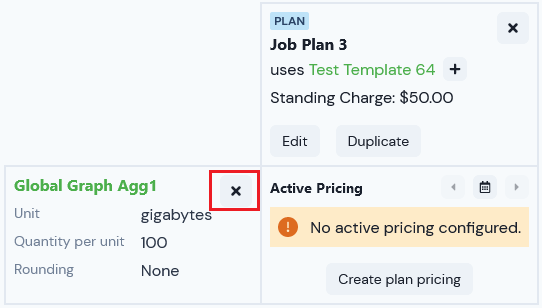
If in your earlier session in the Pricing Editor you added an Aggregation but did not create a pricing for the Plan using the Aggregation, a No active pricing configured message will show and a Remove button is available for the Aggregation, which you can then use to remove the Aggregation immediately.
If in your earlier session in the Pricing Editor you did create a pricing for the Plan using the Aggregation, you cannot remove the Aggregation:
Select Delete pricing - see the previous section in this topic for details.
After you delete the pricing and return to the Pricing Editor, a Delete button is now available for the Aggregation, which you can use to remove it:
{"docsConfig":{"theme":"aspen","$schema":"https://mintlify.com/docs.json","name":"m3ter Documentation","description":"Guides, learning resources and API reference for integrating with m3ter","colors":{"primary":"#4caf4c","dark":"#449d44"},"logo":{"light":"https://mintcdn.com/m3ter/t6C65JBQiQOFtjBy/images/m3ter-logo-blue-sf.svg?fit=max\u0026auto=format\u0026n=t6C65JBQiQOFtjBy\u0026q=85\u0026s=3928db28c84ec6950e43caf96e635d80","dark":"https://mintcdn.com/m3ter/t6C65JBQiQOFtjBy/images/m3ter-logo-white-sf.svg?fit=max\u0026auto=format\u0026n=t6C65JBQiQOFtjBy\u0026q=85\u0026s=a018cb782e49a2fbdd811276476d0605"},"favicon":"https://mintcdn.com/m3ter/T0RRts393DSUkWFc/favicon.svg?fit=max\u0026auto=format\u0026n=T0RRts393DSUkWFc\u0026q=85\u0026s=9492b54cc98df6775983b287b6f865cd","navbar":{"links":[{"href":"https://m3ter.freshdesk.com","label":"Support"},{"href":"https://console.m3ter.com","label":"Console"}],"primary":{"type":"button","label":"Schedule a demo","href":"https://www.m3ter.com/contact"}},"footer":{"socials":{"linkedin":"https://uk.linkedin.com/company/m3ter","x":"https://x.com/m3terHQ","github":"https://github.com/m3ter-com"},"links":[{"items":[{"label":"Website","href":"https://www.m3ter.com"},{"label":"Legal","href":"https://www.m3ter.com/legal"},{"label":"Security","href":"https://www.m3ter.com/security"},{"label":"Trust Center","href":"https://trust.m3ter.com"}]}]},"fonts":{"family":"Montserrat"},"icons":{"library":"lucide"},"styling":{"eyebrows":"breadcrumbs","latex":false},"integrations":{"ga4":{"measurementId":"G-V9C7TTPRQT"}},"contextual":{"options":["copy","view"],"display":"header"},"thumbnails":{"fonts":{"family":"Montserrat"}},"navigation":{"pages":[]}},"deployment":{"deploymentMetadataValue":{"subdomain":"m3ter","hasAudioNarration":false,"actualSubdomain":"m3ter","customDomains":["docs.m3ter.com"],"gitSource":{"type":"github","owner":"m3ter-com","repo":"m3ter-docs","deployBranch":"main","contentDirectory":"","isPrivate":true,"mountPath":"","label":""},"chroma":{"liveDeploymentHistoryId":"6ae4b3832e4c4b8ea8e5ac1c","collectionId":"f4691807-992d-43f9-aab2-d179e798824c","schemaVersion":"v3","latestBuiltDeploymentHistoryId":"6ae4b3832e4c4b8ea8e5ac1c"},"entitlements":{"AI_CHAT":{"status":"ENABLED"},"WEB_MCP":{"status":"ENABLED"},"NARRATION":{"status":"ENABLED"}},"buildId":"6ae9a09c36175fbf7124961d","clientVersion":"0.0.4045","searchFilterCounts":[{"language":"default","tag":"Guides","count":400},{"language":"default","tag":"API Reference","count":393},{"language":"default","tag":"Endpoints","count":387},{"language":"default","tag":"Integrations","count":66},{"language":"default","tag":"m3sh Function Reference","count":66},{"language":"default","tag":"Synthetic functions","count":50},{"language":"default","tag":"m3ter","count":50},{"language":"default","tag":"m3sh","count":43},{"language":"default","tag":"End-Customer Accounts","count":27},{"language":"default","tag":"m3ter Connector for Salesforce","count":24}]},"assistantConfig":{"enableAskAiButton":true,"enableStarterQuestions":false,"enableAskAiSearchBar":false},"basePath":"","hasChatPermissions":true,"hasWebMcpPermissions":true,"toggles":[{"name":"kill-isr","enabled":true,"variant":{"name":"disabled","enabled":false,"feature_enabled":true},"impressionData":false},{"name":"agent-mintlify-slack","enabled":true,"variant":{"name":"disabled","enabled":false,"feature_enabled":true},"impressionData":false},{"name":"agent-integrations-settings","enabled":true,"variant":{"name":"disabled","enabled":false,"feature_enabled":true},"impressionData":false},{"name":"automations-pr-grouping","enabled":true,"variant":{"name":"disabled","enabled":false,"feature_enabled":true},"impressionData":false},{"name":"custom-prefix","enabled":true,"variant":{"name":"disabled","enabled":false,"feature_enabled":true},"impressionData":false},{"name":"analytics-v7","enabled":true,"variant":{"name":"disabled","enabled":false,"feature_enabled":true},"impressionData":false},{"name":"user-flows-analytics","enabled":true,"variant":{"name":"disabled","enabled":false,"feature_enabled":true},"impressionData":false},{"name":"no-publish-flow","enabled":true,"variant":{"name":"disabled","enabled":false,"feature_enabled":true},"impressionData":false},{"name":"workos-onboarding","enabled":true,"variant":{"name":"disabled","enabled":false,"feature_enabled":true},"impressionData":false},{"name":"llms-txt-v2","enabled":true,"variant":{"name":"disabled","enabled":false,"feature_enabled":true},"impressionData":false},{"name":"snapshot-serving-live","enabled":true,"variant":{"name":"disabled","enabled":false,"feature_enabled":true},"impressionData":false},{"name":"stripTemperatureMiddleware","enabled":true,"variant":{"name":"disabled","enabled":false,"feature_enabled":true},"impressionData":false},{"name":"support-platform-pylon-zendesk","enabled":true,"variant":{"name":"disabled","enabled":false,"feature_enabled":true},"impressionData":false},{"name":"snapshot-serving","enabled":true,"variant":{"name":"disabled","enabled":false,"feature_enabled":true},"impressionData":false},{"name":"instant-rollback","enabled":true,"variant":{"name":"disabled","enabled":false,"feature_enabled":true},"impressionData":false},{"name":"granular-notifications-server","enabled":true,"variant":{"name":"disabled","enabled":false,"feature_enabled":true},"impressionData":false},{"name":"granular-notifications","enabled":true,"variant":{"name":"disabled","enabled":false,"feature_enabled":true},"impressionData":false},{"name":"automations-fable","enabled":true,"variant":{"name":"disabled","enabled":false,"feature_enabled":true},"impressionData":false},{"name":"fixed-ai-action-pricing","enabled":true,"variant":{"name":"disabled","enabled":false,"feature_enabled":true},"impressionData":false},{"name":"automation-resolve-merge-conflict","enabled":true,"variant":{"name":"disabled","enabled":false,"feature_enabled":true},"impressionData":false},{"name":"scoped-publishing","enabled":true,"variant":{"name":"disabled","enabled":false,"feature_enabled":true},"impressionData":false},{"name":"mintql","enabled":true,"variant":{"name":"disabled","enabled":false,"feature_enabled":true},"impressionData":false},{"name":"page-level-analytics","enabled":true,"variant":{"name":"disabled","enabled":false,"feature_enabled":true},"impressionData":false},{"name":"editor-version-history-v2","enabled":true,"variant":{"name":"disabled","enabled":false,"feature_enabled":true},"impressionData":false},{"name":"billing-page-v2","enabled":true,"variant":{"name":"disabled","enabled":false,"feature_enabled":true},"impressionData":false},{"name":"full-page-search","enabled":true,"variant":{"name":"disabled","enabled":false,"feature_enabled":true},"impressionData":false},{"name":"workspace-projects","enabled":true,"variant":{"name":"disabled","enabled":false,"feature_enabled":true},"impressionData":false},{"name":"assistant-v5","enabled":true,"variant":{"name":"disabled","enabled":false,"feature_enabled":true},"impressionData":false},{"name":"byok-sep-25","enabled":true,"variant":{"name":"disabled","enabled":false,"feature_enabled":true},"impressionData":false},{"name":"fork-pr-previews","enabled":true,"variant":{"name":"disabled","enabled":false,"feature_enabled":true},"impressionData":false},{"name":"revalidation-jwt","enabled":true,"variant":{"name":"disabled","enabled":false,"feature_enabled":true},"impressionData":false},{"name":"vite-origin","enabled":true,"variant":{"name":"disabled","enabled":false,"feature_enabled":true},"impressionData":false},{"name":"billing-updated-9-15","enabled":true,"variant":{"name":"disabled","enabled":false,"feature_enabled":true},"impressionData":false},{"name":"workos-sso-scim","enabled":true,"variant":{"name":"disabled","enabled":false,"feature_enabled":true},"impressionData":false},{"name":"hobby-abuse-scan","enabled":true,"variant":{"name":"disabled","enabled":false,"feature_enabled":true},"impressionData":false},{"name":"dashboard-inbox","enabled":true,"variant":{"name":"disabled","enabled":false,"feature_enabled":true},"impressionData":false},{"name":"workos-signup","enabled":true,"variant":{"name":"disabled","enabled":false,"feature_enabled":true},"impressionData":false},{"name":"turbopuffer-dual-write","enabled":true,"variant":{"name":"disabled","enabled":false,"feature_enabled":true},"impressionData":false},{"name":"workos-enabled","enabled":true,"variant":{"name":"disabled","enabled":false,"feature_enabled":true},"impressionData":false},{"name":"approve-review-flow","enabled":true,"variant":{"name":"disabled","enabled":false,"feature_enabled":true},"impressionData":false},{"name":"sso-setup-deadline-banner","enabled":true,"variant":{"name":"disabled","enabled":false,"feature_enabled":true},"impressionData":false}],"googleFontsInlined":true},"customCss":[],"page":{"pagePath":"guides/plans-and-pricing/pricing-plans/managing-and-editing-priced-plans-or-plan-templates","slug":"/guides/plans-and-pricing/pricing-plans/managing-and-editing-priced-plans-or-plan-templates","pageMetadata":{"title":"Managing and Editing Priced Plans and Plan Templates","description":null,"href":"/guides/plans-and-pricing/pricing-plans/managing-and-editing-priced-plans-or-plan-templates"},"pageType":"default","mdx":{"mdxSource":{"compiledSource":"\"use strict\";const{Fragment:_Fragment,jsx:_jsx,jsxs:_jsxs}=arguments[0];const{useMDXComponents:_provideComponents}=arguments[0];function _createMdxContent(props){const _components={a:`a`,em:`em`,li:`li`,ol:`ol`,p:`p`,strong:`strong`,ul:`ul`,..._provideComponents(),...props.components},{Heading,OptimizedImage,Tip,Warning}=_components;if(!Heading)_missingMdxReference(`Heading`,true);if(!OptimizedImage)_missingMdxReference(`OptimizedImage`,true);if(!Tip)_missingMdxReference(`Tip`,true);if(!Warning)_missingMdxReference(`Warning`,true);return _jsxs(_Fragment,{children:[_jsx(_components.p,{children:`You can open the Pricing Editor at any time and add Plans or Plan Templates you’ve previously priced. When reviewing your priced Plans and Plan Templates in this way, you can:`}),`\n`,_jsxs(_components.ul,{children:[`\n`,_jsx(_components.li,{children:`Edit a priced Plan or Plan Template.`}),`\n`,_jsx(_components.li,{children:`View the details of Pricing on a priced Plan or Plan Template.`}),`\n`,_jsx(_components.li,{children:`Edit a Pricing for a priced Plan or Plan Template.`}),`\n`,_jsx(_components.li,{children:`View a Pricing Schedule for the Plan, which shows any historic, currently active, or future pricing configured for the Plan.`}),`\n`,_jsx(_components.li,{children:`Delete the pricing you’ve previously configured for a Plan.`}),`\n`,_jsx(_components.li,{children:`If you’ve previously added an Aggregation for pricing a plan, you can remove the Aggregation provided there is no historic, currently active, or future pricing configured for the Plan using the Aggregation.`}),`\n`]}),`\n`,_jsx(_components.p,{children:`This topic explains how to work in the Pricing Editor to edit and manage your priced Plans and Plan Templates:`}),`\n`,_jsxs(_components.ul,{children:[`\n`,_jsx(_components.li,{children:_jsx(_components.a,{href:`/guides/plans-and-pricing/pricing-plans/managing-and-editing-priced-plans-or-plan-templates#editing-a-priced-plan-or-plan-template`,children:`Editing a Priced Plan or Plan Template`})}),`\n`,_jsx(_components.li,{children:_jsx(_components.a,{href:`/guides/plans-and-pricing/pricing-plans/managing-and-editing-priced-plans-or-plan-templates#viewing-the-details-of-a-pricing-on-a-priced-plan-or-plan-template`,children:`Viewing Pricing Details`})}),`\n`,_jsx(_components.li,{children:_jsx(_components.a,{href:`/guides/plans-and-pricing/pricing-plans/managing-and-editing-priced-plans-or-plan-templates#editing-a-pricing-for-a-priced-plan-or-plan-template`,children:`Editing a Pricing`})}),`\n`,_jsx(_components.li,{children:_jsx(_components.a,{href:`/guides/plans-and-pricing/pricing-plans/managing-and-editing-priced-plans-or-plan-templates#viewing-pricing-schedule`,children:`Viewing Pricing Schedule`})}),`\n`,_jsx(_components.li,{children:_jsx(_components.a,{href:`/guides/plans-and-pricing/pricing-plans/managing-and-editing-priced-plans-or-plan-templates#deleting-pricing`,children:`Deleting Pricing`})}),`\n`,_jsx(_components.li,{children:_jsx(_components.a,{href:`/guides/plans-and-pricing/pricing-plans/managing-and-editing-priced-plans-or-plan-templates#removing-aggregations-from-the-pricing-editor`,children:`Removing Aggregations`})}),`\n`]}),`\n`,_jsx(Warning,{children:_jsxs(_components.p,{children:[_jsx(_components.strong,{children:`Important! Unit-based pricing using Counters`}),`. This topic explains how to work in the Pricing Editor to manage and edit your Plan Templates and Plans to which you’ve applied usage-based pricing using `,_jsx(_components.em,{children:`Aggregations`}),` as the pricing metrics. The same functions and features are available for managing and editing your Plan Templates and Plans to which you’ve applied unit-based pricing using `,_jsx(_components.em,{children:`Counters`}),` as the pricing metrics. See the `,_jsx(_components.a,{href:`/guides/recurring-charges-counters`,children:`Recurring Charges: Counters`}),` section for more details.`]})}),`\n`,_jsx(Tip,{children:_jsxs(_components.p,{children:[_jsx(_components.strong,{children:`Tip: Reviewing Pricing?`}),` You can quickly check and review the Pricing associated with a Plan or Plan Template at any time and without having to open the Pricing Editor by opening the Plan or Plan Template `,_jsx(_components.strong,{children:`Details`}),` page. See `,_jsx(_components.a,{href:`/guides/plans-and-pricing/working-with-plan-templates-and-plans/working-in-plan-details`,children:`Working with Plan Templates and Plan Details`}),`.`]})}),`\n`,_jsx(Heading,{level:`2`,id:`editing-a-priced-plan-or-plan-template`,children:`Editing a Priced Plan or Plan Template`}),`\n`,_jsx(_components.p,{children:_jsx(_components.strong,{children:`To edit a priced Plan or Plan Template:`})}),`\n`,_jsxs(_components.ol,{children:[`\n`,_jsxs(_components.li,{children:[`Select `,_jsx(_components.strong,{children:`Pricing>Pricing editor`}),`. The `,_jsx(_components.strong,{children:`Pricing editor`}),` opens.`]}),`\n`,_jsxs(_components.li,{children:[`In the `,_jsx(_components.strong,{children:`Product`}),` drop-down, select the Product for the Plan you want to edit.`]}),`\n`,_jsxs(_components.li,{children:[`Select `,_jsx(_components.strong,{children:`Add plans`}),`. A `,_jsx(_components.strong,{children:`Select Plans`}),` popup appears.`]}),`\n`,_jsxs(_components.li,{children:[`Select the Plans you want to edit and select `,_jsx(_components.strong,{children:`Confirm`}),`. You are returned to the `,_jsx(_components.strong,{children:`Pricing`}),` page where the selected `,_jsx(_components.strong,{children:`Plan`}),` is shown.`]}),`\n`,_jsxs(_components.li,{children:[`If you want to edit the details of a Plan, select `,_jsx(_components.strong,{children:`Edit`}),` under the Plan:`]}),`\n`]}),`\n`,_jsx(OptimizedImage,{src:`https://mintcdn.com/m3ter/cnrDjodlnsopqhK5/images/EditPricedPlan3.png?fit=max\u0026auto=format\u0026n=cnrDjodlnsopqhK5\u0026q=85\u0026s=06924c07059be18447bf80c9da94544e`,alt:`Edit Priced Plan3`,title:`Edit Priced Plan3`,style:{width:`61%`},\"data-og-width\":`626`,width:`626`,\"data-og-height\":`470`,height:`470`,\"data-path\":`images/EditPricedPlan3.png`,\"data-optimize\":`true`,\"data-opv\":`3`,srcset:`https://mintcdn.com/m3ter/cnrDjodlnsopqhK5/images/EditPricedPlan3.png?w=280\u0026fit=max\u0026auto=format\u0026n=cnrDjodlnsopqhK5\u0026q=85\u0026s=450683e4751d3c7f223a9da0a008f6d9 280w, https://mintcdn.com/m3ter/cnrDjodlnsopqhK5/images/EditPricedPlan3.png?w=560\u0026fit=max\u0026auto=format\u0026n=cnrDjodlnsopqhK5\u0026q=85\u0026s=f76663f84ea90163cde8b8a74e008d26 560w, https://mintcdn.com/m3ter/cnrDjodlnsopqhK5/images/EditPricedPlan3.png?w=840\u0026fit=max\u0026auto=format\u0026n=cnrDjodlnsopqhK5\u0026q=85\u0026s=af755a236a7a0de36d76c2cfc8a79bf7 840w, https://mintcdn.com/m3ter/cnrDjodlnsopqhK5/images/EditPricedPlan3.png?w=1100\u0026fit=max\u0026auto=format\u0026n=cnrDjodlnsopqhK5\u0026q=85\u0026s=177665c852bec6b9c90dbc84e2aaf5e0 1100w, https://mintcdn.com/m3ter/cnrDjodlnsopqhK5/images/EditPricedPlan3.png?w=1650\u0026fit=max\u0026auto=format\u0026n=cnrDjodlnsopqhK5\u0026q=85\u0026s=d24310bb12872bdc591dcfeab1777e76 1650w, https://mintcdn.com/m3ter/cnrDjodlnsopqhK5/images/EditPricedPlan3.png?w=2500\u0026fit=max\u0026auto=format\u0026n=cnrDjodlnsopqhK5\u0026q=85\u0026s=61402c7e3df1360590be76fc5f5bdc7a 2500w`}),`\n`,_jsxs(_components.p,{children:[`The `,_jsx(_components.strong,{children:`Plans>Edit`}),` page opens.`]}),`\n`,_jsxs(_components.ol,{start:`6`,children:[`\n`,_jsxs(_components.li,{children:[`Make your editing changes. For example, you might want to change the `,_jsx(_components.strong,{children:`Standing Charge`}),` amount.`]}),`\n`,_jsxs(_components.li,{children:[`Select `,_jsx(_components.strong,{children:`Update Plan`}),`. You are returned to the `,_jsx(_components.strong,{children:`Pricing editor`}),` and your changes are saved.`]}),`\n`]}),`\n`,_jsx(Tip,{children:_jsxs(_components.p,{children:[_jsx(_components.strong,{children:`Tip: Edit Plan Templates?`}),` The steps required to edit a priced Plan Template are similar to those for editing a priced Plan.`]})}),`\n`,_jsx(Heading,{level:`2`,id:`viewing-the-details-of-a-pricing-on-a-priced-plan-or-plan-template`,children:`Viewing the Details of a Pricing on a Priced Plan or Plan Template`}),`\n`,_jsx(_components.p,{children:`From the Pricing Editor, you can open the Details page for a Pricing you’ve configured for a priced Plan or Plan Template.`}),`\n`,_jsx(_components.p,{children:_jsx(_components.strong,{children:`To view the details of a Pricing for a priced Plan or Plan Template:`})}),`\n`,_jsxs(_components.ol,{children:[`\n`,_jsxs(_components.li,{children:[`Select `,_jsx(_components.strong,{children:`Pricing>Pricing Editor`}),`. The `,_jsx(_components.strong,{children:`Pricing Editor`}),` opens.`]}),`\n`,_jsxs(_components.li,{children:[`In the `,_jsx(_components.strong,{children:`Product`}),` drop-down, select the Product for the Plan you want to edit.`]}),`\n`,_jsxs(_components.li,{children:[`Select `,_jsx(_components.strong,{children:`Add plans`}),`. A `,_jsx(_components.strong,{children:`Select Plans`}),` popup appears.`]}),`\n`,_jsxs(_components.li,{children:[`Select the Plan for which you want to view the details of a Pricing and select `,_jsx(_components.strong,{children:`Confirm`}),`. You are returned to the `,_jsx(_components.strong,{children:`Pricing`}),` page where the selected `,_jsx(_components.strong,{children:`Plan`}),` is shown.`]}),`\n`,_jsxs(_components.li,{children:[`In the Pricing Grid, select `,_jsx(_components.strong,{children:`Details`}),` for the Pricing on the Plan you want to view the details for:`]}),`\n`]}),`\n`,_jsx(OptimizedImage,{src:`https://mintcdn.com/m3ter/cnrDjodlnsopqhK5/images/EditPricedPlan4.png?fit=max\u0026auto=format\u0026n=cnrDjodlnsopqhK5\u0026q=85\u0026s=3cfda197f557be883deec39137396055`,alt:`Edit Priced Plan4`,title:`Edit Priced Plan4`,style:{width:`62%`},\"data-og-width\":`626`,width:`626`,\"data-og-height\":`469`,height:`469`,\"data-path\":`images/EditPricedPlan4.png`,\"data-optimize\":`true`,\"data-opv\":`3`,srcset:`https://mintcdn.com/m3ter/cnrDjodlnsopqhK5/images/EditPricedPlan4.png?w=280\u0026fit=max\u0026auto=format\u0026n=cnrDjodlnsopqhK5\u0026q=85\u0026s=13cfda3a99318f9cc40fa32d2fb4aa27 280w, https://mintcdn.com/m3ter/cnrDjodlnsopqhK5/images/EditPricedPlan4.png?w=560\u0026fit=max\u0026auto=format\u0026n=cnrDjodlnsopqhK5\u0026q=85\u0026s=a3f917794d94827921d2a9fb8e24503b 560w, https://mintcdn.com/m3ter/cnrDjodlnsopqhK5/images/EditPricedPlan4.png?w=840\u0026fit=max\u0026auto=format\u0026n=cnrDjodlnsopqhK5\u0026q=85\u0026s=9820140da0dc82033e85137c3e131c36 840w, https://mintcdn.com/m3ter/cnrDjodlnsopqhK5/images/EditPricedPlan4.png?w=1100\u0026fit=max\u0026auto=format\u0026n=cnrDjodlnsopqhK5\u0026q=85\u0026s=ffa8c0c743c0d32dece01425d285cbb5 1100w, https://mintcdn.com/m3ter/cnrDjodlnsopqhK5/images/EditPricedPlan4.png?w=1650\u0026fit=max\u0026auto=format\u0026n=cnrDjodlnsopqhK5\u0026q=85\u0026s=66238aa4fac4e4b86a2f6f4c64851560 1650w, https://mintcdn.com/m3ter/cnrDjodlnsopqhK5/images/EditPricedPlan4.png?w=2500\u0026fit=max\u0026auto=format\u0026n=cnrDjodlnsopqhK5\u0026q=85\u0026s=68a700e4b83be1d118b55862e6e7019f 2500w`}),`\n`,_jsxs(_components.p,{children:[`The `,_jsx(_components.strong,{children:`Pricing details`}),` page opens:`]}),`\n`,_jsx(OptimizedImage,{src:`https://mintcdn.com/m3ter/cnrDjodlnsopqhK5/images/EditPricedPlan5.png?fit=max\u0026auto=format\u0026n=cnrDjodlnsopqhK5\u0026q=85\u0026s=d7963be54bf6e0f3abfb14f5d2438885`,alt:`Edit Priced Plan5`,\"data-og-width\":`1259`,width:`1259`,\"data-og-height\":`773`,height:`773`,\"data-path\":`images/EditPricedPlan5.png`,\"data-optimize\":`true`,\"data-opv\":`3`,srcset:`https://mintcdn.com/m3ter/cnrDjodlnsopqhK5/images/EditPricedPlan5.png?w=280\u0026fit=max\u0026auto=format\u0026n=cnrDjodlnsopqhK5\u0026q=85\u0026s=a11f251e6f06d5033482edb604847986 280w, https://mintcdn.com/m3ter/cnrDjodlnsopqhK5/images/EditPricedPlan5.png?w=560\u0026fit=max\u0026auto=format\u0026n=cnrDjodlnsopqhK5\u0026q=85\u0026s=843e98a1a5471c4a4eefd6fc4df56171 560w, https://mintcdn.com/m3ter/cnrDjodlnsopqhK5/images/EditPricedPlan5.png?w=840\u0026fit=max\u0026auto=format\u0026n=cnrDjodlnsopqhK5\u0026q=85\u0026s=0966cabbdec6cd6d2c301212768bc8ee 840w, https://mintcdn.com/m3ter/cnrDjodlnsopqhK5/images/EditPricedPlan5.png?w=1100\u0026fit=max\u0026auto=format\u0026n=cnrDjodlnsopqhK5\u0026q=85\u0026s=095cb6f79093b0e67e0c98bfdbb2508b 1100w, https://mintcdn.com/m3ter/cnrDjodlnsopqhK5/images/EditPricedPlan5.png?w=1650\u0026fit=max\u0026auto=format\u0026n=cnrDjodlnsopqhK5\u0026q=85\u0026s=6c312df30283d2e98a858c755f58d0a4 1650w, https://mintcdn.com/m3ter/cnrDjodlnsopqhK5/images/EditPricedPlan5.png?w=2500\u0026fit=max\u0026auto=format\u0026n=cnrDjodlnsopqhK5\u0026q=85\u0026s=5a9d7cf5bbc908e531608ec5a3e216a4 2500w`}),`\n`,_jsx(_components.p,{children:`Note that you can:`}),`\n`,_jsxs(_components.ul,{children:[`\n`,_jsxs(_components.li,{children:[`Use hotlinks to open the `,_jsx(_components.strong,{children:`Meter`}),`, `,_jsx(_components.strong,{children:`Aggregation`}),`, `,_jsx(_components.strong,{children:`Plan/Plan Template`}),`, or `,_jsx(_components.strong,{children:`Accounting product`}),` associated with the Pricing.`]}),`\n`,_jsxs(_components.li,{children:[`Copy the `,_jsx(_components.strong,{children:`ID`}),` of the `,_jsx(_components.strong,{children:`Pricing`}),` and the `,_jsx(_components.strong,{children:`IDs`}),` of any `,_jsx(_components.strong,{children:`Pricing bands`}),` directly to your clipboard.`]}),`\n`]}),`\n`,_jsxs(_components.ol,{start:`6`,children:[`\n`,_jsxs(_components.li,{children:[`If you’ve configured any overage pricing bands to be applied when Prepayments or Balances on Accounts have been consumed, then these will be shown under `,_jsx(_components.strong,{children:`Overage pricing bands`}),`:`]}),`\n`]}),`\n`,_jsx(OptimizedImage,{src:`https://mintcdn.com/m3ter/cnrDjodlnsopqhK5/images/EditPricedPlan6.png?fit=max\u0026auto=format\u0026n=cnrDjodlnsopqhK5\u0026q=85\u0026s=8fc44ecffdcc2c4690e066c7802628be`,alt:`Edit Priced Plan6`,\"data-og-width\":`1256`,width:`1256`,\"data-og-height\":`220`,height:`220`,\"data-path\":`images/EditPricedPlan6.png`,\"data-optimize\":`true`,\"data-opv\":`3`,srcset:`https://mintcdn.com/m3ter/cnrDjodlnsopqhK5/images/EditPricedPlan6.png?w=280\u0026fit=max\u0026auto=format\u0026n=cnrDjodlnsopqhK5\u0026q=85\u0026s=e38369ed1362fb17f9b20ee5faf9d1cc 280w, https://mintcdn.com/m3ter/cnrDjodlnsopqhK5/images/EditPricedPlan6.png?w=560\u0026fit=max\u0026auto=format\u0026n=cnrDjodlnsopqhK5\u0026q=85\u0026s=eb8abaafd6f8749f08608c814f5b176e 560w, https://mintcdn.com/m3ter/cnrDjodlnsopqhK5/images/EditPricedPlan6.png?w=840\u0026fit=max\u0026auto=format\u0026n=cnrDjodlnsopqhK5\u0026q=85\u0026s=761107f9325590d27a39c9e5088ceee6 840w, https://mintcdn.com/m3ter/cnrDjodlnsopqhK5/images/EditPricedPlan6.png?w=1100\u0026fit=max\u0026auto=format\u0026n=cnrDjodlnsopqhK5\u0026q=85\u0026s=77ec152b999efdf224c19bb15f2f244f 1100w, https://mintcdn.com/m3ter/cnrDjodlnsopqhK5/images/EditPricedPlan6.png?w=1650\u0026fit=max\u0026auto=format\u0026n=cnrDjodlnsopqhK5\u0026q=85\u0026s=08b6a4b46a04783abac841596978f3e8 1650w, https://mintcdn.com/m3ter/cnrDjodlnsopqhK5/images/EditPricedPlan6.png?w=2500\u0026fit=max\u0026auto=format\u0026n=cnrDjodlnsopqhK5\u0026q=85\u0026s=2c3466860cf716a00fcfb298aee92788 2500w`}),`\n`,_jsxs(_components.ol,{start:`6`,children:[`\n`,_jsxs(_components.li,{children:[`On the `,_jsx(_components.strong,{children:`Pricing details`}),` page, you can also review `,_jsx(_components.strong,{children:`Pricing metadata`}),`:`]}),`\n`]}),`\n`,_jsx(OptimizedImage,{src:`https://mintcdn.com/m3ter/8b6hu8xRk3j1Mge1/images/PricingDetails5A.png?fit=max\u0026auto=format\u0026n=8b6hu8xRk3j1Mge1\u0026q=85\u0026s=600a78d915ed88ffcc0de2becf60a477`,alt:`Pricing Details5a`,\"data-og-width\":`1176`,width:`1176`,\"data-og-height\":`306`,height:`306`,\"data-path\":`images/PricingDetails5A.png`,\"data-optimize\":`true`,\"data-opv\":`3`,srcset:`https://mintcdn.com/m3ter/8b6hu8xRk3j1Mge1/images/PricingDetails5A.png?w=280\u0026fit=max\u0026auto=format\u0026n=8b6hu8xRk3j1Mge1\u0026q=85\u0026s=e0c8fc38cd64d7b03620cf86cbc631cb 280w, https://mintcdn.com/m3ter/8b6hu8xRk3j1Mge1/images/PricingDetails5A.png?w=560\u0026fit=max\u0026auto=format\u0026n=8b6hu8xRk3j1Mge1\u0026q=85\u0026s=046f235c2fed9676f42ef793082d9bbf 560w, https://mintcdn.com/m3ter/8b6hu8xRk3j1Mge1/images/PricingDetails5A.png?w=840\u0026fit=max\u0026auto=format\u0026n=8b6hu8xRk3j1Mge1\u0026q=85\u0026s=dea60cb5a14e527d36fe8539d7830524 840w, https://mintcdn.com/m3ter/8b6hu8xRk3j1Mge1/images/PricingDetails5A.png?w=1100\u0026fit=max\u0026auto=format\u0026n=8b6hu8xRk3j1Mge1\u0026q=85\u0026s=fce47c35864764f905103ed5bd5ee6d2 1100w, https://mintcdn.com/m3ter/8b6hu8xRk3j1Mge1/images/PricingDetails5A.png?w=1650\u0026fit=max\u0026auto=format\u0026n=8b6hu8xRk3j1Mge1\u0026q=85\u0026s=8ee06975ecf31de7862ee32c56381143 1650w, https://mintcdn.com/m3ter/8b6hu8xRk3j1Mge1/images/PricingDetails5A.png?w=2500\u0026fit=max\u0026auto=format\u0026n=8b6hu8xRk3j1Mge1\u0026q=85\u0026s=614dab7ed5bb71fa89a61e9367562709 2500w`}),`\n`,_jsxs(_components.p,{children:[_jsx(_components.strong,{children:`External mappings`}),`. Any External mappings set up for the Pricing are listed:`]}),`\n`,_jsxs(_components.ul,{children:[`\n`,_jsxs(_components.li,{children:[`The `,_jsx(_components.strong,{children:`External system`}),` and `,_jsx(_components.strong,{children:`External table`}),` mapped to are shown - such as `,_jsx(_components.strong,{children:`NetSuite - Item`}),` in the above example. The `,_jsx(_components.strong,{children:`External entity ID`}),` mapped to is also shown.`]}),`\n`,_jsxs(_components.li,{children:[`If a listed External mapping is linked to an Integration, under `,_jsx(_components.strong,{children:`Linked integration`}),` a hotlink text will be shown which you can use to open the Integration.`]}),`\n`,_jsxs(_components.li,{children:[`Under `,_jsx(_components.strong,{children:`Actions`}),`, you can edit or delete the External mapping.`]}),`\n`,_jsxs(_components.li,{children:[`If the Pricing has multiple External mappings created for it, you can use `,_jsx(_components.em,{children:`Search external mappings`}),` to search by `,_jsx(_components.strong,{children:`External table`}),` and `,_jsx(_components.strong,{children:`External entity ID`}),` and filter the list.`]}),`\n`,_jsxs(_components.li,{children:[`You can commence a workflow to `,_jsx(_components.strong,{children:`Create external mapping`}),` for the Pricing directly - see `,_jsx(_components.a,{href:`https://m3ter.mintlify.app/guides/end-customer-accounts/creating-and-managing-external-mappings-for-accounts`,children:`Creating and Managing External Mappings for Accounts`}),` for an example.`]}),`\n`]}),`\n`,_jsxs(_components.p,{children:[_jsx(_components.strong,{children:`Integration runs`}),`. If you’ve set up an integration that synchronizes the Pricing with an external system, the date/time and status of the `,_jsx(_components.strong,{children:`Latest`}),` integration run are shown. You can use a text hotlink to open details of this latest run or `,_jsx(_components.strong,{children:`View all runs`}),`. See `,_jsx(_components.a,{href:`/guides/integrations/setting-up-integrations/reviewing-integration-run-details`,children:`Reviewing Integration Run Details`}),`.`]}),`\n`,_jsxs(_components.ol,{start:`8`,children:[`\n`,_jsxs(_components.li,{children:[`If you want to edit the Pricing, select the `,_jsx(_components.strong,{children:`Edit`}),` button, The `,_jsx(_components.strong,{children:`Pricing>Edit`}),` page opens where you can make changes and then select `,_jsx(_components.strong,{children:`Update pricing`}),` - see the `,_jsx(_components.a,{href:`/guides/plans-and-pricing/pricing-plans/managing-and-editing-priced-plans-or-plan-templates#editing-the-pricing-for-a-priced-plan-or-plan-template`,children:`following section`}),`.`]}),`\n`,_jsxs(_components.li,{children:[`If you want to return to the `,_jsx(_components.strong,{children:`Pricing editor`}),`, use the back button on your browser.`]}),`\n`]}),`\n`,_jsx(Heading,{level:`2`,id:`editing-a-pricing-for-a-priced-plan-or-plan-template`,children:`Editing a Pricing for a Priced Plan or Plan Template`}),`\n`,_jsx(_components.p,{children:_jsx(_components.strong,{children:`To edit the Pricing for a priced Plan or Plan Template:`})}),`\n`,_jsxs(_components.ol,{children:[`\n`,_jsxs(_components.li,{children:[`Select `,_jsx(_components.strong,{children:`Pricing>Pricing editor`}),`. The `,_jsx(_components.strong,{children:`Pricing editor`}),` opens.`]}),`\n`,_jsxs(_components.li,{children:[`In the `,_jsx(_components.strong,{children:`Product`}),` drop-down, select the Product for the Plan you want to edit.`]}),`\n`,_jsxs(_components.li,{children:[`Select `,_jsx(_components.strong,{children:`Add plans`}),`. A `,_jsx(_components.strong,{children:`Select plans`}),` dialog appears.`]}),`\n`,_jsxs(_components.li,{children:[`Select the Plan for which you want to edit a Pricing and select `,_jsx(_components.strong,{children:`Confirm`}),`. You are returned to the `,_jsx(_components.strong,{children:`Pricing`}),` page where the selected `,_jsx(_components.strong,{children:`Plan`}),` is shown.`]}),`\n`,_jsxs(_components.li,{children:[`Select `,_jsx(_components.strong,{children:`Edit`}),` in the Pricing Grid under the Plan.`]}),`\n`]}),`\n`,_jsx(OptimizedImage,{src:`https://mintcdn.com/m3ter/O1qlsc-MFjy-YtIW/images/1744372172-editpricing3a.png?fit=max\u0026auto=format\u0026n=O1qlsc-MFjy-YtIW\u0026q=85\u0026s=e9a228115e96545bda9eeb1eb20033bf`,style:{maxWidth:`min(450px, 100%)`},\"data-og-width\":`651`,width:`651`,\"data-og-height\":`470`,height:`470`,\"data-path\":`images/1744372172-editpricing3a.png`,\"data-optimize\":`true`,\"data-opv\":`3`,srcset:`https://mintcdn.com/m3ter/O1qlsc-MFjy-YtIW/images/1744372172-editpricing3a.png?w=280\u0026fit=max\u0026auto=format\u0026n=O1qlsc-MFjy-YtIW\u0026q=85\u0026s=a0d7e146377c286dd191c1b1265285d0 280w, https://mintcdn.com/m3ter/O1qlsc-MFjy-YtIW/images/1744372172-editpricing3a.png?w=560\u0026fit=max\u0026auto=format\u0026n=O1qlsc-MFjy-YtIW\u0026q=85\u0026s=3d2679e7bc2d75299a453aabccb03efb 560w, https://mintcdn.com/m3ter/O1qlsc-MFjy-YtIW/images/1744372172-editpricing3a.png?w=840\u0026fit=max\u0026auto=format\u0026n=O1qlsc-MFjy-YtIW\u0026q=85\u0026s=6e8ae504457fc34c1780f8af981280b6 840w, https://mintcdn.com/m3ter/O1qlsc-MFjy-YtIW/images/1744372172-editpricing3a.png?w=1100\u0026fit=max\u0026auto=format\u0026n=O1qlsc-MFjy-YtIW\u0026q=85\u0026s=603d7be12ad4034ed8bb5410ec23046c 1100w, https://mintcdn.com/m3ter/O1qlsc-MFjy-YtIW/images/1744372172-editpricing3a.png?w=1650\u0026fit=max\u0026auto=format\u0026n=O1qlsc-MFjy-YtIW\u0026q=85\u0026s=f65605e58ca17f2136056906bbd1f65d 1650w, https://mintcdn.com/m3ter/O1qlsc-MFjy-YtIW/images/1744372172-editpricing3a.png?w=2500\u0026fit=max\u0026auto=format\u0026n=O1qlsc-MFjy-YtIW\u0026q=85\u0026s=c26a90597c40889c77e0ab3791818ac9 2500w`}),`\n`,_jsxs(_components.p,{children:[`The `,_jsx(_components.strong,{children:`Pricing>Edit`}),` page opens.`]}),`\n`,_jsxs(_components.ol,{start:`6`,children:[`\n`,_jsxs(_components.li,{children:[`Make your editing changes to the Pricing. For example, you might have originally configured a `,_jsx(_components.strong,{children:`Tiered`}),` pricing structure that uses two tiers and you now need to update this to use three tiers.`]}),`\n`,_jsxs(_components.li,{children:[`Select `,_jsx(_components.strong,{children:`Update pricing`}),`. You are returned to the Pricing Editor and your changes are saved.`]}),`\n`]}),`\n`,_jsx(Warning,{children:_jsxs(_components.p,{children:[_jsx(_components.strong,{children:`Warning: Changing Pricing Type?`}),` If you change the pricing type, a confirmation popup appears to warn you that the prices for pricing bands you set up earlier might be reset. This depends on the change you are making when editing the pricing structure. For example, changing from a `,_jsx(_components.strong,{children:`Tiered`}),` pricing type to a `,_jsx(_components.strong,{children:`Volume`}),` pricing type will preserve prices for pricing bands. However, if you change from `,_jsx(_components.strong,{children:`Tiered`}),` to `,_jsx(_components.strong,{children:`Stairstep`}),`, prices for bands will be reset to zero.`]})}),`\n`,_jsx(Tip,{children:_jsxs(_components.p,{children:[_jsx(_components.strong,{children:`Tip: When do changes take effect?`}),` Make sure to select `,_jsx(_components.strong,{children:`Apply your editing changes to existing pricing`}),` if you want the pricing changes to be effective immediately for the priced Plan. If not, enter a date to `,_jsx(_components.strong,{children:`Apply these changes from`}),`. If you choose to apply your editing changes for the pricing to take effect at a future date, you’ll be able to view this in the `,_jsx(_components.strong,{children:`Pricing schedule`}),` - see the `,_jsx(_components.a,{href:`/guides/plans-and-pricing/pricing-plans/managing-and-editing-priced-plans-or-plan-templates#viewing-pricing-schedule`,children:`following section`}),` for details.`]})}),`\n`,_jsx(Tip,{children:_jsxs(_components.p,{children:[_jsx(_components.strong,{children:`Tip: Edit a Pricing for priced Plan Template?`}),` The steps required to edit a Pricing for a priced Plan Template are similar to those for editing a Pricing for a priced Plan.`]})}),`\n`,_jsx(Heading,{level:`2`,id:`viewing-pricing-schedule`,children:`Viewing Pricing Schedule`}),`\n`,_jsx(_components.p,{children:`If you’ve set up more than one Pricing for a Plan or Plan Template, you can:`}),`\n`,_jsxs(_components.ul,{children:[`\n`,_jsxs(_components.li,{children:[`View a `,_jsx(_components.strong,{children:`Pricing schedule`}),` for the priced Plan/Plan Template.`]}),`\n`,_jsx(_components.li,{children:`Check the currently active pricing.`}),`\n`,_jsx(_components.li,{children:`Review any historic or future pricing.`}),`\n`]}),`\n`,_jsxs(Tip,{children:[_jsx(_components.p,{children:_jsx(_components.strong,{children:`Notes:`})}),_jsxs(_components.ul,{children:[`\n`,_jsxs(_components.li,{children:[`The following procedure explains how to view the `,_jsx(_components.strong,{children:`Pricing schedule`}),` for a Priced Plan - the steps to follow are similar if you want to view the `,_jsx(_components.strong,{children:`Pricing schedule`}),` for a priced Plan Template.`]}),`\n`,_jsxs(_components.li,{children:[`If you’ve priced a Plan or Plan Template using a `,_jsx(_components.em,{children:`Counter`}),`, you can access and view a `,_jsx(_components.strong,{children:`Counter pricing schedule`}),` in the same way.`]}),`\n`]})]}),`\n`,_jsx(_components.p,{children:_jsx(_components.strong,{children:`To view the pricing schedule for a priced Plan:`})}),`\n`,_jsxs(_components.ol,{children:[`\n`,_jsxs(_components.li,{children:[`Select `,_jsx(_components.strong,{children:`Pricing>Pricing editor`}),`. The `,_jsx(_components.strong,{children:`Pricing editor`}),` opens.`]}),`\n`,_jsxs(_components.li,{children:[`In the `,_jsx(_components.strong,{children:`Product`}),` drop-down, select the Product for the priced Plan whose Pricing Schedule you want to view.`]}),`\n`,_jsxs(_components.li,{children:[`Select `,_jsx(_components.strong,{children:`Add plans`}),`. A `,_jsx(_components.strong,{children:`Select plans`}),` dialog appears.`]}),`\n`,_jsxs(_components.li,{children:[`Select the Plan you want to view the `,_jsx(_components.strong,{children:`Pricing schedule`}),` for and select `,_jsx(_components.strong,{children:`Confirm`}),`. You are returned to the `,_jsx(_components.strong,{children:`Pricing`}),` page where the Pricing grid for the selected `,_jsx(_components.strong,{children:`Plans`}),` is shown:`]}),`\n`]}),`\n`,_jsxs(_components.ul,{children:[`\n`,_jsxs(_components.li,{children:[`An `,_jsx(_components.strong,{children:`Active pricing`}),` will show in the grid only if a Pricing has been configured that is currently active.`]}),`\n`,_jsxs(_components.li,{children:[`You can use the arrows on the `,_jsx(_components.strong,{children:`Pricing schedule`}),` calendar icon to bring a past or future Pricing into the Pricing grid:`]}),`\n`,_jsxs(_components.li,{children:[`If there is an `,_jsx(_components.strong,{children:`Historic pricing`}),` for the Plan, the left-hand arrow on the calendar icon will be active and you can select it to bring that Pricing into the Grid:`]}),`\n`]}),`\n`,_jsx(OptimizedImage,{src:`https://mintcdn.com/m3ter/r3D0c1hhAuooaNQf/images/1728577513-pricingsched27.png?fit=max\u0026auto=format\u0026n=r3D0c1hhAuooaNQf\u0026q=85\u0026s=17f700d495fe456f9dc1c3a5fe61f461`,style:{width:`15%`},\"data-og-width\":`90`,width:`90`,\"data-og-height\":`24`,height:`24`,\"data-path\":`images/1728577513-pricingsched27.png`,\"data-optimize\":`true`,\"data-opv\":`3`,srcset:`https://mintcdn.com/m3ter/r3D0c1hhAuooaNQf/images/1728577513-pricingsched27.png?w=280\u0026fit=max\u0026auto=format\u0026n=r3D0c1hhAuooaNQf\u0026q=85\u0026s=ec7c14ea8052c3435dd4f4304e58ec3d 280w, https://mintcdn.com/m3ter/r3D0c1hhAuooaNQf/images/1728577513-pricingsched27.png?w=560\u0026fit=max\u0026auto=format\u0026n=r3D0c1hhAuooaNQf\u0026q=85\u0026s=4b1d25e487e9c84f89fb4204953346c8 560w, https://mintcdn.com/m3ter/r3D0c1hhAuooaNQf/images/1728577513-pricingsched27.png?w=840\u0026fit=max\u0026auto=format\u0026n=r3D0c1hhAuooaNQf\u0026q=85\u0026s=0d8e9c24a8dab5293759522ffb0f6e72 840w, https://mintcdn.com/m3ter/r3D0c1hhAuooaNQf/images/1728577513-pricingsched27.png?w=1100\u0026fit=max\u0026auto=format\u0026n=r3D0c1hhAuooaNQf\u0026q=85\u0026s=b76161d74c97ae9d8b0a856c8fec31fe 1100w, https://mintcdn.com/m3ter/r3D0c1hhAuooaNQf/images/1728577513-pricingsched27.png?w=1650\u0026fit=max\u0026auto=format\u0026n=r3D0c1hhAuooaNQf\u0026q=85\u0026s=6206d84216b5e95a34c0ec310c909424 1650w, https://mintcdn.com/m3ter/r3D0c1hhAuooaNQf/images/1728577513-pricingsched27.png?w=2500\u0026fit=max\u0026auto=format\u0026n=r3D0c1hhAuooaNQf\u0026q=85\u0026s=beb28cfb8071faf5d7f7647606466995 2500w`}),`\n`,_jsxs(_components.ul,{children:[`\n`,_jsxs(_components.li,{children:[`If there is a `,_jsx(_components.strong,{children:`Future pricing`}),` for the Plan, the right-hand arrow on the calendar icon will be active and you can select it to bring that Pricing into the Grid:`]}),`\n`]}),`\n`,_jsx(OptimizedImage,{src:`https://mintcdn.com/m3ter/r3D0c1hhAuooaNQf/images/1728577764-pricingsched28.png?fit=max\u0026auto=format\u0026n=r3D0c1hhAuooaNQf\u0026q=85\u0026s=5c11d3dbf74328e5175ce7af0af75068`,style:{width:`15%`},\"data-og-width\":`90`,width:`90`,\"data-og-height\":`27`,height:`27`,\"data-path\":`images/1728577764-pricingsched28.png`,\"data-optimize\":`true`,\"data-opv\":`3`,srcset:`https://mintcdn.com/m3ter/r3D0c1hhAuooaNQf/images/1728577764-pricingsched28.png?w=280\u0026fit=max\u0026auto=format\u0026n=r3D0c1hhAuooaNQf\u0026q=85\u0026s=66a47fc59a114514e30cf32c3856f7ed 280w, https://mintcdn.com/m3ter/r3D0c1hhAuooaNQf/images/1728577764-pricingsched28.png?w=560\u0026fit=max\u0026auto=format\u0026n=r3D0c1hhAuooaNQf\u0026q=85\u0026s=90fa5d5822b7f2ce531a8f40733cbb36 560w, https://mintcdn.com/m3ter/r3D0c1hhAuooaNQf/images/1728577764-pricingsched28.png?w=840\u0026fit=max\u0026auto=format\u0026n=r3D0c1hhAuooaNQf\u0026q=85\u0026s=06f5aac96e37ec4af10b20a29f3007c7 840w, https://mintcdn.com/m3ter/r3D0c1hhAuooaNQf/images/1728577764-pricingsched28.png?w=1100\u0026fit=max\u0026auto=format\u0026n=r3D0c1hhAuooaNQf\u0026q=85\u0026s=1ebd245a19a66d5d48c85bbfd2dd7258 1100w, https://mintcdn.com/m3ter/r3D0c1hhAuooaNQf/images/1728577764-pricingsched28.png?w=1650\u0026fit=max\u0026auto=format\u0026n=r3D0c1hhAuooaNQf\u0026q=85\u0026s=721c7bff8930d0ce1812d5ebeac28717 1650w, https://mintcdn.com/m3ter/r3D0c1hhAuooaNQf/images/1728577764-pricingsched28.png?w=2500\u0026fit=max\u0026auto=format\u0026n=r3D0c1hhAuooaNQf\u0026q=85\u0026s=bbae85e37ade08fe22af7ead9d2c5ce0 2500w`}),`\n`,_jsxs(_components.ol,{start:`5`,children:[`\n`,_jsxs(_components.li,{children:[`To view the `,_jsx(_components.strong,{children:`Pricing schedule`}),` for a priced Plan, select the calendar icon:`]}),`\n`]}),`\n`,_jsx(OptimizedImage,{src:`https://mintcdn.com/m3ter/r3D0c1hhAuooaNQf/images/1728577875-pricingsched29.png?fit=max\u0026auto=format\u0026n=r3D0c1hhAuooaNQf\u0026q=85\u0026s=492db422c174e916d47b29f2b1b1c6d7`,style:{width:`5%`},\"data-og-width\":`25`,width:`25`,\"data-og-height\":`25`,height:`25`,\"data-path\":`images/1728577875-pricingsched29.png`,\"data-optimize\":`true`,\"data-opv\":`3`,srcset:`https://mintcdn.com/m3ter/r3D0c1hhAuooaNQf/images/1728577875-pricingsched29.png?w=280\u0026fit=max\u0026auto=format\u0026n=r3D0c1hhAuooaNQf\u0026q=85\u0026s=d897ca97bb844c382a8348b9f5942285 280w, https://mintcdn.com/m3ter/r3D0c1hhAuooaNQf/images/1728577875-pricingsched29.png?w=560\u0026fit=max\u0026auto=format\u0026n=r3D0c1hhAuooaNQf\u0026q=85\u0026s=b6997028372a798ee6ad602cbb0ee16e 560w, https://mintcdn.com/m3ter/r3D0c1hhAuooaNQf/images/1728577875-pricingsched29.png?w=840\u0026fit=max\u0026auto=format\u0026n=r3D0c1hhAuooaNQf\u0026q=85\u0026s=4abfae51ddea0dc1d34fe4dc2165f82c 840w, https://mintcdn.com/m3ter/r3D0c1hhAuooaNQf/images/1728577875-pricingsched29.png?w=1100\u0026fit=max\u0026auto=format\u0026n=r3D0c1hhAuooaNQf\u0026q=85\u0026s=1c630c14c7e5fb5a3f49d3bc0b8977f7 1100w, https://mintcdn.com/m3ter/r3D0c1hhAuooaNQf/images/1728577875-pricingsched29.png?w=1650\u0026fit=max\u0026auto=format\u0026n=r3D0c1hhAuooaNQf\u0026q=85\u0026s=f7221ae1cea530c6169c83a7de553630 1650w, https://mintcdn.com/m3ter/r3D0c1hhAuooaNQf/images/1728577875-pricingsched29.png?w=2500\u0026fit=max\u0026auto=format\u0026n=r3D0c1hhAuooaNQf\u0026q=85\u0026s=efde8081128a52207e00f8b8c6eee098 2500w`}),`\n`,_jsxs(_components.p,{children:[`The `,_jsx(_components.strong,{children:`Pricing schedule`}),` opens:`]}),`\n`,_jsx(OptimizedImage,{src:`https://mintcdn.com/m3ter/r3D0c1hhAuooaNQf/images/1728578058-pricingsched30.png?fit=max\u0026auto=format\u0026n=r3D0c1hhAuooaNQf\u0026q=85\u0026s=0b78d1d76012979808fe64d8d2ef97f4`,style:{maxWidth:`min(900px, 100%)`},\"data-og-width\":`1264`,width:`1264`,\"data-og-height\":`705`,height:`705`,\"data-path\":`images/1728578058-pricingsched30.png`,\"data-optimize\":`true`,\"data-opv\":`3`,srcset:`https://mintcdn.com/m3ter/r3D0c1hhAuooaNQf/images/1728578058-pricingsched30.png?w=280\u0026fit=max\u0026auto=format\u0026n=r3D0c1hhAuooaNQf\u0026q=85\u0026s=93e13eabb37a36f0ab676a9ae38cfb5b 280w, https://mintcdn.com/m3ter/r3D0c1hhAuooaNQf/images/1728578058-pricingsched30.png?w=560\u0026fit=max\u0026auto=format\u0026n=r3D0c1hhAuooaNQf\u0026q=85\u0026s=fb8dc16f3676251b9b3abf72e3f92e27 560w, https://mintcdn.com/m3ter/r3D0c1hhAuooaNQf/images/1728578058-pricingsched30.png?w=840\u0026fit=max\u0026auto=format\u0026n=r3D0c1hhAuooaNQf\u0026q=85\u0026s=44232415cadd83f7836e3bc8b8165e6f 840w, https://mintcdn.com/m3ter/r3D0c1hhAuooaNQf/images/1728578058-pricingsched30.png?w=1100\u0026fit=max\u0026auto=format\u0026n=r3D0c1hhAuooaNQf\u0026q=85\u0026s=9c66eb3bef1e28faa75b269d1719603e 1100w, https://mintcdn.com/m3ter/r3D0c1hhAuooaNQf/images/1728578058-pricingsched30.png?w=1650\u0026fit=max\u0026auto=format\u0026n=r3D0c1hhAuooaNQf\u0026q=85\u0026s=cf5a6c3a708cde38e9a2d291dabce147 1650w, https://mintcdn.com/m3ter/r3D0c1hhAuooaNQf/images/1728578058-pricingsched30.png?w=2500\u0026fit=max\u0026auto=format\u0026n=r3D0c1hhAuooaNQf\u0026q=85\u0026s=bd1e1b8f1b4a6e6d7810557b0db7629e 2500w`}),`\n`,_jsxs(_components.p,{children:[`On the `,_jsx(_components.strong,{children:`Pricing schedule`}),`, you can:`]}),`\n`,_jsxs(_components.ul,{children:[`\n`,_jsxs(_components.li,{children:[`Review `,_jsx(_components.strong,{children:`Plan details`}),` and `,_jsx(_components.strong,{children:`Aggregation details`}),`. These will include audit data showing which User first created and which User last modified the Plan and Aggregation.`]}),`\n`,_jsx(_components.li,{children:`Read-off the start and end dates of any historic or future pricing.`}),`\n`,_jsxs(_components.li,{children:[`Check which pricing is currently `,_jsx(_components.strong,{children:`ACTIVE`}),`.`]}),`\n`]}),`\n`,_jsx(Warning,{children:_jsxs(_components.p,{children:[_jsx(_components.strong,{children:`REMINDER! End dates for Pricing are Exclusive.`}),` Suppose you want to set up a Pricing schedule for one of your products that increases the charge for the highest pricing band in a tiered pricing structure on a month-by-month basis. When setting up this kind of pricing schedule for a Plan, please remember that the end date on a Pricing is `,_jsx(_components.em,{children:`exclusive`}),`. In the above example, it might look as though the second Pricing overlaps with the third Pricing, since the second is set to `,_jsx(_components.em,{children:`end`}),` on 02 Oct 2022 and the third is set to `,_jsx(_components.em,{children:`start`}),` on 02 Oct 2022. But this means the second Pricing ceases to be active for the Plan at midnight on 01 Oct 2022 and the third Pricing starts to be active at that point in time. If we had set the end date of the second Pricing to be 01 Oct 2022, this would have left a gap of one day where no Pricing was active for the Plan!`]})}),`\n`,_jsxs(_components.ul,{children:[`\n`,_jsxs(_components.li,{children:[`If you have a Plan that originally inherited its pricing from the Plan Template but the inherited pricing was overridden at Plan level, this will also be shown. Here’s an example on a `,_jsx(_components.strong,{children:`Counter pricing schedule`}),`:`]}),`\n`]}),`\n`,_jsx(OptimizedImage,{src:`https://mintcdn.com/m3ter/r3D0c1hhAuooaNQf/images/1728578353-pricingsched31.png?fit=max\u0026auto=format\u0026n=r3D0c1hhAuooaNQf\u0026q=85\u0026s=39da5b60ea253ec6e1a5009140f72f98`,style:{maxWidth:`min(850px, 100%)`},\"data-og-width\":`1214`,width:`1214`,\"data-og-height\":`679`,height:`679`,\"data-path\":`images/1728578353-pricingsched31.png`,\"data-optimize\":`true`,\"data-opv\":`3`,srcset:`https://mintcdn.com/m3ter/r3D0c1hhAuooaNQf/images/1728578353-pricingsched31.png?w=280\u0026fit=max\u0026auto=format\u0026n=r3D0c1hhAuooaNQf\u0026q=85\u0026s=bee603388cb062981457eacbc010a6d3 280w, https://mintcdn.com/m3ter/r3D0c1hhAuooaNQf/images/1728578353-pricingsched31.png?w=560\u0026fit=max\u0026auto=format\u0026n=r3D0c1hhAuooaNQf\u0026q=85\u0026s=2b0464f123934c62ca45481df85488d4 560w, https://mintcdn.com/m3ter/r3D0c1hhAuooaNQf/images/1728578353-pricingsched31.png?w=840\u0026fit=max\u0026auto=format\u0026n=r3D0c1hhAuooaNQf\u0026q=85\u0026s=65b07dd4db47238f64c1605dbeadcd0f 840w, https://mintcdn.com/m3ter/r3D0c1hhAuooaNQf/images/1728578353-pricingsched31.png?w=1100\u0026fit=max\u0026auto=format\u0026n=r3D0c1hhAuooaNQf\u0026q=85\u0026s=d781ad70fb64a72eebb79920e267ea02 1100w, https://mintcdn.com/m3ter/r3D0c1hhAuooaNQf/images/1728578353-pricingsched31.png?w=1650\u0026fit=max\u0026auto=format\u0026n=r3D0c1hhAuooaNQf\u0026q=85\u0026s=b7f8d25cced0d299e1416a12c00afb43 1650w, https://mintcdn.com/m3ter/r3D0c1hhAuooaNQf/images/1728578353-pricingsched31.png?w=2500\u0026fit=max\u0026auto=format\u0026n=r3D0c1hhAuooaNQf\u0026q=85\u0026s=8f443ce18261706716d5d884f6db536b 2500w`}),`\n`,_jsx(Tip,{children:_jsxs(_components.p,{children:[_jsx(_components.strong,{children:`Tip: Access Pricing Schedule from Plan details page`}),`. Alternatively, you can access the Pricing Schedule for a priced Plan from the `,_jsx(_components.strong,{children:`Plan details`}),` page under `,_jsx(_components.strong,{children:`Pricing`}),` - simply select the `,_jsx(_components.strong,{children:`View pricing schedule`}),` text link.`]})}),`\n`,_jsx(Heading,{level:`2`,id:`deleting-pricing`,children:`Deleting Pricing`}),`\n`,_jsx(_components.p,{children:`You can delete a pricing you’ve configured for a Plan in the Pricing Editor.`}),`\n`,_jsx(Tip,{children:_jsxs(_components.p,{children:[_jsx(_components.strong,{children:`Delete pricing for Plan Template?`}),` This section explains how to delete the pricing for a Plan. You can delete the pricing for a Plan Template in a similar way.`]})}),`\n`,_jsx(_components.p,{children:_jsx(_components.strong,{children:`To delete the pricing for a Plan:`})}),`\n`,_jsxs(_components.ol,{children:[`\n`,_jsxs(_components.li,{children:[`Select `,_jsx(_components.strong,{children:`Pricing>Pricing editor`}),`. The `,_jsx(_components.strong,{children:`Pricing editor`}),` opens.`]}),`\n`,_jsxs(_components.li,{children:[`In the `,_jsx(_components.strong,{children:`Product`}),` drop-down, select the Product for the Plan whose pricing you want to delete.`]}),`\n`,_jsxs(_components.li,{children:[`Select `,_jsx(_components.strong,{children:`Add plans`}),`. A `,_jsx(_components.strong,{children:`Select plans`}),` dialog appears.`]}),`\n`,_jsxs(_components.li,{children:[`Select the Plan whose pricing you want to delete and select `,_jsx(_components.strong,{children:`Confirm`}),`. You are returned to the `,_jsx(_components.strong,{children:`Pricing`}),` page where the selected `,_jsx(_components.strong,{children:`Plan`}),` is shown with the pricing you configured earlier.`]}),`\n`,_jsxs(_components.li,{children:[`Select `,_jsx(_components.strong,{children:`Delete`}),` under the Plan for an Aggregation used to create a pricing. A confirmation popup appears.`]}),`\n`,_jsxs(_components.li,{children:[`Select `,_jsx(_components.strong,{children:`Yes`}),` to continue. The popup closes and the Plan now shows `,_jsx(_components.strong,{children:`No active pricing configured`}),` using the Aggregation used previously.`]}),`\n`,_jsxs(_components.li,{children:[`If you want to reconfigure the pricing for the Plan using the Aggregation you used previously, you can select `,_jsx(_components.strong,{children:`Create pricing`}),`.`]}),`\n`]}),`\n`,_jsx(Warning,{children:_jsxs(_components.p,{children:[_jsx(_components.strong,{children:`Warning: Deleting Pricing for Plans Attached to Accounts!`}),` If you delete the pricing for a Plan that you’ve attached to one of your end-customer Accounts for charging against that Account, any future Bills will not be able to be calculated. You must re-price the Plan for any future Billing.`]})}),`\n`,_jsx(Heading,{level:`2`,id:`removing-aggregations-from-the-pricing-editor`,children:`Removing Aggregations from the Pricing Editor`}),`\n`,_jsx(_components.p,{children:`You might want to remove an Aggregation you’ve previously added to the Pricing Editor for pricing up a Plan.`}),`\n`,_jsx(Warning,{children:_jsxs(_components.p,{children:[_jsx(_components.strong,{children:`Warning:`}),` You can only remove an Aggregation if there’s no `,_jsx(_components.em,{children:`historic`}),`, `,_jsx(_components.em,{children:`currently active`}),`, or `,_jsx(_components.em,{children:`future pricing`}),` configured for the Plan using the Aggregation.`]})}),`\n`,_jsx(_components.p,{children:_jsx(_components.strong,{children:`To remove Aggregations for a Plan in the Pricing Editor:`})}),`\n`,_jsxs(_components.ol,{children:[`\n`,_jsxs(_components.li,{children:[`Select `,_jsx(_components.strong,{children:`Pricing>Pricing editor`}),`. The `,_jsx(_components.strong,{children:`Pricing editor`}),` opens.`]}),`\n`,_jsxs(_components.li,{children:[`In the `,_jsx(_components.strong,{children:`Product`}),` drop-down, select the Product for the Plan with an Aggregation you want to remove.`]}),`\n`,_jsxs(_components.li,{children:[`Select `,_jsx(_components.strong,{children:`Add plans`}),`. A `,_jsx(_components.strong,{children:`Select plans`}),` dialog appears.`]}),`\n`,_jsxs(_components.li,{children:[`Select the Plan with the Aggregation added earlier for pricing the Plan and select `,_jsx(_components.strong,{children:`Confirm`}),`. You are returned to the `,_jsx(_components.strong,{children:`Pricing`}),` page where the selected `,_jsx(_components.strong,{children:`Plan`}),` is shown with the added Aggregation.`]}),`\n`,_jsxs(_components.li,{children:[`If in your earlier session in the Pricing Editor you added an Aggregation but `,_jsx(_components.em,{children:`did not create a pricing`}),` for the Plan using the Aggregation, a `,_jsx(_components.strong,{children:`No active pricing configured`}),` message will show and a `,_jsx(_components.strong,{children:`Remove`}),` button is available for the Aggregation, which you can then use to remove the Aggregation immediately.`]}),`\n`,_jsxs(_components.li,{children:[`If in your earlier session in the Pricing Editor you `,_jsx(_components.em,{children:`did create a pricing`}),` for the Plan using the Aggregation, you cannot remove the Aggregation:`]}),`\n`]}),`\n`,_jsxs(_components.ul,{children:[`\n`,_jsxs(_components.li,{children:[`Select `,_jsx(_components.strong,{children:`Delete pricing`}),` - see the `,_jsx(_components.a,{href:`/guides/plans-and-pricing/pricing-plans/managing-and-editing-priced-plans-or-plan-templates#deleting-pricing`,children:`previous section`}),` in this topic for details.`]}),`\n`,_jsxs(_components.li,{children:[`After you delete the pricing and return to the Pricing Editor, a `,_jsx(_components.strong,{children:`Delete`}),` button is now available for the Aggregation, which you can use to remove it:`]}),`\n`]}),`\n`,_jsx(OptimizedImage,{src:`https://mintcdn.com/m3ter/sSeshoNuulAewaeU/images/1687520481-pricing66.png?fit=max\u0026auto=format\u0026n=sSeshoNuulAewaeU\u0026q=85\u0026s=196adf2fd3889aa1665b69ecdf85e079`,style:{maxWidth:`min(400px, 100%)`},\"data-og-width\":`542`,width:`542`,\"data-og-height\":`308`,height:`308`,\"data-path\":`images/1687520481-pricing66.png`,\"data-optimize\":`true`,\"data-opv\":`3`,srcset:`https://mintcdn.com/m3ter/sSeshoNuulAewaeU/images/1687520481-pricing66.png?w=280\u0026fit=max\u0026auto=format\u0026n=sSeshoNuulAewaeU\u0026q=85\u0026s=7e94b731bf8d84dc2b6a9f9523df0be0 280w, https://mintcdn.com/m3ter/sSeshoNuulAewaeU/images/1687520481-pricing66.png?w=560\u0026fit=max\u0026auto=format\u0026n=sSeshoNuulAewaeU\u0026q=85\u0026s=077dbe86026ca719c325b59bb5a1435e 560w, https://mintcdn.com/m3ter/sSeshoNuulAewaeU/images/1687520481-pricing66.png?w=840\u0026fit=max\u0026auto=format\u0026n=sSeshoNuulAewaeU\u0026q=85\u0026s=26e2fafe9b1bacf9f52ac486e8897c41 840w, https://mintcdn.com/m3ter/sSeshoNuulAewaeU/images/1687520481-pricing66.png?w=1100\u0026fit=max\u0026auto=format\u0026n=sSeshoNuulAewaeU\u0026q=85\u0026s=744ca343beda57c8560cec2dc37e3b37 1100w, https://mintcdn.com/m3ter/sSeshoNuulAewaeU/images/1687520481-pricing66.png?w=1650\u0026fit=max\u0026auto=format\u0026n=sSeshoNuulAewaeU\u0026q=85\u0026s=5eebd389a238177abef7c2f79ad1989d 1650w, https://mintcdn.com/m3ter/sSeshoNuulAewaeU/images/1687520481-pricing66.png?w=2500\u0026fit=max\u0026auto=format\u0026n=sSeshoNuulAewaeU\u0026q=85\u0026s=574047d29d9126ff8b4948de2a344414 2500w`})]})}function MDXContent(props={}){const{wrapper:MDXLayout}={..._provideComponents(),...props.components};return MDXLayout?_jsx(MDXLayout,{...props,children:_jsx(_createMdxContent,{...props})}):_createMdxContent(props)}return{default:MDXContent};function _missingMdxReference(id,component){throw new Error(`Expected `+(component?`component`:`object`)+\" `\"+id+\"` to be defined: you likely forgot to import, pass, or provide it.\")}","frontmatter":{},"scope":{"config":{},"pageMetadata":{"title":"Managing and Editing Priced Plans and Plan Templates","description":null,"href":"/guides/plans-and-pricing/pricing-plans/managing-and-editing-priced-plans-or-plan-templates"}}},"mdxSourceWithNoJs":null},"mdxExtracts":{"tableOfContents":[{"title":"Editing a Priced Plan or Plan Template","slug":"editing-a-priced-plan-or-plan-template","depth":2,"children":[]},{"title":"Viewing the Details of a Pricing on a Priced Plan or Plan Template","slug":"viewing-the-details-of-a-pricing-on-a-priced-plan-or-plan-template","depth":2,"children":[]},{"title":"Editing a Pricing for a Priced Plan or Plan Template","slug":"editing-a-pricing-for-a-priced-plan-or-plan-template","depth":2,"children":[]},{"title":"Viewing Pricing Schedule","slug":"viewing-pricing-schedule","depth":2,"children":[]},{"title":"Deleting Pricing","slug":"deleting-pricing","depth":2,"children":[]},{"title":"Removing Aggregations from the Pricing Editor","slug":"removing-aggregations-from-the-pricing-editor","depth":2,"children":[]}],"codeExamples":{}},"jsLinks":[],"subdomain":"m3ter","siteName":"m3ter Documentation","title":"Managing and Editing Priced Plans and Plan Templates - m3ter Documentation","navMaps":{"firstHrefInVersion":{},"firstHrefInLanguage":{}},"lastModified":"2026-10-30T15:11:25.303Z","originalFileLocation":"guides/plans-and-pricing/pricing-plans/managing-and-editing-priced-plans-or-plan-templates.mdx"},"headHtml":"\u003cscript data-mint-head>(function(){var d=document.documentElement,p=null;if(!p){try{p=localStorage.getItem(\"isDarkMode\")}catch(e){}if(p==='true')p='dark';else if(p==='false')p='light';if(p!=='light'\u0026\u0026p!=='dark'\u0026\u0026p!=='system')p=\"system\"}var r=p==='system'?(matchMedia(\"(prefers-color-scheme: dark)\").matches?'dark':'light'):p;d.classList.remove(r==='dark'?'light':'dark');d.classList.add(r);d.setAttribute(\"data-theme-preference\",p)})();\u003c/script>\u003cmeta data-mint-head name=\"application-name\" content=\"m3ter Documentation\">\u003cmeta data-mint-head name=\"generator\" content=\"Mintlify\">\u003clink data-mint-head rel=\"icon\" type=\"image/png\" sizes=\"192x192\" href=\"/mintlify-assets/_mintlify/favicons/m3ter/zwvZvZyvpa8TKV7c/_generated/favicon/android-chrome-192x192.png\" media=\"(prefers-color-scheme: light)\">\u003clink data-mint-head rel=\"apple-touch-icon\" type=\"image/png\" sizes=\"180x180\" href=\"/mintlify-assets/_mintlify/favicons/m3ter/zwvZvZyvpa8TKV7c/_generated/favicon/apple-touch-icon.png\">\u003clink data-mint-head rel=\"icon\" type=\"image/png\" sizes=\"16x16\" href=\"/mintlify-assets/_mintlify/favicons/m3ter/zwvZvZyvpa8TKV7c/_generated/favicon/favicon-16x16.png\" media=\"(prefers-color-scheme: light)\">\u003clink data-mint-head rel=\"icon\" type=\"image/png\" sizes=\"32x32\" href=\"/mintlify-assets/_mintlify/favicons/m3ter/zwvZvZyvpa8TKV7c/_generated/favicon/favicon-32x32.png\" media=\"(prefers-color-scheme: light)\">\u003clink data-mint-head rel=\"shortcut icon\" type=\"image/x-icon\" href=\"/mintlify-assets/_mintlify/favicons/m3ter/zwvZvZyvpa8TKV7c/_generated/favicon/favicon.ico\" media=\"(prefers-color-scheme: light)\">\u003clink data-mint-head rel=\"icon\" type=\"image/png\" sizes=\"192x192\" href=\"/mintlify-assets/_mintlify/favicons/m3ter/zwvZvZyvpa8TKV7c/_generated/favicon-dark/android-chrome-192x192.png\" media=\"(prefers-color-scheme: dark)\">\u003clink data-mint-head rel=\"icon\" type=\"image/png\" sizes=\"16x16\" href=\"/mintlify-assets/_mintlify/favicons/m3ter/zwvZvZyvpa8TKV7c/_generated/favicon-dark/favicon-16x16.png\" media=\"(prefers-color-scheme: dark)\">\u003clink data-mint-head rel=\"icon\" type=\"image/png\" sizes=\"32x32\" href=\"/mintlify-assets/_mintlify/favicons/m3ter/zwvZvZyvpa8TKV7c/_generated/favicon-dark/favicon-32x32.png\" media=\"(prefers-color-scheme: dark)\">\u003clink data-mint-head rel=\"shortcut icon\" type=\"image/x-icon\" href=\"/mintlify-assets/_mintlify/favicons/m3ter/zwvZvZyvpa8TKV7c/_generated/favicon-dark/favicon.ico\" media=\"(prefers-color-scheme: dark)\">\u003cmeta data-mint-head property=\"og:title\" content=\"Managing and Editing Priced Plans and Plan Templates - m3ter Documentation\">\u003cmeta data-mint-head property=\"og:site_name\" content=\"m3ter Documentation\">\u003cmeta data-mint-head property=\"og:url\" content=\"https://docs.m3ter.com/guides/plans-and-pricing/pricing-plans/managing-and-editing-priced-plans-or-plan-templates\">\u003cmeta data-mint-head property=\"og:type\" content=\"website\">\u003cmeta data-mint-head property=\"og:image\" content=\"https://m3ter.mintlify.app/_mintlify/api/og/v2?division=Pricing+and+Managing+Plans+and+Plan+Templates\u0026amp;title=Managing+and+Editing+Priced+Plans+and+Plan+Templates\u0026amp;theme=a12cf6d8598fbb808e7ba8a7\u0026amp;signature=16480088e10a428c72b7e3b07faa0a447395167c301829433a0c89a47d11c77f\">\u003cmeta data-mint-head property=\"og:image:width\" content=\"1200\">\u003cmeta data-mint-head property=\"og:image:height\" content=\"630\">\u003cmeta data-mint-head name=\"twitter:card\" content=\"summary_large_image\">\u003cmeta data-mint-head name=\"twitter:title\" content=\"Managing and Editing Priced Plans and Plan Templates - m3ter Documentation\">\u003cmeta data-mint-head name=\"twitter:image\" content=\"https://m3ter.mintlify.app/_mintlify/api/og/v2?division=Pricing+and+Managing+Plans+and+Plan+Templates\u0026amp;title=Managing+and+Editing+Priced+Plans+and+Plan+Templates\u0026amp;theme=a12cf6d8598fbb808e7ba8a7\u0026amp;signature=16480088e10a428c72b7e3b07faa0a447395167c301829433a0c89a47d11c77f\">\u003cmeta data-mint-head name=\"twitter:image:width\" content=\"1200\">\u003cmeta data-mint-head name=\"twitter:image:height\" content=\"630\">\u003cmeta data-mint-head name=\"msapplication-config\" content=\"/mintlify-assets/_mintlify/favicons/m3ter/zwvZvZyvpa8TKV7c/_generated/favicon/browserconfig.xml\">\u003cmeta data-mint-head name=\"apple-mobile-web-app-title\" content=\"m3ter Documentation\">\u003cmeta data-mint-head name=\"msapplication-TileColor\" content=\"#4caf4c\">\u003clink data-mint-head rel=\"canonical\" href=\"https://docs.m3ter.com/guides/plans-and-pricing/pricing-plans/managing-and-editing-priced-plans-or-plan-templates\">\u003clink data-mint-head rel=\"alternate\" type=\"application/xml\" href=\"/sitemap.xml\">\u003clink data-mint-head rel=\"alternate\" type=\"text/markdown\" href=\"/guides/plans-and-pricing/pricing-plans/managing-and-editing-priced-plans-or-plan-templates.md\">\u003cscript data-mint-head type=\"application/ld+json\">{\"@context\":\"https://schema.org\",\"@graph\":[{\"@type\":\"Organization\",\"@id\":\"https://docs.m3ter.com/#organization\",\"name\":\"m3ter Documentation\",\"url\":\"https://docs.m3ter.com\",\"logo\":{\"@type\":\"ImageObject\",\"url\":\"https://mintcdn.com/m3ter/t6C65JBQiQOFtjBy/images/m3ter-logo-blue-sf.svg?fit=max\u0026auto=format\u0026n=t6C65JBQiQOFtjBy\u0026q=85\u0026s=3928db28c84ec6950e43caf96e635d80\"}},{\"@type\":\"WebSite\",\"@id\":\"https://docs.m3ter.com#website\",\"name\":\"m3ter Documentation\",\"url\":\"https://docs.m3ter.com\",\"publisher\":{\"@id\":\"https://docs.m3ter.com/#organization\"}},{\"@type\":\"WebPage\",\"@id\":\"https://docs.m3ter.com/guides/plans-and-pricing/pricing-plans/managing-and-editing-priced-plans-or-plan-templates#webpage\",\"url\":\"https://docs.m3ter.com/guides/plans-and-pricing/pricing-plans/managing-and-editing-priced-plans-or-plan-templates\",\"name\":\"Managing and Editing Priced Plans and Plan Templates\",\"dateModified\":\"2026-10-30T15:11:25.303Z\",\"isPartOf\":{\"@id\":\"https://docs.m3ter.com#website\"},\"breadcrumb\":{\"@id\":\"https://docs.m3ter.com/guides/plans-and-pricing/pricing-plans/managing-and-editing-priced-plans-or-plan-templates#breadcrumb\"}},{\"@type\":\"BreadcrumbList\",\"@id\":\"https://docs.m3ter.com/guides/plans-and-pricing/pricing-plans/managing-and-editing-priced-plans-or-plan-templates#breadcrumb\",\"itemListElement\":[{\"@type\":\"ListItem\",\"position\":1,\"name\":\"Guides\",\"item\":\"https://docs.m3ter.com/guides/getting-started/quick-start-worked-example\"},{\"@type\":\"ListItem\",\"position\":2,\"name\":\"Plans and Pricing\",\"item\":\"https://docs.m3ter.com/guides/plans-and-pricing\"},{\"@type\":\"ListItem\",\"position\":3,\"name\":\"Pricing and Managing Plans and Plan Templates\",\"item\":\"https://docs.m3ter.com/guides/plans-and-pricing/pricing-plans\"},{\"@type\":\"ListItem\",\"position\":4,\"name\":\"Managing and Editing Priced Plans and Plan Templates\",\"item\":\"https://docs.m3ter.com/guides/plans-and-pricing/pricing-plans/managing-and-editing-priced-plans-or-plan-templates\"}]},{\"@type\":[\"Article\",\"TechArticle\"],\"@id\":\"https://docs.m3ter.com/guides/plans-and-pricing/pricing-plans/managing-and-editing-priced-plans-or-plan-templates#article\",\"headline\":\"Managing and Editing Priced Plans and Plan Templates\",\"name\":\"Managing and Editing Priced Plans and Plan Templates\",\"url\":\"https://docs.m3ter.com/guides/plans-and-pricing/pricing-plans/managing-and-editing-priced-plans-or-plan-templates\",\"mainEntityOfPage\":{\"@id\":\"https://docs.m3ter.com/guides/plans-and-pricing/pricing-plans/managing-and-editing-priced-plans-or-plan-templates#webpage\"},\"dateModified\":\"2026-10-30T15:11:25.303Z\",\"publisher\":{\"@id\":\"https://docs.m3ter.com/#organization\"},\"isPartOf\":{\"@id\":\"https://docs.m3ter.com#website\"}}]}\u003c/script>\u003cscript data-mint-head type=\"application/ld+json\">{\"@context\":\"https://schema.org\",\"@type\":\"WebSite\",\"name\":\"m3ter Documentation\",\"creator\":{\"@type\":\"Organization\",\"name\":\"Mintlify\",\"url\":\"https://mintlify.com\"}}\u003c/script>","siteName":"m3ter Documentation","nav":{"global":null,"tabs":[{"tab":"Exploring m3ter","pages":[{"title":"Exploring m3ter","href":""}]},{"tab":"Guides","pages":[{"group":"Guides","pages":[{"group":"Getting Started","root":{"title":"Getting Started","href":"/guides/getting-started"},"expanded":false,"pages":[{"title":"Quick Start","href":"/guides/getting-started/quick-start-worked-example"},{"title":"m3ter Console","href":"/guides/getting-started/working-in-the-m3ter-console"},{"title":"Configuration Workflow","href":"/guides/getting-started/previewing-main-configuration-steps"},{"group":"Worked Examples","expanded":false,"pages":[{"title":"Worked Examples","href":"/guides/getting-started/metering-for-production-worked-examples"},{"title":"Example 1: Cloud Storage and File Cleanup","href":"/guides/getting-started/metering-for-production-worked-examples/worked-example-1-cloud-storage-and-file-cleanup"},{"title":"Example 2: Compound Aggregation for Sign-Up Bonus","href":"/guides/getting-started/metering-for-production-worked-examples/example-2-compound-aggregation-for-sign-up-bonus"},{"title":"Example 3: Segmented Aggregation on Single Meter Usage","href":"/guides/getting-started/metering-for-production-worked-examples/example-3-segmented-aggregation-on-single-meter-usage"}]},{"title":"Dates in m3ter - Quick Reference Starter","href":"/guides/getting-started/working-with-dates-in-m3ter-easy-reference"},{"title":"Feature Release Stages","href":"/guides/getting-started/feature-release-stages"},{"title":"Knowledge Index","href":"/guides/getting-started/knowledge-index"},{"title":"Contacting m3ter Support","href":"/guides/getting-started/contacting-m3ter-support"}]},{"group":"Authentication","root":{"title":"Authentication","href":"/guides/authenticating-with-the-platform"},"expanded":false,"pages":[{"title":"User/Password Authentication","href":"/guides/authenticating-with-the-platform/user-password-authentication"},{"title":"m3ter Single Sign-On","href":"/guides/authenticating-with-the-platform/m3ter-single-sign-on"},{"title":"Service Authentication","href":"/guides/authenticating-with-the-platform/service-authentication"}]},{"group":"Creating, Managing, and Reviewing Products","root":{"title":"Creating, Managing, and Reviewing Products","href":"/guides/creating-and-managing-products"},"expanded":false,"pages":[{"title":"Working with Custom Fields","href":"/guides/creating-and-managing-products/working-with-custom-fields"}]},{"group":"Usage Data: Meters","root":{"title":"Usage Data: Meters","href":"/guides/usage-data-meters"},"expanded":false,"pages":[{"title":"Reviewing Meter Options","mode":"default","href":"/guides/usage-data-meters/reviewing-meter-options"},{"title":"Creating Product Meters","href":"/guides/usage-data-meters/creating-meters"},{"title":"Creating Global Meters","href":"/guides/usage-data-meters/creating-global-meters"},{"title":"Working in Meter Details","href":"/guides/usage-data-meters/working-in-meter-details"},{"title":"Working with Meter Derived Fields and Examples","href":"/guides/usage-data-meters/derived-fields-for-meters-examples-and-supported-syntax"}]},{"group":"Pricing Metrics: Aggregations","root":{"title":"Pricing Metrics: Aggregations","href":"/guides/usage-data-aggregations"},"expanded":false,"pages":[{"title":"Reviewing Aggregation Options","href":"/guides/usage-data-aggregations/reviewing-aggregation-options"},{"title":"Creating Product Aggregations","href":"/guides/usage-data-aggregations/creating-aggregations"},{"title":"Creating Global Aggregations","href":"/guides/usage-data-aggregations/creating-global-aggregations"},{"title":"Compound Aggregations","href":"/guides/usage-data-aggregations/compound-aggregations"},{"title":"Working with Compound Aggregation Calculations","href":"/guides/usage-data-aggregations/compound-aggregation-calculations"},{"title":"Compound Aggregations - Examples","href":"/guides/usage-data-aggregations/compound-aggregations-examples"},{"title":"Segmented Aggregations","href":"/guides/usage-data-aggregations/segmented-aggregations"},{"title":"Custom SQL Aggregations","href":"/guides/usage-data-aggregations/custom-sql-aggregations"},{"title":"Reviewing Aggregation Details","href":"/guides/usage-data-aggregations/reviewing-aggregation-details"}]},{"group":"Recurring Charges: Counters","root":{"title":"Recurring Charges: Counters","href":"/guides/recurring-charges-counters"},"expanded":false,"pages":[{"title":"Creating Counters and Pricing Plans","href":"/guides/recurring-charges-counters/creating-counters"},{"title":"Understanding and Creating Counter Adjustments for Accounts","href":"/guides/recurring-charges-counters/creating-counter-adjustments-for-accounts"},{"title":"Recurring Charges Billing: Seat-Based Pricing","href":"/guides/recurring-charges-counters/reviewing-bills-for-recurring-charges"},{"title":"Recurring Charges Billing: Hybrid Pricing","href":"/guides/recurring-charges-counters/recurring-charges-example-2-hybrid-pricing"}]},{"group":"Plans and Pricing","root":{"title":"Plans and Pricing","href":"/guides/plans-and-pricing"},"expanded":false,"pages":[{"group":"Creating and Working with Plan Templates, Plans, and Plan Groups","root":{"title":"Creating and Working with Plan Templates, Plans, and Plan Groups","href":"/guides/plans-and-pricing/working-with-plan-templates-and-plans"},"expanded":false,"pages":[{"title":"Reviewing Options for Plans and Plan Templates","href":"/guides/plans-and-pricing/working-with-plan-templates-and-plans/reviewing-configuration-options-for-plans-and-plan-templates"},{"title":"Understanding Billing Options for Plan Templates/Plans","href":"/guides/plans-and-pricing/working-with-plan-templates-and-plans/understanding-billing-options-for-plan-templates-plans"},{"title":"Creating Plan Templates","href":"/guides/plans-and-pricing/working-with-plan-templates-and-plans/creating-plan-templates"},{"title":"Creating Plans","href":"/guides/plans-and-pricing/working-with-plan-templates-and-plans/creating-plans"},{"title":"Working in Plan Template and Plan Details","href":"/guides/plans-and-pricing/working-with-plan-templates-and-plans/working-in-plan-details"},{"title":"Editing and Deleting Plan Templates and Plans","href":"/guides/plans-and-pricing/working-with-plan-templates-and-plans/editing-plan-templates-and-plans"},{"title":"Working with Plan Groups","href":"/guides/plans-and-pricing/working-with-plan-templates-and-plans/working-with-plan-groups"}]},{"group":"Pricing and Managing Plans and Plan Templates","root":{"title":"Pricing and Managing Plans and Plan Templates","href":"/guides/plans-and-pricing/pricing-plans"},"expanded":false,"pages":[{"title":"Reviewing Pricing Options for Plans and Plan Templates","href":"/guides/plans-and-pricing/pricing-plans/reviewing-pricing-options-and-pricing-plans"},{"title":"Pricing Plans and Plan Templates","href":"/guides/plans-and-pricing/pricing-plans/pricing-plans"},{"title":"Pricing Plans Using Segmented Aggregations","description":null,"href":"/guides/plans-and-pricing/pricing-plans/pricing-plans-using-segmented-aggregations"},{"title":"Managing and Editing Priced Plans and Plan Templates","href":"/guides/plans-and-pricing/pricing-plans/managing-and-editing-priced-plans-or-plan-templates"},{"title":"Duplicating Priced Plans and Plan Templates","description":null,"href":"/guides/plans-and-pricing/pricing-plans/duplicating-priced-plans-or-plan-templates"}]}]},{"group":"End-Customer Accounts","root":{"title":"End-Customer Accounts","href":"/guides/end-customer-accounts"},"expanded":false,"pages":[{"title":"Managing Accounts - Best Practices","href":"/guides/end-customer-accounts/managing-accounts-best-practices"},{"title":"Creating and Managing Accounts","href":"/guides/end-customer-accounts/creating-an-account"},{"title":"Attaching Plans to an Account","href":"/guides/end-customer-accounts/attaching-plans-to-an-account"},{"title":"Creating Custom Plans for Accounts","href":"/guides/end-customer-accounts/creating-custom-account-plans"},{"title":"Attaching Plan Groups to an Account","href":"/guides/end-customer-accounts/attaching-plan-groups-to-an-account"},{"title":"Creating Custom Plan Groups for Accounts","href":"/guides/end-customer-accounts/creating-custom-plan-groups-for-accounts"},{"title":"Creating Prepayments for Accounts","href":"/guides/end-customer-accounts/creating-prepayments-for-accounts"},{"group":"Working with Contracts for Accounts","root":{"title":"Working with Contracts for Accounts","href":"/guides/end-customer-accounts/creating-contracts-for-accounts"},"expanded":false,"pages":[{"title":"Creating and Managing Contracts","href":"/guides/end-customer-accounts/creating-contracts-for-accounts/creating-and-managing-contracts"},{"title":"Setting Up Contract Billing","href":"/guides/end-customer-accounts/creating-contracts-for-accounts/setting-up-contract-billing"},{"title":"Reviewing Organization Contracts","href":"/guides/end-customer-accounts/creating-contracts-for-accounts/reviewing-organization-contracts"}]},{"group":"Working with Balances for Accounts","root":{"title":"Working with Balances for Accounts","href":"/guides/end-customer-accounts/creating-balances-for-accounts"},"expanded":false,"pages":[{"title":"Understanding and Managing Billing for Balances","href":"/guides/end-customer-accounts/creating-balances-for-accounts/understanding-billing-for-balances"},{"title":"Creating and Managing Account Balances","href":"/guides/end-customer-accounts/creating-balances-for-accounts/creating-and-managing-account-balances"},{"title":"Creating and Managing Transactions for Balances","href":"/guides/end-customer-accounts/creating-balances-for-accounts/creating-and-managing-transactions-for-balances"},{"title":"Setting Up Transaction Schedules for Balances","href":"/guides/end-customer-accounts/creating-balances-for-accounts/setting-transaction-schedules-for-balances"},{"title":"Creating Charges for Balances","href":"/guides/end-customer-accounts/creating-balances-for-accounts/creating-charges-for-balances"},{"title":"Setting Up Charge Schedules for Balances","href":"/guides/end-customer-accounts/creating-balances-for-accounts/setting-charge-schedules-for-balances"},{"title":"Running and Viewing Bills for Balance Charges","href":"/guides/end-customer-accounts/creating-balances-for-accounts/runnning-viewing-bill-for-balance-charges"},{"title":"Reviewing Account Balances Summary","href":"/guides/end-customer-accounts/creating-balances-for-accounts/reviewing-account-balances-summary"},{"title":"Grants","href":"/guides/end-customer-accounts/creating-balances-for-accounts/balance-grants"}]},{"title":"Creating Charges for Accounts","href":"/guides/end-customer-accounts/creating-charges-for-accounts"},{"title":"Creating Counter Adjustments for Accounts","href":"/guides/end-customer-accounts/creating-counter-adjustments-for-accounts"},{"title":"Submitting Usage Data for an Account","href":"/guides/end-customer-accounts/submitting-usage-data-for-an-account"},{"title":"Working in Account Overview","href":"/guides/end-customer-accounts/working-in-account-overview"},{"title":"Reviewing and Recalculating Bills for an Account","href":"/guides/end-customer-accounts/reviewing-bills-for-an-account"},{"group":"Working with Parent/Child Accounts","root":{"title":"Working with Parent/Child Accounts","href":"/guides/end-customer-accounts/creating-and-working-with-child-accounts"},"expanded":false,"pages":[{"title":"Billing Hierarchy Modes for Parent/Child Accounts","href":"/guides/end-customer-accounts/creating-and-working-with-child-accounts/billing-for-parent-child-accounts"}]},{"title":"End Dating Account Billing Entities","href":"/guides/end-customer-accounts/end-dating-account-billing-entities"},{"title":"Creating and Managing External Mappings for Accounts","href":"/guides/end-customer-accounts/creating-and-managing-external-mappings-for-accounts"}]},{"group":"Billing and Usage Data","root":{"title":"Billing and Usage Data","href":"/guides/billing-and-usage-data"},"expanded":false,"pages":[{"group":"Submitting Usage Data","root":{"title":"Submitting Usage Data","href":"/guides/billing-and-usage-data/submitting-usage-data"},"expanded":false,"pages":[{"title":"API Calls for Data Ingest","href":"/guides/billing-and-usage-data/submitting-usage-data/api-calls-for-data-ingest"},{"title":"File Upload Service API","href":"/guides/billing-and-usage-data/submitting-usage-data/file-upload-service-api"},{"title":"Submitting and Checking Test Usage Data","href":"/guides/billing-and-usage-data/submitting-usage-data/submitting-test-usage-data"},{"title":"File Uploads for Usage Data by Meter","href":"/guides/billing-and-usage-data/submitting-usage-data/file-uploads-for-usage-data-by-meter"},{"title":"Submitting Usage Data Adjustments Using Timestamp","href":"/guides/billing-and-usage-data/submitting-usage-data/submitting-usage-data-adjustments-using-timestamp"},{"title":"Submitting Usage Data for Non-Existent Accounts","href":"/guides/billing-and-usage-data/submitting-usage-data/submitting-usage-data-for-non-existent-accounts"},{"title":"Reviewing and Resolving Ingest Events","href":"/guides/billing-and-usage-data/submitting-usage-data/reviewing-and-resolving-ingest-events"}]},{"group":"Running, Viewing, and Managing Bills","root":{"title":"Running, Viewing, and Managing Bills","href":"/guides/billing-and-usage-data/running-viewing-and-managing-bills"},"expanded":false,"pages":[{"title":"Running Bills and Viewing Bill Details","href":"/guides/billing-and-usage-data/running-viewing-and-managing-bills/running-bills-and-viewing-bill-details"},{"title":"Working with Bills in Bill Management","href":"/guides/billing-and-usage-data/running-viewing-and-managing-bills/managing-bills"},{"title":"Approving and Locking Bills - Managing Bill Lifecycle","href":"/guides/billing-and-usage-data/running-viewing-and-managing-bills/approving-and-locking-bills-managing-bill-lifecycle"},{"title":"Adding Credit Line Items to Bills","href":"/guides/billing-and-usage-data/running-viewing-and-managing-bills/adding-credit-line-items-to-bills"},{"title":"Adding Debit Line Items to Bills","href":"/guides/billing-and-usage-data/running-viewing-and-managing-bills/adding-debit-line-items-to-bills"},{"title":"Viewing Bill History","href":"/guides/billing-and-usage-data/running-viewing-and-managing-bills/viewing-bill-history"},{"title":"Scheduling Billing","href":"/guides/billing-and-usage-data/running-viewing-and-managing-bills/scheduling-billing"},{"title":"Working with Bill Statements","href":"/guides/billing-and-usage-data/running-viewing-and-managing-bills/working-with-bill-statements"},{"title":"Bill Line Item Types","href":"/guides/billing-and-usage-data/running-viewing-and-managing-bills/bill-line-item-types"},{"title":"Bill Line Items - Default Descriptions","href":"/guides/billing-and-usage-data/running-viewing-and-managing-bills/bill-line-items-default-descriptions"},{"title":"Bill Line Items - Mapping to Accounting Products","href":"/guides/billing-and-usage-data/running-viewing-and-managing-bills/bill-line-items-mapping-accounting-products"},{"title":"Troubleshooting Bills","href":"/guides/billing-and-usage-data/running-viewing-and-managing-bills/troubleshooting-bills"}]}]},{"group":"m3sh","root":{"title":"m3sh","href":"/guides/m3sh-automation"},"expanded":false,"pages":[{"group":"m3sh Workflows","root":{"title":"m3sh Workflows","href":"/guides/m3sh-workflows/m3sh-workflows"},"pages":[{"title":"m3sh Workflows - Key Concepts and Options","href":"/guides/m3sh-workflows/m3sh-workflows-key-concepts-and-options"},{"title":"Exploring m3sh Workflows","href":"/guides/m3sh-automation/exploring-m3sh-workflows"},{"title":"Reviewing m3sh Workflow Runs","href":"/guides/m3sh-automation/reviewing-m3sh-workflow-runs"},{"title":"Getting to Know the Workflow Builder","href":"/guides/m3sh-workflows/getting-to-know-the-workflow-builder"},{"title":"Creating Event Notification Workflows","href":"/guides/m3sh-workflows/creating-event-notification-workflows"},{"title":"Creating Incoming Webhook Workflows","href":"/guides/m3sh-workflows/creating-incoming-webhook-workflows"},{"title":"Working with Global Parameters","href":"/guides/m3sh-workflows/working-with-global-parameters"},{"title":"Utilizing Workflow Managed Templates","href":"/guides/m3sh-workflows/utilizing-workflow-managed-templates"},{"title":"Testing and Troubleshooting Workflows","href":"/guides/m3sh-workflows/testing-and-troubleshooting-workflows"},{"title":"Exporting and Importing Workflows","href":"/guides/m3sh-workflows/exporting-and-importing-workflows"}]},{"group":"Utilizing Events and Notifications","root":{"title":"Utilizing Events and Notifications","href":"/guides/alerts-events-and-notifications/utilizing-events-and-notifications"},"expanded":false,"pages":[{"title":"Key Concepts and Relationships","href":"/guides/alerts-events-and-notifications/utilizing-events-and-notifications/key-concepts-and-relationships"},{"title":"Object Definitions and API Calls","href":"/guides/alerts-events-and-notifications/utilizing-events-and-notifications/object-definitions-and-api-calls"},{"title":"Creating, Managing, and Reviewing Notifications","href":"/guides/alerts-events-and-notifications/utilizing-events-and-notifications/creating-managing-and-reviewing-notifications"},{"title":"Example - Notification Setup for Commitment Updated Event","href":"/guides/alerts-events-and-notifications/utilizing-events-and-notifications/example-1-commitment-updated-event"},{"title":"Working with Scheduled Events","href":"/guides/alerts-events-and-notifications/utilizing-events-and-notifications/working-with-scheduled-events"}]},{"group":"Creating and Managing Credentials","root":{"title":"Creating and Managing Credentials","href":"/guides/integrations/setting-up-integrations/managing-integration-credentials"},"expanded":false,"pages":[{"title":"Creating Stripe Integration Credentials","href":"/guides/integrations/setting-up-integrations/_managing-integration-credentials-legacy/creating-stripe-integration-credentials"},{"title":"Creating NetSuite Integration Credentials","href":"/guides/integrations/setting-up-integrations/_managing-integration-credentials-legacy/creating-netsuite-integration-credentials"},{"title":"Creating Paddle Integration Credentials","href":"/guides/integrations/setting-up-integrations/_managing-integration-credentials-legacy/creating-paddle-integration-credentials"},{"title":"Creating Chargebee Integration Credentials","href":"/guides/integrations/setting-up-integrations/_managing-integration-credentials-legacy/creating-chargebee-integration-credentials"},{"title":"Creating QuickBooks Integration Credentials","href":"/guides/integrations/setting-up-integrations/_managing-integration-credentials-legacy/creating-quickbooks-integration-credentials"},{"title":"Creating Xero Integration Credentials","href":"/guides/integrations/setting-up-integrations/_managing-integration-credentials-legacy/creating-xero-integration-credentials"},{"title":"Creating Salesforce Integration Credentials","href":"/guides/integrations/setting-up-integrations/_managing-integration-credentials-legacy/creating-salesforce-integration-credentials"},{"title":"Creating AWS Marketplace Integration Credentials","href":"/guides/integrations/setting-up-integrations/_managing-integration-credentials-legacy/creating-aws-marketplace-integration-credentials"},{"title":"Creating Azure Marketplace Integration Credentials","href":"/guides/integrations/setting-up-integrations/_managing-integration-credentials-legacy/creating-azure-marketplace-integration-credentials"}]},{"group":"Integrations","root":{"title":"Integrations","href":"/guides/integrations"},"expanded":false,"pages":[{"title":"m3ter Integrations - Overview","sidebarTitle":"m3ter Integrations","href":"/guides/integrations/m3ter-integrations"},{"group":"Setting Up and Managing Integrations","root":{"title":"Setting Up and Managing Integrations","href":"/guides/integrations/setting-up-integrations"},"expanded":false,"pages":[{"title":"Creating and Managing Integrations","href":"/guides/integrations/setting-up-integrations/creating-and-managing-integration-configurations"},{"title":"Configuring Stripe Integrations","href":"/guides/integrations/setting-up-integrations/configuring-stripe-integrations"},{"title":"Configuring NetSuite Integrations","href":"/guides/integrations/setting-up-integrations/configuring-netsuite-integrations"},{"title":"Configuring Paddle Integrations","href":"/guides/integrations/setting-up-integrations/configuring-paddle-integrations"},{"title":"Configuring Chargebee Integrations","href":"/guides/integrations/setting-up-integrations/configuring-chargebee-integrations"},{"title":"Configuring QuickBooks Integrations","href":"/guides/integrations/setting-up-integrations/configuring-quickbooks-integrations"},{"title":"Configuring Xero Integrations","href":"/guides/integrations/setting-up-integrations/configuring-xero-integrations"},{"title":"Configuring Salesforce Entity Data Sync Integrations","href":"/guides/integrations/setting-up-integrations/configuring-sf-entity-data-integrations"},{"title":"Configuring AWS Marketplace Integrations","href":"/guides/integrations/setting-up-integrations/configuring-aws-integrations"},{"title":"AWS Marketplace Integrations - Reconciliation Features","href":"/guides/integrations/setting-up-integrations/aws-marketplace-integrations-reconciliation-features"},{"title":"Configuring Azure Marketplace Integrations","href":"/guides/integrations/setting-up-integrations/configuring-azure-marketplace-integrations"},{"title":"Azure Marketplace Integrations - Reconciliation Features","href":"/guides/integrations/setting-up-integrations/azure-marketplace-integrations-reconciliation-features"},{"title":"Managing Multiple Third Party Destinations for Integrations","href":"/guides/integrations/setting-up-integrations/managing-multiple-destinations-for-integrations"},{"title":"Reviewing Integration Run Details","href":"/guides/integrations/setting-up-integrations/reviewing-integration-run-details"}]}]},{"title":"Creating and Managing Outgoing Webhooks","href":"/guides/integrations/setting-up-integrations/creating-and-managing-destinations"},{"title":"Reviewing and Resolving Integration Events","href":"/guides/integrations/setting-up-integrations/reviewing-and-resolving-integration-events"},{"title":"Creating and Managing External Mappings","href":"/guides/integrations/setting-up-integrations/creating-and-managing-external-mappings"},{"title":"Creating and Managing Transformations","href":"/guides/m3sh-workflows/creating-and-managing-transformations"}]},{"group":"m3ter APIs","root":{"title":"m3ter APIs","href":"/guides/m3ter-apis"},"expanded":false,"pages":[{"title":"Config API Limits","href":"/guides/m3ter-apis/config-api-limits"},{"title":"Ingest API Limits and Optimizing Measurement Submissions","href":"/guides/m3ter-apis/ingest-api-limits"},{"title":"WAF Rules for HTTP Requests","href":"/guides/m3ter-apis/waf-rules-for-http-requests"},{"title":"Getting Started with API Calls","href":"/guides/m3ter-apis/getting-started-with-api-calls"},{"title":"HTTP Error Codes","href":"/guides/m3ter-apis/http-error-codes"}]},{"title":"m3ter Calculation Engine","href":"/guides/m3ter-calculation-engine"},{"group":"Lookup Tables","root":{"title":"Lookup Tables (Beta)","href":"/guides/lookup-tables"},"tag":"Beta","expanded":false,"pages":[{"title":"Creating and Managing Lookup Tables","href":"/guides/lookup-tables/creating-and-managing-lookup-tables"},{"title":"Adding Data to, Publishing, and Managing Lookup Table Revisions","href":"/guides/lookup-tables/adding-data-to-and-publishing-table-revisions"},{"title":"Worked Example - Variable Usage Discounting","href":"/guides/lookup-tables/worked-example-variable-usage-discounting"},{"title":"Worked Example - Variable Usage Discounting by Account","href":"/guides/lookup-tables/worked-example-variable-usage-discouting-by-account"},{"title":"Lookup Functions","href":"/guides/lookup-tables/lookup-functions"}]},{"title":"System Alerts","href":"/guides/alerts-events-and-notifications/viewing-and-managing-alerts"},{"group":"Organization and Access Management","root":{"title":"Organization and Access Management","href":"/guides/organization-and-access-management"},"expanded":false,"pages":[{"group":"Managing your Organization","root":{"title":"Managing your Organization","href":"/guides/organization-and-access-management/viewing-and-editing-organization"},"expanded":false,"pages":[{"title":"Viewing and Editing Organization Configuration","href":"/guides/organization-and-access-management/viewing-and-editing-organization/viewing-and-editing-organization-configuration"},{"title":"Timezone Settings - Notes and Recommendations","href":"/guides/organization-and-access-management/viewing-and-editing-organization/timezone-settings-notes-and-recommendations"},{"title":"Creating and Managing Currencies","href":"/guides/organization-and-access-management/viewing-and-editing-organization/creating-and-managing-currencies"},{"title":"Creating Credit Reasons","href":"/guides/organization-and-access-management/viewing-and-editing-organization/creating-credit-reasons"},{"title":"Creating Debit Reasons","href":"/guides/organization-and-access-management/viewing-and-editing-organization/creating-debit-reasons"},{"title":"Creating Transaction Types","href":"/guides/organization-and-access-management/viewing-and-editing-organization/creating-transaction-types"},{"title":"Adding and Editing Custom Fields","href":"/guides/organization-and-access-management/viewing-and-editing-organization/adding-and-editing-custom-fields"}]},{"title":"Understanding, Creating, and Managing Permission Policies","href":"/guides/organization-and-access-management/creating-and-managing-permissions"},{"group":"Managing Access and Users","root":{"title":"Managing Access and Users","href":"/guides/organization-and-access-management/managing-users"},"expanded":false,"pages":[{"title":"Managing Users and Assigning Permission Policies","href":"/guides/organization-and-access-management/managing-users/managing-users-and-assigning-permission-policies"},{"title":"Creating and Configuring Service Users","href":"/guides/organization-and-access-management/managing-users/creating-and-configuring-service-users"},{"title":"Creating and Managing User Groups","href":"/guides/organization-and-access-management/managing-users/creating-and-managing-user-groups"},{"title":"Inviting Users to Organization","href":"/guides/organization-and-access-management/managing-users/inviting-users-to-organization"},{"title":"Tracking User Activity in Organization","href":"/guides/organization-and-access-management/managing-users/tracking-user-activity-in-organization"},{"title":"Granting m3ter Support Access to Organization","href":"/guides/organization-and-access-management/managing-users/granting-m3ter-support-access-to-organization"},{"title":"Viewing and Managing Permission Policies","href":"/guides/organization-and-access-management/managing-users/viewing-and-managing-permission-policies"}]}]},{"group":"m3ter Connector for Salesforce","root":{"title":"m3ter Connector for Salesforce","href":"/guides/m3ter-connector-for-salesforce"},"expanded":false,"pages":[{"title":"Overview - Functional Scope and Limitations","href":"/guides/m3ter-connector-for-salesforce/overview-functional-scope-and-limitations"},{"title":"Configuring the m3ter Connector for Salesforce","href":"/guides/m3ter-connector-for-salesforce/configuring-m3ter-salesforce-connector"},{"title":"Reviewing and Managing Metadata Mappings","href":"/guides/m3ter-connector-for-salesforce/reviewing-and-managing-metadata-mappings"},{"title":"Creating Custom Metadata Mappings","href":"/guides/m3ter-connector-for-salesforce/creating-metadata-mappings"},{"title":"Testing Sync Setup from Salesforce to m3ter","href":"/guides/m3ter-connector-for-salesforce/testing-sync-setup-from-salesforce-to-m3ter"},{"title":"Setting Up and Using Sync to m3ter Invocable Action","href":"/guides/m3ter-connector-for-salesforce/setting-up-invocable-action-for-event-driven-sync"},{"title":"Setting Up Sync for End Dating m3ter Account Billing Entities","href":"/guides/m3ter-connector-for-salesforce/setting-up-sync-for-end-dating-m3ter-account-billing-entities"},{"title":"Enabling Two-Way Automated Sync for m3ter Objects","href":"/guides/m3ter-connector-for-salesforce/enabling-two-way-automated-sync-for-m3ter-objects"},{"title":"Mapping Custom Fields on m3ter Entities","href":"/guides/m3ter-connector-for-salesforce/mapping-custom-fields-on-m3ter-entities"},{"title":"Mapping Segment Attributes for Pricing","href":"/guides/m3ter-connector-for-salesforce/mapping-segment-attributes-for-pricing"},{"title":"Setting Up m3sh Webhook Triggers","href":"/guides/m3ter-connector-for-salesforce/setting-up-m3sh-webhook-triggers"},{"title":"CRUD for Metering Entities","href":"/guides/m3ter-connector-for-salesforce/crud-for-metering-entities"},{"title":"Usage Design Targets","href":"/guides/m3ter-connector-for-salesforce/usage-design-targets"},{"title":"Generic m3ter API Invocable Action","href":"/guides/m3ter-connector-for-salesforce/generic-m3ter-api-invocable-action"},{"title":"Product Mapping Resolution","href":"/guides/m3ter-connector-for-salesforce/product-mapping-resolution"},{"title":"Checking Sync Logs and Troubleshooting","href":"/guides/m3ter-connector-for-salesforce/checking-sync-logs-and-troubleshooting"},{"group":"m3ter Connector - Sample Mappings","root":{"title":"m3ter Connector - Sample Mappings","href":"/guides/m3ter-connector-for-salesforce/m3ter-connector-sample-mappings"},"expanded":false,"pages":[{"title":"Sample Mappings 1 - Account","href":"/guides/m3ter-connector-for-salesforce/m3ter-connector-sample-mappings/sample-mapping-1-account"},{"title":"Sample Mappings 2 - Commitment","href":"/guides/m3ter-connector-for-salesforce/m3ter-connector-sample-mappings/sample-mappings-2-commitment"},{"title":"Sample Mappings 3 - Contract","href":"/guides/m3ter-connector-for-salesforce/m3ter-connector-sample-mappings/sample-mappings-3-contract"},{"title":"Sample Mappings 4 - AccountPlan","href":"/guides/m3ter-connector-for-salesforce/m3ter-connector-sample-mappings/sample-mappings-4-accountplan"},{"title":"Sample Mappings 5 - Plan","href":"/guides/m3ter-connector-for-salesforce/m3ter-connector-sample-mappings/sample-mappings-5-plan"},{"title":"Sample Mappings 6 - Pricing","href":"/guides/m3ter-connector-for-salesforce/m3ter-connector-sample-mappings/sample-mappings-6-pricing"},{"title":"Sample Mappings 7 - Pricing Bands","href":"/guides/m3ter-connector-for-salesforce/m3ter-connector-sample-mappings/sample-mappings-7-pricing-bands"}]},{"title":"m3ter Connector for Salesforce - Changelog","href":"/guides/m3ter-connector-for-salesforce/m3ter-connector-for-salesforce-changelog"}]},{"group":"Data Explorers","root":{"title":"Data Explorers","href":"/guides/data-explorer"},"expanded":false,"pages":[{"title":"Usage Data Explorer","href":"/guides/data-explorer/performing-usage-queries-and-reviewing-results"},{"title":"Usage Data Explorer (v2)","href":"/guides/data-explorer/usage-data-explorer-v2"},{"title":"Billing Data Explorer","href":"/guides/data-explorer/performing-billing-queries-and-reviewing-results"},{"title":"Prepayments Data Explorer","href":"/guides/data-explorer/performing-commitments-queries-and-reviewing-results"},{"title":"Data Explorers: Saving, Updating, and Re-Using Queries","href":"/guides/data-explorer/saving-queries"},{"title":"Data Explorers: Exporting Query Results","href":"/guides/data-explorer/exporting-usage-query-results"}]},{"group":"Data Exports","root":{"title":"Data Exports (Preview)","href":"/guides/data-exports"},"tag":"Preview","expanded":false,"pages":[{"title":"Creating and Managing Export Destinations","href":"/guides/data-exports/creating-data-export-destinations"},{"group":"Creating Usage Data Export Schedules","root":{"title":"Creating Usage Data Export Schedules","href":"/guides/data-exports/creating-export-schedules"},"expanded":false,"pages":[{"title":"Creating Legacy Usage Data Export Schedules","href":"/guides/data-exports/creating-export-schedules/creating-legacy-usage-export-schedules"}]},{"title":"Creating Operational Data Export Schedules","href":"/guides/data-exports/creating-operational-data-export-schedules"},{"title":"Reviewing and Managing Export Schedules","href":"/guides/data-exports/reviewing-and-managing-export-schedules"},{"group":"Running Ad-Hoc Usage Data Exports","root":{"title":"Running Ad-Hoc Usage Data Exports","href":"/guides/data-exports/running-ad-hoc-data-exports"},"expanded":false,"pages":[{"title":"Running Ad-Hoc Legacy Usage Data Exports","href":"/guides/data-exports/running-ad-hoc-data-exports/running-ad-hoc-legacy-data-exports"}]},{"title":"Running Ad-Hoc Operational Data Exports","href":"/guides/data-exports/running-ad-hoc-operational-data-exports"},{"title":"Downloading Data Export Files Locally","href":"/guides/data-exports/downloading-data-export-files-locally"},{"title":"Reviewing Export Jobs","href":"/guides/data-exports/reviewing-export-jobs"},{"title":"Data Export - Entity Schema and Relationship Diagram","href":"/guides/data-exports/data-export-object-relationship-diagram"}]}]}]},{"tab":"Glossary","pages":[{"title":"Glossary","href":"/glossary-of-terms"}]},{"tab":"API Reference","pages":[{"title":"API Reference","href":"/api/introduction"}]},{"tab":"m3sh Function Reference","pages":[{"title":"m3sh Function Reference","href":"/m3sh-function-reference/m3ter/introduction"}]},{"tab":"Changelog","pages":[{"title":"Changelog","href":"/changelog"}]}]},"basePath":"","title":"Managing and Editing Priced Plans and Plan Templates - m3ter Documentation","buildId":"dpl_36EDyZCDfRuoUD9af5CH4M1bqY2h","deploymentId":"dpl_36EDyZCDfRuoUD9af5CH4M1bqY2h","dynamics":["a74be98ba7"],"chunks":["zoom-image-lightbox-eHyQ0tlO.js","lightbox-handle-r17bVUz3.js"]}