

- Created the Premium Seats Counter and used it to set up a Tiered pricing for Premium Seats Plan 2: up to 20 seats at $2 per seat; 21 and above seats at $3 per seat. All prorating of charges or credits - for Counter running totals, Counter adjustments debits, and Counter adjustment credits - was disabled.
- Attached the priced Plan to Seats Account 2 for a service period July 1st 2025 until June 30th 2027 inclusive. The Plan was configured for monthly billing frequency, no Standing Charge or Minimum Spend amounts were defined, and USD billing currency was used.
- Created Counter Adjustments using Premium Seats Counter on Seats Account 2:
- For 15 seats on July 1st 2025.
- For 18 seats on July 15th 2025.
- Running Billing - Prorating Disabled First, we’ll first leave all prorating disabled and run billing for the July 2025 and August 2025 billing periods.
- Running Billing - Prorating Enabled Second, we’ll enable prorating for the different Counter charge and credit types and re-run billing to show how prorating is applied for these types at billing.
Running Billing - Prorating Disabled
With prorating disabled for all Counter charge and credit types:- First, we’ll generate the Bill for the July 2025 billing period for Seats Account 2.
- Second, we’ll post some additional Counter Adjustments on Seats Account 2 and run billing for the August 2025 billing period.
- Select Accounts. The Accounts created for the Organization are listed.
- Select the Name hotlink text for Seats Account 2. The Account page opens with the Overview tab selected.
- Select the Bills tab.
- Select Run billing. A Run billing dialog opens.
- On the dialog:
- Invoice date. Use the calendar pop-out to select August 1st 2025.
- Bill frequency. Select Monthly.
- Target currency. Select US Dollar.
- Select Run billing. The modal closes and the Bill job executes. When the Bill job completes the newly generated Bill is listed on the Bills tab.
- Select the Reference hotlink text for the Bill. The Bill opens in Bill management:
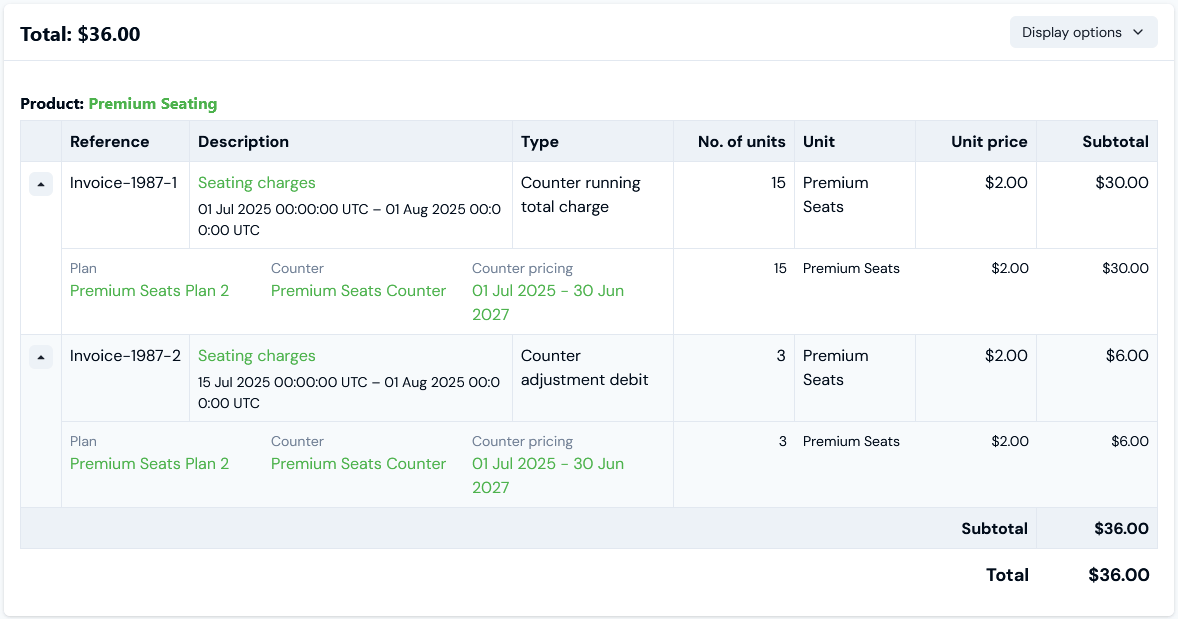
- The two Counter Adjustments we made on the Account appear on this first bill as line item charges of Type:
- Counter running total charge. For the initial adjustment posted for 15 seats to start the running total on the Account.
- Counter adjustment debit. For the second adjustment, which increased the number of seats by 3, and the Bill shows this correctly as an additional charge to give the correct total.
- Because prorating is disabled for all Counter charge types, although the second Counter Adjustment was posted on the Account on July 15th and therefore the extra 3 seats were only subscribed to for the remaining days of the 31-day month, the full $2 per seat charge is applied.
- Lastly, charges can be expanded to show a breakdown which gives relevant details: Plan, Counter, and Counter Pricing period.
- Post two more Counter Adjustments on Seats Account 2 using Premium Seats Counter for the month of July:
- On August 1st 2025 for an increase to 22 seats.
- On August 20th 2025 for a decrease back down to 20 seats.
- Re-run billing as Step 5 above but this time set the Invoice Date to September 1st 2025 for the August billing period.
- When the September 1st 2025 Bill appears on the Bills tab, open it in Bill management:
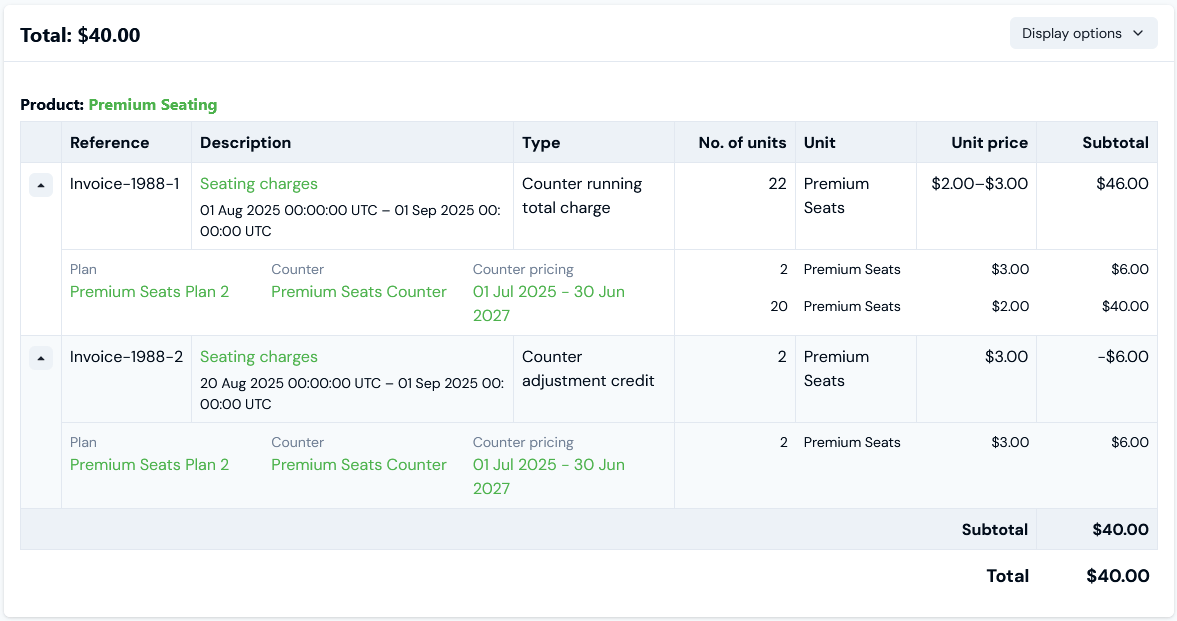
- The number of seats at the end of the previous billing period - July 2025 - was 18 and the Counter Adjustment posted of August 1st 2025 increased the seats Counter number to 22. This becomes the Counter running total for the start of the next billing period - August 2025. We therefore see the first line item charge is of Type - Counter running total charge, and which means on the Tiered pricing we applied to the Account Plan, 20 seats each incur a charge of $2 and 2 seats each incur a charge of $3.
- The second Counter Adjustment of August 20th 2025 decreased the seats Counter number from 22 to 20, which means a credit of 2 seats at a rate of $3 is given. This line item is of Type - Counter adjustment credit.
Running Billing - Prorating Enabled
You can enable prorating for the Counter adjustment debits or credits due at billing under a unit-based product pricing model. For example, if you are billing Accounts monthly and an end-customer increases their units subscription mid-month, you might want to only charge the customer for the extra units for the remaining days of the month billing period and not as if they had subscribed to them for the entire month: In a similar way, you can enable prorating for Counter running total charges under a unit-based product pricing model. This is useful in cases where, for example, you are billing monthly but the contract service period on an Account ends mid-month. You might then want the final bill to apply Counter running total charges for only those days of the final month before the contract service period ended and not for the entire month:Prorating for Counter Adjustment Credits and Debits
For the current seat-based pricing example, we’ll:- First, edit the Counter pricing applied to Premium Seats Plan 2 to enable prorating for Counter adjustment credits and Counter adjustment debits.
- Second, re-calculate the sample Bills we created above to review and check that prorating for these Counter charge types has been correctly applied.
- Open the Plan details page for Premium Seats Plan 2.
- Scroll down the page and on the Pricing panel, select Edit. The Counter pricing>Edit page opens.
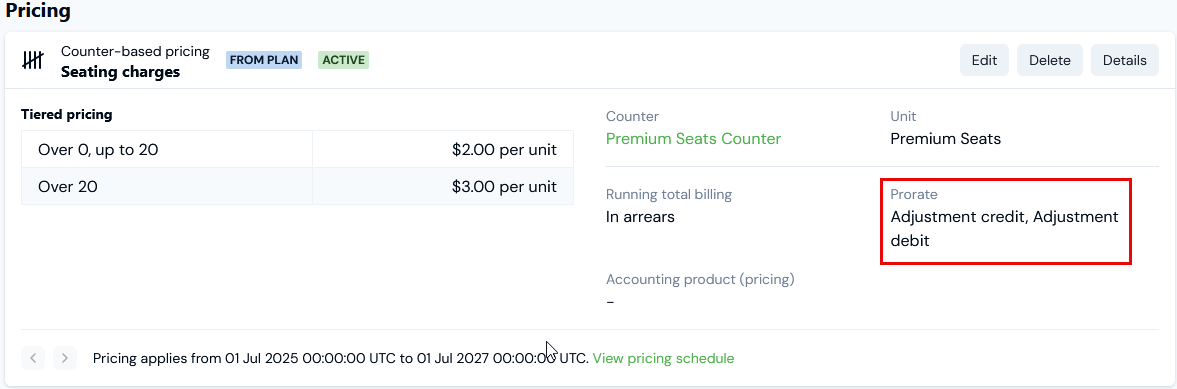
- Under Counter pricing settings, select the Pro-rate adjustment credit and Pro-rate adjustment debit switches to enable them.
- Select Update counter pricing. The Edit page closes and you are returned to Plan details where the prorating is now shown for the Counter-based Pricing:
- Open Seats Account 2 and select the Bills tab on the Account page.
- Select the checkbox for the August 1st 2025 Bill generated earlier and then click Recalculate selected. The Bill job executes and when complete, you’ll see the Total amount adjusts.
- Select the Bill’s Reference text hotlink to open it in Bill management:
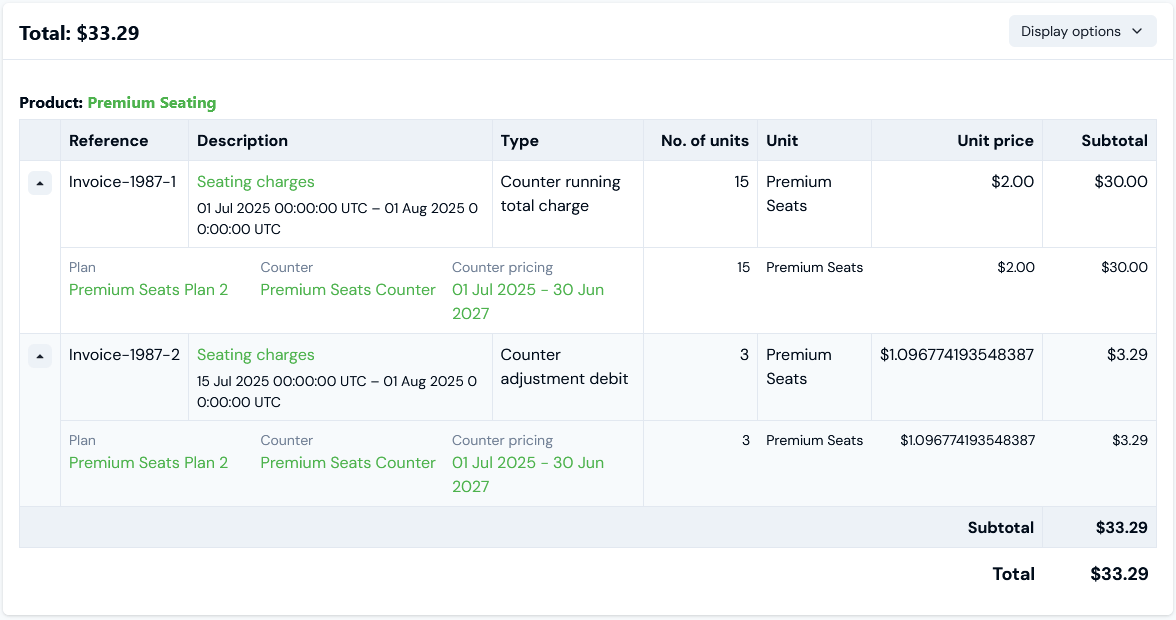
- The Counter running total charge of $30 for the initial 15 seats on Account remains unchanged since the Counter Adjustment posted on the Account was made July 1st and so these seats were subscribed to for the entire month.
- However, the Counter adjustment debit charge for the extra 3 seats due the Counter Adjustment for 18 posted to the Account July 15th has been prorated for the 17 days remaining of the 31-day month of July. The prorating is calculated by adjusting the Unit Price charged per seat accordingly - that is, with a base rate of $2 per seat per month: $2/31 x 17 = $1.096, which amounts to a Counter adjustment debit charge of $3.29 (3 x $1.096) for 3 extra seats.
- Return to the Seats Account 2 page and on the Bills tab, select the checkbox for the September 1st 2025 Bill generated earlier and then click Recalculate selected. The Bill job executes and when complete, you’ll see the Total adjusts.
- Select the Bill’s Reference text hotlink to open it in Bill management:
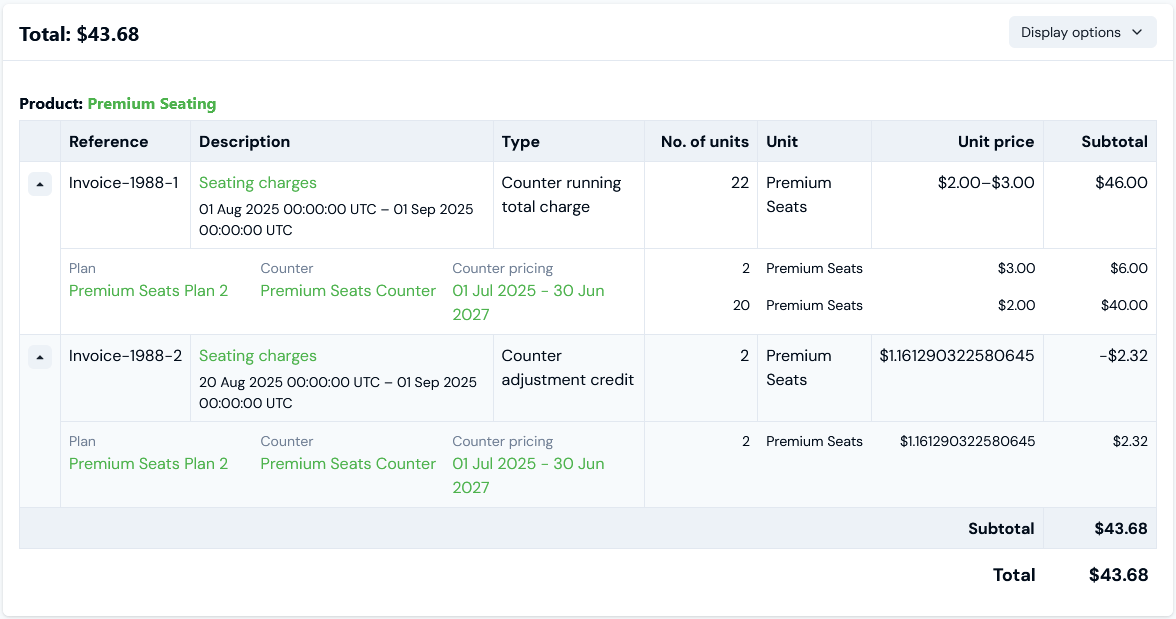
- The Counter running total charge remains the same as when we first generated the Bill.
- The Counter adjustment credit amount has now reduced, since the Counter Adjustment posted to the Account of 20 was made on August 20th 2025, and the credit due is prorated for the remaining 12 days of the 31-day month of August instead of for the full month. The prorating is calculated by adjusting the Unit Price credit due per seat accordingly - that is, with a base rate of $3 per seat per month: $3/31 x 12 = $1.161, which amounts to a Counter adjustment credit of -$2.32 (2 x $1.161) for 2 fewer seats.
Prorating for Counter Running Total Charges
In this section, we take our current seat-based pricing example and edit the Counter pricing for the Account Plan such that it ends September 15th 2025, that is, mid-way through the third monthly billing period:- First, edit the pricing to end mid-billing period - September 15th.
- Second, with prorating disabled, we’ll generate the Bill for the September billing period and dated October 1st 2025.
- Third, we’ll then edit the pricing again to enable prorating for Counter running total charges.
- Fourth, recalculate the October 1st Bill to review and check how the prorating has been applied at billing.
- Open the Plan details page for Premium Seats Plan 2.
- Scroll down the page and on the Pricing panel, select Edit. The Counter pricing>Edit page opens.
- Under Counter Pricing Details, change the End date to September 16th 2025 - End dates for pricing are exclusive so this means the Pricing will apply to the Plan up to the end of day on September 15th 2025.
- Select Update counter pricing.
- From the Accounts page, select to open Seats Account 2. The Account page opens with the Overview tab selected.
- Select the Bills tab.
- Select Run billing. A Run billing dialog opens.
- On the dialog:
- Invoice date. Use the calendar pop-out to select October 1st 2025.
- Bill frequency. Select Monthly.
- Target currency. Select US Dollar.
- Select Run billing. The modal closes and the Bill job executes. When the Bill job completes the newly generated Bill is listed on the Bills tab.
- Select the Reference hotlink text for the Bill. The Bill opens in Bill management:
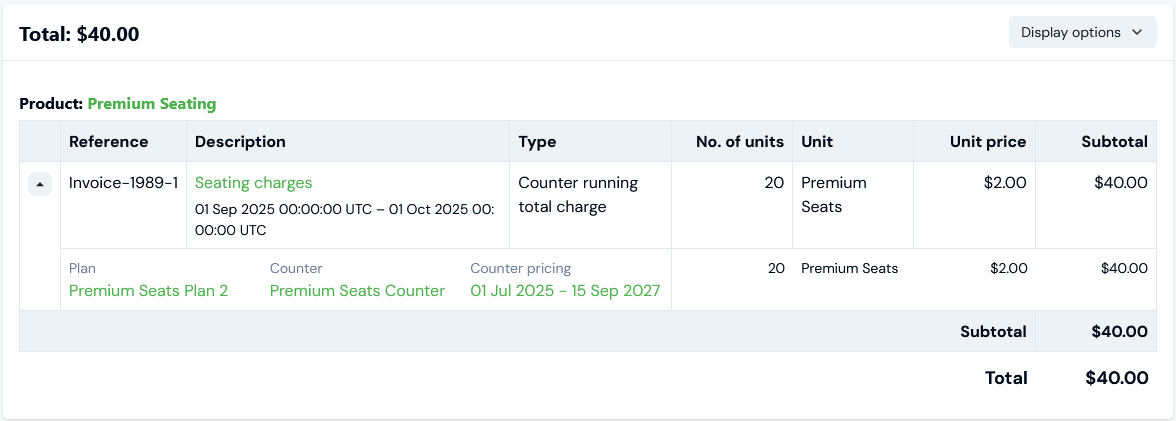
- On review, we can see that even though the pricing ceases to apply to the Account Plan at the end of day on September 15th 2025, the Counter running total charge is for the full amount of 20 seats at $2 per seat.
- Open the Pricing details page again for Premium Seats Plan 2.
- Scroll down the page and on the Pricing panel, select Edit. The Counter pricing>Edit page opens.
- Under Counter pricing settings, enable the Pro-rate running total switch.
- Select Update counter pricing.
- Return to the Bills tab on the Seats Account 2 page.
- Select the checkbox for the October 1st 2025 Bill and click Recalculate selected. The Bill job executes and when complete, you’ll see the Total amount adjusts.
- Select the Reference hotlink text for the Bill. The Bill opens in Bill management:
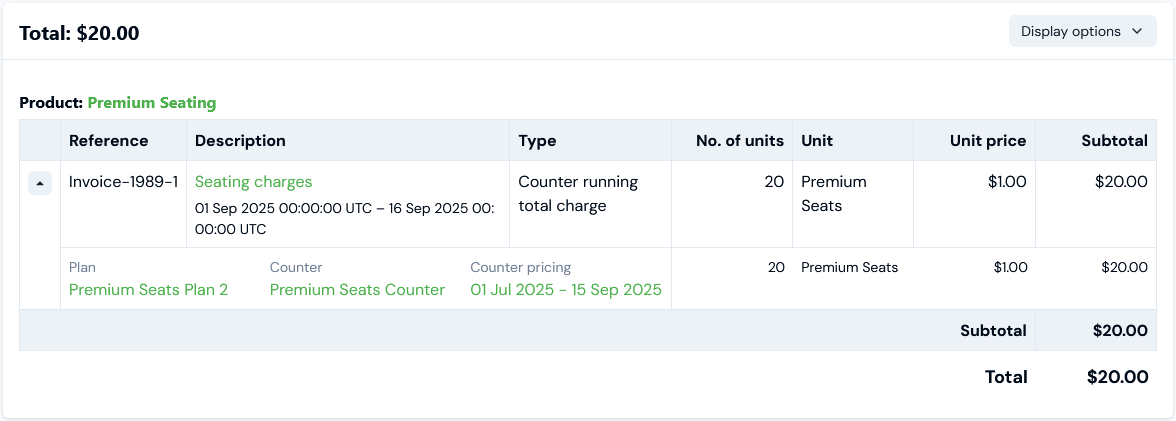
- On review, with pro-rating enabled, we can see that the Counter running total charge has been reduced. The prorating is calculated by adjusting the Unit price per seat accordingly - for the 15 days the pricing was active for the Account Plan, with a base rate of $2 per seat per month: $2/30 x 15 = $1, which amounts to a Counter running total charge of $20 for 20 seats.