You can quickly create Counters in your m3ter Organization, which you can then use as pricing metrics to apply unit-based pricing to Product Plans or Plan Templates for recurring subscription charges.This topic explains how to create Counters and how to use them to price your Product Plans or Plan Templates. A seat-based example is used to explain these tasks - how to set up a Counter to use as a pricing metric to price Plans and be able to charge on the basis of how many seats end-customer Accounts subscribe to in a given billing period:
Product Counters. These can only be used to price Plans belonging to the same Product.
Global Counters. These can be used to price Plans belonging to any Product.
To create a Product Counter:
Select Metering>Counters. The Counters page opens and lists Counters already created for your Organization.
Use the Product drop-down to select the Product you want to create a Counter for. The lists adjust to show any existing Counters belonging to the Product.
Tip: Create Global Counter? If you want to create a Global Counter, clear the Product drop-down.
Select Create Counter. The Create page opens.
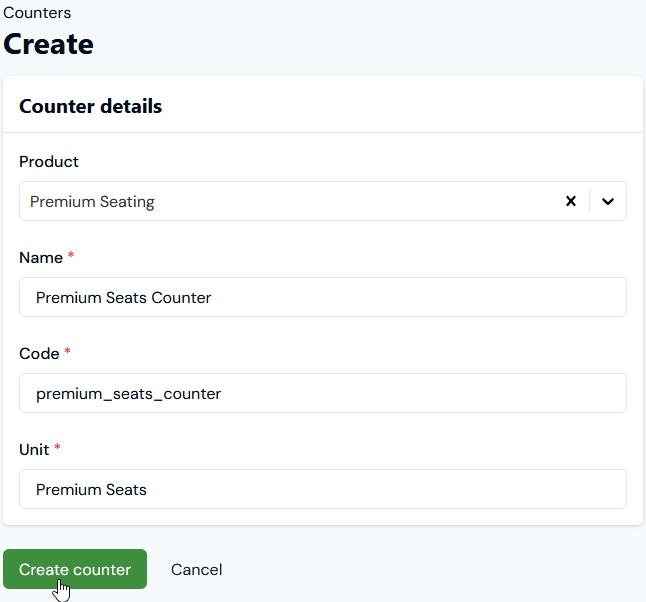
Enter the details of the Counter:
Product.
If you selected a Product on the Counters page, this will be pre-selected.
If you want to create the Counter for a different Product, select it.
If you want to create a Global Counter, leave this blank.
Name and Code of the new Counter. (Required)
Unit. (Required) This will appear on Bill line items charged against the Counter:
In this example, we’ll create a Premium Seats Counter for the Premium Seating Product.
Select Create counter. The Counter details page opens:
We now have a Premium Seats Counter we can use to price Plans belonging to the Premium Seating Product - see the next section.
You can quickly price Plans in using Counters. We created the Premium Seats Counter for the current seat-based pricing example in the previous section. We’ve also set up in preparation for pricing using this Counter:
Premium Seats Plan Template for the Premium Seating Product. This Plan Template is configured for monthly billing frequency in USD currency with no Standing Charge and no Minimum Spend amounts defined.
We’ll now use our Premium Seats Counter to set up seat-based pricing for Premium Seats Plan 2.
Notes & Tips:
Working in the Pricing Editor? Alternatively, you can open the Pricing editor and create a counter-based pricing for a Plan from there. For further guidance on working in the Pricing Editor to price your Product Plans/Plan Templates, see Pricing Plans and Plan Templates.
Price Plan Templates? For the current example, we’ll apply unit-based pricing using our Counter to the Product Plan. The steps to price a Plan Template using a Counter are similar. Any Plan based on the priced Plan Template will inherit the pricing but you can override this pricing at the individual Plan level.
To use a Counter to price a Plan:
Select Pricing the Plans page opens.
Use Search plans to find the Plan you want to create a pricing for or select the Product the Plan belongs to and filter the Plans list.
Select the Name hotlink text of the Plan you want to price using a Counter - for the current example Premium Seats Plan 2. The Plan details page opens.
Scroll down the page and under Pricing select Add counter-based pricing. A Select counters modal appears.
Select the Counter you want to use to price the Plan - for the current example Premium Seats Counter - and select Confirm. The modal closes and the selected Counter is added to the Pricing panel:
Select the creating new pricing link. You are taken to the Pricing editor>Counter pricing page and at the top of the page details are listed for:
The Counter you are using and the Unit it uses.
The Plan you are pricing and the Plan template it is based on.
Enter the Counter pricing details:
Start date (inclusive) and End date (exclusive). (Required) Define the period you want the pricing to be active for the Plan. For the current example, we’ll enter July 1st, 2025 until July 1st, 2027.
Accounting product. For accounting purposes, select a Product that will be linked to any Bill recurring charges line items for this Pricing - Counter adjustment credit, Counter adjustment debit, or Counter running total charge. (Optional) Note that:
If you leave this blank, then the Product the Counter belongs to will be used instead.
When viewing Bills in the Console that contain line items for these charge types and an Accounting product is defined for the Counter pricing, you’ll be able to group line items by Accounting product. See Viewing Bills - Display Options for more details.
Description. Enter a custom description that will appear for Bill line item charges for the pricing. (Optional)
For the current example, we’ll use: Seating charges.
Running total billing. Select for either Bill in arrears - at the end of each billing period - or Bill in advance - at the beginning of each billing period.
For the current example, we can leave this as default: Bill in arrears.
Pro-rate running total. Use this setting to control how Counter running total charges are calculated at billing for cases where the pricing applied to an Account starts or finishes somewhere within the first or final billing period:
For example, suppose you are pricing a Plan set up for monthly billing frequency. The service period agreed with an end-customer Account on the Plan runs from June 1st 2023 until June 15th 2024. The running total at the start of the June 2024 - the final billing period - is 10. The pricing applied to the Account ends June 15th 2024 - this could be because the pricing is set to end for the Account Plan on that date or because the Plan ceases to be active for the Account on that date:
If you enablePro-rate running total for the pricing and the pricing configured is $2 per unit, then the final Bill of July 1st 2024 will calculate the Counter running total charge for 15 days of the 30 day month of June, that is: 10 x $2 x 1/2 = $10.
If you disablePro-rate running total, then the final Bill of July 1st 2024 will calculate a Counter running total charge for the full month, that is: 10 x $2 = $20.
Default is enabled. For the current example, we’ll switch this to disabled.
Pro-rate adjustment credit. Use this setting to control how a Counter Adjustment credit for an Account on the Plan made during the arrears billing period is rated with respect to credit amounts due on the Account:
As if the units were unsubscribed to (not used) for the entire billing period. (Prorating is disabled)
As if the units were unsubscribed to (not used) for the number of days from the date the Counter Adjustment was made to the arrears billing period end. (Prorating is enabled)
For example, suppose the Plan is set up for monthly billing frequency and the Counter pricing you’ve configured is for a flat charge rate of $2 per seat. A Counter Adjustment is made on the Account on June 1st 2024 for 15 seats and a second Counter Adjustment is made on June 16th for 10 seats:
If disabled, the July 1st 2024 Bill will be calculated as if the credit due for the reduction in Counter number of 5 seats covered the entire month: 5 x -$2 = -$10.
If enabled, the July 1st 2024 Bill will be calculated as if the credit due for the reduction in Counter number of 5 seats covered only the remaining 15 days of the 30-day month of June: 5 x -$2 x 1/2 = -$5.
Default is enabled. For the current example, we’ll switch this to disabled.
Pro-rate adjustment debit. Use this setting to control how a Counter Adjustment debit for an Account on the Plan made during the arrears billing period is rated with respect to debit amounts due on the Account:
As if the units were subscribed to (used) for the entire billing period. (Prorating is disabled)
As if the units were subscribed to (used) only for the number of days from the date the Counter Adjustment was made to the arrears billing period end. (Prorating is enabled)
For example, suppose the Plan is set up for monthly billing frequency and the Counter pricing you’ve configured is for a flat charge rate of $2 per seat. A single Counter Adjustment is made for the June billing period on June 16th 2024 for 15 seats:
If disabled, the July 1st 2024 Bill will charge for the full amount: 15 x $2 = $30.
If enabled, the July 1st 2024 Bill will only charge a pro-rated amount for the 15 days remaining in the 30-day month of June: 15 x $2 x 1/2 = $15.
Default is enabled. For the current example, we’ll switch this to disabled.
Tip: More on Prorating of Charges using Counter Pricing for Plans? Generating Bills for the current example for seat-based pricing with prorating enabled is illustrated in the following Recurring Charges Billing: Seat-Based Pricing topic.
Pricing type. Select the pricing type you want to use for the Counter pricing applied to the Plan:
For the current example, we can leave this as the default of Tiered.
Pricing bands. Create the pricing bands for the pricing type:
For the current example, we’ll set up two Tiered pricing bands for the Counter pricing:
Note that the Start (>) value for a pricing band is treated exclusively and the End (<=) value is treated inclusively. In this example, the bottom tier band means any unit measures greater than 0 up to and including 20 are priced at $2 per unit; the second tier band means any unit measures greater than 20 are priced at $3 per unit.
Select Create counter pricing. You are returned to the Plan details page where under Pricing the ACTIVE Tiered pricing is now shown:
We’ve now set up an example for seat-based recurring charges to be applied to the Premium Seating Product. In the next topic, we’ll attach Premium Seats Plan 2, which is priced using the Premium Seats Counter, to an Account and then create some Counter Adjustments on the Account.
Tip: Managing Priced Plans and Counter Pricing? When you’ve priced a Plan using a Counter, from the Pricing editor grid you can manage the priced Plan and the Pricing:
Edit, duplicate, or delete the priced Plan.
Edit, view details, or delete the pricing configured for the Plan.
If you’ve set up more than one pricing for a Plan, view a Pricing Schedule for historic, currently active, and any future pricing.
{"docsConfig":{"theme":"aspen","$schema":"https://mintlify.com/docs.json","name":"m3ter Documentation","description":"Guides, learning resources and API reference for integrating with m3ter","colors":{"primary":"#4caf4c","dark":"#449d44"},"logo":{"light":"https://mintcdn.com/m3ter/t6C65JBQiQOFtjBy/images/m3ter-logo-blue-sf.svg?fit=max\u0026auto=format\u0026n=t6C65JBQiQOFtjBy\u0026q=85\u0026s=3928db28c84ec6950e43caf96e635d80","dark":"https://mintcdn.com/m3ter/t6C65JBQiQOFtjBy/images/m3ter-logo-white-sf.svg?fit=max\u0026auto=format\u0026n=t6C65JBQiQOFtjBy\u0026q=85\u0026s=a018cb782e49a2fbdd811276476d0605"},"favicon":"https://mintcdn.com/m3ter/T0RRts393DSUkWFc/favicon.svg?fit=max\u0026auto=format\u0026n=T0RRts393DSUkWFc\u0026q=85\u0026s=9492b54cc98df6775983b287b6f865cd","navbar":{"links":[{"href":"https://m3ter.freshdesk.com","label":"Support"},{"href":"https://console.m3ter.com","label":"Console"}],"primary":{"type":"button","label":"Schedule a demo","href":"https://www.m3ter.com/contact"}},"footer":{"socials":{"linkedin":"https://uk.linkedin.com/company/m3ter","x":"https://x.com/m3terHQ","github":"https://github.com/m3ter-com"},"links":[{"items":[{"label":"Website","href":"https://www.m3ter.com"},{"label":"Legal","href":"https://www.m3ter.com/legal"},{"label":"Security","href":"https://www.m3ter.com/security"},{"label":"Trust Center","href":"https://trust.m3ter.com"}]}]},"fonts":{"family":"Montserrat"},"icons":{"library":"lucide"},"styling":{"eyebrows":"breadcrumbs","latex":false},"integrations":{"ga4":{"measurementId":"G-V9C7TTPRQT"}},"contextual":{"options":["copy","view"],"display":"header"},"thumbnails":{"fonts":{"family":"Montserrat"}},"navigation":{"pages":[]}},"deployment":{"deploymentMetadataValue":{"subdomain":"m3ter","hasAudioNarration":false,"actualSubdomain":"m3ter","customDomains":["docs.m3ter.com"],"gitSource":{"type":"github","owner":"m3ter-com","repo":"m3ter-docs","deployBranch":"main","contentDirectory":"","isPrivate":true,"mountPath":"","label":""},"chroma":{"liveDeploymentHistoryId":"6ae4b3832e4c4b8ea8e5ac1c","collectionId":"f4691807-992d-43f9-aab2-d179e798824c","schemaVersion":"v3","latestBuiltDeploymentHistoryId":"6ae4b3832e4c4b8ea8e5ac1c"},"entitlements":{"AI_CHAT":{"status":"ENABLED"},"WEB_MCP":{"status":"ENABLED"},"NARRATION":{"status":"ENABLED"}},"buildId":"6ae9a09c36175fbf7124961d","clientVersion":"0.0.4045","searchFilterCounts":[{"language":"default","tag":"Guides","count":400},{"language":"default","tag":"API Reference","count":393},{"language":"default","tag":"Endpoints","count":387},{"language":"default","tag":"Integrations","count":66},{"language":"default","tag":"m3sh Function Reference","count":66},{"language":"default","tag":"Synthetic functions","count":50},{"language":"default","tag":"m3ter","count":50},{"language":"default","tag":"m3sh","count":43},{"language":"default","tag":"End-Customer Accounts","count":27},{"language":"default","tag":"m3ter Connector for Salesforce","count":24}]},"assistantConfig":{"enableAskAiButton":true,"enableStarterQuestions":false,"enableAskAiSearchBar":false},"basePath":"","hasChatPermissions":true,"hasWebMcpPermissions":true,"toggles":[{"name":"kill-isr","enabled":true,"variant":{"name":"disabled","enabled":false,"feature_enabled":true},"impressionData":false},{"name":"agent-mintlify-slack","enabled":true,"variant":{"name":"disabled","enabled":false,"feature_enabled":true},"impressionData":false},{"name":"agent-integrations-settings","enabled":true,"variant":{"name":"disabled","enabled":false,"feature_enabled":true},"impressionData":false},{"name":"automations-pr-grouping","enabled":true,"variant":{"name":"disabled","enabled":false,"feature_enabled":true},"impressionData":false},{"name":"custom-prefix","enabled":true,"variant":{"name":"disabled","enabled":false,"feature_enabled":true},"impressionData":false},{"name":"analytics-v7","enabled":true,"variant":{"name":"disabled","enabled":false,"feature_enabled":true},"impressionData":false},{"name":"user-flows-analytics","enabled":true,"variant":{"name":"disabled","enabled":false,"feature_enabled":true},"impressionData":false},{"name":"no-publish-flow","enabled":true,"variant":{"name":"disabled","enabled":false,"feature_enabled":true},"impressionData":false},{"name":"workos-onboarding","enabled":true,"variant":{"name":"disabled","enabled":false,"feature_enabled":true},"impressionData":false},{"name":"llms-txt-v2","enabled":true,"variant":{"name":"disabled","enabled":false,"feature_enabled":true},"impressionData":false},{"name":"snapshot-serving-live","enabled":true,"variant":{"name":"disabled","enabled":false,"feature_enabled":true},"impressionData":false},{"name":"stripTemperatureMiddleware","enabled":true,"variant":{"name":"disabled","enabled":false,"feature_enabled":true},"impressionData":false},{"name":"support-platform-pylon-zendesk","enabled":true,"variant":{"name":"disabled","enabled":false,"feature_enabled":true},"impressionData":false},{"name":"snapshot-serving","enabled":true,"variant":{"name":"disabled","enabled":false,"feature_enabled":true},"impressionData":false},{"name":"instant-rollback","enabled":true,"variant":{"name":"disabled","enabled":false,"feature_enabled":true},"impressionData":false},{"name":"granular-notifications-server","enabled":true,"variant":{"name":"disabled","enabled":false,"feature_enabled":true},"impressionData":false},{"name":"granular-notifications","enabled":true,"variant":{"name":"disabled","enabled":false,"feature_enabled":true},"impressionData":false},{"name":"automations-fable","enabled":true,"variant":{"name":"disabled","enabled":false,"feature_enabled":true},"impressionData":false},{"name":"fixed-ai-action-pricing","enabled":true,"variant":{"name":"disabled","enabled":false,"feature_enabled":true},"impressionData":false},{"name":"automation-resolve-merge-conflict","enabled":true,"variant":{"name":"disabled","enabled":false,"feature_enabled":true},"impressionData":false},{"name":"scoped-publishing","enabled":true,"variant":{"name":"disabled","enabled":false,"feature_enabled":true},"impressionData":false},{"name":"mintql","enabled":true,"variant":{"name":"disabled","enabled":false,"feature_enabled":true},"impressionData":false},{"name":"page-level-analytics","enabled":true,"variant":{"name":"disabled","enabled":false,"feature_enabled":true},"impressionData":false},{"name":"editor-version-history-v2","enabled":true,"variant":{"name":"disabled","enabled":false,"feature_enabled":true},"impressionData":false},{"name":"billing-page-v2","enabled":true,"variant":{"name":"disabled","enabled":false,"feature_enabled":true},"impressionData":false},{"name":"full-page-search","enabled":true,"variant":{"name":"disabled","enabled":false,"feature_enabled":true},"impressionData":false},{"name":"workspace-projects","enabled":true,"variant":{"name":"disabled","enabled":false,"feature_enabled":true},"impressionData":false},{"name":"assistant-v5","enabled":true,"variant":{"name":"disabled","enabled":false,"feature_enabled":true},"impressionData":false},{"name":"byok-sep-25","enabled":true,"variant":{"name":"disabled","enabled":false,"feature_enabled":true},"impressionData":false},{"name":"fork-pr-previews","enabled":true,"variant":{"name":"disabled","enabled":false,"feature_enabled":true},"impressionData":false},{"name":"revalidation-jwt","enabled":true,"variant":{"name":"disabled","enabled":false,"feature_enabled":true},"impressionData":false},{"name":"vite-origin","enabled":true,"variant":{"name":"disabled","enabled":false,"feature_enabled":true},"impressionData":false},{"name":"billing-updated-9-15","enabled":true,"variant":{"name":"disabled","enabled":false,"feature_enabled":true},"impressionData":false},{"name":"workos-sso-scim","enabled":true,"variant":{"name":"disabled","enabled":false,"feature_enabled":true},"impressionData":false},{"name":"hobby-abuse-scan","enabled":true,"variant":{"name":"disabled","enabled":false,"feature_enabled":true},"impressionData":false},{"name":"dashboard-inbox","enabled":true,"variant":{"name":"disabled","enabled":false,"feature_enabled":true},"impressionData":false},{"name":"workos-signup","enabled":true,"variant":{"name":"disabled","enabled":false,"feature_enabled":true},"impressionData":false},{"name":"turbopuffer-dual-write","enabled":true,"variant":{"name":"disabled","enabled":false,"feature_enabled":true},"impressionData":false},{"name":"workos-enabled","enabled":true,"variant":{"name":"disabled","enabled":false,"feature_enabled":true},"impressionData":false},{"name":"approve-review-flow","enabled":true,"variant":{"name":"disabled","enabled":false,"feature_enabled":true},"impressionData":false},{"name":"sso-setup-deadline-banner","enabled":true,"variant":{"name":"disabled","enabled":false,"feature_enabled":true},"impressionData":false}],"googleFontsInlined":true},"customCss":[],"page":{"pagePath":"guides/recurring-charges-counters/creating-counters","slug":"/guides/recurring-charges-counters/creating-counters","pageMetadata":{"title":"Creating Counters and Pricing Plans","description":null,"href":"/guides/recurring-charges-counters/creating-counters"},"pageType":"default","mdx":{"mdxSource":{"compiledSource":"\"use strict\";const{Fragment:_Fragment,jsx:_jsx,jsxs:_jsxs}=arguments[0];const{useMDXComponents:_provideComponents}=arguments[0];function _createMdxContent(props){const _components={a:`a`,em:`em`,li:`li`,ol:`ol`,p:`p`,strong:`strong`,ul:`ul`,..._provideComponents(),...props.components},{Heading,OptimizedImage,Tip}=_components;if(!Heading)_missingMdxReference(`Heading`,true);if(!OptimizedImage)_missingMdxReference(`OptimizedImage`,true);if(!Tip)_missingMdxReference(`Tip`,true);return _jsxs(_Fragment,{children:[_jsx(_components.p,{children:`You can quickly create Counters in your m3ter Organization, which you can then use as pricing metrics to apply unit-based pricing to Product Plans or Plan Templates for recurring subscription charges.`}),`\n`,_jsx(_components.p,{children:`This topic explains how to create Counters and how to use them to price your Product Plans or Plan Templates. A seat-based example is used to explain these tasks - how to set up a Counter to use as a pricing metric to price Plans and be able to charge on the basis of how many seats end-customer Accounts subscribe to in a given billing period:`}),`\n`,_jsxs(_components.ul,{children:[`\n`,_jsx(_components.li,{children:_jsx(_components.a,{href:`/guides/recurring-charges-counters/creating-counters#creating-counters`,children:`Creating Counters`})}),`\n`,_jsx(_components.li,{children:_jsx(_components.a,{href:`/guides/recurring-charges-counters/creating-counters#using-counters-to-price-plans`,children:`Using Counters to Price Plans`})}),`\n`]}),`\n`,_jsx(Heading,{level:`2`,id:`creating-counters`,children:`Creating Counters`}),`\n`,_jsx(_components.p,{children:`You can create Counters as:`}),`\n`,_jsxs(_components.ul,{children:[`\n`,_jsxs(_components.li,{children:[_jsx(_components.strong,{children:`Product Counters`}),`. These can only be used to price Plans belonging to the `,_jsx(_components.em,{children:`same Product`}),`.`]}),`\n`,_jsxs(_components.li,{children:[_jsx(_components.strong,{children:`Global Counters`}),`. These can be used to price Plans belonging to `,_jsx(_components.em,{children:`any Product`}),`.`]}),`\n`]}),`\n`,_jsx(_components.p,{children:_jsx(_components.strong,{children:`To create a Product Counter:`})}),`\n`,_jsxs(_components.ol,{children:[`\n`,_jsxs(_components.li,{children:[`Select `,_jsx(_components.strong,{children:`Metering>Counters`}),`. The `,_jsx(_components.strong,{children:`Counters`}),` page opens and lists Counters already created for your Organization.`]}),`\n`,_jsxs(_components.li,{children:[`Use the `,_jsx(_components.strong,{children:`Product`}),` drop-down to select the Product you want to create a Counter for. The lists adjust to show any existing Counters belonging to the Product.`]}),`\n`]}),`\n`,_jsx(Tip,{children:_jsxs(_components.p,{children:[_jsx(_components.strong,{children:`Tip: Create Global Counter?`}),` If you want to create a Global Counter, clear the `,_jsx(_components.strong,{children:`Product`}),` drop-down.`]})}),`\n`,_jsxs(_components.ol,{start:`3`,children:[`\n`,_jsxs(_components.li,{children:[`Select `,_jsx(_components.strong,{children:`Create Counter`}),`. The `,_jsx(_components.strong,{children:`Create`}),` page opens.`]}),`\n`,_jsx(_components.li,{children:`Enter the details of the Counter:`}),`\n`]}),`\n`,_jsxs(_components.ul,{children:[`\n`,_jsxs(_components.li,{children:[_jsx(_components.strong,{children:`Product`}),`.`,`\n`,_jsxs(_components.ul,{children:[`\n`,_jsxs(_components.li,{children:[`If you selected a `,_jsx(_components.strong,{children:`Product`}),` on the `,_jsx(_components.strong,{children:`Counters`}),` page, this will be pre-selected.`]}),`\n`,_jsx(_components.li,{children:`If you want to create the Counter for a different Product, select it.`}),`\n`,_jsx(_components.li,{children:`If you want to create a Global Counter, leave this blank.`}),`\n`]}),`\n`]}),`\n`,_jsxs(_components.li,{children:[_jsx(_components.strong,{children:`Name`}),` and `,_jsx(_components.strong,{children:`Code`}),` of the new Counter. (`,_jsx(_components.em,{children:`Required`}),`)`]}),`\n`,_jsxs(_components.li,{children:[_jsx(_components.strong,{children:`Unit`}),`. (`,_jsx(_components.em,{children:`Required`}),`) This will appear on Bill line items charged against the Counter:`]}),`\n`,_jsxs(_components.li,{children:[`In this example, we’ll create a `,_jsx(_components.strong,{children:`Premium Seats Counter`}),` for the `,_jsx(_components.strong,{children:`Premium Seating Product`}),`.`]}),`\n`]}),`\n`,_jsx(OptimizedImage,{src:`https://mintcdn.com/m3ter/uB-nH3l_4oKUc0GG/images/Counters56.png?fit=max\u0026auto=format\u0026n=uB-nH3l_4oKUc0GG\u0026q=85\u0026s=13979feff27f86177f11e3fb3356fe9f`,alt:`Counters56`,title:`Counters56`,style:{width:`62%`},\"data-og-width\":`646`,width:`646`,\"data-og-height\":`602`,height:`602`,\"data-path\":`images/Counters56.png`,\"data-optimize\":`true`,\"data-opv\":`3`,srcset:`https://mintcdn.com/m3ter/uB-nH3l_4oKUc0GG/images/Counters56.png?w=280\u0026fit=max\u0026auto=format\u0026n=uB-nH3l_4oKUc0GG\u0026q=85\u0026s=602cb6a07fcabd50958e9fc06f99bdc6 280w, https://mintcdn.com/m3ter/uB-nH3l_4oKUc0GG/images/Counters56.png?w=560\u0026fit=max\u0026auto=format\u0026n=uB-nH3l_4oKUc0GG\u0026q=85\u0026s=f99d1f9fd2f83e719c3c803b2b94c9d7 560w, https://mintcdn.com/m3ter/uB-nH3l_4oKUc0GG/images/Counters56.png?w=840\u0026fit=max\u0026auto=format\u0026n=uB-nH3l_4oKUc0GG\u0026q=85\u0026s=4e512f97dfa016fa8ed77131c41b91fe 840w, https://mintcdn.com/m3ter/uB-nH3l_4oKUc0GG/images/Counters56.png?w=1100\u0026fit=max\u0026auto=format\u0026n=uB-nH3l_4oKUc0GG\u0026q=85\u0026s=df9394e3f2282ed2720de2243a484246 1100w, https://mintcdn.com/m3ter/uB-nH3l_4oKUc0GG/images/Counters56.png?w=1650\u0026fit=max\u0026auto=format\u0026n=uB-nH3l_4oKUc0GG\u0026q=85\u0026s=d6b336a772e69a5448d4f899cd479337 1650w, https://mintcdn.com/m3ter/uB-nH3l_4oKUc0GG/images/Counters56.png?w=2500\u0026fit=max\u0026auto=format\u0026n=uB-nH3l_4oKUc0GG\u0026q=85\u0026s=10da65fca7bd6f235adce287e3e8c0a0 2500w`}),`\n`,_jsxs(_components.ol,{start:`5`,children:[`\n`,_jsxs(_components.li,{children:[`Select `,_jsx(_components.strong,{children:`Create counter`}),`. The `,_jsx(_components.strong,{children:`Counter details`}),` page opens:`]}),`\n`]}),`\n`,_jsx(OptimizedImage,{src:`https://mintcdn.com/m3ter/uB-nH3l_4oKUc0GG/images/Counters57.png?fit=max\u0026auto=format\u0026n=uB-nH3l_4oKUc0GG\u0026q=85\u0026s=03129acdb629d1055b6611833c8d6c8c`,alt:`Counters57`,\"data-og-width\":`1246`,width:`1246`,\"data-og-height\":`269`,height:`269`,\"data-path\":`images/Counters57.png`,\"data-optimize\":`true`,\"data-opv\":`3`,srcset:`https://mintcdn.com/m3ter/uB-nH3l_4oKUc0GG/images/Counters57.png?w=280\u0026fit=max\u0026auto=format\u0026n=uB-nH3l_4oKUc0GG\u0026q=85\u0026s=4dc122319662da23f0f1893229b08502 280w, https://mintcdn.com/m3ter/uB-nH3l_4oKUc0GG/images/Counters57.png?w=560\u0026fit=max\u0026auto=format\u0026n=uB-nH3l_4oKUc0GG\u0026q=85\u0026s=1f7161ccdadddaef8196be4a0c3fbcad 560w, https://mintcdn.com/m3ter/uB-nH3l_4oKUc0GG/images/Counters57.png?w=840\u0026fit=max\u0026auto=format\u0026n=uB-nH3l_4oKUc0GG\u0026q=85\u0026s=18d0e267a568fbbd26ba1e7136263770 840w, https://mintcdn.com/m3ter/uB-nH3l_4oKUc0GG/images/Counters57.png?w=1100\u0026fit=max\u0026auto=format\u0026n=uB-nH3l_4oKUc0GG\u0026q=85\u0026s=dd313f9edc9e2a4b196dcf839606a917 1100w, https://mintcdn.com/m3ter/uB-nH3l_4oKUc0GG/images/Counters57.png?w=1650\u0026fit=max\u0026auto=format\u0026n=uB-nH3l_4oKUc0GG\u0026q=85\u0026s=406899efdcb7ba4be2e02a34d11493dd 1650w, https://mintcdn.com/m3ter/uB-nH3l_4oKUc0GG/images/Counters57.png?w=2500\u0026fit=max\u0026auto=format\u0026n=uB-nH3l_4oKUc0GG\u0026q=85\u0026s=b4e77cb718f448f75158e14dcc750252 2500w`}),`\n`,_jsxs(_components.ul,{children:[`\n`,_jsxs(_components.li,{children:[`We now have a `,_jsx(_components.strong,{children:`Premium Seats Counter`}),` we can use to price Plans belonging to the `,_jsx(_components.strong,{children:`Premium Seating`}),` Product - see the `,_jsx(_components.a,{href:`/guides/recurring-charges-counters/creating-counters#using-counters-to-price-plans`,children:`next section`}),`.`]}),`\n`]}),`\n`,_jsx(Heading,{level:`2`,id:`using-counters-to-price-plans`,children:`Using Counters to Price Plans`}),`\n`,_jsxs(_components.p,{children:[`You can quickly price Plans in using Counters. We created the `,_jsx(_components.strong,{children:`Premium Seats Counter`}),` for the current seat-based pricing example in the `,_jsx(_components.a,{href:`/guides/recurring-charges-counters/creating-counters#creating-counters`,children:`previous section`}),`. We’ve also set up in preparation for pricing using this Counter:`]}),`\n`,_jsxs(_components.ul,{children:[`\n`,_jsxs(_components.li,{children:[_jsx(_components.strong,{children:`Premium Seats Plan Template`}),` for the Premium Seating Product. This Plan Template is configured for monthly billing frequency in `,_jsx(_components.strong,{children:`USD`}),` currency with no Standing Charge and no Minimum Spend amounts defined.`]}),`\n`,_jsxs(_components.li,{children:[_jsx(_components.strong,{children:`Premium Seats Plan 2`}),` based on the `,_jsx(_components.strong,{children:`Premium Seats Plan Template`}),`. This Plan will inherit billing attributes from the template. See `,_jsx(_components.a,{href:`/guides/plans-and-pricing/working-with-plan-templates-and-plans`,children:`Creating and Working with Plan Templates and Plans`}),`.`]}),`\n`]}),`\n`,_jsxs(_components.p,{children:[`We’ll now use our `,_jsx(_components.strong,{children:`Premium Seats Counter`}),` to set up seat-based pricing for `,_jsx(_components.strong,{children:`Premium Seats Plan 2`}),`.`]}),`\n`,_jsxs(Tip,{children:[_jsx(_components.p,{children:_jsx(_components.strong,{children:`Notes \u0026 Tips:`})}),_jsxs(_components.ul,{children:[`\n`,_jsxs(_components.li,{children:[_jsx(_components.strong,{children:`Working in the Pricing Editor?`}),` Alternatively, you can open the Pricing editor and create a counter-based pricing for a Plan from there. For further guidance on working in the Pricing Editor to price your Product Plans/Plan Templates, see `,_jsx(_components.a,{href:`https://docs.m3ter.com/guides/plans-and-pricing/pricing-plans/pricing-plans`,children:`Pricing Plans and Plan Templates`}),`.`]}),`\n`,_jsxs(_components.li,{children:[_jsx(_components.strong,{children:`Price Plan Templates?`}),` For the current example, we’ll apply unit-based pricing using our Counter to the Product Plan. The steps to price a Plan Template using a Counter are similar. Any Plan based on the priced Plan Template will inherit the pricing but you can override this pricing at the individual Plan level.`]}),`\n`]})]}),`\n`,_jsx(_components.p,{children:_jsx(_components.strong,{children:`To use a Counter to price a Plan:`})}),`\n`,_jsxs(_components.ol,{children:[`\n`,_jsxs(_components.li,{children:[`Select `,_jsx(_components.strong,{children:`Pricing`}),` the `,_jsx(_components.strong,{children:`Plans`}),` page opens.`]}),`\n`,_jsxs(_components.li,{children:[`Use `,_jsx(_components.strong,{children:`Search plans`}),` to find the Plan you want to create a pricing for or select the `,_jsx(_components.strong,{children:`Product`}),` the Plan belongs to and filter the `,_jsx(_components.strong,{children:`Plans`}),` list.`]}),`\n`,_jsxs(_components.li,{children:[`Select the `,_jsx(_components.strong,{children:`Name`}),` hotlink text of the Plan you want to price using a Counter - for the current example `,_jsx(_components.strong,{children:`Premium Seats Plan 2`}),`. The `,_jsx(_components.strong,{children:`Plan details`}),` page opens.`]}),`\n`,_jsxs(_components.li,{children:[`Scroll down the page and under `,_jsx(_components.strong,{children:`Pricing`}),` select `,_jsx(_components.strong,{children:`Add counter-based pricing`}),`. A `,_jsx(_components.strong,{children:`Select counters`}),` modal appears.`]}),`\n`,_jsxs(_components.li,{children:[`Select the Counter you want to use to price the Plan - for the current example `,_jsx(_components.strong,{children:`Premium Seats Counter`}),` - and select `,_jsx(_components.strong,{children:`Confirm`}),`. The modal closes and the selected Counter is added to the `,_jsx(_components.strong,{children:`Pricing`}),` panel:`]}),`\n`]}),`\n`,_jsx(OptimizedImage,{src:`https://mintcdn.com/m3ter/uB-nH3l_4oKUc0GG/images/Counters58.png?fit=max\u0026auto=format\u0026n=uB-nH3l_4oKUc0GG\u0026q=85\u0026s=6317b04fec4567190985f4a361cc63ae`,alt:`Counters58`,\"data-og-width\":`1273`,width:`1273`,\"data-og-height\":`231`,height:`231`,\"data-path\":`images/Counters58.png`,\"data-optimize\":`true`,\"data-opv\":`3`,srcset:`https://mintcdn.com/m3ter/uB-nH3l_4oKUc0GG/images/Counters58.png?w=280\u0026fit=max\u0026auto=format\u0026n=uB-nH3l_4oKUc0GG\u0026q=85\u0026s=30ea6296d851747f0b3bd1976ceb24fa 280w, https://mintcdn.com/m3ter/uB-nH3l_4oKUc0GG/images/Counters58.png?w=560\u0026fit=max\u0026auto=format\u0026n=uB-nH3l_4oKUc0GG\u0026q=85\u0026s=67429fc3f22c6622dc53a18b13310eee 560w, https://mintcdn.com/m3ter/uB-nH3l_4oKUc0GG/images/Counters58.png?w=840\u0026fit=max\u0026auto=format\u0026n=uB-nH3l_4oKUc0GG\u0026q=85\u0026s=9f3a545907f4174a2bad67bd77ad6db5 840w, https://mintcdn.com/m3ter/uB-nH3l_4oKUc0GG/images/Counters58.png?w=1100\u0026fit=max\u0026auto=format\u0026n=uB-nH3l_4oKUc0GG\u0026q=85\u0026s=cf710c3ceab297f4b7a8a49e2c03f1b3 1100w, https://mintcdn.com/m3ter/uB-nH3l_4oKUc0GG/images/Counters58.png?w=1650\u0026fit=max\u0026auto=format\u0026n=uB-nH3l_4oKUc0GG\u0026q=85\u0026s=871684bca45d42ae8b05f82a91048837 1650w, https://mintcdn.com/m3ter/uB-nH3l_4oKUc0GG/images/Counters58.png?w=2500\u0026fit=max\u0026auto=format\u0026n=uB-nH3l_4oKUc0GG\u0026q=85\u0026s=70fe3404de9ff14f1bbf8e0dad32f811 2500w`}),`\n`,_jsxs(_components.ol,{start:`6`,children:[`\n`,_jsxs(_components.li,{children:[`Select the `,_jsx(_components.strong,{children:`creating new pricing`}),` link. You are taken to the `,_jsx(_components.strong,{children:`Pricing editor>Counter pricing`}),` page and at the top of the page details are listed for:`]}),`\n`]}),`\n`,_jsxs(_components.ul,{children:[`\n`,_jsxs(_components.li,{children:[`The `,_jsx(_components.strong,{children:`Counter`}),` you are using and the `,_jsx(_components.strong,{children:`Unit`}),` it uses.`]}),`\n`,_jsxs(_components.li,{children:[`The `,_jsx(_components.strong,{children:`Plan`}),` you are pricing and the `,_jsx(_components.strong,{children:`Plan template`}),` it is based on.`]}),`\n`]}),`\n`,_jsxs(_components.ol,{start:`7`,children:[`\n`,_jsxs(_components.li,{children:[`Enter the `,_jsx(_components.strong,{children:`Counter pricing details`}),`:`]}),`\n`]}),`\n`,_jsxs(_components.ul,{children:[`\n`,_jsxs(_components.li,{children:[_jsx(_components.strong,{children:`Start date (inclusive)`}),` and `,_jsx(_components.strong,{children:`End date (exclusive)`}),`. (`,_jsx(_components.em,{children:`Required`}),`) Define the period you want the pricing to be active for the Plan. For the current example, we’ll enter July 1st, 2025 until July 1st, 2027.`]}),`\n`,_jsxs(_components.li,{children:[_jsx(_components.strong,{children:`Accounting product`}),`. For accounting purposes, select a Product that will be linked to any Bill recurring charges line items for this Pricing - `,_jsx(_components.em,{children:`Counter adjustment credit`}),`, `,_jsx(_components.em,{children:`Counter adjustment debit`}),`, or `,_jsx(_components.em,{children:`Counter running total charge`}),`. (`,_jsx(_components.em,{children:`Optional`}),`) Note that:`,`\n`,_jsxs(_components.ul,{children:[`\n`,_jsxs(_components.li,{children:[`If you leave this blank, then the `,_jsx(_components.strong,{children:`Product`}),` the Counter belongs to will be used instead.`]}),`\n`,_jsxs(_components.li,{children:[`When viewing Bills in the Console that contain line items for these charge types and an Accounting product is defined for the Counter pricing, you’ll be able to group line items by Accounting product. See `,_jsx(_components.a,{href:`https://docs.m3ter.com/guides/billing-and-usage-data/running-viewing-and-managing-bills/running-bills-and-viewing-bill-details#viewing-bills-display-options`,children:`Viewing Bills - Display Options`}),` for more details.`]}),`\n`]}),`\n`]}),`\n`,_jsxs(_components.li,{children:[_jsx(_components.strong,{children:`Description`}),`. Enter a `,_jsx(_components.em,{children:`custom description`}),` that will appear for Bill line item charges for the pricing. (`,_jsx(_components.em,{children:`Optional`}),`)`,`\n`,_jsxs(_components.ul,{children:[`\n`,_jsxs(_components.li,{children:[`For the current example, we’ll use: `,_jsx(_components.strong,{children:`Seating charges`}),`.`]}),`\n`]}),`\n`]}),`\n`]}),`\n`,_jsx(OptimizedImage,{src:`https://mintcdn.com/m3ter/uB-nH3l_4oKUc0GG/images/Counters59.png?fit=max\u0026auto=format\u0026n=uB-nH3l_4oKUc0GG\u0026q=85\u0026s=1047b458e325b5a25b3ec3344585e3fb`,alt:`Counters59`,\"data-og-width\":`969`,width:`969`,\"data-og-height\":`638`,height:`638`,\"data-path\":`images/Counters59.png`,\"data-optimize\":`true`,\"data-opv\":`3`,srcset:`https://mintcdn.com/m3ter/uB-nH3l_4oKUc0GG/images/Counters59.png?w=280\u0026fit=max\u0026auto=format\u0026n=uB-nH3l_4oKUc0GG\u0026q=85\u0026s=d5c2ec76f4ea89c25f925c58f69b7d1b 280w, https://mintcdn.com/m3ter/uB-nH3l_4oKUc0GG/images/Counters59.png?w=560\u0026fit=max\u0026auto=format\u0026n=uB-nH3l_4oKUc0GG\u0026q=85\u0026s=19eb57de829d29cfb79359616ed1f89c 560w, https://mintcdn.com/m3ter/uB-nH3l_4oKUc0GG/images/Counters59.png?w=840\u0026fit=max\u0026auto=format\u0026n=uB-nH3l_4oKUc0GG\u0026q=85\u0026s=ad629f5fb31819589b7e23042a8ce40c 840w, https://mintcdn.com/m3ter/uB-nH3l_4oKUc0GG/images/Counters59.png?w=1100\u0026fit=max\u0026auto=format\u0026n=uB-nH3l_4oKUc0GG\u0026q=85\u0026s=f0849e3469b83707ca5ba70c969984ca 1100w, https://mintcdn.com/m3ter/uB-nH3l_4oKUc0GG/images/Counters59.png?w=1650\u0026fit=max\u0026auto=format\u0026n=uB-nH3l_4oKUc0GG\u0026q=85\u0026s=33f00935ab7fbb45668b67c19f1804d3 1650w, https://mintcdn.com/m3ter/uB-nH3l_4oKUc0GG/images/Counters59.png?w=2500\u0026fit=max\u0026auto=format\u0026n=uB-nH3l_4oKUc0GG\u0026q=85\u0026s=7646f1a71d28710f45af084269a8afa3 2500w`}),`\n`,_jsx(Tip,{children:_jsxs(_components.p,{children:[_jsx(_components.strong,{children:`Tip: Default Description?`}),` If you omit a custom description, then a `,_jsx(_components.em,{children:`default description`}),` is used: see `,_jsx(_components.a,{href:`/guides/billing-and-usage-data/running-viewing-and-managing-bills/bill-line-items-default-descriptions`,children:`Bill Line Items - Default Descriptions`}),` for details`]})}),`\n`,_jsxs(_components.ol,{start:`8`,children:[`\n`,_jsxs(_components.li,{children:[`Define the `,_jsx(_components.strong,{children:`Counter pricing settings`}),`:`]}),`\n`]}),`\n`,_jsxs(_components.ul,{children:[`\n`,_jsxs(_components.li,{children:[_jsx(_components.strong,{children:`Running total billing`}),`. Select for either `,_jsx(_components.strong,{children:`Bill in arrears`}),` - at the end of each billing period - or `,_jsx(_components.strong,{children:`Bill in advance`}),` - at the beginning of each billing period.`,`\n`,_jsxs(_components.ul,{children:[`\n`,_jsxs(_components.li,{children:[`For the current example, we can leave this as default: `,_jsx(_components.strong,{children:`Bill in arrears`}),`.`]}),`\n`]}),`\n`]}),`\n`,_jsxs(_components.li,{children:[_jsx(_components.strong,{children:`Pro-rate running total`}),`. Use this setting to control how `,_jsx(_components.em,{children:`Counter running total`}),` charges are calculated at billing for cases where the pricing applied to an Account starts or finishes somewhere within the first or final billing period:`,`\n`,_jsxs(_components.ul,{children:[`\n`,_jsxs(_components.li,{children:[`For example, suppose you are pricing a Plan set up for monthly billing frequency. The service period agreed with an end-customer Account on the Plan runs from June 1st 2023 until June 15th 2024. The running total at the start of the June 2024 - the final billing period - is 10. The pricing applied to the Account ends June 15th 2024 - this could be because the pricing is set to end for the Account Plan on that date or because the Plan ceases to be active for the Account on that date:`,`\n`,_jsxs(_components.ul,{children:[`\n`,_jsxs(_components.li,{children:[`If you `,_jsx(_components.em,{children:`enable`}),` `,_jsx(_components.strong,{children:`Pro-rate running total`}),` for the pricing and the pricing configured is $2 per unit, then the final Bill of July 1st 2024 will calculate the Counter running total charge for 15 days of the 30 day month of June, that is: 10 x $2 x 1/2 = $10.`]}),`\n`,_jsxs(_components.li,{children:[`If you `,_jsx(_components.em,{children:`disable`}),` `,_jsx(_components.strong,{children:`Pro-rate running total`}),`, then the final Bill of July 1st 2024 will calculate a Counter running total charge for the full month, that is: 10 x $2 = $20.`]}),`\n`]}),`\n`]}),`\n`,_jsxs(_components.li,{children:[`Default is enabled. For the current example, we’ll switch this to `,_jsx(_components.strong,{children:`disabled`}),`.`]}),`\n`]}),`\n`]}),`\n`,_jsxs(_components.li,{children:[_jsx(_components.strong,{children:`Pro-rate adjustment credit`}),`. Use this setting to control how a `,_jsx(_components.em,{children:`Counter Adjustment credit`}),` for an Account on the Plan made during the arrears billing period is rated with respect to credit amounts due on the Account:`,`\n`,_jsxs(_components.ul,{children:[`\n`,_jsx(_components.li,{children:`As if the units were unsubscribed to (not used) for the entire billing period. (Prorating is disabled)`}),`\n`,_jsx(_components.li,{children:`As if the units were unsubscribed to (not used) for the number of days from the date the Counter Adjustment was made to the arrears billing period end. (Prorating is enabled)`}),`\n`,_jsxs(_components.li,{children:[`For example, suppose the Plan is set up for monthly billing frequency and the Counter pricing you’ve configured is for a flat charge rate of $2 per seat. A Counter Adjustment is made on the Account on June 1st 2024 for 15 seats and a second Counter Adjustment is made on June 16th for 10 seats:`,`\n`,_jsxs(_components.ul,{children:[`\n`,_jsx(_components.li,{children:`If disabled, the July 1st 2024 Bill will be calculated as if the credit due for the reduction in Counter number of 5 seats covered the entire month: 5 x -$2 = -$10.`}),`\n`,_jsx(_components.li,{children:`If enabled, the July 1st 2024 Bill will be calculated as if the credit due for the reduction in Counter number of 5 seats covered only the remaining 15 days of the 30-day month of June: 5 x -$2 x 1/2 = -$5.`}),`\n`]}),`\n`]}),`\n`,_jsxs(_components.li,{children:[`Default is enabled. For the current example, we’ll switch this to `,_jsx(_components.strong,{children:`disabled`}),`.`]}),`\n`]}),`\n`]}),`\n`,_jsxs(_components.li,{children:[_jsx(_components.strong,{children:`Pro-rate adjustment debit`}),`. Use this setting to control how a `,_jsx(_components.em,{children:`Counter Adjustment debit`}),` for an Account on the Plan made during the arrears billing period is rated with respect to debit amounts due on the Account:`,`\n`,_jsxs(_components.ul,{children:[`\n`,_jsx(_components.li,{children:`As if the units were subscribed to (used) for the entire billing period. (Prorating is disabled)`}),`\n`,_jsx(_components.li,{children:`As if the units were subscribed to (used) only for the number of days from the date the Counter Adjustment was made to the arrears billing period end. (Prorating is enabled)`}),`\n`,_jsxs(_components.li,{children:[`For example, suppose the Plan is set up for monthly billing frequency and the Counter pricing you’ve configured is for a flat charge rate of $2 per seat. A single Counter Adjustment is made for the June billing period on June 16th 2024 for 15 seats:`,`\n`,_jsxs(_components.ul,{children:[`\n`,_jsx(_components.li,{children:`If disabled, the July 1st 2024 Bill will charge for the full amount: 15 x $2 = $30.`}),`\n`,_jsx(_components.li,{children:`If enabled, the July 1st 2024 Bill will only charge a pro-rated amount for the 15 days remaining in the 30-day month of June: 15 x $2 x 1/2 = $15.`}),`\n`]}),`\n`]}),`\n`,_jsxs(_components.li,{children:[`Default is enabled. For the current example, we’ll switch this to `,_jsx(_components.strong,{children:`disabled`}),`.`]}),`\n`]}),`\n`]}),`\n`]}),`\n`,_jsx(Tip,{children:_jsxs(_components.p,{children:[_jsx(_components.strong,{children:`Tip: More on Prorating of Charges using Counter Pricing for Plans?`}),` Generating Bills for the current example for seat-based pricing with prorating enabled is illustrated in the following `,_jsx(_components.a,{href:`/guides/recurring-charges-counters/reviewing-bills-for-recurring-charges`,children:`Recurring Charges Billing: Seat-Based Pricing`}),` topic.`]})}),`\n`,_jsxs(_components.ul,{children:[`\n`,_jsxs(_components.li,{children:[_jsx(_components.strong,{children:`Pricing type`}),`. Select the pricing type you want to use for the Counter pricing applied to the Plan:`,`\n`,_jsxs(_components.ul,{children:[`\n`,_jsxs(_components.li,{children:[`For the current example, we can leave this as the default of `,_jsx(_components.strong,{children:`Tiered`}),`.`]}),`\n`]}),`\n`]}),`\n`]}),`\n`,_jsx(Tip,{children:_jsxs(_components.p,{children:[_jsx(_components.strong,{children:`Tip: More on Pricing Types?`}),` See `,_jsx(_components.a,{href:`/guides/plans-and-pricing/pricing-plans/reviewing-pricing-options-and-pricing-plans`,children:`Reviewing Pricing Options for Pricing Plans and Plan Templates`}),`.`]})}),`\n`,_jsxs(_components.ul,{children:[`\n`,_jsxs(_components.li,{children:[_jsx(_components.strong,{children:`Pricing bands`}),`. Create the pricing bands for the pricing type:`,`\n`,_jsxs(_components.ul,{children:[`\n`,_jsxs(_components.li,{children:[`For the current example, we’ll set up two `,_jsx(_components.strong,{children:`Tiered pricing bands`}),` for the Counter pricing:`]}),`\n`]}),`\n`]}),`\n`]}),`\n`,_jsx(OptimizedImage,{src:`https://mintcdn.com/m3ter/zFF74W1cpWY5nnkU/images/1739273077-counters11a.png?fit=max\u0026auto=format\u0026n=zFF74W1cpWY5nnkU\u0026q=85\u0026s=bb735a5b67107e3b0c980effbc8dcff9`,style:{maxWidth:`min(650px, 100%)`},\"data-og-width\":`807`,width:`807`,\"data-og-height\":`803`,height:`803`,\"data-path\":`images/1739273077-counters11a.png`,\"data-optimize\":`true`,\"data-opv\":`3`,srcset:`https://mintcdn.com/m3ter/zFF74W1cpWY5nnkU/images/1739273077-counters11a.png?w=280\u0026fit=max\u0026auto=format\u0026n=zFF74W1cpWY5nnkU\u0026q=85\u0026s=476ef03e3738e8046cd96855507d09a0 280w, https://mintcdn.com/m3ter/zFF74W1cpWY5nnkU/images/1739273077-counters11a.png?w=560\u0026fit=max\u0026auto=format\u0026n=zFF74W1cpWY5nnkU\u0026q=85\u0026s=8a14a18e45a68a8cd05a4b327e1939c9 560w, https://mintcdn.com/m3ter/zFF74W1cpWY5nnkU/images/1739273077-counters11a.png?w=840\u0026fit=max\u0026auto=format\u0026n=zFF74W1cpWY5nnkU\u0026q=85\u0026s=c375f0af2a412df7eefa82531311c953 840w, https://mintcdn.com/m3ter/zFF74W1cpWY5nnkU/images/1739273077-counters11a.png?w=1100\u0026fit=max\u0026auto=format\u0026n=zFF74W1cpWY5nnkU\u0026q=85\u0026s=a8afd182d75901faa1e49a9c7326cce2 1100w, https://mintcdn.com/m3ter/zFF74W1cpWY5nnkU/images/1739273077-counters11a.png?w=1650\u0026fit=max\u0026auto=format\u0026n=zFF74W1cpWY5nnkU\u0026q=85\u0026s=4a04338d509801642e391d760c15d26d 1650w, https://mintcdn.com/m3ter/zFF74W1cpWY5nnkU/images/1739273077-counters11a.png?w=2500\u0026fit=max\u0026auto=format\u0026n=zFF74W1cpWY5nnkU\u0026q=85\u0026s=9a6b0b2ef4d33585183e094a12eda84e 2500w`}),`\n`,_jsxs(_components.ul,{children:[`\n`,_jsxs(_components.li,{children:[`Note that the `,_jsx(_components.strong,{children:`Start (>)`}),` value for a pricing band is treated `,_jsx(_components.em,{children:`exclusively`}),` and the `,_jsx(_components.strong,{children:`End (\u003c=)`}),` value is treated `,_jsx(_components.em,{children:`inclusively`}),`. In this example, the bottom tier band means any unit measures greater than 0 up to and including 20 are priced at $2 per unit; the second tier band means any unit measures greater than 20 are priced at $3 per unit.`]}),`\n`]}),`\n`,_jsxs(_components.ol,{start:`9`,children:[`\n`,_jsxs(_components.li,{children:[`Select `,_jsx(_components.strong,{children:`Create counter pricing`}),`. You are returned to the `,_jsx(_components.strong,{children:`Plan details`}),` page where under Pricing the `,_jsx(_components.strong,{children:`ACTIVE Tiered pricing`}),` is now shown:`]}),`\n`]}),`\n`,_jsx(OptimizedImage,{src:`https://mintcdn.com/m3ter/uB-nH3l_4oKUc0GG/images/Counters60.png?fit=max\u0026auto=format\u0026n=uB-nH3l_4oKUc0GG\u0026q=85\u0026s=d285c087842623fb329895d546baf135`,alt:`Counters60`,\"data-og-width\":`1271`,width:`1271`,\"data-og-height\":`371`,height:`371`,\"data-path\":`images/Counters60.png`,\"data-optimize\":`true`,\"data-opv\":`3`,srcset:`https://mintcdn.com/m3ter/uB-nH3l_4oKUc0GG/images/Counters60.png?w=280\u0026fit=max\u0026auto=format\u0026n=uB-nH3l_4oKUc0GG\u0026q=85\u0026s=adba4e2045e60e30797b2e8f4dd0830d 280w, https://mintcdn.com/m3ter/uB-nH3l_4oKUc0GG/images/Counters60.png?w=560\u0026fit=max\u0026auto=format\u0026n=uB-nH3l_4oKUc0GG\u0026q=85\u0026s=13edc75cc24f90e3595ab67e10c0f887 560w, https://mintcdn.com/m3ter/uB-nH3l_4oKUc0GG/images/Counters60.png?w=840\u0026fit=max\u0026auto=format\u0026n=uB-nH3l_4oKUc0GG\u0026q=85\u0026s=6e32ed73c876eaabb64a7c0eb93e6f33 840w, https://mintcdn.com/m3ter/uB-nH3l_4oKUc0GG/images/Counters60.png?w=1100\u0026fit=max\u0026auto=format\u0026n=uB-nH3l_4oKUc0GG\u0026q=85\u0026s=a8aeb510beadd71683a893de99611060 1100w, https://mintcdn.com/m3ter/uB-nH3l_4oKUc0GG/images/Counters60.png?w=1650\u0026fit=max\u0026auto=format\u0026n=uB-nH3l_4oKUc0GG\u0026q=85\u0026s=03c76290f09644b71248f90ce3cfb8b3 1650w, https://mintcdn.com/m3ter/uB-nH3l_4oKUc0GG/images/Counters60.png?w=2500\u0026fit=max\u0026auto=format\u0026n=uB-nH3l_4oKUc0GG\u0026q=85\u0026s=0872f6acdc08aa470800648602f4104d 2500w`}),`\n`,_jsxs(_components.ul,{children:[`\n`,_jsxs(_components.li,{children:[`We’ve now set up an example for seat-based recurring charges to be applied to the `,_jsx(_components.strong,{children:`Premium Seating`}),` Product. In the `,_jsx(_components.a,{href:`/guides/recurring-charges-counters/creating-counter-adjustments-for-accounts`,children:`next topic`}),`, we’ll attach `,_jsx(_components.strong,{children:`Premium Seats Plan 2,`}),` which is priced using the `,_jsx(_components.strong,{children:`Premium Seats Counter`}),`, to an Account and then create some Counter Adjustments on the Account.`]}),`\n`]}),`\n`,_jsxs(Tip,{children:[_jsxs(_components.p,{children:[_jsx(_components.strong,{children:`Tip: Managing Priced Plans and Counter Pricing?`}),` When you’ve priced a Plan using a Counter, from the Pricing editor grid you can manage the priced Plan and the Pricing:`]}),_jsxs(_components.ul,{children:[`\n`,_jsx(_components.li,{children:`Edit, duplicate, or delete the priced Plan.`}),`\n`,_jsx(_components.li,{children:`Edit, view details, or delete the pricing configured for the Plan.`}),`\n`,_jsx(_components.li,{children:`If you’ve set up more than one pricing for a Plan, view a Pricing Schedule for historic, currently active, and any future pricing.`}),`\n`,_jsxs(_components.li,{children:[`For more details, see `,_jsx(_components.a,{href:`/guides/plans-and-pricing/pricing-plans/managing-and-editing-priced-plans-or-plan-templates`,children:`Managing and Editing Priced Plans and Plan Templates`}),` and `,_jsx(_components.a,{href:`/guides/plans-and-pricing/pricing-plans/duplicating-priced-plans-or-plan-templates`,children:`Duplicating Priced Plans and Plan Templates`}),`.`]}),`\n`]})]})]})}function MDXContent(props={}){const{wrapper:MDXLayout}={..._provideComponents(),...props.components};return MDXLayout?_jsx(MDXLayout,{...props,children:_jsx(_createMdxContent,{...props})}):_createMdxContent(props)}return{default:MDXContent};function _missingMdxReference(id,component){throw new Error(`Expected `+(component?`component`:`object`)+\" `\"+id+\"` to be defined: you likely forgot to import, pass, or provide it.\")}","frontmatter":{},"scope":{"config":{},"pageMetadata":{"title":"Creating Counters and Pricing Plans","description":null,"href":"/guides/recurring-charges-counters/creating-counters"}}},"mdxSourceWithNoJs":null},"mdxExtracts":{"tableOfContents":[{"title":"Creating Counters","slug":"creating-counters","depth":2,"children":[]},{"title":"Using Counters to Price Plans","slug":"using-counters-to-price-plans","depth":2,"children":[]}],"codeExamples":{}},"jsLinks":[],"subdomain":"m3ter","siteName":"m3ter Documentation","title":"Creating Counters and Pricing Plans - m3ter Documentation","navMaps":{"firstHrefInVersion":{},"firstHrefInLanguage":{}},"lastModified":"2026-10-30T15:11:25.088Z","originalFileLocation":"guides/recurring-charges-counters/creating-counters.mdx"},"headHtml":"\u003cscript data-mint-head>(function(){var d=document.documentElement,p=null;if(!p){try{p=localStorage.getItem(\"isDarkMode\")}catch(e){}if(p==='true')p='dark';else if(p==='false')p='light';if(p!=='light'\u0026\u0026p!=='dark'\u0026\u0026p!=='system')p=\"system\"}var r=p==='system'?(matchMedia(\"(prefers-color-scheme: dark)\").matches?'dark':'light'):p;d.classList.remove(r==='dark'?'light':'dark');d.classList.add(r);d.setAttribute(\"data-theme-preference\",p)})();\u003c/script>\u003cmeta data-mint-head name=\"application-name\" content=\"m3ter Documentation\">\u003cmeta data-mint-head name=\"generator\" content=\"Mintlify\">\u003clink data-mint-head rel=\"icon\" type=\"image/png\" sizes=\"192x192\" href=\"/mintlify-assets/_mintlify/favicons/m3ter/zwvZvZyvpa8TKV7c/_generated/favicon/android-chrome-192x192.png\" media=\"(prefers-color-scheme: light)\">\u003clink data-mint-head rel=\"apple-touch-icon\" type=\"image/png\" sizes=\"180x180\" href=\"/mintlify-assets/_mintlify/favicons/m3ter/zwvZvZyvpa8TKV7c/_generated/favicon/apple-touch-icon.png\">\u003clink data-mint-head rel=\"icon\" type=\"image/png\" sizes=\"16x16\" href=\"/mintlify-assets/_mintlify/favicons/m3ter/zwvZvZyvpa8TKV7c/_generated/favicon/favicon-16x16.png\" media=\"(prefers-color-scheme: light)\">\u003clink data-mint-head rel=\"icon\" type=\"image/png\" sizes=\"32x32\" href=\"/mintlify-assets/_mintlify/favicons/m3ter/zwvZvZyvpa8TKV7c/_generated/favicon/favicon-32x32.png\" media=\"(prefers-color-scheme: light)\">\u003clink data-mint-head rel=\"shortcut icon\" type=\"image/x-icon\" href=\"/mintlify-assets/_mintlify/favicons/m3ter/zwvZvZyvpa8TKV7c/_generated/favicon/favicon.ico\" media=\"(prefers-color-scheme: light)\">\u003clink data-mint-head rel=\"icon\" type=\"image/png\" sizes=\"192x192\" href=\"/mintlify-assets/_mintlify/favicons/m3ter/zwvZvZyvpa8TKV7c/_generated/favicon-dark/android-chrome-192x192.png\" media=\"(prefers-color-scheme: dark)\">\u003clink data-mint-head rel=\"icon\" type=\"image/png\" sizes=\"16x16\" href=\"/mintlify-assets/_mintlify/favicons/m3ter/zwvZvZyvpa8TKV7c/_generated/favicon-dark/favicon-16x16.png\" media=\"(prefers-color-scheme: dark)\">\u003clink data-mint-head rel=\"icon\" type=\"image/png\" sizes=\"32x32\" href=\"/mintlify-assets/_mintlify/favicons/m3ter/zwvZvZyvpa8TKV7c/_generated/favicon-dark/favicon-32x32.png\" media=\"(prefers-color-scheme: dark)\">\u003clink data-mint-head rel=\"shortcut icon\" type=\"image/x-icon\" href=\"/mintlify-assets/_mintlify/favicons/m3ter/zwvZvZyvpa8TKV7c/_generated/favicon-dark/favicon.ico\" media=\"(prefers-color-scheme: dark)\">\u003cmeta data-mint-head property=\"og:title\" content=\"Creating Counters and Pricing Plans - m3ter Documentation\">\u003cmeta data-mint-head property=\"og:site_name\" content=\"m3ter Documentation\">\u003cmeta data-mint-head property=\"og:url\" content=\"https://docs.m3ter.com/guides/recurring-charges-counters/creating-counters\">\u003cmeta data-mint-head property=\"og:type\" content=\"website\">\u003cmeta data-mint-head property=\"og:image\" content=\"https://m3ter.mintlify.app/_mintlify/api/og/v2?division=Recurring+Charges%3A+Counters\u0026amp;title=Creating+Counters+and+Pricing+Plans\u0026amp;theme=a12cf6d8598fbb808e7ba8a7\u0026amp;signature=7130a31b366bd8f71dcf77769f58b8e612b912a9291553210c021d7305a7dca5\">\u003cmeta data-mint-head property=\"og:image:width\" content=\"1200\">\u003cmeta data-mint-head property=\"og:image:height\" content=\"630\">\u003cmeta data-mint-head name=\"twitter:card\" content=\"summary_large_image\">\u003cmeta data-mint-head name=\"twitter:title\" content=\"Creating Counters and Pricing Plans - m3ter Documentation\">\u003cmeta data-mint-head name=\"twitter:image\" content=\"https://m3ter.mintlify.app/_mintlify/api/og/v2?division=Recurring+Charges%3A+Counters\u0026amp;title=Creating+Counters+and+Pricing+Plans\u0026amp;theme=a12cf6d8598fbb808e7ba8a7\u0026amp;signature=7130a31b366bd8f71dcf77769f58b8e612b912a9291553210c021d7305a7dca5\">\u003cmeta data-mint-head name=\"twitter:image:width\" content=\"1200\">\u003cmeta data-mint-head name=\"twitter:image:height\" content=\"630\">\u003cmeta data-mint-head name=\"msapplication-config\" content=\"/mintlify-assets/_mintlify/favicons/m3ter/zwvZvZyvpa8TKV7c/_generated/favicon/browserconfig.xml\">\u003cmeta data-mint-head name=\"apple-mobile-web-app-title\" content=\"m3ter Documentation\">\u003cmeta data-mint-head name=\"msapplication-TileColor\" content=\"#4caf4c\">\u003clink data-mint-head rel=\"canonical\" href=\"https://docs.m3ter.com/guides/recurring-charges-counters/creating-counters\">\u003clink data-mint-head rel=\"alternate\" type=\"application/xml\" href=\"/sitemap.xml\">\u003clink data-mint-head rel=\"alternate\" type=\"text/markdown\" href=\"/guides/recurring-charges-counters/creating-counters.md\">\u003cscript data-mint-head type=\"application/ld+json\">{\"@context\":\"https://schema.org\",\"@graph\":[{\"@type\":\"Organization\",\"@id\":\"https://docs.m3ter.com/#organization\",\"name\":\"m3ter Documentation\",\"url\":\"https://docs.m3ter.com\",\"logo\":{\"@type\":\"ImageObject\",\"url\":\"https://mintcdn.com/m3ter/t6C65JBQiQOFtjBy/images/m3ter-logo-blue-sf.svg?fit=max\u0026auto=format\u0026n=t6C65JBQiQOFtjBy\u0026q=85\u0026s=3928db28c84ec6950e43caf96e635d80\"}},{\"@type\":\"WebSite\",\"@id\":\"https://docs.m3ter.com#website\",\"name\":\"m3ter Documentation\",\"url\":\"https://docs.m3ter.com\",\"publisher\":{\"@id\":\"https://docs.m3ter.com/#organization\"}},{\"@type\":\"WebPage\",\"@id\":\"https://docs.m3ter.com/guides/recurring-charges-counters/creating-counters#webpage\",\"url\":\"https://docs.m3ter.com/guides/recurring-charges-counters/creating-counters\",\"name\":\"Creating Counters and Pricing Plans\",\"dateModified\":\"2026-10-30T15:11:25.088Z\",\"isPartOf\":{\"@id\":\"https://docs.m3ter.com#website\"},\"breadcrumb\":{\"@id\":\"https://docs.m3ter.com/guides/recurring-charges-counters/creating-counters#breadcrumb\"}},{\"@type\":\"BreadcrumbList\",\"@id\":\"https://docs.m3ter.com/guides/recurring-charges-counters/creating-counters#breadcrumb\",\"itemListElement\":[{\"@type\":\"ListItem\",\"position\":1,\"name\":\"Guides\",\"item\":\"https://docs.m3ter.com/guides/getting-started/quick-start-worked-example\"},{\"@type\":\"ListItem\",\"position\":2,\"name\":\"Recurring Charges: Counters\",\"item\":\"https://docs.m3ter.com/guides/recurring-charges-counters\"},{\"@type\":\"ListItem\",\"position\":3,\"name\":\"Creating Counters and Pricing Plans\",\"item\":\"https://docs.m3ter.com/guides/recurring-charges-counters/creating-counters\"}]},{\"@type\":[\"Article\",\"TechArticle\"],\"@id\":\"https://docs.m3ter.com/guides/recurring-charges-counters/creating-counters#article\",\"headline\":\"Creating Counters and Pricing Plans\",\"name\":\"Creating Counters and Pricing Plans\",\"url\":\"https://docs.m3ter.com/guides/recurring-charges-counters/creating-counters\",\"mainEntityOfPage\":{\"@id\":\"https://docs.m3ter.com/guides/recurring-charges-counters/creating-counters#webpage\"},\"dateModified\":\"2026-10-30T15:11:25.088Z\",\"publisher\":{\"@id\":\"https://docs.m3ter.com/#organization\"},\"isPartOf\":{\"@id\":\"https://docs.m3ter.com#website\"}}]}\u003c/script>\u003cscript data-mint-head type=\"application/ld+json\">{\"@context\":\"https://schema.org\",\"@type\":\"WebSite\",\"name\":\"m3ter Documentation\",\"creator\":{\"@type\":\"Organization\",\"name\":\"Mintlify\",\"url\":\"https://mintlify.com\"}}\u003c/script>","siteName":"m3ter Documentation","nav":{"global":null,"tabs":[{"tab":"Exploring m3ter","pages":[{"title":"Exploring m3ter","href":""}]},{"tab":"Guides","pages":[{"group":"Guides","pages":[{"group":"Getting Started","root":{"title":"Getting Started","href":"/guides/getting-started"},"expanded":false,"pages":[{"title":"Quick Start","href":"/guides/getting-started/quick-start-worked-example"},{"title":"m3ter Console","href":"/guides/getting-started/working-in-the-m3ter-console"},{"title":"Configuration Workflow","href":"/guides/getting-started/previewing-main-configuration-steps"},{"group":"Worked Examples","expanded":false,"pages":[{"title":"Worked Examples","href":"/guides/getting-started/metering-for-production-worked-examples"},{"title":"Example 1: Cloud Storage and File Cleanup","href":"/guides/getting-started/metering-for-production-worked-examples/worked-example-1-cloud-storage-and-file-cleanup"},{"title":"Example 2: Compound Aggregation for Sign-Up Bonus","href":"/guides/getting-started/metering-for-production-worked-examples/example-2-compound-aggregation-for-sign-up-bonus"},{"title":"Example 3: Segmented Aggregation on Single Meter Usage","href":"/guides/getting-started/metering-for-production-worked-examples/example-3-segmented-aggregation-on-single-meter-usage"}]},{"title":"Dates in m3ter - Quick Reference Starter","href":"/guides/getting-started/working-with-dates-in-m3ter-easy-reference"},{"title":"Feature Release Stages","href":"/guides/getting-started/feature-release-stages"},{"title":"Knowledge Index","href":"/guides/getting-started/knowledge-index"},{"title":"Contacting m3ter Support","href":"/guides/getting-started/contacting-m3ter-support"}]},{"group":"Authentication","root":{"title":"Authentication","href":"/guides/authenticating-with-the-platform"},"expanded":false,"pages":[{"title":"User/Password Authentication","href":"/guides/authenticating-with-the-platform/user-password-authentication"},{"title":"m3ter Single Sign-On","href":"/guides/authenticating-with-the-platform/m3ter-single-sign-on"},{"title":"Service Authentication","href":"/guides/authenticating-with-the-platform/service-authentication"}]},{"group":"Creating, Managing, and Reviewing Products","root":{"title":"Creating, Managing, and Reviewing Products","href":"/guides/creating-and-managing-products"},"expanded":false,"pages":[{"title":"Working with Custom Fields","href":"/guides/creating-and-managing-products/working-with-custom-fields"}]},{"group":"Usage Data: Meters","root":{"title":"Usage Data: Meters","href":"/guides/usage-data-meters"},"expanded":false,"pages":[{"title":"Reviewing Meter Options","mode":"default","href":"/guides/usage-data-meters/reviewing-meter-options"},{"title":"Creating Product Meters","href":"/guides/usage-data-meters/creating-meters"},{"title":"Creating Global Meters","href":"/guides/usage-data-meters/creating-global-meters"},{"title":"Working in Meter Details","href":"/guides/usage-data-meters/working-in-meter-details"},{"title":"Working with Meter Derived Fields and Examples","href":"/guides/usage-data-meters/derived-fields-for-meters-examples-and-supported-syntax"}]},{"group":"Pricing Metrics: Aggregations","root":{"title":"Pricing Metrics: Aggregations","href":"/guides/usage-data-aggregations"},"expanded":false,"pages":[{"title":"Reviewing Aggregation Options","href":"/guides/usage-data-aggregations/reviewing-aggregation-options"},{"title":"Creating Product Aggregations","href":"/guides/usage-data-aggregations/creating-aggregations"},{"title":"Creating Global Aggregations","href":"/guides/usage-data-aggregations/creating-global-aggregations"},{"title":"Compound Aggregations","href":"/guides/usage-data-aggregations/compound-aggregations"},{"title":"Working with Compound Aggregation Calculations","href":"/guides/usage-data-aggregations/compound-aggregation-calculations"},{"title":"Compound Aggregations - Examples","href":"/guides/usage-data-aggregations/compound-aggregations-examples"},{"title":"Segmented Aggregations","href":"/guides/usage-data-aggregations/segmented-aggregations"},{"title":"Custom SQL Aggregations","href":"/guides/usage-data-aggregations/custom-sql-aggregations"},{"title":"Reviewing Aggregation Details","href":"/guides/usage-data-aggregations/reviewing-aggregation-details"}]},{"group":"Recurring Charges: Counters","root":{"title":"Recurring Charges: Counters","description":"Learn how to set up Counters in m3ter for recurring charges and subscription-based product pricing. Using Counters, follow a seat-based pricing example and a hybrid pricing example.","href":"/guides/recurring-charges-counters"},"expanded":false,"pages":[{"title":"Creating Counters and Pricing Plans","href":"/guides/recurring-charges-counters/creating-counters"},{"title":"Understanding and Creating Counter Adjustments for Accounts","description":null,"href":"/guides/recurring-charges-counters/creating-counter-adjustments-for-accounts"},{"title":"Recurring Charges Billing: Seat-Based Pricing","href":"/guides/recurring-charges-counters/reviewing-bills-for-recurring-charges"},{"title":"Recurring Charges Billing: Hybrid Pricing","href":"/guides/recurring-charges-counters/recurring-charges-example-2-hybrid-pricing"}]},{"group":"Plans and Pricing","root":{"title":"Plans and Pricing","href":"/guides/plans-and-pricing"},"expanded":false,"pages":[{"group":"Creating and Working with Plan Templates, Plans, and Plan Groups","root":{"title":"Creating and Working with Plan Templates, Plans, and Plan Groups","href":"/guides/plans-and-pricing/working-with-plan-templates-and-plans"},"expanded":false,"pages":[{"title":"Reviewing Options for Plans and Plan Templates","href":"/guides/plans-and-pricing/working-with-plan-templates-and-plans/reviewing-configuration-options-for-plans-and-plan-templates"},{"title":"Understanding Billing Options for Plan Templates/Plans","href":"/guides/plans-and-pricing/working-with-plan-templates-and-plans/understanding-billing-options-for-plan-templates-plans"},{"title":"Creating Plan Templates","href":"/guides/plans-and-pricing/working-with-plan-templates-and-plans/creating-plan-templates"},{"title":"Creating Plans","href":"/guides/plans-and-pricing/working-with-plan-templates-and-plans/creating-plans"},{"title":"Working in Plan Template and Plan Details","href":"/guides/plans-and-pricing/working-with-plan-templates-and-plans/working-in-plan-details"},{"title":"Editing and Deleting Plan Templates and Plans","href":"/guides/plans-and-pricing/working-with-plan-templates-and-plans/editing-plan-templates-and-plans"},{"title":"Working with Plan Groups","href":"/guides/plans-and-pricing/working-with-plan-templates-and-plans/working-with-plan-groups"}]},{"group":"Pricing and Managing Plans and Plan Templates","root":{"title":"Pricing and Managing Plans and Plan Templates","href":"/guides/plans-and-pricing/pricing-plans"},"expanded":false,"pages":[{"title":"Reviewing Pricing Options for Plans and Plan Templates","href":"/guides/plans-and-pricing/pricing-plans/reviewing-pricing-options-and-pricing-plans"},{"title":"Pricing Plans and Plan Templates","href":"/guides/plans-and-pricing/pricing-plans/pricing-plans"},{"title":"Pricing Plans Using Segmented Aggregations","href":"/guides/plans-and-pricing/pricing-plans/pricing-plans-using-segmented-aggregations"},{"title":"Managing and Editing Priced Plans and Plan Templates","href":"/guides/plans-and-pricing/pricing-plans/managing-and-editing-priced-plans-or-plan-templates"},{"title":"Duplicating Priced Plans and Plan Templates","href":"/guides/plans-and-pricing/pricing-plans/duplicating-priced-plans-or-plan-templates"}]}]},{"group":"End-Customer Accounts","root":{"title":"End-Customer Accounts","href":"/guides/end-customer-accounts"},"expanded":false,"pages":[{"title":"Managing Accounts - Best Practices","href":"/guides/end-customer-accounts/managing-accounts-best-practices"},{"title":"Creating and Managing Accounts","href":"/guides/end-customer-accounts/creating-an-account"},{"title":"Attaching Plans to an Account","href":"/guides/end-customer-accounts/attaching-plans-to-an-account"},{"title":"Creating Custom Plans for Accounts","href":"/guides/end-customer-accounts/creating-custom-account-plans"},{"title":"Attaching Plan Groups to an Account","href":"/guides/end-customer-accounts/attaching-plan-groups-to-an-account"},{"title":"Creating Custom Plan Groups for Accounts","href":"/guides/end-customer-accounts/creating-custom-plan-groups-for-accounts"},{"title":"Creating Prepayments for Accounts","href":"/guides/end-customer-accounts/creating-prepayments-for-accounts"},{"group":"Working with Contracts for Accounts","root":{"title":"Working with Contracts for Accounts","href":"/guides/end-customer-accounts/creating-contracts-for-accounts"},"expanded":false,"pages":[{"title":"Creating and Managing Contracts","href":"/guides/end-customer-accounts/creating-contracts-for-accounts/creating-and-managing-contracts"},{"title":"Setting Up Contract Billing","href":"/guides/end-customer-accounts/creating-contracts-for-accounts/setting-up-contract-billing"},{"title":"Reviewing Organization Contracts","href":"/guides/end-customer-accounts/creating-contracts-for-accounts/reviewing-organization-contracts"}]},{"group":"Working with Balances for Accounts","root":{"title":"Working with Balances for Accounts","href":"/guides/end-customer-accounts/creating-balances-for-accounts"},"expanded":false,"pages":[{"title":"Understanding and Managing Billing for Balances","href":"/guides/end-customer-accounts/creating-balances-for-accounts/understanding-billing-for-balances"},{"title":"Creating and Managing Account Balances","href":"/guides/end-customer-accounts/creating-balances-for-accounts/creating-and-managing-account-balances"},{"title":"Creating and Managing Transactions for Balances","href":"/guides/end-customer-accounts/creating-balances-for-accounts/creating-and-managing-transactions-for-balances"},{"title":"Setting Up Transaction Schedules for Balances","href":"/guides/end-customer-accounts/creating-balances-for-accounts/setting-transaction-schedules-for-balances"},{"title":"Creating Charges for Balances","href":"/guides/end-customer-accounts/creating-balances-for-accounts/creating-charges-for-balances"},{"title":"Setting Up Charge Schedules for Balances","href":"/guides/end-customer-accounts/creating-balances-for-accounts/setting-charge-schedules-for-balances"},{"title":"Running and Viewing Bills for Balance Charges","href":"/guides/end-customer-accounts/creating-balances-for-accounts/runnning-viewing-bill-for-balance-charges"},{"title":"Reviewing Account Balances Summary","href":"/guides/end-customer-accounts/creating-balances-for-accounts/reviewing-account-balances-summary"},{"title":"Grants","href":"/guides/end-customer-accounts/creating-balances-for-accounts/balance-grants"}]},{"title":"Creating Charges for Accounts","href":"/guides/end-customer-accounts/creating-charges-for-accounts"},{"title":"Creating Counter Adjustments for Accounts","href":"/guides/end-customer-accounts/creating-counter-adjustments-for-accounts"},{"title":"Submitting Usage Data for an Account","href":"/guides/end-customer-accounts/submitting-usage-data-for-an-account"},{"title":"Working in Account Overview","href":"/guides/end-customer-accounts/working-in-account-overview"},{"title":"Reviewing and Recalculating Bills for an Account","href":"/guides/end-customer-accounts/reviewing-bills-for-an-account"},{"group":"Working with Parent/Child Accounts","root":{"title":"Working with Parent/Child Accounts","href":"/guides/end-customer-accounts/creating-and-working-with-child-accounts"},"expanded":false,"pages":[{"title":"Billing Hierarchy Modes for Parent/Child Accounts","href":"/guides/end-customer-accounts/creating-and-working-with-child-accounts/billing-for-parent-child-accounts"}]},{"title":"End Dating Account Billing Entities","href":"/guides/end-customer-accounts/end-dating-account-billing-entities"},{"title":"Creating and Managing External Mappings for Accounts","href":"/guides/end-customer-accounts/creating-and-managing-external-mappings-for-accounts"}]},{"group":"Billing and Usage Data","root":{"title":"Billing and Usage Data","href":"/guides/billing-and-usage-data"},"expanded":false,"pages":[{"group":"Submitting Usage Data","root":{"title":"Submitting Usage Data","href":"/guides/billing-and-usage-data/submitting-usage-data"},"expanded":false,"pages":[{"title":"API Calls for Data Ingest","href":"/guides/billing-and-usage-data/submitting-usage-data/api-calls-for-data-ingest"},{"title":"File Upload Service API","href":"/guides/billing-and-usage-data/submitting-usage-data/file-upload-service-api"},{"title":"Submitting and Checking Test Usage Data","href":"/guides/billing-and-usage-data/submitting-usage-data/submitting-test-usage-data"},{"title":"File Uploads for Usage Data by Meter","href":"/guides/billing-and-usage-data/submitting-usage-data/file-uploads-for-usage-data-by-meter"},{"title":"Submitting Usage Data Adjustments Using Timestamp","href":"/guides/billing-and-usage-data/submitting-usage-data/submitting-usage-data-adjustments-using-timestamp"},{"title":"Submitting Usage Data for Non-Existent Accounts","href":"/guides/billing-and-usage-data/submitting-usage-data/submitting-usage-data-for-non-existent-accounts"},{"title":"Reviewing and Resolving Ingest Events","href":"/guides/billing-and-usage-data/submitting-usage-data/reviewing-and-resolving-ingest-events"}]},{"group":"Running, Viewing, and Managing Bills","root":{"title":"Running, Viewing, and Managing Bills","href":"/guides/billing-and-usage-data/running-viewing-and-managing-bills"},"expanded":false,"pages":[{"title":"Running Bills and Viewing Bill Details","href":"/guides/billing-and-usage-data/running-viewing-and-managing-bills/running-bills-and-viewing-bill-details"},{"title":"Working with Bills in Bill Management","href":"/guides/billing-and-usage-data/running-viewing-and-managing-bills/managing-bills"},{"title":"Approving and Locking Bills - Managing Bill Lifecycle","href":"/guides/billing-and-usage-data/running-viewing-and-managing-bills/approving-and-locking-bills-managing-bill-lifecycle"},{"title":"Adding Credit Line Items to Bills","href":"/guides/billing-and-usage-data/running-viewing-and-managing-bills/adding-credit-line-items-to-bills"},{"title":"Adding Debit Line Items to Bills","href":"/guides/billing-and-usage-data/running-viewing-and-managing-bills/adding-debit-line-items-to-bills"},{"title":"Viewing Bill History","href":"/guides/billing-and-usage-data/running-viewing-and-managing-bills/viewing-bill-history"},{"title":"Scheduling Billing","href":"/guides/billing-and-usage-data/running-viewing-and-managing-bills/scheduling-billing"},{"title":"Working with Bill Statements","href":"/guides/billing-and-usage-data/running-viewing-and-managing-bills/working-with-bill-statements"},{"title":"Bill Line Item Types","href":"/guides/billing-and-usage-data/running-viewing-and-managing-bills/bill-line-item-types"},{"title":"Bill Line Items - Default Descriptions","href":"/guides/billing-and-usage-data/running-viewing-and-managing-bills/bill-line-items-default-descriptions"},{"title":"Bill Line Items - Mapping to Accounting Products","href":"/guides/billing-and-usage-data/running-viewing-and-managing-bills/bill-line-items-mapping-accounting-products"},{"title":"Troubleshooting Bills","href":"/guides/billing-and-usage-data/running-viewing-and-managing-bills/troubleshooting-bills"}]}]},{"group":"m3sh","root":{"title":"m3sh","href":"/guides/m3sh-automation"},"expanded":false,"pages":[{"group":"m3sh Workflows","root":{"title":"m3sh Workflows","href":"/guides/m3sh-workflows/m3sh-workflows"},"pages":[{"title":"m3sh Workflows - Key Concepts and Options","href":"/guides/m3sh-workflows/m3sh-workflows-key-concepts-and-options"},{"title":"Exploring m3sh Workflows","href":"/guides/m3sh-automation/exploring-m3sh-workflows"},{"title":"Reviewing m3sh Workflow Runs","href":"/guides/m3sh-automation/reviewing-m3sh-workflow-runs"},{"title":"Getting to Know the Workflow Builder","href":"/guides/m3sh-workflows/getting-to-know-the-workflow-builder"},{"title":"Creating Event Notification Workflows","href":"/guides/m3sh-workflows/creating-event-notification-workflows"},{"title":"Creating Incoming Webhook Workflows","href":"/guides/m3sh-workflows/creating-incoming-webhook-workflows"},{"title":"Working with Global Parameters","href":"/guides/m3sh-workflows/working-with-global-parameters"},{"title":"Utilizing Workflow Managed Templates","href":"/guides/m3sh-workflows/utilizing-workflow-managed-templates"},{"title":"Testing and Troubleshooting Workflows","href":"/guides/m3sh-workflows/testing-and-troubleshooting-workflows"},{"title":"Exporting and Importing Workflows","href":"/guides/m3sh-workflows/exporting-and-importing-workflows"}]},{"group":"Utilizing Events and Notifications","root":{"title":"Utilizing Events and Notifications","href":"/guides/alerts-events-and-notifications/utilizing-events-and-notifications"},"expanded":false,"pages":[{"title":"Key Concepts and Relationships","href":"/guides/alerts-events-and-notifications/utilizing-events-and-notifications/key-concepts-and-relationships"},{"title":"Object Definitions and API Calls","href":"/guides/alerts-events-and-notifications/utilizing-events-and-notifications/object-definitions-and-api-calls"},{"title":"Creating, Managing, and Reviewing Notifications","href":"/guides/alerts-events-and-notifications/utilizing-events-and-notifications/creating-managing-and-reviewing-notifications"},{"title":"Example - Notification Setup for Commitment Updated Event","href":"/guides/alerts-events-and-notifications/utilizing-events-and-notifications/example-1-commitment-updated-event"},{"title":"Working with Scheduled Events","href":"/guides/alerts-events-and-notifications/utilizing-events-and-notifications/working-with-scheduled-events"}]},{"group":"Creating and Managing Credentials","root":{"title":"Creating and Managing Credentials","href":"/guides/integrations/setting-up-integrations/managing-integration-credentials"},"expanded":false,"pages":[{"title":"Creating Stripe Integration Credentials","href":"/guides/integrations/setting-up-integrations/_managing-integration-credentials-legacy/creating-stripe-integration-credentials"},{"title":"Creating NetSuite Integration Credentials","href":"/guides/integrations/setting-up-integrations/_managing-integration-credentials-legacy/creating-netsuite-integration-credentials"},{"title":"Creating Paddle Integration Credentials","href":"/guides/integrations/setting-up-integrations/_managing-integration-credentials-legacy/creating-paddle-integration-credentials"},{"title":"Creating Chargebee Integration Credentials","href":"/guides/integrations/setting-up-integrations/_managing-integration-credentials-legacy/creating-chargebee-integration-credentials"},{"title":"Creating QuickBooks Integration Credentials","href":"/guides/integrations/setting-up-integrations/_managing-integration-credentials-legacy/creating-quickbooks-integration-credentials"},{"title":"Creating Xero Integration Credentials","href":"/guides/integrations/setting-up-integrations/_managing-integration-credentials-legacy/creating-xero-integration-credentials"},{"title":"Creating Salesforce Integration Credentials","href":"/guides/integrations/setting-up-integrations/_managing-integration-credentials-legacy/creating-salesforce-integration-credentials"},{"title":"Creating AWS Marketplace Integration Credentials","href":"/guides/integrations/setting-up-integrations/_managing-integration-credentials-legacy/creating-aws-marketplace-integration-credentials"},{"title":"Creating Azure Marketplace Integration Credentials","href":"/guides/integrations/setting-up-integrations/_managing-integration-credentials-legacy/creating-azure-marketplace-integration-credentials"}]},{"group":"Integrations","root":{"title":"Integrations","href":"/guides/integrations"},"expanded":false,"pages":[{"title":"m3ter Integrations - Overview","sidebarTitle":"m3ter Integrations","href":"/guides/integrations/m3ter-integrations"},{"group":"Setting Up and Managing Integrations","root":{"title":"Setting Up and Managing Integrations","href":"/guides/integrations/setting-up-integrations"},"expanded":false,"pages":[{"title":"Creating and Managing Integrations","href":"/guides/integrations/setting-up-integrations/creating-and-managing-integration-configurations"},{"title":"Configuring Stripe Integrations","href":"/guides/integrations/setting-up-integrations/configuring-stripe-integrations"},{"title":"Configuring NetSuite Integrations","href":"/guides/integrations/setting-up-integrations/configuring-netsuite-integrations"},{"title":"Configuring Paddle Integrations","href":"/guides/integrations/setting-up-integrations/configuring-paddle-integrations"},{"title":"Configuring Chargebee Integrations","href":"/guides/integrations/setting-up-integrations/configuring-chargebee-integrations"},{"title":"Configuring QuickBooks Integrations","href":"/guides/integrations/setting-up-integrations/configuring-quickbooks-integrations"},{"title":"Configuring Xero Integrations","href":"/guides/integrations/setting-up-integrations/configuring-xero-integrations"},{"title":"Configuring Salesforce Entity Data Sync Integrations","href":"/guides/integrations/setting-up-integrations/configuring-sf-entity-data-integrations"},{"title":"Configuring AWS Marketplace Integrations","href":"/guides/integrations/setting-up-integrations/configuring-aws-integrations"},{"title":"AWS Marketplace Integrations - Reconciliation Features","href":"/guides/integrations/setting-up-integrations/aws-marketplace-integrations-reconciliation-features"},{"title":"Configuring Azure Marketplace Integrations","href":"/guides/integrations/setting-up-integrations/configuring-azure-marketplace-integrations"},{"title":"Azure Marketplace Integrations - Reconciliation Features","href":"/guides/integrations/setting-up-integrations/azure-marketplace-integrations-reconciliation-features"},{"title":"Managing Multiple Third Party Destinations for Integrations","href":"/guides/integrations/setting-up-integrations/managing-multiple-destinations-for-integrations"},{"title":"Reviewing Integration Run Details","href":"/guides/integrations/setting-up-integrations/reviewing-integration-run-details"}]}]},{"title":"Creating and Managing Outgoing Webhooks","href":"/guides/integrations/setting-up-integrations/creating-and-managing-destinations"},{"title":"Reviewing and Resolving Integration Events","href":"/guides/integrations/setting-up-integrations/reviewing-and-resolving-integration-events"},{"title":"Creating and Managing External Mappings","href":"/guides/integrations/setting-up-integrations/creating-and-managing-external-mappings"},{"title":"Creating and Managing Transformations","href":"/guides/m3sh-workflows/creating-and-managing-transformations"}]},{"group":"m3ter APIs","root":{"title":"m3ter APIs","href":"/guides/m3ter-apis"},"expanded":false,"pages":[{"title":"Config API Limits","href":"/guides/m3ter-apis/config-api-limits"},{"title":"Ingest API Limits and Optimizing Measurement Submissions","href":"/guides/m3ter-apis/ingest-api-limits"},{"title":"WAF Rules for HTTP Requests","href":"/guides/m3ter-apis/waf-rules-for-http-requests"},{"title":"Getting Started with API Calls","href":"/guides/m3ter-apis/getting-started-with-api-calls"},{"title":"HTTP Error Codes","href":"/guides/m3ter-apis/http-error-codes"}]},{"title":"m3ter Calculation Engine","href":"/guides/m3ter-calculation-engine"},{"group":"Lookup Tables","root":{"title":"Lookup Tables (Beta)","href":"/guides/lookup-tables"},"tag":"Beta","expanded":false,"pages":[{"title":"Creating and Managing Lookup Tables","href":"/guides/lookup-tables/creating-and-managing-lookup-tables"},{"title":"Adding Data to, Publishing, and Managing Lookup Table Revisions","href":"/guides/lookup-tables/adding-data-to-and-publishing-table-revisions"},{"title":"Worked Example - Variable Usage Discounting","href":"/guides/lookup-tables/worked-example-variable-usage-discounting"},{"title":"Worked Example - Variable Usage Discounting by Account","href":"/guides/lookup-tables/worked-example-variable-usage-discouting-by-account"},{"title":"Lookup Functions","href":"/guides/lookup-tables/lookup-functions"}]},{"title":"System Alerts","href":"/guides/alerts-events-and-notifications/viewing-and-managing-alerts"},{"group":"Organization and Access Management","root":{"title":"Organization and Access Management","href":"/guides/organization-and-access-management"},"expanded":false,"pages":[{"group":"Managing your Organization","root":{"title":"Managing your Organization","href":"/guides/organization-and-access-management/viewing-and-editing-organization"},"expanded":false,"pages":[{"title":"Viewing and Editing Organization Configuration","href":"/guides/organization-and-access-management/viewing-and-editing-organization/viewing-and-editing-organization-configuration"},{"title":"Timezone Settings - Notes and Recommendations","href":"/guides/organization-and-access-management/viewing-and-editing-organization/timezone-settings-notes-and-recommendations"},{"title":"Creating and Managing Currencies","href":"/guides/organization-and-access-management/viewing-and-editing-organization/creating-and-managing-currencies"},{"title":"Creating Credit Reasons","href":"/guides/organization-and-access-management/viewing-and-editing-organization/creating-credit-reasons"},{"title":"Creating Debit Reasons","href":"/guides/organization-and-access-management/viewing-and-editing-organization/creating-debit-reasons"},{"title":"Creating Transaction Types","href":"/guides/organization-and-access-management/viewing-and-editing-organization/creating-transaction-types"},{"title":"Adding and Editing Custom Fields","href":"/guides/organization-and-access-management/viewing-and-editing-organization/adding-and-editing-custom-fields"}]},{"title":"Understanding, Creating, and Managing Permission Policies","href":"/guides/organization-and-access-management/creating-and-managing-permissions"},{"group":"Managing Access and Users","root":{"title":"Managing Access and Users","href":"/guides/organization-and-access-management/managing-users"},"expanded":false,"pages":[{"title":"Managing Users and Assigning Permission Policies","href":"/guides/organization-and-access-management/managing-users/managing-users-and-assigning-permission-policies"},{"title":"Creating and Configuring Service Users","href":"/guides/organization-and-access-management/managing-users/creating-and-configuring-service-users"},{"title":"Creating and Managing User Groups","href":"/guides/organization-and-access-management/managing-users/creating-and-managing-user-groups"},{"title":"Inviting Users to Organization","href":"/guides/organization-and-access-management/managing-users/inviting-users-to-organization"},{"title":"Tracking User Activity in Organization","href":"/guides/organization-and-access-management/managing-users/tracking-user-activity-in-organization"},{"title":"Granting m3ter Support Access to Organization","href":"/guides/organization-and-access-management/managing-users/granting-m3ter-support-access-to-organization"},{"title":"Viewing and Managing Permission Policies","href":"/guides/organization-and-access-management/managing-users/viewing-and-managing-permission-policies"}]}]},{"group":"m3ter Connector for Salesforce","root":{"title":"m3ter Connector for Salesforce","href":"/guides/m3ter-connector-for-salesforce"},"expanded":false,"pages":[{"title":"Overview - Functional Scope and Limitations","href":"/guides/m3ter-connector-for-salesforce/overview-functional-scope-and-limitations"},{"title":"Configuring the m3ter Connector for Salesforce","href":"/guides/m3ter-connector-for-salesforce/configuring-m3ter-salesforce-connector"},{"title":"Reviewing and Managing Metadata Mappings","href":"/guides/m3ter-connector-for-salesforce/reviewing-and-managing-metadata-mappings"},{"title":"Creating Custom Metadata Mappings","href":"/guides/m3ter-connector-for-salesforce/creating-metadata-mappings"},{"title":"Testing Sync Setup from Salesforce to m3ter","href":"/guides/m3ter-connector-for-salesforce/testing-sync-setup-from-salesforce-to-m3ter"},{"title":"Setting Up and Using Sync to m3ter Invocable Action","href":"/guides/m3ter-connector-for-salesforce/setting-up-invocable-action-for-event-driven-sync"},{"title":"Setting Up Sync for End Dating m3ter Account Billing Entities","href":"/guides/m3ter-connector-for-salesforce/setting-up-sync-for-end-dating-m3ter-account-billing-entities"},{"title":"Enabling Two-Way Automated Sync for m3ter Objects","href":"/guides/m3ter-connector-for-salesforce/enabling-two-way-automated-sync-for-m3ter-objects"},{"title":"Mapping Custom Fields on m3ter Entities","href":"/guides/m3ter-connector-for-salesforce/mapping-custom-fields-on-m3ter-entities"},{"title":"Mapping Segment Attributes for Pricing","href":"/guides/m3ter-connector-for-salesforce/mapping-segment-attributes-for-pricing"},{"title":"Setting Up m3sh Webhook Triggers","href":"/guides/m3ter-connector-for-salesforce/setting-up-m3sh-webhook-triggers"},{"title":"CRUD for Metering Entities","href":"/guides/m3ter-connector-for-salesforce/crud-for-metering-entities"},{"title":"Usage Design Targets","href":"/guides/m3ter-connector-for-salesforce/usage-design-targets"},{"title":"Generic m3ter API Invocable Action","href":"/guides/m3ter-connector-for-salesforce/generic-m3ter-api-invocable-action"},{"title":"Product Mapping Resolution","href":"/guides/m3ter-connector-for-salesforce/product-mapping-resolution"},{"title":"Checking Sync Logs and Troubleshooting","href":"/guides/m3ter-connector-for-salesforce/checking-sync-logs-and-troubleshooting"},{"group":"m3ter Connector - Sample Mappings","root":{"title":"m3ter Connector - Sample Mappings","href":"/guides/m3ter-connector-for-salesforce/m3ter-connector-sample-mappings"},"expanded":false,"pages":[{"title":"Sample Mappings 1 - Account","href":"/guides/m3ter-connector-for-salesforce/m3ter-connector-sample-mappings/sample-mapping-1-account"},{"title":"Sample Mappings 2 - Commitment","href":"/guides/m3ter-connector-for-salesforce/m3ter-connector-sample-mappings/sample-mappings-2-commitment"},{"title":"Sample Mappings 3 - Contract","href":"/guides/m3ter-connector-for-salesforce/m3ter-connector-sample-mappings/sample-mappings-3-contract"},{"title":"Sample Mappings 4 - AccountPlan","href":"/guides/m3ter-connector-for-salesforce/m3ter-connector-sample-mappings/sample-mappings-4-accountplan"},{"title":"Sample Mappings 5 - Plan","href":"/guides/m3ter-connector-for-salesforce/m3ter-connector-sample-mappings/sample-mappings-5-plan"},{"title":"Sample Mappings 6 - Pricing","href":"/guides/m3ter-connector-for-salesforce/m3ter-connector-sample-mappings/sample-mappings-6-pricing"},{"title":"Sample Mappings 7 - Pricing Bands","href":"/guides/m3ter-connector-for-salesforce/m3ter-connector-sample-mappings/sample-mappings-7-pricing-bands"}]},{"title":"m3ter Connector for Salesforce - Changelog","href":"/guides/m3ter-connector-for-salesforce/m3ter-connector-for-salesforce-changelog"}]},{"group":"Data Explorers","root":{"title":"Data Explorers","href":"/guides/data-explorer"},"expanded":false,"pages":[{"title":"Usage Data Explorer","href":"/guides/data-explorer/performing-usage-queries-and-reviewing-results"},{"title":"Usage Data Explorer (v2)","href":"/guides/data-explorer/usage-data-explorer-v2"},{"title":"Billing Data Explorer","href":"/guides/data-explorer/performing-billing-queries-and-reviewing-results"},{"title":"Prepayments Data Explorer","href":"/guides/data-explorer/performing-commitments-queries-and-reviewing-results"},{"title":"Data Explorers: Saving, Updating, and Re-Using Queries","href":"/guides/data-explorer/saving-queries"},{"title":"Data Explorers: Exporting Query Results","href":"/guides/data-explorer/exporting-usage-query-results"}]},{"group":"Data Exports","root":{"title":"Data Exports (Preview)","href":"/guides/data-exports"},"tag":"Preview","expanded":false,"pages":[{"title":"Creating and Managing Export Destinations","href":"/guides/data-exports/creating-data-export-destinations"},{"group":"Creating Usage Data Export Schedules","root":{"title":"Creating Usage Data Export Schedules","href":"/guides/data-exports/creating-export-schedules"},"expanded":false,"pages":[{"title":"Creating Legacy Usage Data Export Schedules","href":"/guides/data-exports/creating-export-schedules/creating-legacy-usage-export-schedules"}]},{"title":"Creating Operational Data Export Schedules","href":"/guides/data-exports/creating-operational-data-export-schedules"},{"title":"Reviewing and Managing Export Schedules","href":"/guides/data-exports/reviewing-and-managing-export-schedules"},{"group":"Running Ad-Hoc Usage Data Exports","root":{"title":"Running Ad-Hoc Usage Data Exports","href":"/guides/data-exports/running-ad-hoc-data-exports"},"expanded":false,"pages":[{"title":"Running Ad-Hoc Legacy Usage Data Exports","href":"/guides/data-exports/running-ad-hoc-data-exports/running-ad-hoc-legacy-data-exports"}]},{"title":"Running Ad-Hoc Operational Data Exports","href":"/guides/data-exports/running-ad-hoc-operational-data-exports"},{"title":"Downloading Data Export Files Locally","href":"/guides/data-exports/downloading-data-export-files-locally"},{"title":"Reviewing Export Jobs","href":"/guides/data-exports/reviewing-export-jobs"},{"title":"Data Export - Entity Schema and Relationship Diagram","href":"/guides/data-exports/data-export-object-relationship-diagram"}]}]}]},{"tab":"Glossary","pages":[{"title":"Glossary","href":"/glossary-of-terms"}]},{"tab":"API Reference","pages":[{"title":"API Reference","href":"/api/introduction"}]},{"tab":"m3sh Function Reference","pages":[{"title":"m3sh Function Reference","href":"/m3sh-function-reference/m3ter/introduction"}]},{"tab":"Changelog","pages":[{"title":"Changelog","href":"/changelog"}]}]},"basePath":"","title":"Creating Counters and Pricing Plans - m3ter Documentation","buildId":"dpl_36EDyZCDfRuoUD9af5CH4M1bqY2h","deploymentId":"dpl_36EDyZCDfRuoUD9af5CH4M1bqY2h","dynamics":["a74be98ba7"],"chunks":["zoom-image-lightbox-eHyQ0tlO.js","lightbox-handle-r17bVUz3.js"]}