

- Relationship Diagram
- Events and Event Types - Key Points
- Types of Events
- Notification Rule
- Notification Webhook Integration - Outgoing Webhooks and Credentials
- Creating Calculations
- Events Permissions
Relationship Diagram
The following diagram shows the key concepts and their relationships in the Events and Notifications framework: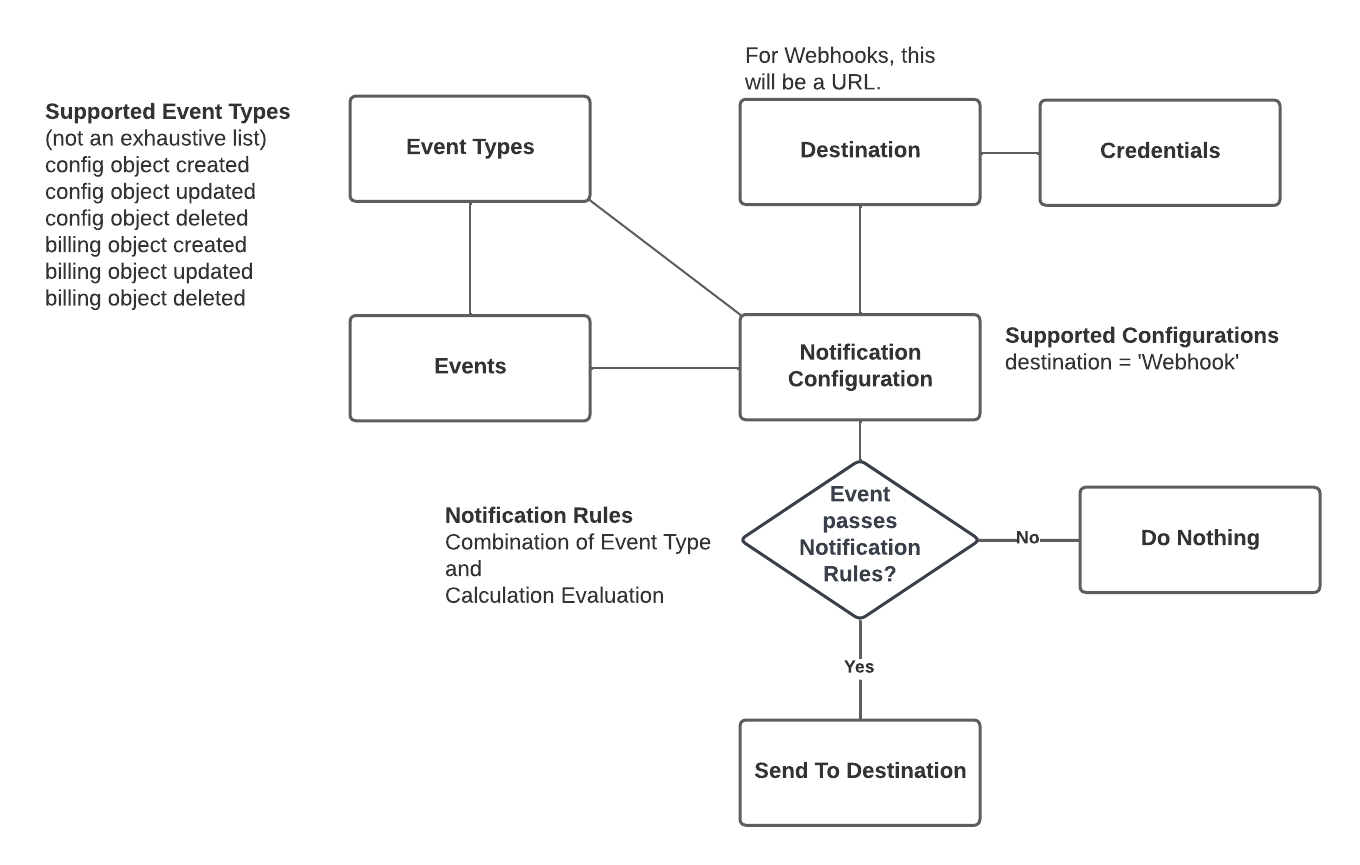
Events and Event Types - Key Points
Here are some key points to note regarding Events and Event Types:- Events are tokens of Event Types. Any Notifications you set up act on actual Events.
- Events are system generated. For example, when a new Prepayment/Commitment is created for an Account.
- Events Types are available for main configuration and billing entities. For each entity three Event Types are available - when the entity is created, updated, or deleted.
- Each Event Type offers a number of fields. By referencing these Event fields, you can exploit a wide-ranging flexibility when you define the conditions on which a Notification will be triggered by an Event.
- Real-time processing. Events are evaluated in real-time.
- Evolving schemas. The Events system doesn’t statically hold schemas, they are dynamically updated assuming forward compatibility is kept.
- Events are time-bound. Events in m3ter are time-bound and are deleted 28 days after creation. This includes all system Events, Notification Events, Integration error Events, Ingestion validation failure Events, Data Export job failure Events, and Scheduled Events.
Types of Events
Events fall into several broad categories:- Configuration Entity Events
- Billing Entity Events
- Integration Events
- Integration Error Events
- Ingest Failure Events
- Data Export Job Events
- Scheduled Events
Configuration Entity Events
Event Types are available for each of the following m3ter configuration entities. Three events are associated with each entity - whenever an entity is created, deleted, or updated:- Account
- Account Plan
- Aggregation
- Alert
- Commitment
- Compound Aggregation
- Contract
- Counter
- Counter Pricing
- Credit Reason
- Custom Field
- Lookup Table
- Lookup Table Revision
- Lookup Table Revision Data Job
- Meter
- Meter Group
- Organization
- Organization Configuration
- Plan
- Plan Group
- Plan Group Link
- Plan Template
- Pricing
- Pricing Band
- Product
- Transaction Type
Billing Entity Events
Event Types are available for each of the following m3ter billing entities. Three events are associated with each entity - whenever a billing entity is created, deleted, or updated:- Balance
- Balance Amount
- Bill
- Bill Config
- Bill Job
- Charge
- Counter Adjustment
- Scheduled Balance Charge
- Scheduled Balance Transaction
- Statement Job
Integration Events
Event Types are available for the External Mapping entity - whenever one is created, updated, or deleted.Integration Error Events
Event Types are available for certain kinds of error that can occur for an integration:- authentication
- disabled
- missing account mapping
- perform
- validation
Ingest Failure Events
A usage data ingest failure Event Type is available for when a usage measurement you submit to the m3ter platform fails to ingest properly:- ingest validation
Data Export Job Events
Data export job success and failure Event Types are available for when a data export job succeeds or fails to complete:- data export job
Scheduled Events
Scheduled Events are custom Events that reference Date/Time fields belonging to configuration and billing entities. They are specific to an Organization. See Working with Scheduled Events for more details.Notification Rule
A Notification Rule allows you to control when a Notification is triggered with reference to an Event. You can:- Include a calculation that references Event fields. This allows you to precisely define the conditions on which the Notification is triggered with respect to the Event. For example, send a Notification when a new Commitment is created for an Account and the commitment amount is equal to or greater than $5000. See the following Creating Calculations section for more details.
- Select to always fire the Notification, and omit any calculation. This means the Notification will be triggered simply by the referenced Event occurring and with no further conditions having to be met.
Notification Webhook Integration - Outgoing Webhooks and Credentials
To complete a Notification setup, you must link a Notification Rule to an Outgoing Webhook as the endpoint for the Notification and to create a Notification Webhook Integration:- Currently, only the
M3TER_SIGNED_REQUESTcredentials format can be used as the authentication method used for connecting to a webhook. - If credentials are not required, then dummy values can be used.
Creating Calculations
The calculations you use in your Notification Rules can reference Event fields. This powerful capability sits at the heart of the Events and Notifications feature, giving you wide-ranging flexibility to define the precise conditions for sending Notifications:- A Notification calculation is a formula that will be evaluated to a boolean.
- If the calculation evaluates to true, a Notification instance for the Event is created and is sent to the configured Outgoing Webhook.
- You can reference numeric, string, and boolean Event fields in a calculation.
- The fields you can use in a calculation are those returned in the response to the List Events API call:
GET https://api.m3ter.com/organizations/{orgId}/events/fields- See the Event Fields section of the Object Definitions and API Calls topic for more details.
- For details of the supported operators, variables, functions, and type casts for creating Notification calculations, see m3ter Calculation Engine.
Example Calculations
- Only trigger the Notification for a single Account:
new.accountId == "df41d216-XXXX-470f-YYYY-79b16059a96f"
- Trigger a Notification when the Amount Spent field (on a commitment) has exceeded 90%:
(new.amountSpent >= ((new.amount*100)/90)) AND ((old.amountSpent <= ((old.amount*100)/90)) OR (old.amountSpent == null))- Note that this has a check against the “old” value to ensure there is only 1 notification when crossing the 90% threshold.
Events Permissions
You can use the m3ter Permissions framework to create Permission Policies to allow users in your Organization to create, retrieve, update, or delete Events. Permissions for Events work in the normal way:- If a user has a deny Event Permission Policy assigned to them, they will not be able to see Events.
- If a user has a deny Permission Policy for another entity assigned to them, for example deny Product, they will not be able to see Events associated with Products.