

- Click the diagram to open it in a separate tab and use the browser zoom to view.
- See below for section summaries and links to relevant documentation.
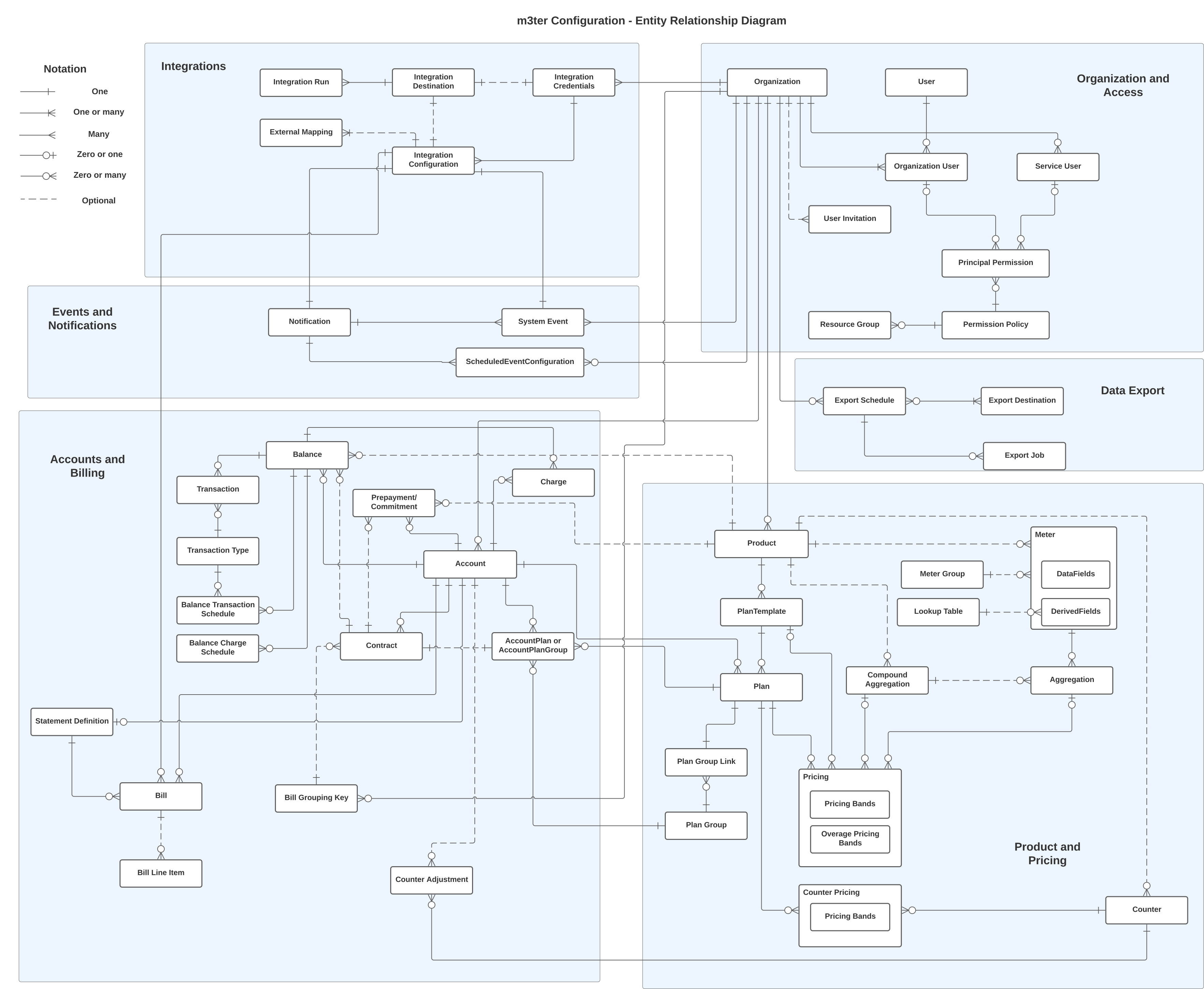
Organization and Access
An Organization represents your company as a direct customer of m3ter. An Organization offers many settings that are applied generally and ensure key areas such as billing fulfill your specific requirements. m3ter supports two types of user that can authenticate and be granted access to your Organization:- Users. Represent the people you’ll grant access to your Organization.
- Service Users. Intended to represent automated processes that you want to grant direct API access to your Organization. You’ll typically want to set up Service Users for integrations of your 3rd-party systems with the m3ter platform.
Product and Pricing
Products in m3ter to represent the products and services you offer to your end customers. Once you have created a Product, to enable pricing for it you can then:- Create Meters to collect Product usage data.
- Create and configure Aggregations that target Meter data fields and define usage-based pricing metrics as units of aggregated usage.
- Create Counters to apply unit-based pricing for recurring subscription charges.
- Set up Product Plans and apply Pricing to those Plans using your pricing metrics.
Accounts and Billing
An Account is used to define one of your end-customers. You can attach a priced Product Plan to an Account and create an Account Plan, which is used at billing to determine the charges due for any:- Product usage consumed by the Account in the billing period.
- Counter units subscribed to by the Account for the billing period.
Integrations
Use m3ter Integrations to quickly map and synchronize data held in any 3rd-party systems you use for core business operations, such as sales, pricing, billing and invoicing, and general finance:- Map and synchronize data held in leading Finance, CRM, and CPQ systems.
- Self-serve Integrations and set them up directly in the m3ter Console for outbound billing flows into your preferred invoicing system.
Events and Notifications
m3ter’s Events and Notifications feature allows you to define and implement Notifications that are triggered by specific Events in your m3ter production environment:- Set up a Notification Rule that references a System Event or a Scheduled Event.
- Include a calculation for the Notification Rule that references the Event’s fields to define the precise conditions for triggering the Notification.
- Configure a webhook as Destination for the Notification payload to be delivered to.