When you have created some Export Destinations using S3 buckets in your AWS account or using buckets in your Google Cloud Storage account, you can set up Export Schedules to perform usage data exports to those destinations from your m3ter Organization. You can specify an hourly or daily frequency for these exports to run.This topic explains how to work with and create Export Schedules for exporting usage data from your Organization at regular intervals:
Start in Usage Data Explorer? You might want to first review the usage data returned for a query you plan to use for your Export Schedule. If so, you can start in the Usage Data Explorer and build and perform the query. If the data the query returns is the data you want to export, you can then select Create export schedule. See Using Queries for Data Export for more details.
Export jobs for Export schedules? When you have created a data Export schedule, an export job is created for each time the data export is due to run under the schedule. You can review and check the status of data export jobs on the Export jobs page - see Reviewing Export Jobs.
Usage data (legacy format) Export Schedules? If you were an early customer of Data Exports you might also still have access to the legacy usage format for data Export Schedules. See Creating Legacy Usage Data Export Schedules. However, the legacy usage format is NOT available for new customers.
This section explains how the Data Export service will compile and run usage data exports according to the various options available to you when setting up your usage data Export Schedules:
Important! Please review this section before setting up any usage data Export schedules to understand the various options you can use to ensure the exports contain the correct usage data to serve your specific needs.
When you’ve completed the configuration for an Export Schedule and select to create it:
An Export job is scheduled to run the data export immediately with the Data Export service.
Export jobs for the next and subsequent in the series of exports are then scheduled to run with the Data Export Service according to the frequency you’ve configured for the Schedule - at a specified number of minutes, hours, or days intervals. You can also define an offset: for hourly scheduling an offset in minutes from start of hour; for daily scheduling an offset in hours from midnight.
For example, if you select to create an Export schedule at 10:00 a.m. on June 1st, 2024 UTC and the Export schedule is configured for a frequency of every 2 days, an Export job is scheduled to run with the Data Export Service immediately. An Export job for the next data export will then be scheduled to run at 10:00 a.m. on June 3rd 2024 UTC, and so on.
Exported files are retained in m3ter for 24 hours after the Export job completes, after which they are removed.
The range of usage data and the way it is compiled will depend on several options which allow you to control closely what the export file will contain.
You can define a Time period when creating a usage data Export schedule to control the range of data you want the data export to contain each time it runs according to the schedule. Options:
Today. Data collected for the current day up until the time the export is scheduled to run. For example, if the Export schedule is configured to run with a frequency of every 3 hours and is created initially at 10:00 a.m. UTC, the first export scheduled to run will contain the usage data collected up until 10 a.m. UTC of the current day, the second export will be scheduled to run at 1 p.m. UTC that day and will contain all the usage data collected up until 1 p.m. for that day, and so on. (Default setting)
Yesterday. Data collected for the day before the export runs under the schedule - that is, the 24 hour period from midnight to midnight of the day before.
Week, Month, Year to date. Data collected for the period covering the current week, month, or year period. For example, for Week to date setting weeks run Monday to Monday - if the Export is scheduled to run at 10 a.m. UTC on October 16th 2024, which is a Wednesday, it will contain all usage data collected starting Monday October 14th 2024 through to the Wednesday at 10 a.m. UTC of the current week.
Previous week, month, quarter, year. Data collected for the previous full week, month, quarter, or year period. For example, weeks run Monday to Monday - if the export is scheduled to run on June 12th 2024, which is a Wednesday, the export will contain data for the period running from Monday, June 3rd to midnight on Sunday, June 9th 2024.
Last 12 hours. Data collected for the twelve hour period up to the start of the hour in which the export is scheduled to run.
Last 7 days, 30 days, 35 days, 90 days, 120 days, year. Data collected for the selected period prior to the date the export is scheduled to run. For example, if Last 30 days and the export is scheduled to run for any time on June 15th 2024, it will contain usage data collected for the previous 30 days - starting May 16th 2024 through to midnight on June 14th 2024.
You can select Meters and Accounts in your Organization for the export. The usage data export file will then contain only the usage data collected for those Meters and Accounts:
If you do not select to aggregate the usage data, then the export will contain the raw usage data measurements ingested by the selected Meters and selected Accounts. The usage data measurement values included in the export for non-aggregated usage data exports are:
For all Data Fields types - both String and Numeric - and any Derived Fields on the selected Meters.
The values will be the post-enrichment ingest process values. See Usage Data Ingest Process for more details.
Default option is for all Meters and all Accounts.
You can filter the usage data returned for export by adding specific values of non-numeric Dimension data fields on included Meters. Only the data collected for the values you’ve added for the selected Dimension fields will be included in the export.
If you’ve applied Aggregation functions to the usage data for export, you can then select to group the data returned for export by:
Account
Time
Dimension
Important: Applying Aggregations and Grouping for Usage Data Exports! If you intend to apply Aggregations to usage data returned for export and apply grouping to the aggregated data, please ensure you review the Applying Aggregations for Queries section first. The functionality used by the Data Export service when you set up a usage data export and aggregate the data is the same as used by the Usage Data Explorer (v2) for querying usage data.
You can quickly set up Export schedules for data exports containing usage data collected for your Organization. Usage data exports contain the usage data measurements ingested into m3ter for the selected Meters and Accounts covering the specified time period.To create a Usage Data Export Schedule:
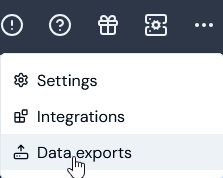
Select Data exports:
The Data exports page opens and lists any existing Export schedules:
Select Create export schedule. The Create page opens.
Enter the Export schedule details:
Name. Descriptive name for the schedule.
Code. Unique identifier for the schedule.
Note that when you’ve entered a Name and clicked in the Code field, a Code is automatically entered based on the Name. You can then edit the auto-generated Code as required.
Destinations. Use the drop-down to select the Export destinations to be used each time the data export runs for the schedule. Notes:
Select a destination.
If No options shows in the drop-down, you must first create at least one destination before you can set up an Export Schedule - see Creating and Managing Export Destinations.
Alternatively, if you simply want to download the data export file locally, do not select a Destination. See Downloading Data Export Files Locally for more details.
Export file format. Select the format you require for the usage data export files:
CSV. (Default).
JSONL.
Set up the Export schedule:
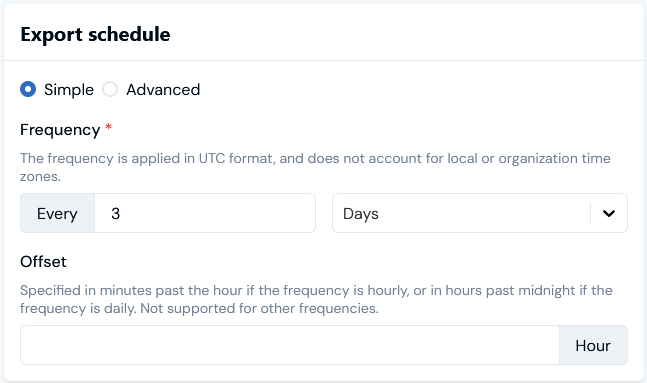
You can use the default Simple scheduling mode to do this:
Frequency. Define the frequency for the schedule in Hours, Days, or Minutes.
Offset. If you use an hourly or daily frequency, then you can define an offset for when the export will run relative to the hour or day:
For hourly scheduling, an offset in minutes from start of hour.
For daily scheduling an offset in hours from midnight.
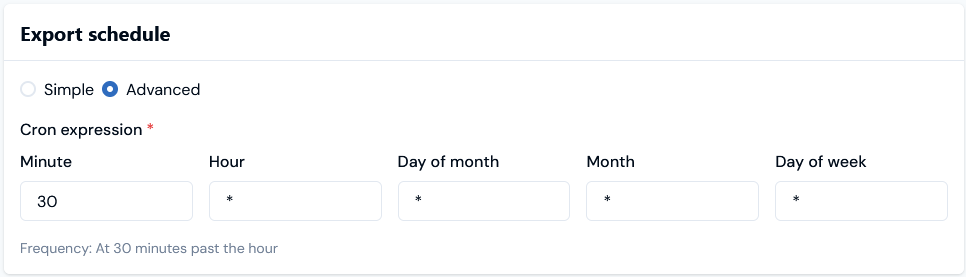
Alternatively, select the Advanced scheduling mode and define a cron expression for when you want the export to run:
The data export will be scheduled to run immediately when you create it and then at the defined frequency.
Warning! Limits are imposed:
Lowest frequency is every 3 days.
Highest frequency is every 15 minutes.
Errors will show if you try to set a frequency outside of these limits.
Enter the Export data:
Source type. For a usage data Export schedule, leave this as the default selection for Usage data.
Time period. Define a time period you want the data export to cover each time it runs according to the schedule. This setting controls what usage data collected for the specified Meters/Accounts the export will contain. See above: Time Period for details on each of the options. Today is the Default.
Meters. Add Meters for the data export:
Select the plus icon. A popup will show listing all Meters in your Organization and you can search the list.
Check the Meters whose usage data you want to include in the export and select Add.
For the current example, we’ve used the Search field on the dialog to filter the list.
Alternatively, you can enter the ID of a Meter and then Add it.
The export will contain the usage data collected by the Meters you add for the specified Time period. (Default isAll meters)
Accounts. Add Accounts for the data export:
Select the plus icon. A popup will show listing all Accounts in your Organization and you can search the list.
Check the Accounts whose usage data you want to include in the export and select Add.
For the current example, we’ve used the Search field on the dialog to filter the list.
Alternatively, you can enter the ID of an Account and then Add it.
The export will contain the usage data collected by the Meters and Accounts you’ve added for the specified Time period. (Default isAll Accounts)
If you want to use Dimensions filters for the usage data included in the export, select Add dimension filter. A menu appears and lists any Dimension fields for Meters selected for the export:
In the current example, a single Meter has two Dimension fields configured.
Select the Meter Dimension field you want to use to filter the data returned for the export. For the current example, we’ll select RevGraph Meter 1 > Customer Name. A dialog replaces the menu, which lists values used for this field when usage submissions were made for the Meter within the selected Time period.
Check the values used for the selected Meter Dimension field you want to use to filter the data returned for the export and then select Add filter:
The dialog closes and the select Dimension field values are added under Dimension filters:
If you want to apply Aggregations to the usage data returned for export, under Aggregations, select Add aggregation. A menu listing available aggregation methods appears:
Select the Aggregation method you want to apply. For example, select Sum. A dialog replaces the menu and shows the fields on the Meters selected for the export which can have this aggregation method applied:
Select the Meter data field you want to apply the Aggregation method to. The selection is added under Aggregations.
Repeat steps to apply any other Aggregations for the usage data export:
For the current example, we’ve applied a Sum Aggregation to both of the numeric data fields on the selected Meter.
If you’ve applied Aggregations to the returned usage data for export and you want to group the data, under Aggregations, select the grouped by plus icon. A menu appears:
In the current example, we select to group by a Meter Dimension. The menu is replaced by a dialog showing the available Dimensions on the Meter:
Select the Dimension you want to group the data by. The dialog closes and your grouped by selection is added under Aggregations.
When you have entered all details, select Create export schedule. The Export schedule details page opens:
In this example, we’ve selected a single Meter and Account for which filtered and aggregated usage data grouped by a dimension will be included in the data exports ran every three days for the Export Schedule.
Return to the Data exports page where the new schedule is listed on the Export schedules panel:
{"docsConfig":{"theme":"aspen","$schema":"https://mintlify.com/docs.json","name":"m3ter Documentation","description":"Guides, learning resources and API reference for integrating with m3ter","colors":{"primary":"#4caf4c","dark":"#449d44"},"logo":{"light":"https://mintcdn.com/m3ter/t6C65JBQiQOFtjBy/images/m3ter-logo-blue-sf.svg?fit=max\u0026auto=format\u0026n=t6C65JBQiQOFtjBy\u0026q=85\u0026s=3928db28c84ec6950e43caf96e635d80","dark":"https://mintcdn.com/m3ter/t6C65JBQiQOFtjBy/images/m3ter-logo-white-sf.svg?fit=max\u0026auto=format\u0026n=t6C65JBQiQOFtjBy\u0026q=85\u0026s=a018cb782e49a2fbdd811276476d0605"},"favicon":"https://mintcdn.com/m3ter/T0RRts393DSUkWFc/favicon.svg?fit=max\u0026auto=format\u0026n=T0RRts393DSUkWFc\u0026q=85\u0026s=9492b54cc98df6775983b287b6f865cd","navbar":{"links":[{"href":"https://m3ter.freshdesk.com","label":"Support"},{"href":"https://console.m3ter.com","label":"Console"}],"primary":{"type":"button","label":"Schedule a demo","href":"https://www.m3ter.com/contact"}},"footer":{"socials":{"linkedin":"https://uk.linkedin.com/company/m3ter","x":"https://x.com/m3terHQ","github":"https://github.com/m3ter-com"},"links":[{"items":[{"label":"Website","href":"https://www.m3ter.com"},{"label":"Legal","href":"https://www.m3ter.com/legal"},{"label":"Security","href":"https://www.m3ter.com/security"},{"label":"Trust Center","href":"https://trust.m3ter.com"}]}]},"fonts":{"family":"Montserrat"},"icons":{"library":"lucide"},"styling":{"eyebrows":"breadcrumbs","latex":false},"integrations":{"ga4":{"measurementId":"G-V9C7TTPRQT"}},"contextual":{"options":["copy","view"],"display":"header"},"thumbnails":{"fonts":{"family":"Montserrat"}},"navigation":{"pages":[]}},"deployment":{"deploymentMetadataValue":{"subdomain":"m3ter","hasAudioNarration":false,"actualSubdomain":"m3ter","customDomains":["docs.m3ter.com"],"gitSource":{"type":"github","owner":"m3ter-com","repo":"m3ter-docs","deployBranch":"main","contentDirectory":"","isPrivate":true,"mountPath":"","label":""},"chroma":{"liveDeploymentHistoryId":"6ae9a09c36175fbf7124961d","collectionId":"92768e54-2234-4c9f-bb43-903eed567982","schemaVersion":"v3","latestBuiltDeploymentHistoryId":"6ae9a09c36175fbf7124961d"},"entitlements":{"AI_CHAT":{"status":"ENABLED"},"WEB_MCP":{"status":"ENABLED"},"NARRATION":{"status":"ENABLED"}},"buildId":"6ae9a09c36175fbf7124961d","clientVersion":"0.0.4054","searchFilterCounts":[{"language":"default","tag":"Guides","count":400},{"language":"default","tag":"API Reference","count":393},{"language":"default","tag":"Endpoints","count":387},{"language":"default","tag":"Integrations","count":66},{"language":"default","tag":"m3sh Function Reference","count":66},{"language":"default","tag":"Synthetic functions","count":50},{"language":"default","tag":"m3ter","count":50},{"language":"default","tag":"m3sh","count":43},{"language":"default","tag":"End-Customer Accounts","count":27},{"language":"default","tag":"m3ter Connector for Salesforce","count":24}]},"assistantConfig":{"enableAskAiButton":true,"enableStarterQuestions":false,"enableAskAiSearchBar":false},"basePath":"","hasChatPermissions":true,"hasWebMcpPermissions":true,"toggles":[{"name":"kill-isr","enabled":true,"variant":{"name":"disabled","enabled":false,"feature_enabled":true},"impressionData":false},{"name":"agent-mintlify-slack","enabled":true,"variant":{"name":"disabled","enabled":false,"feature_enabled":true},"impressionData":false},{"name":"agent-integrations-settings","enabled":true,"variant":{"name":"disabled","enabled":false,"feature_enabled":true},"impressionData":false},{"name":"automations-pr-grouping","enabled":true,"variant":{"name":"disabled","enabled":false,"feature_enabled":true},"impressionData":false},{"name":"custom-prefix","enabled":true,"variant":{"name":"disabled","enabled":false,"feature_enabled":true},"impressionData":false},{"name":"analytics-v7","enabled":true,"variant":{"name":"disabled","enabled":false,"feature_enabled":true},"impressionData":false},{"name":"user-flows-analytics","enabled":true,"variant":{"name":"disabled","enabled":false,"feature_enabled":true},"impressionData":false},{"name":"no-publish-flow","enabled":true,"variant":{"name":"disabled","enabled":false,"feature_enabled":true},"impressionData":false},{"name":"workos-onboarding","enabled":true,"variant":{"name":"disabled","enabled":false,"feature_enabled":true},"impressionData":false},{"name":"llms-txt-v2","enabled":true,"variant":{"name":"disabled","enabled":false,"feature_enabled":true},"impressionData":false},{"name":"snapshot-serving-live","enabled":true,"variant":{"name":"disabled","enabled":false,"feature_enabled":true},"impressionData":false},{"name":"stripTemperatureMiddleware","enabled":true,"variant":{"name":"disabled","enabled":false,"feature_enabled":true},"impressionData":false},{"name":"support-platform-pylon-zendesk","enabled":true,"variant":{"name":"disabled","enabled":false,"feature_enabled":true},"impressionData":false},{"name":"snapshot-serving","enabled":true,"variant":{"name":"disabled","enabled":false,"feature_enabled":true},"impressionData":false},{"name":"instant-rollback","enabled":true,"variant":{"name":"disabled","enabled":false,"feature_enabled":true},"impressionData":false},{"name":"granular-notifications-server","enabled":true,"variant":{"name":"disabled","enabled":false,"feature_enabled":true},"impressionData":false},{"name":"granular-notifications","enabled":true,"variant":{"name":"disabled","enabled":false,"feature_enabled":true},"impressionData":false},{"name":"automations-fable","enabled":true,"variant":{"name":"disabled","enabled":false,"feature_enabled":true},"impressionData":false},{"name":"fixed-ai-action-pricing","enabled":true,"variant":{"name":"disabled","enabled":false,"feature_enabled":true},"impressionData":false},{"name":"automation-resolve-merge-conflict","enabled":true,"variant":{"name":"disabled","enabled":false,"feature_enabled":true},"impressionData":false},{"name":"scoped-publishing","enabled":true,"variant":{"name":"disabled","enabled":false,"feature_enabled":true},"impressionData":false},{"name":"mintql","enabled":true,"variant":{"name":"disabled","enabled":false,"feature_enabled":true},"impressionData":false},{"name":"page-level-analytics","enabled":true,"variant":{"name":"disabled","enabled":false,"feature_enabled":true},"impressionData":false},{"name":"editor-version-history-v2","enabled":true,"variant":{"name":"disabled","enabled":false,"feature_enabled":true},"impressionData":false},{"name":"billing-page-v2","enabled":true,"variant":{"name":"disabled","enabled":false,"feature_enabled":true},"impressionData":false},{"name":"full-page-search","enabled":true,"variant":{"name":"disabled","enabled":false,"feature_enabled":true},"impressionData":false},{"name":"workspace-projects","enabled":true,"variant":{"name":"disabled","enabled":false,"feature_enabled":true},"impressionData":false},{"name":"assistant-v5","enabled":true,"variant":{"name":"disabled","enabled":false,"feature_enabled":true},"impressionData":false},{"name":"byok-sep-25","enabled":true,"variant":{"name":"disabled","enabled":false,"feature_enabled":true},"impressionData":false},{"name":"fork-pr-previews","enabled":true,"variant":{"name":"disabled","enabled":false,"feature_enabled":true},"impressionData":false},{"name":"revalidation-jwt","enabled":true,"variant":{"name":"disabled","enabled":false,"feature_enabled":true},"impressionData":false},{"name":"vite-origin","enabled":true,"variant":{"name":"disabled","enabled":false,"feature_enabled":true},"impressionData":false},{"name":"billing-updated-9-15","enabled":true,"variant":{"name":"disabled","enabled":false,"feature_enabled":true},"impressionData":false},{"name":"workos-sso-scim","enabled":true,"variant":{"name":"disabled","enabled":false,"feature_enabled":true},"impressionData":false},{"name":"hobby-abuse-scan","enabled":true,"variant":{"name":"disabled","enabled":false,"feature_enabled":true},"impressionData":false},{"name":"dashboard-inbox","enabled":true,"variant":{"name":"disabled","enabled":false,"feature_enabled":true},"impressionData":false},{"name":"workos-signup","enabled":true,"variant":{"name":"disabled","enabled":false,"feature_enabled":true},"impressionData":false},{"name":"turbopuffer-dual-write","enabled":true,"variant":{"name":"disabled","enabled":false,"feature_enabled":true},"impressionData":false},{"name":"workos-enabled","enabled":true,"variant":{"name":"disabled","enabled":false,"feature_enabled":true},"impressionData":false},{"name":"approve-review-flow","enabled":true,"variant":{"name":"disabled","enabled":false,"feature_enabled":true},"impressionData":false},{"name":"sso-setup-deadline-banner","enabled":true,"variant":{"name":"disabled","enabled":false,"feature_enabled":true},"impressionData":false},{"name":"rbac-expansion","enabled":true,"variant":{"name":"disabled","enabled":false,"feature_enabled":true},"impressionData":false}],"googleFontsInlined":true},"customCss":[],"page":{"pagePath":"guides/data-exports/creating-export-schedules","slug":"/guides/data-exports/creating-export-schedules","pageMetadata":{"title":"Creating Usage Data Export Schedules","description":null,"href":"/guides/data-exports/creating-export-schedules"},"pageType":"default","mdx":{"mdxSource":{"compiledSource":"\"use strict\";const{Fragment:_Fragment,jsx:_jsx,jsxs:_jsxs}=arguments[0];const{useMDXComponents:_provideComponents}=arguments[0];function _createMdxContent(props){const _components={a:`a`,code:`code`,em:`em`,li:`li`,ol:`ol`,p:`p`,strong:`strong`,ul:`ul`,..._provideComponents(),...props.components},{Heading,OptimizedImage,Tip,Warning}=_components;if(!Heading)_missingMdxReference(`Heading`,true);if(!OptimizedImage)_missingMdxReference(`OptimizedImage`,true);if(!Tip)_missingMdxReference(`Tip`,true);if(!Warning)_missingMdxReference(`Warning`,true);return _jsxs(_Fragment,{children:[_jsxs(_components.p,{children:[`When you have created some Export Destinations using S3 buckets in your AWS account or using buckets in your Google Cloud Storage account, you can set up Export Schedules to perform `,_jsx(_components.em,{children:`usage data exports`}),` to those destinations from your m3ter Organization. You can specify an hourly or daily frequency for these exports to run.`]}),`\n`,_jsx(_components.p,{children:`This topic explains how to work with and create Export Schedules for exporting usage data from your Organization at regular intervals:`}),`\n`,_jsxs(_components.ul,{children:[`\n`,_jsx(_components.li,{children:_jsx(_components.a,{href:`/guides/data-exports/creating-export-schedules#working-with-usage-data-export-schedules`,children:`Working with Usage Data Export Schedules`})}),`\n`,_jsx(_components.li,{children:_jsx(_components.a,{href:`/guides/data-exports/creating-export-schedules#creating-usage-data-export-schedules`,children:`Creating Usage Data Export Schedules`})}),`\n`]}),`\n`,_jsxs(Tip,{children:[_jsx(_components.p,{children:_jsx(_components.strong,{children:`Note and Tips:`})}),_jsxs(_components.ul,{children:[`\n`,_jsxs(_components.li,{children:[_jsx(_components.strong,{children:`Start in Usage Data Explorer?`}),` You might want to first review the usage data returned for a query you plan to use for your Export Schedule. If so, you can start in the Usage Data Explorer and build and perform the query. If the data the query returns is the data you want to export, you can then select `,_jsx(_components.strong,{children:`Create export schedule`}),`. See `,_jsx(_components.a,{href:`/guides/data-explorer/usage-data-explorer-v2#using-queries-for-data-export`,children:`Using Queries for Data Export`}),` for more details.`]}),`\n`,_jsxs(_components.li,{children:[_jsx(_components.strong,{children:`Export jobs for Export schedules?`}),` When you have created a data Export schedule, an export job is created for each time the data export is due to run under the schedule. You can review and check the status of data export jobs on the `,_jsx(_components.strong,{children:`Export jobs`}),` page - see `,_jsx(_components.a,{href:`/guides/data-exports/reviewing-export-jobs`,children:`Reviewing Export Jobs`}),`.`]}),`\n`,_jsxs(_components.li,{children:[_jsx(_components.strong,{children:`Usage data (legacy format) Export Schedules?`}),` If you were an early customer of Data Exports you might also still have access to the legacy usage format for data Export Schedules. See `,_jsx(_components.a,{href:`/guides/data-exports/creating-export-schedules/creating-legacy-usage-export-schedules`,children:`Creating Legacy Usage Data Export Schedules`}),`. However, the legacy usage format is `,_jsx(_components.em,{children:`NOT available`}),` for new customers.`]}),`\n`]})]}),`\n`,_jsx(Heading,{level:`2`,id:`working-with-usage-data-export-schedules`,children:`Working with Usage Data Export Schedules`}),`\n`,_jsx(_components.p,{children:`This section explains how the Data Export service will compile and run usage data exports according to the various options available to you when setting up your usage data Export Schedules:`}),`\n`,_jsxs(_components.ul,{children:[`\n`,_jsx(_components.li,{children:_jsx(_components.a,{href:`/guides/data-exports/creating-export-schedules#data-export-service-timezone-used`,children:`Data Export Service - Timezone Used`})}),`\n`,_jsx(_components.li,{children:_jsx(_components.a,{href:`/guides/data-exports/creating-export-schedules#when-export-schedules-are-run`,children:`When Export Schedules are Run`})}),`\n`,_jsx(_components.li,{children:_jsx(_components.a,{href:`/guides/data-exports/creating-export-schedules#export-file-format-and-composition`,children:`Export File Format and Composition`})}),`\n`,_jsx(_components.li,{children:_jsx(_components.a,{href:`/guides/data-exports/creating-export-schedules#maximum-results-and-output-file-sizes`,children:`Maximum Results and Output File Sizes`})}),`\n`]}),`\n`,_jsx(Warning,{children:_jsxs(_components.p,{children:[_jsx(_components.strong,{children:`Important!`}),` Please review this section before setting up any usage data Export schedules to understand the various options you can use to ensure the exports contain the correct usage data to serve your specific needs.`]})}),`\n`,_jsx(Heading,{level:`3`,id:`data-export-service-timezone-used`,children:`Data Export Service - Timezone Used`}),`\n`,_jsxs(_components.p,{children:[`The Data Export service uses UTC and this is not affected by the `,_jsx(_components.strong,{children:`Timezone`}),` you’ve set for your Organization.`]}),`\n`,_jsx(Heading,{level:`3`,id:`when-export-schedules-are-run`,children:`When Export Schedules are Run`}),`\n`,_jsx(_components.p,{children:`When you’ve completed the configuration for an Export Schedule and select to create it:`}),`\n`,_jsxs(_components.ul,{children:[`\n`,_jsx(_components.li,{children:`An Export job is scheduled to run the data export immediately with the Data Export service.`}),`\n`,_jsx(_components.li,{children:`Export jobs for the next and subsequent in the series of exports are then scheduled to run with the Data Export Service according to the frequency you’ve configured for the Schedule - at a specified number of minutes, hours, or days intervals. You can also define an offset: for hourly scheduling an offset in minutes from start of hour; for daily scheduling an offset in hours from midnight.`}),`\n`,_jsx(_components.li,{children:`For example, if you select to create an Export schedule at 10:00 a.m. on June 1st, 2024 UTC and the Export schedule is configured for a frequency of every 2 days, an Export job is scheduled to run with the Data Export Service immediately. An Export job for the next data export will then be scheduled to run at 10:00 a.m. on June 3rd 2024 UTC, and so on.`}),`\n`,_jsx(_components.li,{children:`Exported files are retained in m3ter for 24 hours after the Export job completes, after which they are removed.`}),`\n`]}),`\n`,_jsx(Heading,{level:`3`,id:`export-file-format-and-composition`,children:`Export File Format and Composition`}),`\n`,_jsx(_components.p,{children:`The range of usage data and the way it is compiled will depend on several options which allow you to control closely what the export file will contain.`}),`\n`,_jsx(Heading,{level:`4`,id:`file-format`,children:`File Format`}),`\n`,_jsxs(_components.p,{children:[`The available data exports file formats are `,_jsx(_components.code,{children:`.CSV`}),` or `,_jsx(_components.code,{children:`JSONL`}),`.`]}),`\n`,_jsx(Heading,{level:`4`,id:`time-period`,children:`Time Period`}),`\n`,_jsx(_components.p,{children:`You can define a Time period when creating a usage data Export schedule to control the range of data you want the data export to contain each time it runs according to the schedule. Options:`}),`\n`,_jsxs(_components.ul,{children:[`\n`,_jsxs(_components.li,{children:[_jsx(_components.strong,{children:`Today`}),`. Data collected for the current day up until the time the export is scheduled to run. For example, if the Export schedule is configured to run with a frequency of every 3 hours and is created initially at 10:00 a.m. UTC, the first export scheduled to run will contain the usage data collected up until 10 a.m. UTC of the current day, the second export will be scheduled to run at 1 p.m. UTC that day and will contain all the usage data collected up until 1 p.m. for that day, and so on. (`,_jsx(_components.em,{children:`Default setting`}),`)`]}),`\n`,_jsxs(_components.li,{children:[_jsx(_components.strong,{children:`Yesterday`}),`. Data collected for the day before the export runs under the schedule - that is, the 24 hour period from midnight to midnight of the day before.`]}),`\n`,_jsxs(_components.li,{children:[_jsx(_components.strong,{children:`Week, Month, Year to date`}),`. Data collected for the period covering the current week, month, or year period. For example, for `,_jsx(_components.strong,{children:`Week to date`}),` setting weeks run Monday to Monday - if the Export is scheduled to run at 10 a.m. UTC on October 16th 2024, which is a Wednesday, it will contain all usage data collected starting Monday October 14th 2024 through to the Wednesday at 10 a.m. UTC of the current week.`]}),`\n`,_jsxs(_components.li,{children:[_jsx(_components.strong,{children:`Previous week, month, quarter, year`}),`. Data collected for the previous full week, month, quarter, or year period. For example, weeks run Monday to Monday - if the export is scheduled to run on June 12th 2024, which is a Wednesday, the export will contain data for the period running from Monday, June 3rd to midnight on Sunday, June 9th 2024.`]}),`\n`,_jsxs(_components.li,{children:[_jsx(_components.strong,{children:`Last 12 hours`}),`. Data collected for the twelve hour period up to the start of the hour in which the export is scheduled to run.`]}),`\n`,_jsxs(_components.li,{children:[_jsx(_components.strong,{children:`Last 7 days, 30 days, 35 days, 90 days, 120 days, year`}),`. Data collected for the selected period prior to the date the export is scheduled to run. For example, if `,_jsx(_components.strong,{children:`Last 30 days`}),` and the export is scheduled to run for any time on June 15th 2024, it will contain usage data collected for the previous 30 days - starting May 16th 2024 through to midnight on June 14th 2024.`]}),`\n`]}),`\n`,_jsx(Heading,{level:`4`,id:`meters-and-accounts`,children:`Meters and Accounts`}),`\n`,_jsx(_components.p,{children:`You can select Meters and Accounts in your Organization for the export. The usage data export file will then contain only the usage data collected for those Meters and Accounts:`}),`\n`,_jsxs(_components.ul,{children:[`\n`,_jsxs(_components.li,{children:[`If you `,_jsx(_components.em,{children:`do not select to aggregate`}),` the usage data, then the export will contain the raw usage data measurements ingested by the selected Meters and selected Accounts. The usage data measurement values included in the export for `,_jsx(_components.em,{children:`non-aggregated`}),` usage data exports are:`,`\n`,_jsxs(_components.ul,{children:[`\n`,_jsx(_components.li,{children:`For all Data Fields types - both String and Numeric - and any Derived Fields on the selected Meters.`}),`\n`,_jsxs(_components.li,{children:[`The values will be the post-enrichment ingest process values. See `,_jsx(_components.a,{href:`/exploring-m3ter-getting-to-know-the-platform/getting-usage-data-into-m3ter-quick-reference-starter#usage-data-ingest-process`,children:`Usage Data Ingest Process`}),` for more details.`]}),`\n`]}),`\n`]}),`\n`,_jsx(_components.li,{children:`Default option is for all Meters and all Accounts.`}),`\n`]}),`\n`,_jsx(Heading,{level:`4`,id:`dimension-filters`,children:`Dimension Filters`}),`\n`,_jsx(_components.p,{children:`You can filter the usage data returned for export by adding specific values of non-numeric Dimension data fields on included Meters. Only the data collected for the values you’ve added for the selected Dimension fields will be included in the export.`}),`\n`,_jsx(Heading,{level:`4`,id:`aggregations`,children:`Aggregations`}),`\n`,_jsx(_components.p,{children:`You can apply Aggregation functions to the usage data returned for export.`}),`\n`,_jsx(Heading,{level:`4`,id:`group-by`,children:`Group By`}),`\n`,_jsx(_components.p,{children:`If you’ve applied Aggregation functions to the usage data for export, you can then select to group the data returned for export by:`}),`\n`,_jsxs(_components.ul,{children:[`\n`,_jsx(_components.li,{children:_jsx(_components.strong,{children:`Account`})}),`\n`,_jsx(_components.li,{children:_jsx(_components.strong,{children:`Time`})}),`\n`,_jsx(_components.li,{children:_jsx(_components.strong,{children:`Dimension`})}),`\n`]}),`\n`,_jsx(Warning,{children:_jsxs(_components.p,{children:[_jsx(_components.strong,{children:`Important: Applying Aggregations and Grouping for Usage Data Exports!`}),` If you intend to apply Aggregations to usage data returned for export and apply grouping to the aggregated data, `,_jsx(_components.em,{children:`please ensure you review`}),` the `,_jsx(_components.a,{href:`/guides/data-explorer/usage-data-explorer-v2#applying-aggregations-for-queries`,children:`Applying Aggregations for Queries`}),` section first. The functionality used by the Data Export service when you set up a usage data export and aggregate the data is the same as used by the Usage Data Explorer (v2) for querying usage data.`]})}),`\n`,_jsx(Heading,{level:`3`,id:`maximum-results-and-output-file-sizes`,children:`Maximum Results and Output File Sizes`}),`\n`,_jsx(_components.p,{children:`Data Exports can contain up to 500,000,000 records, and the file size limit is determined by the file size limit imposed by your destination.`}),`\n`,_jsx(Heading,{level:`2`,id:`creating-usage-data-export-schedules`,children:`Creating Usage Data Export Schedules`}),`\n`,_jsx(_components.p,{children:`You can quickly set up Export schedules for data exports containing usage data collected for your Organization. Usage data exports contain the usage data measurements ingested into m3ter for the selected Meters and Accounts covering the specified time period.`}),`\n`,_jsx(_components.p,{children:_jsx(_components.strong,{children:`To create a Usage Data Export Schedule:`})}),`\n`,_jsxs(_components.ol,{children:[`\n`,_jsxs(_components.li,{children:[`Select `,_jsx(_components.strong,{children:`Data exports`}),`:`]}),`\n`]}),`\n`,_jsx(OptimizedImage,{src:`https://mintcdn.com/m3ter/FcWrVREdED1szRzf/images/1758545636-dataexport46c.png?fit=max\u0026auto=format\u0026n=FcWrVREdED1szRzf\u0026q=85\u0026s=a59e5ef18b94efe971f15285e5f7d7bc`,style:{maxWidth:`min(180px, 100%)`},\"data-og-width\":`223`,width:`223`,\"data-og-height\":`178`,height:`178`,\"data-path\":`images/1758545636-dataexport46c.png`,\"data-optimize\":`true`,\"data-opv\":`3`,srcset:`https://mintcdn.com/m3ter/FcWrVREdED1szRzf/images/1758545636-dataexport46c.png?w=280\u0026fit=max\u0026auto=format\u0026n=FcWrVREdED1szRzf\u0026q=85\u0026s=4c138144f5b527c133cf8748a98540cb 280w, https://mintcdn.com/m3ter/FcWrVREdED1szRzf/images/1758545636-dataexport46c.png?w=560\u0026fit=max\u0026auto=format\u0026n=FcWrVREdED1szRzf\u0026q=85\u0026s=3060af625e980637160d0081ffb64b4b 560w, https://mintcdn.com/m3ter/FcWrVREdED1szRzf/images/1758545636-dataexport46c.png?w=840\u0026fit=max\u0026auto=format\u0026n=FcWrVREdED1szRzf\u0026q=85\u0026s=4783e63578b3183b687d3006d9059e47 840w, https://mintcdn.com/m3ter/FcWrVREdED1szRzf/images/1758545636-dataexport46c.png?w=1100\u0026fit=max\u0026auto=format\u0026n=FcWrVREdED1szRzf\u0026q=85\u0026s=313121bd11b59daded300dc6f6cc8cf7 1100w, https://mintcdn.com/m3ter/FcWrVREdED1szRzf/images/1758545636-dataexport46c.png?w=1650\u0026fit=max\u0026auto=format\u0026n=FcWrVREdED1szRzf\u0026q=85\u0026s=f922ee007937ed91ee37e15831a3b2ee 1650w, https://mintcdn.com/m3ter/FcWrVREdED1szRzf/images/1758545636-dataexport46c.png?w=2500\u0026fit=max\u0026auto=format\u0026n=FcWrVREdED1szRzf\u0026q=85\u0026s=38d3bf6f5fc34741ca7886afe38c3abb 2500w`}),`\n`,_jsxs(_components.p,{children:[`The `,_jsx(_components.strong,{children:`Data exports`}),` page opens and lists any existing `,_jsx(_components.strong,{children:`Export schedules`}),`:`]}),`\n`,_jsx(OptimizedImage,{src:`https://mintcdn.com/m3ter/FcWrVREdED1szRzf/images/1758547685-dataexport73c.png?fit=max\u0026auto=format\u0026n=FcWrVREdED1szRzf\u0026q=85\u0026s=2c428bfb0a2c98b5b4923c4765845aab`,style:{maxWidth:`min(850px, 100%)`},\"data-og-width\":`1366`,width:`1366`,\"data-og-height\":`685`,height:`685`,\"data-path\":`images/1758547685-dataexport73c.png`,\"data-optimize\":`true`,\"data-opv\":`3`,srcset:`https://mintcdn.com/m3ter/FcWrVREdED1szRzf/images/1758547685-dataexport73c.png?w=280\u0026fit=max\u0026auto=format\u0026n=FcWrVREdED1szRzf\u0026q=85\u0026s=a79f3fd1d0b92a163994687ec3694684 280w, https://mintcdn.com/m3ter/FcWrVREdED1szRzf/images/1758547685-dataexport73c.png?w=560\u0026fit=max\u0026auto=format\u0026n=FcWrVREdED1szRzf\u0026q=85\u0026s=62819c94ed4fb11754ba4053967fa154 560w, https://mintcdn.com/m3ter/FcWrVREdED1szRzf/images/1758547685-dataexport73c.png?w=840\u0026fit=max\u0026auto=format\u0026n=FcWrVREdED1szRzf\u0026q=85\u0026s=1c33cbe0625735b16d3071ba2b190915 840w, https://mintcdn.com/m3ter/FcWrVREdED1szRzf/images/1758547685-dataexport73c.png?w=1100\u0026fit=max\u0026auto=format\u0026n=FcWrVREdED1szRzf\u0026q=85\u0026s=e1b2a2f7e4403147dd6011e20f6fde52 1100w, https://mintcdn.com/m3ter/FcWrVREdED1szRzf/images/1758547685-dataexport73c.png?w=1650\u0026fit=max\u0026auto=format\u0026n=FcWrVREdED1szRzf\u0026q=85\u0026s=32b1b5a6514dc37a5d52221e724e72c1 1650w, https://mintcdn.com/m3ter/FcWrVREdED1szRzf/images/1758547685-dataexport73c.png?w=2500\u0026fit=max\u0026auto=format\u0026n=FcWrVREdED1szRzf\u0026q=85\u0026s=9c4749177ea18b465871756bfa04eb17 2500w`}),`\n`,_jsxs(_components.ol,{start:`2`,children:[`\n`,_jsxs(_components.li,{children:[`Select `,_jsx(_components.strong,{children:`Create export schedule`}),`. The `,_jsx(_components.strong,{children:`Create`}),` page opens.`]}),`\n`,_jsxs(_components.li,{children:[`Enter the `,_jsx(_components.strong,{children:`Export schedule details`}),`:`]}),`\n`]}),`\n`,_jsxs(_components.ul,{children:[`\n`,_jsxs(_components.li,{children:[_jsx(_components.strong,{children:`Name`}),`. Descriptive name for the schedule.`]}),`\n`,_jsxs(_components.li,{children:[_jsx(_components.strong,{children:`Code`}),`. Unique identifier for the schedule.`,`\n`,_jsxs(_components.ul,{children:[`\n`,_jsxs(_components.li,{children:[`Note that when you’ve entered a Name and clicked in the `,_jsx(_components.strong,{children:`Code`}),` field, a Code is automatically entered based on the Name. You can then edit the auto-generated Code as required.`]}),`\n`]}),`\n`]}),`\n`,_jsxs(_components.li,{children:[_jsx(_components.strong,{children:`Destinations`}),`. Use the drop-down to select the Export destinations to be used each time the data export runs for the schedule. Notes:`,`\n`,_jsxs(_components.ul,{children:[`\n`,_jsx(_components.li,{children:`Select a destination.`}),`\n`,_jsxs(_components.li,{children:[`If `,_jsx(_components.em,{children:`No options`}),` shows in the drop-down, you must first create at least one destination before you can set up an Export Schedule - see `,_jsx(_components.a,{href:`/guides/data-exports/creating-data-export-destinations`,children:`Creating and Managing Export Destinations`}),`.`]}),`\n`,_jsxs(_components.li,{children:[`Alternatively, if you simply want to download the data export file locally, `,_jsx(_components.em,{children:`do not select`}),` a Destination. See `,_jsx(_components.a,{href:`/guides/data-exports/downloading-data-export-files-locally`,children:`Downloading Data Export Files Locally`}),` for more details.`]}),`\n`]}),`\n`]}),`\n`,_jsxs(_components.li,{children:[_jsx(_components.strong,{children:`Export file format`}),`. Select the format you require for the usage data export files:`,`\n`,_jsxs(_components.ul,{children:[`\n`,_jsxs(_components.li,{children:[_jsx(_components.strong,{children:`CSV`}),`. (`,_jsx(_components.em,{children:`Default`}),`).`]}),`\n`,_jsxs(_components.li,{children:[_jsx(_components.strong,{children:`JSONL`}),`.`]}),`\n`]}),`\n`]}),`\n`]}),`\n`,_jsxs(_components.ol,{start:`4`,children:[`\n`,_jsxs(_components.li,{children:[`Set up the `,_jsx(_components.strong,{children:`Export schedule`}),`:`]}),`\n`]}),`\n`,_jsx(OptimizedImage,{src:`https://mintcdn.com/m3ter/FcWrVREdED1szRzf/images/1759498315-dataexport86.png?fit=max\u0026auto=format\u0026n=FcWrVREdED1szRzf\u0026q=85\u0026s=ccad1f80bc1f0c6bcb4e8a79b2e0547f`,style:{maxWidth:`min(500px, 100%)`},\"data-og-width\":`647`,width:`647`,\"data-og-height\":`383`,height:`383`,\"data-path\":`images/1759498315-dataexport86.png`,\"data-optimize\":`true`,\"data-opv\":`3`,srcset:`https://mintcdn.com/m3ter/FcWrVREdED1szRzf/images/1759498315-dataexport86.png?w=280\u0026fit=max\u0026auto=format\u0026n=FcWrVREdED1szRzf\u0026q=85\u0026s=44c52b1f795d00ae69d276b75d64cb72 280w, https://mintcdn.com/m3ter/FcWrVREdED1szRzf/images/1759498315-dataexport86.png?w=560\u0026fit=max\u0026auto=format\u0026n=FcWrVREdED1szRzf\u0026q=85\u0026s=1347b6f1eec52b710e2b332fd94421dc 560w, https://mintcdn.com/m3ter/FcWrVREdED1szRzf/images/1759498315-dataexport86.png?w=840\u0026fit=max\u0026auto=format\u0026n=FcWrVREdED1szRzf\u0026q=85\u0026s=cf6a4f5901c7536d5c81b0596e1ec5cd 840w, https://mintcdn.com/m3ter/FcWrVREdED1szRzf/images/1759498315-dataexport86.png?w=1100\u0026fit=max\u0026auto=format\u0026n=FcWrVREdED1szRzf\u0026q=85\u0026s=d817166cb91cdfd3e35df395a247a720 1100w, https://mintcdn.com/m3ter/FcWrVREdED1szRzf/images/1759498315-dataexport86.png?w=1650\u0026fit=max\u0026auto=format\u0026n=FcWrVREdED1szRzf\u0026q=85\u0026s=1f89a3751601f1cc33031676d7987964 1650w, https://mintcdn.com/m3ter/FcWrVREdED1szRzf/images/1759498315-dataexport86.png?w=2500\u0026fit=max\u0026auto=format\u0026n=FcWrVREdED1szRzf\u0026q=85\u0026s=499bf3f951ea5279bc0ecdc8e895ee2b 2500w`}),`\n`,_jsxs(_components.ul,{children:[`\n`,_jsxs(_components.li,{children:[`You can use the default `,_jsx(_components.strong,{children:`Simple`}),` scheduling mode to do this:`,`\n`,_jsxs(_components.ul,{children:[`\n`,_jsxs(_components.li,{children:[_jsx(_components.strong,{children:`Frequency`}),`. Define the frequency for the schedule in `,_jsx(_components.strong,{children:`Hours`}),`, `,_jsx(_components.strong,{children:`Days`}),`, or `,_jsx(_components.strong,{children:`Minutes`}),`.`]}),`\n`,_jsxs(_components.li,{children:[_jsx(_components.strong,{children:`Offset`}),`. If you use an hourly or daily frequency, then you can define an offset for when the export will run relative to the hour or day:`,`\n`,_jsxs(_components.ul,{children:[`\n`,_jsx(_components.li,{children:`For hourly scheduling, an offset in minutes from start of hour.`}),`\n`,_jsx(_components.li,{children:`For daily scheduling an offset in hours from midnight.`}),`\n`]}),`\n`]}),`\n`]}),`\n`]}),`\n`,_jsxs(_components.li,{children:[`Alternatively, select the `,_jsx(_components.strong,{children:`Advanced`}),` scheduling mode and define a cron expression for when you want the export to run:`]}),`\n`]}),`\n`,_jsx(OptimizedImage,{src:`https://mintcdn.com/m3ter/FcWrVREdED1szRzf/images/1759500404-dataexport87.png?fit=max\u0026auto=format\u0026n=FcWrVREdED1szRzf\u0026q=85\u0026s=65496cdff1c36e208c342692cdaadda8`,style:{maxWidth:`min(725px, 100%)`},\"data-og-width\":`966`,width:`966`,\"data-og-height\":`277`,height:`277`,\"data-path\":`images/1759500404-dataexport87.png`,\"data-optimize\":`true`,\"data-opv\":`3`,srcset:`https://mintcdn.com/m3ter/FcWrVREdED1szRzf/images/1759500404-dataexport87.png?w=280\u0026fit=max\u0026auto=format\u0026n=FcWrVREdED1szRzf\u0026q=85\u0026s=cdb15bad8ad95d9cdb3cb7e7da9be1da 280w, https://mintcdn.com/m3ter/FcWrVREdED1szRzf/images/1759500404-dataexport87.png?w=560\u0026fit=max\u0026auto=format\u0026n=FcWrVREdED1szRzf\u0026q=85\u0026s=90d52d34caf8f2c188b556b8df5aefd5 560w, https://mintcdn.com/m3ter/FcWrVREdED1szRzf/images/1759500404-dataexport87.png?w=840\u0026fit=max\u0026auto=format\u0026n=FcWrVREdED1szRzf\u0026q=85\u0026s=1e7703a6183c55eebfe800c63dd6d13d 840w, https://mintcdn.com/m3ter/FcWrVREdED1szRzf/images/1759500404-dataexport87.png?w=1100\u0026fit=max\u0026auto=format\u0026n=FcWrVREdED1szRzf\u0026q=85\u0026s=b0b4a96e5f360628f6443251e8c17e98 1100w, https://mintcdn.com/m3ter/FcWrVREdED1szRzf/images/1759500404-dataexport87.png?w=1650\u0026fit=max\u0026auto=format\u0026n=FcWrVREdED1szRzf\u0026q=85\u0026s=df090c0eda62f72e5dd16e11f787096e 1650w, https://mintcdn.com/m3ter/FcWrVREdED1szRzf/images/1759500404-dataexport87.png?w=2500\u0026fit=max\u0026auto=format\u0026n=FcWrVREdED1szRzf\u0026q=85\u0026s=14f658c43c08c48252434443f4cb5f1c 2500w`}),`\n`,_jsx(_components.p,{children:`The data export will be scheduled to run immediately when you create it and then at the defined frequency.`}),`\n`,_jsxs(Warning,{children:[_jsx(_components.p,{children:_jsx(_components.strong,{children:`Warning! Limits are imposed:`})}),_jsxs(_components.ul,{children:[`\n`,_jsx(_components.li,{children:`Lowest frequency is every 3 days.`}),`\n`,_jsx(_components.li,{children:`Highest frequency is every 15 minutes.`}),`\n`,_jsx(_components.li,{children:`Errors will show if you try to set a frequency outside of these limits.`}),`\n`]})]}),`\n`,_jsxs(_components.ol,{start:`5`,children:[`\n`,_jsxs(_components.li,{children:[`Enter the `,_jsx(_components.strong,{children:`Export data`}),`:`]}),`\n`]}),`\n`,_jsxs(_components.ul,{children:[`\n`,_jsxs(_components.li,{children:[_jsx(_components.strong,{children:`Source type`}),`. For a usage data Export schedule, leave this as the default selection for `,_jsx(_components.strong,{children:`Usage data`}),`.`]}),`\n`,_jsxs(_components.li,{children:[_jsx(_components.strong,{children:`Time period`}),`. Define a time period you want the data export to cover each time it runs according to the schedule. This setting controls what usage data collected for the specified Meters/Accounts the export will contain. See above: `,_jsx(_components.a,{href:`/guides/data-exports/creating-export-schedules#time-period`,children:`Time Period`}),` for details on each of the options. `,_jsx(_components.strong,{children:`Today`}),` is the Default.`]}),`\n`]}),`\n`,_jsx(OptimizedImage,{src:`https://mintcdn.com/m3ter/f13HbMnZJAPh4iYI/images/1747205829-dataexport9c.png?fit=max\u0026auto=format\u0026n=f13HbMnZJAPh4iYI\u0026q=85\u0026s=00b391f2374a9b3e2d44c69564d611ec`,style:{maxWidth:`min(250px, 100%)`},\"data-og-width\":`316`,width:`316`,\"data-og-height\":`389`,height:`389`,\"data-path\":`images/1747205829-dataexport9c.png`,\"data-optimize\":`true`,\"data-opv\":`3`,srcset:`https://mintcdn.com/m3ter/f13HbMnZJAPh4iYI/images/1747205829-dataexport9c.png?w=280\u0026fit=max\u0026auto=format\u0026n=f13HbMnZJAPh4iYI\u0026q=85\u0026s=57f5a304fd76f46e2cddbe476f4c2a01 280w, https://mintcdn.com/m3ter/f13HbMnZJAPh4iYI/images/1747205829-dataexport9c.png?w=560\u0026fit=max\u0026auto=format\u0026n=f13HbMnZJAPh4iYI\u0026q=85\u0026s=cb2fc57f2889e1dbdba5fbe5402e4249 560w, https://mintcdn.com/m3ter/f13HbMnZJAPh4iYI/images/1747205829-dataexport9c.png?w=840\u0026fit=max\u0026auto=format\u0026n=f13HbMnZJAPh4iYI\u0026q=85\u0026s=16b638f437ed87bd79f5acf102e4d8a6 840w, https://mintcdn.com/m3ter/f13HbMnZJAPh4iYI/images/1747205829-dataexport9c.png?w=1100\u0026fit=max\u0026auto=format\u0026n=f13HbMnZJAPh4iYI\u0026q=85\u0026s=bee2e12682c2ab67d829dd4a3f2a94ff 1100w, https://mintcdn.com/m3ter/f13HbMnZJAPh4iYI/images/1747205829-dataexport9c.png?w=1650\u0026fit=max\u0026auto=format\u0026n=f13HbMnZJAPh4iYI\u0026q=85\u0026s=609cf37cf92eb4c18adc26df30c5d42c 1650w, https://mintcdn.com/m3ter/f13HbMnZJAPh4iYI/images/1747205829-dataexport9c.png?w=2500\u0026fit=max\u0026auto=format\u0026n=f13HbMnZJAPh4iYI\u0026q=85\u0026s=2c3b8dbae849dd3cb9c86c5eb1831ba8 2500w`}),`\n`,_jsxs(_components.ul,{children:[`\n`,_jsxs(_components.li,{children:[_jsx(_components.strong,{children:`Meters`}),`. Add Meters for the data export:`,`\n`,_jsxs(_components.ul,{children:[`\n`,_jsx(_components.li,{children:`Select the plus icon. A popup will show listing all Meters in your Organization and you can search the list.`}),`\n`,_jsxs(_components.li,{children:[`Check the Meters whose usage data you want to include in the export and select `,_jsx(_components.strong,{children:`Add`}),`.`]}),`\n`,_jsxs(_components.li,{children:[`For the current example, we’ve used the `,_jsx(_components.strong,{children:`Search`}),` field on the dialog to filter the list.`]}),`\n`,_jsxs(_components.li,{children:[`Alternatively, you can enter the `,_jsx(_components.strong,{children:`ID`}),` of a Meter and then `,_jsx(_components.strong,{children:`Add`}),` it.`]}),`\n`,_jsxs(_components.li,{children:[`The export will contain the usage data collected by the Meters you add for the specified `,_jsx(_components.strong,{children:`Time period`}),`. (`,_jsx(_components.em,{children:`Default is`}),` `,_jsx(_components.em,{children:_jsx(_components.strong,{children:`All meters`})}),`)`]}),`\n`]}),`\n`]}),`\n`]}),`\n`,_jsx(OptimizedImage,{src:`https://mintcdn.com/m3ter/O1qlsc-MFjy-YtIW/images/1745499394-dataexport10b.png?fit=max\u0026auto=format\u0026n=O1qlsc-MFjy-YtIW\u0026q=85\u0026s=f687d4db759b9fb324dae4dd2968c23b`,style:{maxWidth:`min(250px, 100%)`},\"data-og-width\":`319`,width:`319`,\"data-og-height\":`236`,height:`236`,\"data-path\":`images/1745499394-dataexport10b.png`,\"data-optimize\":`true`,\"data-opv\":`3`,srcset:`https://mintcdn.com/m3ter/O1qlsc-MFjy-YtIW/images/1745499394-dataexport10b.png?w=280\u0026fit=max\u0026auto=format\u0026n=O1qlsc-MFjy-YtIW\u0026q=85\u0026s=b486fa7c3ef95cf739f97c0e636298d3 280w, https://mintcdn.com/m3ter/O1qlsc-MFjy-YtIW/images/1745499394-dataexport10b.png?w=560\u0026fit=max\u0026auto=format\u0026n=O1qlsc-MFjy-YtIW\u0026q=85\u0026s=9ced1fd0ddcad1009f193e30c377bc97 560w, https://mintcdn.com/m3ter/O1qlsc-MFjy-YtIW/images/1745499394-dataexport10b.png?w=840\u0026fit=max\u0026auto=format\u0026n=O1qlsc-MFjy-YtIW\u0026q=85\u0026s=9c88fce0b10fa48d86c164a59f622710 840w, https://mintcdn.com/m3ter/O1qlsc-MFjy-YtIW/images/1745499394-dataexport10b.png?w=1100\u0026fit=max\u0026auto=format\u0026n=O1qlsc-MFjy-YtIW\u0026q=85\u0026s=7a80bb2db175e0760a8e61393fa21a61 1100w, https://mintcdn.com/m3ter/O1qlsc-MFjy-YtIW/images/1745499394-dataexport10b.png?w=1650\u0026fit=max\u0026auto=format\u0026n=O1qlsc-MFjy-YtIW\u0026q=85\u0026s=ce9fa265ee063a63d060e00c1282a828 1650w, https://mintcdn.com/m3ter/O1qlsc-MFjy-YtIW/images/1745499394-dataexport10b.png?w=2500\u0026fit=max\u0026auto=format\u0026n=O1qlsc-MFjy-YtIW\u0026q=85\u0026s=0f6fa3507b2fde6c927256bdf2b6e9b9 2500w`}),`\n`,_jsxs(_components.ul,{children:[`\n`,_jsxs(_components.li,{children:[_jsx(_components.strong,{children:`Accounts`}),`. Add Accounts for the data export:`,`\n`,_jsxs(_components.ul,{children:[`\n`,_jsx(_components.li,{children:`Select the plus icon. A popup will show listing all Accounts in your Organization and you can search the list.`}),`\n`,_jsxs(_components.li,{children:[`Check the Accounts whose usage data you want to include in the export and select `,_jsx(_components.strong,{children:`Add`}),`.`]}),`\n`,_jsxs(_components.li,{children:[`For the current example, we’ve used the `,_jsx(_components.strong,{children:`Search`}),` field on the dialog to filter the list.`]}),`\n`,_jsxs(_components.li,{children:[`Alternatively, you can enter the `,_jsx(_components.strong,{children:`ID`}),` of an Account and then `,_jsx(_components.strong,{children:`Add`}),` it.`]}),`\n`,_jsxs(_components.li,{children:[`The export will contain the usage data collected by the Meters and Accounts you’ve added for the specified `,_jsx(_components.strong,{children:`Time period`}),`. (`,_jsx(_components.em,{children:`Default is`}),` `,_jsx(_components.em,{children:_jsx(_components.strong,{children:`All Accounts`})}),`)`]}),`\n`]}),`\n`]}),`\n`]}),`\n`,_jsx(OptimizedImage,{src:`https://mintcdn.com/m3ter/O1qlsc-MFjy-YtIW/images/1745500181-dataexport12b.png?fit=max\u0026auto=format\u0026n=O1qlsc-MFjy-YtIW\u0026q=85\u0026s=e08664e0ba1aa44ab64debdc9d6902df`,style:{maxWidth:`min(250px, 100%)`},\"data-og-width\":`319`,width:`319`,\"data-og-height\":`425`,height:`425`,\"data-path\":`images/1745500181-dataexport12b.png`,\"data-optimize\":`true`,\"data-opv\":`3`,srcset:`https://mintcdn.com/m3ter/O1qlsc-MFjy-YtIW/images/1745500181-dataexport12b.png?w=280\u0026fit=max\u0026auto=format\u0026n=O1qlsc-MFjy-YtIW\u0026q=85\u0026s=587a2003fdec0922c35200b6e2574997 280w, https://mintcdn.com/m3ter/O1qlsc-MFjy-YtIW/images/1745500181-dataexport12b.png?w=560\u0026fit=max\u0026auto=format\u0026n=O1qlsc-MFjy-YtIW\u0026q=85\u0026s=c5506eb80d00b9b2d58e4907e7ce09bb 560w, https://mintcdn.com/m3ter/O1qlsc-MFjy-YtIW/images/1745500181-dataexport12b.png?w=840\u0026fit=max\u0026auto=format\u0026n=O1qlsc-MFjy-YtIW\u0026q=85\u0026s=7036ae54954f89d4af9e1ed149d3cec8 840w, https://mintcdn.com/m3ter/O1qlsc-MFjy-YtIW/images/1745500181-dataexport12b.png?w=1100\u0026fit=max\u0026auto=format\u0026n=O1qlsc-MFjy-YtIW\u0026q=85\u0026s=527e94bc47ef31e3d4e8e8c9b5ea7af6 1100w, https://mintcdn.com/m3ter/O1qlsc-MFjy-YtIW/images/1745500181-dataexport12b.png?w=1650\u0026fit=max\u0026auto=format\u0026n=O1qlsc-MFjy-YtIW\u0026q=85\u0026s=d82fc2617639cbd68a006334fcdbde78 1650w, https://mintcdn.com/m3ter/O1qlsc-MFjy-YtIW/images/1745500181-dataexport12b.png?w=2500\u0026fit=max\u0026auto=format\u0026n=O1qlsc-MFjy-YtIW\u0026q=85\u0026s=560225c237d2f842a32adac3f695f72b 2500w`}),`\n`,_jsxs(_components.ol,{start:`6`,children:[`\n`,_jsxs(_components.li,{children:[`If you want to use `,_jsx(_components.strong,{children:`Dimensions filters`}),` for the usage data included in the export, select `,_jsx(_components.strong,{children:`Add dimension filter`}),`. A menu appears and lists any Dimension fields for Meters selected for the export:`]}),`\n`]}),`\n`,_jsx(OptimizedImage,{src:`https://mintcdn.com/m3ter/O1qlsc-MFjy-YtIW/images/1745502983-dataexport60.png?fit=max\u0026auto=format\u0026n=O1qlsc-MFjy-YtIW\u0026q=85\u0026s=22e9cb965e79b7efdc587348b1e644cb`,style:{maxWidth:`min(250px, 100%)`},\"data-og-width\":`319`,width:`319`,\"data-og-height\":`210`,height:`210`,\"data-path\":`images/1745502983-dataexport60.png`,\"data-optimize\":`true`,\"data-opv\":`3`,srcset:`https://mintcdn.com/m3ter/O1qlsc-MFjy-YtIW/images/1745502983-dataexport60.png?w=280\u0026fit=max\u0026auto=format\u0026n=O1qlsc-MFjy-YtIW\u0026q=85\u0026s=dec7d4d987ef6fc780bc914aab0bfe9d 280w, https://mintcdn.com/m3ter/O1qlsc-MFjy-YtIW/images/1745502983-dataexport60.png?w=560\u0026fit=max\u0026auto=format\u0026n=O1qlsc-MFjy-YtIW\u0026q=85\u0026s=6b6a034638742cb3822daeec07e9d4a1 560w, https://mintcdn.com/m3ter/O1qlsc-MFjy-YtIW/images/1745502983-dataexport60.png?w=840\u0026fit=max\u0026auto=format\u0026n=O1qlsc-MFjy-YtIW\u0026q=85\u0026s=7922089dc17979157c24882840f2aa03 840w, https://mintcdn.com/m3ter/O1qlsc-MFjy-YtIW/images/1745502983-dataexport60.png?w=1100\u0026fit=max\u0026auto=format\u0026n=O1qlsc-MFjy-YtIW\u0026q=85\u0026s=2ee511167bc8cb53e0654b8117c0d19f 1100w, https://mintcdn.com/m3ter/O1qlsc-MFjy-YtIW/images/1745502983-dataexport60.png?w=1650\u0026fit=max\u0026auto=format\u0026n=O1qlsc-MFjy-YtIW\u0026q=85\u0026s=fd0a4665e2e57ed5461a540863b20353 1650w, https://mintcdn.com/m3ter/O1qlsc-MFjy-YtIW/images/1745502983-dataexport60.png?w=2500\u0026fit=max\u0026auto=format\u0026n=O1qlsc-MFjy-YtIW\u0026q=85\u0026s=508d8fedcca68f0ca7a9c799fc4f1ae3 2500w`}),`\n`,_jsxs(_components.ul,{children:[`\n`,_jsx(_components.li,{children:`In the current example, a single Meter has two Dimension fields configured.`}),`\n`]}),`\n`,_jsxs(_components.ol,{start:`7`,children:[`\n`,_jsxs(_components.li,{children:[`Select the Meter Dimension field you want to use to filter the data returned for the export. For the current example, we’ll select `,_jsx(_components.strong,{children:`RevGraph Meter 1 > Customer Name`}),`. A dialog replaces the menu, which lists values used for this field when usage submissions were made for the Meter within the selected `,_jsx(_components.strong,{children:`Time period`}),`.`]}),`\n`,_jsxs(_components.li,{children:[`Check the values used for the selected Meter Dimension field you want to use to filter the data returned for the export and then select `,_jsx(_components.strong,{children:`Add filter`}),`:`]}),`\n`]}),`\n`,_jsx(OptimizedImage,{src:`https://mintcdn.com/m3ter/O1qlsc-MFjy-YtIW/images/1745504279-dataexport61.png?fit=max\u0026auto=format\u0026n=O1qlsc-MFjy-YtIW\u0026q=85\u0026s=5440c931dcbf3ddb1f9d1bc73e96a899`,style:{maxWidth:`min(250px, 100%)`},\"data-og-width\":`321`,width:`321`,\"data-og-height\":`313`,height:`313`,\"data-path\":`images/1745504279-dataexport61.png`,\"data-optimize\":`true`,\"data-opv\":`3`,srcset:`https://mintcdn.com/m3ter/O1qlsc-MFjy-YtIW/images/1745504279-dataexport61.png?w=280\u0026fit=max\u0026auto=format\u0026n=O1qlsc-MFjy-YtIW\u0026q=85\u0026s=1ca6a38d8feb34a9668732238d6a78e6 280w, https://mintcdn.com/m3ter/O1qlsc-MFjy-YtIW/images/1745504279-dataexport61.png?w=560\u0026fit=max\u0026auto=format\u0026n=O1qlsc-MFjy-YtIW\u0026q=85\u0026s=01cb1b64efaccf9e4420490bf070f237 560w, https://mintcdn.com/m3ter/O1qlsc-MFjy-YtIW/images/1745504279-dataexport61.png?w=840\u0026fit=max\u0026auto=format\u0026n=O1qlsc-MFjy-YtIW\u0026q=85\u0026s=fb9e72bf20b87480337f46e3198ae779 840w, https://mintcdn.com/m3ter/O1qlsc-MFjy-YtIW/images/1745504279-dataexport61.png?w=1100\u0026fit=max\u0026auto=format\u0026n=O1qlsc-MFjy-YtIW\u0026q=85\u0026s=9d44dea2ed584c253eaf86e1fa5a5422 1100w, https://mintcdn.com/m3ter/O1qlsc-MFjy-YtIW/images/1745504279-dataexport61.png?w=1650\u0026fit=max\u0026auto=format\u0026n=O1qlsc-MFjy-YtIW\u0026q=85\u0026s=079addf2b97e2be6fad44e1e632803f0 1650w, https://mintcdn.com/m3ter/O1qlsc-MFjy-YtIW/images/1745504279-dataexport61.png?w=2500\u0026fit=max\u0026auto=format\u0026n=O1qlsc-MFjy-YtIW\u0026q=85\u0026s=700073b3adb6a7fbd78898a2849faed3 2500w`}),`\n`,_jsxs(_components.p,{children:[`The dialog closes and the select Dimension field values are added under `,_jsx(_components.strong,{children:`Dimension filters`}),`:`]}),`\n`,_jsx(OptimizedImage,{src:`https://mintcdn.com/m3ter/O1qlsc-MFjy-YtIW/images/1745504427-dataexport62.png?fit=max\u0026auto=format\u0026n=O1qlsc-MFjy-YtIW\u0026q=85\u0026s=dbb32b62e8b91e1754ca65abed9e1a41`,style:{maxWidth:`min(700px, 100%)`},\"data-og-width\":`962`,width:`962`,\"data-og-height\":`78`,height:`78`,\"data-path\":`images/1745504427-dataexport62.png`,\"data-optimize\":`true`,\"data-opv\":`3`,srcset:`https://mintcdn.com/m3ter/O1qlsc-MFjy-YtIW/images/1745504427-dataexport62.png?w=280\u0026fit=max\u0026auto=format\u0026n=O1qlsc-MFjy-YtIW\u0026q=85\u0026s=133a4361174d82e1e271b9983f460b10 280w, https://mintcdn.com/m3ter/O1qlsc-MFjy-YtIW/images/1745504427-dataexport62.png?w=560\u0026fit=max\u0026auto=format\u0026n=O1qlsc-MFjy-YtIW\u0026q=85\u0026s=49a335deff12bb9302e93ccc4971a4ff 560w, https://mintcdn.com/m3ter/O1qlsc-MFjy-YtIW/images/1745504427-dataexport62.png?w=840\u0026fit=max\u0026auto=format\u0026n=O1qlsc-MFjy-YtIW\u0026q=85\u0026s=f65b791b129e007eb4c639c2824e8587 840w, https://mintcdn.com/m3ter/O1qlsc-MFjy-YtIW/images/1745504427-dataexport62.png?w=1100\u0026fit=max\u0026auto=format\u0026n=O1qlsc-MFjy-YtIW\u0026q=85\u0026s=a9924102da79b87f9966437e9d5b3e95 1100w, https://mintcdn.com/m3ter/O1qlsc-MFjy-YtIW/images/1745504427-dataexport62.png?w=1650\u0026fit=max\u0026auto=format\u0026n=O1qlsc-MFjy-YtIW\u0026q=85\u0026s=7335e77b0c2f7ccece1bae4e9ec1becd 1650w, https://mintcdn.com/m3ter/O1qlsc-MFjy-YtIW/images/1745504427-dataexport62.png?w=2500\u0026fit=max\u0026auto=format\u0026n=O1qlsc-MFjy-YtIW\u0026q=85\u0026s=c3bbdbd634647d8f95256722c61ca33d 2500w`}),`\n`,_jsxs(_components.ol,{start:`9`,children:[`\n`,_jsxs(_components.li,{children:[`If you want to apply Aggregations to the usage data returned for export, under `,_jsx(_components.strong,{children:`Aggregations`}),`, select `,_jsx(_components.strong,{children:`Add aggregation`}),`. A menu listing available aggregation methods appears:`]}),`\n`]}),`\n`,_jsx(OptimizedImage,{src:`https://mintcdn.com/m3ter/O1qlsc-MFjy-YtIW/images/1745505936-dataexport63.png?fit=max\u0026auto=format\u0026n=O1qlsc-MFjy-YtIW\u0026q=85\u0026s=e2cbb81291207a219c8da71945fcdd55`,style:{maxWidth:`min(250px, 100%)`},\"data-og-width\":`320`,width:`320`,\"data-og-height\":`380`,height:`380`,\"data-path\":`images/1745505936-dataexport63.png`,\"data-optimize\":`true`,\"data-opv\":`3`,srcset:`https://mintcdn.com/m3ter/O1qlsc-MFjy-YtIW/images/1745505936-dataexport63.png?w=280\u0026fit=max\u0026auto=format\u0026n=O1qlsc-MFjy-YtIW\u0026q=85\u0026s=ed32dbf4b6190102825cb803056e8727 280w, https://mintcdn.com/m3ter/O1qlsc-MFjy-YtIW/images/1745505936-dataexport63.png?w=560\u0026fit=max\u0026auto=format\u0026n=O1qlsc-MFjy-YtIW\u0026q=85\u0026s=9f8232c7a39632cad4333277c7807d3e 560w, https://mintcdn.com/m3ter/O1qlsc-MFjy-YtIW/images/1745505936-dataexport63.png?w=840\u0026fit=max\u0026auto=format\u0026n=O1qlsc-MFjy-YtIW\u0026q=85\u0026s=ba76aeee29734479cd4ee528f3fafa5f 840w, https://mintcdn.com/m3ter/O1qlsc-MFjy-YtIW/images/1745505936-dataexport63.png?w=1100\u0026fit=max\u0026auto=format\u0026n=O1qlsc-MFjy-YtIW\u0026q=85\u0026s=1275f7a5e7c114572afe89018362ab63 1100w, https://mintcdn.com/m3ter/O1qlsc-MFjy-YtIW/images/1745505936-dataexport63.png?w=1650\u0026fit=max\u0026auto=format\u0026n=O1qlsc-MFjy-YtIW\u0026q=85\u0026s=b48c8e261bbb1237cac63321885a2f55 1650w, https://mintcdn.com/m3ter/O1qlsc-MFjy-YtIW/images/1745505936-dataexport63.png?w=2500\u0026fit=max\u0026auto=format\u0026n=O1qlsc-MFjy-YtIW\u0026q=85\u0026s=d1f7b8ffa11cf8a566d8273f1d7a7dff 2500w`}),`\n`,_jsxs(_components.ol,{start:`10`,children:[`\n`,_jsxs(_components.li,{children:[`Select the Aggregation method you want to apply. For example, select `,_jsx(_components.strong,{children:`Sum`}),`. A dialog replaces the menu and shows the fields on the Meters selected for the export which can have this aggregation method applied:`]}),`\n`]}),`\n`,_jsx(OptimizedImage,{src:`https://mintcdn.com/m3ter/O1qlsc-MFjy-YtIW/images/1745506130-dataexport64.png?fit=max\u0026auto=format\u0026n=O1qlsc-MFjy-YtIW\u0026q=85\u0026s=44f096eae5c648797f2cdf99ac43203b`,style:{maxWidth:`min(250px, 100%)`},\"data-og-width\":`319`,width:`319`,\"data-og-height\":`260`,height:`260`,\"data-path\":`images/1745506130-dataexport64.png`,\"data-optimize\":`true`,\"data-opv\":`3`,srcset:`https://mintcdn.com/m3ter/O1qlsc-MFjy-YtIW/images/1745506130-dataexport64.png?w=280\u0026fit=max\u0026auto=format\u0026n=O1qlsc-MFjy-YtIW\u0026q=85\u0026s=4dff35c16442d222d5b31f687664c14e 280w, https://mintcdn.com/m3ter/O1qlsc-MFjy-YtIW/images/1745506130-dataexport64.png?w=560\u0026fit=max\u0026auto=format\u0026n=O1qlsc-MFjy-YtIW\u0026q=85\u0026s=821511ad4fc0d61a4390e6aa019bcf8e 560w, https://mintcdn.com/m3ter/O1qlsc-MFjy-YtIW/images/1745506130-dataexport64.png?w=840\u0026fit=max\u0026auto=format\u0026n=O1qlsc-MFjy-YtIW\u0026q=85\u0026s=86b49da944131e5034229192bfec34d0 840w, https://mintcdn.com/m3ter/O1qlsc-MFjy-YtIW/images/1745506130-dataexport64.png?w=1100\u0026fit=max\u0026auto=format\u0026n=O1qlsc-MFjy-YtIW\u0026q=85\u0026s=14cf6406c9c6f434d06e113908e57b83 1100w, https://mintcdn.com/m3ter/O1qlsc-MFjy-YtIW/images/1745506130-dataexport64.png?w=1650\u0026fit=max\u0026auto=format\u0026n=O1qlsc-MFjy-YtIW\u0026q=85\u0026s=d69e2ddcf84b14c8e08a5ab28931ac66 1650w, https://mintcdn.com/m3ter/O1qlsc-MFjy-YtIW/images/1745506130-dataexport64.png?w=2500\u0026fit=max\u0026auto=format\u0026n=O1qlsc-MFjy-YtIW\u0026q=85\u0026s=eca91a3b441aa83d82346ab2fc9257a3 2500w`}),`\n`,_jsxs(_components.ol,{start:`11`,children:[`\n`,_jsxs(_components.li,{children:[`Select the Meter data field you want to apply the Aggregation method to. The selection is added under `,_jsx(_components.strong,{children:`Aggregations`}),`.`]}),`\n`,_jsx(_components.li,{children:`Repeat steps to apply any other Aggregations for the usage data export:`}),`\n`]}),`\n`,_jsx(OptimizedImage,{src:`https://mintcdn.com/m3ter/O1qlsc-MFjy-YtIW/images/1745506531-dataexport65.png?fit=max\u0026auto=format\u0026n=O1qlsc-MFjy-YtIW\u0026q=85\u0026s=d3fc1686ffced8439111044dcdd42dec`,style:{maxWidth:`min(700px, 100%)`},\"data-og-width\":`957`,width:`957`,\"data-og-height\":`77`,height:`77`,\"data-path\":`images/1745506531-dataexport65.png`,\"data-optimize\":`true`,\"data-opv\":`3`,srcset:`https://mintcdn.com/m3ter/O1qlsc-MFjy-YtIW/images/1745506531-dataexport65.png?w=280\u0026fit=max\u0026auto=format\u0026n=O1qlsc-MFjy-YtIW\u0026q=85\u0026s=ca5e2558df1e0823934c9d80ff9d9833 280w, https://mintcdn.com/m3ter/O1qlsc-MFjy-YtIW/images/1745506531-dataexport65.png?w=560\u0026fit=max\u0026auto=format\u0026n=O1qlsc-MFjy-YtIW\u0026q=85\u0026s=fc84cfa32606e8daa8de80647cb60202 560w, https://mintcdn.com/m3ter/O1qlsc-MFjy-YtIW/images/1745506531-dataexport65.png?w=840\u0026fit=max\u0026auto=format\u0026n=O1qlsc-MFjy-YtIW\u0026q=85\u0026s=3bc092b7873ae677a49494893be71b55 840w, https://mintcdn.com/m3ter/O1qlsc-MFjy-YtIW/images/1745506531-dataexport65.png?w=1100\u0026fit=max\u0026auto=format\u0026n=O1qlsc-MFjy-YtIW\u0026q=85\u0026s=7e11a15231ffa79551f680874cc73a3d 1100w, https://mintcdn.com/m3ter/O1qlsc-MFjy-YtIW/images/1745506531-dataexport65.png?w=1650\u0026fit=max\u0026auto=format\u0026n=O1qlsc-MFjy-YtIW\u0026q=85\u0026s=4d296f48f539215a43b23cc2f245cf9f 1650w, https://mintcdn.com/m3ter/O1qlsc-MFjy-YtIW/images/1745506531-dataexport65.png?w=2500\u0026fit=max\u0026auto=format\u0026n=O1qlsc-MFjy-YtIW\u0026q=85\u0026s=b7645f8957954f15eedae6032bac4e8a 2500w`}),`\n`,_jsxs(_components.p,{children:[`For the current example, we’ve applied a `,_jsx(_components.strong,{children:`Sum`}),` Aggregation to both of the numeric data fields on the selected Meter.`]}),`\n`,_jsxs(_components.ol,{start:`13`,children:[`\n`,_jsxs(_components.li,{children:[`If you’ve applied Aggregations to the returned usage data for export and you want to group the data, under `,_jsx(_components.strong,{children:`Aggregations`}),`, select the `,_jsx(_components.strong,{children:`grouped by`}),` plus icon. A menu appears:`]}),`\n`]}),`\n`,_jsx(OptimizedImage,{src:`https://mintcdn.com/m3ter/O1qlsc-MFjy-YtIW/images/1745507121-dataexport68.png?fit=max\u0026auto=format\u0026n=O1qlsc-MFjy-YtIW\u0026q=85\u0026s=6dc92e569cf16b0382b20642e1ac3cff`,style:{maxWidth:`min(250px, 100%)`},\"data-og-width\":`320`,width:`320`,\"data-og-height\":`216`,height:`216`,\"data-path\":`images/1745507121-dataexport68.png`,\"data-optimize\":`true`,\"data-opv\":`3`,srcset:`https://mintcdn.com/m3ter/O1qlsc-MFjy-YtIW/images/1745507121-dataexport68.png?w=280\u0026fit=max\u0026auto=format\u0026n=O1qlsc-MFjy-YtIW\u0026q=85\u0026s=b3b961c5bc62fdc312965edae4f009aa 280w, https://mintcdn.com/m3ter/O1qlsc-MFjy-YtIW/images/1745507121-dataexport68.png?w=560\u0026fit=max\u0026auto=format\u0026n=O1qlsc-MFjy-YtIW\u0026q=85\u0026s=5f2eac49455ad3251053e2cdcb9184af 560w, https://mintcdn.com/m3ter/O1qlsc-MFjy-YtIW/images/1745507121-dataexport68.png?w=840\u0026fit=max\u0026auto=format\u0026n=O1qlsc-MFjy-YtIW\u0026q=85\u0026s=3396c21e34e81091803195a1595a8fe6 840w, https://mintcdn.com/m3ter/O1qlsc-MFjy-YtIW/images/1745507121-dataexport68.png?w=1100\u0026fit=max\u0026auto=format\u0026n=O1qlsc-MFjy-YtIW\u0026q=85\u0026s=77c736432a429248aa10784897693038 1100w, https://mintcdn.com/m3ter/O1qlsc-MFjy-YtIW/images/1745507121-dataexport68.png?w=1650\u0026fit=max\u0026auto=format\u0026n=O1qlsc-MFjy-YtIW\u0026q=85\u0026s=d7bd14f4b6bcc4d6f3fed2779816d0b8 1650w, https://mintcdn.com/m3ter/O1qlsc-MFjy-YtIW/images/1745507121-dataexport68.png?w=2500\u0026fit=max\u0026auto=format\u0026n=O1qlsc-MFjy-YtIW\u0026q=85\u0026s=716bf18ed83964774ecb5622795801f7 2500w`}),`\n`,_jsx(_components.p,{children:`In the current example, we select to group by a Meter Dimension. The menu is replaced by a dialog showing the available Dimensions on the Meter:`}),`\n`,_jsx(OptimizedImage,{src:`https://mintcdn.com/m3ter/O1qlsc-MFjy-YtIW/images/1745507332-dataexport69.png?fit=max\u0026auto=format\u0026n=O1qlsc-MFjy-YtIW\u0026q=85\u0026s=40de3fe9562ed34e4aef0fcda8bdd435`,style:{maxWidth:`min(250px, 100%)`},\"data-og-width\":`320`,width:`320`,\"data-og-height\":`261`,height:`261`,\"data-path\":`images/1745507332-dataexport69.png`,\"data-optimize\":`true`,\"data-opv\":`3`,srcset:`https://mintcdn.com/m3ter/O1qlsc-MFjy-YtIW/images/1745507332-dataexport69.png?w=280\u0026fit=max\u0026auto=format\u0026n=O1qlsc-MFjy-YtIW\u0026q=85\u0026s=a2f0b2ed4b8ffe9a367de5b99a4fdefb 280w, https://mintcdn.com/m3ter/O1qlsc-MFjy-YtIW/images/1745507332-dataexport69.png?w=560\u0026fit=max\u0026auto=format\u0026n=O1qlsc-MFjy-YtIW\u0026q=85\u0026s=4667959ab7ff2270623a62067491a27d 560w, https://mintcdn.com/m3ter/O1qlsc-MFjy-YtIW/images/1745507332-dataexport69.png?w=840\u0026fit=max\u0026auto=format\u0026n=O1qlsc-MFjy-YtIW\u0026q=85\u0026s=77bb3a635a1f6a4a0285afbe489b0e0b 840w, https://mintcdn.com/m3ter/O1qlsc-MFjy-YtIW/images/1745507332-dataexport69.png?w=1100\u0026fit=max\u0026auto=format\u0026n=O1qlsc-MFjy-YtIW\u0026q=85\u0026s=6f2eaa763a1b15cdae6049ed88391a16 1100w, https://mintcdn.com/m3ter/O1qlsc-MFjy-YtIW/images/1745507332-dataexport69.png?w=1650\u0026fit=max\u0026auto=format\u0026n=O1qlsc-MFjy-YtIW\u0026q=85\u0026s=6e38590a4292761d5fff9f0ea9ed5095 1650w, https://mintcdn.com/m3ter/O1qlsc-MFjy-YtIW/images/1745507332-dataexport69.png?w=2500\u0026fit=max\u0026auto=format\u0026n=O1qlsc-MFjy-YtIW\u0026q=85\u0026s=b59321b696c04e73b9992a24d3eb30cc 2500w`}),`\n`,_jsxs(_components.ol,{start:`14`,children:[`\n`,_jsxs(_components.li,{children:[`Select the Dimension you want to group the data by. The dialog closes and your `,_jsx(_components.strong,{children:`grouped by`}),` selection is added under `,_jsx(_components.strong,{children:`Aggregations`}),`.`]}),`\n`,_jsxs(_components.li,{children:[`When you have entered all details, select `,_jsx(_components.strong,{children:`Create export schedule`}),`. The `,_jsx(_components.strong,{children:`Export schedule details`}),` page opens:`]}),`\n`]}),`\n`,_jsx(OptimizedImage,{src:`https://mintcdn.com/m3ter/UNNNqzWAlbEgfOnu/images/DataExport91.png?fit=max\u0026auto=format\u0026n=UNNNqzWAlbEgfOnu\u0026q=85\u0026s=d72648a692f664e84a5de9b02666fd06`,alt:`Data Export91`,\"data-og-width\":`1177`,width:`1177`,\"data-og-height\":`630`,height:`630`,\"data-path\":`images/DataExport91.png`,\"data-optimize\":`true`,\"data-opv\":`3`,srcset:`https://mintcdn.com/m3ter/UNNNqzWAlbEgfOnu/images/DataExport91.png?w=280\u0026fit=max\u0026auto=format\u0026n=UNNNqzWAlbEgfOnu\u0026q=85\u0026s=79fd9df22469c9576236cfcf9901979d 280w, https://mintcdn.com/m3ter/UNNNqzWAlbEgfOnu/images/DataExport91.png?w=560\u0026fit=max\u0026auto=format\u0026n=UNNNqzWAlbEgfOnu\u0026q=85\u0026s=4b8a1f165973f7e7d0cf418c5bcb7f1a 560w, https://mintcdn.com/m3ter/UNNNqzWAlbEgfOnu/images/DataExport91.png?w=840\u0026fit=max\u0026auto=format\u0026n=UNNNqzWAlbEgfOnu\u0026q=85\u0026s=7496cb1afc26b7dbecb8bdabc05b382f 840w, https://mintcdn.com/m3ter/UNNNqzWAlbEgfOnu/images/DataExport91.png?w=1100\u0026fit=max\u0026auto=format\u0026n=UNNNqzWAlbEgfOnu\u0026q=85\u0026s=7d5e95b6dc0b378eb3436d6bf12bae19 1100w, https://mintcdn.com/m3ter/UNNNqzWAlbEgfOnu/images/DataExport91.png?w=1650\u0026fit=max\u0026auto=format\u0026n=UNNNqzWAlbEgfOnu\u0026q=85\u0026s=e77de555b3cad9fd50ec1c891aecfbc3 1650w, https://mintcdn.com/m3ter/UNNNqzWAlbEgfOnu/images/DataExport91.png?w=2500\u0026fit=max\u0026auto=format\u0026n=UNNNqzWAlbEgfOnu\u0026q=85\u0026s=757a6683f90bc385c50f15aca5590c66 2500w`}),`\n`,_jsxs(_components.ul,{children:[`\n`,_jsx(_components.li,{children:`In this example, we’ve selected a single Meter and Account for which filtered and aggregated usage data grouped by a dimension will be included in the data exports ran every three days for the Export Schedule.`}),`\n`]}),`\n`,_jsxs(_components.ol,{start:`16`,children:[`\n`,_jsxs(_components.li,{children:[`Return to the `,_jsx(_components.strong,{children:`Data exports`}),` page where the new schedule is listed on the `,_jsx(_components.strong,{children:`Export schedules`}),` panel:`]}),`\n`]}),`\n`,_jsx(OptimizedImage,{src:`https://mintcdn.com/m3ter/Okr_78TxCz7Erw90/images/1759501878-dataexport74c.png?fit=max\u0026auto=format\u0026n=Okr_78TxCz7Erw90\u0026q=85\u0026s=a10b21217e8c7732cc4dea4a698c535e`,style:{maxWidth:`min(850px, 100%)`},\"data-og-width\":`1346`,width:`1346`,\"data-og-height\":`684`,height:`684`,\"data-path\":`images/1759501878-dataexport74c.png`,\"data-optimize\":`true`,\"data-opv\":`3`,srcset:`https://mintcdn.com/m3ter/Okr_78TxCz7Erw90/images/1759501878-dataexport74c.png?w=280\u0026fit=max\u0026auto=format\u0026n=Okr_78TxCz7Erw90\u0026q=85\u0026s=a708e0fb6dd632c8abd38b0f17586892 280w, https://mintcdn.com/m3ter/Okr_78TxCz7Erw90/images/1759501878-dataexport74c.png?w=560\u0026fit=max\u0026auto=format\u0026n=Okr_78TxCz7Erw90\u0026q=85\u0026s=a613df630443e60d151da50a945f1be6 560w, https://mintcdn.com/m3ter/Okr_78TxCz7Erw90/images/1759501878-dataexport74c.png?w=840\u0026fit=max\u0026auto=format\u0026n=Okr_78TxCz7Erw90\u0026q=85\u0026s=52da7aea6fabced9e177fbb635a2d209 840w, https://mintcdn.com/m3ter/Okr_78TxCz7Erw90/images/1759501878-dataexport74c.png?w=1100\u0026fit=max\u0026auto=format\u0026n=Okr_78TxCz7Erw90\u0026q=85\u0026s=93755050f14bc324657d42329413542f 1100w, https://mintcdn.com/m3ter/Okr_78TxCz7Erw90/images/1759501878-dataexport74c.png?w=1650\u0026fit=max\u0026auto=format\u0026n=Okr_78TxCz7Erw90\u0026q=85\u0026s=7e6e829e431c4e15a40928faa8693a9a 1650w, https://mintcdn.com/m3ter/Okr_78TxCz7Erw90/images/1759501878-dataexport74c.png?w=2500\u0026fit=max\u0026auto=format\u0026n=Okr_78TxCz7Erw90\u0026q=85\u0026s=32ec8ad6e7b67b4ff230920fc7176b2c 2500w`})]})}function MDXContent(props={}){const{wrapper:MDXLayout}={..._provideComponents(),...props.components};return MDXLayout?_jsx(MDXLayout,{...props,children:_jsx(_createMdxContent,{...props})}):_createMdxContent(props)}return{default:MDXContent};function _missingMdxReference(id,component){throw new Error(`Expected `+(component?`component`:`object`)+\" `\"+id+\"` to be defined: you likely forgot to import, pass, or provide it.\")}","frontmatter":{},"scope":{"config":{},"pageMetadata":{"title":"Creating Usage Data Export Schedules","description":null,"href":"/guides/data-exports/creating-export-schedules"}}},"mdxSourceWithNoJs":null},"mdxExtracts":{"tableOfContents":[{"title":"Working with Usage Data Export Schedules","slug":"working-with-usage-data-export-schedules","depth":2,"children":[{"title":"Data Export Service - Timezone Used","slug":"data-export-service-timezone-used","depth":3,"children":[]},{"title":"When Export Schedules are Run","slug":"when-export-schedules-are-run","depth":3,"children":[]},{"title":"Export File Format and Composition","slug":"export-file-format-and-composition","depth":3,"children":[]},{"title":"File Format","slug":"file-format","depth":4,"children":[]},{"title":"Time Period","slug":"time-period","depth":4,"children":[]},{"title":"Meters and Accounts","slug":"meters-and-accounts","depth":4,"children":[]},{"title":"Dimension Filters","slug":"dimension-filters","depth":4,"children":[]},{"title":"Aggregations","slug":"aggregations","depth":4,"children":[]},{"title":"Group By","slug":"group-by","depth":4,"children":[]},{"title":"Maximum Results and Output File Sizes","slug":"maximum-results-and-output-file-sizes","depth":3,"children":[]}]},{"title":"Creating Usage Data Export Schedules","slug":"creating-usage-data-export-schedules","depth":2,"children":[]}],"codeExamples":{}},"jsLinks":[],"subdomain":"m3ter","siteName":"m3ter Documentation","title":"Creating Usage Data Export Schedules - m3ter Documentation","navMaps":{"firstHrefInVersion":{},"firstHrefInLanguage":{}},"lastModified":"2026-10-30T15:11:26.086Z","originalFileLocation":"guides/data-exports/creating-export-schedules.mdx"},"headHtml":"\u003cscript data-mint-head>(function(){var d=document.documentElement,p=null;if(!p){try{p=localStorage.getItem(\"isDarkMode\")}catch(e){}if(p==='true')p='dark';else if(p==='false')p='light';if(p!=='light'\u0026\u0026p!=='dark'\u0026\u0026p!=='system')p=\"system\"}var r=p==='system'?(matchMedia(\"(prefers-color-scheme: dark)\").matches?'dark':'light'):p;d.classList.remove(r==='dark'?'light':'dark');d.classList.add(r);d.setAttribute(\"data-theme-preference\",p)})();\u003c/script>\u003cmeta data-mint-head name=\"application-name\" content=\"m3ter Documentation\">\u003cmeta data-mint-head name=\"generator\" content=\"Mintlify\">\u003clink data-mint-head rel=\"icon\" type=\"image/png\" sizes=\"192x192\" href=\"/mintlify-assets/_mintlify/favicons/m3ter/zwvZvZyvpa8TKV7c/_generated/favicon/android-chrome-192x192.png\" media=\"(prefers-color-scheme: light)\">\u003clink data-mint-head rel=\"apple-touch-icon\" type=\"image/png\" sizes=\"180x180\" href=\"/mintlify-assets/_mintlify/favicons/m3ter/zwvZvZyvpa8TKV7c/_generated/favicon/apple-touch-icon.png\">\u003clink data-mint-head rel=\"icon\" type=\"image/png\" sizes=\"16x16\" href=\"/mintlify-assets/_mintlify/favicons/m3ter/zwvZvZyvpa8TKV7c/_generated/favicon/favicon-16x16.png\" media=\"(prefers-color-scheme: light)\">\u003clink data-mint-head rel=\"icon\" type=\"image/png\" sizes=\"32x32\" href=\"/mintlify-assets/_mintlify/favicons/m3ter/zwvZvZyvpa8TKV7c/_generated/favicon/favicon-32x32.png\" media=\"(prefers-color-scheme: light)\">\u003clink data-mint-head rel=\"shortcut icon\" type=\"image/x-icon\" href=\"/mintlify-assets/_mintlify/favicons/m3ter/zwvZvZyvpa8TKV7c/_generated/favicon/favicon.ico\" media=\"(prefers-color-scheme: light)\">\u003clink data-mint-head rel=\"icon\" type=\"image/png\" sizes=\"192x192\" href=\"/mintlify-assets/_mintlify/favicons/m3ter/zwvZvZyvpa8TKV7c/_generated/favicon-dark/android-chrome-192x192.png\" media=\"(prefers-color-scheme: dark)\">\u003clink data-mint-head rel=\"icon\" type=\"image/png\" sizes=\"16x16\" href=\"/mintlify-assets/_mintlify/favicons/m3ter/zwvZvZyvpa8TKV7c/_generated/favicon-dark/favicon-16x16.png\" media=\"(prefers-color-scheme: dark)\">\u003clink data-mint-head rel=\"icon\" type=\"image/png\" sizes=\"32x32\" href=\"/mintlify-assets/_mintlify/favicons/m3ter/zwvZvZyvpa8TKV7c/_generated/favicon-dark/favicon-32x32.png\" media=\"(prefers-color-scheme: dark)\">\u003clink data-mint-head rel=\"shortcut icon\" type=\"image/x-icon\" href=\"/mintlify-assets/_mintlify/favicons/m3ter/zwvZvZyvpa8TKV7c/_generated/favicon-dark/favicon.ico\" media=\"(prefers-color-scheme: dark)\">\u003cmeta data-mint-head property=\"og:title\" content=\"Creating Usage Data Export Schedules - m3ter Documentation\">\u003cmeta data-mint-head property=\"og:site_name\" content=\"m3ter Documentation\">\u003cmeta data-mint-head property=\"og:url\" content=\"https://docs.m3ter.com/guides/data-exports/creating-export-schedules\">\u003cmeta data-mint-head property=\"og:type\" content=\"website\">\u003cmeta data-mint-head property=\"og:image\" content=\"https://m3ter.mintlify.app/_mintlify/api/og/v2?division=Documentation\u0026amp;title=Creating+Usage+Data+Export+Schedules\u0026amp;theme=a12cf6d8598fbb808e7ba8a7\u0026amp;signature=979adbfeea00ab60340c584f3294fe27bef2fe771f70069f36907c8302a87365\">\u003cmeta data-mint-head property=\"og:image:width\" content=\"1200\">\u003cmeta data-mint-head property=\"og:image:height\" content=\"630\">\u003cmeta data-mint-head name=\"twitter:card\" content=\"summary_large_image\">\u003cmeta data-mint-head name=\"twitter:title\" content=\"Creating Usage Data Export Schedules - m3ter Documentation\">\u003cmeta data-mint-head name=\"twitter:image\" content=\"https://m3ter.mintlify.app/_mintlify/api/og/v2?division=Documentation\u0026amp;title=Creating+Usage+Data+Export+Schedules\u0026amp;theme=a12cf6d8598fbb808e7ba8a7\u0026amp;signature=979adbfeea00ab60340c584f3294fe27bef2fe771f70069f36907c8302a87365\">\u003cmeta data-mint-head name=\"twitter:image:width\" content=\"1200\">\u003cmeta data-mint-head name=\"twitter:image:height\" content=\"630\">\u003cmeta data-mint-head name=\"msapplication-config\" content=\"/mintlify-assets/_mintlify/favicons/m3ter/zwvZvZyvpa8TKV7c/_generated/favicon/browserconfig.xml\">\u003cmeta data-mint-head name=\"apple-mobile-web-app-title\" content=\"m3ter Documentation\">\u003cmeta data-mint-head name=\"msapplication-TileColor\" content=\"#4caf4c\">\u003clink data-mint-head rel=\"canonical\" href=\"https://docs.m3ter.com/guides/data-exports/creating-export-schedules\">\u003clink data-mint-head rel=\"alternate\" type=\"application/xml\" href=\"/sitemap.xml\">\u003clink data-mint-head rel=\"alternate\" type=\"text/markdown\" href=\"/guides/data-exports/creating-export-schedules.md\">\u003cscript data-mint-head type=\"application/ld+json\">{\"@context\":\"https://schema.org\",\"@graph\":[{\"@type\":\"Organization\",\"@id\":\"https://docs.m3ter.com/#organization\",\"name\":\"m3ter Documentation\",\"url\":\"https://docs.m3ter.com\",\"logo\":{\"@type\":\"ImageObject\",\"url\":\"https://mintcdn.com/m3ter/t6C65JBQiQOFtjBy/images/m3ter-logo-blue-sf.svg?fit=max\u0026auto=format\u0026n=t6C65JBQiQOFtjBy\u0026q=85\u0026s=3928db28c84ec6950e43caf96e635d80\"}},{\"@type\":\"WebSite\",\"@id\":\"https://docs.m3ter.com#website\",\"name\":\"m3ter Documentation\",\"url\":\"https://docs.m3ter.com\",\"publisher\":{\"@id\":\"https://docs.m3ter.com/#organization\"}},{\"@type\":\"WebPage\",\"@id\":\"https://docs.m3ter.com/guides/data-exports/creating-export-schedules#webpage\",\"url\":\"https://docs.m3ter.com/guides/data-exports/creating-export-schedules\",\"name\":\"Creating Usage Data Export Schedules\",\"dateModified\":\"2026-10-30T15:11:26.086Z\",\"isPartOf\":{\"@id\":\"https://docs.m3ter.com#website\"},\"breadcrumb\":{\"@id\":\"https://docs.m3ter.com/guides/data-exports/creating-export-schedules#breadcrumb\"}},{\"@type\":\"BreadcrumbList\",\"@id\":\"https://docs.m3ter.com/guides/data-exports/creating-export-schedules#breadcrumb\",\"itemListElement\":[{\"@type\":\"ListItem\",\"position\":1,\"name\":\"Guides\",\"item\":\"https://docs.m3ter.com/guides/getting-started/quick-start-worked-example\"},{\"@type\":\"ListItem\",\"position\":2,\"name\":\"Data Exports\",\"item\":\"https://docs.m3ter.com/guides/data-exports\"},{\"@type\":\"ListItem\",\"position\":3,\"name\":\"Creating Usage Data Export Schedules\",\"item\":\"https://docs.m3ter.com/guides/data-exports/creating-export-schedules\"}]},{\"@type\":[\"Article\",\"TechArticle\"],\"@id\":\"https://docs.m3ter.com/guides/data-exports/creating-export-schedules#article\",\"headline\":\"Creating Usage Data Export Schedules\",\"name\":\"Creating Usage Data Export Schedules\",\"url\":\"https://docs.m3ter.com/guides/data-exports/creating-export-schedules\",\"mainEntityOfPage\":{\"@id\":\"https://docs.m3ter.com/guides/data-exports/creating-export-schedules#webpage\"},\"dateModified\":\"2026-10-30T15:11:26.086Z\",\"publisher\":{\"@id\":\"https://docs.m3ter.com/#organization\"},\"isPartOf\":{\"@id\":\"https://docs.m3ter.com#website\"}}]}\u003c/script>\u003cscript data-mint-head type=\"application/ld+json\">{\"@context\":\"https://schema.org\",\"@type\":\"WebSite\",\"name\":\"m3ter Documentation\",\"creator\":{\"@type\":\"Organization\",\"name\":\"Mintlify\",\"url\":\"https://mintlify.com\"}}\u003c/script>","siteName":"m3ter Documentation","nav":{"global":null,"tabs":[{"tab":"Exploring m3ter","pages":[{"title":"Exploring m3ter","href":""}]},{"tab":"Guides","pages":[{"group":"Guides","pages":[{"group":"Getting Started","root":{"title":"Getting Started","href":"/guides/getting-started"},"expanded":false,"pages":[{"title":"Quick Start","href":"/guides/getting-started/quick-start-worked-example"},{"title":"m3ter Console","href":"/guides/getting-started/working-in-the-m3ter-console"},{"title":"Configuration Workflow","href":"/guides/getting-started/previewing-main-configuration-steps"},{"group":"Worked Examples","expanded":false,"pages":[{"title":"Worked Examples","href":"/guides/getting-started/metering-for-production-worked-examples"},{"title":"Example 1: Cloud Storage and File Cleanup","href":"/guides/getting-started/metering-for-production-worked-examples/worked-example-1-cloud-storage-and-file-cleanup"},{"title":"Example 2: Compound Aggregation for Sign-Up Bonus","href":"/guides/getting-started/metering-for-production-worked-examples/example-2-compound-aggregation-for-sign-up-bonus"},{"title":"Example 3: Segmented Aggregation on Single Meter Usage","href":"/guides/getting-started/metering-for-production-worked-examples/example-3-segmented-aggregation-on-single-meter-usage"}]},{"title":"Dates in m3ter - Quick Reference Starter","href":"/guides/getting-started/working-with-dates-in-m3ter-easy-reference"},{"title":"Feature Release Stages","href":"/guides/getting-started/feature-release-stages"},{"title":"Knowledge Index","href":"/guides/getting-started/knowledge-index"},{"title":"Contacting m3ter Support","href":"/guides/getting-started/contacting-m3ter-support"}]},{"group":"Authentication","root":{"title":"Authentication","href":"/guides/authenticating-with-the-platform"},"expanded":false,"pages":[{"title":"User/Password Authentication","href":"/guides/authenticating-with-the-platform/user-password-authentication"},{"title":"m3ter Single Sign-On","href":"/guides/authenticating-with-the-platform/m3ter-single-sign-on"},{"title":"Service Authentication","href":"/guides/authenticating-with-the-platform/service-authentication"}]},{"group":"Creating, Managing, and Reviewing Products","root":{"title":"Creating, Managing, and Reviewing Products","href":"/guides/creating-and-managing-products"},"expanded":false,"pages":[{"title":"Working with Custom Fields","href":"/guides/creating-and-managing-products/working-with-custom-fields"}]},{"group":"Usage Data: Meters","root":{"title":"Usage Data: Meters","href":"/guides/usage-data-meters"},"expanded":false,"pages":[{"title":"Reviewing Meter Options","mode":"default","href":"/guides/usage-data-meters/reviewing-meter-options"},{"title":"Creating Product Meters","href":"/guides/usage-data-meters/creating-meters"},{"title":"Creating Global Meters","href":"/guides/usage-data-meters/creating-global-meters"},{"title":"Working in Meter Details","href":"/guides/usage-data-meters/working-in-meter-details"},{"title":"Working with Meter Derived Fields and Examples","href":"/guides/usage-data-meters/derived-fields-for-meters-examples-and-supported-syntax"}]},{"group":"Pricing Metrics: Aggregations","root":{"title":"Pricing Metrics: Aggregations","href":"/guides/usage-data-aggregations"},"expanded":false,"pages":[{"title":"Reviewing Aggregation Options","href":"/guides/usage-data-aggregations/reviewing-aggregation-options"},{"title":"Creating Product Aggregations","href":"/guides/usage-data-aggregations/creating-aggregations"},{"title":"Creating Global Aggregations","href":"/guides/usage-data-aggregations/creating-global-aggregations"},{"title":"Compound Aggregations","href":"/guides/usage-data-aggregations/compound-aggregations"},{"title":"Working with Compound Aggregation Calculations","href":"/guides/usage-data-aggregations/compound-aggregation-calculations"},{"title":"Compound Aggregations - Examples","href":"/guides/usage-data-aggregations/compound-aggregations-examples"},{"title":"Segmented Aggregations","href":"/guides/usage-data-aggregations/segmented-aggregations"},{"title":"Custom SQL Aggregations","href":"/guides/usage-data-aggregations/custom-sql-aggregations"},{"title":"Reviewing Aggregation Details","href":"/guides/usage-data-aggregations/reviewing-aggregation-details"}]},{"group":"Recurring Charges: Counters","root":{"title":"Recurring Charges: Counters","href":"/guides/recurring-charges-counters"},"expanded":false,"pages":[{"title":"Creating Counters and Pricing Plans","href":"/guides/recurring-charges-counters/creating-counters"},{"title":"Understanding and Creating Counter Adjustments for Accounts","href":"/guides/recurring-charges-counters/creating-counter-adjustments-for-accounts"},{"title":"Recurring Charges Billing: Seat-Based Pricing","href":"/guides/recurring-charges-counters/reviewing-bills-for-recurring-charges"},{"title":"Recurring Charges Billing: Hybrid Pricing","href":"/guides/recurring-charges-counters/recurring-charges-example-2-hybrid-pricing"}]},{"group":"Plans and Pricing","root":{"title":"Plans and Pricing","href":"/guides/plans-and-pricing"},"expanded":false,"pages":[{"group":"Creating and Working with Plan Templates, Plans, and Plan Groups","root":{"title":"Creating and Working with Plan Templates, Plans, and Plan Groups","href":"/guides/plans-and-pricing/working-with-plan-templates-and-plans"},"expanded":false,"pages":[{"title":"Reviewing Options for Plans and Plan Templates","href":"/guides/plans-and-pricing/working-with-plan-templates-and-plans/reviewing-configuration-options-for-plans-and-plan-templates"},{"title":"Understanding Billing Options for Plan Templates/Plans","href":"/guides/plans-and-pricing/working-with-plan-templates-and-plans/understanding-billing-options-for-plan-templates-plans"},{"title":"Creating Plan Templates","href":"/guides/plans-and-pricing/working-with-plan-templates-and-plans/creating-plan-templates"},{"title":"Creating Plans","href":"/guides/plans-and-pricing/working-with-plan-templates-and-plans/creating-plans"},{"title":"Working in Plan Template and Plan Details","href":"/guides/plans-and-pricing/working-with-plan-templates-and-plans/working-in-plan-details"},{"title":"Editing and Deleting Plan Templates and Plans","href":"/guides/plans-and-pricing/working-with-plan-templates-and-plans/editing-plan-templates-and-plans"},{"title":"Working with Plan Groups","href":"/guides/plans-and-pricing/working-with-plan-templates-and-plans/working-with-plan-groups"}]},{"group":"Pricing and Managing Plans and Plan Templates","root":{"title":"Pricing and Managing Plans and Plan Templates","href":"/guides/plans-and-pricing/pricing-plans"},"expanded":false,"pages":[{"title":"Reviewing Pricing Options for Plans and Plan Templates","href":"/guides/plans-and-pricing/pricing-plans/reviewing-pricing-options-and-pricing-plans"},{"title":"Pricing Plans and Plan Templates","href":"/guides/plans-and-pricing/pricing-plans/pricing-plans"},{"title":"Pricing Plans Using Segmented Aggregations","href":"/guides/plans-and-pricing/pricing-plans/pricing-plans-using-segmented-aggregations"},{"title":"Managing and Editing Priced Plans and Plan Templates","href":"/guides/plans-and-pricing/pricing-plans/managing-and-editing-priced-plans-or-plan-templates"},{"title":"Duplicating Priced Plans and Plan Templates","href":"/guides/plans-and-pricing/pricing-plans/duplicating-priced-plans-or-plan-templates"}]}]},{"group":"End-Customer Accounts","root":{"title":"End-Customer Accounts","href":"/guides/end-customer-accounts"},"expanded":false,"pages":[{"title":"Managing Accounts - Best Practices","href":"/guides/end-customer-accounts/managing-accounts-best-practices"},{"title":"Creating and Managing Accounts","href":"/guides/end-customer-accounts/creating-an-account"},{"title":"Attaching Plans to an Account","href":"/guides/end-customer-accounts/attaching-plans-to-an-account"},{"title":"Creating Custom Plans for Accounts","href":"/guides/end-customer-accounts/creating-custom-account-plans"},{"title":"Attaching Plan Groups to an Account","href":"/guides/end-customer-accounts/attaching-plan-groups-to-an-account"},{"title":"Creating Custom Plan Groups for Accounts","href":"/guides/end-customer-accounts/creating-custom-plan-groups-for-accounts"},{"title":"Creating Prepayments for Accounts","href":"/guides/end-customer-accounts/creating-prepayments-for-accounts"},{"group":"Working with Contracts for Accounts","root":{"title":"Working with Contracts for Accounts","href":"/guides/end-customer-accounts/creating-contracts-for-accounts"},"expanded":false,"pages":[{"title":"Creating and Managing Contracts","href":"/guides/end-customer-accounts/creating-contracts-for-accounts/creating-and-managing-contracts"},{"title":"Setting Up Contract Billing","href":"/guides/end-customer-accounts/creating-contracts-for-accounts/setting-up-contract-billing"},{"title":"Reviewing Organization Contracts","href":"/guides/end-customer-accounts/creating-contracts-for-accounts/reviewing-organization-contracts"}]},{"group":"Working with Balances for Accounts","root":{"title":"Working with Balances for Accounts","href":"/guides/end-customer-accounts/creating-balances-for-accounts"},"expanded":false,"pages":[{"title":"Understanding and Managing Billing for Balances","href":"/guides/end-customer-accounts/creating-balances-for-accounts/understanding-billing-for-balances"},{"title":"Creating and Managing Account Balances","href":"/guides/end-customer-accounts/creating-balances-for-accounts/creating-and-managing-account-balances"},{"title":"Creating and Managing Transactions for Balances","href":"/guides/end-customer-accounts/creating-balances-for-accounts/creating-and-managing-transactions-for-balances"},{"title":"Setting Up Transaction Schedules for Balances","href":"/guides/end-customer-accounts/creating-balances-for-accounts/setting-transaction-schedules-for-balances"},{"title":"Creating Charges for Balances","href":"/guides/end-customer-accounts/creating-balances-for-accounts/creating-charges-for-balances"},{"title":"Setting Up Charge Schedules for Balances","href":"/guides/end-customer-accounts/creating-balances-for-accounts/setting-charge-schedules-for-balances"},{"title":"Running and Viewing Bills for Balance Charges","href":"/guides/end-customer-accounts/creating-balances-for-accounts/runnning-viewing-bill-for-balance-charges"},{"title":"Reviewing Account Balances Summary","href":"/guides/end-customer-accounts/creating-balances-for-accounts/reviewing-account-balances-summary"},{"title":"Grants","href":"/guides/end-customer-accounts/creating-balances-for-accounts/balance-grants"}]},{"title":"Creating Charges for Accounts","href":"/guides/end-customer-accounts/creating-charges-for-accounts"},{"title":"Creating Counter Adjustments for Accounts","href":"/guides/end-customer-accounts/creating-counter-adjustments-for-accounts"},{"title":"Submitting Usage Data for an Account","href":"/guides/end-customer-accounts/submitting-usage-data-for-an-account"},{"title":"Working in Account Overview","href":"/guides/end-customer-accounts/working-in-account-overview"},{"title":"Reviewing and Recalculating Bills for an Account","href":"/guides/end-customer-accounts/reviewing-bills-for-an-account"},{"group":"Working with Parent/Child Accounts","root":{"title":"Working with Parent/Child Accounts","href":"/guides/end-customer-accounts/creating-and-working-with-child-accounts"},"expanded":false,"pages":[{"title":"Billing Hierarchy Modes for Parent/Child Accounts","href":"/guides/end-customer-accounts/creating-and-working-with-child-accounts/billing-for-parent-child-accounts"}]},{"title":"End Dating Account Billing Entities","href":"/guides/end-customer-accounts/end-dating-account-billing-entities"},{"title":"Creating and Managing External Mappings for Accounts","href":"/guides/end-customer-accounts/creating-and-managing-external-mappings-for-accounts"}]},{"group":"Billing and Usage Data","root":{"title":"Billing and Usage Data","href":"/guides/billing-and-usage-data"},"expanded":false,"pages":[{"group":"Submitting Usage Data","root":{"title":"Submitting Usage Data","href":"/guides/billing-and-usage-data/submitting-usage-data"},"expanded":false,"pages":[{"title":"API Calls for Data Ingest","href":"/guides/billing-and-usage-data/submitting-usage-data/api-calls-for-data-ingest"},{"title":"File Upload Service API","href":"/guides/billing-and-usage-data/submitting-usage-data/file-upload-service-api"},{"title":"Submitting and Checking Test Usage Data","href":"/guides/billing-and-usage-data/submitting-usage-data/submitting-test-usage-data"},{"title":"File Uploads for Usage Data by Meter","href":"/guides/billing-and-usage-data/submitting-usage-data/file-uploads-for-usage-data-by-meter"},{"title":"Submitting Usage Data Adjustments Using Timestamp","href":"/guides/billing-and-usage-data/submitting-usage-data/submitting-usage-data-adjustments-using-timestamp"},{"title":"Submitting Usage Data for Non-Existent Accounts","href":"/guides/billing-and-usage-data/submitting-usage-data/submitting-usage-data-for-non-existent-accounts"},{"title":"Reviewing and Resolving Ingest Events","href":"/guides/billing-and-usage-data/submitting-usage-data/reviewing-and-resolving-ingest-events"}]},{"group":"Running, Viewing, and Managing Bills","root":{"title":"Running, Viewing, and Managing Bills","href":"/guides/billing-and-usage-data/running-viewing-and-managing-bills"},"expanded":false,"pages":[{"title":"Running Bills and Viewing Bill Details","href":"/guides/billing-and-usage-data/running-viewing-and-managing-bills/running-bills-and-viewing-bill-details"},{"title":"Working with Bills in Bill Management","href":"/guides/billing-and-usage-data/running-viewing-and-managing-bills/managing-bills"},{"title":"Approving and Locking Bills - Managing Bill Lifecycle","href":"/guides/billing-and-usage-data/running-viewing-and-managing-bills/approving-and-locking-bills-managing-bill-lifecycle"},{"title":"Adding Credit Line Items to Bills","href":"/guides/billing-and-usage-data/running-viewing-and-managing-bills/adding-credit-line-items-to-bills"},{"title":"Adding Debit Line Items to Bills","href":"/guides/billing-and-usage-data/running-viewing-and-managing-bills/adding-debit-line-items-to-bills"},{"title":"Viewing Bill History","href":"/guides/billing-and-usage-data/running-viewing-and-managing-bills/viewing-bill-history"},{"title":"Scheduling Billing","href":"/guides/billing-and-usage-data/running-viewing-and-managing-bills/scheduling-billing"},{"title":"Working with Bill Statements","href":"/guides/billing-and-usage-data/running-viewing-and-managing-bills/working-with-bill-statements"},{"title":"Bill Line Item Types","href":"/guides/billing-and-usage-data/running-viewing-and-managing-bills/bill-line-item-types"},{"title":"Bill Line Items - Default Descriptions","href":"/guides/billing-and-usage-data/running-viewing-and-managing-bills/bill-line-items-default-descriptions"},{"title":"Bill Line Items - Mapping to Accounting Products","href":"/guides/billing-and-usage-data/running-viewing-and-managing-bills/bill-line-items-mapping-accounting-products"},{"title":"Troubleshooting Bills","href":"/guides/billing-and-usage-data/running-viewing-and-managing-bills/troubleshooting-bills"}]}]},{"group":"m3sh","root":{"title":"m3sh","href":"/guides/m3sh-automation"},"expanded":false,"pages":[{"group":"m3sh Workflows","root":{"title":"m3sh Workflows","href":"/guides/m3sh-workflows/m3sh-workflows"},"pages":[{"title":"m3sh Workflows - Key Concepts and Options","href":"/guides/m3sh-workflows/m3sh-workflows-key-concepts-and-options"},{"title":"Exploring m3sh Workflows","href":"/guides/m3sh-automation/exploring-m3sh-workflows"},{"title":"Reviewing m3sh Workflow Runs","href":"/guides/m3sh-automation/reviewing-m3sh-workflow-runs"},{"title":"Getting to Know the Workflow Builder","href":"/guides/m3sh-workflows/getting-to-know-the-workflow-builder"},{"title":"Creating Event Notification Workflows","href":"/guides/m3sh-workflows/creating-event-notification-workflows"},{"title":"Creating Incoming Webhook Workflows","href":"/guides/m3sh-workflows/creating-incoming-webhook-workflows"},{"title":"Working with Global Parameters","href":"/guides/m3sh-workflows/working-with-global-parameters"},{"title":"Utilizing Workflow Managed Templates","href":"/guides/m3sh-workflows/utilizing-workflow-managed-templates"},{"title":"Testing and Troubleshooting Workflows","href":"/guides/m3sh-workflows/testing-and-troubleshooting-workflows"},{"title":"Exporting and Importing Workflows","href":"/guides/m3sh-workflows/exporting-and-importing-workflows"}]},{"group":"Utilizing Events and Notifications","root":{"title":"Utilizing Events and Notifications","href":"/guides/alerts-events-and-notifications/utilizing-events-and-notifications"},"expanded":false,"pages":[{"title":"Key Concepts and Relationships","href":"/guides/alerts-events-and-notifications/utilizing-events-and-notifications/key-concepts-and-relationships"},{"title":"Object Definitions and API Calls","href":"/guides/alerts-events-and-notifications/utilizing-events-and-notifications/object-definitions-and-api-calls"},{"title":"Creating, Managing, and Reviewing Notifications","href":"/guides/alerts-events-and-notifications/utilizing-events-and-notifications/creating-managing-and-reviewing-notifications"},{"title":"Example - Notification Setup for Commitment Updated Event","href":"/guides/alerts-events-and-notifications/utilizing-events-and-notifications/example-1-commitment-updated-event"},{"title":"Working with Scheduled Events","href":"/guides/alerts-events-and-notifications/utilizing-events-and-notifications/working-with-scheduled-events"}]},{"group":"Creating and Managing Credentials","root":{"title":"Creating and Managing Credentials","href":"/guides/integrations/setting-up-integrations/managing-integration-credentials"},"expanded":false,"pages":[{"title":"Creating Stripe Integration Credentials","href":"/guides/integrations/setting-up-integrations/_managing-integration-credentials-legacy/creating-stripe-integration-credentials"},{"title":"Creating NetSuite Integration Credentials","href":"/guides/integrations/setting-up-integrations/_managing-integration-credentials-legacy/creating-netsuite-integration-credentials"},{"title":"Creating Paddle Integration Credentials","href":"/guides/integrations/setting-up-integrations/_managing-integration-credentials-legacy/creating-paddle-integration-credentials"},{"title":"Creating Chargebee Integration Credentials","href":"/guides/integrations/setting-up-integrations/_managing-integration-credentials-legacy/creating-chargebee-integration-credentials"},{"title":"Creating QuickBooks Integration Credentials","href":"/guides/integrations/setting-up-integrations/_managing-integration-credentials-legacy/creating-quickbooks-integration-credentials"},{"title":"Creating Xero Integration Credentials","href":"/guides/integrations/setting-up-integrations/_managing-integration-credentials-legacy/creating-xero-integration-credentials"},{"title":"Creating Salesforce Integration Credentials","href":"/guides/integrations/setting-up-integrations/_managing-integration-credentials-legacy/creating-salesforce-integration-credentials"},{"title":"Creating AWS Marketplace Integration Credentials","href":"/guides/integrations/setting-up-integrations/_managing-integration-credentials-legacy/creating-aws-marketplace-integration-credentials"},{"title":"Creating Azure Marketplace Integration Credentials","href":"/guides/integrations/setting-up-integrations/_managing-integration-credentials-legacy/creating-azure-marketplace-integration-credentials"}]},{"group":"Integrations","root":{"title":"Integrations","href":"/guides/integrations"},"expanded":false,"pages":[{"title":"m3ter Integrations - Overview","sidebarTitle":"m3ter Integrations","href":"/guides/integrations/m3ter-integrations"},{"group":"Setting Up and Managing Integrations","root":{"title":"Setting Up and Managing Integrations","href":"/guides/integrations/setting-up-integrations"},"expanded":false,"pages":[{"title":"Creating and Managing Integrations","href":"/guides/integrations/setting-up-integrations/creating-and-managing-integration-configurations"},{"title":"Configuring Stripe Integrations","href":"/guides/integrations/setting-up-integrations/configuring-stripe-integrations"},{"title":"Configuring NetSuite Integrations","href":"/guides/integrations/setting-up-integrations/configuring-netsuite-integrations"},{"title":"Configuring Paddle Integrations","href":"/guides/integrations/setting-up-integrations/configuring-paddle-integrations"},{"title":"Configuring Chargebee Integrations","href":"/guides/integrations/setting-up-integrations/configuring-chargebee-integrations"},{"title":"Configuring QuickBooks Integrations","href":"/guides/integrations/setting-up-integrations/configuring-quickbooks-integrations"},{"title":"Configuring Xero Integrations","href":"/guides/integrations/setting-up-integrations/configuring-xero-integrations"},{"title":"Configuring Salesforce Entity Data Sync Integrations","href":"/guides/integrations/setting-up-integrations/configuring-sf-entity-data-integrations"},{"title":"Configuring AWS Marketplace Integrations","href":"/guides/integrations/setting-up-integrations/configuring-aws-integrations"},{"title":"AWS Marketplace Integrations - Reconciliation Features","href":"/guides/integrations/setting-up-integrations/aws-marketplace-integrations-reconciliation-features"},{"title":"Configuring Azure Marketplace Integrations","href":"/guides/integrations/setting-up-integrations/configuring-azure-marketplace-integrations"},{"title":"Azure Marketplace Integrations - Reconciliation Features","href":"/guides/integrations/setting-up-integrations/azure-marketplace-integrations-reconciliation-features"},{"title":"Managing Multiple Third Party Destinations for Integrations","href":"/guides/integrations/setting-up-integrations/managing-multiple-destinations-for-integrations"},{"title":"Reviewing Integration Run Details","href":"/guides/integrations/setting-up-integrations/reviewing-integration-run-details"}]}]},{"title":"Creating and Managing Outgoing Webhooks","href":"/guides/integrations/setting-up-integrations/creating-and-managing-destinations"},{"title":"Reviewing and Resolving Integration Events","href":"/guides/integrations/setting-up-integrations/reviewing-and-resolving-integration-events"},{"title":"Creating and Managing External Mappings","href":"/guides/integrations/setting-up-integrations/creating-and-managing-external-mappings"},{"title":"Creating and Managing Transformations","href":"/guides/m3sh-workflows/creating-and-managing-transformations"}]},{"group":"m3ter APIs","root":{"title":"m3ter APIs","href":"/guides/m3ter-apis"},"expanded":false,"pages":[{"title":"Config API Limits","href":"/guides/m3ter-apis/config-api-limits"},{"title":"Ingest API Limits and Optimizing Measurement Submissions","href":"/guides/m3ter-apis/ingest-api-limits"},{"title":"WAF Rules for HTTP Requests","href":"/guides/m3ter-apis/waf-rules-for-http-requests"},{"title":"Getting Started with API Calls","href":"/guides/m3ter-apis/getting-started-with-api-calls"},{"title":"HTTP Error Codes","href":"/guides/m3ter-apis/http-error-codes"}]},{"title":"m3ter Calculation Engine","href":"/guides/m3ter-calculation-engine"},{"group":"Lookup Tables","root":{"title":"Lookup Tables (Beta)","href":"/guides/lookup-tables"},"tag":"Beta","expanded":false,"pages":[{"title":"Creating and Managing Lookup Tables","href":"/guides/lookup-tables/creating-and-managing-lookup-tables"},{"title":"Adding Data to, Publishing, and Managing Lookup Table Revisions","href":"/guides/lookup-tables/adding-data-to-and-publishing-table-revisions"},{"title":"Worked Example - Variable Usage Discounting","href":"/guides/lookup-tables/worked-example-variable-usage-discounting"},{"title":"Worked Example - Variable Usage Discounting by Account","href":"/guides/lookup-tables/worked-example-variable-usage-discouting-by-account"},{"title":"Lookup Functions","href":"/guides/lookup-tables/lookup-functions"}]},{"title":"System Alerts","href":"/guides/alerts-events-and-notifications/viewing-and-managing-alerts"},{"group":"Organization and Access Management","root":{"title":"Organization and Access Management","href":"/guides/organization-and-access-management"},"expanded":false,"pages":[{"group":"Managing your Organization","root":{"title":"Managing your Organization","href":"/guides/organization-and-access-management/viewing-and-editing-organization"},"expanded":false,"pages":[{"title":"Viewing and Editing Organization Configuration","href":"/guides/organization-and-access-management/viewing-and-editing-organization/viewing-and-editing-organization-configuration"},{"title":"Timezone Settings - Notes and Recommendations","href":"/guides/organization-and-access-management/viewing-and-editing-organization/timezone-settings-notes-and-recommendations"},{"title":"Creating and Managing Currencies","href":"/guides/organization-and-access-management/viewing-and-editing-organization/creating-and-managing-currencies"},{"title":"Creating Credit Reasons","href":"/guides/organization-and-access-management/viewing-and-editing-organization/creating-credit-reasons"},{"title":"Creating Debit Reasons","href":"/guides/organization-and-access-management/viewing-and-editing-organization/creating-debit-reasons"},{"title":"Creating Transaction Types","href":"/guides/organization-and-access-management/viewing-and-editing-organization/creating-transaction-types"},{"title":"Adding and Editing Custom Fields","href":"/guides/organization-and-access-management/viewing-and-editing-organization/adding-and-editing-custom-fields"}]},{"title":"Understanding, Creating, and Managing Permission Policies","href":"/guides/organization-and-access-management/creating-and-managing-permissions"},{"group":"Managing Access and Users","root":{"title":"Managing Access and Users","href":"/guides/organization-and-access-management/managing-users"},"expanded":false,"pages":[{"title":"Managing Users and Assigning Permission Policies","href":"/guides/organization-and-access-management/managing-users/managing-users-and-assigning-permission-policies"},{"title":"Creating and Configuring Service Users","href":"/guides/organization-and-access-management/managing-users/creating-and-configuring-service-users"},{"title":"Creating and Managing User Groups","href":"/guides/organization-and-access-management/managing-users/creating-and-managing-user-groups"},{"title":"Inviting Users to Organization","href":"/guides/organization-and-access-management/managing-users/inviting-users-to-organization"},{"title":"Tracking User Activity in Organization","href":"/guides/organization-and-access-management/managing-users/tracking-user-activity-in-organization"},{"title":"Granting m3ter Support Access to Organization","href":"/guides/organization-and-access-management/managing-users/granting-m3ter-support-access-to-organization"},{"title":"Viewing and Managing Permission Policies","href":"/guides/organization-and-access-management/managing-users/viewing-and-managing-permission-policies"}]}]},{"group":"m3ter Connector for Salesforce","root":{"title":"m3ter Connector for Salesforce","href":"/guides/m3ter-connector-for-salesforce"},"expanded":false,"pages":[{"title":"Overview - Functional Scope and Limitations","href":"/guides/m3ter-connector-for-salesforce/overview-functional-scope-and-limitations"},{"title":"Configuring the m3ter Connector for Salesforce","href":"/guides/m3ter-connector-for-salesforce/configuring-m3ter-salesforce-connector"},{"title":"Reviewing and Managing Metadata Mappings","href":"/guides/m3ter-connector-for-salesforce/reviewing-and-managing-metadata-mappings"},{"title":"Creating Custom Metadata Mappings","href":"/guides/m3ter-connector-for-salesforce/creating-metadata-mappings"},{"title":"Testing Sync Setup from Salesforce to m3ter","href":"/guides/m3ter-connector-for-salesforce/testing-sync-setup-from-salesforce-to-m3ter"},{"title":"Setting Up and Using Sync to m3ter Invocable Action","href":"/guides/m3ter-connector-for-salesforce/setting-up-invocable-action-for-event-driven-sync"},{"title":"Setting Up Sync for End Dating m3ter Account Billing Entities","href":"/guides/m3ter-connector-for-salesforce/setting-up-sync-for-end-dating-m3ter-account-billing-entities"},{"title":"Enabling Two-Way Automated Sync for m3ter Objects","href":"/guides/m3ter-connector-for-salesforce/enabling-two-way-automated-sync-for-m3ter-objects"},{"title":"Mapping Custom Fields on m3ter Entities","href":"/guides/m3ter-connector-for-salesforce/mapping-custom-fields-on-m3ter-entities"},{"title":"Mapping Segment Attributes for Pricing","href":"/guides/m3ter-connector-for-salesforce/mapping-segment-attributes-for-pricing"},{"title":"Setting Up m3sh Webhook Triggers","href":"/guides/m3ter-connector-for-salesforce/setting-up-m3sh-webhook-triggers"},{"title":"CRUD for Metering Entities","href":"/guides/m3ter-connector-for-salesforce/crud-for-metering-entities"},{"title":"Usage Design Targets","href":"/guides/m3ter-connector-for-salesforce/usage-design-targets"},{"title":"Generic m3ter API Invocable Action","href":"/guides/m3ter-connector-for-salesforce/generic-m3ter-api-invocable-action"},{"title":"Product Mapping Resolution","href":"/guides/m3ter-connector-for-salesforce/product-mapping-resolution"},{"title":"Checking Sync Logs and Troubleshooting","href":"/guides/m3ter-connector-for-salesforce/checking-sync-logs-and-troubleshooting"},{"group":"m3ter Connector - Sample Mappings","root":{"title":"m3ter Connector - Sample Mappings","href":"/guides/m3ter-connector-for-salesforce/m3ter-connector-sample-mappings"},"expanded":false,"pages":[{"title":"Sample Mappings 1 - Account","href":"/guides/m3ter-connector-for-salesforce/m3ter-connector-sample-mappings/sample-mapping-1-account"},{"title":"Sample Mappings 2 - Commitment","href":"/guides/m3ter-connector-for-salesforce/m3ter-connector-sample-mappings/sample-mappings-2-commitment"},{"title":"Sample Mappings 3 - Contract","href":"/guides/m3ter-connector-for-salesforce/m3ter-connector-sample-mappings/sample-mappings-3-contract"},{"title":"Sample Mappings 4 - AccountPlan","href":"/guides/m3ter-connector-for-salesforce/m3ter-connector-sample-mappings/sample-mappings-4-accountplan"},{"title":"Sample Mappings 5 - Plan","href":"/guides/m3ter-connector-for-salesforce/m3ter-connector-sample-mappings/sample-mappings-5-plan"},{"title":"Sample Mappings 6 - Pricing","href":"/guides/m3ter-connector-for-salesforce/m3ter-connector-sample-mappings/sample-mappings-6-pricing"},{"title":"Sample Mappings 7 - Pricing Bands","href":"/guides/m3ter-connector-for-salesforce/m3ter-connector-sample-mappings/sample-mappings-7-pricing-bands"}]},{"title":"m3ter Connector for Salesforce - Changelog","href":"/guides/m3ter-connector-for-salesforce/m3ter-connector-for-salesforce-changelog"}]},{"group":"Data Explorers","root":{"title":"Data Explorers","href":"/guides/data-explorer"},"expanded":false,"pages":[{"title":"Usage Data Explorer","href":"/guides/data-explorer/performing-usage-queries-and-reviewing-results"},{"title":"Usage Data Explorer (v2)","href":"/guides/data-explorer/usage-data-explorer-v2"},{"title":"Billing Data Explorer","href":"/guides/data-explorer/performing-billing-queries-and-reviewing-results"},{"title":"Prepayments Data Explorer","href":"/guides/data-explorer/performing-commitments-queries-and-reviewing-results"},{"title":"Data Explorers: Saving, Updating, and Re-Using Queries","href":"/guides/data-explorer/saving-queries"},{"title":"Data Explorers: Exporting Query Results","href":"/guides/data-explorer/exporting-usage-query-results"}]},{"group":"Data Exports","root":{"title":"Data Exports (Preview)","href":"/guides/data-exports"},"tag":"Preview","expanded":false,"pages":[{"title":"Creating and Managing Export Destinations","description":null,"href":"/guides/data-exports/creating-data-export-destinations"},{"group":"Creating Usage Data Export Schedules","root":{"title":"Creating Usage Data Export Schedules","href":"/guides/data-exports/creating-export-schedules"},"expanded":false,"pages":[{"title":"Creating Legacy Usage Data Export Schedules","description":null,"href":"/guides/data-exports/creating-export-schedules/creating-legacy-usage-export-schedules"}]},{"title":"Creating Operational Data Export Schedules","href":"/guides/data-exports/creating-operational-data-export-schedules"},{"title":"Reviewing and Managing Export Schedules","href":"/guides/data-exports/reviewing-and-managing-export-schedules"},{"group":"Running Ad-Hoc Usage Data Exports","root":{"title":"Running Ad-Hoc Usage Data Exports","href":"/guides/data-exports/running-ad-hoc-data-exports"},"expanded":false,"pages":[{"title":"Running Ad-Hoc Legacy Usage Data Exports","href":"/guides/data-exports/running-ad-hoc-data-exports/running-ad-hoc-legacy-data-exports"}]},{"title":"Running Ad-Hoc Operational Data Exports","href":"/guides/data-exports/running-ad-hoc-operational-data-exports"},{"title":"Downloading Data Export Files Locally","href":"/guides/data-exports/downloading-data-export-files-locally"},{"title":"Reviewing Export Jobs","href":"/guides/data-exports/reviewing-export-jobs"},{"title":"Data Export - Entity Schema and Relationship Diagram","href":"/guides/data-exports/data-export-object-relationship-diagram"}]}]}]},{"tab":"Glossary","pages":[{"title":"Glossary","href":"/glossary-of-terms"}]},{"tab":"API Reference","pages":[{"title":"API Reference","href":"/api/introduction"}]},{"tab":"m3sh Function Reference","pages":[{"title":"m3sh Function Reference","href":"/m3sh-function-reference/m3ter/introduction"}]},{"tab":"Changelog","pages":[{"title":"Changelog","href":"/changelog"}]}]},"basePath":"","title":"Creating Usage Data Export Schedules - m3ter Documentation","buildId":"dpl_345ReqzYaAjzS9QpeJemsKdb7KDj","deploymentId":"dpl_345ReqzYaAjzS9QpeJemsKdb7KDj","dynamics":["a74be98ba7"],"chunks":["zoom-image-lightbox-B4-wUcHm.js","lightbox-handle-r17bVUz3.js"]}