

- Allows for easy integration with Salesforce Flows and Apex, enabling automated sync processes based on a customer business process or automation needs.
- Extends the current manual sync functionality and leverages the same metadata / configuration driven approach by adding a layer of extensibility, namely via a new IA named Sync To m3ter
- Implementing Sync to m3ter IA
- Reviewing Feature Details
- Reviewing Guardrails and Limits
- Enforcing Asynchronous Processing
Implementing Sync to m3ter IA
There are two ways you can implement Sync to m3ter IA feature for use with your managed package:- Flow
- APEX
Flow
The following diagram highlights the key settings when implementing with Flow using Recorded Trigger Flows: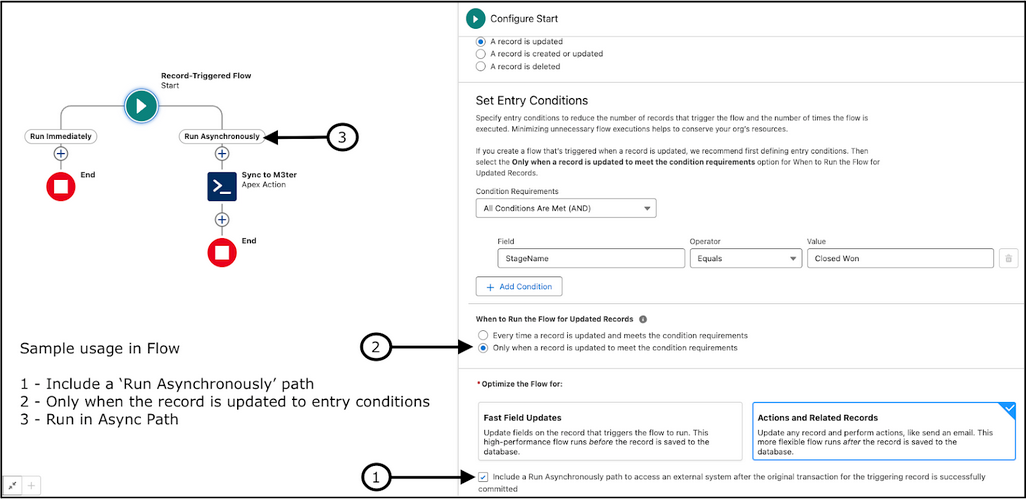
- To enable Run Asynchronously, you must select the checkbox for:
- Include a Run Asynchronously path to access an external system after the original transaction for the triggering record is successfully committed.
- In the options for When to Run the Flow for Updated Records, you must select:
- Only when a record is updated to meet the condition requirements.
- You must add the Action to the Run Asynchronously path.
APEX
For implementing with APEX, the following is required and contains explanatory comments:Sample Outputs
- Success = True, Sync Status = Completed:
15:52:39.49 (2279271858)|USER_DEBUG|[12]|DEBUG|Overall Sync Success: ``**true**`` 15:52:39.49 (2279288498)|USER_DEBUG|[13]|DEBUG|Sync Status: Complete 15:52:39.49 (2279300703)|USER_DEBUG|[14]|DEBUG|Sync Message: Sync process completed successfully 15:52:39.49 (2279312987)|USER_DEBUG|[17]|DEBUG|Concatenated Results: Object: Account, Success: ``**true**``, Message: m3ter Identifier: d82738f3-d1d7-4a13-94a2-757658d64948, Salesforce ID: 001S900000RzsIUIAZ Object: Contract, Success: ``**true**``, Message: m3ter Identifier: e383ee1c-01e7-4f56-a220-cbf4888bd9ec, Salesforce ID: 006S900000795MNIAY Object: Commitment, Success: ``**true**``, Message: m3ter Identifier: acc4483e-f74c-4fb2-80ed-219480892a90, Salesforce ID: 006S900000795MNIAY Object: Plan, Success: ``**true**``, Message:m3ter Identifier: b22233fe-5d97-4961-a3e8-24e97df0fd45, Salesforce ID: 00kS9000001Nxy5IAC Object: AccountPlan, Success: ``**true**``, Message: m3ter Identifier: b22233fe-5d97-4961-a3e8-24e97df0fd45, Salesforce ID: 00kS9000001Nxy5IAC
- Success = False, Sync Status = Partial Success:
15:29:01.57 (2557064317)|USER_DEBUG|[12]|DEBUG|Overall Sync Success: ``**false**`` 15:29:01.57 (2557081586)|USER_DEBUG|[13]|DEBUG|Sync Status: Partial Success 15:29:01.57 (2557093491)|USER_DEBUG|[14]|DEBUG|Sync Message: Sync process completed successfully 15:29:01.57 (2557105264)|USER_DEBUG|[17]|DEBUG|Concatenated Results: Object: Account, Success: ``**true**``, Message: m3ter Identifier: d82738f3-d1d7-4a13-94a2-757658d64948, Salesforce ID: 001S900000RzsIUIAZ Object: Contract, Success: ``**true**``, Message: m3ter Identifier: 83df45e7-78ea-4211-8d12-6220b7c7ca86, Salesforce ID: 006S900000795MNIAY Object: Commitment, Success: ``**false**``, Message: Commitment would overlap with existing Commitment 293b2bca-fa87-4036-9a0b-e0f1d3cd8c9e, Salesforce ID: 006S900000795MNIAY Object: Plan, Success: ``**false**``, Message: The object plans ``**for**`` the record 00kS9000001Nxy5IAC was flagged to not sync., Salesforce ID: 00kS9000001Nxy5IAC Object: Pricing, Success: ``**false**``, Message: The object pricings ``**for**`` the record 00kS9000001Nxy5IAC was flagged to not sync., Salesforce ID: 00kS9000001Nxy5IAC Object: AccountPlan, Success: ``**false**``, Message: AccountPlan would overlap with AccountPlan 544ecdae-54a5-4654-b0fb-b503a7ed58b2 ``**for**`` the same product 21e063b6-2350-4add-a028-3e6ad5b233ed, Salesforce ID: 00kS9000001Nxy5IAC
Reviewing Feature Details
This section provides important reference information if you choose to implement the Sync to m3ter IA feature.Invocable Action - Sync to m3ter
Individual Sync Results Details
Reviewing Guardrails and Limits
Some operational safeguards and design constraints are built into the Sync to m3ter IA. Please review this section before implementing and running the feature.Single Record Processing
To ensure predictable behavior and prevents resource exhaustion:- The Action is explicitly designed to process only one record at a time.
- Multiple record requests will result in a Failed status with appropriate error message.
Record Validation
Validation checks:- Performs existence check on the parent record before initiating sync.
-
Returns specific error statuses for:
- Invalid/null record IDs.
- Non-existent records.
- Record access issues.
Status Codes and Messages
Three status codes are given:- Completed: All objects synced successful.
- Partial Success: Some objects synced successfully, others failed.
- Failed: System-level failures (CPU limits, validation errors, and so on).
Enforcing Asynchronous Processing
Given the action will perform a number of API callouts to m3ter, you must ensure that it is called from a separate transaction to avoid provoking the following error:- “You have uncommitted work pending. Please commit or rollback before calling out”
- Flows: If the action is not set to run asynchronously, and there are any DML operations before it in the flow, you will encounter this error.
- Apex: If you try to call the action directly after performing DML operations in the same transaction, you will get this error.
- Flows: Always use the “Run Asynchronously” option for the Sync to m3ter action.
- Apex: Use the
@future(callout=true)method. This ensures the callout happens in a separate transaction.