You can create currencies for your Organization, which will then be available for selection when you create and configure pricing and billing entities, such as Plan Templates or Accounts.When your Organization is first set up, a US Dollar currency is created and set as the default currency - USD. You can create other standard or custom currencies and set one of these as the default currency.The currency you select for your Organization determines the billing currency. This billing currency can be different from the pricing currency used when pricing Product Plans. If you intend to use different billing and pricing currencies, you must define currency conversion rates.This topic explains how to create and manage the currencies you’ll need in your m3ter Organization to meet your pricing and billing requirements:
When an Organization is first created in m3ter, US Dollar (USD) is added as the default currency and set at Organization level as the billing currency. This is to ensure from the outset that a billing currency is defined and Bills can be immediately generated for your Organization. You cannot delete the currency which is set as the default currency. If you want to make another currency the default for your Organization, you must first create the currency and then set it as the default.To set the default currency for your Organization:
Select Settings. The Organization page opens.
Select Currency settings:
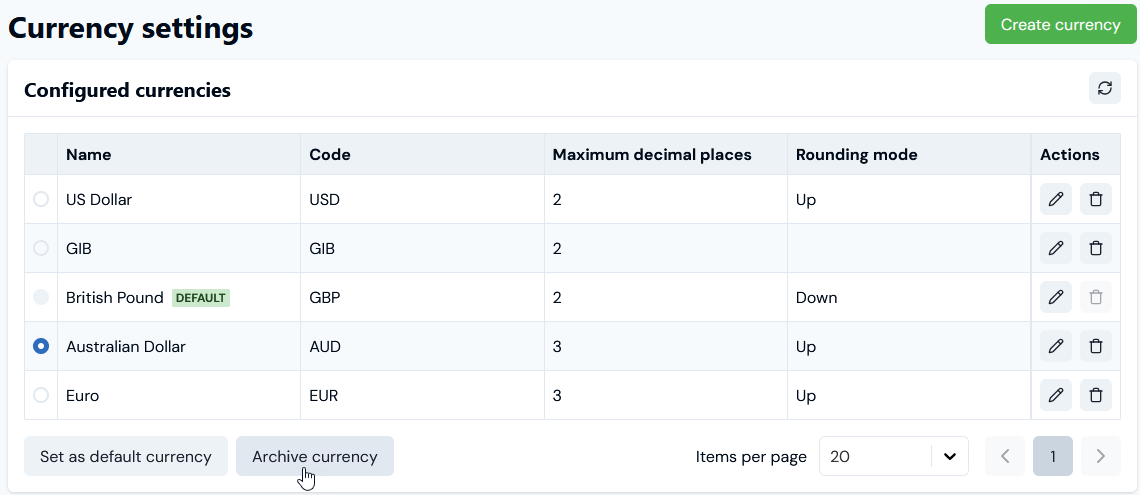
The Currency settings page opens:
In this example, USD is set as the DEFAULT.
If the currency you want to use as your Organization’s default is not listed, under Configured currencies select Create currency. See below Creating Standard Currencies or Creating Custom Currencies for details on how to create currencies.
Select the currency you want to use as the default, and then select Set as default currency. A confirmation dialog appears.
Select Set as default currency to confirm the selection. The Configured currencies list adjusts and the selected currency is now shown as the DEFAULT:
In this example, British Pound (GBP) has been set as the DEFAULT currency.
Note that you cannot delete a currency that is set as the Organization default.
To create a Standard Currency for your Organization:
Select Settings>Organization. The Organization page opens.
Select Currency settings. The Currency settings page opens.
Select Create currency. The Create page opens.
If you want to create a Standard currency, this is selected by default under Currency details. Use the drop-down list to select which standard world currency you want to create.
If you want to control the number of decimal places used when Bills are calculated using the standard currency, enter the Maximum decimal places.
(Optional) Note that if you leave this blank, then the default number of decimal places will be used for the selected standard currency.
The maximum number of decimal places is 5. If you enter a number greater than 5, you’ll receive an error when you try to create the currency.
If you want currency amounts to be rounded, select the Rounding mode you want to apply:
Half-up (Round half away from zero)
Midpoint values (exactly 0.5) are rounded toward positive infinity: 2.5 is rounded to 3, −2.5 is rounded to −2.
Half-even (Banker’s Rounding / IEEE 754 Default)
If the fractional part ≠ 0.5, round to the nearest integer. If the fractional part = 0.5, round to the nearest even integer: 2.5 is rounded to 2, 3.5 is rounded to 4, 4.5 is rounded to 4.
Down (Round Toward Zero / Truncation)
Discard the fractional part: 2.9 is rounded to 2, −2.9 is rounded to −2.
Up (Round Away From Zero)
Always rounds away from zero: 2.1 is rounded to 3, −2.1 is rounded to −3.
Half-down (Round Half Toward Zero)
Midpoint values (exactly 0.5) are rounded toward negative infinity: 2.5 is rounded to 2, 3.5 is rounded to 3.
Ceiling (Round Toward Positive Infinity)
Always round towards positive infinity: 2.1 is rounded to 3, −2.9 is rounded to −2.
Floor (Round Toward Negative Infinity)
Always round towards negative infinity: 2.9 is rounded to 2, −2.1 is rounded to −3.
If you want to archive a currency at any time, you can use the Archived switch to do so.
Warning! If you archive a currency, it will no longer be available in Currency drop-down lists across your Organization.
Select Create currency. You are returned to the Currencies setting page where the new standard currency is listed on the Configured currencies panel.
You’re not restricted to creating standard world currencies - such as US dollars (USD) or British pounds (GBP). You can also create non-standard or custom currencies for your Organization to:
Allow your customers to be able to purchase custom currency amounts as credits to use for consuming your products and services.
Use custom currency amounts to offer bonus or sign-up credits to your customers to spend when consuming your products and services.
To create a Custom Currency for your Organization:
Select Settings>Organization. The Organization page opens.
Select Currency settings. The Currency settings page opens.
Select Create currency. The Create page opens.
Select Custom currency. The Currency details panel adjusts.
Enter a Name for the currency. (Required)
Enter a Code for the currency:
(Required) Note that the Code must be three characters.
Enter the Maximum decimal places used when Bills are calculated using the custom currency:
(Required) Note that if you leave this blank, then you won’t be able to save the custom currency and a warning will be shown.
If you want currency amounts to be rounded, select the Rounding mode you want to apply:
You can select a billing currency at either Organization or individual Account level:
If you use a different pricing currency for an Account Plan attached to an Account, when a Bill is generated line items are calculated in the pricing currency and then converted to the billing currency.
If you intend to use mixed currencies, you can add any required currency conversion rates.
Important! If you haven’t set up a conversion rate to convert pricing currency amounts to billing currency amounts, Bills will fail for the Account and you’ll receive an error alert.
To add Currency Conversion Rates for your Organization:
Select Settings>Organization. The Organization page opens.
Select Currency settings. The Currency settings page opens.
On the Currency conversions panel, select Edit. The Edit page opens.
On the Currency conversions card, select Add. The card adjusts to show a new conversion rate row for you to complete.
Use the From and To fields for the conversion rate direction - for example, from British Pound to US Dollar.
Enter the Conversion rate.
Select Update currency conversions. You are returned to the Currency settings page and the new conversion rate is listed under Currency conversions.
Note that a warning text for Missing currency conversions is shown to remind of conversion rates you might also want to add.
Tip: Deleting currency conversion rates? To do this, open the Currency conversions> Edit page, delete the conversion rate that is no longer required and select Update currency conversions.
Warning! If you delete or archive a currency, it will no longer be available in Currency drop-down lists across your Organization.
To delete or archive currencies:
Select Settings>Organization. The Organization page opens.
Select Currency settings. The Currency settings page opens.
If you want to delete a currency, in the Configured currencies list select the delete icon:
A confirmation dialog appears.
Select Delete to confirm the delete action.
Note that you cannot delete the DEFAULT currency. You must first set another currency as the DEFAULT.
If you want to archive a currency, select to edit the currency:
The Edit page opens.
On the Currency details card, enable the Archived switch.
Note that you cannot archive the DEFAULT currency.
Select Update currency. You are returned to the Currency settings page where the archived currency is flagged as ARCHIVED in the Configured currencies list:
Alternatively, you can select a currency in the Configured currencies list and select Archive currency:
{"docsConfig":{"theme":"aspen","$schema":"https://mintlify.com/docs.json","name":"m3ter Documentation","description":"Guides, learning resources and API reference for integrating with m3ter","colors":{"primary":"#4caf4c","dark":"#449d44"},"logo":{"light":"https://mintcdn.com/m3ter/t6C65JBQiQOFtjBy/images/m3ter-logo-blue-sf.svg?fit=max\u0026auto=format\u0026n=t6C65JBQiQOFtjBy\u0026q=85\u0026s=3928db28c84ec6950e43caf96e635d80","dark":"https://mintcdn.com/m3ter/t6C65JBQiQOFtjBy/images/m3ter-logo-white-sf.svg?fit=max\u0026auto=format\u0026n=t6C65JBQiQOFtjBy\u0026q=85\u0026s=a018cb782e49a2fbdd811276476d0605"},"favicon":"https://mintcdn.com/m3ter/T0RRts393DSUkWFc/favicon.svg?fit=max\u0026auto=format\u0026n=T0RRts393DSUkWFc\u0026q=85\u0026s=9492b54cc98df6775983b287b6f865cd","navbar":{"links":[{"href":"https://m3ter.freshdesk.com","label":"Support"},{"href":"https://console.m3ter.com","label":"Console"}],"primary":{"type":"button","label":"Schedule a demo","href":"https://www.m3ter.com/contact"}},"footer":{"socials":{"linkedin":"https://uk.linkedin.com/company/m3ter","x":"https://x.com/m3terHQ","github":"https://github.com/m3ter-com"},"links":[{"items":[{"label":"Website","href":"https://www.m3ter.com"},{"label":"Legal","href":"https://www.m3ter.com/legal"},{"label":"Security","href":"https://www.m3ter.com/security"},{"label":"Trust Center","href":"https://trust.m3ter.com"}]}]},"fonts":{"family":"Montserrat"},"icons":{"library":"lucide"},"styling":{"eyebrows":"breadcrumbs","latex":false},"integrations":{"ga4":{"measurementId":"G-V9C7TTPRQT"}},"contextual":{"options":["copy","view"],"display":"header"},"thumbnails":{"fonts":{"family":"Montserrat"}},"navigation":{"pages":[]}},"deployment":{"deploymentMetadataValue":{"subdomain":"m3ter","hasAudioNarration":false,"actualSubdomain":"m3ter","customDomains":["docs.m3ter.com"],"gitSource":{"type":"github","owner":"m3ter-com","repo":"m3ter-docs","deployBranch":"main","contentDirectory":"","isPrivate":true,"mountPath":"","label":""},"chroma":{"liveDeploymentHistoryId":"6ae9a09c36175fbf7124961d","collectionId":"92768e54-2234-4c9f-bb43-903eed567982","schemaVersion":"v3","latestBuiltDeploymentHistoryId":"6ae9a09c36175fbf7124961d"},"entitlements":{"AI_CHAT":{"status":"ENABLED"},"WEB_MCP":{"status":"ENABLED"},"NARRATION":{"status":"ENABLED"}},"buildId":"6ae9a09c36175fbf7124961d","clientVersion":"0.0.4054","searchFilterCounts":[{"language":"default","tag":"Guides","count":400},{"language":"default","tag":"API Reference","count":393},{"language":"default","tag":"Endpoints","count":387},{"language":"default","tag":"Integrations","count":66},{"language":"default","tag":"m3sh Function Reference","count":66},{"language":"default","tag":"Synthetic functions","count":50},{"language":"default","tag":"m3ter","count":50},{"language":"default","tag":"m3sh","count":43},{"language":"default","tag":"End-Customer Accounts","count":27},{"language":"default","tag":"m3ter Connector for Salesforce","count":24}]},"assistantConfig":{"enableAskAiButton":true,"enableStarterQuestions":false,"enableAskAiSearchBar":false},"basePath":"","hasChatPermissions":true,"hasWebMcpPermissions":true,"toggles":[{"name":"kill-isr","enabled":true,"variant":{"name":"disabled","enabled":false,"feature_enabled":true},"impressionData":false},{"name":"agent-mintlify-slack","enabled":true,"variant":{"name":"disabled","enabled":false,"feature_enabled":true},"impressionData":false},{"name":"agent-integrations-settings","enabled":true,"variant":{"name":"disabled","enabled":false,"feature_enabled":true},"impressionData":false},{"name":"automations-pr-grouping","enabled":true,"variant":{"name":"disabled","enabled":false,"feature_enabled":true},"impressionData":false},{"name":"custom-prefix","enabled":true,"variant":{"name":"disabled","enabled":false,"feature_enabled":true},"impressionData":false},{"name":"analytics-v7","enabled":true,"variant":{"name":"disabled","enabled":false,"feature_enabled":true},"impressionData":false},{"name":"user-flows-analytics","enabled":true,"variant":{"name":"disabled","enabled":false,"feature_enabled":true},"impressionData":false},{"name":"no-publish-flow","enabled":true,"variant":{"name":"disabled","enabled":false,"feature_enabled":true},"impressionData":false},{"name":"workos-onboarding","enabled":true,"variant":{"name":"disabled","enabled":false,"feature_enabled":true},"impressionData":false},{"name":"llms-txt-v2","enabled":true,"variant":{"name":"disabled","enabled":false,"feature_enabled":true},"impressionData":false},{"name":"snapshot-serving-live","enabled":true,"variant":{"name":"disabled","enabled":false,"feature_enabled":true},"impressionData":false},{"name":"stripTemperatureMiddleware","enabled":true,"variant":{"name":"disabled","enabled":false,"feature_enabled":true},"impressionData":false},{"name":"support-platform-pylon-zendesk","enabled":true,"variant":{"name":"disabled","enabled":false,"feature_enabled":true},"impressionData":false},{"name":"snapshot-serving","enabled":true,"variant":{"name":"disabled","enabled":false,"feature_enabled":true},"impressionData":false},{"name":"instant-rollback","enabled":true,"variant":{"name":"disabled","enabled":false,"feature_enabled":true},"impressionData":false},{"name":"granular-notifications-server","enabled":true,"variant":{"name":"disabled","enabled":false,"feature_enabled":true},"impressionData":false},{"name":"granular-notifications","enabled":true,"variant":{"name":"disabled","enabled":false,"feature_enabled":true},"impressionData":false},{"name":"automations-fable","enabled":true,"variant":{"name":"disabled","enabled":false,"feature_enabled":true},"impressionData":false},{"name":"fixed-ai-action-pricing","enabled":true,"variant":{"name":"disabled","enabled":false,"feature_enabled":true},"impressionData":false},{"name":"automation-resolve-merge-conflict","enabled":true,"variant":{"name":"disabled","enabled":false,"feature_enabled":true},"impressionData":false},{"name":"scoped-publishing","enabled":true,"variant":{"name":"disabled","enabled":false,"feature_enabled":true},"impressionData":false},{"name":"mintql","enabled":true,"variant":{"name":"disabled","enabled":false,"feature_enabled":true},"impressionData":false},{"name":"page-level-analytics","enabled":true,"variant":{"name":"disabled","enabled":false,"feature_enabled":true},"impressionData":false},{"name":"editor-version-history-v2","enabled":true,"variant":{"name":"disabled","enabled":false,"feature_enabled":true},"impressionData":false},{"name":"billing-page-v2","enabled":true,"variant":{"name":"disabled","enabled":false,"feature_enabled":true},"impressionData":false},{"name":"full-page-search","enabled":true,"variant":{"name":"disabled","enabled":false,"feature_enabled":true},"impressionData":false},{"name":"workspace-projects","enabled":true,"variant":{"name":"disabled","enabled":false,"feature_enabled":true},"impressionData":false},{"name":"assistant-v5","enabled":true,"variant":{"name":"disabled","enabled":false,"feature_enabled":true},"impressionData":false},{"name":"byok-sep-25","enabled":true,"variant":{"name":"disabled","enabled":false,"feature_enabled":true},"impressionData":false},{"name":"fork-pr-previews","enabled":true,"variant":{"name":"disabled","enabled":false,"feature_enabled":true},"impressionData":false},{"name":"revalidation-jwt","enabled":true,"variant":{"name":"disabled","enabled":false,"feature_enabled":true},"impressionData":false},{"name":"vite-origin","enabled":true,"variant":{"name":"disabled","enabled":false,"feature_enabled":true},"impressionData":false},{"name":"billing-updated-9-15","enabled":true,"variant":{"name":"disabled","enabled":false,"feature_enabled":true},"impressionData":false},{"name":"workos-sso-scim","enabled":true,"variant":{"name":"disabled","enabled":false,"feature_enabled":true},"impressionData":false},{"name":"hobby-abuse-scan","enabled":true,"variant":{"name":"disabled","enabled":false,"feature_enabled":true},"impressionData":false},{"name":"dashboard-inbox","enabled":true,"variant":{"name":"disabled","enabled":false,"feature_enabled":true},"impressionData":false},{"name":"workos-signup","enabled":true,"variant":{"name":"disabled","enabled":false,"feature_enabled":true},"impressionData":false},{"name":"turbopuffer-dual-write","enabled":true,"variant":{"name":"disabled","enabled":false,"feature_enabled":true},"impressionData":false},{"name":"workos-enabled","enabled":true,"variant":{"name":"disabled","enabled":false,"feature_enabled":true},"impressionData":false},{"name":"approve-review-flow","enabled":true,"variant":{"name":"disabled","enabled":false,"feature_enabled":true},"impressionData":false},{"name":"sso-setup-deadline-banner","enabled":true,"variant":{"name":"disabled","enabled":false,"feature_enabled":true},"impressionData":false},{"name":"rbac-expansion","enabled":true,"variant":{"name":"disabled","enabled":false,"feature_enabled":true},"impressionData":false}],"googleFontsInlined":true},"customCss":[],"page":{"pagePath":"guides/organization-and-access-management/viewing-and-editing-organization/creating-and-managing-currencies","slug":"/guides/organization-and-access-management/viewing-and-editing-organization/creating-and-managing-currencies","pageMetadata":{"title":"Creating and Managing Currencies","description":null,"href":"/guides/organization-and-access-management/viewing-and-editing-organization/creating-and-managing-currencies"},"pageType":"default","mdx":{"mdxSource":{"compiledSource":"\"use strict\";const{Fragment:_Fragment,jsx:_jsx,jsxs:_jsxs}=arguments[0];const{useMDXComponents:_provideComponents}=arguments[0];function _createMdxContent(props){const _components={a:`a`,em:`em`,li:`li`,ol:`ol`,p:`p`,strong:`strong`,ul:`ul`,..._provideComponents(),...props.components},{Frame,Heading,OptimizedImage,Tip,Warning}=_components;if(!Frame)_missingMdxReference(`Frame`,true);if(!Heading)_missingMdxReference(`Heading`,true);if(!OptimizedImage)_missingMdxReference(`OptimizedImage`,true);if(!Tip)_missingMdxReference(`Tip`,true);if(!Warning)_missingMdxReference(`Warning`,true);return _jsxs(_Fragment,{children:[_jsx(_components.p,{children:`You can create currencies for your Organization, which will then be available for selection when you create and configure pricing and billing entities, such as Plan Templates or Accounts.`}),`\n`,_jsxs(_components.p,{children:[`When your Organization is first set up, a US Dollar currency is created and set as the `,_jsx(_components.em,{children:`default currency`}),` - `,_jsx(_components.strong,{children:`USD`}),`. You can create other standard or custom currencies and set one of these as the default currency.`]}),`\n`,_jsxs(_components.p,{children:[`The currency you select for your Organization determines the `,_jsx(_components.em,{children:`billing currency`}),`. This billing currency can be different from the `,_jsx(_components.em,{children:`pricing currency`}),` used when pricing Product Plans. If you intend to use different billing and pricing currencies, you must define currency conversion rates.`]}),`\n`,_jsx(_components.p,{children:`This topic explains how to create and manage the currencies you’ll need in your m3ter Organization to meet your pricing and billing requirements:`}),`\n`,_jsxs(_components.ul,{children:[`\n`,_jsx(_components.li,{children:_jsx(_components.a,{href:`/guides/organization-and-access-management/viewing-and-editing-organization/creating-and-managing-currencies#setting-default-currency`,children:`Setting Default Currency`})}),`\n`,_jsx(_components.li,{children:_jsx(_components.a,{href:`/guides/organization-and-access-management/viewing-and-editing-organization/creating-and-managing-currencies#creating-standard-currencies`,children:`Creating Standard Currencies`})}),`\n`,_jsx(_components.li,{children:_jsx(_components.a,{href:`/guides/organization-and-access-management/viewing-and-editing-organization/creating-and-managing-currencies#creating-custom-currencies`,children:`Creating Custom Currencies`})}),`\n`,_jsx(_components.li,{children:_jsx(_components.a,{href:`/guides/organization-and-access-management/viewing-and-editing-organization/creating-and-managing-currencies#adding-currency-conversion-rates`,children:`Adding Currency Conversion Rates`})}),`\n`,_jsx(_components.li,{children:_jsx(_components.a,{href:`/guides/organization-and-access-management/viewing-and-editing-organization/creating-and-managing-currencies#deleting-and-archiving-currencies`,children:`Deleting and Archiving Currencies`})}),`\n`]}),`\n`,_jsx(Heading,{level:`2`,id:`setting-default-currency`,children:`Setting Default Currency`}),`\n`,_jsxs(_components.p,{children:[`When an Organization is first created in m3ter, US Dollar (`,_jsx(_components.strong,{children:`USD`}),`) is added as the default currency and set at Organization level as the billing currency. This is to ensure from the outset that a billing currency is defined and Bills can be immediately generated for your Organization. You cannot delete the currency which is set as the default currency. If you want to make another currency the default for your Organization, you must first create the currency and then set it as the default.`]}),`\n`,_jsx(_components.p,{children:_jsx(_components.strong,{children:`To set the default currency for your Organization:`})}),`\n`,_jsxs(_components.ol,{children:[`\n`,_jsxs(_components.li,{children:[`Select `,_jsx(_components.strong,{children:`Settings`}),`. The `,_jsx(_components.strong,{children:`Organization`}),` page opens.`]}),`\n`,_jsxs(_components.li,{children:[`Select `,_jsx(_components.strong,{children:`Currency settings`}),`:`]}),`\n`]}),`\n`,_jsx(OptimizedImage,{src:`https://mintcdn.com/m3ter/f13HbMnZJAPh4iYI/images/1748616839-defaultcurr3.png?fit=max\u0026auto=format\u0026n=f13HbMnZJAPh4iYI\u0026q=85\u0026s=c27554ac114aed28c11435b05efe4a71`,style:{maxWidth:`min(140px, 100%)`},\"data-og-width\":`177`,width:`177`,\"data-og-height\":`52`,height:`52`,\"data-path\":`images/1748616839-defaultcurr3.png`,\"data-optimize\":`true`,\"data-opv\":`3`,srcset:`https://mintcdn.com/m3ter/f13HbMnZJAPh4iYI/images/1748616839-defaultcurr3.png?w=280\u0026fit=max\u0026auto=format\u0026n=f13HbMnZJAPh4iYI\u0026q=85\u0026s=0d9b86170c36f01d6f22c28e3c077af4 280w, https://mintcdn.com/m3ter/f13HbMnZJAPh4iYI/images/1748616839-defaultcurr3.png?w=560\u0026fit=max\u0026auto=format\u0026n=f13HbMnZJAPh4iYI\u0026q=85\u0026s=a3407f1359700ff9ef049540fd4364be 560w, https://mintcdn.com/m3ter/f13HbMnZJAPh4iYI/images/1748616839-defaultcurr3.png?w=840\u0026fit=max\u0026auto=format\u0026n=f13HbMnZJAPh4iYI\u0026q=85\u0026s=4278cf7496be7ba1ced15a3523597a1f 840w, https://mintcdn.com/m3ter/f13HbMnZJAPh4iYI/images/1748616839-defaultcurr3.png?w=1100\u0026fit=max\u0026auto=format\u0026n=f13HbMnZJAPh4iYI\u0026q=85\u0026s=2cd71124006f2e4e33de99509a77697f 1100w, https://mintcdn.com/m3ter/f13HbMnZJAPh4iYI/images/1748616839-defaultcurr3.png?w=1650\u0026fit=max\u0026auto=format\u0026n=f13HbMnZJAPh4iYI\u0026q=85\u0026s=f7c53e9f6132c7b958a238e3e7569da7 1650w, https://mintcdn.com/m3ter/f13HbMnZJAPh4iYI/images/1748616839-defaultcurr3.png?w=2500\u0026fit=max\u0026auto=format\u0026n=f13HbMnZJAPh4iYI\u0026q=85\u0026s=3cf26079b4732d043dfec8a3fc5e9f28 2500w`}),`\n`,_jsxs(_components.p,{children:[`The `,_jsx(_components.strong,{children:`Currency settings`}),` page opens:`]}),`\n`,_jsx(OptimizedImage,{src:`https://mintcdn.com/m3ter/DOKwY-7WzlS7EMNx/images/Currencies6.png?fit=max\u0026auto=format\u0026n=DOKwY-7WzlS7EMNx\u0026q=85\u0026s=1396a8e9204d342ed929150f590361e1`,alt:`Currencies6`,\"data-og-width\":`1136`,width:`1136`,\"data-og-height\":`693`,height:`693`,\"data-path\":`images/Currencies6.png`,\"data-optimize\":`true`,\"data-opv\":`3`,srcset:`https://mintcdn.com/m3ter/DOKwY-7WzlS7EMNx/images/Currencies6.png?w=280\u0026fit=max\u0026auto=format\u0026n=DOKwY-7WzlS7EMNx\u0026q=85\u0026s=ec6807a4d66b8c4a60a87e50b04c7862 280w, https://mintcdn.com/m3ter/DOKwY-7WzlS7EMNx/images/Currencies6.png?w=560\u0026fit=max\u0026auto=format\u0026n=DOKwY-7WzlS7EMNx\u0026q=85\u0026s=69f3e441684b9ce2e4f4867b4df07fc2 560w, https://mintcdn.com/m3ter/DOKwY-7WzlS7EMNx/images/Currencies6.png?w=840\u0026fit=max\u0026auto=format\u0026n=DOKwY-7WzlS7EMNx\u0026q=85\u0026s=9373a071ec8c4b0c1121d6f3aa964382 840w, https://mintcdn.com/m3ter/DOKwY-7WzlS7EMNx/images/Currencies6.png?w=1100\u0026fit=max\u0026auto=format\u0026n=DOKwY-7WzlS7EMNx\u0026q=85\u0026s=9b33cb789a2bfa4346c6ef1c43665d8c 1100w, https://mintcdn.com/m3ter/DOKwY-7WzlS7EMNx/images/Currencies6.png?w=1650\u0026fit=max\u0026auto=format\u0026n=DOKwY-7WzlS7EMNx\u0026q=85\u0026s=6c34d0aac9d4beda64998002e8cd6687 1650w, https://mintcdn.com/m3ter/DOKwY-7WzlS7EMNx/images/Currencies6.png?w=2500\u0026fit=max\u0026auto=format\u0026n=DOKwY-7WzlS7EMNx\u0026q=85\u0026s=8525e5e59c2b81e889562f1b81b21fb7 2500w`}),`\n`,_jsxs(_components.ul,{children:[`\n`,_jsxs(_components.li,{children:[`In this example, `,_jsx(_components.strong,{children:`USD`}),` is set as the `,_jsx(_components.strong,{children:`DEFAULT`}),`.`]}),`\n`,_jsxs(_components.li,{children:[`If the currency you want to use as your Organization’s default is not listed, under `,_jsx(_components.strong,{children:`Configured currencies`}),` select `,_jsx(_components.strong,{children:`Create currency`}),`. See below `,_jsx(_components.a,{href:`/guides/organization-and-access-management/viewing-and-editing-organization/creating-and-managing-currencies#creating-standard-currencies`,children:`Creating Standard Currencies`}),` or `,_jsx(_components.a,{href:`/guides/organization-and-access-management/viewing-and-editing-organization/creating-and-managing-currencies#creating-custom-currencies`,children:`Creating Custom Currencies`}),` for details on how to create currencies.`]}),`\n`]}),`\n`,_jsxs(_components.ol,{start:`3`,children:[`\n`,_jsxs(_components.li,{children:[`Select the currency you want to use as the default, and then select `,_jsx(_components.strong,{children:`Set as default currency`}),`. A confirmation dialog appears.`]}),`\n`,_jsxs(_components.li,{children:[`Select `,_jsx(_components.strong,{children:`Set as default currency`}),` to confirm the selection. The `,_jsx(_components.strong,{children:`Configured currencies`}),` list adjusts and the selected currency is now shown as the `,_jsx(_components.strong,{children:`DEFAULT`}),`:`]}),`\n`]}),`\n`,_jsx(OptimizedImage,{src:`https://mintcdn.com/m3ter/DOKwY-7WzlS7EMNx/images/Currencies7.png?fit=max\u0026auto=format\u0026n=DOKwY-7WzlS7EMNx\u0026q=85\u0026s=6fd306be5caff444f31db84b02f2b099`,alt:`Currencies7`,\"data-og-width\":`1138`,width:`1138`,\"data-og-height\":`396`,height:`396`,\"data-path\":`images/Currencies7.png`,\"data-optimize\":`true`,\"data-opv\":`3`,srcset:`https://mintcdn.com/m3ter/DOKwY-7WzlS7EMNx/images/Currencies7.png?w=280\u0026fit=max\u0026auto=format\u0026n=DOKwY-7WzlS7EMNx\u0026q=85\u0026s=2acfb5e7cc3d8d8e86b977a0e6356f2d 280w, https://mintcdn.com/m3ter/DOKwY-7WzlS7EMNx/images/Currencies7.png?w=560\u0026fit=max\u0026auto=format\u0026n=DOKwY-7WzlS7EMNx\u0026q=85\u0026s=ecb64561717f66bc466c2d7695a598a8 560w, https://mintcdn.com/m3ter/DOKwY-7WzlS7EMNx/images/Currencies7.png?w=840\u0026fit=max\u0026auto=format\u0026n=DOKwY-7WzlS7EMNx\u0026q=85\u0026s=77ce3d4f4ec86e0c4d86106b3b59890f 840w, https://mintcdn.com/m3ter/DOKwY-7WzlS7EMNx/images/Currencies7.png?w=1100\u0026fit=max\u0026auto=format\u0026n=DOKwY-7WzlS7EMNx\u0026q=85\u0026s=78ec21cba78b0ab0aced92cbfe61a7af 1100w, https://mintcdn.com/m3ter/DOKwY-7WzlS7EMNx/images/Currencies7.png?w=1650\u0026fit=max\u0026auto=format\u0026n=DOKwY-7WzlS7EMNx\u0026q=85\u0026s=424077a5f45572e81ad48f70a958d0b7 1650w, https://mintcdn.com/m3ter/DOKwY-7WzlS7EMNx/images/Currencies7.png?w=2500\u0026fit=max\u0026auto=format\u0026n=DOKwY-7WzlS7EMNx\u0026q=85\u0026s=b85b2064b4684dec10229d6d29eac61b 2500w`}),`\n`,_jsxs(_components.ul,{children:[`\n`,_jsxs(_components.li,{children:[`In this example, British Pound (GBP) has been set as the `,_jsx(_components.strong,{children:`DEFAULT`}),` currency.`]}),`\n`,_jsx(_components.li,{children:`Note that you cannot delete a currency that is set as the Organization default.`}),`\n`]}),`\n`,_jsx(Heading,{level:`2`,id:`creating-standard-currencies`,children:`Creating Standard Currencies`}),`\n`,_jsx(_components.p,{children:_jsx(_components.strong,{children:`To create a Standard Currency for your Organization:`})}),`\n`,_jsxs(_components.ol,{children:[`\n`,_jsxs(_components.li,{children:[`Select `,_jsx(_components.strong,{children:`Settings>Organization`}),`. The `,_jsx(_components.strong,{children:`Organization`}),` page opens.`]}),`\n`,_jsxs(_components.li,{children:[`Select `,_jsx(_components.strong,{children:`Currency settings`}),`. The `,_jsx(_components.strong,{children:`Currency settings`}),` page opens.`]}),`\n`,_jsxs(_components.li,{children:[`Select `,_jsx(_components.strong,{children:`Create currency`}),`. The `,_jsx(_components.strong,{children:`Create`}),` page opens.`]}),`\n`,_jsxs(_components.li,{children:[`If you want to create a `,_jsx(_components.strong,{children:`Standard currency`}),`, this is selected by default under `,_jsx(_components.strong,{children:`Currency details`}),`. Use the drop-down list to select which standard world currency you want to create.`]}),`\n`,_jsxs(_components.li,{children:[`If you want to control the number of decimal places used when Bills are calculated using the standard currency, enter the `,_jsx(_components.strong,{children:`Maximum decimal places`}),`.`]}),`\n`]}),`\n`,_jsxs(_components.ul,{children:[`\n`,_jsxs(_components.li,{children:[_jsx(_components.em,{children:`(Optional)`}),` Note that if you leave this blank, then the default number of decimal places will be used for the selected standard currency.`]}),`\n`,_jsxs(_components.li,{children:[`The maximum number of decimal places is `,_jsx(_components.strong,{children:`5`}),`. If you enter a number greater than `,_jsx(_components.strong,{children:`5`}),`, you’ll receive an error when you try to create the currency.`]}),`\n`]}),`\n`,_jsxs(_components.ol,{start:`6`,children:[`\n`,_jsxs(_components.li,{children:[`If you want currency amounts to be rounded, select the `,_jsx(_components.strong,{children:`Rounding mode`}),` you want to apply:`]}),`\n`]}),`\n`,_jsxs(_components.ul,{children:[`\n`,_jsxs(_components.li,{children:[_jsx(_components.strong,{children:`Half-up`}),` (Round half away from zero)`,`\n`,_jsxs(_components.ul,{children:[`\n`,_jsx(_components.li,{children:`Midpoint values (exactly 0.5) are rounded toward positive infinity: 2.5 is rounded to 3, −2.5 is rounded to −2.`}),`\n`]}),`\n`]}),`\n`,_jsxs(_components.li,{children:[_jsx(_components.strong,{children:`Half-even`}),` (Banker’s Rounding / IEEE 754 Default)`,`\n`,_jsxs(_components.ul,{children:[`\n`,_jsx(_components.li,{children:`If the fractional part ≠ 0.5, round to the nearest integer. If the fractional part = 0.5, round to the nearest even integer: 2.5 is rounded to 2, 3.5 is rounded to 4, 4.5 is rounded to 4.`}),`\n`]}),`\n`]}),`\n`,_jsxs(_components.li,{children:[_jsx(_components.strong,{children:`Down`}),` (Round Toward Zero / Truncation)`,`\n`,_jsxs(_components.ul,{children:[`\n`,_jsx(_components.li,{children:`Discard the fractional part: 2.9 is rounded to 2, −2.9 is rounded to −2.`}),`\n`]}),`\n`]}),`\n`,_jsxs(_components.li,{children:[_jsx(_components.strong,{children:`Up`}),` (Round Away From Zero)`,`\n`,_jsxs(_components.ul,{children:[`\n`,_jsx(_components.li,{children:`Always rounds away from zero: 2.1 is rounded to 3, −2.1 is rounded to −3.`}),`\n`]}),`\n`]}),`\n`,_jsxs(_components.li,{children:[_jsx(_components.strong,{children:`Half-down`}),` (Round Half Toward Zero)`,`\n`,_jsxs(_components.ul,{children:[`\n`,_jsx(_components.li,{children:`Midpoint values (exactly 0.5) are rounded toward negative infinity: 2.5 is rounded to 2, 3.5 is rounded to 3.`}),`\n`]}),`\n`]}),`\n`,_jsxs(_components.li,{children:[_jsx(_components.strong,{children:`Ceiling`}),` (Round Toward Positive Infinity)`,`\n`,_jsxs(_components.ul,{children:[`\n`,_jsx(_components.li,{children:`Always round towards positive infinity: 2.1 is rounded to 3, −2.9 is rounded to −2.`}),`\n`]}),`\n`]}),`\n`,_jsxs(_components.li,{children:[_jsx(_components.strong,{children:`Floor`}),` (Round Toward Negative Infinity)`,`\n`,_jsxs(_components.ul,{children:[`\n`,_jsx(_components.li,{children:`Always round towards negative infinity: 2.9 is rounded to 2, −2.1 is rounded to −3.`}),`\n`]}),`\n`]}),`\n`]}),`\n`,_jsxs(_components.ol,{start:`7`,children:[`\n`,_jsxs(_components.li,{children:[`If you want to archive a currency at any time, you can use the `,_jsx(_components.strong,{children:`Archived`}),` switch to do so.`]}),`\n`]}),`\n`,_jsx(Warning,{children:_jsxs(_components.p,{children:[_jsx(_components.strong,{children:`Warning!`}),` If you archive a currency, it will no longer be available in `,_jsx(_components.strong,{children:`Currency`}),` drop-down lists across your Organization.`]})}),`\n`,_jsxs(_components.ol,{start:`8`,children:[`\n`,_jsxs(_components.li,{children:[`Select `,_jsx(_components.strong,{children:`Create currency`}),`. You are returned to the `,_jsx(_components.strong,{children:`Currencies setting`}),` page where the new standard currency is listed on the `,_jsx(_components.strong,{children:`Configured currencies`}),` panel.`]}),`\n`]}),`\n`,_jsx(Heading,{level:`2`,id:`creating-custom-currencies`,children:`Creating Custom Currencies`}),`\n`,_jsxs(_components.p,{children:[`You’re not restricted to creating standard world currencies - such as US dollars (`,_jsx(_components.strong,{children:`USD`}),`) or British pounds (`,_jsx(_components.strong,{children:`GBP`}),`). You can also create non-standard or `,_jsx(_components.em,{children:`custom currencies`}),` for your Organization to:`]}),`\n`,_jsxs(_components.ul,{children:[`\n`,_jsx(_components.li,{children:`Allow your customers to be able to purchase custom currency amounts as credits to use for consuming your products and services.`}),`\n`,_jsx(_components.li,{children:`Use custom currency amounts to offer bonus or sign-up credits to your customers to spend when consuming your products and services.`}),`\n`]}),`\n`,_jsx(_components.p,{children:_jsx(_components.strong,{children:`To create a Custom Currency for your Organization:`})}),`\n`,_jsxs(_components.ol,{children:[`\n`,_jsxs(_components.li,{children:[`Select `,_jsx(_components.strong,{children:`Settings>Organization`}),`. The `,_jsx(_components.strong,{children:`Organization`}),` page opens.`]}),`\n`,_jsxs(_components.li,{children:[`Select `,_jsx(_components.strong,{children:`Currency settings`}),`. The `,_jsx(_components.strong,{children:`Currency settings`}),` page opens.`]}),`\n`,_jsxs(_components.li,{children:[`Select `,_jsx(_components.strong,{children:`Create currency`}),`. The `,_jsx(_components.strong,{children:`Create`}),` page opens.`]}),`\n`,_jsxs(_components.li,{children:[`Select `,_jsx(_components.strong,{children:`Custom currency`}),`. The `,_jsx(_components.strong,{children:`Currency details`}),` panel adjusts.`]}),`\n`,_jsxs(_components.li,{children:[`Enter a `,_jsx(_components.strong,{children:`Name`}),` for the currency. (`,_jsx(_components.em,{children:`Required`}),`)`]}),`\n`,_jsxs(_components.li,{children:[`Enter a `,_jsx(_components.strong,{children:`Code`}),` for the currency:`]}),`\n`]}),`\n`,_jsxs(_components.ul,{children:[`\n`,_jsxs(_components.li,{children:[`(`,_jsx(_components.em,{children:`Required`}),`) Note that the `,_jsx(_components.strong,{children:`Code`}),` must be three characters.`]}),`\n`]}),`\n`,_jsxs(_components.ol,{start:`7`,children:[`\n`,_jsxs(_components.li,{children:[`Enter the `,_jsx(_components.strong,{children:`Maximum decimal places`}),` used when Bills are calculated using the custom currency:`]}),`\n`]}),`\n`,_jsxs(_components.ul,{children:[`\n`,_jsxs(_components.li,{children:[_jsx(_components.em,{children:`(Required)`}),` Note that if you leave this blank, then you won’t be able to save the custom currency and a warning will be shown.`]}),`\n`]}),`\n`,_jsxs(_components.ol,{start:`8`,children:[`\n`,_jsxs(_components.li,{children:[`If you want currency amounts to be rounded, select the `,_jsx(_components.strong,{children:`Rounding mode`}),` you want to apply:`]}),`\n`]}),`\n`,_jsxs(_components.ul,{children:[`\n`,_jsxs(_components.li,{children:[_jsx(_components.strong,{children:`Half-up`}),` (Round half away from zero)`]}),`\n`,_jsxs(_components.li,{children:[_jsx(_components.strong,{children:`Half-even`}),` (Banker’s Rounding / IEEE 754 Default)`]}),`\n`,_jsxs(_components.li,{children:[_jsx(_components.strong,{children:`Down`}),` (Round Toward Zero / Truncation)`]}),`\n`,_jsxs(_components.li,{children:[_jsx(_components.strong,{children:`Up`}),` (Round Away From Zero)`]}),`\n`,_jsxs(_components.li,{children:[_jsx(_components.strong,{children:`Half-down`}),` (Round Half Toward Zero)`]}),`\n`,_jsxs(_components.li,{children:[_jsx(_components.strong,{children:`Ceiling`}),` (Round Toward Positive Infinity)`]}),`\n`,_jsxs(_components.li,{children:[_jsx(_components.strong,{children:`Floor`}),` (Round Toward Negative Infinity)`]}),`\n`]}),`\n`,_jsx(Tip,{children:_jsxs(_components.p,{children:[`For more details and examples of these rounding options, see previous section: `,_jsx(_components.a,{href:`#creating-standard-currencies`,children:`Creating Standard Currencies`}),`.`]})}),`\n`,_jsxs(_components.ol,{start:`9`,children:[`\n`,_jsxs(_components.li,{children:[`If you want to archive a currency at any time, you can use the `,_jsx(_components.strong,{children:`Archived`}),` switch to do so.`]}),`\n`]}),`\n`,_jsx(Warning,{children:_jsxs(_components.p,{children:[_jsx(_components.strong,{children:`Warning!`}),` If you archive a currency, it will no longer be available in Currency drop-down lists across your Organization.`]})}),`\n`,_jsxs(_components.ol,{start:`10`,children:[`\n`,_jsxs(_components.li,{children:[`Select `,_jsx(_components.strong,{children:`Create currency`}),`. You are returned to the `,_jsx(_components.strong,{children:`Currencies setting`}),` page where the new standard currency is listed on the `,_jsx(_components.strong,{children:`Configured currencies`}),` panel.`]}),`\n`]}),`\n`,_jsx(Heading,{level:`2`,id:`adding-currency-conversion-rates`,children:`Adding Currency Conversion Rates`}),`\n`,_jsx(_components.p,{children:`You can select a billing currency at either Organization or individual Account level:`}),`\n`,_jsxs(_components.ul,{children:[`\n`,_jsx(_components.li,{children:`If you use a different pricing currency for an Account Plan attached to an Account, when a Bill is generated line items are calculated in the pricing currency and then converted to the billing currency.`}),`\n`,_jsx(_components.li,{children:`If you intend to use mixed currencies, you can add any required currency conversion rates.`}),`\n`]}),`\n`,_jsx(Warning,{children:_jsxs(_components.p,{children:[_jsx(_components.strong,{children:`Important!`}),` If you `,_jsx(_components.em,{children:`haven’t set up a conversion rate`}),` to convert pricing currency amounts to billing currency amounts, `,_jsx(_components.em,{children:_jsx(_components.strong,{children:`Bills will fail for the Account`})}),` and you’ll receive an error alert.`]})}),`\n`,_jsx(_components.p,{children:_jsx(_components.strong,{children:`To add Currency Conversion Rates for your Organization:`})}),`\n`,_jsxs(_components.ol,{children:[`\n`,_jsxs(_components.li,{children:[`Select `,_jsx(_components.strong,{children:`Settings>Organization`}),`. The `,_jsx(_components.strong,{children:`Organization`}),` page opens.`]}),`\n`,_jsxs(_components.li,{children:[`Select `,_jsx(_components.strong,{children:`Currency settings`}),`. The `,_jsx(_components.strong,{children:`Currency settings`}),` page opens.`]}),`\n`,_jsxs(_components.li,{children:[`On the `,_jsx(_components.strong,{children:`Currency conversions`}),` panel, select `,_jsx(_components.strong,{children:`Edit`}),`. The Edit page opens.`]}),`\n`,_jsxs(_components.li,{children:[`On the `,_jsx(_components.strong,{children:`Currency conversions`}),` card, select `,_jsx(_components.strong,{children:`Add`}),`. The card adjusts to show a new conversion rate row for you to complete.`]}),`\n`,_jsxs(_components.li,{children:[`Use the `,_jsx(_components.strong,{children:`From`}),` and `,_jsx(_components.strong,{children:`To`}),` fields for the conversion rate direction - for example, from `,_jsx(_components.strong,{children:`British Pound`}),` to `,_jsx(_components.strong,{children:`US Dollar`}),`.`]}),`\n`,_jsxs(_components.li,{children:[`Enter the `,_jsx(_components.strong,{children:`Conversion rate`}),`.`]}),`\n`,_jsxs(_components.li,{children:[`Select `,_jsx(_components.strong,{children:`Update currency conversions`}),`. You are returned to the `,_jsx(_components.strong,{children:`Currency settings`}),` page and the new conversion rate is listed under `,_jsx(_components.strong,{children:`Currency conversions`}),`.`]}),`\n`]}),`\n`,_jsxs(_components.ul,{children:[`\n`,_jsxs(_components.li,{children:[`Note that a warning text for `,_jsx(_components.strong,{children:`Missing currency conversions`}),` is shown to remind of conversion rates you might also want to add.`]}),`\n`]}),`\n`,_jsx(Tip,{children:_jsxs(_components.p,{children:[_jsx(_components.strong,{children:`Tip: Deleting currency conversion rates?`}),` To do this, open the `,_jsx(_components.strong,{children:`Currency conversions> Edit`}),` page, delete the conversion rate that is no longer required and select `,_jsx(_components.strong,{children:`Update currency conversions`}),`.`]})}),`\n`,_jsx(Heading,{level:`2`,id:`deleting-and-archiving-currencies`,children:`Deleting and Archiving Currencies`}),`\n`,_jsx(_components.p,{children:`You can delete or archive a currency at any time.`}),`\n`,_jsx(Warning,{children:_jsxs(_components.p,{children:[_jsx(_components.strong,{children:`Warning!`}),` If you delete or archive a currency, it will no longer be available in `,_jsx(_components.strong,{children:`Currency`}),` drop-down lists across your Organization.`]})}),`\n`,_jsx(_components.p,{children:_jsx(_components.strong,{children:`To delete or archive currencies:`})}),`\n`,_jsxs(_components.ol,{children:[`\n`,_jsxs(_components.li,{children:[`Select `,_jsx(_components.strong,{children:`Settings>Organization`}),`. The `,_jsx(_components.strong,{children:`Organization`}),` page opens.`]}),`\n`,_jsxs(_components.li,{children:[`Select `,_jsx(_components.strong,{children:`Currency settings`}),`. The `,_jsx(_components.strong,{children:`Currency settings`}),` page opens.`]}),`\n`,_jsxs(_components.li,{children:[`If you want to delete a currency, in the `,_jsx(_components.strong,{children:`Configured currencies`}),` list select the `,_jsx(_components.strong,{children:`delete`}),` icon:`]}),`\n`]}),`\n`,_jsx(OptimizedImage,{src:`https://mintcdn.com/m3ter/4PA7eaLaMtaA6FQv/images/1727272786-deleteicon2.png?fit=max\u0026auto=format\u0026n=4PA7eaLaMtaA6FQv\u0026q=85\u0026s=164e2bf3ef1032ad21cfed6fcd09a18a`,style:{width:`5%`},\"data-og-width\":`31`,width:`31`,\"data-og-height\":`29`,height:`29`,\"data-path\":`images/1727272786-deleteicon2.png`,\"data-optimize\":`true`,\"data-opv\":`3`,srcset:`https://mintcdn.com/m3ter/4PA7eaLaMtaA6FQv/images/1727272786-deleteicon2.png?w=280\u0026fit=max\u0026auto=format\u0026n=4PA7eaLaMtaA6FQv\u0026q=85\u0026s=d0b4b13cdf4e6a052f3ec8fc63e35e3e 280w, https://mintcdn.com/m3ter/4PA7eaLaMtaA6FQv/images/1727272786-deleteicon2.png?w=560\u0026fit=max\u0026auto=format\u0026n=4PA7eaLaMtaA6FQv\u0026q=85\u0026s=c678ba57482a829bec44025f36aa1776 560w, https://mintcdn.com/m3ter/4PA7eaLaMtaA6FQv/images/1727272786-deleteicon2.png?w=840\u0026fit=max\u0026auto=format\u0026n=4PA7eaLaMtaA6FQv\u0026q=85\u0026s=0963585ce2c4472885cc8c460108ccd4 840w, https://mintcdn.com/m3ter/4PA7eaLaMtaA6FQv/images/1727272786-deleteicon2.png?w=1100\u0026fit=max\u0026auto=format\u0026n=4PA7eaLaMtaA6FQv\u0026q=85\u0026s=345c3b8906833e99cb3c4bf839813e16 1100w, https://mintcdn.com/m3ter/4PA7eaLaMtaA6FQv/images/1727272786-deleteicon2.png?w=1650\u0026fit=max\u0026auto=format\u0026n=4PA7eaLaMtaA6FQv\u0026q=85\u0026s=39f50d9941045a27fa6d63a873b7892b 1650w, https://mintcdn.com/m3ter/4PA7eaLaMtaA6FQv/images/1727272786-deleteicon2.png?w=2500\u0026fit=max\u0026auto=format\u0026n=4PA7eaLaMtaA6FQv\u0026q=85\u0026s=bfc1db390a7b05061a8d2783e4994317 2500w`}),`\n`,_jsx(_components.p,{children:`A confirmation dialog appears.`}),`\n`,_jsxs(_components.ol,{start:`4`,children:[`\n`,_jsxs(_components.li,{children:[`Select `,_jsx(_components.strong,{children:`Delete`}),` to confirm the delete action.`]}),`\n`]}),`\n`,_jsxs(_components.ul,{children:[`\n`,_jsxs(_components.li,{children:[`Note that you cannot delete the `,_jsx(_components.strong,{children:`DEFAULT`}),` currency. You must first set another currency as the `,_jsx(_components.strong,{children:`DEFAULT`}),`.`]}),`\n`]}),`\n`,_jsxs(_components.ol,{start:`5`,children:[`\n`,_jsxs(_components.li,{children:[`If you want to archive a currency, select to `,_jsx(_components.strong,{children:`edit`}),` the currency:`]}),`\n`]}),`\n`,_jsx(OptimizedImage,{src:`https://mintcdn.com/m3ter/4PA7eaLaMtaA6FQv/images/1727276886-editbutton2.png?fit=max\u0026auto=format\u0026n=4PA7eaLaMtaA6FQv\u0026q=85\u0026s=3f40a58bc776bc60d57dd8985886a798`,style:{width:`5%`},\"data-og-width\":`31`,width:`31`,\"data-og-height\":`29`,height:`29`,\"data-path\":`images/1727276886-editbutton2.png`,\"data-optimize\":`true`,\"data-opv\":`3`,srcset:`https://mintcdn.com/m3ter/4PA7eaLaMtaA6FQv/images/1727276886-editbutton2.png?w=280\u0026fit=max\u0026auto=format\u0026n=4PA7eaLaMtaA6FQv\u0026q=85\u0026s=ee2aebfd9ea9bcf25b2a3388957c4538 280w, https://mintcdn.com/m3ter/4PA7eaLaMtaA6FQv/images/1727276886-editbutton2.png?w=560\u0026fit=max\u0026auto=format\u0026n=4PA7eaLaMtaA6FQv\u0026q=85\u0026s=e977459255ea6bc43a805711b19f8828 560w, https://mintcdn.com/m3ter/4PA7eaLaMtaA6FQv/images/1727276886-editbutton2.png?w=840\u0026fit=max\u0026auto=format\u0026n=4PA7eaLaMtaA6FQv\u0026q=85\u0026s=d59c50afd2fae948004a1d9b21591f18 840w, https://mintcdn.com/m3ter/4PA7eaLaMtaA6FQv/images/1727276886-editbutton2.png?w=1100\u0026fit=max\u0026auto=format\u0026n=4PA7eaLaMtaA6FQv\u0026q=85\u0026s=48d296c50d9e6acee016abd2cfda545a 1100w, https://mintcdn.com/m3ter/4PA7eaLaMtaA6FQv/images/1727276886-editbutton2.png?w=1650\u0026fit=max\u0026auto=format\u0026n=4PA7eaLaMtaA6FQv\u0026q=85\u0026s=bda704061f921062c679acd632a9ed7e 1650w, https://mintcdn.com/m3ter/4PA7eaLaMtaA6FQv/images/1727276886-editbutton2.png?w=2500\u0026fit=max\u0026auto=format\u0026n=4PA7eaLaMtaA6FQv\u0026q=85\u0026s=36e70b874d36c3844d693d3f7165973d 2500w`}),`\n`,_jsxs(_components.p,{children:[`The `,_jsx(_components.strong,{children:`Edit`}),` page opens.`]}),`\n`,_jsxs(_components.ol,{start:`6`,children:[`\n`,_jsxs(_components.li,{children:[`On the `,_jsx(_components.strong,{children:`Currency details`}),` card, enable the `,_jsx(_components.strong,{children:`Archived`}),` switch.`]}),`\n`]}),`\n`,_jsxs(_components.ul,{children:[`\n`,_jsxs(_components.li,{children:[`Note that you cannot archive the `,_jsx(_components.strong,{children:`DEFAULT`}),` currency.`]}),`\n`]}),`\n`,_jsxs(_components.ol,{start:`7`,children:[`\n`,_jsxs(_components.li,{children:[`Select `,_jsx(_components.strong,{children:`Update currency`}),`. You are returned to the `,_jsx(_components.strong,{children:`Currency settings`}),` page where the archived currency is flagged as `,_jsx(_components.strong,{children:`ARCHIVED`}),` in the `,_jsx(_components.strong,{children:`Configured currencies`}),` list:`]}),`\n`]}),`\n`,_jsx(Frame,{children:_jsx(OptimizedImage,{src:`https://mintcdn.com/m3ter/DOKwY-7WzlS7EMNx/images/Currencies8.png?fit=max\u0026auto=format\u0026n=DOKwY-7WzlS7EMNx\u0026q=85\u0026s=2364e25da8826211fa09215a7fd7f31f`,alt:`Currencies8`,\"data-og-width\":`1135`,width:`1135`,\"data-og-height\":`493`,height:`493`,\"data-path\":`images/Currencies8.png`,\"data-optimize\":`true`,\"data-opv\":`3`,srcset:`https://mintcdn.com/m3ter/DOKwY-7WzlS7EMNx/images/Currencies8.png?w=280\u0026fit=max\u0026auto=format\u0026n=DOKwY-7WzlS7EMNx\u0026q=85\u0026s=1d1dac21197c5aabe9872fbaf14ef120 280w, https://mintcdn.com/m3ter/DOKwY-7WzlS7EMNx/images/Currencies8.png?w=560\u0026fit=max\u0026auto=format\u0026n=DOKwY-7WzlS7EMNx\u0026q=85\u0026s=b68d943898184937bc31aa8587809f26 560w, https://mintcdn.com/m3ter/DOKwY-7WzlS7EMNx/images/Currencies8.png?w=840\u0026fit=max\u0026auto=format\u0026n=DOKwY-7WzlS7EMNx\u0026q=85\u0026s=c38ff3d26b8f0ef5946b3d7a43a6519d 840w, https://mintcdn.com/m3ter/DOKwY-7WzlS7EMNx/images/Currencies8.png?w=1100\u0026fit=max\u0026auto=format\u0026n=DOKwY-7WzlS7EMNx\u0026q=85\u0026s=e43ef01db2d187c6ff0f5a4f9bb67f98 1100w, https://mintcdn.com/m3ter/DOKwY-7WzlS7EMNx/images/Currencies8.png?w=1650\u0026fit=max\u0026auto=format\u0026n=DOKwY-7WzlS7EMNx\u0026q=85\u0026s=e3556c616e16c6b658da688455c7afc4 1650w, https://mintcdn.com/m3ter/DOKwY-7WzlS7EMNx/images/Currencies8.png?w=2500\u0026fit=max\u0026auto=format\u0026n=DOKwY-7WzlS7EMNx\u0026q=85\u0026s=c757fdbfdfc8debe3552d3a5610aed86 2500w`})}),`\n`,_jsxs(_components.ul,{children:[`\n`,_jsxs(_components.li,{children:[`Alternatively, you can select a currency in the `,_jsx(_components.strong,{children:`Configured currencies`}),` list and select `,_jsx(_components.strong,{children:`Archive currency`}),`:`]}),`\n`]}),`\n`,_jsx(OptimizedImage,{src:`https://mintcdn.com/m3ter/DOKwY-7WzlS7EMNx/images/Currencies9.png?fit=max\u0026auto=format\u0026n=DOKwY-7WzlS7EMNx\u0026q=85\u0026s=aebdfb1341f0295774c367833af08dfb`,alt:`Currencies9`,\"data-og-width\":`1140`,width:`1140`,\"data-og-height\":`495`,height:`495`,\"data-path\":`images/Currencies9.png`,\"data-optimize\":`true`,\"data-opv\":`3`,srcset:`https://mintcdn.com/m3ter/DOKwY-7WzlS7EMNx/images/Currencies9.png?w=280\u0026fit=max\u0026auto=format\u0026n=DOKwY-7WzlS7EMNx\u0026q=85\u0026s=baca50587dda8a8835d66703db69ea85 280w, https://mintcdn.com/m3ter/DOKwY-7WzlS7EMNx/images/Currencies9.png?w=560\u0026fit=max\u0026auto=format\u0026n=DOKwY-7WzlS7EMNx\u0026q=85\u0026s=55174961281ed2975f8aa92e7418bc17 560w, https://mintcdn.com/m3ter/DOKwY-7WzlS7EMNx/images/Currencies9.png?w=840\u0026fit=max\u0026auto=format\u0026n=DOKwY-7WzlS7EMNx\u0026q=85\u0026s=2657c9dde68fa189b92b3ae38d0cc6c5 840w, https://mintcdn.com/m3ter/DOKwY-7WzlS7EMNx/images/Currencies9.png?w=1100\u0026fit=max\u0026auto=format\u0026n=DOKwY-7WzlS7EMNx\u0026q=85\u0026s=19b21200d6db121c3db3d40eb5422607 1100w, https://mintcdn.com/m3ter/DOKwY-7WzlS7EMNx/images/Currencies9.png?w=1650\u0026fit=max\u0026auto=format\u0026n=DOKwY-7WzlS7EMNx\u0026q=85\u0026s=51846c606c6889c8417a2178f6233311 1650w, https://mintcdn.com/m3ter/DOKwY-7WzlS7EMNx/images/Currencies9.png?w=2500\u0026fit=max\u0026auto=format\u0026n=DOKwY-7WzlS7EMNx\u0026q=85\u0026s=1608a3024c1adfb2b03dafaaf89730ce 2500w`})]})}function MDXContent(props={}){const{wrapper:MDXLayout}={..._provideComponents(),...props.components};return MDXLayout?_jsx(MDXLayout,{...props,children:_jsx(_createMdxContent,{...props})}):_createMdxContent(props)}return{default:MDXContent};function _missingMdxReference(id,component){throw new Error(`Expected `+(component?`component`:`object`)+\" `\"+id+\"` to be defined: you likely forgot to import, pass, or provide it.\")}","frontmatter":{},"scope":{"config":{},"pageMetadata":{"title":"Creating and Managing Currencies","description":null,"href":"/guides/organization-and-access-management/viewing-and-editing-organization/creating-and-managing-currencies"}}},"mdxSourceWithNoJs":null},"mdxExtracts":{"tableOfContents":[{"title":"Setting Default Currency","slug":"setting-default-currency","depth":2,"children":[]},{"title":"Creating Standard Currencies","slug":"creating-standard-currencies","depth":2,"children":[]},{"title":"Creating Custom Currencies","slug":"creating-custom-currencies","depth":2,"children":[]},{"title":"Adding Currency Conversion Rates","slug":"adding-currency-conversion-rates","depth":2,"children":[]},{"title":"Deleting and Archiving Currencies","slug":"deleting-and-archiving-currencies","depth":2,"children":[]}],"codeExamples":{}},"jsLinks":[],"subdomain":"m3ter","siteName":"m3ter Documentation","title":"Creating and Managing Currencies - m3ter Documentation","navMaps":{"firstHrefInVersion":{},"firstHrefInLanguage":{}},"lastModified":"2026-10-30T15:11:25.292Z","originalFileLocation":"guides/organization-and-access-management/viewing-and-editing-organization/creating-and-managing-currencies.mdx"},"headHtml":"\u003cscript data-mint-head>(function(){var d=document.documentElement,p=null;if(!p){try{p=localStorage.getItem(\"isDarkMode\")}catch(e){}if(p==='true')p='dark';else if(p==='false')p='light';if(p!=='light'\u0026\u0026p!=='dark'\u0026\u0026p!=='system')p=\"system\"}var r=p==='system'?(matchMedia(\"(prefers-color-scheme: dark)\").matches?'dark':'light'):p;d.classList.remove(r==='dark'?'light':'dark');d.classList.add(r);d.setAttribute(\"data-theme-preference\",p)})();\u003c/script>\u003cmeta data-mint-head name=\"application-name\" content=\"m3ter Documentation\">\u003cmeta data-mint-head name=\"generator\" content=\"Mintlify\">\u003clink data-mint-head rel=\"icon\" type=\"image/png\" sizes=\"192x192\" href=\"/mintlify-assets/_mintlify/favicons/m3ter/zwvZvZyvpa8TKV7c/_generated/favicon/android-chrome-192x192.png\" media=\"(prefers-color-scheme: light)\">\u003clink data-mint-head rel=\"apple-touch-icon\" type=\"image/png\" sizes=\"180x180\" href=\"/mintlify-assets/_mintlify/favicons/m3ter/zwvZvZyvpa8TKV7c/_generated/favicon/apple-touch-icon.png\">\u003clink data-mint-head rel=\"icon\" type=\"image/png\" sizes=\"16x16\" href=\"/mintlify-assets/_mintlify/favicons/m3ter/zwvZvZyvpa8TKV7c/_generated/favicon/favicon-16x16.png\" media=\"(prefers-color-scheme: light)\">\u003clink data-mint-head rel=\"icon\" type=\"image/png\" sizes=\"32x32\" href=\"/mintlify-assets/_mintlify/favicons/m3ter/zwvZvZyvpa8TKV7c/_generated/favicon/favicon-32x32.png\" media=\"(prefers-color-scheme: light)\">\u003clink data-mint-head rel=\"shortcut icon\" type=\"image/x-icon\" href=\"/mintlify-assets/_mintlify/favicons/m3ter/zwvZvZyvpa8TKV7c/_generated/favicon/favicon.ico\" media=\"(prefers-color-scheme: light)\">\u003clink data-mint-head rel=\"icon\" type=\"image/png\" sizes=\"192x192\" href=\"/mintlify-assets/_mintlify/favicons/m3ter/zwvZvZyvpa8TKV7c/_generated/favicon-dark/android-chrome-192x192.png\" media=\"(prefers-color-scheme: dark)\">\u003clink data-mint-head rel=\"icon\" type=\"image/png\" sizes=\"16x16\" href=\"/mintlify-assets/_mintlify/favicons/m3ter/zwvZvZyvpa8TKV7c/_generated/favicon-dark/favicon-16x16.png\" media=\"(prefers-color-scheme: dark)\">\u003clink data-mint-head rel=\"icon\" type=\"image/png\" sizes=\"32x32\" href=\"/mintlify-assets/_mintlify/favicons/m3ter/zwvZvZyvpa8TKV7c/_generated/favicon-dark/favicon-32x32.png\" media=\"(prefers-color-scheme: dark)\">\u003clink data-mint-head rel=\"shortcut icon\" type=\"image/x-icon\" href=\"/mintlify-assets/_mintlify/favicons/m3ter/zwvZvZyvpa8TKV7c/_generated/favicon-dark/favicon.ico\" media=\"(prefers-color-scheme: dark)\">\u003cmeta data-mint-head property=\"og:title\" content=\"Creating and Managing Currencies - m3ter Documentation\">\u003cmeta data-mint-head property=\"og:site_name\" content=\"m3ter Documentation\">\u003cmeta data-mint-head property=\"og:url\" content=\"https://docs.m3ter.com/guides/organization-and-access-management/viewing-and-editing-organization/creating-and-managing-currencies\">\u003cmeta data-mint-head property=\"og:type\" content=\"website\">\u003cmeta data-mint-head property=\"og:image\" content=\"https://m3ter.mintlify.app/_mintlify/api/og/v2?division=Managing+your+Organization\u0026amp;title=Creating+and+Managing+Currencies\u0026amp;theme=a12cf6d8598fbb808e7ba8a7\u0026amp;signature=f565e74d7d964057825258f14141ed8456f46662a05d0520fdd998e54b5818b7\">\u003cmeta data-mint-head property=\"og:image:width\" content=\"1200\">\u003cmeta data-mint-head property=\"og:image:height\" content=\"630\">\u003cmeta data-mint-head name=\"twitter:card\" content=\"summary_large_image\">\u003cmeta data-mint-head name=\"twitter:title\" content=\"Creating and Managing Currencies - m3ter Documentation\">\u003cmeta data-mint-head name=\"twitter:image\" content=\"https://m3ter.mintlify.app/_mintlify/api/og/v2?division=Managing+your+Organization\u0026amp;title=Creating+and+Managing+Currencies\u0026amp;theme=a12cf6d8598fbb808e7ba8a7\u0026amp;signature=f565e74d7d964057825258f14141ed8456f46662a05d0520fdd998e54b5818b7\">\u003cmeta data-mint-head name=\"twitter:image:width\" content=\"1200\">\u003cmeta data-mint-head name=\"twitter:image:height\" content=\"630\">\u003cmeta data-mint-head name=\"msapplication-config\" content=\"/mintlify-assets/_mintlify/favicons/m3ter/zwvZvZyvpa8TKV7c/_generated/favicon/browserconfig.xml\">\u003cmeta data-mint-head name=\"apple-mobile-web-app-title\" content=\"m3ter Documentation\">\u003cmeta data-mint-head name=\"msapplication-TileColor\" content=\"#4caf4c\">\u003clink data-mint-head rel=\"canonical\" href=\"https://docs.m3ter.com/guides/organization-and-access-management/viewing-and-editing-organization/creating-and-managing-currencies\">\u003clink data-mint-head rel=\"alternate\" type=\"application/xml\" href=\"/sitemap.xml\">\u003clink data-mint-head rel=\"alternate\" type=\"text/markdown\" href=\"/guides/organization-and-access-management/viewing-and-editing-organization/creating-and-managing-currencies.md\">\u003cscript data-mint-head type=\"application/ld+json\">{\"@context\":\"https://schema.org\",\"@graph\":[{\"@type\":\"Organization\",\"@id\":\"https://docs.m3ter.com/#organization\",\"name\":\"m3ter Documentation\",\"url\":\"https://docs.m3ter.com\",\"logo\":{\"@type\":\"ImageObject\",\"url\":\"https://mintcdn.com/m3ter/t6C65JBQiQOFtjBy/images/m3ter-logo-blue-sf.svg?fit=max\u0026auto=format\u0026n=t6C65JBQiQOFtjBy\u0026q=85\u0026s=3928db28c84ec6950e43caf96e635d80\"}},{\"@type\":\"WebSite\",\"@id\":\"https://docs.m3ter.com#website\",\"name\":\"m3ter Documentation\",\"url\":\"https://docs.m3ter.com\",\"publisher\":{\"@id\":\"https://docs.m3ter.com/#organization\"}},{\"@type\":\"WebPage\",\"@id\":\"https://docs.m3ter.com/guides/organization-and-access-management/viewing-and-editing-organization/creating-and-managing-currencies#webpage\",\"url\":\"https://docs.m3ter.com/guides/organization-and-access-management/viewing-and-editing-organization/creating-and-managing-currencies\",\"name\":\"Creating and Managing Currencies\",\"dateModified\":\"2026-10-30T15:11:25.292Z\",\"isPartOf\":{\"@id\":\"https://docs.m3ter.com#website\"},\"breadcrumb\":{\"@id\":\"https://docs.m3ter.com/guides/organization-and-access-management/viewing-and-editing-organization/creating-and-managing-currencies#breadcrumb\"}},{\"@type\":\"BreadcrumbList\",\"@id\":\"https://docs.m3ter.com/guides/organization-and-access-management/viewing-and-editing-organization/creating-and-managing-currencies#breadcrumb\",\"itemListElement\":[{\"@type\":\"ListItem\",\"position\":1,\"name\":\"Guides\",\"item\":\"https://docs.m3ter.com/guides/getting-started/quick-start-worked-example\"},{\"@type\":\"ListItem\",\"position\":2,\"name\":\"Organization and Access Management\",\"item\":\"https://docs.m3ter.com/guides/organization-and-access-management\"},{\"@type\":\"ListItem\",\"position\":3,\"name\":\"Managing your Organization\",\"item\":\"https://docs.m3ter.com/guides/organization-and-access-management/viewing-and-editing-organization\"},{\"@type\":\"ListItem\",\"position\":4,\"name\":\"Creating and Managing Currencies\",\"item\":\"https://docs.m3ter.com/guides/organization-and-access-management/viewing-and-editing-organization/creating-and-managing-currencies\"}]},{\"@type\":[\"Article\",\"TechArticle\"],\"@id\":\"https://docs.m3ter.com/guides/organization-and-access-management/viewing-and-editing-organization/creating-and-managing-currencies#article\",\"headline\":\"Creating and Managing Currencies\",\"name\":\"Creating and Managing Currencies\",\"url\":\"https://docs.m3ter.com/guides/organization-and-access-management/viewing-and-editing-organization/creating-and-managing-currencies\",\"mainEntityOfPage\":{\"@id\":\"https://docs.m3ter.com/guides/organization-and-access-management/viewing-and-editing-organization/creating-and-managing-currencies#webpage\"},\"dateModified\":\"2026-10-30T15:11:25.292Z\",\"publisher\":{\"@id\":\"https://docs.m3ter.com/#organization\"},\"isPartOf\":{\"@id\":\"https://docs.m3ter.com#website\"}}]}\u003c/script>\u003cscript data-mint-head type=\"application/ld+json\">{\"@context\":\"https://schema.org\",\"@type\":\"WebSite\",\"name\":\"m3ter Documentation\",\"creator\":{\"@type\":\"Organization\",\"name\":\"Mintlify\",\"url\":\"https://mintlify.com\"}}\u003c/script>","siteName":"m3ter Documentation","nav":{"global":null,"tabs":[{"tab":"Exploring m3ter","pages":[{"title":"Exploring m3ter","href":""}]},{"tab":"Guides","pages":[{"group":"Guides","pages":[{"group":"Getting Started","root":{"title":"Getting Started","href":"/guides/getting-started"},"expanded":false,"pages":[{"title":"Quick Start","href":"/guides/getting-started/quick-start-worked-example"},{"title":"m3ter Console","href":"/guides/getting-started/working-in-the-m3ter-console"},{"title":"Configuration Workflow","href":"/guides/getting-started/previewing-main-configuration-steps"},{"group":"Worked Examples","expanded":false,"pages":[{"title":"Worked Examples","href":"/guides/getting-started/metering-for-production-worked-examples"},{"title":"Example 1: Cloud Storage and File Cleanup","href":"/guides/getting-started/metering-for-production-worked-examples/worked-example-1-cloud-storage-and-file-cleanup"},{"title":"Example 2: Compound Aggregation for Sign-Up Bonus","href":"/guides/getting-started/metering-for-production-worked-examples/example-2-compound-aggregation-for-sign-up-bonus"},{"title":"Example 3: Segmented Aggregation on Single Meter Usage","href":"/guides/getting-started/metering-for-production-worked-examples/example-3-segmented-aggregation-on-single-meter-usage"}]},{"title":"Dates in m3ter - Quick Reference Starter","href":"/guides/getting-started/working-with-dates-in-m3ter-easy-reference"},{"title":"Feature Release Stages","href":"/guides/getting-started/feature-release-stages"},{"title":"Knowledge Index","href":"/guides/getting-started/knowledge-index"},{"title":"Contacting m3ter Support","href":"/guides/getting-started/contacting-m3ter-support"}]},{"group":"Authentication","root":{"title":"Authentication","href":"/guides/authenticating-with-the-platform"},"expanded":false,"pages":[{"title":"User/Password Authentication","href":"/guides/authenticating-with-the-platform/user-password-authentication"},{"title":"m3ter Single Sign-On","href":"/guides/authenticating-with-the-platform/m3ter-single-sign-on"},{"title":"Service Authentication","href":"/guides/authenticating-with-the-platform/service-authentication"}]},{"group":"Creating, Managing, and Reviewing Products","root":{"title":"Creating, Managing, and Reviewing Products","href":"/guides/creating-and-managing-products"},"expanded":false,"pages":[{"title":"Working with Custom Fields","href":"/guides/creating-and-managing-products/working-with-custom-fields"}]},{"group":"Usage Data: Meters","root":{"title":"Usage Data: Meters","href":"/guides/usage-data-meters"},"expanded":false,"pages":[{"title":"Reviewing Meter Options","mode":"default","href":"/guides/usage-data-meters/reviewing-meter-options"},{"title":"Creating Product Meters","href":"/guides/usage-data-meters/creating-meters"},{"title":"Creating Global Meters","href":"/guides/usage-data-meters/creating-global-meters"},{"title":"Working in Meter Details","href":"/guides/usage-data-meters/working-in-meter-details"},{"title":"Working with Meter Derived Fields and Examples","href":"/guides/usage-data-meters/derived-fields-for-meters-examples-and-supported-syntax"}]},{"group":"Pricing Metrics: Aggregations","root":{"title":"Pricing Metrics: Aggregations","href":"/guides/usage-data-aggregations"},"expanded":false,"pages":[{"title":"Reviewing Aggregation Options","href":"/guides/usage-data-aggregations/reviewing-aggregation-options"},{"title":"Creating Product Aggregations","href":"/guides/usage-data-aggregations/creating-aggregations"},{"title":"Creating Global Aggregations","href":"/guides/usage-data-aggregations/creating-global-aggregations"},{"title":"Compound Aggregations","href":"/guides/usage-data-aggregations/compound-aggregations"},{"title":"Working with Compound Aggregation Calculations","href":"/guides/usage-data-aggregations/compound-aggregation-calculations"},{"title":"Compound Aggregations - Examples","href":"/guides/usage-data-aggregations/compound-aggregations-examples"},{"title":"Segmented Aggregations","href":"/guides/usage-data-aggregations/segmented-aggregations"},{"title":"Custom SQL Aggregations","href":"/guides/usage-data-aggregations/custom-sql-aggregations"},{"title":"Reviewing Aggregation Details","href":"/guides/usage-data-aggregations/reviewing-aggregation-details"}]},{"group":"Recurring Charges: Counters","root":{"title":"Recurring Charges: Counters","href":"/guides/recurring-charges-counters"},"expanded":false,"pages":[{"title":"Creating Counters and Pricing Plans","href":"/guides/recurring-charges-counters/creating-counters"},{"title":"Understanding and Creating Counter Adjustments for Accounts","href":"/guides/recurring-charges-counters/creating-counter-adjustments-for-accounts"},{"title":"Recurring Charges Billing: Seat-Based Pricing","href":"/guides/recurring-charges-counters/reviewing-bills-for-recurring-charges"},{"title":"Recurring Charges Billing: Hybrid Pricing","href":"/guides/recurring-charges-counters/recurring-charges-example-2-hybrid-pricing"}]},{"group":"Plans and Pricing","root":{"title":"Plans and Pricing","href":"/guides/plans-and-pricing"},"expanded":false,"pages":[{"group":"Creating and Working with Plan Templates, Plans, and Plan Groups","root":{"title":"Creating and Working with Plan Templates, Plans, and Plan Groups","href":"/guides/plans-and-pricing/working-with-plan-templates-and-plans"},"expanded":false,"pages":[{"title":"Reviewing Options for Plans and Plan Templates","href":"/guides/plans-and-pricing/working-with-plan-templates-and-plans/reviewing-configuration-options-for-plans-and-plan-templates"},{"title":"Understanding Billing Options for Plan Templates/Plans","href":"/guides/plans-and-pricing/working-with-plan-templates-and-plans/understanding-billing-options-for-plan-templates-plans"},{"title":"Creating Plan Templates","href":"/guides/plans-and-pricing/working-with-plan-templates-and-plans/creating-plan-templates"},{"title":"Creating Plans","href":"/guides/plans-and-pricing/working-with-plan-templates-and-plans/creating-plans"},{"title":"Working in Plan Template and Plan Details","href":"/guides/plans-and-pricing/working-with-plan-templates-and-plans/working-in-plan-details"},{"title":"Editing and Deleting Plan Templates and Plans","href":"/guides/plans-and-pricing/working-with-plan-templates-and-plans/editing-plan-templates-and-plans"},{"title":"Working with Plan Groups","href":"/guides/plans-and-pricing/working-with-plan-templates-and-plans/working-with-plan-groups"}]},{"group":"Pricing and Managing Plans and Plan Templates","root":{"title":"Pricing and Managing Plans and Plan Templates","href":"/guides/plans-and-pricing/pricing-plans"},"expanded":false,"pages":[{"title":"Reviewing Pricing Options for Plans and Plan Templates","href":"/guides/plans-and-pricing/pricing-plans/reviewing-pricing-options-and-pricing-plans"},{"title":"Pricing Plans and Plan Templates","href":"/guides/plans-and-pricing/pricing-plans/pricing-plans"},{"title":"Pricing Plans Using Segmented Aggregations","href":"/guides/plans-and-pricing/pricing-plans/pricing-plans-using-segmented-aggregations"},{"title":"Managing and Editing Priced Plans and Plan Templates","href":"/guides/plans-and-pricing/pricing-plans/managing-and-editing-priced-plans-or-plan-templates"},{"title":"Duplicating Priced Plans and Plan Templates","href":"/guides/plans-and-pricing/pricing-plans/duplicating-priced-plans-or-plan-templates"}]}]},{"group":"End-Customer Accounts","root":{"title":"End-Customer Accounts","href":"/guides/end-customer-accounts"},"expanded":false,"pages":[{"title":"Managing Accounts - Best Practices","href":"/guides/end-customer-accounts/managing-accounts-best-practices"},{"title":"Creating and Managing Accounts","href":"/guides/end-customer-accounts/creating-an-account"},{"title":"Attaching Plans to an Account","href":"/guides/end-customer-accounts/attaching-plans-to-an-account"},{"title":"Creating Custom Plans for Accounts","href":"/guides/end-customer-accounts/creating-custom-account-plans"},{"title":"Attaching Plan Groups to an Account","href":"/guides/end-customer-accounts/attaching-plan-groups-to-an-account"},{"title":"Creating Custom Plan Groups for Accounts","href":"/guides/end-customer-accounts/creating-custom-plan-groups-for-accounts"},{"title":"Creating Prepayments for Accounts","href":"/guides/end-customer-accounts/creating-prepayments-for-accounts"},{"group":"Working with Contracts for Accounts","root":{"title":"Working with Contracts for Accounts","href":"/guides/end-customer-accounts/creating-contracts-for-accounts"},"expanded":false,"pages":[{"title":"Creating and Managing Contracts","href":"/guides/end-customer-accounts/creating-contracts-for-accounts/creating-and-managing-contracts"},{"title":"Setting Up Contract Billing","href":"/guides/end-customer-accounts/creating-contracts-for-accounts/setting-up-contract-billing"},{"title":"Reviewing Organization Contracts","href":"/guides/end-customer-accounts/creating-contracts-for-accounts/reviewing-organization-contracts"}]},{"group":"Working with Balances for Accounts","root":{"title":"Working with Balances for Accounts","href":"/guides/end-customer-accounts/creating-balances-for-accounts"},"expanded":false,"pages":[{"title":"Understanding and Managing Billing for Balances","href":"/guides/end-customer-accounts/creating-balances-for-accounts/understanding-billing-for-balances"},{"title":"Creating and Managing Account Balances","href":"/guides/end-customer-accounts/creating-balances-for-accounts/creating-and-managing-account-balances"},{"title":"Creating and Managing Transactions for Balances","href":"/guides/end-customer-accounts/creating-balances-for-accounts/creating-and-managing-transactions-for-balances"},{"title":"Setting Up Transaction Schedules for Balances","href":"/guides/end-customer-accounts/creating-balances-for-accounts/setting-transaction-schedules-for-balances"},{"title":"Creating Charges for Balances","href":"/guides/end-customer-accounts/creating-balances-for-accounts/creating-charges-for-balances"},{"title":"Setting Up Charge Schedules for Balances","href":"/guides/end-customer-accounts/creating-balances-for-accounts/setting-charge-schedules-for-balances"},{"title":"Running and Viewing Bills for Balance Charges","href":"/guides/end-customer-accounts/creating-balances-for-accounts/runnning-viewing-bill-for-balance-charges"},{"title":"Reviewing Account Balances Summary","href":"/guides/end-customer-accounts/creating-balances-for-accounts/reviewing-account-balances-summary"},{"title":"Grants","href":"/guides/end-customer-accounts/creating-balances-for-accounts/balance-grants"}]},{"title":"Creating Charges for Accounts","href":"/guides/end-customer-accounts/creating-charges-for-accounts"},{"title":"Creating Counter Adjustments for Accounts","href":"/guides/end-customer-accounts/creating-counter-adjustments-for-accounts"},{"title":"Submitting Usage Data for an Account","href":"/guides/end-customer-accounts/submitting-usage-data-for-an-account"},{"title":"Working in Account Overview","href":"/guides/end-customer-accounts/working-in-account-overview"},{"title":"Reviewing and Recalculating Bills for an Account","href":"/guides/end-customer-accounts/reviewing-bills-for-an-account"},{"group":"Working with Parent/Child Accounts","root":{"title":"Working with Parent/Child Accounts","href":"/guides/end-customer-accounts/creating-and-working-with-child-accounts"},"expanded":false,"pages":[{"title":"Billing Hierarchy Modes for Parent/Child Accounts","href":"/guides/end-customer-accounts/creating-and-working-with-child-accounts/billing-for-parent-child-accounts"}]},{"title":"End Dating Account Billing Entities","href":"/guides/end-customer-accounts/end-dating-account-billing-entities"},{"title":"Creating and Managing External Mappings for Accounts","href":"/guides/end-customer-accounts/creating-and-managing-external-mappings-for-accounts"}]},{"group":"Billing and Usage Data","root":{"title":"Billing and Usage Data","href":"/guides/billing-and-usage-data"},"expanded":false,"pages":[{"group":"Submitting Usage Data","root":{"title":"Submitting Usage Data","href":"/guides/billing-and-usage-data/submitting-usage-data"},"expanded":false,"pages":[{"title":"API Calls for Data Ingest","href":"/guides/billing-and-usage-data/submitting-usage-data/api-calls-for-data-ingest"},{"title":"File Upload Service API","href":"/guides/billing-and-usage-data/submitting-usage-data/file-upload-service-api"},{"title":"Submitting and Checking Test Usage Data","href":"/guides/billing-and-usage-data/submitting-usage-data/submitting-test-usage-data"},{"title":"File Uploads for Usage Data by Meter","href":"/guides/billing-and-usage-data/submitting-usage-data/file-uploads-for-usage-data-by-meter"},{"title":"Submitting Usage Data Adjustments Using Timestamp","href":"/guides/billing-and-usage-data/submitting-usage-data/submitting-usage-data-adjustments-using-timestamp"},{"title":"Submitting Usage Data for Non-Existent Accounts","href":"/guides/billing-and-usage-data/submitting-usage-data/submitting-usage-data-for-non-existent-accounts"},{"title":"Reviewing and Resolving Ingest Events","href":"/guides/billing-and-usage-data/submitting-usage-data/reviewing-and-resolving-ingest-events"}]},{"group":"Running, Viewing, and Managing Bills","root":{"title":"Running, Viewing, and Managing Bills","href":"/guides/billing-and-usage-data/running-viewing-and-managing-bills"},"expanded":false,"pages":[{"title":"Running Bills and Viewing Bill Details","href":"/guides/billing-and-usage-data/running-viewing-and-managing-bills/running-bills-and-viewing-bill-details"},{"title":"Working with Bills in Bill Management","href":"/guides/billing-and-usage-data/running-viewing-and-managing-bills/managing-bills"},{"title":"Approving and Locking Bills - Managing Bill Lifecycle","href":"/guides/billing-and-usage-data/running-viewing-and-managing-bills/approving-and-locking-bills-managing-bill-lifecycle"},{"title":"Adding Credit Line Items to Bills","href":"/guides/billing-and-usage-data/running-viewing-and-managing-bills/adding-credit-line-items-to-bills"},{"title":"Adding Debit Line Items to Bills","href":"/guides/billing-and-usage-data/running-viewing-and-managing-bills/adding-debit-line-items-to-bills"},{"title":"Viewing Bill History","href":"/guides/billing-and-usage-data/running-viewing-and-managing-bills/viewing-bill-history"},{"title":"Scheduling Billing","href":"/guides/billing-and-usage-data/running-viewing-and-managing-bills/scheduling-billing"},{"title":"Working with Bill Statements","href":"/guides/billing-and-usage-data/running-viewing-and-managing-bills/working-with-bill-statements"},{"title":"Bill Line Item Types","href":"/guides/billing-and-usage-data/running-viewing-and-managing-bills/bill-line-item-types"},{"title":"Bill Line Items - Default Descriptions","href":"/guides/billing-and-usage-data/running-viewing-and-managing-bills/bill-line-items-default-descriptions"},{"title":"Bill Line Items - Mapping to Accounting Products","href":"/guides/billing-and-usage-data/running-viewing-and-managing-bills/bill-line-items-mapping-accounting-products"},{"title":"Troubleshooting Bills","href":"/guides/billing-and-usage-data/running-viewing-and-managing-bills/troubleshooting-bills"}]}]},{"group":"m3sh","root":{"title":"m3sh","href":"/guides/m3sh-automation"},"expanded":false,"pages":[{"group":"m3sh Workflows","root":{"title":"m3sh Workflows","href":"/guides/m3sh-workflows/m3sh-workflows"},"pages":[{"title":"m3sh Workflows - Key Concepts and Options","href":"/guides/m3sh-workflows/m3sh-workflows-key-concepts-and-options"},{"title":"Exploring m3sh Workflows","href":"/guides/m3sh-automation/exploring-m3sh-workflows"},{"title":"Reviewing m3sh Workflow Runs","href":"/guides/m3sh-automation/reviewing-m3sh-workflow-runs"},{"title":"Getting to Know the Workflow Builder","href":"/guides/m3sh-workflows/getting-to-know-the-workflow-builder"},{"title":"Creating Event Notification Workflows","href":"/guides/m3sh-workflows/creating-event-notification-workflows"},{"title":"Creating Incoming Webhook Workflows","href":"/guides/m3sh-workflows/creating-incoming-webhook-workflows"},{"title":"Working with Global Parameters","href":"/guides/m3sh-workflows/working-with-global-parameters"},{"title":"Utilizing Workflow Managed Templates","href":"/guides/m3sh-workflows/utilizing-workflow-managed-templates"},{"title":"Testing and Troubleshooting Workflows","href":"/guides/m3sh-workflows/testing-and-troubleshooting-workflows"},{"title":"Exporting and Importing Workflows","href":"/guides/m3sh-workflows/exporting-and-importing-workflows"}]},{"group":"Utilizing Events and Notifications","root":{"title":"Utilizing Events and Notifications","href":"/guides/alerts-events-and-notifications/utilizing-events-and-notifications"},"expanded":false,"pages":[{"title":"Key Concepts and Relationships","href":"/guides/alerts-events-and-notifications/utilizing-events-and-notifications/key-concepts-and-relationships"},{"title":"Object Definitions and API Calls","href":"/guides/alerts-events-and-notifications/utilizing-events-and-notifications/object-definitions-and-api-calls"},{"title":"Creating, Managing, and Reviewing Notifications","href":"/guides/alerts-events-and-notifications/utilizing-events-and-notifications/creating-managing-and-reviewing-notifications"},{"title":"Example - Notification Setup for Commitment Updated Event","href":"/guides/alerts-events-and-notifications/utilizing-events-and-notifications/example-1-commitment-updated-event"},{"title":"Working with Scheduled Events","href":"/guides/alerts-events-and-notifications/utilizing-events-and-notifications/working-with-scheduled-events"}]},{"group":"Creating and Managing Credentials","root":{"title":"Creating and Managing Credentials","href":"/guides/integrations/setting-up-integrations/managing-integration-credentials"},"expanded":false,"pages":[{"title":"Creating Stripe Integration Credentials","href":"/guides/integrations/setting-up-integrations/_managing-integration-credentials-legacy/creating-stripe-integration-credentials"},{"title":"Creating NetSuite Integration Credentials","href":"/guides/integrations/setting-up-integrations/_managing-integration-credentials-legacy/creating-netsuite-integration-credentials"},{"title":"Creating Paddle Integration Credentials","href":"/guides/integrations/setting-up-integrations/_managing-integration-credentials-legacy/creating-paddle-integration-credentials"},{"title":"Creating Chargebee Integration Credentials","href":"/guides/integrations/setting-up-integrations/_managing-integration-credentials-legacy/creating-chargebee-integration-credentials"},{"title":"Creating QuickBooks Integration Credentials","href":"/guides/integrations/setting-up-integrations/_managing-integration-credentials-legacy/creating-quickbooks-integration-credentials"},{"title":"Creating Xero Integration Credentials","href":"/guides/integrations/setting-up-integrations/_managing-integration-credentials-legacy/creating-xero-integration-credentials"},{"title":"Creating Salesforce Integration Credentials","href":"/guides/integrations/setting-up-integrations/_managing-integration-credentials-legacy/creating-salesforce-integration-credentials"},{"title":"Creating AWS Marketplace Integration Credentials","href":"/guides/integrations/setting-up-integrations/_managing-integration-credentials-legacy/creating-aws-marketplace-integration-credentials"},{"title":"Creating Azure Marketplace Integration Credentials","href":"/guides/integrations/setting-up-integrations/_managing-integration-credentials-legacy/creating-azure-marketplace-integration-credentials"}]},{"group":"Integrations","root":{"title":"Integrations","href":"/guides/integrations"},"expanded":false,"pages":[{"title":"m3ter Integrations - Overview","sidebarTitle":"m3ter Integrations","href":"/guides/integrations/m3ter-integrations"},{"group":"Setting Up and Managing Integrations","root":{"title":"Setting Up and Managing Integrations","href":"/guides/integrations/setting-up-integrations"},"expanded":false,"pages":[{"title":"Creating and Managing Integrations","href":"/guides/integrations/setting-up-integrations/creating-and-managing-integration-configurations"},{"title":"Configuring Stripe Integrations","href":"/guides/integrations/setting-up-integrations/configuring-stripe-integrations"},{"title":"Configuring NetSuite Integrations","href":"/guides/integrations/setting-up-integrations/configuring-netsuite-integrations"},{"title":"Configuring Paddle Integrations","href":"/guides/integrations/setting-up-integrations/configuring-paddle-integrations"},{"title":"Configuring Chargebee Integrations","href":"/guides/integrations/setting-up-integrations/configuring-chargebee-integrations"},{"title":"Configuring QuickBooks Integrations","href":"/guides/integrations/setting-up-integrations/configuring-quickbooks-integrations"},{"title":"Configuring Xero Integrations","href":"/guides/integrations/setting-up-integrations/configuring-xero-integrations"},{"title":"Configuring Salesforce Entity Data Sync Integrations","href":"/guides/integrations/setting-up-integrations/configuring-sf-entity-data-integrations"},{"title":"Configuring AWS Marketplace Integrations","href":"/guides/integrations/setting-up-integrations/configuring-aws-integrations"},{"title":"AWS Marketplace Integrations - Reconciliation Features","href":"/guides/integrations/setting-up-integrations/aws-marketplace-integrations-reconciliation-features"},{"title":"Configuring Azure Marketplace Integrations","href":"/guides/integrations/setting-up-integrations/configuring-azure-marketplace-integrations"},{"title":"Azure Marketplace Integrations - Reconciliation Features","href":"/guides/integrations/setting-up-integrations/azure-marketplace-integrations-reconciliation-features"},{"title":"Managing Multiple Third Party Destinations for Integrations","href":"/guides/integrations/setting-up-integrations/managing-multiple-destinations-for-integrations"},{"title":"Reviewing Integration Run Details","href":"/guides/integrations/setting-up-integrations/reviewing-integration-run-details"}]}]},{"title":"Creating and Managing Outgoing Webhooks","href":"/guides/integrations/setting-up-integrations/creating-and-managing-destinations"},{"title":"Reviewing and Resolving Integration Events","href":"/guides/integrations/setting-up-integrations/reviewing-and-resolving-integration-events"},{"title":"Creating and Managing External Mappings","href":"/guides/integrations/setting-up-integrations/creating-and-managing-external-mappings"},{"title":"Creating and Managing Transformations","href":"/guides/m3sh-workflows/creating-and-managing-transformations"}]},{"group":"m3ter APIs","root":{"title":"m3ter APIs","href":"/guides/m3ter-apis"},"expanded":false,"pages":[{"title":"Config API Limits","href":"/guides/m3ter-apis/config-api-limits"},{"title":"Ingest API Limits and Optimizing Measurement Submissions","href":"/guides/m3ter-apis/ingest-api-limits"},{"title":"WAF Rules for HTTP Requests","href":"/guides/m3ter-apis/waf-rules-for-http-requests"},{"title":"Getting Started with API Calls","href":"/guides/m3ter-apis/getting-started-with-api-calls"},{"title":"HTTP Error Codes","href":"/guides/m3ter-apis/http-error-codes"}]},{"title":"m3ter Calculation Engine","href":"/guides/m3ter-calculation-engine"},{"group":"Lookup Tables","root":{"title":"Lookup Tables (Beta)","href":"/guides/lookup-tables"},"tag":"Beta","expanded":false,"pages":[{"title":"Creating and Managing Lookup Tables","href":"/guides/lookup-tables/creating-and-managing-lookup-tables"},{"title":"Adding Data to, Publishing, and Managing Lookup Table Revisions","href":"/guides/lookup-tables/adding-data-to-and-publishing-table-revisions"},{"title":"Worked Example - Variable Usage Discounting","href":"/guides/lookup-tables/worked-example-variable-usage-discounting"},{"title":"Worked Example - Variable Usage Discounting by Account","href":"/guides/lookup-tables/worked-example-variable-usage-discouting-by-account"},{"title":"Lookup Functions","href":"/guides/lookup-tables/lookup-functions"}]},{"title":"System Alerts","href":"/guides/alerts-events-and-notifications/viewing-and-managing-alerts"},{"group":"Organization and Access Management","root":{"title":"Organization and Access Management","href":"/guides/organization-and-access-management"},"expanded":false,"pages":[{"group":"Managing your Organization","root":{"title":"Managing your Organization","href":"/guides/organization-and-access-management/viewing-and-editing-organization"},"expanded":false,"pages":[{"title":"Viewing and Editing Organization Configuration","href":"/guides/organization-and-access-management/viewing-and-editing-organization/viewing-and-editing-organization-configuration"},{"title":"Timezone Settings - Notes and Recommendations","description":null,"href":"/guides/organization-and-access-management/viewing-and-editing-organization/timezone-settings-notes-and-recommendations"},{"title":"Creating and Managing Currencies","href":"/guides/organization-and-access-management/viewing-and-editing-organization/creating-and-managing-currencies"},{"title":"Creating Credit Reasons","description":null,"href":"/guides/organization-and-access-management/viewing-and-editing-organization/creating-credit-reasons"},{"title":"Creating Debit Reasons","href":"/guides/organization-and-access-management/viewing-and-editing-organization/creating-debit-reasons"},{"title":"Creating Transaction Types","href":"/guides/organization-and-access-management/viewing-and-editing-organization/creating-transaction-types"},{"title":"Adding and Editing Custom Fields","href":"/guides/organization-and-access-management/viewing-and-editing-organization/adding-and-editing-custom-fields"}]},{"title":"Understanding, Creating, and Managing Permission Policies","href":"/guides/organization-and-access-management/creating-and-managing-permissions"},{"group":"Managing Access and Users","root":{"title":"Managing Access and Users","href":"/guides/organization-and-access-management/managing-users"},"expanded":false,"pages":[{"title":"Managing Users and Assigning Permission Policies","href":"/guides/organization-and-access-management/managing-users/managing-users-and-assigning-permission-policies"},{"title":"Creating and Configuring Service Users","href":"/guides/organization-and-access-management/managing-users/creating-and-configuring-service-users"},{"title":"Creating and Managing User Groups","href":"/guides/organization-and-access-management/managing-users/creating-and-managing-user-groups"},{"title":"Inviting Users to Organization","href":"/guides/organization-and-access-management/managing-users/inviting-users-to-organization"},{"title":"Tracking User Activity in Organization","href":"/guides/organization-and-access-management/managing-users/tracking-user-activity-in-organization"},{"title":"Granting m3ter Support Access to Organization","href":"/guides/organization-and-access-management/managing-users/granting-m3ter-support-access-to-organization"},{"title":"Viewing and Managing Permission Policies","href":"/guides/organization-and-access-management/managing-users/viewing-and-managing-permission-policies"}]}]},{"group":"m3ter Connector for Salesforce","root":{"title":"m3ter Connector for Salesforce","href":"/guides/m3ter-connector-for-salesforce"},"expanded":false,"pages":[{"title":"Overview - Functional Scope and Limitations","href":"/guides/m3ter-connector-for-salesforce/overview-functional-scope-and-limitations"},{"title":"Configuring the m3ter Connector for Salesforce","href":"/guides/m3ter-connector-for-salesforce/configuring-m3ter-salesforce-connector"},{"title":"Reviewing and Managing Metadata Mappings","href":"/guides/m3ter-connector-for-salesforce/reviewing-and-managing-metadata-mappings"},{"title":"Creating Custom Metadata Mappings","href":"/guides/m3ter-connector-for-salesforce/creating-metadata-mappings"},{"title":"Testing Sync Setup from Salesforce to m3ter","href":"/guides/m3ter-connector-for-salesforce/testing-sync-setup-from-salesforce-to-m3ter"},{"title":"Setting Up and Using Sync to m3ter Invocable Action","href":"/guides/m3ter-connector-for-salesforce/setting-up-invocable-action-for-event-driven-sync"},{"title":"Setting Up Sync for End Dating m3ter Account Billing Entities","href":"/guides/m3ter-connector-for-salesforce/setting-up-sync-for-end-dating-m3ter-account-billing-entities"},{"title":"Enabling Two-Way Automated Sync for m3ter Objects","href":"/guides/m3ter-connector-for-salesforce/enabling-two-way-automated-sync-for-m3ter-objects"},{"title":"Mapping Custom Fields on m3ter Entities","href":"/guides/m3ter-connector-for-salesforce/mapping-custom-fields-on-m3ter-entities"},{"title":"Mapping Segment Attributes for Pricing","href":"/guides/m3ter-connector-for-salesforce/mapping-segment-attributes-for-pricing"},{"title":"Setting Up m3sh Webhook Triggers","href":"/guides/m3ter-connector-for-salesforce/setting-up-m3sh-webhook-triggers"},{"title":"CRUD for Metering Entities","href":"/guides/m3ter-connector-for-salesforce/crud-for-metering-entities"},{"title":"Usage Design Targets","href":"/guides/m3ter-connector-for-salesforce/usage-design-targets"},{"title":"Generic m3ter API Invocable Action","href":"/guides/m3ter-connector-for-salesforce/generic-m3ter-api-invocable-action"},{"title":"Product Mapping Resolution","href":"/guides/m3ter-connector-for-salesforce/product-mapping-resolution"},{"title":"Checking Sync Logs and Troubleshooting","href":"/guides/m3ter-connector-for-salesforce/checking-sync-logs-and-troubleshooting"},{"group":"m3ter Connector - Sample Mappings","root":{"title":"m3ter Connector - Sample Mappings","href":"/guides/m3ter-connector-for-salesforce/m3ter-connector-sample-mappings"},"expanded":false,"pages":[{"title":"Sample Mappings 1 - Account","href":"/guides/m3ter-connector-for-salesforce/m3ter-connector-sample-mappings/sample-mapping-1-account"},{"title":"Sample Mappings 2 - Commitment","href":"/guides/m3ter-connector-for-salesforce/m3ter-connector-sample-mappings/sample-mappings-2-commitment"},{"title":"Sample Mappings 3 - Contract","href":"/guides/m3ter-connector-for-salesforce/m3ter-connector-sample-mappings/sample-mappings-3-contract"},{"title":"Sample Mappings 4 - AccountPlan","href":"/guides/m3ter-connector-for-salesforce/m3ter-connector-sample-mappings/sample-mappings-4-accountplan"},{"title":"Sample Mappings 5 - Plan","href":"/guides/m3ter-connector-for-salesforce/m3ter-connector-sample-mappings/sample-mappings-5-plan"},{"title":"Sample Mappings 6 - Pricing","href":"/guides/m3ter-connector-for-salesforce/m3ter-connector-sample-mappings/sample-mappings-6-pricing"},{"title":"Sample Mappings 7 - Pricing Bands","href":"/guides/m3ter-connector-for-salesforce/m3ter-connector-sample-mappings/sample-mappings-7-pricing-bands"}]},{"title":"m3ter Connector for Salesforce - Changelog","href":"/guides/m3ter-connector-for-salesforce/m3ter-connector-for-salesforce-changelog"}]},{"group":"Data Explorers","root":{"title":"Data Explorers","href":"/guides/data-explorer"},"expanded":false,"pages":[{"title":"Usage Data Explorer","href":"/guides/data-explorer/performing-usage-queries-and-reviewing-results"},{"title":"Usage Data Explorer (v2)","href":"/guides/data-explorer/usage-data-explorer-v2"},{"title":"Billing Data Explorer","href":"/guides/data-explorer/performing-billing-queries-and-reviewing-results"},{"title":"Prepayments Data Explorer","href":"/guides/data-explorer/performing-commitments-queries-and-reviewing-results"},{"title":"Data Explorers: Saving, Updating, and Re-Using Queries","href":"/guides/data-explorer/saving-queries"},{"title":"Data Explorers: Exporting Query Results","href":"/guides/data-explorer/exporting-usage-query-results"}]},{"group":"Data Exports","root":{"title":"Data Exports (Preview)","href":"/guides/data-exports"},"tag":"Preview","expanded":false,"pages":[{"title":"Creating and Managing Export Destinations","href":"/guides/data-exports/creating-data-export-destinations"},{"group":"Creating Usage Data Export Schedules","root":{"title":"Creating Usage Data Export Schedules","href":"/guides/data-exports/creating-export-schedules"},"expanded":false,"pages":[{"title":"Creating Legacy Usage Data Export Schedules","href":"/guides/data-exports/creating-export-schedules/creating-legacy-usage-export-schedules"}]},{"title":"Creating Operational Data Export Schedules","href":"/guides/data-exports/creating-operational-data-export-schedules"},{"title":"Reviewing and Managing Export Schedules","href":"/guides/data-exports/reviewing-and-managing-export-schedules"},{"group":"Running Ad-Hoc Usage Data Exports","root":{"title":"Running Ad-Hoc Usage Data Exports","href":"/guides/data-exports/running-ad-hoc-data-exports"},"expanded":false,"pages":[{"title":"Running Ad-Hoc Legacy Usage Data Exports","href":"/guides/data-exports/running-ad-hoc-data-exports/running-ad-hoc-legacy-data-exports"}]},{"title":"Running Ad-Hoc Operational Data Exports","href":"/guides/data-exports/running-ad-hoc-operational-data-exports"},{"title":"Downloading Data Export Files Locally","href":"/guides/data-exports/downloading-data-export-files-locally"},{"title":"Reviewing Export Jobs","href":"/guides/data-exports/reviewing-export-jobs"},{"title":"Data Export - Entity Schema and Relationship Diagram","href":"/guides/data-exports/data-export-object-relationship-diagram"}]}]}]},{"tab":"Glossary","pages":[{"title":"Glossary","href":"/glossary-of-terms"}]},{"tab":"API Reference","pages":[{"title":"API Reference","href":"/api/introduction"}]},{"tab":"m3sh Function Reference","pages":[{"title":"m3sh Function Reference","href":"/m3sh-function-reference/m3ter/introduction"}]},{"tab":"Changelog","pages":[{"title":"Changelog","href":"/changelog"}]}]},"basePath":"","title":"Creating and Managing Currencies - m3ter Documentation","buildId":"dpl_345ReqzYaAjzS9QpeJemsKdb7KDj","deploymentId":"dpl_345ReqzYaAjzS9QpeJemsKdb7KDj","dynamics":["a74be98ba7","07c022d89b"],"chunks":["zoom-image-lightbox-B4-wUcHm.js","lightbox-handle-r17bVUz3.js","Frame-PS-3COT9.js","DynamicMarkdown-BcnBltEQ.js"]}