Configuring Salesforce Entity Data Sync Integrations
You can create integrations for sending Accounts, Bills, Contracts, Prepayments/Commitments, or Balances data into your Salesforce system. An entity data sync integration allows you to send the operational data held in your m3ter Organization for these entities. You can then use this data for setting up Reports or for supporting other business management tools in your external system.This topic explains how to set up entity data sync integrations using the example of an Accounts entity data sync integration for Salesforce:
Second, set up authentication for the integration to connect with your external system.
Important! Notes and Warnings:
Warning: Balance Entity Data Sync! If you set up an entity data sync for Balances, then any Balance Transactions linked to Balances in your m3ter Organization are also sent through to your Salesforce system.
Note: Accounting Products for Bill integrations? Many line item types can be mapped to specific Accounting Products to serve your revenue recognition and accounting purposes. Where this is the case, the integration will use the assigned Accounting Products.
Note: Reviewing Integration Runs! When you’ve set up an integration with Salesforce for your Organization in your production environment, you can review details of the integration runs performed for the integration. See Reviewing Integration Run Details.
Tip: m3ter Connector for Salesforce as also available! The m3ter Connector for Salesforce allows you to map and synchronize data in your Salesforce systems with the m3ter platform. See m3ter Connector for Salesforce for more details.
Creating the Integration
You can quickly set up an entity data sync integration in the Console. You must complete two stages of configuration when setting up an entity data sync integration:
You can use Global configuration settings to define which Accounts you want the operational data for the selected entity to be included when the integration runs.To complete Global configuration for a Salesforce entity data sync integration:
Select m3sh:
The Workflows page opens.
Select Integrations. The m3sh / Integrations page opens with All selected by default.
Select Data Sync Integrations. The page adjusts.
Select Salesforce:
The m3sh / Integrations>Salesforce page opens.
On the Configurations panel, select Configure new integration>Configure account integration:
The Create page opens and the Entity type - Account and External system - Salesforce are shown at the top of the page.
Use the Global configuration panel to:
Enter a Name for the Integration. This is required and is useful if you intend to create multiple Integrations for the same External system/Entity Type and need to clearly differentiate them.
Select the Accounts you want the integration to apply to:
Account ids. Select the Accounts you want to include - all selected Accounts are treated as allowed for the integration.
Restricted account ids. Select the Accounts you want to exclude - all selected Accounts are treated as disallowed for the integration.
Tip: Include all Accounts Data? If you want to include all Accounts in the integration, leave both Accounts ids and Restricted account ids empty.
Select Users for Email notifications if disabled:
Integration disabled notification users. Select Organization Users you want to receive an Email notification if the integration is automatically disabled.
Notes:
An integration is automatically disabled if there have been 20 successive previous error Event responses to earlier attempts to run the integration. See Reviewing and Resolving Integration Events for more details.
If you select Organization Users to receive an Email notification when the integration is automatically disabled, their User id will be listed under Configuration data on the Integration details page.
In this example, the Accounts entity data sync integration will include data for all Accounts in the Organization because both Accounts ids and Restricted account ids settings are empty.
You can use the external system settings to define the location in your Salesforce Org where the selected entity’s data will be synced to and to specify any entity Custom Fields you want to be included in the integration.To complete External system configuration for a Salesforce entity data sync integration:
When you have completed the Global configuration, on the External system configuration panel enter:
Namespace. This is a required setting for a Salesforce entity data sync integration. Use it to specify the correct location in your Salesforce Org where the entity data will be synced to. Three options:
Custom Objects. If you don’t have the m3ter Connector managed package installed.
m3ter Connector. If you have the m3ter Connector managed package installed. Default.
m3ter Connector (Testing). If you have the m3ter Connector managed package installed as a test install.
Custom field mappings. If you want custom fields data to be included when the entity data sync integration runs, add mappings for those custom fields set up for the entity in your Organization to Salesforce fields.
In this example, a single Account custom field mapping has been set up for the integration.
Select Create integration. You are returned to the Integrations>Salesforce page, where the integration is listed on the Configurations panel:
Setting up Authentication for the Integration
When you’ve created an entity data sync integration, you can select an Integration Credential you’ve created for authentication allowing the integration to connect with your external system.To set up authentication for your m3ter - entity data sync integration:
Select m3sh. The Workflows page opens.
Select Integrations. The Integrations page opens.
Select Salesforce. The m3sh / Integrations>Salesforce page opens.
On the Configurations panel, select the Name hotlink text of the Salesforce integration you want to set up authentication for. The Integration details page opens:
Notes:
A warning is shown that the integration is not yet connected to your external system - in this example Salesforce.
The ID of the integration configuration is shown at the bottom of the Details card, and you can copy the ID directly to your clipboard.
Select Connect credential. A Select credential modal appears.
Select a Credential you created earlier and want to use to authenticate the integration with your external system.
Select Confirm. The modal closes and on Integrations details the integration now shows as CONNECTED:
The Credential used to connect the integration is shown.
If at any time you want to disconnect the integration, select Disconnect credential.
If you want to use a different Credential for connecting the integration, select Change credential. The Select credential modal appears and you can select a different Credential.
Notes:
Testing your Integration Setup? Your Salesforce integration is now available for use. However, it remains in Beta release and we strongly recommend you test the implementation in your m3ter Sandbox or QA environment before releasing it to your Production environment. See section 7. of our Terms of Service for Beta Usage.
When will the Integration run? The integration will run on hourly basis close to the start of each hour. The schedule for integration runs is not currently configurable.
Integrations API Calls? When you have set up your Salesforce integration, you can review and manage the integration using a full set of API Calls. See the Integrations section of our API Reference Docs.
Reviewing Entity Data in Salesforce
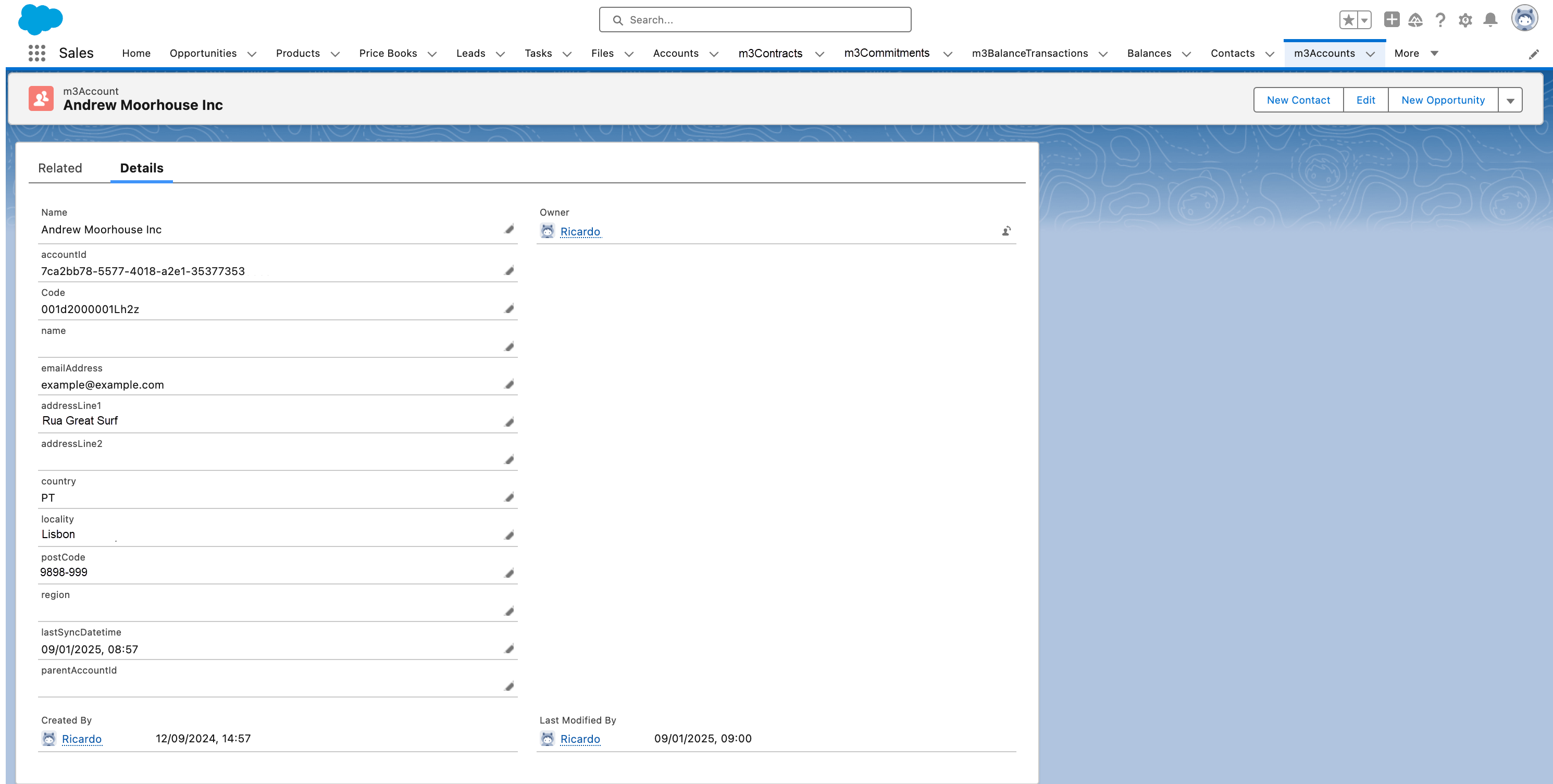
When the entity data sync integration has run, you can go into your Salesforce Org to review the entity data. For the current example when an Accounts entity data sync has run, you can review the Accounts entity and check that all m3ter Accounts have been synced:You can then drill into a specific Account and check details:
{"docsConfig":{"theme":"aspen","$schema":"https://mintlify.com/docs.json","name":"m3ter Documentation","description":"Guides, learning resources and API reference for integrating with m3ter","colors":{"primary":"#4caf4c","dark":"#449d44"},"logo":{"light":"https://mintcdn.com/m3ter/t6C65JBQiQOFtjBy/images/m3ter-logo-blue-sf.svg?fit=max\u0026auto=format\u0026n=t6C65JBQiQOFtjBy\u0026q=85\u0026s=3928db28c84ec6950e43caf96e635d80","dark":"https://mintcdn.com/m3ter/t6C65JBQiQOFtjBy/images/m3ter-logo-white-sf.svg?fit=max\u0026auto=format\u0026n=t6C65JBQiQOFtjBy\u0026q=85\u0026s=a018cb782e49a2fbdd811276476d0605"},"favicon":"https://mintcdn.com/m3ter/T0RRts393DSUkWFc/favicon.svg?fit=max\u0026auto=format\u0026n=T0RRts393DSUkWFc\u0026q=85\u0026s=9492b54cc98df6775983b287b6f865cd","navbar":{"links":[{"href":"https://m3ter.freshdesk.com","label":"Support"},{"href":"https://console.m3ter.com","label":"Console"}],"primary":{"type":"button","label":"Schedule a demo","href":"https://www.m3ter.com/contact"}},"footer":{"socials":{"linkedin":"https://uk.linkedin.com/company/m3ter","x":"https://x.com/m3terHQ","github":"https://github.com/m3ter-com"},"links":[{"items":[{"label":"Website","href":"https://www.m3ter.com"},{"label":"Legal","href":"https://www.m3ter.com/legal"},{"label":"Security","href":"https://www.m3ter.com/security"},{"label":"Trust Center","href":"https://trust.m3ter.com"}]}]},"fonts":{"family":"Montserrat"},"icons":{"library":"lucide"},"styling":{"eyebrows":"breadcrumbs","latex":false},"integrations":{"ga4":{"measurementId":"G-V9C7TTPRQT"}},"contextual":{"options":["copy","view"],"display":"header"},"thumbnails":{"fonts":{"family":"Montserrat"}},"navigation":{"pages":[]}},"deployment":{"deploymentMetadataValue":{"subdomain":"m3ter","hasAudioNarration":false,"actualSubdomain":"m3ter","customDomains":["docs.m3ter.com"],"gitSource":{"type":"github","owner":"m3ter-com","repo":"m3ter-docs","deployBranch":"main","contentDirectory":"","isPrivate":true,"mountPath":"","label":""},"entitlements":{"AI_CHAT":{"status":"ENABLED"},"WEB_MCP":{"status":"ENABLED"},"NARRATION":{"status":"ENABLED"}},"buildId":"6afd7e9c7d9a0e231c56ca16","clientVersion":"0.0.4270","searchFilterCounts":[{"language":"default","tag":"Guides","count":402},{"language":"default","tag":"API Reference","count":397},{"language":"default","tag":"Endpoints","count":391},{"language":"default","tag":"Integrations","count":69},{"language":"default","tag":"m3sh Function Reference","count":66},{"language":"default","tag":"Synthetic functions","count":50},{"language":"default","tag":"m3ter","count":50},{"language":"default","tag":"m3sh","count":43},{"language":"default","tag":"End-Customer Accounts","count":27},{"language":"default","tag":"m3ter Connector for Salesforce","count":24}]},"assistantConfig":{"enableAskAiButton":true,"enableStarterQuestions":false,"enableAskAiSearchBar":false},"basePath":"","hasChatPermissions":true,"hasWebMcpPermissions":true,"toggles":[{"name":"kill-isr","enabled":true,"variant":{"name":"disabled","enabled":false,"feature_enabled":true},"impressionData":false},{"name":"custom-rbac-roles","enabled":true,"variant":{"name":"disabled","enabled":false,"feature_enabled":true},"impressionData":false},{"name":"agent-mintlify-slack","enabled":true,"variant":{"name":"disabled","enabled":false,"feature_enabled":true},"impressionData":false},{"name":"agent-integrations-settings","enabled":true,"variant":{"name":"disabled","enabled":false,"feature_enabled":true},"impressionData":false},{"name":"rbac-expansion","enabled":true,"variant":{"name":"disabled","enabled":false,"feature_enabled":true},"impressionData":false},{"name":"automations-pr-grouping","enabled":true,"variant":{"name":"disabled","enabled":false,"feature_enabled":true},"impressionData":false},{"name":"custom-prefix","enabled":true,"variant":{"name":"disabled","enabled":false,"feature_enabled":true},"impressionData":false},{"name":"analytics-v7","enabled":true,"variant":{"name":"disabled","enabled":false,"feature_enabled":true},"impressionData":false},{"name":"user-flows-analytics","enabled":true,"variant":{"name":"disabled","enabled":false,"feature_enabled":true},"impressionData":false},{"name":"no-publish-flow","enabled":true,"variant":{"name":"disabled","enabled":false,"feature_enabled":true},"impressionData":false},{"name":"workos-onboarding","enabled":true,"variant":{"name":"disabled","enabled":false,"feature_enabled":true},"impressionData":false},{"name":"snapshot-serving-live","enabled":true,"variant":{"name":"disabled","enabled":false,"feature_enabled":true},"impressionData":false},{"name":"stripTemperatureMiddleware","enabled":true,"variant":{"name":"disabled","enabled":false,"feature_enabled":true},"impressionData":false},{"name":"support-platform-pylon-zendesk","enabled":true,"variant":{"name":"disabled","enabled":false,"feature_enabled":true},"impressionData":false},{"name":"snapshot-serving","enabled":true,"variant":{"name":"disabled","enabled":false,"feature_enabled":true},"impressionData":false},{"name":"instant-rollback","enabled":true,"variant":{"name":"disabled","enabled":false,"feature_enabled":true},"impressionData":false},{"name":"granular-notifications-server","enabled":true,"variant":{"name":"disabled","enabled":false,"feature_enabled":true},"impressionData":false},{"name":"granular-notifications","enabled":true,"variant":{"name":"disabled","enabled":false,"feature_enabled":true},"impressionData":false},{"name":"automations-fable","enabled":true,"variant":{"name":"disabled","enabled":false,"feature_enabled":true},"impressionData":false},{"name":"fixed-ai-action-pricing","enabled":true,"variant":{"name":"disabled","enabled":false,"feature_enabled":true},"impressionData":false},{"name":"site-roles","enabled":true,"variant":{"name":"disabled","enabled":false,"feature_enabled":true},"impressionData":false},{"name":"automation-resolve-merge-conflict","enabled":true,"variant":{"name":"disabled","enabled":false,"feature_enabled":true},"impressionData":false},{"name":"scoped-publishing","enabled":true,"variant":{"name":"disabled","enabled":false,"feature_enabled":true},"impressionData":false},{"name":"mintql","enabled":true,"variant":{"name":"disabled","enabled":false,"feature_enabled":true},"impressionData":false},{"name":"page-level-analytics","enabled":true,"variant":{"name":"disabled","enabled":false,"feature_enabled":true},"impressionData":false},{"name":"editor-version-history-v2","enabled":true,"variant":{"name":"disabled","enabled":false,"feature_enabled":true},"impressionData":false},{"name":"billing-page-v2","enabled":true,"variant":{"name":"disabled","enabled":false,"feature_enabled":true},"impressionData":false},{"name":"full-page-search","enabled":true,"variant":{"name":"disabled","enabled":false,"feature_enabled":true},"impressionData":false},{"name":"workspace-projects","enabled":true,"variant":{"name":"disabled","enabled":false,"feature_enabled":true},"impressionData":false},{"name":"assistant-v5","enabled":true,"variant":{"name":"disabled","enabled":false,"feature_enabled":true},"impressionData":false},{"name":"fork-pr-previews","enabled":true,"variant":{"name":"disabled","enabled":false,"feature_enabled":true},"impressionData":false},{"name":"revalidation-jwt","enabled":true,"variant":{"name":"disabled","enabled":false,"feature_enabled":true},"impressionData":false},{"name":"workos-sso-scim","enabled":true,"variant":{"name":"disabled","enabled":false,"feature_enabled":true},"impressionData":false},{"name":"hobby-abuse-scan","enabled":true,"variant":{"name":"disabled","enabled":false,"feature_enabled":true},"impressionData":false},{"name":"dashboard-inbox","enabled":true,"variant":{"name":"disabled","enabled":false,"feature_enabled":true},"impressionData":false},{"name":"workos-signup","enabled":true,"variant":{"name":"disabled","enabled":false,"feature_enabled":true},"impressionData":false},{"name":"turbopuffer-dual-write","enabled":true,"variant":{"name":"disabled","enabled":false,"feature_enabled":true},"impressionData":false},{"name":"workos-enabled","enabled":true,"variant":{"name":"disabled","enabled":false,"feature_enabled":true},"impressionData":false},{"name":"approve-review-flow","enabled":true,"variant":{"name":"disabled","enabled":false,"feature_enabled":true},"impressionData":false},{"name":"editor-metadata","enabled":true,"variant":{"name":"disabled","enabled":false,"feature_enabled":true},"impressionData":false},{"name":"sso-setup-deadline-banner","enabled":true,"variant":{"name":"disabled","enabled":false,"feature_enabled":true},"impressionData":false},{"name":"turbopuffer-serve","enabled":true,"variant":{"name":"disabled","enabled":false,"feature_enabled":true},"impressionData":false},{"name":"live-agents","enabled":true,"variant":{"name":"disabled","enabled":false,"feature_enabled":true},"impressionData":false},{"name":"starter-pricing","enabled":true,"variant":{"name":"treatment","enabled":true,"payload":{"type":"string","value":"treatment"},"feature_enabled":true},"impressionData":false},{"name":"llms-txt-v2","enabled":true,"variant":{"name":"disabled","enabled":false,"feature_enabled":true},"impressionData":false},{"name":"wildcard-email-auth","enabled":true,"variant":{"name":"disabled","enabled":false,"feature_enabled":true},"impressionData":false}],"googleFontsInlined":true},"customCss":[]}
{"page":{"pagePath":"guides/integrations/setting-up-integrations/configuring-sf-entity-data-integrations","slug":"/guides/integrations/setting-up-integrations/configuring-sf-entity-data-integrations","pageMetadata":{"title":"Configuring Salesforce Entity Data Sync Integrations","description":null,"href":"/guides/integrations/setting-up-integrations/configuring-sf-entity-data-integrations"},"pageType":"default","mdx":{"mdxSource":{"compiledSource":"\"use strict\";const{Fragment:_Fragment,jsx:_jsx,jsxs:_jsxs}=arguments[0];const{useMDXComponents:_provideComponents}=arguments[0];function _createMdxContent(props){const _components={a:`a`,em:`em`,li:`li`,ol:`ol`,p:`p`,strong:`strong`,ul:`ul`,..._provideComponents(),...props.components},{Heading,OptimizedImage,Tip,Warning}=_components;if(!Heading)_missingMdxReference(`Heading`,true);if(!OptimizedImage)_missingMdxReference(`OptimizedImage`,true);if(!Tip)_missingMdxReference(`Tip`,true);if(!Warning)_missingMdxReference(`Warning`,true);return _jsxs(_Fragment,{children:[_jsxs(_components.p,{children:[`You can create integrations for sending `,_jsx(_components.strong,{children:`Accounts`}),`, `,_jsx(_components.strong,{children:`Bills`}),`, `,_jsx(_components.strong,{children:`Contracts`}),`, `,_jsx(_components.strong,{children:`Prepayments/Commitments`}),`, or `,_jsx(_components.strong,{children:`Balances`}),` data into your Salesforce system. An `,_jsx(_components.em,{children:`entity data sync`}),` integration allows you to send the operational data held in your m3ter Organization for these entities. You can then use this data for setting up Reports or for supporting other business management tools in your external system.`]}),`\n`,_jsxs(_components.p,{children:[`This topic explains how to set up entity data sync integrations using the example of an `,_jsx(_components.em,{children:`Accounts`}),` entity data sync integration for Salesforce:`]}),`\n`,_jsxs(_components.ul,{children:[`\n`,_jsxs(_components.li,{children:[`First, `,_jsx(_components.a,{href:`/guides/integrations/setting-up-integrations/configuring-sf-entity-data-integrations#creating-the-integration`,children:`create the integration`}),`.`]}),`\n`,_jsxs(_components.li,{children:[`Second, `,_jsx(_components.a,{href:`/guides/integrations/setting-up-integrations/configuring-sf-entity-data-integrations#setting-up-authentication-for-the-integration`,children:`set up authentication`}),` for the integration to connect with your external system.`]}),`\n`]}),`\n`,_jsxs(Warning,{children:[_jsx(_components.p,{children:_jsx(_components.strong,{children:`Important! Notes and Warnings:`})}),_jsxs(_components.ul,{children:[`\n`,_jsxs(_components.li,{children:[_jsx(_components.strong,{children:`Warning: Balance Entity Data Sync!`}),` If you set up an entity data sync for Balances, then any Balance Transactions linked to Balances in your m3ter Organization are also sent through to your Salesforce system.`]}),`\n`,_jsxs(_components.li,{children:[_jsx(_components.strong,{children:`Note: Accounting Products for Bill integrations?`}),` Many line item types can be mapped to specific Accounting Products to serve your revenue recognition and accounting purposes. Where this is the case, the integration will use the assigned Accounting Products.`]}),`\n`,_jsxs(_components.li,{children:[_jsx(_components.strong,{children:`Note: Reviewing Integration Runs!`}),` When you’ve set up an integration with Salesforce for your Organization in your production environment, you can review details of the integration runs performed for the integration. See `,_jsx(_components.a,{href:`/guides/integrations/setting-up-integrations/reviewing-integration-run-details`,children:`Reviewing Integration Run Details`}),`.`]}),`\n`]})]}),`\n`,_jsx(Tip,{children:_jsxs(_components.p,{children:[_jsx(_components.strong,{children:`Tip: m3ter Connector for Salesforce as also available!`}),` The m3ter Connector for Salesforce allows you to map and synchronize data in your Salesforce systems with the m3ter platform. See `,_jsx(_components.a,{href:`/guides/m3ter-connector-for-salesforce`,children:`m3ter Connector for Salesforce`}),` for more details.`]})}),`\n`,_jsx(Heading,{level:`2`,id:`creating-the-integration`,children:`Creating the Integration`}),`\n`,_jsx(_components.p,{children:`You can quickly set up an entity data sync integration in the Console. You must complete two stages of configuration when setting up an entity data sync integration:`}),`\n`,_jsxs(_components.ul,{children:[`\n`,_jsx(_components.li,{children:_jsx(_components.a,{href:`/guides/integrations/setting-up-integrations/configuring-sf-entity-data-integrations#global-configuration`,children:`Global Configuration`})}),`\n`,_jsx(_components.li,{children:_jsx(_components.a,{href:`/guides/integrations/setting-up-integrations/configuring-sf-entity-data-integrations#external-system-configuration`,children:`External System Configuration`})}),`\n`]}),`\n`,_jsx(Heading,{level:`3`,id:`global-configuration`,children:`Global Configuration`}),`\n`,_jsx(_components.p,{children:`You can use Global configuration settings to define which Accounts you want the operational data for the selected entity to be included when the integration runs.`}),`\n`,_jsx(_components.p,{children:_jsx(_components.strong,{children:`To complete Global configuration for a Salesforce entity data sync integration:`})}),`\n`,_jsxs(_components.ol,{children:[`\n`,_jsxs(_components.li,{children:[`Select `,_jsx(_components.strong,{children:`m3sh`}),`:`]}),`\n`]}),`\n`,_jsx(OptimizedImage,{src:`https://mintcdn.com/m3ter/gg3zPcB5MVj--Cnq/images/m3shMainNav1.png?fit=max\u0026auto=format\u0026n=gg3zPcB5MVj--Cnq\u0026q=85\u0026s=c26ad71debe6cffcd46844fa558e0e6f`,alt:`M3sh Main Nav1`,title:`M3sh Main Nav1`,style:{width:`8%`},\"data-og-width\":`61`,width:`61`,\"data-og-height\":`64`,height:`64`,\"data-path\":`images/m3shMainNav1.png`,\"data-optimize\":`true`,\"data-opv\":`3`,srcset:`https://mintcdn.com/m3ter/gg3zPcB5MVj--Cnq/images/m3shMainNav1.png?w=280\u0026fit=max\u0026auto=format\u0026n=gg3zPcB5MVj--Cnq\u0026q=85\u0026s=fe3ac651321aa11df53b83b0fd230256 280w, https://mintcdn.com/m3ter/gg3zPcB5MVj--Cnq/images/m3shMainNav1.png?w=560\u0026fit=max\u0026auto=format\u0026n=gg3zPcB5MVj--Cnq\u0026q=85\u0026s=1f58ad93c04cdc3ed5cd3b76d4506472 560w, https://mintcdn.com/m3ter/gg3zPcB5MVj--Cnq/images/m3shMainNav1.png?w=840\u0026fit=max\u0026auto=format\u0026n=gg3zPcB5MVj--Cnq\u0026q=85\u0026s=517207d64345c42f2dc1dcde73630009 840w, https://mintcdn.com/m3ter/gg3zPcB5MVj--Cnq/images/m3shMainNav1.png?w=1100\u0026fit=max\u0026auto=format\u0026n=gg3zPcB5MVj--Cnq\u0026q=85\u0026s=d7887d92cf2fbee414d23c3870ebd40c 1100w, https://mintcdn.com/m3ter/gg3zPcB5MVj--Cnq/images/m3shMainNav1.png?w=1650\u0026fit=max\u0026auto=format\u0026n=gg3zPcB5MVj--Cnq\u0026q=85\u0026s=8f715eeb32d8670a864608e3c186de72 1650w, https://mintcdn.com/m3ter/gg3zPcB5MVj--Cnq/images/m3shMainNav1.png?w=2500\u0026fit=max\u0026auto=format\u0026n=gg3zPcB5MVj--Cnq\u0026q=85\u0026s=ae21cc3976cbf6a81e69ea0c9103a477 2500w`}),`\n`,_jsxs(_components.p,{children:[`The `,_jsx(_components.strong,{children:`Workflows`}),` page opens.`]}),`\n`,_jsxs(_components.ol,{start:`2`,children:[`\n`,_jsxs(_components.li,{children:[`Select `,_jsx(_components.strong,{children:`Integrations`}),`. The `,_jsx(_components.strong,{children:`m3sh / Integrations`}),` page opens with `,_jsx(_components.strong,{children:`All`}),` selected by default.`]}),`\n`,_jsxs(_components.li,{children:[`Select `,_jsx(_components.strong,{children:`Data Sync Integrations`}),`. The page adjusts.`]}),`\n`,_jsxs(_components.li,{children:[`Select `,_jsx(_components.strong,{children:`Salesforce`}),`:`]}),`\n`]}),`\n`,_jsx(OptimizedImage,{src:`https://mintcdn.com/m3ter/UoZRdWxSYd82wgRm/images/IntegConfigs23G.png?fit=max\u0026auto=format\u0026n=UoZRdWxSYd82wgRm\u0026q=85\u0026s=00376b7781edeb9558e4ca39bd2e3196`,alt:`Integ Configs23g`,title:`Integ Configs23g`,style:{width:`39%`},className:`mint-mr-auto`,\"data-og-width\":`416`,width:`416`,\"data-og-height\":`371`,height:`371`,\"data-path\":`images/IntegConfigs23G.png`,\"data-optimize\":`true`,\"data-opv\":`3`,srcset:`https://mintcdn.com/m3ter/UoZRdWxSYd82wgRm/images/IntegConfigs23G.png?w=280\u0026fit=max\u0026auto=format\u0026n=UoZRdWxSYd82wgRm\u0026q=85\u0026s=895b62e7f0a69370e056753e69bd7c48 280w, https://mintcdn.com/m3ter/UoZRdWxSYd82wgRm/images/IntegConfigs23G.png?w=560\u0026fit=max\u0026auto=format\u0026n=UoZRdWxSYd82wgRm\u0026q=85\u0026s=4c3d65c190587d708c740181f0662d17 560w, https://mintcdn.com/m3ter/UoZRdWxSYd82wgRm/images/IntegConfigs23G.png?w=840\u0026fit=max\u0026auto=format\u0026n=UoZRdWxSYd82wgRm\u0026q=85\u0026s=446dfab793ec042763bb2c8043f60ec6 840w, https://mintcdn.com/m3ter/UoZRdWxSYd82wgRm/images/IntegConfigs23G.png?w=1100\u0026fit=max\u0026auto=format\u0026n=UoZRdWxSYd82wgRm\u0026q=85\u0026s=f807d3b766c7d3255406cd86c2fa442b 1100w, https://mintcdn.com/m3ter/UoZRdWxSYd82wgRm/images/IntegConfigs23G.png?w=1650\u0026fit=max\u0026auto=format\u0026n=UoZRdWxSYd82wgRm\u0026q=85\u0026s=fdbd11a978526c86e992ce5f1ccdfdc2 1650w, https://mintcdn.com/m3ter/UoZRdWxSYd82wgRm/images/IntegConfigs23G.png?w=2500\u0026fit=max\u0026auto=format\u0026n=UoZRdWxSYd82wgRm\u0026q=85\u0026s=0af95a70a5f400d7c32c7dffcb6a90a0 2500w`}),`\n`,_jsxs(_components.p,{children:[`The `,_jsx(_components.strong,{children:`m3sh / Integrations>Salesforce`}),` page opens.`]}),`\n`,_jsxs(_components.ol,{start:`5`,children:[`\n`,_jsxs(_components.li,{children:[`On the `,_jsx(_components.strong,{children:`Configurations`}),` panel, select `,_jsx(_components.strong,{children:`Configure new integration>Configure account integration`}),`:`]}),`\n`]}),`\n`,_jsx(OptimizedImage,{src:`https://mintcdn.com/m3ter/2lmtCAgnVZCgmAM4/images/IntegConfigs36B.png?fit=max\u0026auto=format\u0026n=2lmtCAgnVZCgmAM4\u0026q=85\u0026s=2a057f9f2562c9201742ca0dcca7f494`,alt:`Integ Configs36b`,title:`Integ Configs36b`,style:{width:`31%`},\"data-og-width\":`254`,width:`254`,\"data-og-height\":`227`,height:`227`,\"data-path\":`images/IntegConfigs36B.png`,\"data-optimize\":`true`,\"data-opv\":`3`,srcset:`https://mintcdn.com/m3ter/2lmtCAgnVZCgmAM4/images/IntegConfigs36B.png?w=280\u0026fit=max\u0026auto=format\u0026n=2lmtCAgnVZCgmAM4\u0026q=85\u0026s=36833343fd171120088442f10678ad1d 280w, https://mintcdn.com/m3ter/2lmtCAgnVZCgmAM4/images/IntegConfigs36B.png?w=560\u0026fit=max\u0026auto=format\u0026n=2lmtCAgnVZCgmAM4\u0026q=85\u0026s=5847664f5f646c2c049f0682cc4dd631 560w, https://mintcdn.com/m3ter/2lmtCAgnVZCgmAM4/images/IntegConfigs36B.png?w=840\u0026fit=max\u0026auto=format\u0026n=2lmtCAgnVZCgmAM4\u0026q=85\u0026s=f099f2cbc98b883c1e0f4be4cf1e19b4 840w, https://mintcdn.com/m3ter/2lmtCAgnVZCgmAM4/images/IntegConfigs36B.png?w=1100\u0026fit=max\u0026auto=format\u0026n=2lmtCAgnVZCgmAM4\u0026q=85\u0026s=98a8991bd578105d0789e9fe564b31ac 1100w, https://mintcdn.com/m3ter/2lmtCAgnVZCgmAM4/images/IntegConfigs36B.png?w=1650\u0026fit=max\u0026auto=format\u0026n=2lmtCAgnVZCgmAM4\u0026q=85\u0026s=2da863a6bba419e949792948e1637538 1650w, https://mintcdn.com/m3ter/2lmtCAgnVZCgmAM4/images/IntegConfigs36B.png?w=2500\u0026fit=max\u0026auto=format\u0026n=2lmtCAgnVZCgmAM4\u0026q=85\u0026s=f80905bade8917117cc86c2681801f91 2500w`}),`\n`,_jsxs(_components.p,{children:[`The `,_jsx(_components.strong,{children:`Create`}),` page opens and the `,_jsx(_components.strong,{children:`Entity type`}),` - `,_jsx(_components.strong,{children:`Account`}),` and `,_jsx(_components.strong,{children:`External system`}),` - `,_jsx(_components.strong,{children:`Salesforce`}),` are shown at the top of the page.`]}),`\n`,_jsxs(_components.ol,{start:`6`,children:[`\n`,_jsxs(_components.li,{children:[`Use the `,_jsx(_components.strong,{children:`Global configuration`}),` panel to:`]}),`\n`]}),`\n`,_jsxs(_components.ul,{children:[`\n`,_jsxs(_components.li,{children:[`Enter a `,_jsx(_components.strong,{children:`Name`}),` for the Integration. This is required and is useful if you intend to create multiple Integrations for the same External system/Entity Type and need to clearly differentiate them.`]}),`\n`,_jsxs(_components.li,{children:[`Select the Accounts you want the integration to apply to:`,`\n`,_jsxs(_components.ul,{children:[`\n`,_jsxs(_components.li,{children:[_jsx(_components.strong,{children:`Account ids.`}),` Select the Accounts you want to include - all selected Accounts are treated as `,_jsx(_components.em,{children:`allowed`}),` for the integration.`]}),`\n`,_jsxs(_components.li,{children:[_jsx(_components.strong,{children:`Restricted account ids.`}),` Select the Accounts you want to exclude - all selected Accounts are treated as `,_jsx(_components.em,{children:`disallowed`}),` for the integration.`]}),`\n`]}),`\n`]}),`\n`]}),`\n`,_jsx(Tip,{children:_jsxs(_components.p,{children:[_jsx(_components.strong,{children:`Tip: Include all Accounts Data?`}),` If you want to include `,_jsx(_components.em,{children:`all Accounts`}),` in the integration, leave both `,_jsx(_components.strong,{children:`Accounts ids`}),` and `,_jsx(_components.strong,{children:`Restricted account ids`}),` empty.`]})}),`\n`,_jsxs(_components.ul,{children:[`\n`,_jsxs(_components.li,{children:[`Select Users for Email notifications if disabled:`,`\n`,_jsxs(_components.ul,{children:[`\n`,_jsxs(_components.li,{children:[_jsx(_components.strong,{children:`Integration disabled notification users`}),`. Select Organization Users you want to receive an Email notification if the integration is automatically disabled.`]}),`\n`]}),`\n`]}),`\n`]}),`\n`,_jsxs(Tip,{children:[_jsx(_components.p,{children:_jsx(_components.strong,{children:`Notes:`})}),_jsxs(_components.ul,{children:[`\n`,_jsxs(_components.li,{children:[`An integration is automatically disabled if there have been 20 successive previous error Event responses to earlier attempts to run the integration. See `,_jsx(_components.a,{href:`/guides/integrations/setting-up-integrations/reviewing-and-resolving-integration-events`,children:`Reviewing and Resolving Integration Events`}),` for more details.`]}),`\n`,_jsxs(_components.li,{children:[`If you select Organization Users to receive an Email notification when the integration is automatically disabled, their User id will be listed under `,_jsx(_components.strong,{children:`Configuration data`}),` on the `,_jsx(_components.strong,{children:`Integration details`}),` page.`]}),`\n`]})]}),`\n`,_jsx(OptimizedImage,{src:`https://mintcdn.com/m3ter/kKlHDl-4iCfb1L41/images/EntityDataSync3A.png?fit=max\u0026auto=format\u0026n=kKlHDl-4iCfb1L41\u0026q=85\u0026s=3d711e022ce464fe45c06b571ddc0132`,alt:`Entity Data Sync3a`,title:`Entity Data Sync3a`,style:{width:`69%`},\"data-og-width\":`647`,width:`647`,\"data-og-height\":`753`,height:`753`,\"data-path\":`images/EntityDataSync3A.png`,\"data-optimize\":`true`,\"data-opv\":`3`,srcset:`https://mintcdn.com/m3ter/kKlHDl-4iCfb1L41/images/EntityDataSync3A.png?w=280\u0026fit=max\u0026auto=format\u0026n=kKlHDl-4iCfb1L41\u0026q=85\u0026s=0f24abdd0b9d323613ee3d0ca1b26ce4 280w, https://mintcdn.com/m3ter/kKlHDl-4iCfb1L41/images/EntityDataSync3A.png?w=560\u0026fit=max\u0026auto=format\u0026n=kKlHDl-4iCfb1L41\u0026q=85\u0026s=f87d5e8c2658628ad841aa3b28ecfa1d 560w, https://mintcdn.com/m3ter/kKlHDl-4iCfb1L41/images/EntityDataSync3A.png?w=840\u0026fit=max\u0026auto=format\u0026n=kKlHDl-4iCfb1L41\u0026q=85\u0026s=976d5d18f0e84ad39de1ae153f8b40f1 840w, https://mintcdn.com/m3ter/kKlHDl-4iCfb1L41/images/EntityDataSync3A.png?w=1100\u0026fit=max\u0026auto=format\u0026n=kKlHDl-4iCfb1L41\u0026q=85\u0026s=995ceb101212ff666c6e6ab2a79b5fa6 1100w, https://mintcdn.com/m3ter/kKlHDl-4iCfb1L41/images/EntityDataSync3A.png?w=1650\u0026fit=max\u0026auto=format\u0026n=kKlHDl-4iCfb1L41\u0026q=85\u0026s=5284a355c163af101212eb7161e89c25 1650w, https://mintcdn.com/m3ter/kKlHDl-4iCfb1L41/images/EntityDataSync3A.png?w=2500\u0026fit=max\u0026auto=format\u0026n=kKlHDl-4iCfb1L41\u0026q=85\u0026s=f63331ee5e78b49e6611167429e4faec 2500w`}),`\n`,_jsxs(_components.ul,{children:[`\n`,_jsxs(_components.li,{children:[`In this example, the Accounts entity data sync integration will include data for `,_jsx(_components.em,{children:`all Accounts`}),` in the Organization because both `,_jsx(_components.strong,{children:`Accounts ids`}),` and `,_jsx(_components.strong,{children:`Restricted account ids`}),` settings are empty.`]}),`\n`,_jsxs(_components.li,{children:[`You can now move on to complete `,_jsx(_components.a,{href:`/guides/integrations/setting-up-integrations/configuring-sf-entity-data-integrations#external-system-configuration`,children:`External system configuration`}),`.`]}),`\n`]}),`\n`,_jsx(Heading,{level:`3`,id:`external-system-configuration`,children:`External System Configuration`}),`\n`,_jsx(_components.p,{children:`You can use the external system settings to define the location in your Salesforce Org where the selected entity’s data will be synced to and to specify any entity Custom Fields you want to be included in the integration.`}),`\n`,_jsx(_components.p,{children:_jsx(_components.strong,{children:`To complete External system configuration for a Salesforce entity data sync integration:`})}),`\n`,_jsxs(_components.ol,{children:[`\n`,_jsxs(_components.li,{children:[`When you have completed the `,_jsx(_components.a,{href:`/guides/integrations/setting-up-integrations/configuring-sf-entity-data-integrations#global-configuration`,children:`Global configuration`}),`, on the `,_jsx(_components.strong,{children:`External system configuration`}),` panel enter:`]}),`\n`]}),`\n`,_jsxs(_components.ul,{children:[`\n`,_jsxs(_components.li,{children:[_jsx(_components.strong,{children:`Namespace`}),`. This is a `,_jsx(_components.em,{children:`required setting`}),` for a Salesforce entity data sync integration. Use it to specify the correct location in your Salesforce Org where the entity data will be synced to. Three options:`,`\n`,_jsxs(_components.ul,{children:[`\n`,_jsxs(_components.li,{children:[_jsx(_components.strong,{children:`Custom Objects`}),`. If you don’t have the m3ter Connector managed package installed.`]}),`\n`,_jsxs(_components.li,{children:[_jsx(_components.strong,{children:`m3ter Connector`}),`. If you have the m3ter Connector managed package installed. `,_jsx(_components.em,{children:`Default`}),`.`]}),`\n`,_jsxs(_components.li,{children:[_jsx(_components.strong,{children:`m3ter Connector (Testing)`}),`. If you have the m3ter Connector managed package installed as a test install.`]}),`\n`]}),`\n`]}),`\n`,_jsxs(_components.li,{children:[_jsx(_components.strong,{children:`Custom field mappings`}),`. If you want custom fields data to be included when the entity data sync integration runs, add mappings for those custom fields set up for the entity in your Organization to Salesforce fields.`]}),`\n`]}),`\n`,_jsx(OptimizedImage,{src:`https://mintcdn.com/m3ter/mLLI4d7fxI8XAEOB/images/1742812925-entitydatasync4b.png?fit=max\u0026auto=format\u0026n=mLLI4d7fxI8XAEOB\u0026q=85\u0026s=5dae057ab85997b919cb3f3b22c1c372`,style:{maxWidth:`min(500px, 100%)`,width:`61%`},\"data-og-width\":`646`,width:`646`,\"data-og-height\":`488`,height:`488`,\"data-path\":`images/1742812925-entitydatasync4b.png`,\"data-optimize\":`true`,\"data-opv\":`3`,srcset:`https://mintcdn.com/m3ter/mLLI4d7fxI8XAEOB/images/1742812925-entitydatasync4b.png?w=280\u0026fit=max\u0026auto=format\u0026n=mLLI4d7fxI8XAEOB\u0026q=85\u0026s=f395f6d5a261ecc6c3d6ad9413d852a4 280w, https://mintcdn.com/m3ter/mLLI4d7fxI8XAEOB/images/1742812925-entitydatasync4b.png?w=560\u0026fit=max\u0026auto=format\u0026n=mLLI4d7fxI8XAEOB\u0026q=85\u0026s=b66b7276b9f650c715292bf14eaa3c31 560w, https://mintcdn.com/m3ter/mLLI4d7fxI8XAEOB/images/1742812925-entitydatasync4b.png?w=840\u0026fit=max\u0026auto=format\u0026n=mLLI4d7fxI8XAEOB\u0026q=85\u0026s=2a707188f4063fb43a4293c97f015743 840w, https://mintcdn.com/m3ter/mLLI4d7fxI8XAEOB/images/1742812925-entitydatasync4b.png?w=1100\u0026fit=max\u0026auto=format\u0026n=mLLI4d7fxI8XAEOB\u0026q=85\u0026s=2dae1fd858657271eb972e972e5ffb2a 1100w, https://mintcdn.com/m3ter/mLLI4d7fxI8XAEOB/images/1742812925-entitydatasync4b.png?w=1650\u0026fit=max\u0026auto=format\u0026n=mLLI4d7fxI8XAEOB\u0026q=85\u0026s=7c37696d87311be521cbc74cde915728 1650w, https://mintcdn.com/m3ter/mLLI4d7fxI8XAEOB/images/1742812925-entitydatasync4b.png?w=2500\u0026fit=max\u0026auto=format\u0026n=mLLI4d7fxI8XAEOB\u0026q=85\u0026s=1ba9fd0ce4aa1d88ec0155b04c9ce3d8 2500w`}),`\n`,_jsxs(_components.ul,{children:[`\n`,_jsx(_components.li,{children:`In this example, a single Account custom field mapping has been set up for the integration.`}),`\n`]}),`\n`,_jsxs(_components.ol,{start:`2`,children:[`\n`,_jsxs(_components.li,{children:[`Select `,_jsx(_components.strong,{children:`Create integration`}),`. You are returned to the `,_jsx(_components.strong,{children:`Integrations>Salesforce`}),` page, where the integration is listed on the `,_jsx(_components.strong,{children:`Configurations`}),` panel:`]}),`\n`]}),`\n`,_jsx(OptimizedImage,{src:`https://mintcdn.com/m3ter/mC89AON4X0ckKhXt/images/1750081254-salesforceintegs1.png?fit=max\u0026auto=format\u0026n=mC89AON4X0ckKhXt\u0026q=85\u0026s=d4cfd52e899b5965eee654496991f0a6`,style:{maxWidth:`min(850px, 100%)`},\"data-og-width\":`1185`,width:`1185`,\"data-og-height\":`201`,height:`201`,\"data-path\":`images/1750081254-salesforceintegs1.png`,\"data-optimize\":`true`,\"data-opv\":`3`,srcset:`https://mintcdn.com/m3ter/mC89AON4X0ckKhXt/images/1750081254-salesforceintegs1.png?w=280\u0026fit=max\u0026auto=format\u0026n=mC89AON4X0ckKhXt\u0026q=85\u0026s=252369395c8d823055bd6f4e48407a3b 280w, https://mintcdn.com/m3ter/mC89AON4X0ckKhXt/images/1750081254-salesforceintegs1.png?w=560\u0026fit=max\u0026auto=format\u0026n=mC89AON4X0ckKhXt\u0026q=85\u0026s=3588a2d09e33bc0c92525e1282fe7a46 560w, https://mintcdn.com/m3ter/mC89AON4X0ckKhXt/images/1750081254-salesforceintegs1.png?w=840\u0026fit=max\u0026auto=format\u0026n=mC89AON4X0ckKhXt\u0026q=85\u0026s=9ebbc397b83dc5604ac6c1a33e77b268 840w, https://mintcdn.com/m3ter/mC89AON4X0ckKhXt/images/1750081254-salesforceintegs1.png?w=1100\u0026fit=max\u0026auto=format\u0026n=mC89AON4X0ckKhXt\u0026q=85\u0026s=20967aceb5c39c220f3825b82ae0bd2f 1100w, https://mintcdn.com/m3ter/mC89AON4X0ckKhXt/images/1750081254-salesforceintegs1.png?w=1650\u0026fit=max\u0026auto=format\u0026n=mC89AON4X0ckKhXt\u0026q=85\u0026s=90b3489885f683ae2df9c3b38e5a77ee 1650w, https://mintcdn.com/m3ter/mC89AON4X0ckKhXt/images/1750081254-salesforceintegs1.png?w=2500\u0026fit=max\u0026auto=format\u0026n=mC89AON4X0ckKhXt\u0026q=85\u0026s=87dbebcec4a919800d123e2d65d52281 2500w`}),`\n`,_jsx(Heading,{level:`2`,id:`setting-up-authentication-for-the-integration`,children:`Setting up Authentication for the Integration`}),`\n`,_jsx(_components.p,{children:`When you’ve created an entity data sync integration, you can select an Integration Credential you’ve created for authentication allowing the integration to connect with your external system.`}),`\n`,_jsx(_components.p,{children:_jsx(_components.strong,{children:`To set up authentication for your m3ter - entity data sync integration:`})}),`\n`,_jsxs(_components.ol,{children:[`\n`,_jsxs(_components.li,{children:[`Select `,_jsx(_components.strong,{children:`m3sh`}),`. The `,_jsx(_components.strong,{children:`Workflows`}),` page opens.`]}),`\n`,_jsxs(_components.li,{children:[`Select `,_jsx(_components.strong,{children:`Integrations`}),`. The `,_jsx(_components.strong,{children:`Integrations`}),` page opens.`]}),`\n`,_jsxs(_components.li,{children:[`Select `,_jsx(_components.strong,{children:`Salesforce`}),`. The `,_jsx(_components.strong,{children:`m3sh / Integrations>Salesforce`}),` page opens.`]}),`\n`,_jsxs(_components.li,{children:[`On the `,_jsx(_components.strong,{children:`Configurations`}),` panel, select the `,_jsx(_components.strong,{children:`Name`}),` hotlink text of the Salesforce integration you want to set up authentication for. The `,_jsx(_components.strong,{children:`Integration details`}),` page opens:`]}),`\n`]}),`\n`,_jsx(OptimizedImage,{src:`https://mintcdn.com/m3ter/_WrggqO-h-Q_N-7Q/images/IntegConfigs47A.png?fit=max\u0026auto=format\u0026n=_WrggqO-h-Q_N-7Q\u0026q=85\u0026s=542931d4eecac0408d8f10fd883c6f59`,alt:`Integ Configs47a`,\"data-og-width\":`1259`,width:`1259`,\"data-og-height\":`643`,height:`643`,\"data-path\":`images/IntegConfigs47A.png`,\"data-optimize\":`true`,\"data-opv\":`3`,srcset:`https://mintcdn.com/m3ter/_WrggqO-h-Q_N-7Q/images/IntegConfigs47A.png?w=280\u0026fit=max\u0026auto=format\u0026n=_WrggqO-h-Q_N-7Q\u0026q=85\u0026s=0eeaea7cc38b93b06bda6db760efcd84 280w, https://mintcdn.com/m3ter/_WrggqO-h-Q_N-7Q/images/IntegConfigs47A.png?w=560\u0026fit=max\u0026auto=format\u0026n=_WrggqO-h-Q_N-7Q\u0026q=85\u0026s=53f8eeb87ee24edc467c62d64af780bb 560w, https://mintcdn.com/m3ter/_WrggqO-h-Q_N-7Q/images/IntegConfigs47A.png?w=840\u0026fit=max\u0026auto=format\u0026n=_WrggqO-h-Q_N-7Q\u0026q=85\u0026s=872a52dec5c5adf3b558731d7bd48940 840w, https://mintcdn.com/m3ter/_WrggqO-h-Q_N-7Q/images/IntegConfigs47A.png?w=1100\u0026fit=max\u0026auto=format\u0026n=_WrggqO-h-Q_N-7Q\u0026q=85\u0026s=c477b2281e95cdf9e026f23f1ba7e013 1100w, https://mintcdn.com/m3ter/_WrggqO-h-Q_N-7Q/images/IntegConfigs47A.png?w=1650\u0026fit=max\u0026auto=format\u0026n=_WrggqO-h-Q_N-7Q\u0026q=85\u0026s=4af68c7119cd695f0fdaf859e094f5ec 1650w, https://mintcdn.com/m3ter/_WrggqO-h-Q_N-7Q/images/IntegConfigs47A.png?w=2500\u0026fit=max\u0026auto=format\u0026n=_WrggqO-h-Q_N-7Q\u0026q=85\u0026s=bac0ba384b98f0bded07bfa335547a23 2500w`}),`\n`,_jsxs(_components.ul,{children:[`\n`,_jsxs(_components.li,{children:[`Notes:`,`\n`,_jsxs(_components.ul,{children:[`\n`,_jsx(_components.li,{children:`A warning is shown that the integration is not yet connected to your external system - in this example Salesforce.`}),`\n`,_jsxs(_components.li,{children:[`The `,_jsx(_components.strong,{children:`ID`}),` of the integration configuration is shown at the bottom of the `,_jsx(_components.strong,{children:`Details`}),` card, and you can copy the `,_jsx(_components.strong,{children:`ID`}),` directly to your clipboard.`]}),`\n`]}),`\n`]}),`\n`]}),`\n`,_jsxs(_components.ol,{start:`5`,children:[`\n`,_jsxs(_components.li,{children:[`Select `,_jsx(_components.strong,{children:`Connect credential`}),`. A `,_jsx(_components.strong,{children:`Select credential`}),` modal appears.`]}),`\n`,_jsx(_components.li,{children:`Select a Credential you created earlier and want to use to authenticate the integration with your external system.`}),`\n`,_jsxs(_components.li,{children:[`Select `,_jsx(_components.strong,{children:`Confirm`}),`. The modal closes and on `,_jsx(_components.strong,{children:`Integrations details`}),` the integration now shows as `,_jsx(_components.strong,{children:`CONNECTED`}),`:`]}),`\n`]}),`\n`,_jsx(OptimizedImage,{src:`https://mintcdn.com/m3ter/key-ofX2DiicZTFJ/images/SalesforceCredAdded2A.png?fit=max\u0026auto=format\u0026n=key-ofX2DiicZTFJ\u0026q=85\u0026s=9198c7b41327498c280a43b070ff20d1`,alt:`Salesforce Cred Added2a`,\"data-og-width\":`1172`,width:`1172`,\"data-og-height\":`393`,height:`393`,\"data-path\":`images/SalesforceCredAdded2A.png`,\"data-optimize\":`true`,\"data-opv\":`3`,srcset:`https://mintcdn.com/m3ter/key-ofX2DiicZTFJ/images/SalesforceCredAdded2A.png?w=280\u0026fit=max\u0026auto=format\u0026n=key-ofX2DiicZTFJ\u0026q=85\u0026s=31c7b39e0b3c313384a400c00cab13f2 280w, https://mintcdn.com/m3ter/key-ofX2DiicZTFJ/images/SalesforceCredAdded2A.png?w=560\u0026fit=max\u0026auto=format\u0026n=key-ofX2DiicZTFJ\u0026q=85\u0026s=e2974b8a5f1c73414516adf084f100ec 560w, https://mintcdn.com/m3ter/key-ofX2DiicZTFJ/images/SalesforceCredAdded2A.png?w=840\u0026fit=max\u0026auto=format\u0026n=key-ofX2DiicZTFJ\u0026q=85\u0026s=cc486bd184489b35e50a5eb4f089975a 840w, https://mintcdn.com/m3ter/key-ofX2DiicZTFJ/images/SalesforceCredAdded2A.png?w=1100\u0026fit=max\u0026auto=format\u0026n=key-ofX2DiicZTFJ\u0026q=85\u0026s=a35e91f5d5a9c4556d0ce0e29b8f4a3e 1100w, https://mintcdn.com/m3ter/key-ofX2DiicZTFJ/images/SalesforceCredAdded2A.png?w=1650\u0026fit=max\u0026auto=format\u0026n=key-ofX2DiicZTFJ\u0026q=85\u0026s=72c84b8c140b227eafd4afaaf22a3778 1650w, https://mintcdn.com/m3ter/key-ofX2DiicZTFJ/images/SalesforceCredAdded2A.png?w=2500\u0026fit=max\u0026auto=format\u0026n=key-ofX2DiicZTFJ\u0026q=85\u0026s=a9847909c3d47ab521f03ca62d60cd29 2500w`}),`\n`,_jsxs(_components.ul,{children:[`\n`,_jsx(_components.li,{children:`The Credential used to connect the integration is shown.`}),`\n`,_jsxs(_components.li,{children:[`If at any time you want to disconnect the integration, select `,_jsx(_components.strong,{children:`Disconnect credential`}),`.`]}),`\n`,_jsxs(_components.li,{children:[`If you want to use a different Credential for connecting the integration, select `,_jsx(_components.strong,{children:`Change credential`}),`. The `,_jsx(_components.strong,{children:`Select credential`}),` modal appears and you can select a different Credential.`]}),`\n`]}),`\n`,_jsxs(Tip,{children:[_jsx(_components.p,{children:_jsx(_components.strong,{children:`Notes:`})}),_jsxs(_components.ul,{children:[`\n`,_jsxs(_components.li,{children:[_jsx(_components.strong,{children:`Testing your Integration Setup?`}),` Your Salesforce integration is now available for use. However, it remains in Beta release and we strongly recommend you test the implementation in your m3ter Sandbox or QA environment before releasing it to your Production environment. See section 7. of our `,_jsx(_components.a,{href:`https://www.m3ter.com/docs/legal/terms-of-service`,children:`Terms of Service`}),` for Beta Usage.`]}),`\n`,_jsxs(_components.li,{children:[_jsx(_components.strong,{children:`When will the Integration run?`}),` The integration will run on hourly basis close to the start of each hour. The schedule for integration runs is not currently configurable.`]}),`\n`,_jsxs(_components.li,{children:[_jsx(_components.strong,{children:`Integrations API Calls?`}),` When you have set up your Salesforce integration, you can review and manage the integration using a full set of API Calls. See the `,_jsx(_components.a,{href:`/api/integrations/introduction`,children:`Integrations section`}),` of our API Reference Docs.`]}),`\n`]})]}),`\n`,_jsx(Heading,{level:`2`,id:`reviewing-entity-data-in-salesforce`,children:`Reviewing Entity Data in Salesforce`}),`\n`,_jsx(_components.p,{children:`When the entity data sync integration has run, you can go into your Salesforce Org to review the entity data. For the current example when an Accounts entity data sync has run, you can review the Accounts entity and check that all m3ter Accounts have been synced:`}),`\n`,_jsx(OptimizedImage,{src:`https://mintcdn.com/m3ter/zFF74W1cpWY5nnkU/images/1736425405-entitydatasync7.png?fit=max\u0026auto=format\u0026n=zFF74W1cpWY5nnkU\u0026q=85\u0026s=b512c8f8dcf502ec5289afdff8b91906`,style:{maxWidth:`min(900px, 100%)`},\"data-og-width\":`2970`,width:`2970`,\"data-og-height\":`1507`,height:`1507`,\"data-path\":`images/1736425405-entitydatasync7.png`,\"data-optimize\":`true`,\"data-opv\":`3`,srcset:`https://mintcdn.com/m3ter/zFF74W1cpWY5nnkU/images/1736425405-entitydatasync7.png?w=280\u0026fit=max\u0026auto=format\u0026n=zFF74W1cpWY5nnkU\u0026q=85\u0026s=f4320244d5f9746455feb8daf44556f2 280w, https://mintcdn.com/m3ter/zFF74W1cpWY5nnkU/images/1736425405-entitydatasync7.png?w=560\u0026fit=max\u0026auto=format\u0026n=zFF74W1cpWY5nnkU\u0026q=85\u0026s=e19c2e4f292967164bf91b82b2c7ba46 560w, https://mintcdn.com/m3ter/zFF74W1cpWY5nnkU/images/1736425405-entitydatasync7.png?w=840\u0026fit=max\u0026auto=format\u0026n=zFF74W1cpWY5nnkU\u0026q=85\u0026s=b7deaf3294674f2448f78041ddf79822 840w, https://mintcdn.com/m3ter/zFF74W1cpWY5nnkU/images/1736425405-entitydatasync7.png?w=1100\u0026fit=max\u0026auto=format\u0026n=zFF74W1cpWY5nnkU\u0026q=85\u0026s=0cb378235f365eb900c00e63ce869644 1100w, https://mintcdn.com/m3ter/zFF74W1cpWY5nnkU/images/1736425405-entitydatasync7.png?w=1650\u0026fit=max\u0026auto=format\u0026n=zFF74W1cpWY5nnkU\u0026q=85\u0026s=5d012128f20b793f1f6286b7290dc30d 1650w, https://mintcdn.com/m3ter/zFF74W1cpWY5nnkU/images/1736425405-entitydatasync7.png?w=2500\u0026fit=max\u0026auto=format\u0026n=zFF74W1cpWY5nnkU\u0026q=85\u0026s=125c6f706fe78b71a4eb1ddd65797ccf 2500w`}),`\n`,_jsx(_components.p,{children:`You can then drill into a specific Account and check details:`}),`\n`,_jsx(OptimizedImage,{src:`https://mintcdn.com/m3ter/zFF74W1cpWY5nnkU/images/1736426568-entitydatasync8.png?fit=max\u0026auto=format\u0026n=zFF74W1cpWY5nnkU\u0026q=85\u0026s=c6796d784cde940911ec16deac599ca4`,style:{maxWidth:`min(900px, 100%)`},\"data-og-width\":`2981`,width:`2981`,\"data-og-height\":`1505`,height:`1505`,\"data-path\":`images/1736426568-entitydatasync8.png`,\"data-optimize\":`true`,\"data-opv\":`3`,srcset:`https://mintcdn.com/m3ter/zFF74W1cpWY5nnkU/images/1736426568-entitydatasync8.png?w=280\u0026fit=max\u0026auto=format\u0026n=zFF74W1cpWY5nnkU\u0026q=85\u0026s=3c9c2aca8622913970edb0c7ae5106c2 280w, https://mintcdn.com/m3ter/zFF74W1cpWY5nnkU/images/1736426568-entitydatasync8.png?w=560\u0026fit=max\u0026auto=format\u0026n=zFF74W1cpWY5nnkU\u0026q=85\u0026s=0a7d84c7279b966530a6e57ff43c76b1 560w, https://mintcdn.com/m3ter/zFF74W1cpWY5nnkU/images/1736426568-entitydatasync8.png?w=840\u0026fit=max\u0026auto=format\u0026n=zFF74W1cpWY5nnkU\u0026q=85\u0026s=10f3b8044ebb3528bbe79d441eacc153 840w, https://mintcdn.com/m3ter/zFF74W1cpWY5nnkU/images/1736426568-entitydatasync8.png?w=1100\u0026fit=max\u0026auto=format\u0026n=zFF74W1cpWY5nnkU\u0026q=85\u0026s=d81b6e962fdbb5fbdf0549db3cc01e30 1100w, https://mintcdn.com/m3ter/zFF74W1cpWY5nnkU/images/1736426568-entitydatasync8.png?w=1650\u0026fit=max\u0026auto=format\u0026n=zFF74W1cpWY5nnkU\u0026q=85\u0026s=4dde38768feba4c18cc228f69b84c954 1650w, https://mintcdn.com/m3ter/zFF74W1cpWY5nnkU/images/1736426568-entitydatasync8.png?w=2500\u0026fit=max\u0026auto=format\u0026n=zFF74W1cpWY5nnkU\u0026q=85\u0026s=1bfb8fc400a7210404a33306d5299fa7 2500w`})]})}function MDXContent(props={}){const{wrapper:MDXLayout}={..._provideComponents(),...props.components};return MDXLayout?_jsx(MDXLayout,{...props,children:_jsx(_createMdxContent,{...props})}):_createMdxContent(props)}return{default:MDXContent};function _missingMdxReference(id,component){throw new Error(`Expected `+(component?`component`:`object`)+\" `\"+id+\"` to be defined: you likely forgot to import, pass, or provide it.\")}","frontmatter":{},"scope":{"config":{},"pageMetadata":{"title":"Configuring Salesforce Entity Data Sync Integrations","description":null,"href":"/guides/integrations/setting-up-integrations/configuring-sf-entity-data-integrations"}}},"mdxSourceWithNoJs":null},"mdxExtracts":{"tableOfContents":[{"title":"Creating the Integration","slug":"creating-the-integration","depth":2,"children":[{"title":"Global Configuration","slug":"global-configuration","depth":3,"children":[]},{"title":"External System Configuration","slug":"external-system-configuration","depth":3,"children":[]}]},{"title":"Setting up Authentication for the Integration","slug":"setting-up-authentication-for-the-integration","depth":2,"children":[]},{"title":"Reviewing Entity Data in Salesforce","slug":"reviewing-entity-data-in-salesforce","depth":2,"children":[]}],"codeExamples":{}},"jsLinks":[],"dynamicCss":".mint-mr-auto {\n margin-right: auto\n}","subdomain":"m3ter","siteName":"m3ter Documentation","title":"Configuring Salesforce Entity Data Sync Integrations - m3ter Documentation","navMaps":{"firstHrefInVersion":{},"firstHrefInLanguage":{}},"lastModified":"2026-11-12T10:33:55.912Z","originalFileLocation":"guides/integrations/setting-up-integrations/configuring-sf-entity-data-integrations.mdx"},"headHtml":"\u003cscript data-mint-head>(function(){var d=document.documentElement,p=null;if(!p){try{p=localStorage.getItem(\"isDarkMode\")}catch(e){}if(p==='true')p='dark';else if(p==='false')p='light';if(p!=='light'\u0026\u0026p!=='dark'\u0026\u0026p!=='system')p=\"system\"}var r=p==='system'?(matchMedia(\"(prefers-color-scheme: dark)\").matches?'dark':'light'):p;d.classList.remove(r==='dark'?'light':'dark');d.classList.add(r);d.setAttribute(\"data-theme-preference\",p)})();\u003c/script>\u003cmeta data-mint-head name=\"application-name\" content=\"m3ter Documentation\">\u003cmeta data-mint-head name=\"generator\" content=\"Mintlify\">\u003clink data-mint-head rel=\"icon\" type=\"image/png\" sizes=\"192x192\" href=\"/mintlify-assets/_mintlify/favicons/m3ter/zwvZvZyvpa8TKV7c/_generated/favicon/android-chrome-192x192.png\" media=\"(prefers-color-scheme: light)\">\u003clink data-mint-head rel=\"apple-touch-icon\" type=\"image/png\" sizes=\"180x180\" href=\"/mintlify-assets/_mintlify/favicons/m3ter/zwvZvZyvpa8TKV7c/_generated/favicon/apple-touch-icon.png\">\u003clink data-mint-head rel=\"icon\" type=\"image/png\" sizes=\"16x16\" href=\"/mintlify-assets/_mintlify/favicons/m3ter/zwvZvZyvpa8TKV7c/_generated/favicon/favicon-16x16.png\" media=\"(prefers-color-scheme: light)\">\u003clink data-mint-head rel=\"icon\" type=\"image/png\" sizes=\"32x32\" href=\"/mintlify-assets/_mintlify/favicons/m3ter/zwvZvZyvpa8TKV7c/_generated/favicon/favicon-32x32.png\" media=\"(prefers-color-scheme: light)\">\u003clink data-mint-head rel=\"shortcut icon\" type=\"image/x-icon\" href=\"/mintlify-assets/_mintlify/favicons/m3ter/zwvZvZyvpa8TKV7c/_generated/favicon/favicon.ico\" media=\"(prefers-color-scheme: light)\">\u003clink data-mint-head rel=\"icon\" type=\"image/png\" sizes=\"192x192\" href=\"/mintlify-assets/_mintlify/favicons/m3ter/zwvZvZyvpa8TKV7c/_generated/favicon-dark/android-chrome-192x192.png\" media=\"(prefers-color-scheme: dark)\">\u003clink data-mint-head rel=\"icon\" type=\"image/png\" sizes=\"16x16\" href=\"/mintlify-assets/_mintlify/favicons/m3ter/zwvZvZyvpa8TKV7c/_generated/favicon-dark/favicon-16x16.png\" media=\"(prefers-color-scheme: dark)\">\u003clink data-mint-head rel=\"icon\" type=\"image/png\" sizes=\"32x32\" href=\"/mintlify-assets/_mintlify/favicons/m3ter/zwvZvZyvpa8TKV7c/_generated/favicon-dark/favicon-32x32.png\" media=\"(prefers-color-scheme: dark)\">\u003clink data-mint-head rel=\"shortcut icon\" type=\"image/x-icon\" href=\"/mintlify-assets/_mintlify/favicons/m3ter/zwvZvZyvpa8TKV7c/_generated/favicon-dark/favicon.ico\" media=\"(prefers-color-scheme: dark)\">\u003cmeta data-mint-head property=\"og:title\" content=\"Configuring Salesforce Entity Data Sync Integrations - m3ter Documentation\">\u003cmeta data-mint-head property=\"og:site_name\" content=\"m3ter Documentation\">\u003cmeta data-mint-head property=\"og:url\" content=\"https://docs.m3ter.com/guides/integrations/setting-up-integrations/configuring-sf-entity-data-integrations\">\u003cmeta data-mint-head property=\"og:type\" content=\"website\">\u003cmeta data-mint-head property=\"og:image\" content=\"https://m3ter.mintlify.site/_mintlify/api/og/v2?division=Setting+Up+and+Managing+Integrations\u0026amp;title=Configuring+Salesforce+Entity+Data+Sync+Integrations\u0026amp;theme=f65f867c9d6db06823eaf387\u0026amp;signature=102449d4f996a1b45a2cf0613ad754ffa7c474cc96f6ee1bec46b776a98847c9\">\u003cmeta data-mint-head property=\"og:image:width\" content=\"1200\">\u003cmeta data-mint-head property=\"og:image:height\" content=\"630\">\u003cmeta data-mint-head name=\"twitter:card\" content=\"summary_large_image\">\u003cmeta data-mint-head name=\"twitter:title\" content=\"Configuring Salesforce Entity Data Sync Integrations - m3ter Documentation\">\u003cmeta data-mint-head name=\"twitter:image\" content=\"https://m3ter.mintlify.site/_mintlify/api/og/v2?division=Setting+Up+and+Managing+Integrations\u0026amp;title=Configuring+Salesforce+Entity+Data+Sync+Integrations\u0026amp;theme=f65f867c9d6db06823eaf387\u0026amp;signature=102449d4f996a1b45a2cf0613ad754ffa7c474cc96f6ee1bec46b776a98847c9\">\u003cmeta data-mint-head name=\"twitter:image:width\" content=\"1200\">\u003cmeta data-mint-head name=\"twitter:image:height\" content=\"630\">\u003cmeta data-mint-head name=\"msapplication-config\" content=\"/mintlify-assets/_mintlify/favicons/m3ter/zwvZvZyvpa8TKV7c/_generated/favicon/browserconfig.xml\">\u003cmeta data-mint-head name=\"apple-mobile-web-app-title\" content=\"m3ter Documentation\">\u003cmeta data-mint-head name=\"msapplication-TileColor\" content=\"#4caf4c\">\u003clink data-mint-head rel=\"canonical\" href=\"https://docs.m3ter.com/guides/integrations/setting-up-integrations/configuring-sf-entity-data-integrations\">\u003clink data-mint-head rel=\"alternate\" type=\"application/xml\" href=\"/sitemap.xml\">\u003clink data-mint-head rel=\"alternate\" type=\"text/markdown\" href=\"/guides/integrations/setting-up-integrations/configuring-sf-entity-data-integrations.md\">\u003cscript data-mint-head type=\"application/ld+json\">{\"@context\":\"https://schema.org\",\"@graph\":[{\"@type\":\"Organization\",\"@id\":\"https://docs.m3ter.com/#organization\",\"name\":\"m3ter Documentation\",\"url\":\"https://docs.m3ter.com\",\"logo\":{\"@type\":\"ImageObject\",\"url\":\"https://mintcdn.com/m3ter/t6C65JBQiQOFtjBy/images/m3ter-logo-blue-sf.svg?fit=max\u0026auto=format\u0026n=t6C65JBQiQOFtjBy\u0026q=85\u0026s=3928db28c84ec6950e43caf96e635d80\"}},{\"@type\":\"WebSite\",\"@id\":\"https://docs.m3ter.com#website\",\"name\":\"m3ter Documentation\",\"url\":\"https://docs.m3ter.com\",\"publisher\":{\"@id\":\"https://docs.m3ter.com/#organization\"}},{\"@type\":\"WebPage\",\"@id\":\"https://docs.m3ter.com/guides/integrations/setting-up-integrations/configuring-sf-entity-data-integrations#webpage\",\"url\":\"https://docs.m3ter.com/guides/integrations/setting-up-integrations/configuring-sf-entity-data-integrations\",\"name\":\"Configuring Salesforce Entity Data Sync Integrations\",\"dateModified\":\"2026-11-12T10:33:55.912Z\",\"isPartOf\":{\"@id\":\"https://docs.m3ter.com#website\"},\"breadcrumb\":{\"@id\":\"https://docs.m3ter.com/guides/integrations/setting-up-integrations/configuring-sf-entity-data-integrations#breadcrumb\"}},{\"@type\":\"BreadcrumbList\",\"@id\":\"https://docs.m3ter.com/guides/integrations/setting-up-integrations/configuring-sf-entity-data-integrations#breadcrumb\",\"itemListElement\":[{\"@type\":\"ListItem\",\"position\":1,\"name\":\"Guides\",\"item\":\"https://docs.m3ter.com/guides/getting-started/quick-start-worked-example\"},{\"@type\":\"ListItem\",\"position\":2,\"name\":\"m3sh\",\"item\":\"https://docs.m3ter.com/guides/m3sh-automation\"},{\"@type\":\"ListItem\",\"position\":3,\"name\":\"Integrations\",\"item\":\"https://docs.m3ter.com/guides/integrations\"},{\"@type\":\"ListItem\",\"position\":4,\"name\":\"Setting Up and Managing Integrations\",\"item\":\"https://docs.m3ter.com/guides/integrations/setting-up-integrations\"},{\"@type\":\"ListItem\",\"position\":5,\"name\":\"Configuring Salesforce Entity Data Sync Integrations\",\"item\":\"https://docs.m3ter.com/guides/integrations/setting-up-integrations/configuring-sf-entity-data-integrations\"}]},{\"@type\":[\"Article\",\"TechArticle\"],\"@id\":\"https://docs.m3ter.com/guides/integrations/setting-up-integrations/configuring-sf-entity-data-integrations#article\",\"headline\":\"Configuring Salesforce Entity Data Sync Integrations\",\"name\":\"Configuring Salesforce Entity Data Sync Integrations\",\"url\":\"https://docs.m3ter.com/guides/integrations/setting-up-integrations/configuring-sf-entity-data-integrations\",\"mainEntityOfPage\":{\"@id\":\"https://docs.m3ter.com/guides/integrations/setting-up-integrations/configuring-sf-entity-data-integrations#webpage\"},\"dateModified\":\"2026-11-12T10:33:55.912Z\",\"publisher\":{\"@id\":\"https://docs.m3ter.com/#organization\"},\"isPartOf\":{\"@id\":\"https://docs.m3ter.com#website\"}}]}\u003c/script>\u003cscript data-mint-head type=\"application/ld+json\">{\"@context\":\"https://schema.org\",\"@type\":\"WebSite\",\"name\":\"m3ter Documentation\",\"publisher\":{\"@type\":\"Organization\",\"name\":\"m3ter Documentation\"},\"provider\":{\"@type\":\"Organization\",\"name\":\"Mintlify\",\"url\":\"https://mintlify.com\"}}\u003c/script>","agentPointerHref":"/guides/integrations/setting-up-integrations/configuring-sf-entity-data-integrations.md","siteName":"m3ter Documentation","nav":{"global":null,"tabs":[{"tab":"Exploring m3ter","pages":[{"title":"Exploring m3ter","href":""}]},{"tab":"Guides","pages":[{"group":"Guides","pages":[{"group":"Getting Started","root":{"title":"Getting Started","href":"/guides/getting-started"},"expanded":false,"pages":[{"title":"Quick Start","href":"/guides/getting-started/quick-start-worked-example"},{"title":"m3ter Console","href":"/guides/getting-started/working-in-the-m3ter-console"},{"title":"Configuration Workflow","href":"/guides/getting-started/previewing-main-configuration-steps"},{"group":"Worked Examples","expanded":false,"pages":[{"title":"Worked Examples","href":"/guides/getting-started/metering-for-production-worked-examples"},{"title":"Example 1: Cloud Storage and File Cleanup","href":"/guides/getting-started/metering-for-production-worked-examples/worked-example-1-cloud-storage-and-file-cleanup"},{"title":"Example 2: Compound Aggregation for Sign-Up Bonus","href":"/guides/getting-started/metering-for-production-worked-examples/example-2-compound-aggregation-for-sign-up-bonus"},{"title":"Example 3: Segmented Aggregation on Single Meter Usage","href":"/guides/getting-started/metering-for-production-worked-examples/example-3-segmented-aggregation-on-single-meter-usage"}]},{"title":"Dates in m3ter - Quick Reference Starter","href":"/guides/getting-started/working-with-dates-in-m3ter-easy-reference"},{"title":"Feature Release Stages","href":"/guides/getting-started/feature-release-stages"},{"title":"Knowledge Index","href":"/guides/getting-started/knowledge-index"},{"title":"Contacting m3ter Support","href":"/guides/getting-started/contacting-m3ter-support"}]},{"group":"Authentication","root":{"title":"Authentication","href":"/guides/authenticating-with-the-platform"},"expanded":false,"pages":[{"title":"User/Password Authentication","href":"/guides/authenticating-with-the-platform/user-password-authentication"},{"title":"m3ter Single Sign-On","href":"/guides/authenticating-with-the-platform/m3ter-single-sign-on"},{"title":"Service Authentication","href":"/guides/authenticating-with-the-platform/service-authentication"}]},{"group":"Creating, Managing, and Reviewing Products","root":{"title":"Creating, Managing, and Reviewing Products","href":"/guides/creating-and-managing-products"},"expanded":false,"pages":[{"title":"Working with Custom Fields","href":"/guides/creating-and-managing-products/working-with-custom-fields"}]},{"group":"Usage Data: Meters","root":{"title":"Usage Data: Meters","href":"/guides/usage-data-meters"},"expanded":false,"pages":[{"title":"Reviewing Meter Options","mode":"default","href":"/guides/usage-data-meters/reviewing-meter-options"},{"title":"Creating Product Meters","href":"/guides/usage-data-meters/creating-meters"},{"title":"Creating Global Meters","href":"/guides/usage-data-meters/creating-global-meters"},{"title":"Working in Meter Details","href":"/guides/usage-data-meters/working-in-meter-details"},{"title":"Working with Meter Derived Fields and Examples","href":"/guides/usage-data-meters/derived-fields-for-meters-examples-and-supported-syntax"}]},{"group":"Pricing Metrics: Aggregations","root":{"title":"Pricing Metrics: Aggregations","href":"/guides/usage-data-aggregations"},"expanded":false,"pages":[{"title":"Reviewing Aggregation Options","href":"/guides/usage-data-aggregations/reviewing-aggregation-options"},{"title":"Creating Product Aggregations","href":"/guides/usage-data-aggregations/creating-aggregations"},{"title":"Creating Global Aggregations","href":"/guides/usage-data-aggregations/creating-global-aggregations"},{"title":"Compound Aggregations","href":"/guides/usage-data-aggregations/compound-aggregations"},{"title":"Working with Compound Aggregation Calculations","href":"/guides/usage-data-aggregations/compound-aggregation-calculations"},{"title":"Compound Aggregations - Examples","href":"/guides/usage-data-aggregations/compound-aggregations-examples"},{"title":"Segmented Aggregations","href":"/guides/usage-data-aggregations/segmented-aggregations"},{"title":"Custom SQL Aggregations","href":"/guides/usage-data-aggregations/custom-sql-aggregations"},{"title":"Reviewing Aggregation Details","href":"/guides/usage-data-aggregations/reviewing-aggregation-details"}]},{"group":"Recurring Charges: Counters","root":{"title":"Recurring Charges: Counters","href":"/guides/recurring-charges-counters"},"expanded":false,"pages":[{"title":"Creating Counters and Pricing Plans","href":"/guides/recurring-charges-counters/creating-counters"},{"title":"Understanding and Creating Counter Adjustments for Accounts","href":"/guides/recurring-charges-counters/creating-counter-adjustments-for-accounts"},{"title":"Recurring Charges Billing: Seat-Based Pricing","href":"/guides/recurring-charges-counters/reviewing-bills-for-recurring-charges"},{"title":"Recurring Charges Billing: Hybrid Pricing","href":"/guides/recurring-charges-counters/recurring-charges-example-2-hybrid-pricing"}]},{"group":"Plans and Pricing","root":{"title":"Plans and Pricing","href":"/guides/plans-and-pricing"},"expanded":false,"pages":[{"group":"Creating and Working with Plan Templates, Plans, and Plan Groups","root":{"title":"Creating and Working with Plan Templates, Plans, and Plan Groups","href":"/guides/plans-and-pricing/working-with-plan-templates-and-plans"},"expanded":false,"pages":[{"title":"Reviewing Options for Plans and Plan Templates","href":"/guides/plans-and-pricing/working-with-plan-templates-and-plans/reviewing-configuration-options-for-plans-and-plan-templates"},{"title":"Understanding Billing Options for Plan Templates/Plans","href":"/guides/plans-and-pricing/working-with-plan-templates-and-plans/understanding-billing-options-for-plan-templates-plans"},{"title":"Creating Plan Templates","href":"/guides/plans-and-pricing/working-with-plan-templates-and-plans/creating-plan-templates"},{"title":"Creating Plans","href":"/guides/plans-and-pricing/working-with-plan-templates-and-plans/creating-plans"},{"title":"Working in Plan Template and Plan Details","href":"/guides/plans-and-pricing/working-with-plan-templates-and-plans/working-in-plan-details"},{"title":"Editing and Deleting Plan Templates and Plans","href":"/guides/plans-and-pricing/working-with-plan-templates-and-plans/editing-plan-templates-and-plans"},{"title":"Working with Plan Groups","href":"/guides/plans-and-pricing/working-with-plan-templates-and-plans/working-with-plan-groups"}]},{"group":"Pricing and Managing Plans and Plan Templates","root":{"title":"Pricing and Managing Plans and Plan Templates","href":"/guides/plans-and-pricing/pricing-plans"},"expanded":false,"pages":[{"title":"Reviewing Pricing Options for Plans and Plan Templates","href":"/guides/plans-and-pricing/pricing-plans/reviewing-pricing-options-and-pricing-plans"},{"title":"Pricing Plans and Plan Templates","href":"/guides/plans-and-pricing/pricing-plans/pricing-plans"},{"title":"Pricing Plans Using Segmented Aggregations","href":"/guides/plans-and-pricing/pricing-plans/pricing-plans-using-segmented-aggregations"},{"title":"Managing and Editing Priced Plans and Plan Templates","href":"/guides/plans-and-pricing/pricing-plans/managing-and-editing-priced-plans-or-plan-templates"},{"title":"Duplicating Priced Plans and Plan Templates","href":"/guides/plans-and-pricing/pricing-plans/duplicating-priced-plans-or-plan-templates"}]}]},{"group":"End-Customer Accounts","root":{"title":"End-Customer Accounts","href":"/guides/end-customer-accounts"},"expanded":false,"pages":[{"title":"Managing Accounts - Best Practices","href":"/guides/end-customer-accounts/managing-accounts-best-practices"},{"title":"Creating and Managing Accounts","href":"/guides/end-customer-accounts/creating-an-account"},{"title":"Attaching Plans to an Account","href":"/guides/end-customer-accounts/attaching-plans-to-an-account"},{"title":"Creating Custom Plans for Accounts","href":"/guides/end-customer-accounts/creating-custom-account-plans"},{"title":"Attaching Plan Groups to an Account","href":"/guides/end-customer-accounts/attaching-plan-groups-to-an-account"},{"title":"Creating Custom Plan Groups for Accounts","href":"/guides/end-customer-accounts/creating-custom-plan-groups-for-accounts"},{"title":"Creating Prepayments for Accounts","href":"/guides/end-customer-accounts/creating-prepayments-for-accounts"},{"group":"Working with Contracts for Accounts","root":{"title":"Working with Contracts for Accounts","href":"/guides/end-customer-accounts/creating-contracts-for-accounts"},"expanded":false,"pages":[{"title":"Creating and Managing Contracts","href":"/guides/end-customer-accounts/creating-contracts-for-accounts/creating-and-managing-contracts"},{"title":"Setting Up Contract Billing","href":"/guides/end-customer-accounts/creating-contracts-for-accounts/setting-up-contract-billing"},{"title":"Reviewing Organization Contracts","href":"/guides/end-customer-accounts/creating-contracts-for-accounts/reviewing-organization-contracts"}]},{"group":"Working with Balances for Accounts","root":{"title":"Working with Balances for Accounts","href":"/guides/end-customer-accounts/creating-balances-for-accounts"},"expanded":false,"pages":[{"title":"Understanding and Managing Billing for Balances","href":"/guides/end-customer-accounts/creating-balances-for-accounts/understanding-billing-for-balances"},{"title":"Creating and Managing Account Balances","href":"/guides/end-customer-accounts/creating-balances-for-accounts/creating-and-managing-account-balances"},{"title":"Creating and Managing Transactions for Balances","href":"/guides/end-customer-accounts/creating-balances-for-accounts/creating-and-managing-transactions-for-balances"},{"title":"Setting Up Transaction Schedules for Balances","href":"/guides/end-customer-accounts/creating-balances-for-accounts/setting-transaction-schedules-for-balances"},{"title":"Creating Charges for Balances","href":"/guides/end-customer-accounts/creating-balances-for-accounts/creating-charges-for-balances"},{"title":"Setting Up Charge Schedules for Balances","href":"/guides/end-customer-accounts/creating-balances-for-accounts/setting-charge-schedules-for-balances"},{"title":"Running and Viewing Bills for Balance Charges","href":"/guides/end-customer-accounts/creating-balances-for-accounts/runnning-viewing-bill-for-balance-charges"},{"title":"Reviewing Account Balances Summary","href":"/guides/end-customer-accounts/creating-balances-for-accounts/reviewing-account-balances-summary"},{"title":"Grants","href":"/guides/end-customer-accounts/creating-balances-for-accounts/balance-grants"}]},{"title":"Creating Charges for Accounts","href":"/guides/end-customer-accounts/creating-charges-for-accounts"},{"title":"Creating Counter Adjustments for Accounts","href":"/guides/end-customer-accounts/creating-counter-adjustments-for-accounts"},{"title":"Submitting Usage Data for an Account","href":"/guides/end-customer-accounts/submitting-usage-data-for-an-account"},{"title":"Working in Account Overview","href":"/guides/end-customer-accounts/working-in-account-overview"},{"title":"Reviewing and Recalculating Bills for an Account","href":"/guides/end-customer-accounts/reviewing-bills-for-an-account"},{"group":"Working with Parent/Child Accounts","root":{"title":"Working with Parent/Child Accounts","href":"/guides/end-customer-accounts/creating-and-working-with-child-accounts"},"expanded":false,"pages":[{"title":"Billing Hierarchy Modes for Parent/Child Accounts","href":"/guides/end-customer-accounts/creating-and-working-with-child-accounts/billing-for-parent-child-accounts"}]},{"title":"End Dating Account Billing Entities","href":"/guides/end-customer-accounts/end-dating-account-billing-entities"},{"title":"Creating and Managing External Mappings for Accounts","href":"/guides/end-customer-accounts/creating-and-managing-external-mappings-for-accounts"}]},{"group":"Billing and Usage Data","root":{"title":"Billing and Usage Data","href":"/guides/billing-and-usage-data"},"expanded":false,"pages":[{"group":"Submitting Usage Data","root":{"title":"Submitting Usage Data","href":"/guides/billing-and-usage-data/submitting-usage-data"},"expanded":false,"pages":[{"title":"API Calls for Data Ingest","href":"/guides/billing-and-usage-data/submitting-usage-data/api-calls-for-data-ingest"},{"title":"File Upload Service API","href":"/guides/billing-and-usage-data/submitting-usage-data/file-upload-service-api"},{"title":"Submitting and Checking Test Usage Data","href":"/guides/billing-and-usage-data/submitting-usage-data/submitting-test-usage-data"},{"title":"File Uploads for Usage Data by Meter","href":"/guides/billing-and-usage-data/submitting-usage-data/file-uploads-for-usage-data-by-meter"},{"title":"Submitting Usage Data Adjustments Using Timestamp","href":"/guides/billing-and-usage-data/submitting-usage-data/submitting-usage-data-adjustments-using-timestamp"},{"title":"Submitting Usage Data for Non-Existent Accounts","href":"/guides/billing-and-usage-data/submitting-usage-data/submitting-usage-data-for-non-existent-accounts"},{"title":"Reviewing and Resolving Ingest Events","href":"/guides/billing-and-usage-data/submitting-usage-data/reviewing-and-resolving-ingest-events"}]},{"group":"Running, Viewing, and Managing Bills","root":{"title":"Running, Viewing, and Managing Bills","href":"/guides/billing-and-usage-data/running-viewing-and-managing-bills"},"expanded":false,"pages":[{"title":"Running Bills and Viewing Bill Details","href":"/guides/billing-and-usage-data/running-viewing-and-managing-bills/running-bills-and-viewing-bill-details"},{"title":"Working with Bills in Bill Management","href":"/guides/billing-and-usage-data/running-viewing-and-managing-bills/managing-bills"},{"title":"Approving and Locking Bills - Managing Bill Lifecycle","href":"/guides/billing-and-usage-data/running-viewing-and-managing-bills/approving-and-locking-bills-managing-bill-lifecycle"},{"title":"Adding Credit Line Items to Bills","href":"/guides/billing-and-usage-data/running-viewing-and-managing-bills/adding-credit-line-items-to-bills"},{"title":"Adding Debit Line Items to Bills","href":"/guides/billing-and-usage-data/running-viewing-and-managing-bills/adding-debit-line-items-to-bills"},{"title":"Viewing Bill History","href":"/guides/billing-and-usage-data/running-viewing-and-managing-bills/viewing-bill-history"},{"title":"Scheduling Billing","href":"/guides/billing-and-usage-data/running-viewing-and-managing-bills/scheduling-billing"},{"title":"Working with Bill Statements","href":"/guides/billing-and-usage-data/running-viewing-and-managing-bills/working-with-bill-statements"},{"title":"Bill Line Item Types","href":"/guides/billing-and-usage-data/running-viewing-and-managing-bills/bill-line-item-types"},{"title":"Bill Line Items - Default Descriptions","href":"/guides/billing-and-usage-data/running-viewing-and-managing-bills/bill-line-items-default-descriptions"},{"title":"Bill Line Items - Mapping to Accounting Products","href":"/guides/billing-and-usage-data/running-viewing-and-managing-bills/bill-line-items-mapping-accounting-products"},{"title":"Troubleshooting Bills","href":"/guides/billing-and-usage-data/running-viewing-and-managing-bills/troubleshooting-bills"}]}]},{"group":"m3sh","root":{"title":"m3sh","href":"/guides/m3sh-automation"},"expanded":false,"pages":[{"group":"m3sh Workflows","root":{"title":"m3sh Workflows","href":"/guides/m3sh-workflows/m3sh-workflows"},"pages":[{"title":"m3sh Workflows - Key Concepts and Options","href":"/guides/m3sh-workflows/m3sh-workflows-key-concepts-and-options"},{"title":"Exploring m3sh Workflows","href":"/guides/m3sh-automation/exploring-m3sh-workflows"},{"title":"Reviewing m3sh Workflow Runs","href":"/guides/m3sh-automation/reviewing-m3sh-workflow-runs"},{"title":"Getting to Know the Workflow Builder","href":"/guides/m3sh-workflows/getting-to-know-the-workflow-builder"},{"title":"Creating Event Notification Workflows","href":"/guides/m3sh-workflows/creating-event-notification-workflows"},{"title":"Creating Incoming Webhook Workflows","href":"/guides/m3sh-workflows/creating-incoming-webhook-workflows"},{"title":"Working with Global Parameters","href":"/guides/m3sh-workflows/working-with-global-parameters"},{"title":"Utilizing Workflow Managed Templates","href":"/guides/m3sh-workflows/utilizing-workflow-managed-templates"},{"title":"Testing and Troubleshooting Workflows","href":"/guides/m3sh-workflows/testing-and-troubleshooting-workflows"},{"title":"Exporting and Importing Workflows","href":"/guides/m3sh-workflows/exporting-and-importing-workflows"}]},{"group":"Utilizing Events and Notifications","root":{"title":"Utilizing Events and Notifications","href":"/guides/alerts-events-and-notifications/utilizing-events-and-notifications"},"expanded":false,"pages":[{"title":"Key Concepts and Relationships","href":"/guides/alerts-events-and-notifications/utilizing-events-and-notifications/key-concepts-and-relationships"},{"title":"Object Definitions and API Calls","href":"/guides/alerts-events-and-notifications/utilizing-events-and-notifications/object-definitions-and-api-calls"},{"title":"Creating, Managing, and Reviewing Notifications","href":"/guides/alerts-events-and-notifications/utilizing-events-and-notifications/creating-managing-and-reviewing-notifications"},{"title":"Example - Notification Setup for Commitment Updated Event","href":"/guides/alerts-events-and-notifications/utilizing-events-and-notifications/example-1-commitment-updated-event"},{"title":"Working with Scheduled Events","href":"/guides/alerts-events-and-notifications/utilizing-events-and-notifications/working-with-scheduled-events"}]},{"group":"Creating and Managing Credentials","root":{"title":"Creating and Managing Credentials","href":"/guides/integrations/setting-up-integrations/managing-integration-credentials"},"expanded":false,"pages":[{"title":"Creating Stripe Integration Credentials","href":"/guides/integrations/setting-up-integrations/_managing-integration-credentials-legacy/creating-stripe-integration-credentials"},{"title":"Creating NetSuite Integration Credentials","href":"/guides/integrations/setting-up-integrations/_managing-integration-credentials-legacy/creating-netsuite-integration-credentials"},{"title":"Creating Paddle Integration Credentials","href":"/guides/integrations/setting-up-integrations/_managing-integration-credentials-legacy/creating-paddle-integration-credentials"},{"title":"Creating Chargebee Integration Credentials","href":"/guides/integrations/setting-up-integrations/_managing-integration-credentials-legacy/creating-chargebee-integration-credentials"},{"title":"Creating QuickBooks Integration Credentials","href":"/guides/integrations/setting-up-integrations/_managing-integration-credentials-legacy/creating-quickbooks-integration-credentials"},{"title":"Creating Xero Integration Credentials","href":"/guides/integrations/setting-up-integrations/_managing-integration-credentials-legacy/creating-xero-integration-credentials"},{"title":"Creating Salesforce Integration Credentials","href":"/guides/integrations/setting-up-integrations/_managing-integration-credentials-legacy/creating-salesforce-integration-credentials"},{"title":"Creating AWS Marketplace Integration Credentials","href":"/guides/integrations/setting-up-integrations/_managing-integration-credentials-legacy/creating-aws-marketplace-integration-credentials"},{"title":"Creating Azure Marketplace Integration Credentials","href":"/guides/integrations/setting-up-integrations/_managing-integration-credentials-legacy/creating-azure-marketplace-integration-credentials"}]},{"group":"Integrations","root":{"title":"Integrations","href":"/guides/integrations"},"expanded":false,"pages":[{"title":"m3ter Integrations - Overview","sidebarTitle":"m3ter Integrations","href":"/guides/integrations/m3ter-integrations"},{"group":"Setting Up and Managing Integrations","root":{"title":"Setting Up and Managing Integrations","href":"/guides/integrations/setting-up-integrations"},"expanded":false,"pages":[{"title":"Creating and Managing Integrations","href":"/guides/integrations/setting-up-integrations/creating-and-managing-integration-configurations"},{"title":"Configuring Stripe Integrations","href":"/guides/integrations/setting-up-integrations/configuring-stripe-integrations"},{"title":"Configuring NetSuite Integrations","href":"/guides/integrations/setting-up-integrations/configuring-netsuite-integrations"},{"title":"Configuring Paddle Integrations","href":"/guides/integrations/setting-up-integrations/configuring-paddle-integrations"},{"title":"Configuring Chargebee Integrations","href":"/guides/integrations/setting-up-integrations/configuring-chargebee-integrations"},{"title":"Configuring QuickBooks Integrations","href":"/guides/integrations/setting-up-integrations/configuring-quickbooks-integrations"},{"title":"Configuring Xero Integrations","description":null,"href":"/guides/integrations/setting-up-integrations/configuring-xero-integrations"},{"title":"Configuring Salesforce Entity Data Sync Integrations","href":"/guides/integrations/setting-up-integrations/configuring-sf-entity-data-integrations"},{"title":"Configuring AWS Marketplace Integrations","description":null,"href":"/guides/integrations/setting-up-integrations/configuring-aws-integrations"},{"title":"AWS Marketplace Integrations - Reconciliation Features","href":"/guides/integrations/setting-up-integrations/aws-marketplace-integrations-reconciliation-features"},{"title":"Configuring Azure Marketplace Integrations","href":"/guides/integrations/setting-up-integrations/configuring-azure-marketplace-integrations"},{"title":"Azure Marketplace Integrations - Reconciliation Features","href":"/guides/integrations/setting-up-integrations/azure-marketplace-integrations-reconciliation-features"},{"title":"Managing Multiple Third Party Destinations for Integrations","href":"/guides/integrations/setting-up-integrations/managing-multiple-destinations-for-integrations"},{"title":"Reviewing Integration Run Details","href":"/guides/integrations/setting-up-integrations/reviewing-integration-run-details"}]}]},{"title":"Creating and Managing Outgoing Webhooks","href":"/guides/integrations/setting-up-integrations/creating-and-managing-destinations"},{"title":"Reviewing and Resolving Integration Events","href":"/guides/integrations/setting-up-integrations/reviewing-and-resolving-integration-events"},{"title":"Creating and Managing External Mappings","href":"/guides/integrations/setting-up-integrations/creating-and-managing-external-mappings"},{"title":"Creating and Managing Transformations","href":"/guides/m3sh-workflows/creating-and-managing-transformations"}]},{"group":"m3ter APIs","root":{"title":"m3ter APIs","href":"/guides/m3ter-apis"},"expanded":false,"pages":[{"title":"Config API Limits","href":"/guides/m3ter-apis/config-api-limits"},{"title":"Ingest API Limits and Optimizing Measurement Submissions","href":"/guides/m3ter-apis/ingest-api-limits"},{"title":"WAF Rules for HTTP Requests","href":"/guides/m3ter-apis/waf-rules-for-http-requests"},{"title":"Getting Started with API Calls","href":"/guides/m3ter-apis/getting-started-with-api-calls"},{"title":"HTTP Error Codes","href":"/guides/m3ter-apis/http-error-codes"}]},{"title":"m3ter Calculation Engine","href":"/guides/m3ter-calculation-engine"},{"group":"Lookup Tables","root":{"title":"Lookup Tables (Beta)","href":"/guides/lookup-tables"},"tag":"Beta","expanded":false,"pages":[{"title":"Creating and Managing Lookup Tables","href":"/guides/lookup-tables/creating-and-managing-lookup-tables"},{"title":"Adding Data to, Publishing, and Managing Lookup Table Revisions","href":"/guides/lookup-tables/adding-data-to-and-publishing-table-revisions"},{"title":"Worked Example - Variable Usage Discounting","href":"/guides/lookup-tables/worked-example-variable-usage-discounting"},{"title":"Worked Example - Variable Usage Discounting by Account","href":"/guides/lookup-tables/worked-example-variable-usage-discouting-by-account"},{"title":"Lookup Functions","href":"/guides/lookup-tables/lookup-functions"}]},{"title":"System Alerts","href":"/guides/alerts-events-and-notifications/viewing-and-managing-alerts"},{"group":"Organization and Access Management","root":{"title":"Organization and Access Management","href":"/guides/organization-and-access-management"},"expanded":false,"pages":[{"group":"Managing your Organization","root":{"title":"Managing your Organization","href":"/guides/organization-and-access-management/viewing-and-editing-organization"},"expanded":false,"pages":[{"title":"Viewing and Editing Organization Configuration","href":"/guides/organization-and-access-management/viewing-and-editing-organization/viewing-and-editing-organization-configuration"},{"title":"Timezone Settings - Notes and Recommendations","href":"/guides/organization-and-access-management/viewing-and-editing-organization/timezone-settings-notes-and-recommendations"},{"title":"Creating and Managing Currencies","href":"/guides/organization-and-access-management/viewing-and-editing-organization/creating-and-managing-currencies"},{"title":"Creating Credit Reasons","href":"/guides/organization-and-access-management/viewing-and-editing-organization/creating-credit-reasons"},{"title":"Creating Debit Reasons","href":"/guides/organization-and-access-management/viewing-and-editing-organization/creating-debit-reasons"},{"title":"Creating Transaction Types","href":"/guides/organization-and-access-management/viewing-and-editing-organization/creating-transaction-types"},{"title":"Adding and Editing Custom Fields","href":"/guides/organization-and-access-management/viewing-and-editing-organization/adding-and-editing-custom-fields"}]},{"title":"Understanding, Creating, and Managing Permission Policies","href":"/guides/organization-and-access-management/creating-and-managing-permissions"},{"group":"Managing Access and Users","root":{"title":"Managing Access and Users","href":"/guides/organization-and-access-management/managing-users"},"expanded":false,"pages":[{"title":"Managing Users and Assigning Permission Policies","href":"/guides/organization-and-access-management/managing-users/managing-users-and-assigning-permission-policies"},{"title":"Creating and Configuring Service Users","href":"/guides/organization-and-access-management/managing-users/creating-and-configuring-service-users"},{"title":"Creating and Managing User Groups","href":"/guides/organization-and-access-management/managing-users/creating-and-managing-user-groups"},{"title":"Inviting Users to Organization","href":"/guides/organization-and-access-management/managing-users/inviting-users-to-organization"},{"title":"Tracking User Activity in Organization","href":"/guides/organization-and-access-management/managing-users/tracking-user-activity-in-organization"},{"title":"Granting m3ter Support Access to Organization","href":"/guides/organization-and-access-management/managing-users/granting-m3ter-support-access-to-organization"},{"title":"Viewing and Managing Permission Policies","href":"/guides/organization-and-access-management/managing-users/viewing-and-managing-permission-policies"}]}]},{"group":"m3ter Connector for Salesforce","root":{"title":"m3ter Connector for Salesforce","href":"/guides/m3ter-connector-for-salesforce"},"expanded":false,"pages":[{"title":"Overview - Functional Scope and Limitations","href":"/guides/m3ter-connector-for-salesforce/overview-functional-scope-and-limitations"},{"title":"Configuring the m3ter Connector for Salesforce","href":"/guides/m3ter-connector-for-salesforce/configuring-m3ter-salesforce-connector"},{"title":"Reviewing and Managing Metadata Mappings","href":"/guides/m3ter-connector-for-salesforce/reviewing-and-managing-metadata-mappings"},{"title":"Creating Custom Metadata Mappings","href":"/guides/m3ter-connector-for-salesforce/creating-metadata-mappings"},{"title":"Testing Sync Setup from Salesforce to m3ter","href":"/guides/m3ter-connector-for-salesforce/testing-sync-setup-from-salesforce-to-m3ter"},{"title":"Setting Up and Using Sync to m3ter Invocable Action","href":"/guides/m3ter-connector-for-salesforce/setting-up-invocable-action-for-event-driven-sync"},{"title":"Setting Up Sync for End Dating m3ter Account Billing Entities","href":"/guides/m3ter-connector-for-salesforce/setting-up-sync-for-end-dating-m3ter-account-billing-entities"},{"title":"Enabling Two-Way Automated Sync for m3ter Objects","href":"/guides/m3ter-connector-for-salesforce/enabling-two-way-automated-sync-for-m3ter-objects"},{"title":"Mapping Custom Fields on m3ter Entities","href":"/guides/m3ter-connector-for-salesforce/mapping-custom-fields-on-m3ter-entities"},{"title":"Mapping Segment Attributes for Pricing","href":"/guides/m3ter-connector-for-salesforce/mapping-segment-attributes-for-pricing"},{"title":"Setting Up m3sh Webhook Triggers","href":"/guides/m3ter-connector-for-salesforce/setting-up-m3sh-webhook-triggers"},{"title":"CRUD for Metering Entities","href":"/guides/m3ter-connector-for-salesforce/crud-for-metering-entities"},{"title":"Usage Design Targets","href":"/guides/m3ter-connector-for-salesforce/usage-design-targets"},{"title":"Generic m3ter API Invocable Action","href":"/guides/m3ter-connector-for-salesforce/generic-m3ter-api-invocable-action"},{"title":"Product Mapping Resolution","href":"/guides/m3ter-connector-for-salesforce/product-mapping-resolution"},{"title":"Checking Sync Logs and Troubleshooting","href":"/guides/m3ter-connector-for-salesforce/checking-sync-logs-and-troubleshooting"},{"group":"m3ter Connector - Sample Mappings","root":{"title":"m3ter Connector - Sample Mappings","href":"/guides/m3ter-connector-for-salesforce/m3ter-connector-sample-mappings"},"expanded":false,"pages":[{"title":"Sample Mappings 1 - Account","href":"/guides/m3ter-connector-for-salesforce/m3ter-connector-sample-mappings/sample-mapping-1-account"},{"title":"Sample Mappings 2 - Commitment","href":"/guides/m3ter-connector-for-salesforce/m3ter-connector-sample-mappings/sample-mappings-2-commitment"},{"title":"Sample Mappings 3 - Contract","href":"/guides/m3ter-connector-for-salesforce/m3ter-connector-sample-mappings/sample-mappings-3-contract"},{"title":"Sample Mappings 4 - AccountPlan","href":"/guides/m3ter-connector-for-salesforce/m3ter-connector-sample-mappings/sample-mappings-4-accountplan"},{"title":"Sample Mappings 5 - Plan","href":"/guides/m3ter-connector-for-salesforce/m3ter-connector-sample-mappings/sample-mappings-5-plan"},{"title":"Sample Mappings 6 - Pricing","href":"/guides/m3ter-connector-for-salesforce/m3ter-connector-sample-mappings/sample-mappings-6-pricing"},{"title":"Sample Mappings 7 - Pricing Bands","href":"/guides/m3ter-connector-for-salesforce/m3ter-connector-sample-mappings/sample-mappings-7-pricing-bands"}]},{"title":"m3ter Connector for Salesforce - Changelog","href":"/guides/m3ter-connector-for-salesforce/m3ter-connector-for-salesforce-changelog"}]},{"group":"Data Explorers","root":{"title":"Data Explorers","href":"/guides/data-explorer"},"expanded":false,"pages":[{"title":"Usage Data Explorer","href":"/guides/data-explorer/performing-usage-queries-and-reviewing-results"},{"title":"Usage Data Explorer (v2)","href":"/guides/data-explorer/usage-data-explorer-v2"},{"title":"Billing Data Explorer","href":"/guides/data-explorer/performing-billing-queries-and-reviewing-results"},{"title":"Prepayments Data Explorer","href":"/guides/data-explorer/performing-commitments-queries-and-reviewing-results"},{"title":"Data Explorers: Saving, Updating, and Re-Using Queries","href":"/guides/data-explorer/saving-queries"},{"title":"Data Explorers: Exporting Query Results","href":"/guides/data-explorer/exporting-usage-query-results"}]},{"title":"Audit Logs (Preview)","href":"/audit-logs"},{"group":"Data Exports","root":{"title":"Data Exports (Preview)","href":"/guides/data-exports"},"tag":"Preview","expanded":false,"pages":[{"title":"Creating and Managing Export Destinations","href":"/guides/data-exports/creating-data-export-destinations"},{"group":"Creating Usage Data Export Schedules","root":{"title":"Creating Usage Data Export Schedules","href":"/guides/data-exports/creating-export-schedules"},"expanded":false,"pages":[{"title":"Creating Legacy Usage Data Export Schedules","href":"/guides/data-exports/creating-export-schedules/creating-legacy-usage-export-schedules"}]},{"title":"Creating Operational Data Export Schedules","href":"/guides/data-exports/creating-operational-data-export-schedules"},{"title":"Reviewing and Managing Export Schedules","href":"/guides/data-exports/reviewing-and-managing-export-schedules"},{"group":"Running Ad-Hoc Usage Data Exports","root":{"title":"Running Ad-Hoc Usage Data Exports","href":"/guides/data-exports/running-ad-hoc-data-exports"},"expanded":false,"pages":[{"title":"Running Ad-Hoc Legacy Usage Data Exports","href":"/guides/data-exports/running-ad-hoc-data-exports/running-ad-hoc-legacy-data-exports"}]},{"title":"Running Ad-Hoc Operational Data Exports","href":"/guides/data-exports/running-ad-hoc-operational-data-exports"},{"title":"Downloading Data Export Files Locally","href":"/guides/data-exports/downloading-data-export-files-locally"},{"title":"Reviewing Export Jobs","href":"/guides/data-exports/reviewing-export-jobs"},{"title":"Data Export - Entity Schema and Relationship Diagram","href":"/guides/data-exports/data-export-object-relationship-diagram"}]}]}]},{"tab":"Glossary","pages":[{"title":"Glossary","href":"/glossary-of-terms"}]},{"tab":"API Reference","pages":[{"title":"API Reference","href":"/api/introduction"}]},{"tab":"m3sh Function Reference","pages":[{"title":"m3sh Function Reference","href":"/m3sh-function-reference/m3ter/introduction"}]},{"tab":"Changelog","pages":[{"title":"Changelog","href":"/changelog"}]}]},"basePath":"","title":"Configuring Salesforce Entity Data Sync Integrations - m3ter Documentation","deploymentId":"dpl_DyXGnKeCjZyA3sUdfMJ7FjkdBefg","buildId":"dpl_DyXGnKeCjZyA3sUdfMJ7FjkdBefg","dynamics":["a74be98ba7"],"chunks":["zoom-image-lightbox-BQ4tbj_9.js","lightbox-handle-r17bVUz3.js"]}