If you intend to implement this integration for your m3ter Organization, please contact m3ter Support or your m3ter contact person to discuss.
Note: Accounting Products? Many line item types can be mapped to specific Accounting Products to serve your revenue recognition and accounting purposes. Where this is the case, the integration will use the assigned Accounting Products.
Note: Reviewing Integration Runs! When you’ve set up an integration with Xero for your Organization in your production environment, you can review details of the integration runs performed for the integration. See Reviewing Integration Run Details.
Warning: High-Precision Values! The Xero system does not currently support high-precision values. Values with more than 2 decimal places of precision are rounded leading to inaccurate values. Please bear this in mind when pricing Product Plans and entering a price per unit, and when defining maximum decimal places for Currencies.
Creating the Integration
You can quickly set up a Xero integration in the Console.
Tip: Reviewing Integration Runs! When you’ve set up an integration with Xero for your Organization in your production environment, you can review details of the integration runs performed for the integration. See Reviewing Integration Run Details.
To define a m3ter - Xero integration:
Select m3sh:
The Workflows page opens.
Select Integrations. The Integrations page opens with All selected by default.
Select Xero:
The m3sh / Integrations>Xero page opens.
On the Configurations panel, select Configure new integration>Configure bill integration:
The Create page opens and the Entity type - Bill and External system - Xero are shown at the top of the page.
Use the Global configuration panel to:
Enter a Name for the Integration. This is required and is useful if you intend to create multiple Integrations for the same External system/Entity type and need to clearly differentiate them.
Select the Accounts you want the integration to apply to:
Account ids. Select the Accounts you want to include - all selected Accounts are treated as allowed for the integration.
Restricted account ids. Select the Accounts you want to exclude - all selected Accounts are treated as disallowed for the integration.
Notes:
If you want to include all Accounts in the integration, leave both Accounts ids and Restricted account ids empty.
Any filtering by Account ids you define using these settings to control which Accounts the integration runs for will be in addition to any filtering you define using the Account filter option - see the following step for Entity Configuration options.
Select Users for Email notifications if disabled:
Integration disabled notification users. Select Organization Users you want to receive an Email notification if the integration is automatically disabled.
Notes:
An integration is automatically disabled if there have been 20 successive previous error Event responses to earlier attempts to run the integration. See Reviewing and Resolving Integration Events for more details.
If you select Organization Users to receive an Email notification when the integration is automatically disabled, their User id will be listed under Configuration Data on the Integration Details page.
Use the Entity configuration panel to configure the m3ter entity you will be synchronizing with for the integration. In the case of an outbound Bill integration, this entity will be the Bill generated for a customer Account in m3ter:
Only send bill on approval. Enable this if you only want Bills to be sent when they have been approved. If disabled, the Bill will be sent every time it is regenerated. Default is disabled. Note that:
The frequency of Bills sent will depend on the billing frequency defined for the Account Plan attached to the Account - such as daily/weekly/monthly/annually.
If an Account has a Prepayment on it and the billing for Prepayment fees is configured to run on a customized schedule, Bills will be sent when scheduled Bills are generated.
If a Bill is manually recalculated the updated Bill will be sent.
If you enable this, then the integration will not run for all Bill Jobs.
Use external mapping account code. Enable this if you want the integration to look in the External Mappings for the Account identifier code, which means you can use an external Id. If this is disabled, the m3ter Account Id is used. Default is disabled.
Excluded line item types. Optionally, filter the Bill line item types you send to the destination system. For example, only send charges or credits and exclude all other line item types.
Account filter. Optionally, enter an expression that is run on the Account to determine whether or not the integration includes the Account. You can use this setting if you have multiple destinations for sending Bills outbound to your Xero system. For example:
"customFields != null AND customFields.country == "UK""
In this example, the integration will include an Account only if you have created a Custom Field for the Account called country and given the field a value of UK.
Notes:
Other Account fields for Account filter expression? You can reference other fields on the Account object in the Account filter expression. For details and another example, see Managing Multiple Third Party Destinations for Integrations.
Additional filtering? Any global filtering you define using the settings to include/exclude Accounts for integration runs by Account ids will be in addition to any filtering you define using the Account filter option - see the previous step for Global Configuration.
Enforce external mappings for config. Optionally enable this if you want the integration to use only those external mappings specified as being for this configuration.
Use this setting if you want to set up multiple integrations for the same external system. You can then create separate external mappings for each integration from the details page of each integration, and these external mappings become Linked external mappings for the specific integration. See Creating Linked External Mappings.
Excluded products. Optionally filter the Bill line items you send to the external system. Any line items associated with the selected Products will be be excluded when the integration runs.
Note that if line items are mapped to a specific Accounting Products, these will be used for filtering to exclude line items.
Excluded aggregations. Optionally filter the Bill line items you send to the external system. Any line items associated with the selected Aggregations will be be excluded when the integration runs.
Use the External system configuration panel to enter the settings specific to the external system:
Split usage line items. This setting determines how m3ter will create usage invoice items in Xero. Xero items can be mapped to an individual usage pricing band or to a product:
Item per usage band.
Item per product.
Sort line items by. Optionally, select a property to sort line items by before they are sent out to the external system. Three options:
None
Subtotal
Aggregation ID
Xero describe pricing bands. If you have selected the Item per product option for Split usage line items, then optionally you can enable this switch. If enabled, the integration will add pricing band information to line item descriptions.
Strict line item mapping. Optionally, enable this switch if you want the integration to map Description, Quantity, and Unit price line item values directly to Xero invoice items.
Possible rounding errors! If you enable Strict line item mapping, this might result in rounding errors for the originating Quantity or Unit price values being mapped directly.
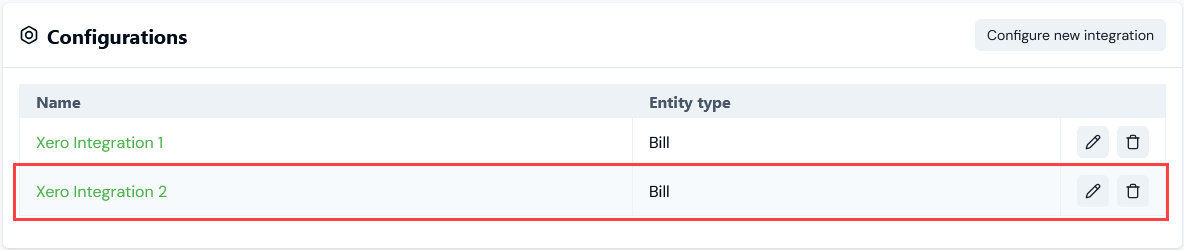
Select Create integration. You are returned to the Integrations>Xero page, where the integration is listed on the Configurations panel:
Setting Up Authentication for the Integration
When you’ve created a Xero integration, you can select an Integration Credential you’ve created for authentication allowing the integration to connect with your Xero system.To set up authentication for your m3ter - Xero integration:
Select m3sh. The Workflows page opens.
Select Integrations. The Integrations page opens.
Select Xero. The Integrations>Xero page opens.
On the Configurations panel, select the Name hotlink text of the Xero integration you want to set up authentication for. The Integration details page opens:
Notes:
A warning is shown that the integration is not yet connected to your Xero system.
The ID of the integration configuration is shown at the bottom of the Details card, and you can copy the ID directly to your clipboard.
Select Connect credential. A Select credential modal appears.
Select Confirm. The modal closes and on Integrations details the integration now shows as CONNECTED:
The Credential used to connect the integration is shown.
If at any time you want to disconnect the integration, select Disconnect credential.
If you want to use a different Credential for connecting the integration, select Change credential. The Select credential modal appears and you can select a different Credential.
Tip: Testing your Integration Setup? Your Xero integration is now available for use. However, it remains in Beta release and we strongly recommend you test the implementation in your m3ter Sandbox or QA environment before releasing it to your Production environment. See section 7. of our Terms of Service for Beta Usage.
Tip: Integrations API Calls? When you have set up your Xero integration, you can review and manage the integration using a full set of API Calls. See the Integrations section of our API Reference Docs.
{"docsConfig":{"theme":"aspen","$schema":"https://mintlify.com/docs.json","name":"m3ter Documentation","description":"Guides, learning resources and API reference for integrating with m3ter","colors":{"primary":"#4caf4c","dark":"#449d44"},"logo":{"light":"https://mintcdn.com/m3ter/t6C65JBQiQOFtjBy/images/m3ter-logo-blue-sf.svg?fit=max\u0026auto=format\u0026n=t6C65JBQiQOFtjBy\u0026q=85\u0026s=3928db28c84ec6950e43caf96e635d80","dark":"https://mintcdn.com/m3ter/t6C65JBQiQOFtjBy/images/m3ter-logo-white-sf.svg?fit=max\u0026auto=format\u0026n=t6C65JBQiQOFtjBy\u0026q=85\u0026s=a018cb782e49a2fbdd811276476d0605"},"favicon":"https://mintcdn.com/m3ter/T0RRts393DSUkWFc/favicon.svg?fit=max\u0026auto=format\u0026n=T0RRts393DSUkWFc\u0026q=85\u0026s=9492b54cc98df6775983b287b6f865cd","navbar":{"links":[{"href":"https://m3ter.freshdesk.com","label":"Support"},{"href":"https://console.m3ter.com","label":"Console"}],"primary":{"type":"button","label":"Schedule a demo","href":"https://www.m3ter.com/contact"}},"footer":{"socials":{"linkedin":"https://uk.linkedin.com/company/m3ter","x":"https://x.com/m3terHQ","github":"https://github.com/m3ter-com"},"links":[{"items":[{"label":"Website","href":"https://www.m3ter.com"},{"label":"Legal","href":"https://www.m3ter.com/legal"},{"label":"Security","href":"https://www.m3ter.com/security"},{"label":"Trust Center","href":"https://trust.m3ter.com"}]}]},"fonts":{"family":"Montserrat"},"icons":{"library":"lucide"},"styling":{"eyebrows":"breadcrumbs","latex":false},"integrations":{"ga4":{"measurementId":"G-V9C7TTPRQT"}},"contextual":{"options":["copy","view"],"display":"header"},"thumbnails":{"fonts":{"family":"Montserrat"}},"navigation":{"pages":[]}},"deployment":{"deploymentMetadataValue":{"subdomain":"m3ter","hasAudioNarration":false,"actualSubdomain":"m3ter","customDomains":["docs.m3ter.com"],"gitSource":{"type":"github","owner":"m3ter-com","repo":"m3ter-docs","deployBranch":"main","contentDirectory":"","isPrivate":true,"mountPath":"","label":""},"entitlements":{"AI_CHAT":{"status":"ENABLED"},"WEB_MCP":{"status":"ENABLED"},"NARRATION":{"status":"ENABLED"}},"buildId":"6afd7e9c7d9a0e231c56ca16","clientVersion":"0.0.4270","searchFilterCounts":[{"language":"default","tag":"Guides","count":402},{"language":"default","tag":"API Reference","count":397},{"language":"default","tag":"Endpoints","count":391},{"language":"default","tag":"Integrations","count":69},{"language":"default","tag":"m3sh Function Reference","count":66},{"language":"default","tag":"Synthetic functions","count":50},{"language":"default","tag":"m3ter","count":50},{"language":"default","tag":"m3sh","count":43},{"language":"default","tag":"End-Customer Accounts","count":27},{"language":"default","tag":"m3ter Connector for Salesforce","count":24}]},"assistantConfig":{"enableAskAiButton":true,"enableStarterQuestions":false,"enableAskAiSearchBar":false},"basePath":"","hasChatPermissions":true,"hasWebMcpPermissions":true,"toggles":[{"name":"kill-isr","enabled":true,"variant":{"name":"disabled","enabled":false,"feature_enabled":true},"impressionData":false},{"name":"custom-rbac-roles","enabled":true,"variant":{"name":"disabled","enabled":false,"feature_enabled":true},"impressionData":false},{"name":"agent-mintlify-slack","enabled":true,"variant":{"name":"disabled","enabled":false,"feature_enabled":true},"impressionData":false},{"name":"agent-integrations-settings","enabled":true,"variant":{"name":"disabled","enabled":false,"feature_enabled":true},"impressionData":false},{"name":"rbac-expansion","enabled":true,"variant":{"name":"disabled","enabled":false,"feature_enabled":true},"impressionData":false},{"name":"automations-pr-grouping","enabled":true,"variant":{"name":"disabled","enabled":false,"feature_enabled":true},"impressionData":false},{"name":"custom-prefix","enabled":true,"variant":{"name":"disabled","enabled":false,"feature_enabled":true},"impressionData":false},{"name":"analytics-v7","enabled":true,"variant":{"name":"disabled","enabled":false,"feature_enabled":true},"impressionData":false},{"name":"user-flows-analytics","enabled":true,"variant":{"name":"disabled","enabled":false,"feature_enabled":true},"impressionData":false},{"name":"no-publish-flow","enabled":true,"variant":{"name":"disabled","enabled":false,"feature_enabled":true},"impressionData":false},{"name":"workos-onboarding","enabled":true,"variant":{"name":"disabled","enabled":false,"feature_enabled":true},"impressionData":false},{"name":"snapshot-serving-live","enabled":true,"variant":{"name":"disabled","enabled":false,"feature_enabled":true},"impressionData":false},{"name":"stripTemperatureMiddleware","enabled":true,"variant":{"name":"disabled","enabled":false,"feature_enabled":true},"impressionData":false},{"name":"support-platform-pylon-zendesk","enabled":true,"variant":{"name":"disabled","enabled":false,"feature_enabled":true},"impressionData":false},{"name":"snapshot-serving","enabled":true,"variant":{"name":"disabled","enabled":false,"feature_enabled":true},"impressionData":false},{"name":"instant-rollback","enabled":true,"variant":{"name":"disabled","enabled":false,"feature_enabled":true},"impressionData":false},{"name":"granular-notifications-server","enabled":true,"variant":{"name":"disabled","enabled":false,"feature_enabled":true},"impressionData":false},{"name":"granular-notifications","enabled":true,"variant":{"name":"disabled","enabled":false,"feature_enabled":true},"impressionData":false},{"name":"automations-fable","enabled":true,"variant":{"name":"disabled","enabled":false,"feature_enabled":true},"impressionData":false},{"name":"fixed-ai-action-pricing","enabled":true,"variant":{"name":"disabled","enabled":false,"feature_enabled":true},"impressionData":false},{"name":"site-roles","enabled":true,"variant":{"name":"disabled","enabled":false,"feature_enabled":true},"impressionData":false},{"name":"automation-resolve-merge-conflict","enabled":true,"variant":{"name":"disabled","enabled":false,"feature_enabled":true},"impressionData":false},{"name":"scoped-publishing","enabled":true,"variant":{"name":"disabled","enabled":false,"feature_enabled":true},"impressionData":false},{"name":"mintql","enabled":true,"variant":{"name":"disabled","enabled":false,"feature_enabled":true},"impressionData":false},{"name":"page-level-analytics","enabled":true,"variant":{"name":"disabled","enabled":false,"feature_enabled":true},"impressionData":false},{"name":"editor-version-history-v2","enabled":true,"variant":{"name":"disabled","enabled":false,"feature_enabled":true},"impressionData":false},{"name":"billing-page-v2","enabled":true,"variant":{"name":"disabled","enabled":false,"feature_enabled":true},"impressionData":false},{"name":"full-page-search","enabled":true,"variant":{"name":"disabled","enabled":false,"feature_enabled":true},"impressionData":false},{"name":"workspace-projects","enabled":true,"variant":{"name":"disabled","enabled":false,"feature_enabled":true},"impressionData":false},{"name":"assistant-v5","enabled":true,"variant":{"name":"disabled","enabled":false,"feature_enabled":true},"impressionData":false},{"name":"fork-pr-previews","enabled":true,"variant":{"name":"disabled","enabled":false,"feature_enabled":true},"impressionData":false},{"name":"revalidation-jwt","enabled":true,"variant":{"name":"disabled","enabled":false,"feature_enabled":true},"impressionData":false},{"name":"workos-sso-scim","enabled":true,"variant":{"name":"disabled","enabled":false,"feature_enabled":true},"impressionData":false},{"name":"hobby-abuse-scan","enabled":true,"variant":{"name":"disabled","enabled":false,"feature_enabled":true},"impressionData":false},{"name":"dashboard-inbox","enabled":true,"variant":{"name":"disabled","enabled":false,"feature_enabled":true},"impressionData":false},{"name":"workos-signup","enabled":true,"variant":{"name":"disabled","enabled":false,"feature_enabled":true},"impressionData":false},{"name":"turbopuffer-dual-write","enabled":true,"variant":{"name":"disabled","enabled":false,"feature_enabled":true},"impressionData":false},{"name":"workos-enabled","enabled":true,"variant":{"name":"disabled","enabled":false,"feature_enabled":true},"impressionData":false},{"name":"approve-review-flow","enabled":true,"variant":{"name":"disabled","enabled":false,"feature_enabled":true},"impressionData":false},{"name":"editor-metadata","enabled":true,"variant":{"name":"disabled","enabled":false,"feature_enabled":true},"impressionData":false},{"name":"sso-setup-deadline-banner","enabled":true,"variant":{"name":"disabled","enabled":false,"feature_enabled":true},"impressionData":false},{"name":"turbopuffer-serve","enabled":true,"variant":{"name":"disabled","enabled":false,"feature_enabled":true},"impressionData":false},{"name":"live-agents","enabled":true,"variant":{"name":"disabled","enabled":false,"feature_enabled":true},"impressionData":false},{"name":"starter-pricing","enabled":true,"variant":{"name":"treatment","enabled":true,"payload":{"type":"string","value":"treatment"},"feature_enabled":true},"impressionData":false},{"name":"llms-txt-v2","enabled":true,"variant":{"name":"disabled","enabled":false,"feature_enabled":true},"impressionData":false},{"name":"wildcard-email-auth","enabled":true,"variant":{"name":"disabled","enabled":false,"feature_enabled":true},"impressionData":false}],"googleFontsInlined":true},"customCss":[]}
{"page":{"pagePath":"guides/integrations/setting-up-integrations/configuring-xero-integrations","slug":"/guides/integrations/setting-up-integrations/configuring-xero-integrations","pageMetadata":{"title":"Configuring Xero Integrations","description":null,"href":"/guides/integrations/setting-up-integrations/configuring-xero-integrations"},"pageType":"default","mdx":{"mdxSource":{"compiledSource":"\"use strict\";const{Fragment:_Fragment,jsx:_jsx,jsxs:_jsxs}=arguments[0];const{useMDXComponents:_provideComponents}=arguments[0];function _createMdxContent(props){const _components={a:`a`,code:`code`,em:`em`,li:`li`,ol:`ol`,p:`p`,strong:`strong`,ul:`ul`,..._provideComponents(),...props.components},{Heading,OptimizedImage,Tip,Warning}=_components;if(!Heading)_missingMdxReference(`Heading`,true);if(!OptimizedImage)_missingMdxReference(`OptimizedImage`,true);if(!Tip)_missingMdxReference(`Tip`,true);if(!Warning)_missingMdxReference(`Warning`,true);return _jsxs(_Fragment,{children:[_jsx(_components.p,{children:`You can define and manage integrations for sending your end customer Account Bills generated in m3ter outbound into your Xero system:`}),`\n`,_jsxs(_components.ul,{children:[`\n`,_jsxs(_components.li,{children:[`First, `,_jsx(_components.a,{href:`/guides/integrations/setting-up-integrations/configuring-stripe-integrations#creating-the-integration`,children:`create the integration`}),`.`]}),`\n`,_jsxs(_components.li,{children:[`Second, `,_jsx(_components.a,{href:`/guides/integrations/setting-up-integrations/configuring-stripe-integrations#setting-up-authentication-for-integration`,children:`set up authentication`}),` for the integration to connect with Xero.`]}),`\n`]}),`\n`,_jsxs(Warning,{children:[_jsx(_components.p,{children:_jsx(_components.strong,{children:`Important! Notes and Warnings:`})}),_jsxs(_components.ul,{children:[`\n`,_jsxs(_components.li,{children:[_jsx(_components.strong,{children:`Note: Xero Integration in Beta Release!`}),` Please note that the Xero integration is currently in beta release:`,`\n`,_jsxs(_components.ul,{children:[`\n`,_jsxs(_components.li,{children:[`See `,_jsx(_components.a,{href:`/guides/getting-started/feature-release-stages`,children:`Feature Release Stages`}),` for Beta release definition.`]}),`\n`,_jsx(_components.li,{children:`If you intend to implement this integration for your m3ter Organization, please contact m3ter Support or your m3ter contact person to discuss.`}),`\n`]}),`\n`]}),`\n`,_jsxs(_components.li,{children:[_jsx(_components.strong,{children:`Note: Accounting Products?`}),` Many line item types can be mapped to specific Accounting Products to serve your revenue recognition and accounting purposes. Where this is the case, the integration will use the assigned Accounting Products.`]}),`\n`,_jsxs(_components.li,{children:[_jsx(_components.strong,{children:`Note: Reviewing Integration Runs!`}),` When you’ve set up an integration with Xero for your Organization in your production environment, you can review details of the integration runs performed for the integration. See `,_jsx(_components.a,{href:`/guides/integrations/setting-up-integrations/reviewing-integration-run-details`,children:`Reviewing Integration Run Details`}),`.`]}),`\n`,_jsxs(_components.li,{children:[_jsx(_components.strong,{children:`Warning: High-Precision Values!`}),` The Xero system `,_jsx(_components.em,{children:`does not`}),` currently support high-precision values. Values with more than 2 decimal places of precision are rounded leading to inaccurate values. Please bear this in mind when pricing Product Plans and entering a price per unit, and when defining maximum decimal places for Currencies.`]}),`\n`]})]}),`\n`,_jsx(Heading,{level:`2`,id:`creating-the-integration`,children:`Creating the Integration`}),`\n`,_jsx(_components.p,{children:`You can quickly set up a Xero integration in the Console.`}),`\n`,_jsx(Tip,{children:_jsxs(_components.p,{children:[_jsx(_components.strong,{children:`Tip: Reviewing Integration Runs!`}),` When you’ve set up an integration with Xero for your Organization in your production environment, you can review details of the integration runs performed for the integration. See `,_jsx(_components.a,{href:`/guides/integrations/setting-up-integrations/reviewing-integration-run-details`,children:`Reviewing Integration Run Details`}),`.`]})}),`\n`,_jsx(_components.p,{children:_jsx(_components.strong,{children:`To define a m3ter - Xero integration:`})}),`\n`,_jsxs(_components.ol,{children:[`\n`,_jsxs(_components.li,{children:[`Select `,_jsx(_components.strong,{children:`m3sh`}),`:`]}),`\n`]}),`\n`,_jsx(OptimizedImage,{src:`https://mintcdn.com/m3ter/gg3zPcB5MVj--Cnq/images/m3shMainNav1.png?fit=max\u0026auto=format\u0026n=gg3zPcB5MVj--Cnq\u0026q=85\u0026s=c26ad71debe6cffcd46844fa558e0e6f`,alt:`M3sh Main Nav1`,title:`M3sh Main Nav1`,style:{width:`8%`},\"data-og-width\":`61`,width:`61`,\"data-og-height\":`64`,height:`64`,\"data-path\":`images/m3shMainNav1.png`,\"data-optimize\":`true`,\"data-opv\":`3`,srcset:`https://mintcdn.com/m3ter/gg3zPcB5MVj--Cnq/images/m3shMainNav1.png?w=280\u0026fit=max\u0026auto=format\u0026n=gg3zPcB5MVj--Cnq\u0026q=85\u0026s=fe3ac651321aa11df53b83b0fd230256 280w, https://mintcdn.com/m3ter/gg3zPcB5MVj--Cnq/images/m3shMainNav1.png?w=560\u0026fit=max\u0026auto=format\u0026n=gg3zPcB5MVj--Cnq\u0026q=85\u0026s=1f58ad93c04cdc3ed5cd3b76d4506472 560w, https://mintcdn.com/m3ter/gg3zPcB5MVj--Cnq/images/m3shMainNav1.png?w=840\u0026fit=max\u0026auto=format\u0026n=gg3zPcB5MVj--Cnq\u0026q=85\u0026s=517207d64345c42f2dc1dcde73630009 840w, https://mintcdn.com/m3ter/gg3zPcB5MVj--Cnq/images/m3shMainNav1.png?w=1100\u0026fit=max\u0026auto=format\u0026n=gg3zPcB5MVj--Cnq\u0026q=85\u0026s=d7887d92cf2fbee414d23c3870ebd40c 1100w, https://mintcdn.com/m3ter/gg3zPcB5MVj--Cnq/images/m3shMainNav1.png?w=1650\u0026fit=max\u0026auto=format\u0026n=gg3zPcB5MVj--Cnq\u0026q=85\u0026s=8f715eeb32d8670a864608e3c186de72 1650w, https://mintcdn.com/m3ter/gg3zPcB5MVj--Cnq/images/m3shMainNav1.png?w=2500\u0026fit=max\u0026auto=format\u0026n=gg3zPcB5MVj--Cnq\u0026q=85\u0026s=ae21cc3976cbf6a81e69ea0c9103a477 2500w`}),`\n`,_jsxs(_components.p,{children:[`The `,_jsx(_components.strong,{children:`Workflows`}),` page opens.`]}),`\n`,_jsxs(_components.ol,{start:`2`,children:[`\n`,_jsxs(_components.li,{children:[`Select `,_jsx(_components.strong,{children:`Integrations`}),`. The `,_jsx(_components.strong,{children:`Integrations`}),` page opens with `,_jsx(_components.strong,{children:`All`}),` selected by default.`]}),`\n`,_jsxs(_components.li,{children:[`Select `,_jsx(_components.strong,{children:`Xero`}),`:`]}),`\n`]}),`\n`,_jsx(OptimizedImage,{src:`https://mintcdn.com/m3ter/LVNrL_zy_uSM3For/images/IntegConfigs22E.png?fit=max\u0026auto=format\u0026n=LVNrL_zy_uSM3For\u0026q=85\u0026s=4c8b9f4409b75e2501d7b7dfe8ddda94`,alt:`Integ Configs22e`,title:`Integ Configs22e`,style:{width:`42%`},\"data-og-width\":`415`,width:`415`,\"data-og-height\":`321`,height:`321`,\"data-path\":`images/IntegConfigs22E.png`,\"data-optimize\":`true`,\"data-opv\":`3`,srcset:`https://mintcdn.com/m3ter/LVNrL_zy_uSM3For/images/IntegConfigs22E.png?w=280\u0026fit=max\u0026auto=format\u0026n=LVNrL_zy_uSM3For\u0026q=85\u0026s=b79ef363ec77c998fd222545410d0cd8 280w, https://mintcdn.com/m3ter/LVNrL_zy_uSM3For/images/IntegConfigs22E.png?w=560\u0026fit=max\u0026auto=format\u0026n=LVNrL_zy_uSM3For\u0026q=85\u0026s=b058aeb833ca3ca65727c4927f2b9476 560w, https://mintcdn.com/m3ter/LVNrL_zy_uSM3For/images/IntegConfigs22E.png?w=840\u0026fit=max\u0026auto=format\u0026n=LVNrL_zy_uSM3For\u0026q=85\u0026s=eb70c77620855db1a261c55c4b950b98 840w, https://mintcdn.com/m3ter/LVNrL_zy_uSM3For/images/IntegConfigs22E.png?w=1100\u0026fit=max\u0026auto=format\u0026n=LVNrL_zy_uSM3For\u0026q=85\u0026s=3b5f85e79acf04f52750486b11096db0 1100w, https://mintcdn.com/m3ter/LVNrL_zy_uSM3For/images/IntegConfigs22E.png?w=1650\u0026fit=max\u0026auto=format\u0026n=LVNrL_zy_uSM3For\u0026q=85\u0026s=d3b9ee7f70c165134f3c76395b629037 1650w, https://mintcdn.com/m3ter/LVNrL_zy_uSM3For/images/IntegConfigs22E.png?w=2500\u0026fit=max\u0026auto=format\u0026n=LVNrL_zy_uSM3For\u0026q=85\u0026s=634f325722a7c2820998df3777b3686e 2500w`}),`\n`,_jsxs(_components.p,{children:[`The `,_jsx(_components.strong,{children:`m3sh / Integrations>Xero`}),` page opens.`]}),`\n`,_jsxs(_components.ol,{start:`4`,children:[`\n`,_jsxs(_components.li,{children:[`On the `,_jsx(_components.strong,{children:`Configurations`}),` panel, select `,_jsx(_components.strong,{children:`Configure new integration>Configure bill integration`}),`:`]}),`\n`]}),`\n`,_jsx(OptimizedImage,{src:`https://mintcdn.com/m3ter/_WrggqO-h-Q_N-7Q/images/IntegConfigs32A.png?fit=max\u0026auto=format\u0026n=_WrggqO-h-Q_N-7Q\u0026q=85\u0026s=125bdac170bc9de46a55bda3c52eff43`,alt:`Integ Configs32a`,\"data-og-width\":`1282`,width:`1282`,\"data-og-height\":`419`,height:`419`,\"data-path\":`images/IntegConfigs32A.png`,\"data-optimize\":`true`,\"data-opv\":`3`,srcset:`https://mintcdn.com/m3ter/_WrggqO-h-Q_N-7Q/images/IntegConfigs32A.png?w=280\u0026fit=max\u0026auto=format\u0026n=_WrggqO-h-Q_N-7Q\u0026q=85\u0026s=e6209cbc6826e016995400b5e28d6158 280w, https://mintcdn.com/m3ter/_WrggqO-h-Q_N-7Q/images/IntegConfigs32A.png?w=560\u0026fit=max\u0026auto=format\u0026n=_WrggqO-h-Q_N-7Q\u0026q=85\u0026s=8665086a6865217e3829c9f2b16b8211 560w, https://mintcdn.com/m3ter/_WrggqO-h-Q_N-7Q/images/IntegConfigs32A.png?w=840\u0026fit=max\u0026auto=format\u0026n=_WrggqO-h-Q_N-7Q\u0026q=85\u0026s=6ddff0b5d33610bd3dc2dfb354464c65 840w, https://mintcdn.com/m3ter/_WrggqO-h-Q_N-7Q/images/IntegConfigs32A.png?w=1100\u0026fit=max\u0026auto=format\u0026n=_WrggqO-h-Q_N-7Q\u0026q=85\u0026s=8b9c3f6b618722975fbab6143482daad 1100w, https://mintcdn.com/m3ter/_WrggqO-h-Q_N-7Q/images/IntegConfigs32A.png?w=1650\u0026fit=max\u0026auto=format\u0026n=_WrggqO-h-Q_N-7Q\u0026q=85\u0026s=ffacf91919d37b386360e7497175e57c 1650w, https://mintcdn.com/m3ter/_WrggqO-h-Q_N-7Q/images/IntegConfigs32A.png?w=2500\u0026fit=max\u0026auto=format\u0026n=_WrggqO-h-Q_N-7Q\u0026q=85\u0026s=0ef35e77209634652fe913ad1d4a0df4 2500w`}),`\n`,_jsxs(_components.p,{children:[`The `,_jsx(_components.strong,{children:`Create`}),` page opens and the `,_jsx(_components.strong,{children:`Entity type`}),` - `,_jsx(_components.strong,{children:`Bill`}),` and `,_jsx(_components.strong,{children:`External system`}),` - `,_jsx(_components.strong,{children:`Xero`}),` are shown at the top of the page.`]}),`\n`,_jsxs(_components.ol,{start:`5`,children:[`\n`,_jsxs(_components.li,{children:[`Use the `,_jsx(_components.strong,{children:`Global configuration`}),` panel to:`]}),`\n`]}),`\n`,_jsxs(_components.ul,{children:[`\n`,_jsxs(_components.li,{children:[`Enter a `,_jsx(_components.strong,{children:`Name`}),` for the Integration. This is required and is useful if you intend to create multiple Integrations for the same External system/Entity type and need to clearly differentiate them.`]}),`\n`,_jsxs(_components.li,{children:[`Select the Accounts you want the integration to apply to:`,`\n`,_jsxs(_components.ul,{children:[`\n`,_jsxs(_components.li,{children:[_jsx(_components.strong,{children:`Account ids.`}),` Select the Accounts you want to include - all selected Accounts are treated as `,_jsx(_components.em,{children:`allowed`}),` for the integration.`]}),`\n`,_jsxs(_components.li,{children:[_jsx(_components.strong,{children:`Restricted account ids.`}),` Select the Accounts you want to exclude - all selected Accounts are treated as `,_jsx(_components.em,{children:`disallowed`}),` for the integration.`]}),`\n`]}),`\n`]}),`\n`]}),`\n`,_jsxs(Tip,{children:[_jsx(_components.p,{children:_jsx(_components.strong,{children:`Notes:`})}),_jsxs(_components.ul,{children:[`\n`,_jsxs(_components.li,{children:[`If you want to include `,_jsx(_components.em,{children:`all Accounts`}),` in the integration, leave both `,_jsx(_components.strong,{children:`Accounts ids`}),` and `,_jsx(_components.strong,{children:`Restricted account ids`}),` empty.`]}),`\n`,_jsxs(_components.li,{children:[`Any filtering by `,_jsx(_components.strong,{children:`Account ids`}),` you define using these settings to control which Accounts the integration runs for will be `,_jsx(_components.em,{children:`in addition`}),` to any filtering you define using the `,_jsx(_components.strong,{children:`Account filter`}),` option - see the following step for `,_jsx(_components.strong,{children:`Entity Configuration`}),` options.`]}),`\n`]})]}),`\n`,_jsxs(_components.ul,{children:[`\n`,_jsxs(_components.li,{children:[`Select Users for Email notifications if disabled:`,`\n`,_jsxs(_components.ul,{children:[`\n`,_jsxs(_components.li,{children:[_jsx(_components.strong,{children:`Integration disabled notification users`}),`. Select Organization Users you want to receive an Email notification if the integration is automatically disabled.`]}),`\n`]}),`\n`]}),`\n`]}),`\n`,_jsxs(Tip,{children:[_jsx(_components.p,{children:_jsx(_components.strong,{children:`Notes:`})}),_jsxs(_components.ul,{children:[`\n`,_jsxs(_components.li,{children:[`An integration is automatically disabled if there have been 20 successive previous error Event responses to earlier attempts to run the integration. See `,_jsx(_components.a,{href:`/guides/integrations/setting-up-integrations/reviewing-and-resolving-integration-events`,children:`Reviewing and Resolving Integration Events`}),` for more details.`]}),`\n`,_jsxs(_components.li,{children:[`If you select Organization Users to receive an Email notification when the integration is automatically disabled, their User id will be listed under `,_jsx(_components.strong,{children:`Configuration Data`}),` on the `,_jsx(_components.strong,{children:`Integration Details`}),` page.`]}),`\n`]})]}),`\n`,_jsxs(_components.ol,{start:`6`,children:[`\n`,_jsxs(_components.li,{children:[`Use the `,_jsx(_components.strong,{children:`Entity configuration`}),` panel to configure the m3ter entity you will be synchronizing with for the integration. In the case of an outbound Bill integration, this entity will be the Bill generated for a customer Account in m3ter:`]}),`\n`]}),`\n`,_jsxs(_components.ul,{children:[`\n`,_jsxs(_components.li,{children:[_jsx(_components.strong,{children:`Only send bill on approval.`}),` Enable this if you only want Bills to be sent when they have been approved. If disabled, the Bill will be sent every time it is regenerated. Default is disabled. Note that:`,`\n`,_jsxs(_components.ul,{children:[`\n`,_jsx(_components.li,{children:`The frequency of Bills sent will depend on the billing frequency defined for the Account Plan attached to the Account - such as daily/weekly/monthly/annually.`}),`\n`,_jsx(_components.li,{children:`If an Account has a Prepayment on it and the billing for Prepayment fees is configured to run on a customized schedule, Bills will be sent when scheduled Bills are generated.`}),`\n`,_jsx(_components.li,{children:`If a Bill is manually recalculated the updated Bill will be sent.`}),`\n`,_jsxs(_components.li,{children:[`If you enable this, then the integration will not run for `,_jsx(_components.em,{children:`all Bill Jobs`}),`.`]}),`\n`]}),`\n`]}),`\n`,_jsxs(_components.li,{children:[_jsx(_components.strong,{children:`Use external mapping account code.`}),` Enable this if you want the integration to look in the External Mappings for the Account identifier code, which means you can use an external Id. If this is disabled, the m3ter Account Id is used. Default is disabled.`]}),`\n`,_jsxs(_components.li,{children:[_jsx(_components.strong,{children:`Excluded line item types.`}),` Optionally, filter the Bill line item types you send to the destination system. For example, only send charges or credits and exclude all other line item types.`,`\n`,_jsxs(_components.ul,{children:[`\n`,_jsxs(_components.li,{children:[`For details of line item types, see `,_jsx(_components.a,{href:`/guides/billing-and-usage-data/running-viewing-and-managing-bills/bill-line-item-types`,children:`Bill Line Item Types`}),`.`]}),`\n`]}),`\n`]}),`\n`,_jsxs(_components.li,{children:[_jsx(_components.strong,{children:`Account filter`}),`. Optionally, enter an expression that is run on the Account to determine whether or not the integration includes the Account. You can use this setting if you have multiple destinations for sending Bills outbound to your Xero system. For example:`,`\n`,_jsxs(_components.ul,{children:[`\n`,_jsx(_components.li,{children:_jsx(_components.code,{children:`\"customFields != null AND customFields.country == \"UK\"\"`})}),`\n`,_jsxs(_components.li,{children:[`In this example, the integration will include an Account `,_jsx(_components.em,{children:`only if`}),` you have created a Custom Field for the Account called `,_jsx(_components.em,{children:`country`}),` and given the field a value of `,_jsx(_components.em,{children:`UK`}),`.`]}),`\n`]}),`\n`]}),`\n`]}),`\n`,_jsxs(Tip,{children:[_jsx(_components.p,{children:_jsx(_components.strong,{children:`Notes:`})}),_jsxs(_components.ul,{children:[`\n`,_jsxs(_components.li,{children:[_jsx(_components.strong,{children:`Other Account fields for Account filter expression?`}),` You can reference other fields on the Account object in the `,_jsx(_components.strong,{children:`Account filter`}),` expression. For details and another example, see `,_jsx(_components.a,{href:`/guides/integrations/setting-up-integrations/managing-multiple-destinations-for-integrations`,children:`Managing Multiple Third Party Destinations for Integrations`}),`.`]}),`\n`,_jsxs(_components.li,{children:[_jsx(_components.strong,{children:`Additional filtering?`}),` Any global filtering you define using the settings to include/exclude Accounts for integration runs by `,_jsx(_components.strong,{children:`Account ids`}),` will be `,_jsx(_components.em,{children:`in addition`}),` to any filtering you define using the `,_jsx(_components.strong,{children:`Account filter`}),` option - see the previous step for `,_jsx(_components.strong,{children:`Global Configuration`}),`.`]}),`\n`]})]}),`\n`,_jsxs(_components.ul,{children:[`\n`,_jsxs(_components.li,{children:[_jsx(_components.strong,{children:`Enforce external mappings for config`}),`. Optionally enable this if you want the integration to use only those external mappings specified as being for this configuration.`,`\n`,_jsxs(_components.ul,{children:[`\n`,_jsxs(_components.li,{children:[`Use this setting if you want to set up multiple integrations for the same external system. You can then create separate external mappings for each integration from the details page of each integration, and these external mappings become `,_jsx(_components.strong,{children:`Linked external mappings`}),` for the specific integration. See `,_jsx(_components.a,{href:`/guides/integrations/setting-up-integrations/creating-and-managing-external-mappings#creating-linked-external-mappings`,children:`Creating Linked External Mappings`}),`.`]}),`\n`]}),`\n`]}),`\n`,_jsxs(_components.li,{children:[_jsx(_components.strong,{children:`Excluded products`}),`. Optionally filter the Bill line items you send to the external system. Any line items associated with the selected Products will be be excluded when the integration runs.`,`\n`,_jsxs(_components.ul,{children:[`\n`,_jsxs(_components.li,{children:[`Note that if line items are mapped to a specific `,_jsx(_components.em,{children:`Accounting Products`}),`, these will be used for filtering to exclude line items.`]}),`\n`]}),`\n`]}),`\n`,_jsxs(_components.li,{children:[_jsx(_components.strong,{children:`Excluded aggregations`}),`. Optionally filter the Bill line items you send to the external system. Any line items associated with the selected Aggregations will be be excluded when the integration runs.`]}),`\n`]}),`\n`,_jsxs(_components.ol,{start:`7`,children:[`\n`,_jsxs(_components.li,{children:[`Use the `,_jsx(_components.strong,{children:`External system configuration`}),` panel to enter the settings specific to the external system:`]}),`\n`]}),`\n`,_jsxs(_components.ul,{children:[`\n`,_jsxs(_components.li,{children:[_jsx(_components.strong,{children:`Split usage line items`}),`. This setting determines how m3ter will create usage invoice items in Xero. Xero items can be mapped to an individual usage pricing band or to a product:`,`\n`,_jsxs(_components.ul,{children:[`\n`,_jsxs(_components.li,{children:[_jsx(_components.strong,{children:`Item per usage band`}),`.`]}),`\n`,_jsxs(_components.li,{children:[_jsx(_components.strong,{children:`Item per product`}),`.`]}),`\n`]}),`\n`]}),`\n`,_jsxs(_components.li,{children:[_jsx(_components.strong,{children:`Sort line items by`}),`. Optionally, select a property to sort line items by before they are sent out to the external system. Three options:`,`\n`,_jsxs(_components.ul,{children:[`\n`,_jsx(_components.li,{children:_jsx(_components.strong,{children:`None`})}),`\n`,_jsx(_components.li,{children:_jsx(_components.strong,{children:`Subtotal`})}),`\n`,_jsx(_components.li,{children:_jsx(_components.strong,{children:`Aggregation ID`})}),`\n`]}),`\n`]}),`\n`,_jsxs(_components.li,{children:[_jsx(_components.strong,{children:`Xero describe pricing bands`}),`. If you have selected the `,_jsx(_components.strong,{children:`Item per product`}),` option for `,_jsx(_components.strong,{children:`Split usage line items`}),`, then optionally you can enable this switch. If enabled, the integration will add pricing band information to line item descriptions.`]}),`\n`,_jsxs(_components.li,{children:[_jsx(_components.strong,{children:`Strict line item mapping`}),`. Optionally, enable this switch if you want the integration to map `,_jsx(_components.strong,{children:`Description`}),`, `,_jsx(_components.strong,{children:`Quantity`}),`, and `,_jsx(_components.strong,{children:`Unit price`}),` line item values directly to Xero invoice items.`]}),`\n`]}),`\n`,_jsx(Warning,{children:_jsxs(_components.p,{children:[_jsx(_components.strong,{children:`Possible rounding errors!`}),` If you enable `,_jsx(_components.strong,{children:`Strict line item mapping`}),`, this might result in rounding errors for the originating `,_jsx(_components.strong,{children:`Quantity`}),` or `,_jsx(_components.strong,{children:`Unit price`}),` values being mapped directly.`]})}),`\n`,_jsxs(_components.ol,{start:`8`,children:[`\n`,_jsxs(_components.li,{children:[`Select `,_jsx(_components.strong,{children:`Create integration`}),`. You are returned to the `,_jsx(_components.strong,{children:`Integrations>Xero`}),` page, where the integration is listed on the `,_jsx(_components.strong,{children:`Configurations`}),` panel:`]}),`\n`]}),`\n`,_jsx(OptimizedImage,{src:`https://mintcdn.com/m3ter/mC89AON4X0ckKhXt/images/1750080905-xerointegs1.png?fit=max\u0026auto=format\u0026n=mC89AON4X0ckKhXt\u0026q=85\u0026s=95f45ea25e6057edd481cd6faf299fc6`,style:{maxWidth:`min(850px, 100%)`},\"data-og-width\":`1184`,width:`1184`,\"data-og-height\":`250`,height:`250`,\"data-path\":`images/1750080905-xerointegs1.png`,\"data-optimize\":`true`,\"data-opv\":`3`,srcset:`https://mintcdn.com/m3ter/mC89AON4X0ckKhXt/images/1750080905-xerointegs1.png?w=280\u0026fit=max\u0026auto=format\u0026n=mC89AON4X0ckKhXt\u0026q=85\u0026s=42ad3b7d3673ed9861adcfe69a3d4ab8 280w, https://mintcdn.com/m3ter/mC89AON4X0ckKhXt/images/1750080905-xerointegs1.png?w=560\u0026fit=max\u0026auto=format\u0026n=mC89AON4X0ckKhXt\u0026q=85\u0026s=a8ba404a7497b1710a57f102b0146249 560w, https://mintcdn.com/m3ter/mC89AON4X0ckKhXt/images/1750080905-xerointegs1.png?w=840\u0026fit=max\u0026auto=format\u0026n=mC89AON4X0ckKhXt\u0026q=85\u0026s=ecb88f81011455a91947c6542f965006 840w, https://mintcdn.com/m3ter/mC89AON4X0ckKhXt/images/1750080905-xerointegs1.png?w=1100\u0026fit=max\u0026auto=format\u0026n=mC89AON4X0ckKhXt\u0026q=85\u0026s=004886a595cd7f50743268d0c371219b 1100w, https://mintcdn.com/m3ter/mC89AON4X0ckKhXt/images/1750080905-xerointegs1.png?w=1650\u0026fit=max\u0026auto=format\u0026n=mC89AON4X0ckKhXt\u0026q=85\u0026s=a6bf3863a3ee2879a7b3c12b19a835d6 1650w, https://mintcdn.com/m3ter/mC89AON4X0ckKhXt/images/1750080905-xerointegs1.png?w=2500\u0026fit=max\u0026auto=format\u0026n=mC89AON4X0ckKhXt\u0026q=85\u0026s=476f94d17ca6e70929458afd4fa25df2 2500w`}),`\n`,_jsx(Heading,{level:`2`,id:`setting-up-authentication-for-the-integration`,children:`Setting Up Authentication for the Integration`}),`\n`,_jsx(_components.p,{children:`When you’ve created a Xero integration, you can select an Integration Credential you’ve created for authentication allowing the integration to connect with your Xero system.`}),`\n`,_jsx(_components.p,{children:_jsx(_components.strong,{children:`To set up authentication for your m3ter - Xero integration:`})}),`\n`,_jsxs(_components.ol,{children:[`\n`,_jsxs(_components.li,{children:[`Select `,_jsx(_components.strong,{children:`m3sh`}),`. The `,_jsx(_components.strong,{children:`Workflows`}),` page opens.`]}),`\n`,_jsxs(_components.li,{children:[`Select `,_jsx(_components.strong,{children:`Integrations`}),`. The `,_jsx(_components.strong,{children:`Integrations`}),` page opens.`]}),`\n`,_jsxs(_components.li,{children:[`Select `,_jsx(_components.strong,{children:`Xero`}),`. The `,_jsx(_components.strong,{children:`Integrations>Xero`}),` page opens.`]}),`\n`,_jsxs(_components.li,{children:[`On the `,_jsx(_components.strong,{children:`Configurations`}),` panel, select the `,_jsx(_components.strong,{children:`Name`}),` hotlink text of the Xero integration you want to set up authentication for. The `,_jsx(_components.strong,{children:`Integration details`}),` page opens:`]}),`\n`]}),`\n`,_jsx(OptimizedImage,{src:`https://mintcdn.com/m3ter/_WrggqO-h-Q_N-7Q/images/IntegConfigs46A.png?fit=max\u0026auto=format\u0026n=_WrggqO-h-Q_N-7Q\u0026q=85\u0026s=3bd797d33dd5d1ad203fabac8b68f996`,alt:`Integ Configs46a`,\"data-og-width\":`1259`,width:`1259`,\"data-og-height\":`684`,height:`684`,\"data-path\":`images/IntegConfigs46A.png`,\"data-optimize\":`true`,\"data-opv\":`3`,srcset:`https://mintcdn.com/m3ter/_WrggqO-h-Q_N-7Q/images/IntegConfigs46A.png?w=280\u0026fit=max\u0026auto=format\u0026n=_WrggqO-h-Q_N-7Q\u0026q=85\u0026s=b9717277c5446a5de730f899762be48b 280w, https://mintcdn.com/m3ter/_WrggqO-h-Q_N-7Q/images/IntegConfigs46A.png?w=560\u0026fit=max\u0026auto=format\u0026n=_WrggqO-h-Q_N-7Q\u0026q=85\u0026s=dc5078616885f9f9c3ce84f1965de158 560w, https://mintcdn.com/m3ter/_WrggqO-h-Q_N-7Q/images/IntegConfigs46A.png?w=840\u0026fit=max\u0026auto=format\u0026n=_WrggqO-h-Q_N-7Q\u0026q=85\u0026s=21f678e37c4b117c14aae390c5efda49 840w, https://mintcdn.com/m3ter/_WrggqO-h-Q_N-7Q/images/IntegConfigs46A.png?w=1100\u0026fit=max\u0026auto=format\u0026n=_WrggqO-h-Q_N-7Q\u0026q=85\u0026s=23e555e113d4c52ae1d1631cfbd89303 1100w, https://mintcdn.com/m3ter/_WrggqO-h-Q_N-7Q/images/IntegConfigs46A.png?w=1650\u0026fit=max\u0026auto=format\u0026n=_WrggqO-h-Q_N-7Q\u0026q=85\u0026s=2e677296c33e1a4363845de8c60ea8d0 1650w, https://mintcdn.com/m3ter/_WrggqO-h-Q_N-7Q/images/IntegConfigs46A.png?w=2500\u0026fit=max\u0026auto=format\u0026n=_WrggqO-h-Q_N-7Q\u0026q=85\u0026s=1dcd099df6077f9b508dc9726f4dc073 2500w`}),`\n`,_jsxs(_components.ul,{children:[`\n`,_jsxs(_components.li,{children:[`Notes:`,`\n`,_jsxs(_components.ul,{children:[`\n`,_jsx(_components.li,{children:`A warning is shown that the integration is not yet connected to your Xero system.`}),`\n`,_jsxs(_components.li,{children:[`The `,_jsx(_components.strong,{children:`ID`}),` of the integration configuration is shown at the bottom of the `,_jsx(_components.strong,{children:`Details`}),` card, and you can copy the `,_jsx(_components.strong,{children:`ID`}),` directly to your clipboard.`]}),`\n`]}),`\n`]}),`\n`]}),`\n`,_jsxs(_components.ol,{start:`5`,children:[`\n`,_jsxs(_components.li,{children:[`Select `,_jsx(_components.strong,{children:`Connect credential`}),`. A `,_jsx(_components.strong,{children:`Select credential`}),` modal appears.`]}),`\n`,_jsxs(_components.li,{children:[`Select a Credential you created earlier and want to use to authenticate the integration with Xero. See `,_jsx(_components.a,{href:`/guides/integrations/setting-up-integrations/_managing-integration-credentials-legacy/creating-xero-integration-credentials`,children:`Creating Xero Integration Credentials`}),`.`]}),`\n`,_jsxs(_components.li,{children:[`Select `,_jsx(_components.strong,{children:`Confirm`}),`. The modal closes and on `,_jsx(_components.strong,{children:`Integrations details`}),` the integration now shows as `,_jsx(_components.strong,{children:`CONNECTED`}),`:`]}),`\n`]}),`\n`,_jsx(OptimizedImage,{src:`https://mintcdn.com/m3ter/1PY-jTfc-k-63E1k/images/XeroCredAdded2A.png?fit=max\u0026auto=format\u0026n=1PY-jTfc-k-63E1k\u0026q=85\u0026s=45a2391d55d7b48322baeed37a18229d`,alt:`Xero Cred Added2a`,\"data-og-width\":`1173`,width:`1173`,\"data-og-height\":`393`,height:`393`,\"data-path\":`images/XeroCredAdded2A.png`,\"data-optimize\":`true`,\"data-opv\":`3`,srcset:`https://mintcdn.com/m3ter/1PY-jTfc-k-63E1k/images/XeroCredAdded2A.png?w=280\u0026fit=max\u0026auto=format\u0026n=1PY-jTfc-k-63E1k\u0026q=85\u0026s=9f95a248e72a6ef92c4b8d63c2e6f63b 280w, https://mintcdn.com/m3ter/1PY-jTfc-k-63E1k/images/XeroCredAdded2A.png?w=560\u0026fit=max\u0026auto=format\u0026n=1PY-jTfc-k-63E1k\u0026q=85\u0026s=9122ebcdc138a5d93c1e99ea38d036af 560w, https://mintcdn.com/m3ter/1PY-jTfc-k-63E1k/images/XeroCredAdded2A.png?w=840\u0026fit=max\u0026auto=format\u0026n=1PY-jTfc-k-63E1k\u0026q=85\u0026s=5e3da711b5a19d95623045f4c5435580 840w, https://mintcdn.com/m3ter/1PY-jTfc-k-63E1k/images/XeroCredAdded2A.png?w=1100\u0026fit=max\u0026auto=format\u0026n=1PY-jTfc-k-63E1k\u0026q=85\u0026s=4e9a351458c7433d6346027450d77dfc 1100w, https://mintcdn.com/m3ter/1PY-jTfc-k-63E1k/images/XeroCredAdded2A.png?w=1650\u0026fit=max\u0026auto=format\u0026n=1PY-jTfc-k-63E1k\u0026q=85\u0026s=2357aa85e288b89b0b26633b0cfc5b4f 1650w, https://mintcdn.com/m3ter/1PY-jTfc-k-63E1k/images/XeroCredAdded2A.png?w=2500\u0026fit=max\u0026auto=format\u0026n=1PY-jTfc-k-63E1k\u0026q=85\u0026s=b1107c8cba28613c70b6ab4b9c2353ab 2500w`}),`\n`,_jsxs(_components.ul,{children:[`\n`,_jsx(_components.li,{children:`The Credential used to connect the integration is shown.`}),`\n`,_jsxs(_components.li,{children:[`If at any time you want to disconnect the integration, select `,_jsx(_components.strong,{children:`Disconnect credential`}),`.`]}),`\n`,_jsxs(_components.li,{children:[`If you want to use a different Credential for connecting the integration, select `,_jsx(_components.strong,{children:`Change credential`}),`. The `,_jsx(_components.strong,{children:`Select credential`}),` modal appears and you can select a different Credential.`]}),`\n`]}),`\n`,_jsx(Tip,{children:_jsxs(_components.p,{children:[_jsx(_components.strong,{children:`Tip: Testing your Integration Setup?`}),` Your Xero integration is now available for use. However, it remains in Beta release and we strongly recommend you test the implementation in your m3ter Sandbox or QA environment before releasing it to your Production environment. See section 7. of our `,_jsx(_components.a,{href:`https://www.m3ter.com/docs/legal/terms-of-service`,children:`Terms of Service`}),` for Beta Usage.`]})}),`\n`,_jsx(Tip,{children:_jsxs(_components.p,{children:[_jsx(_components.strong,{children:`Tip: Integrations API Calls?`}),` When you have set up your Xero integration, you can review and manage the integration using a full set of API Calls. See the `,_jsx(_components.a,{href:`/api/integrations/introduction`,children:`Integrations section`}),` of our API Reference Docs.`]})})]})}function MDXContent(props={}){const{wrapper:MDXLayout}={..._provideComponents(),...props.components};return MDXLayout?_jsx(MDXLayout,{...props,children:_jsx(_createMdxContent,{...props})}):_createMdxContent(props)}return{default:MDXContent};function _missingMdxReference(id,component){throw new Error(`Expected `+(component?`component`:`object`)+\" `\"+id+\"` to be defined: you likely forgot to import, pass, or provide it.\")}","frontmatter":{},"scope":{"config":{},"pageMetadata":{"title":"Configuring Xero Integrations","description":null,"href":"/guides/integrations/setting-up-integrations/configuring-xero-integrations"}}},"mdxSourceWithNoJs":null},"mdxExtracts":{"tableOfContents":[{"title":"Creating the Integration","slug":"creating-the-integration","depth":2,"children":[]},{"title":"Setting Up Authentication for the Integration","slug":"setting-up-authentication-for-the-integration","depth":2,"children":[]}],"codeExamples":{}},"jsLinks":[],"subdomain":"m3ter","siteName":"m3ter Documentation","title":"Configuring Xero Integrations - m3ter Documentation","navMaps":{"firstHrefInVersion":{},"firstHrefInLanguage":{}},"lastModified":"2026-11-12T10:33:55.903Z","originalFileLocation":"guides/integrations/setting-up-integrations/configuring-xero-integrations.mdx"},"headHtml":"\u003cscript data-mint-head>(function(){var d=document.documentElement,p=null;if(!p){try{p=localStorage.getItem(\"isDarkMode\")}catch(e){}if(p==='true')p='dark';else if(p==='false')p='light';if(p!=='light'\u0026\u0026p!=='dark'\u0026\u0026p!=='system')p=\"system\"}var r=p==='system'?(matchMedia(\"(prefers-color-scheme: dark)\").matches?'dark':'light'):p;d.classList.remove(r==='dark'?'light':'dark');d.classList.add(r);d.setAttribute(\"data-theme-preference\",p)})();\u003c/script>\u003cmeta data-mint-head name=\"application-name\" content=\"m3ter Documentation\">\u003cmeta data-mint-head name=\"generator\" content=\"Mintlify\">\u003clink data-mint-head rel=\"icon\" type=\"image/png\" sizes=\"192x192\" href=\"/mintlify-assets/_mintlify/favicons/m3ter/zwvZvZyvpa8TKV7c/_generated/favicon/android-chrome-192x192.png\" media=\"(prefers-color-scheme: light)\">\u003clink data-mint-head rel=\"apple-touch-icon\" type=\"image/png\" sizes=\"180x180\" href=\"/mintlify-assets/_mintlify/favicons/m3ter/zwvZvZyvpa8TKV7c/_generated/favicon/apple-touch-icon.png\">\u003clink data-mint-head rel=\"icon\" type=\"image/png\" sizes=\"16x16\" href=\"/mintlify-assets/_mintlify/favicons/m3ter/zwvZvZyvpa8TKV7c/_generated/favicon/favicon-16x16.png\" media=\"(prefers-color-scheme: light)\">\u003clink data-mint-head rel=\"icon\" type=\"image/png\" sizes=\"32x32\" href=\"/mintlify-assets/_mintlify/favicons/m3ter/zwvZvZyvpa8TKV7c/_generated/favicon/favicon-32x32.png\" media=\"(prefers-color-scheme: light)\">\u003clink data-mint-head rel=\"shortcut icon\" type=\"image/x-icon\" href=\"/mintlify-assets/_mintlify/favicons/m3ter/zwvZvZyvpa8TKV7c/_generated/favicon/favicon.ico\" media=\"(prefers-color-scheme: light)\">\u003clink data-mint-head rel=\"icon\" type=\"image/png\" sizes=\"192x192\" href=\"/mintlify-assets/_mintlify/favicons/m3ter/zwvZvZyvpa8TKV7c/_generated/favicon-dark/android-chrome-192x192.png\" media=\"(prefers-color-scheme: dark)\">\u003clink data-mint-head rel=\"icon\" type=\"image/png\" sizes=\"16x16\" href=\"/mintlify-assets/_mintlify/favicons/m3ter/zwvZvZyvpa8TKV7c/_generated/favicon-dark/favicon-16x16.png\" media=\"(prefers-color-scheme: dark)\">\u003clink data-mint-head rel=\"icon\" type=\"image/png\" sizes=\"32x32\" href=\"/mintlify-assets/_mintlify/favicons/m3ter/zwvZvZyvpa8TKV7c/_generated/favicon-dark/favicon-32x32.png\" media=\"(prefers-color-scheme: dark)\">\u003clink data-mint-head rel=\"shortcut icon\" type=\"image/x-icon\" href=\"/mintlify-assets/_mintlify/favicons/m3ter/zwvZvZyvpa8TKV7c/_generated/favicon-dark/favicon.ico\" media=\"(prefers-color-scheme: dark)\">\u003cmeta data-mint-head property=\"og:title\" content=\"Configuring Xero Integrations - m3ter Documentation\">\u003cmeta data-mint-head property=\"og:site_name\" content=\"m3ter Documentation\">\u003cmeta data-mint-head property=\"og:url\" content=\"https://docs.m3ter.com/guides/integrations/setting-up-integrations/configuring-xero-integrations\">\u003cmeta data-mint-head property=\"og:type\" content=\"website\">\u003cmeta data-mint-head property=\"og:image\" content=\"https://m3ter.mintlify.site/_mintlify/api/og/v2?division=Setting+Up+and+Managing+Integrations\u0026amp;title=Configuring+Xero+Integrations\u0026amp;theme=f65f867c9d6db06823eaf387\u0026amp;signature=157bd250b2f8389262890cd8ecc8c311afc366bb04b9a8e876d721ca39270129\">\u003cmeta data-mint-head property=\"og:image:width\" content=\"1200\">\u003cmeta data-mint-head property=\"og:image:height\" content=\"630\">\u003cmeta data-mint-head name=\"twitter:card\" content=\"summary_large_image\">\u003cmeta data-mint-head name=\"twitter:title\" content=\"Configuring Xero Integrations - m3ter Documentation\">\u003cmeta data-mint-head name=\"twitter:image\" content=\"https://m3ter.mintlify.site/_mintlify/api/og/v2?division=Setting+Up+and+Managing+Integrations\u0026amp;title=Configuring+Xero+Integrations\u0026amp;theme=f65f867c9d6db06823eaf387\u0026amp;signature=157bd250b2f8389262890cd8ecc8c311afc366bb04b9a8e876d721ca39270129\">\u003cmeta data-mint-head name=\"twitter:image:width\" content=\"1200\">\u003cmeta data-mint-head name=\"twitter:image:height\" content=\"630\">\u003cmeta data-mint-head name=\"msapplication-config\" content=\"/mintlify-assets/_mintlify/favicons/m3ter/zwvZvZyvpa8TKV7c/_generated/favicon/browserconfig.xml\">\u003cmeta data-mint-head name=\"apple-mobile-web-app-title\" content=\"m3ter Documentation\">\u003cmeta data-mint-head name=\"msapplication-TileColor\" content=\"#4caf4c\">\u003clink data-mint-head rel=\"canonical\" href=\"https://docs.m3ter.com/guides/integrations/setting-up-integrations/configuring-xero-integrations\">\u003clink data-mint-head rel=\"alternate\" type=\"application/xml\" href=\"/sitemap.xml\">\u003clink data-mint-head rel=\"alternate\" type=\"text/markdown\" href=\"/guides/integrations/setting-up-integrations/configuring-xero-integrations.md\">\u003cscript data-mint-head type=\"application/ld+json\">{\"@context\":\"https://schema.org\",\"@graph\":[{\"@type\":\"Organization\",\"@id\":\"https://docs.m3ter.com/#organization\",\"name\":\"m3ter Documentation\",\"url\":\"https://docs.m3ter.com\",\"logo\":{\"@type\":\"ImageObject\",\"url\":\"https://mintcdn.com/m3ter/t6C65JBQiQOFtjBy/images/m3ter-logo-blue-sf.svg?fit=max\u0026auto=format\u0026n=t6C65JBQiQOFtjBy\u0026q=85\u0026s=3928db28c84ec6950e43caf96e635d80\"}},{\"@type\":\"WebSite\",\"@id\":\"https://docs.m3ter.com#website\",\"name\":\"m3ter Documentation\",\"url\":\"https://docs.m3ter.com\",\"publisher\":{\"@id\":\"https://docs.m3ter.com/#organization\"}},{\"@type\":\"WebPage\",\"@id\":\"https://docs.m3ter.com/guides/integrations/setting-up-integrations/configuring-xero-integrations#webpage\",\"url\":\"https://docs.m3ter.com/guides/integrations/setting-up-integrations/configuring-xero-integrations\",\"name\":\"Configuring Xero Integrations\",\"dateModified\":\"2026-11-12T10:33:55.903Z\",\"isPartOf\":{\"@id\":\"https://docs.m3ter.com#website\"},\"breadcrumb\":{\"@id\":\"https://docs.m3ter.com/guides/integrations/setting-up-integrations/configuring-xero-integrations#breadcrumb\"}},{\"@type\":\"BreadcrumbList\",\"@id\":\"https://docs.m3ter.com/guides/integrations/setting-up-integrations/configuring-xero-integrations#breadcrumb\",\"itemListElement\":[{\"@type\":\"ListItem\",\"position\":1,\"name\":\"Guides\",\"item\":\"https://docs.m3ter.com/guides/getting-started/quick-start-worked-example\"},{\"@type\":\"ListItem\",\"position\":2,\"name\":\"m3sh\",\"item\":\"https://docs.m3ter.com/guides/m3sh-automation\"},{\"@type\":\"ListItem\",\"position\":3,\"name\":\"Integrations\",\"item\":\"https://docs.m3ter.com/guides/integrations\"},{\"@type\":\"ListItem\",\"position\":4,\"name\":\"Setting Up and Managing Integrations\",\"item\":\"https://docs.m3ter.com/guides/integrations/setting-up-integrations\"},{\"@type\":\"ListItem\",\"position\":5,\"name\":\"Configuring Xero Integrations\",\"item\":\"https://docs.m3ter.com/guides/integrations/setting-up-integrations/configuring-xero-integrations\"}]},{\"@type\":[\"Article\",\"TechArticle\"],\"@id\":\"https://docs.m3ter.com/guides/integrations/setting-up-integrations/configuring-xero-integrations#article\",\"headline\":\"Configuring Xero Integrations\",\"name\":\"Configuring Xero Integrations\",\"url\":\"https://docs.m3ter.com/guides/integrations/setting-up-integrations/configuring-xero-integrations\",\"mainEntityOfPage\":{\"@id\":\"https://docs.m3ter.com/guides/integrations/setting-up-integrations/configuring-xero-integrations#webpage\"},\"dateModified\":\"2026-11-12T10:33:55.903Z\",\"publisher\":{\"@id\":\"https://docs.m3ter.com/#organization\"},\"isPartOf\":{\"@id\":\"https://docs.m3ter.com#website\"}}]}\u003c/script>\u003cscript data-mint-head type=\"application/ld+json\">{\"@context\":\"https://schema.org\",\"@type\":\"WebSite\",\"name\":\"m3ter Documentation\",\"publisher\":{\"@type\":\"Organization\",\"name\":\"m3ter Documentation\"},\"provider\":{\"@type\":\"Organization\",\"name\":\"Mintlify\",\"url\":\"https://mintlify.com\"}}\u003c/script>","agentPointerHref":"/guides/integrations/setting-up-integrations/configuring-xero-integrations.md","siteName":"m3ter Documentation","nav":{"global":null,"tabs":[{"tab":"Exploring m3ter","pages":[{"title":"Exploring m3ter","href":""}]},{"tab":"Guides","pages":[{"group":"Guides","pages":[{"group":"Getting Started","root":{"title":"Getting Started","href":"/guides/getting-started"},"expanded":false,"pages":[{"title":"Quick Start","href":"/guides/getting-started/quick-start-worked-example"},{"title":"m3ter Console","href":"/guides/getting-started/working-in-the-m3ter-console"},{"title":"Configuration Workflow","href":"/guides/getting-started/previewing-main-configuration-steps"},{"group":"Worked Examples","expanded":false,"pages":[{"title":"Worked Examples","href":"/guides/getting-started/metering-for-production-worked-examples"},{"title":"Example 1: Cloud Storage and File Cleanup","href":"/guides/getting-started/metering-for-production-worked-examples/worked-example-1-cloud-storage-and-file-cleanup"},{"title":"Example 2: Compound Aggregation for Sign-Up Bonus","href":"/guides/getting-started/metering-for-production-worked-examples/example-2-compound-aggregation-for-sign-up-bonus"},{"title":"Example 3: Segmented Aggregation on Single Meter Usage","href":"/guides/getting-started/metering-for-production-worked-examples/example-3-segmented-aggregation-on-single-meter-usage"}]},{"title":"Dates in m3ter - Quick Reference Starter","href":"/guides/getting-started/working-with-dates-in-m3ter-easy-reference"},{"title":"Feature Release Stages","href":"/guides/getting-started/feature-release-stages"},{"title":"Knowledge Index","href":"/guides/getting-started/knowledge-index"},{"title":"Contacting m3ter Support","href":"/guides/getting-started/contacting-m3ter-support"}]},{"group":"Authentication","root":{"title":"Authentication","href":"/guides/authenticating-with-the-platform"},"expanded":false,"pages":[{"title":"User/Password Authentication","href":"/guides/authenticating-with-the-platform/user-password-authentication"},{"title":"m3ter Single Sign-On","href":"/guides/authenticating-with-the-platform/m3ter-single-sign-on"},{"title":"Service Authentication","href":"/guides/authenticating-with-the-platform/service-authentication"}]},{"group":"Creating, Managing, and Reviewing Products","root":{"title":"Creating, Managing, and Reviewing Products","href":"/guides/creating-and-managing-products"},"expanded":false,"pages":[{"title":"Working with Custom Fields","href":"/guides/creating-and-managing-products/working-with-custom-fields"}]},{"group":"Usage Data: Meters","root":{"title":"Usage Data: Meters","href":"/guides/usage-data-meters"},"expanded":false,"pages":[{"title":"Reviewing Meter Options","mode":"default","href":"/guides/usage-data-meters/reviewing-meter-options"},{"title":"Creating Product Meters","href":"/guides/usage-data-meters/creating-meters"},{"title":"Creating Global Meters","href":"/guides/usage-data-meters/creating-global-meters"},{"title":"Working in Meter Details","href":"/guides/usage-data-meters/working-in-meter-details"},{"title":"Working with Meter Derived Fields and Examples","href":"/guides/usage-data-meters/derived-fields-for-meters-examples-and-supported-syntax"}]},{"group":"Pricing Metrics: Aggregations","root":{"title":"Pricing Metrics: Aggregations","href":"/guides/usage-data-aggregations"},"expanded":false,"pages":[{"title":"Reviewing Aggregation Options","href":"/guides/usage-data-aggregations/reviewing-aggregation-options"},{"title":"Creating Product Aggregations","href":"/guides/usage-data-aggregations/creating-aggregations"},{"title":"Creating Global Aggregations","href":"/guides/usage-data-aggregations/creating-global-aggregations"},{"title":"Compound Aggregations","href":"/guides/usage-data-aggregations/compound-aggregations"},{"title":"Working with Compound Aggregation Calculations","href":"/guides/usage-data-aggregations/compound-aggregation-calculations"},{"title":"Compound Aggregations - Examples","href":"/guides/usage-data-aggregations/compound-aggregations-examples"},{"title":"Segmented Aggregations","href":"/guides/usage-data-aggregations/segmented-aggregations"},{"title":"Custom SQL Aggregations","href":"/guides/usage-data-aggregations/custom-sql-aggregations"},{"title":"Reviewing Aggregation Details","href":"/guides/usage-data-aggregations/reviewing-aggregation-details"}]},{"group":"Recurring Charges: Counters","root":{"title":"Recurring Charges: Counters","href":"/guides/recurring-charges-counters"},"expanded":false,"pages":[{"title":"Creating Counters and Pricing Plans","href":"/guides/recurring-charges-counters/creating-counters"},{"title":"Understanding and Creating Counter Adjustments for Accounts","href":"/guides/recurring-charges-counters/creating-counter-adjustments-for-accounts"},{"title":"Recurring Charges Billing: Seat-Based Pricing","href":"/guides/recurring-charges-counters/reviewing-bills-for-recurring-charges"},{"title":"Recurring Charges Billing: Hybrid Pricing","href":"/guides/recurring-charges-counters/recurring-charges-example-2-hybrid-pricing"}]},{"group":"Plans and Pricing","root":{"title":"Plans and Pricing","href":"/guides/plans-and-pricing"},"expanded":false,"pages":[{"group":"Creating and Working with Plan Templates, Plans, and Plan Groups","root":{"title":"Creating and Working with Plan Templates, Plans, and Plan Groups","href":"/guides/plans-and-pricing/working-with-plan-templates-and-plans"},"expanded":false,"pages":[{"title":"Reviewing Options for Plans and Plan Templates","href":"/guides/plans-and-pricing/working-with-plan-templates-and-plans/reviewing-configuration-options-for-plans-and-plan-templates"},{"title":"Understanding Billing Options for Plan Templates/Plans","href":"/guides/plans-and-pricing/working-with-plan-templates-and-plans/understanding-billing-options-for-plan-templates-plans"},{"title":"Creating Plan Templates","href":"/guides/plans-and-pricing/working-with-plan-templates-and-plans/creating-plan-templates"},{"title":"Creating Plans","href":"/guides/plans-and-pricing/working-with-plan-templates-and-plans/creating-plans"},{"title":"Working in Plan Template and Plan Details","href":"/guides/plans-and-pricing/working-with-plan-templates-and-plans/working-in-plan-details"},{"title":"Editing and Deleting Plan Templates and Plans","href":"/guides/plans-and-pricing/working-with-plan-templates-and-plans/editing-plan-templates-and-plans"},{"title":"Working with Plan Groups","href":"/guides/plans-and-pricing/working-with-plan-templates-and-plans/working-with-plan-groups"}]},{"group":"Pricing and Managing Plans and Plan Templates","root":{"title":"Pricing and Managing Plans and Plan Templates","href":"/guides/plans-and-pricing/pricing-plans"},"expanded":false,"pages":[{"title":"Reviewing Pricing Options for Plans and Plan Templates","href":"/guides/plans-and-pricing/pricing-plans/reviewing-pricing-options-and-pricing-plans"},{"title":"Pricing Plans and Plan Templates","href":"/guides/plans-and-pricing/pricing-plans/pricing-plans"},{"title":"Pricing Plans Using Segmented Aggregations","href":"/guides/plans-and-pricing/pricing-plans/pricing-plans-using-segmented-aggregations"},{"title":"Managing and Editing Priced Plans and Plan Templates","href":"/guides/plans-and-pricing/pricing-plans/managing-and-editing-priced-plans-or-plan-templates"},{"title":"Duplicating Priced Plans and Plan Templates","href":"/guides/plans-and-pricing/pricing-plans/duplicating-priced-plans-or-plan-templates"}]}]},{"group":"End-Customer Accounts","root":{"title":"End-Customer Accounts","href":"/guides/end-customer-accounts"},"expanded":false,"pages":[{"title":"Managing Accounts - Best Practices","href":"/guides/end-customer-accounts/managing-accounts-best-practices"},{"title":"Creating and Managing Accounts","href":"/guides/end-customer-accounts/creating-an-account"},{"title":"Attaching Plans to an Account","href":"/guides/end-customer-accounts/attaching-plans-to-an-account"},{"title":"Creating Custom Plans for Accounts","href":"/guides/end-customer-accounts/creating-custom-account-plans"},{"title":"Attaching Plan Groups to an Account","href":"/guides/end-customer-accounts/attaching-plan-groups-to-an-account"},{"title":"Creating Custom Plan Groups for Accounts","href":"/guides/end-customer-accounts/creating-custom-plan-groups-for-accounts"},{"title":"Creating Prepayments for Accounts","href":"/guides/end-customer-accounts/creating-prepayments-for-accounts"},{"group":"Working with Contracts for Accounts","root":{"title":"Working with Contracts for Accounts","href":"/guides/end-customer-accounts/creating-contracts-for-accounts"},"expanded":false,"pages":[{"title":"Creating and Managing Contracts","href":"/guides/end-customer-accounts/creating-contracts-for-accounts/creating-and-managing-contracts"},{"title":"Setting Up Contract Billing","href":"/guides/end-customer-accounts/creating-contracts-for-accounts/setting-up-contract-billing"},{"title":"Reviewing Organization Contracts","href":"/guides/end-customer-accounts/creating-contracts-for-accounts/reviewing-organization-contracts"}]},{"group":"Working with Balances for Accounts","root":{"title":"Working with Balances for Accounts","href":"/guides/end-customer-accounts/creating-balances-for-accounts"},"expanded":false,"pages":[{"title":"Understanding and Managing Billing for Balances","href":"/guides/end-customer-accounts/creating-balances-for-accounts/understanding-billing-for-balances"},{"title":"Creating and Managing Account Balances","href":"/guides/end-customer-accounts/creating-balances-for-accounts/creating-and-managing-account-balances"},{"title":"Creating and Managing Transactions for Balances","href":"/guides/end-customer-accounts/creating-balances-for-accounts/creating-and-managing-transactions-for-balances"},{"title":"Setting Up Transaction Schedules for Balances","href":"/guides/end-customer-accounts/creating-balances-for-accounts/setting-transaction-schedules-for-balances"},{"title":"Creating Charges for Balances","href":"/guides/end-customer-accounts/creating-balances-for-accounts/creating-charges-for-balances"},{"title":"Setting Up Charge Schedules for Balances","href":"/guides/end-customer-accounts/creating-balances-for-accounts/setting-charge-schedules-for-balances"},{"title":"Running and Viewing Bills for Balance Charges","href":"/guides/end-customer-accounts/creating-balances-for-accounts/runnning-viewing-bill-for-balance-charges"},{"title":"Reviewing Account Balances Summary","href":"/guides/end-customer-accounts/creating-balances-for-accounts/reviewing-account-balances-summary"},{"title":"Grants","href":"/guides/end-customer-accounts/creating-balances-for-accounts/balance-grants"}]},{"title":"Creating Charges for Accounts","href":"/guides/end-customer-accounts/creating-charges-for-accounts"},{"title":"Creating Counter Adjustments for Accounts","href":"/guides/end-customer-accounts/creating-counter-adjustments-for-accounts"},{"title":"Submitting Usage Data for an Account","href":"/guides/end-customer-accounts/submitting-usage-data-for-an-account"},{"title":"Working in Account Overview","href":"/guides/end-customer-accounts/working-in-account-overview"},{"title":"Reviewing and Recalculating Bills for an Account","href":"/guides/end-customer-accounts/reviewing-bills-for-an-account"},{"group":"Working with Parent/Child Accounts","root":{"title":"Working with Parent/Child Accounts","href":"/guides/end-customer-accounts/creating-and-working-with-child-accounts"},"expanded":false,"pages":[{"title":"Billing Hierarchy Modes for Parent/Child Accounts","href":"/guides/end-customer-accounts/creating-and-working-with-child-accounts/billing-for-parent-child-accounts"}]},{"title":"End Dating Account Billing Entities","href":"/guides/end-customer-accounts/end-dating-account-billing-entities"},{"title":"Creating and Managing External Mappings for Accounts","href":"/guides/end-customer-accounts/creating-and-managing-external-mappings-for-accounts"}]},{"group":"Billing and Usage Data","root":{"title":"Billing and Usage Data","href":"/guides/billing-and-usage-data"},"expanded":false,"pages":[{"group":"Submitting Usage Data","root":{"title":"Submitting Usage Data","href":"/guides/billing-and-usage-data/submitting-usage-data"},"expanded":false,"pages":[{"title":"API Calls for Data Ingest","href":"/guides/billing-and-usage-data/submitting-usage-data/api-calls-for-data-ingest"},{"title":"File Upload Service API","href":"/guides/billing-and-usage-data/submitting-usage-data/file-upload-service-api"},{"title":"Submitting and Checking Test Usage Data","href":"/guides/billing-and-usage-data/submitting-usage-data/submitting-test-usage-data"},{"title":"File Uploads for Usage Data by Meter","href":"/guides/billing-and-usage-data/submitting-usage-data/file-uploads-for-usage-data-by-meter"},{"title":"Submitting Usage Data Adjustments Using Timestamp","href":"/guides/billing-and-usage-data/submitting-usage-data/submitting-usage-data-adjustments-using-timestamp"},{"title":"Submitting Usage Data for Non-Existent Accounts","href":"/guides/billing-and-usage-data/submitting-usage-data/submitting-usage-data-for-non-existent-accounts"},{"title":"Reviewing and Resolving Ingest Events","href":"/guides/billing-and-usage-data/submitting-usage-data/reviewing-and-resolving-ingest-events"}]},{"group":"Running, Viewing, and Managing Bills","root":{"title":"Running, Viewing, and Managing Bills","href":"/guides/billing-and-usage-data/running-viewing-and-managing-bills"},"expanded":false,"pages":[{"title":"Running Bills and Viewing Bill Details","href":"/guides/billing-and-usage-data/running-viewing-and-managing-bills/running-bills-and-viewing-bill-details"},{"title":"Working with Bills in Bill Management","href":"/guides/billing-and-usage-data/running-viewing-and-managing-bills/managing-bills"},{"title":"Approving and Locking Bills - Managing Bill Lifecycle","href":"/guides/billing-and-usage-data/running-viewing-and-managing-bills/approving-and-locking-bills-managing-bill-lifecycle"},{"title":"Adding Credit Line Items to Bills","href":"/guides/billing-and-usage-data/running-viewing-and-managing-bills/adding-credit-line-items-to-bills"},{"title":"Adding Debit Line Items to Bills","href":"/guides/billing-and-usage-data/running-viewing-and-managing-bills/adding-debit-line-items-to-bills"},{"title":"Viewing Bill History","href":"/guides/billing-and-usage-data/running-viewing-and-managing-bills/viewing-bill-history"},{"title":"Scheduling Billing","href":"/guides/billing-and-usage-data/running-viewing-and-managing-bills/scheduling-billing"},{"title":"Working with Bill Statements","href":"/guides/billing-and-usage-data/running-viewing-and-managing-bills/working-with-bill-statements"},{"title":"Bill Line Item Types","href":"/guides/billing-and-usage-data/running-viewing-and-managing-bills/bill-line-item-types"},{"title":"Bill Line Items - Default Descriptions","href":"/guides/billing-and-usage-data/running-viewing-and-managing-bills/bill-line-items-default-descriptions"},{"title":"Bill Line Items - Mapping to Accounting Products","href":"/guides/billing-and-usage-data/running-viewing-and-managing-bills/bill-line-items-mapping-accounting-products"},{"title":"Troubleshooting Bills","href":"/guides/billing-and-usage-data/running-viewing-and-managing-bills/troubleshooting-bills"}]}]},{"group":"m3sh","root":{"title":"m3sh","href":"/guides/m3sh-automation"},"expanded":false,"pages":[{"group":"m3sh Workflows","root":{"title":"m3sh Workflows","href":"/guides/m3sh-workflows/m3sh-workflows"},"pages":[{"title":"m3sh Workflows - Key Concepts and Options","href":"/guides/m3sh-workflows/m3sh-workflows-key-concepts-and-options"},{"title":"Exploring m3sh Workflows","href":"/guides/m3sh-automation/exploring-m3sh-workflows"},{"title":"Reviewing m3sh Workflow Runs","href":"/guides/m3sh-automation/reviewing-m3sh-workflow-runs"},{"title":"Getting to Know the Workflow Builder","href":"/guides/m3sh-workflows/getting-to-know-the-workflow-builder"},{"title":"Creating Event Notification Workflows","href":"/guides/m3sh-workflows/creating-event-notification-workflows"},{"title":"Creating Incoming Webhook Workflows","href":"/guides/m3sh-workflows/creating-incoming-webhook-workflows"},{"title":"Working with Global Parameters","href":"/guides/m3sh-workflows/working-with-global-parameters"},{"title":"Utilizing Workflow Managed Templates","href":"/guides/m3sh-workflows/utilizing-workflow-managed-templates"},{"title":"Testing and Troubleshooting Workflows","href":"/guides/m3sh-workflows/testing-and-troubleshooting-workflows"},{"title":"Exporting and Importing Workflows","href":"/guides/m3sh-workflows/exporting-and-importing-workflows"}]},{"group":"Utilizing Events and Notifications","root":{"title":"Utilizing Events and Notifications","href":"/guides/alerts-events-and-notifications/utilizing-events-and-notifications"},"expanded":false,"pages":[{"title":"Key Concepts and Relationships","href":"/guides/alerts-events-and-notifications/utilizing-events-and-notifications/key-concepts-and-relationships"},{"title":"Object Definitions and API Calls","href":"/guides/alerts-events-and-notifications/utilizing-events-and-notifications/object-definitions-and-api-calls"},{"title":"Creating, Managing, and Reviewing Notifications","href":"/guides/alerts-events-and-notifications/utilizing-events-and-notifications/creating-managing-and-reviewing-notifications"},{"title":"Example - Notification Setup for Commitment Updated Event","href":"/guides/alerts-events-and-notifications/utilizing-events-and-notifications/example-1-commitment-updated-event"},{"title":"Working with Scheduled Events","href":"/guides/alerts-events-and-notifications/utilizing-events-and-notifications/working-with-scheduled-events"}]},{"group":"Creating and Managing Credentials","root":{"title":"Creating and Managing Credentials","href":"/guides/integrations/setting-up-integrations/managing-integration-credentials"},"expanded":false,"pages":[{"title":"Creating Stripe Integration Credentials","href":"/guides/integrations/setting-up-integrations/_managing-integration-credentials-legacy/creating-stripe-integration-credentials"},{"title":"Creating NetSuite Integration Credentials","href":"/guides/integrations/setting-up-integrations/_managing-integration-credentials-legacy/creating-netsuite-integration-credentials"},{"title":"Creating Paddle Integration Credentials","href":"/guides/integrations/setting-up-integrations/_managing-integration-credentials-legacy/creating-paddle-integration-credentials"},{"title":"Creating Chargebee Integration Credentials","href":"/guides/integrations/setting-up-integrations/_managing-integration-credentials-legacy/creating-chargebee-integration-credentials"},{"title":"Creating QuickBooks Integration Credentials","href":"/guides/integrations/setting-up-integrations/_managing-integration-credentials-legacy/creating-quickbooks-integration-credentials"},{"title":"Creating Xero Integration Credentials","href":"/guides/integrations/setting-up-integrations/_managing-integration-credentials-legacy/creating-xero-integration-credentials"},{"title":"Creating Salesforce Integration Credentials","href":"/guides/integrations/setting-up-integrations/_managing-integration-credentials-legacy/creating-salesforce-integration-credentials"},{"title":"Creating AWS Marketplace Integration Credentials","href":"/guides/integrations/setting-up-integrations/_managing-integration-credentials-legacy/creating-aws-marketplace-integration-credentials"},{"title":"Creating Azure Marketplace Integration Credentials","href":"/guides/integrations/setting-up-integrations/_managing-integration-credentials-legacy/creating-azure-marketplace-integration-credentials"}]},{"group":"Integrations","root":{"title":"Integrations","href":"/guides/integrations"},"expanded":false,"pages":[{"title":"m3ter Integrations - Overview","sidebarTitle":"m3ter Integrations","href":"/guides/integrations/m3ter-integrations"},{"group":"Setting Up and Managing Integrations","root":{"title":"Setting Up and Managing Integrations","href":"/guides/integrations/setting-up-integrations"},"expanded":false,"pages":[{"title":"Creating and Managing Integrations","href":"/guides/integrations/setting-up-integrations/creating-and-managing-integration-configurations"},{"title":"Configuring Stripe Integrations","href":"/guides/integrations/setting-up-integrations/configuring-stripe-integrations"},{"title":"Configuring NetSuite Integrations","href":"/guides/integrations/setting-up-integrations/configuring-netsuite-integrations"},{"title":"Configuring Paddle Integrations","href":"/guides/integrations/setting-up-integrations/configuring-paddle-integrations"},{"title":"Configuring Chargebee Integrations","href":"/guides/integrations/setting-up-integrations/configuring-chargebee-integrations"},{"title":"Configuring QuickBooks Integrations","description":null,"href":"/guides/integrations/setting-up-integrations/configuring-quickbooks-integrations"},{"title":"Configuring Xero Integrations","href":"/guides/integrations/setting-up-integrations/configuring-xero-integrations"},{"title":"Configuring Salesforce Entity Data Sync Integrations","description":null,"href":"/guides/integrations/setting-up-integrations/configuring-sf-entity-data-integrations"},{"title":"Configuring AWS Marketplace Integrations","href":"/guides/integrations/setting-up-integrations/configuring-aws-integrations"},{"title":"AWS Marketplace Integrations - Reconciliation Features","href":"/guides/integrations/setting-up-integrations/aws-marketplace-integrations-reconciliation-features"},{"title":"Configuring Azure Marketplace Integrations","href":"/guides/integrations/setting-up-integrations/configuring-azure-marketplace-integrations"},{"title":"Azure Marketplace Integrations - Reconciliation Features","href":"/guides/integrations/setting-up-integrations/azure-marketplace-integrations-reconciliation-features"},{"title":"Managing Multiple Third Party Destinations for Integrations","href":"/guides/integrations/setting-up-integrations/managing-multiple-destinations-for-integrations"},{"title":"Reviewing Integration Run Details","href":"/guides/integrations/setting-up-integrations/reviewing-integration-run-details"}]}]},{"title":"Creating and Managing Outgoing Webhooks","href":"/guides/integrations/setting-up-integrations/creating-and-managing-destinations"},{"title":"Reviewing and Resolving Integration Events","href":"/guides/integrations/setting-up-integrations/reviewing-and-resolving-integration-events"},{"title":"Creating and Managing External Mappings","href":"/guides/integrations/setting-up-integrations/creating-and-managing-external-mappings"},{"title":"Creating and Managing Transformations","href":"/guides/m3sh-workflows/creating-and-managing-transformations"}]},{"group":"m3ter APIs","root":{"title":"m3ter APIs","href":"/guides/m3ter-apis"},"expanded":false,"pages":[{"title":"Config API Limits","href":"/guides/m3ter-apis/config-api-limits"},{"title":"Ingest API Limits and Optimizing Measurement Submissions","href":"/guides/m3ter-apis/ingest-api-limits"},{"title":"WAF Rules for HTTP Requests","href":"/guides/m3ter-apis/waf-rules-for-http-requests"},{"title":"Getting Started with API Calls","href":"/guides/m3ter-apis/getting-started-with-api-calls"},{"title":"HTTP Error Codes","href":"/guides/m3ter-apis/http-error-codes"}]},{"title":"m3ter Calculation Engine","href":"/guides/m3ter-calculation-engine"},{"group":"Lookup Tables","root":{"title":"Lookup Tables (Beta)","href":"/guides/lookup-tables"},"tag":"Beta","expanded":false,"pages":[{"title":"Creating and Managing Lookup Tables","href":"/guides/lookup-tables/creating-and-managing-lookup-tables"},{"title":"Adding Data to, Publishing, and Managing Lookup Table Revisions","href":"/guides/lookup-tables/adding-data-to-and-publishing-table-revisions"},{"title":"Worked Example - Variable Usage Discounting","href":"/guides/lookup-tables/worked-example-variable-usage-discounting"},{"title":"Worked Example - Variable Usage Discounting by Account","href":"/guides/lookup-tables/worked-example-variable-usage-discouting-by-account"},{"title":"Lookup Functions","href":"/guides/lookup-tables/lookup-functions"}]},{"title":"System Alerts","href":"/guides/alerts-events-and-notifications/viewing-and-managing-alerts"},{"group":"Organization and Access Management","root":{"title":"Organization and Access Management","href":"/guides/organization-and-access-management"},"expanded":false,"pages":[{"group":"Managing your Organization","root":{"title":"Managing your Organization","href":"/guides/organization-and-access-management/viewing-and-editing-organization"},"expanded":false,"pages":[{"title":"Viewing and Editing Organization Configuration","href":"/guides/organization-and-access-management/viewing-and-editing-organization/viewing-and-editing-organization-configuration"},{"title":"Timezone Settings - Notes and Recommendations","href":"/guides/organization-and-access-management/viewing-and-editing-organization/timezone-settings-notes-and-recommendations"},{"title":"Creating and Managing Currencies","href":"/guides/organization-and-access-management/viewing-and-editing-organization/creating-and-managing-currencies"},{"title":"Creating Credit Reasons","href":"/guides/organization-and-access-management/viewing-and-editing-organization/creating-credit-reasons"},{"title":"Creating Debit Reasons","href":"/guides/organization-and-access-management/viewing-and-editing-organization/creating-debit-reasons"},{"title":"Creating Transaction Types","href":"/guides/organization-and-access-management/viewing-and-editing-organization/creating-transaction-types"},{"title":"Adding and Editing Custom Fields","href":"/guides/organization-and-access-management/viewing-and-editing-organization/adding-and-editing-custom-fields"}]},{"title":"Understanding, Creating, and Managing Permission Policies","href":"/guides/organization-and-access-management/creating-and-managing-permissions"},{"group":"Managing Access and Users","root":{"title":"Managing Access and Users","href":"/guides/organization-and-access-management/managing-users"},"expanded":false,"pages":[{"title":"Managing Users and Assigning Permission Policies","href":"/guides/organization-and-access-management/managing-users/managing-users-and-assigning-permission-policies"},{"title":"Creating and Configuring Service Users","href":"/guides/organization-and-access-management/managing-users/creating-and-configuring-service-users"},{"title":"Creating and Managing User Groups","href":"/guides/organization-and-access-management/managing-users/creating-and-managing-user-groups"},{"title":"Inviting Users to Organization","href":"/guides/organization-and-access-management/managing-users/inviting-users-to-organization"},{"title":"Tracking User Activity in Organization","href":"/guides/organization-and-access-management/managing-users/tracking-user-activity-in-organization"},{"title":"Granting m3ter Support Access to Organization","href":"/guides/organization-and-access-management/managing-users/granting-m3ter-support-access-to-organization"},{"title":"Viewing and Managing Permission Policies","href":"/guides/organization-and-access-management/managing-users/viewing-and-managing-permission-policies"}]}]},{"group":"m3ter Connector for Salesforce","root":{"title":"m3ter Connector for Salesforce","href":"/guides/m3ter-connector-for-salesforce"},"expanded":false,"pages":[{"title":"Overview - Functional Scope and Limitations","href":"/guides/m3ter-connector-for-salesforce/overview-functional-scope-and-limitations"},{"title":"Configuring the m3ter Connector for Salesforce","href":"/guides/m3ter-connector-for-salesforce/configuring-m3ter-salesforce-connector"},{"title":"Reviewing and Managing Metadata Mappings","href":"/guides/m3ter-connector-for-salesforce/reviewing-and-managing-metadata-mappings"},{"title":"Creating Custom Metadata Mappings","href":"/guides/m3ter-connector-for-salesforce/creating-metadata-mappings"},{"title":"Testing Sync Setup from Salesforce to m3ter","href":"/guides/m3ter-connector-for-salesforce/testing-sync-setup-from-salesforce-to-m3ter"},{"title":"Setting Up and Using Sync to m3ter Invocable Action","href":"/guides/m3ter-connector-for-salesforce/setting-up-invocable-action-for-event-driven-sync"},{"title":"Setting Up Sync for End Dating m3ter Account Billing Entities","href":"/guides/m3ter-connector-for-salesforce/setting-up-sync-for-end-dating-m3ter-account-billing-entities"},{"title":"Enabling Two-Way Automated Sync for m3ter Objects","href":"/guides/m3ter-connector-for-salesforce/enabling-two-way-automated-sync-for-m3ter-objects"},{"title":"Mapping Custom Fields on m3ter Entities","href":"/guides/m3ter-connector-for-salesforce/mapping-custom-fields-on-m3ter-entities"},{"title":"Mapping Segment Attributes for Pricing","href":"/guides/m3ter-connector-for-salesforce/mapping-segment-attributes-for-pricing"},{"title":"Setting Up m3sh Webhook Triggers","href":"/guides/m3ter-connector-for-salesforce/setting-up-m3sh-webhook-triggers"},{"title":"CRUD for Metering Entities","href":"/guides/m3ter-connector-for-salesforce/crud-for-metering-entities"},{"title":"Usage Design Targets","href":"/guides/m3ter-connector-for-salesforce/usage-design-targets"},{"title":"Generic m3ter API Invocable Action","href":"/guides/m3ter-connector-for-salesforce/generic-m3ter-api-invocable-action"},{"title":"Product Mapping Resolution","href":"/guides/m3ter-connector-for-salesforce/product-mapping-resolution"},{"title":"Checking Sync Logs and Troubleshooting","href":"/guides/m3ter-connector-for-salesforce/checking-sync-logs-and-troubleshooting"},{"group":"m3ter Connector - Sample Mappings","root":{"title":"m3ter Connector - Sample Mappings","href":"/guides/m3ter-connector-for-salesforce/m3ter-connector-sample-mappings"},"expanded":false,"pages":[{"title":"Sample Mappings 1 - Account","href":"/guides/m3ter-connector-for-salesforce/m3ter-connector-sample-mappings/sample-mapping-1-account"},{"title":"Sample Mappings 2 - Commitment","href":"/guides/m3ter-connector-for-salesforce/m3ter-connector-sample-mappings/sample-mappings-2-commitment"},{"title":"Sample Mappings 3 - Contract","href":"/guides/m3ter-connector-for-salesforce/m3ter-connector-sample-mappings/sample-mappings-3-contract"},{"title":"Sample Mappings 4 - AccountPlan","href":"/guides/m3ter-connector-for-salesforce/m3ter-connector-sample-mappings/sample-mappings-4-accountplan"},{"title":"Sample Mappings 5 - Plan","href":"/guides/m3ter-connector-for-salesforce/m3ter-connector-sample-mappings/sample-mappings-5-plan"},{"title":"Sample Mappings 6 - Pricing","href":"/guides/m3ter-connector-for-salesforce/m3ter-connector-sample-mappings/sample-mappings-6-pricing"},{"title":"Sample Mappings 7 - Pricing Bands","href":"/guides/m3ter-connector-for-salesforce/m3ter-connector-sample-mappings/sample-mappings-7-pricing-bands"}]},{"title":"m3ter Connector for Salesforce - Changelog","href":"/guides/m3ter-connector-for-salesforce/m3ter-connector-for-salesforce-changelog"}]},{"group":"Data Explorers","root":{"title":"Data Explorers","href":"/guides/data-explorer"},"expanded":false,"pages":[{"title":"Usage Data Explorer","href":"/guides/data-explorer/performing-usage-queries-and-reviewing-results"},{"title":"Usage Data Explorer (v2)","href":"/guides/data-explorer/usage-data-explorer-v2"},{"title":"Billing Data Explorer","href":"/guides/data-explorer/performing-billing-queries-and-reviewing-results"},{"title":"Prepayments Data Explorer","href":"/guides/data-explorer/performing-commitments-queries-and-reviewing-results"},{"title":"Data Explorers: Saving, Updating, and Re-Using Queries","href":"/guides/data-explorer/saving-queries"},{"title":"Data Explorers: Exporting Query Results","href":"/guides/data-explorer/exporting-usage-query-results"}]},{"title":"Audit Logs (Preview)","href":"/audit-logs"},{"group":"Data Exports","root":{"title":"Data Exports (Preview)","href":"/guides/data-exports"},"tag":"Preview","expanded":false,"pages":[{"title":"Creating and Managing Export Destinations","href":"/guides/data-exports/creating-data-export-destinations"},{"group":"Creating Usage Data Export Schedules","root":{"title":"Creating Usage Data Export Schedules","href":"/guides/data-exports/creating-export-schedules"},"expanded":false,"pages":[{"title":"Creating Legacy Usage Data Export Schedules","href":"/guides/data-exports/creating-export-schedules/creating-legacy-usage-export-schedules"}]},{"title":"Creating Operational Data Export Schedules","href":"/guides/data-exports/creating-operational-data-export-schedules"},{"title":"Reviewing and Managing Export Schedules","href":"/guides/data-exports/reviewing-and-managing-export-schedules"},{"group":"Running Ad-Hoc Usage Data Exports","root":{"title":"Running Ad-Hoc Usage Data Exports","href":"/guides/data-exports/running-ad-hoc-data-exports"},"expanded":false,"pages":[{"title":"Running Ad-Hoc Legacy Usage Data Exports","href":"/guides/data-exports/running-ad-hoc-data-exports/running-ad-hoc-legacy-data-exports"}]},{"title":"Running Ad-Hoc Operational Data Exports","href":"/guides/data-exports/running-ad-hoc-operational-data-exports"},{"title":"Downloading Data Export Files Locally","href":"/guides/data-exports/downloading-data-export-files-locally"},{"title":"Reviewing Export Jobs","href":"/guides/data-exports/reviewing-export-jobs"},{"title":"Data Export - Entity Schema and Relationship Diagram","href":"/guides/data-exports/data-export-object-relationship-diagram"}]}]}]},{"tab":"Glossary","pages":[{"title":"Glossary","href":"/glossary-of-terms"}]},{"tab":"API Reference","pages":[{"title":"API Reference","href":"/api/introduction"}]},{"tab":"m3sh Function Reference","pages":[{"title":"m3sh Function Reference","href":"/m3sh-function-reference/m3ter/introduction"}]},{"tab":"Changelog","pages":[{"title":"Changelog","href":"/changelog"}]}]},"basePath":"","title":"Configuring Xero Integrations - m3ter Documentation","deploymentId":"dpl_DyXGnKeCjZyA3sUdfMJ7FjkdBefg","buildId":"dpl_DyXGnKeCjZyA3sUdfMJ7FjkdBefg","dynamics":["a74be98ba7"],"chunks":["zoom-image-lightbox-BQ4tbj_9.js","lightbox-handle-r17bVUz3.js"]}